Cloud Archives - gettectonic.com - Page 70
Salesforce Scheduler

Salesforce Scheduler

Salesforce Scheduler provides the objects required for appointment scheduling and an app that makes it easy to set up Scheduler. It provides preconfigured, customizable flows and rules that provide appointment booking experience. It also provides business APIs to create appointment booking experiences.

Read More
salesforce integrations

Salesforce Integrations

How do you make Salesforce even better? Integrate it with all the third party apps you already use. From productivity to marketing to collaboration and beyond, now you can connect your Salesforce to the other tools you need to run your business. MuleSoft is Salesforce’s integration and automation technology and offers connectivity solutions for all of your apps. Learn more about Salesforce integrations. Streamline your team’s workflow and increase productivity by syncing G Suite by Google Cloud with Salesforce. Increase team collaboration and efficiency with the Slack and Salesforce integration. Increase sales while generating accurate financial data by integrating Quickbooks and Salesforce. Make it easier to manage email lists and contact records by connecting directly MailChimp to Salesforce. Target and engage the right buyers and save valuable time with the LinkedIn and Salesforce integration. Connect DocuSign to Salesforce and send, sign and track agreements and approvals on any device. Integrate Jira and Salesforce and make it easier to monitor the progress of your projects. Use the HelloSign integration to simplify the process for preparing and tracking e-signature documents. Build customer apps lightning fast, with the Salesforce and CodeScience integration. Connect ActiveCampaign and Salesforce to accelerate business growth with automated one to one experiences that connect across all channels and through the entire customer lifecycle. Sync documents to keep files updated and organized, with the Dropbox and Salesforce integration. This is just the beginning of the ways that integrating Salesforce with your other systems can increase employee productivity, automate data transfer, reduce human error, and make everyone happier. If you have questions about integrating your systems with Salesforce, contact Tectonic today. Like1 Related Posts Who is Salesforce? Who is Salesforce? Here is their story in their own words. From our inception, we’ve proudly embraced the identity of Read more Salesforce Marketing Cloud Transactional Emails Salesforce Marketing Cloud Transactional Emails are immediate, automated, non-promotional messages crucial to business operations and customer satisfaction, such as order Read more Salesforce Unites Einstein Analytics with Financial CRM Salesforce has unveiled a comprehensive analytics solution tailored for wealth managers, home office professionals, and retail bankers, merging its Financial Read more AI-Driven Propensity Scores AI plays a crucial role in propensity score estimation as it can discern underlying patterns between treatments and confounding variables Read more


Read More
Salesforce Heroku

Heroku Explained

scale modern apps. Their platform is characterized by its elegance, flexibility, and user-friendly nature, providing developers with the simplest path to bring their apps to market.

Read More

Box and Salesforce Integration

What is Box and Salesforce integration? Together, Box and Salesforce integration bring you seamless solutions that make it easy for teams to securely collaborate on the most critical content in Box, without leaving Salesforce. It easily connects with other Apps to share and store the data. Box allows users to create, edit, update, and share files/folders with Salesforce. It has a highly secured authentication process and a customizable user permission to access the files/folders. Your teams and customers expect amazing digital experiences, no matter what tools they use — which means you must deliver a consistent content experience across every app. Together, Box and Salesforce bring you seamlessly integrated solutions. The result? Better customer engagements, faster resolution on support cases, and seamless signatures so organizations can quickly go from quote to cash. Content is at the core of business today — and a driving force for your sales teams. Our integration empowers sales reps to collaborate on content directly in Salesforce, while your organization’s documents are centralized in Box to streamline processes, engage customers, and accelerate sales cycles. With Box for Salesforce, account teams can easily and securely access and share relevant files from any device, no matter if they’re at home, in the office, or out in the field. Box – Secure File Sharing — From file creation and sharing, to e-signing and retention — one secure place for it all.  Like Related Posts Who is Salesforce? Who is Salesforce? Here is their story in their own words. From our inception, we’ve proudly embraced the identity of Read more Salesforce Marketing Cloud Transactional Emails Salesforce Marketing Cloud Transactional Emails are immediate, automated, non-promotional messages crucial to business operations and customer satisfaction, such as order Read more Salesforce Unites Einstein Analytics with Financial CRM Salesforce has unveiled a comprehensive analytics solution tailored for wealth managers, home office professionals, and retail bankers, merging its Financial Read more AI-Driven Propensity Scores AI plays a crucial role in propensity score estimation as it can discern underlying patterns between treatments and confounding variables Read more

Read More
Salesforce Contact Key

What is the Contact Key in Salesforce?

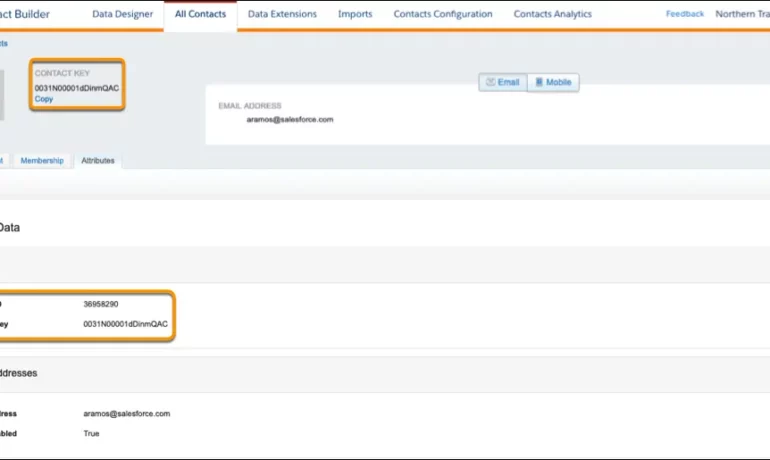
The contact key in Salesforce, also known as a subscriber key, is a unique identifier for a contact in Marketing Cloud MobilePush. Use this value to associate cross-channel addresses and subscriptions for a single contact. You can use the same key for a contact across multiple channels, such as email, SMS, and push messaging. What are contact keys? An immutable object that stores information about a single contact, such as the contact’s first name, phone numbers, and addresses. What is a Salesforce Subscriber key? A subscriber key is a text field that contains a value that uniquely identifies a subscriber in your Marketing Cloud account. A subscriber key is limited to 254 English characters. Avoid using email addresses as subscriber keys. What is the difference between subscriber key and contact key? This key is used to identify a single person across multiple channels inside of Marketing Cloud. In Email Studio, that key is called the “Subscriber Key”. In other channels, such as Mobile Connect or Mobile Push, that value is called “Contact Key”. What is the difference between contacts and subscribers? A subscriber in SFMC primarily represents an individual’s email communication preferences and is associated with email campaigns, while a contact represents a broader customer profile that includes information beyond email, allowing you to engage with customers across various channels. What is the difference between contact ID and contact key? The Contact Key gives you this ability and consistence. Existence of the contact key gives you the consistence of sending messages thru multiple channels and identify your contacts. Email and Text Message channels in our case. Contact ID is a unique number for your contacts in Salesforce Marketing Cloud. What is a subscriber key in Marketing Cloud? A subscriber is a person who has opted to receive communications from your organization. You can track information about subscribers using profile and preference attributes. Use the subscriber key to identify your subscribers in Marketing Cloud. Create lists or data extensions to store your subscribers. What is the difference between contact and subscriber in Marketing Cloud? Key Differences: Purpose: Contacts store customer data and facilitate segmentation and personalization efforts. Subscribers represent individuals who have subscribed to receive communications from your organization. Primary key is  a column or set of columns that uniquely identifies the record in the table. When a primary key is defined using multiple columns, the data from each column is used to determine whether a record/row is unique. Like Related Posts Who is Salesforce? Who is Salesforce? Here is their story in their own words. From our inception, we’ve proudly embraced the identity of Read more Salesforce Marketing Cloud Transactional Emails Salesforce Marketing Cloud Transactional Emails are immediate, automated, non-promotional messages crucial to business operations and customer satisfaction, such as order Read more Salesforce Unites Einstein Analytics with Financial CRM Salesforce has unveiled a comprehensive analytics solution tailored for wealth managers, home office professionals, and retail bankers, merging its Financial Read more AI-Driven Propensity Scores AI plays a crucial role in propensity score estimation as it can discern underlying patterns between treatments and confounding variables Read more
Read More
Salesforce analytics insurance

Cool Ways to Use Surveys With Salesforce

Leveraging survey forms is an effective way to gather real-life insights from individuals crucial to your organization. Salesforce facilitates survey integration either through Salesforce Surveys and Feedback Management (add-on license) or by seamlessly integrating web forms with Salesforce. Storing feedback in your CRM, linked to comprehensive contact information, is an obvious advantage. Salesforce surveys give you real-time feedback.  However, adopting an integrated web form approach offers additional benefits. Here are seven ideas to enhance your survey integration with Salesforce, ensuring valuable customer insights: Integrating survey forms with Salesforce is a strategic move to enhance customer experience and internal processes. Implementing these tips will not only improve the effectiveness of your Salesforce surveys but also align internal practices with best standards. Choose a tip that fits your needs and contributes to the success of your Salesforce surveys. Like Related Posts Who is Salesforce? Who is Salesforce? Here is their story in their own words. From our inception, we’ve proudly embraced the identity of Read more Salesforce Marketing Cloud Transactional Emails Salesforce Marketing Cloud Transactional Emails are immediate, automated, non-promotional messages crucial to business operations and customer satisfaction, such as order Read more Salesforce Unites Einstein Analytics with Financial CRM Salesforce has unveiled a comprehensive analytics solution tailored for wealth managers, home office professionals, and retail bankers, merging its Financial Read more AI-Driven Propensity Scores AI plays a crucial role in propensity score estimation as it can discern underlying patterns between treatments and confounding variables Read more

Read More
How Good is Our Data

Agiloft Salesforce Integration

Optimize organizational efficiency, performance, and value by automating contracts with Agiloft Contract Lifecycle Management Software. Regain control and streamline processes through seamless integration with Salesforce. Read on about Agiloft Salesforce integration to learn more. Agiloft’s core platform offers direct integrations that facilitate interaction within your daily tools. Collaborate effortlessly in Microsoft Teams, Outlook, and Office, exchange data seamlessly in Salesforce, and create actionable dashboards in Tableau or Power BI. Integration works in two directions: inbound and outbound. Inbound integration occurs when an external system initiates contact with Salesforce, while outbound integration involves Salesforce initiating contact with an external system. Wondering about the cloud aspect? Agiloft is purposefully designed as a pure web application with full multi-tenancy support. It stands out by being available as a Hosted Cloud service and also for deployment on-premise, providing flexibility to suit your specific needs. Agiloft Salesforce integration is one of the many Salesforce integrations Tectonic can handle. Extend your Salesforce CRM Experience by adding a no-code, AI-powered Contract Lifecycle Management (CLM) solution. Eliminate red tape and automate the contracting process Full Salesforce integration with one-click contract creation of proposals, MSAs, and other agreements as well as automated approval processes integrated with email, SMS, and e-signature. Minimize revenue leakage from contracts Keep track of performance obligations, contract end-dates, renewals, and invoicing as well as recommend actions to maximize revenue. Build custom dashboards to track KPIs and issue alerts as required. Like Related Posts Who is Salesforce? Who is Salesforce? Here is their story in their own words. From our inception, we’ve proudly embraced the identity of Read more Salesforce Marketing Cloud Transactional Emails Salesforce Marketing Cloud Transactional Emails are immediate, automated, non-promotional messages crucial to business operations and customer satisfaction, such as order Read more Salesforce Unites Einstein Analytics with Financial CRM Salesforce has unveiled a comprehensive analytics solution tailored for wealth managers, home office professionals, and retail bankers, merging its Financial Read more AI-Driven Propensity Scores AI plays a crucial role in propensity score estimation as it can discern underlying patterns between treatments and confounding variables Read more
Read More
Salesforce Document Generation

Generating Documents in Salesforce

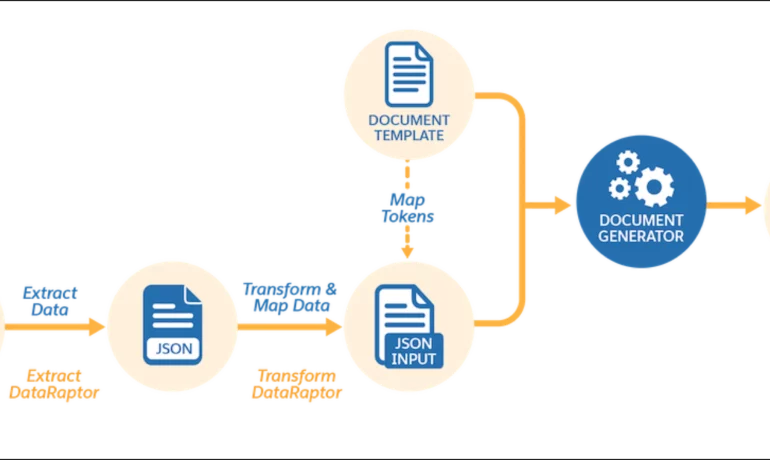
Salesforce document generation poses a challenge for businesses, given the intricacies of integration involved. Fortunately, a variety of tools are available for generating documents in Salesforce, and Tectonic is well-equipped to assist in their successful implementation. Salesforce Industries Document Generation empowers businesses to craft and manage accurate documents linked to standard Salesforce objects, encompassing contracts, opportunities, orders, quotes, and custom objects. For a more dynamic approach, Salesforce OmniStudio Document Generation facilitates the creation of documents using Microsoft Word and Microsoft PowerPoint templates. These templates can incorporate values from any JSON-based data within the text, including data sourced from various Salesforce objects. This versatile tool enables the generation of contracts, proposals, quotes, reports, non-disclosure agreements, service agreements, and more. Salesforce Industries Document Generation seamlessly integrates with Vlocity Insurance, Vlocity Health, communications, media, energy, utilities, government, and beyond. Vlocity Analytics, another valuable component, offers pre-built measurement tools that seamlessly integrate with Salesforce Reports, Dashboards, and Einstein. The Salesforce AppExchange boasts an extensive array of over 200 document generation tools. Your Salesforce partner can assist in selecting, installing, and implementing the most suitable options based on your business requirements. With Document Generation, you can generate contracts, proposals, quotes, reports, non-disclosure agreements, job offers, service agreements, and so on. You can generate documents using the specified sample client-side or server-side OmniScripts. You can also create your own OmniScripts by cloning and customizing the sample OmniScript to generate documents. Client-Side document generation is a synchronous process that results in a downloadable preview of the generated documents. You can generate documents from Microsoft Word (.docx), Microsoft PowerPoint (.pptx), and Web templates. These templates can include values from any JSON-based data in the text, including data from any Salesforce object. You can optionally convert the resulting documents to .pdf format. Server-Side document generation is available in both the OmniStudio Foundation and Salesforce Industries packages. Server-Side document generation is an asynchronous process that’s best for large and rendering-heavy documents and for document generation in batches. The Server-Side document generation service is secure and scalable and is hosted on Salesforce Hyperforce. The generated document is stored in your Salesforce org, and is attached to the object for which it’s generated. You can use Apex Classes, sample Integration Procedures, or a sample OmniScript to generate documents. Client-Side document generation supports Customer Community Plus, Customer Community, and Partner Community users to generate documents using client-side OmniScripts. Server-Side document generation supports Customer Community Plus, Customer Community, and Partner Community users to generate documents using the singleDocxServersideLwc server-side OmniScript. With the right licenses, Document Generation is available in the Salesforce Industries package. Metering measures resource utilization levels and throttling controls resource access and use based on defined rules. Metering measures the number of server-side documents that are generated by an org hourly and daily. The default hourly and daily limits for processing server-side document generation requests are 1,000 per org and 24,000 per org respectively. Throttling maintains consistency and resilience of the server-side document generation service by managing incoming server-side document generation requests from multiple orgs. Throttling can also prevent service degradation caused by high volume of requests at peak hours by blocking requests that exceed the default limits. The request details are saved in the Document Generation Processes entity. You can retrieve the blocked requests and later retry the server-side document generation. No matter what your specific document generation needs, Tectonic simplifies the process of getting your system up and running seamlessly, whether it’s through Salesforce Quickstarts or comprehensive implementation services. Content updated in 2February 2024, Shannan Hearne. Like1 Related Posts Who is Salesforce? Who is Salesforce? Here is their story in their own words. From our inception, we’ve proudly embraced the identity of Read more Salesforce Marketing Cloud Transactional Emails Salesforce Marketing Cloud Transactional Emails are immediate, automated, non-promotional messages crucial to business operations and customer satisfaction, such as order Read more Salesforce Unites Einstein Analytics with Financial CRM Salesforce has unveiled a comprehensive analytics solution tailored for wealth managers, home office professionals, and retail bankers, merging its Financial Read more AI-Driven Propensity Scores AI plays a crucial role in propensity score estimation as it can discern underlying patterns between treatments and confounding variables Read more
Read More
Salesforce

What is Salesforce?

Salesforce is cloud-based CRM software. It makes it easier for companies to find more prospects, close more deals, and connect with customers in a whole new, personalized way, so they can provide them with amazing service at scale. Salesforce, Inc. is an American cloud-based software company headquartered in San Francisco, California. It provides customer relationship management software and applications focused on sales, customer service, marketing automation, e-commerce, analytics, and application development. According to Wikipedia… Salesforce brings together all your data, from any source. Customer 360, the complete suite of products, unites your sales, service, marketing, commerce, and IT teams with a single, shared view of customer information. With artificial intelligence integrated across all products, SFDC helps everyone in your company work more productively and better deliver the personalized experiences customers love. To explore all Salesforce has to offer for your business, contact Tectonic today. Salesforce is cloud-based CRM software (What is CRM?). It makes it easier for companies to find more prospects, close more deals, and connect with customers in a whole new way, so they can provide them with amazing service at scale. Salesforce brings together all your data, from any source. Customer 360, our complete suite of products, unites your sales, service, marketing, commerce, and IT teams with a single, shared view of customer information. With artificial intelligence integrated across all products, SFDC helps everyone in your company work more productively and better deliver the personalized experiences customers love. Content updaed February 2025, Shannan Hearne Like Related Posts Who is Salesforce? Who is Salesforce? Here is their story in their own words. From our inception, we’ve proudly embraced the identity of Read more Salesforce Marketing Cloud Transactional Emails Salesforce Marketing Cloud Transactional Emails are immediate, automated, non-promotional messages crucial to business operations and customer satisfaction, such as order Read more Salesforce Unites Einstein Analytics with Financial CRM Salesforce has unveiled a comprehensive analytics solution tailored for wealth managers, home office professionals, and retail bankers, merging its Financial Read more AI-Driven Propensity Scores AI plays a crucial role in propensity score estimation as it can discern underlying patterns between treatments and confounding variables Read more

Read More
salesforce asset management

Asset Management Salesforce

Can Salesforce do asset management? You can manage assets in Consumer Goods (desktop) and in the Consumer Goods offline mobile app in Salesforce. Let’s understand the process in detail. Create Asset Templates and Asset Types: Before you create assets, ensure that admins have created asset templates and asset types. Assets are items, such as refrigerators or freezers, that you place at a customer location (retail store) to increase your sales. Assets are also items you use in your business such as vehicles or computers. As an asset’s owner, you’re responsible for the maintenance, repair, or any other services required for the asset. Managing assets efficiently can help reduce customer complaints and, in turn, increase your brand value. By actively tracking your assets’ conditions, you can budget better, reduce losses, and ensure employee safety. What is the use of asset object in Salesforce? So, Assets are used quite frequently by sales, customer service in your back office. Assets are a standard object. It comes out-of-the-box with Salesforce. And being a standard object we can add custom fields, validation rules, record types, multiple page layouts. How do I create an asset for a product in Salesforce? Create an Asset What is the asset state period in Salesforce? An asset state period represents a time span when an asset has the same quantity, amount, and monthly recurring revenue (MRR). An asset has as many asset state periods as there are changes to it (asset actions) during its lifecycle. The dashboard and related pages show the current asset state period. What is the difference between subscription and asset in Salesforce? Use subscriptions to keep records of subscription products you’ve quoted or sold. Use assets to keep records of stand-alone products you’ve quoted or sold. You can use these records later to manage amendments and renewals to your opportunities and orders. How do I enable assets in Salesforce? Enable Asset Scheduling in Salesforce Scheduler How do I create an asset in Salesforce CPQ? Salesforce CPQ creates assets when you click Contracted on an opportunity or order. The asset creation process varies based on your account’s renewal model and the value of the asset conversion field on the product you’re contracting. How do you renew assets in Salesforce CPQ? Select the assets you want to renew, and then click Renew. Salesforce CPQ creates a renewal quote, associates it with a renewal opportunity, and opens the quote line editor. Edit the quantities of the assets from your original quote as needed. You can also add new products. What is an asset state? Asset State denotes the different states of assets in the organization such as assets in Use, In Store, Expired and so on. Apart from the default asset states, you can create custom ones. You can also enable or disable ownership and scan for custom asset states you create. Note that Salesforce also has a Digital Asset Management (DAM) capability. Where is asset library in Salesforce? To view asset files in Files home, select Libraries and then select Asset Library . To view and edit asset files in Setup, enter Asset Files in the Quick Find box, then select Asset Files. For more information on Salesforce Asset Management, contact Tectonic today. Like1 Related Posts Who is Salesforce? Who is Salesforce? Here is their story in their own words. From our inception, we’ve proudly embraced the identity of Read more Salesforce Marketing Cloud Transactional Emails Salesforce Marketing Cloud Transactional Emails are immediate, automated, non-promotional messages crucial to business operations and customer satisfaction, such as order Read more Salesforce Unites Einstein Analytics with Financial CRM Salesforce has unveiled a comprehensive analytics solution tailored for wealth managers, home office professionals, and retail bankers, merging its Financial Read more AI-Driven Propensity Scores AI plays a crucial role in propensity score estimation as it can discern underlying patterns between treatments and confounding variables Read more
Read More
Tectonic-Ensuring Salesforce Customer Satisfaction

Tectonic’s Successful Salesforce Track Record

Salesforce Technology Services Integrator – Tectonic has successfully delivered Salesforce in a variety of industries including Public Sector, Hospitality, Manufacturing, and Health Life Sciences.  Read on about Tectonic’s successful Salesforce track record. Our primary focus is assisting clients with their Salesforce needs to solve business challenges. We work at the intersection of CRM, Marketing, Big Data, and Analytics. Public Sector Experience/Focus Proven Delivery – Tectonic delivers Salesforce Implementation, Integration and Managed Services, utilizing a modified Waterfall / Agile Delivery Method, leveraging US and International Delivery Center (IDC) resources, and delivering with strong, experienced Project Management Health and Life Sciences Focus We’ve helped healthcare providers navigate the challenges of moving data, including PHI and PII, into the cloud, providing physician facing services and improving operations. Salesforce provides comprehensive solutions tailored for the healthcare industry, addressing the specific needs of both payers (insurance providers) and providers (healthcare organizations). These solutions are designed to enhance patient engagement, improve operational efficiency, and drive better health outcomes. Financial Services Focus Transforming financial service delivery, optimizing operations, and cultivating community well-being and trust are at the core of Salesforce Financial Services Solutions. By automating every banking customer experience and uniting teams through Salesforce’s intelligence and a shared view of real-time customer data, a comprehensive banking solution is created, fostering customer satisfaction and loyalty. Travel and Hospitality Focus Salesforce provides tailored solutions for the hospitality and travel industry, helping businesses in this sector deliver exceptional customer experiences, streamline operations, and drive growth. These solutions leverage the power of the Salesforce Customer 360 platform to centralize data, enhance communication, and provide a personalized experience for guests. Manufacturing, Distribution, and Energy Focus We’ve helped small and large manufacturers optimize their sales operations and drive efficiencies in their contact center. Salesforce offers a suite of solutions tailored for manufacturing and distribution industries to enhance processes, improve collaboration, and drive overall efficiency. These solutions are designed to streamline operations. Designed improve customer relationships and provide valuable insights. Nonprofit Focus We’ve helped nonprofits and NGO’s optimize their operations and drive efficiencies in their fundraising and mission efforts. Salesforce offers a suite of solutions to nurture relationships and scale impact. Solutions with AI-driven, personalized services. Salesforce allows you to take control of your data on a single integrated platform. Nonprofit Cloud brings a nonprofit CRM, fundraising, programs, marketing engagement, and outcomes together in a single product. Strategic Relationship with Salesforce – Salesforce Ventures invested in Tectonic in Q3 2015.  We maintain strong working relationships with Salesforce License Sales, Professional Services and Alliances. Tectonic’s successful Salesforce track record stems from our great relationship with Salesforce and grows through each customer interaction. Like1 Related Posts Who is Salesforce? Who is Salesforce? Here is their story in their own words. From our inception, we’ve proudly embraced the identity of Read more Salesforce Marketing Cloud Transactional Emails Salesforce Marketing Cloud Transactional Emails are immediate, automated, non-promotional messages crucial to business operations and customer satisfaction, such as order Read more Salesforce Unites Einstein Analytics with Financial CRM Salesforce has unveiled a comprehensive analytics solution tailored for wealth managers, home office professionals, and retail bankers, merging its Financial Read more AI-Driven Propensity Scores AI plays a crucial role in propensity score estimation as it can discern underlying patterns between treatments and confounding variables Read more

Read More
Financial Services Sector

Salesforce Unites Einstein Analytics with Financial CRM

Salesforce has unveiled a comprehensive analytics solution tailored for wealth managers, home office professionals, and retail bankers, merging its Financial Services Cloud with Einstein Analytics. This amalgamation, known as Einstein Analytics for Financial Services, harnesses Salesforce’s robust query engine and interpretation layers, fueled by the enterprise data analytics prowess acquired through BeyondCore in 2016. Salesforce Unites Einstein Analytics with Financial CRM This integrated platform – Salesforce Unites Einstein Analytics with Financial CRM – offers two prebuilt analytical models, meticulously designed to gauge client churn (identifying clients at risk of leaving) and the potential for clients to bring additional assets to a firm. These models, while prepackaged, can be tailored to specific needs, providing insights into future scenarios within the firm. Advisors can leverage these models to assess client characteristics against firm-wide benchmarks and receive actionable suggestions to enhance client retention. Home office professionals and data scientists have the option to delve into the underlying mathematical frameworks of these models, allowing for customization if required. While the tool offers enterprise-level benchmarking, firms can incorporate their own industry-specific data to run the models, ensuring tailored insights. This initiative builds upon previous endeavors integrating machine learning into Financial Services Cloud, which aimed to identify crucial life events and offer actionable recommendations. The decision to develop a more holistic solution stemmed from observing customer behavior and the growing trend of custom dashboard creation. By streamlining and prepackaging these insights, Salesforce aims to accelerate adoption and empower users to focus on their core tasks. Although customization remains a key feature, the platform aims to simplify adoption by providing templated solutions. However, the efficacy of insights depends on the quality of the ingested data, emphasizing the importance of data aggregation and normalization. Future updates are expected to introduce additional machine learning models focused on reducing heldaway assets and increasing assets under management. Developed in collaboration with diverse stakeholders, ranging from enterprise financial advisors to firms of varying sizes, the service is priced at $150 per user per month. It’s not a standalone product and requires integration with Financial Services Cloud or Einstein Analytics Plus. Like2 Related Posts Who is Salesforce? Who is Salesforce? Here is their story in their own words. From our inception, we’ve proudly embraced the identity of Read more Salesforce Marketing Cloud Transactional Emails Salesforce Marketing Cloud Transactional Emails are immediate, automated, non-promotional messages crucial to business operations and customer satisfaction, such as order Read more AI-Driven Propensity Scores AI plays a crucial role in propensity score estimation as it can discern underlying patterns between treatments and confounding variables Read more Tectonic’s Successful Salesforce Track Record Salesforce Technology Services Integrator – Tectonic has successfully delivered Salesforce in a variety of industries including Public Sector, Hospitality, Manufacturing, Read more
Read More
Salesforce

Who is Salesforce?

Who is Salesforce? Here is their story in their own words. From our inception, we’ve proudly embraced the identity of a customer-centric company. Since the very day we opened our doors, customer focus has been the guiding force behind every decision we make. It’s the catalyst for our growth and the driving factor behind our customers’ success. Our commitment involves developing technologies, fostering partnerships, and building communities that enable companies to establish profound connections with their customers, transforming every business into a customer-centric entity. While the world evolves, our unwavering commitment to customer focus remains constant. New technologies, social trends, and immediate priorities may emerge, but the essence of the customer—discerning, demanding, and eager to be impressed—endures. Our mission is to assist you in meeting your customers where they are, fostering unwavering loyalty to your company through thick and thin. Our role is to construct bridges between companies and customers, recognizing that meaningful connections are the linchpin of business success. We are dedicated to delivering on this mission. Empowering every department to prioritize customers is our goal, facilitated by Customer 360—the world’s leading CRM. We provide a platform where every team member can access a unified source of truth, enhancing collaboration with integrated capabilities that facilitate crucial conversations and decisions where they matter most. With Tableau, we empower companies to unearth profound insights and take data-driven actions to better serve their customers. Every product in our portfolio plays a pivotal role in establishing connections that drive success, with the potential to channel that success into positive change. HISTORY In 1999, Salesforce founders launched a revolutionary customer relationship management (CRM) system from a small San Francisco apartment. Their groundbreaking approach involved hosting all software and critical customer data on the internet, pioneering the “software as a service” (SaaS) model that quickly spread across the tech industry. Cultivating Trust Early adopters took a leap of faith in embracing our cloud-based model, and trust became a cornerstone. Over the decades, our product has evolved, becoming an essential service for some of the world’s most significant businesses, governments, and organizations. Trust and relationships have become invaluable commodities. Core Values Our core values drive our actions and unite us as a company: This content was updated in 2023. Like Related Posts Salesforce Marketing Cloud Transactional Emails Salesforce Marketing Cloud Transactional Emails are immediate, automated, non-promotional messages crucial to business operations and customer satisfaction, such as order Read more Salesforce Unites Einstein Analytics with Financial CRM Salesforce has unveiled a comprehensive analytics solution tailored for wealth managers, home office professionals, and retail bankers, merging its Financial Read more AI-Driven Propensity Scores AI plays a crucial role in propensity score estimation as it can discern underlying patterns between treatments and confounding variables Read more Tectonic’s Successful Salesforce Track Record Salesforce Technology Services Integrator – Tectonic has successfully delivered Salesforce in a variety of industries including Public Sector, Hospitality, Manufacturing, Read more
Read More
gettectonic.com