
Approvers and Approver Groups in Salesforce
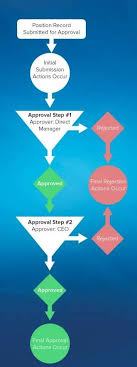
Approvers and Approver Groups in Salesforce. An approver in Salesforce CPQ Advanced Approvals is a user who receives approval request emails and can either approve or reject the request. An approver record can represent an individual user or a group of users. Utilizing approver groups (like Salesforce queues) is beneficial when you need to route approvals to all members of a specific team. REQUIRED Salesforce CPQ EDITIONSAvailable in: Salesforce CPQ Summer ‘16 and later with Advanced Approvals 3.1 and later For instance, you can create an approver group that includes all managers in the accounting department. This group can then be associated with an approval rule triggered by a quote with a net total of $750,000 or more. Consequently, each accounting manager will receive an email notification regarding the request. Assign Approvers Dynamically Based on Criteria You can specify an approver dynamically based on a formula or specific criteria. For instance, you might want the approver to be the regional manager associated with a sales rep’s opportunity. If the regional manager changes, the approval will automatically reference the new manager. To set up a dynamic approver: Add a custom formula field to your quote or opportunity that references the ID of the approver’s user record.Include this formula field in your approval rule setup.Delegate Approvers Delegated approvers are designated users who receive approval requests on behalf of another user for a predefined period, typically during the original approver’s absence. To delegate approvers: Specify the user to whom you want to delegate in the “Delegated Approver” field.Set the start and end dates for the delegation period.Ensure that delegated approvers have the necessary permissions and access to the approval objects page layout, including the ability to approve or reject requests. Approver Fields Depending on page layouts and field-level security settings, not all approver fields may be visible or editable. Delegated Approver: This field designates the user receiving approval requests instead of the primary approver for a limited time. Delegation End: Specifies the date after which delegated approvers no longer receive requests.Delegation Start: Specifies the date from which delegated approvers start receiving requests.Group ID: If the approver represents a group, this field references the Group record’s ID.Unanimous: Indicates that approval from all group members is required for the request to be considered approved.User: If the approver is an individual user, this field references the User record. Approval Rules Approval rules dictate which users or groups receive approval requests and the email templates used for notifications upon approval or rejection. When a sales rep submits a record for approval, Salesforce CPQ evaluates all active approval rules associated with that record’s object. If the approval conditions are met, the corresponding rule triggers, and Salesforce CPQ sends an approval request email to the designated approver(s) as defined in the rule. Each approval rule can optionally include lookups to request templates, approval templates, and rejection templates, allowing for customized email notifications based on specific conditions. Interested in creating automated approvals or approver groups in your Salesforce org? Contact Tectonic today. Like1 Related Posts Who is Salesforce? Who is Salesforce? Here is their story in their own words. From our inception, we’ve proudly embraced the identity of Read more Salesforce Marketing Cloud Transactional Emails Salesforce Marketing Cloud Transactional Emails are immediate, automated, non-promotional messages crucial to business operations and customer satisfaction, such as order Read more Salesforce Unites Einstein Analytics with Financial CRM Salesforce has unveiled a comprehensive analytics solution tailored for wealth managers, home office professionals, and retail bankers, merging its Financial Read more AI-Driven Propensity Scores AI plays a crucial role in propensity score estimation as it can discern underlying patterns between treatments and confounding variables Read more


