
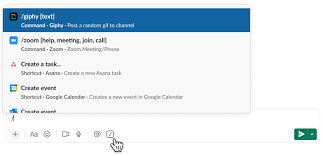
Turn on the Slack Slash Command
Introducing the Power of Slash Commands in Slack With the simple use of a slash and a command, you can seamlessly access data from connected apps without ever leaving Slack. The Service Cloud for Slack app streamlines workflows for service teams, enabling them to create new Salesforce records directly from Slack. This reduces the need for context switching and empowers teams to resolve issues swiftly within Slack’s integrated environment. Turn on the Slack Slash Command. Simplified, Unified Experience While workflows may originate from various sources and involve different types of data, the end goal remains consistent: a simplified, unified experience for users. Slash commands act as triggers, allowing users to summon your app with a quick text input in Slack’s message composer. Note that slash commands cannot be invoked within message threads, providing clarity in communication channels. How Slash Commands Work When a slash command is triggered, Slack sends a payload of data to the associated app, providing valuable context for further action. This interaction enables the app to respond accordingly, leveraging the information provided in the payload to deliver relevant insights or perform specified tasks. Applications of Slash Commands Whether it’s creating a to-do list, managing tasks, or initiating specific actions, slash commands offer a structured approach to app interactions within Slack. By understanding the structure and usage of slash commands, developers can tailor their apps to meet the unique needs of their audience. Turn on the Slack Slash Command To get started with slash commands: Response Process As part of the response process, apps should: This ensures a smooth user experience and facilitates seamless communication between Slack and connected apps. Conclusion – Turn on the Slack Slash Command Slash commands offer a convenient way to interact with apps directly from Slack, enhancing productivity and collaboration. By following best practices and understanding the nuances of command creation and response handling, developers can unlock the full potential of slash commands to enrich the Slack experience for users. Like Related Posts Who is Salesforce? Who is Salesforce? Here is their story in their own words. From our inception, we’ve proudly embraced the identity of Read more Salesforce Marketing Cloud Transactional Emails Salesforce Marketing Cloud Transactional Emails are immediate, automated, non-promotional messages crucial to business operations and customer satisfaction, such as order Read more Salesforce Unites Einstein Analytics with Financial CRM Salesforce has unveiled a comprehensive analytics solution tailored for wealth managers, home office professionals, and retail bankers, merging its Financial Read more AI-Driven Propensity Scores AI plays a crucial role in propensity score estimation as it can discern underlying patterns between treatments and confounding variables Read more


