Introducing the Journey Builder Wait Until API Event Activity, a cutting-edge addition to Journey Builder unveiled in the April 2021 Salesforce Marketing Cloud Release. This feature revolutionizes customer engagement by enabling real-time experiences through external event triggers within a journey. By strategically placing the Wait Until API Event activity within your journey, you can suspend customer progression until a specified event occurs, ensuring seamless transitions to the next activity.
Journey Builder Wait Until API Event
Key Features:
- Real-Time Experience: Contacts within the journey remain on hold until an external event is triggered, guaranteeing timely and relevant interactions.
- Customized Experiences: The activity offers tailored paths for customers who take action and those who don’t, facilitating personalized experiences for all contacts.
Use Cases:
- Abandoned Cart Journeys: Direct subscribers to a different path upon finalizing a purchase, boosting conversion rates.
- Website Interaction: Prompt confirmation emails or other actions immediately upon specific website interactions by customers.
- Email Link Clicks: Initiate actions as soon as subscribers click on specific links within emails, offering seamless engagement opportunities.
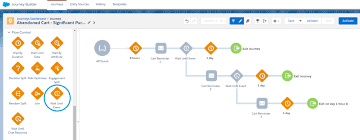
Configuration Steps:
- Drag and Drop: Add the Wait Until API Event activity to your journey canvas, creating a no-event path for non-responsive contacts.
- Event Selection: Choose an API event or create a new one, setting filter criteria based on contact or journey event data.
- Maximum Wait Duration: Specify the maximum time contacts are held in this activity before proceeding along the no-event path.
- Summary Review: Confirm your settings and configure the no-event path for re-engagement or journey exit.
API Event Configuration:
- Data Extension Selection: Choose a Data Extension for the API event, ensuring compatibility with your journey’s data structure.
- API Call: Trigger the Wait Until Event activity through an API call, specifying contact details and event parameters.
Additional Considerations:
- Ensure proper Data Extension configuration, using a composite primary key or none at all to prevent duplicate records.
- While technical documentation for the Wait Until Event API is limited, it operates similarly to the API Event Entry Source, injecting contacts into a journey.
Use Case Example:
- In a Double Opt-In journey, API calls can initiate contacts’ journey entry and Data Extension update. Subsequent API calls release contacts from the Wait Until Event activity upon meeting specific criteria, such as email confirmation.
- For engagements like email link clicks, a CloudPage can facilitate API calls, seamlessly redirecting contacts to target websites while releasing them from the Wait Until Event activity.
In summary, the Wait Until API Event Activity empowers marketers to orchestrate dynamic, real-time journeys tailored to individual customer actions, driving enhanced engagement and conversion rates across multiple touchpoints.

Who is Salesforce? Here is their story in their own words. From our inception, we've proudly embraced the identity of Read more

Salesforce Marketing Cloud Transactional Emails are immediate, automated, non-promotional messages crucial to business operations and customer satisfaction, such as order Read more

Salesforce has unveiled a comprehensive analytics solution tailored for wealth managers, home office professionals, and retail bankers, merging its Financial Read more
AI plays a crucial role in propensity score estimation as it can discern underlying patterns between treatments and confounding variables Read more