Email Studio Archives - gettectonic.com
Salesforce Foundations

Salesforce Products

Salesforce Products: A Complete Guide to Powering Your Business Growth Transform Your Business with Salesforce’s Integrated Solutions For companies focused on growth, efficiency, and exceptional customer experiences, Salesforce provides a comprehensive suite of cloud-based tools that adapt to your unique business needs. Whether you’re managing sales pipelines, marketing campaigns, customer service operations, or eCommerce platforms, Salesforce offers specialized solutions that work together seamlessly. Core Salesforce Products for Every Business Function 1. Sales Cloud: The Ultimate Sales Acceleration Platform “Since implementing Sales Cloud, our reps spend 30% more time selling and 40% less time on admin work.” – Enterprise Sales Director 2. Service Cloud: Revolutionizing Customer Support 3. Marketing Cloud: Personalized Engagement at Scale 4. Commerce Cloud: Unified Shopping Experiences Enhancing Your Salesforce Ecosystem Experience Cloud: Build Digital Communities Data & Analytics: Smarter Decision Making Customization & Integration Why Companies Choose Salesforce ✅ Proven Scalability: From startups to Fortune 500 enterprises✅ Continuous Innovation: 3 major releases per year with new features✅ Trusted Security: Enterprise-grade protection for your data✅ Global Ecosystem: 150,000+ certified consultants and developers Getting Started with Salesforce Whether you’re evaluating CRM options or planning a digital transformation, Salesforce offers: Next Steps:Explore Salesforce products in depth or speak with a solutions consultant to identify the right tools for your business needs. Like Related Posts AI Automated Offers with Marketing Cloud Personalization AI-Powered Offers Elevate the relevance of each customer interaction on your website and app through Einstein Decisions. Driven by a Read more Salesforce OEM AppExchange Expanding its reach beyond CRM, Salesforce.com has launched a new service called AppExchange OEM Edition, aimed at non-CRM service providers. Read more The Salesforce Story In Marc Benioff’s own words How did salesforce.com grow from a start up in a rented apartment into the world’s Read more Salesforce Jigsaw Salesforce.com, a prominent figure in cloud computing, has finalized a deal to acquire Jigsaw, a wiki-style business contact database, for Read more

Read More
Marketing Cloud Admins

Salesforce Marketing Cloud (SFMC) Connector

The Salesforce Marketing Cloud (SFMC) is a robust digital marketing platform designed to empower marketers with tools for automating campaigns across multiple channels. By integrating assets with SFMC, organizations can streamline workflows, accelerate campaign launches, and ensure consistent brand messaging. This integration eliminates process inefficiencies, enabling marketers to deliver personalized, engaging content quickly across diverse channels—keeping pace with the increasing demand for dynamic marketing strategies. Preparation Before Integration To ensure a smooth setup, verify the following: Installing and Setting Up the SFMC Connector Once installed, this connector allows seamless access to assets directly within SFMC, helping marketers drive efficiency and deliver impactful campaigns. 🔔🔔 Follow us on LinkedIn 🔔🔔 Like Related Posts AI Automated Offers with Marketing Cloud Personalization AI-Powered Offers Elevate the relevance of each customer interaction on your website and app through Einstein Decisions. Driven by a Read more Salesforce OEM AppExchange Expanding its reach beyond CRM, Salesforce.com has launched a new service called AppExchange OEM Edition, aimed at non-CRM service providers. Read more The Salesforce Story In Marc Benioff’s own words How did salesforce.com grow from a start up in a rented apartment into the world’s Read more Salesforce Jigsaw Salesforce.com, a prominent figure in cloud computing, has finalized a deal to acquire Jigsaw, a wiki-style business contact database, for Read more

Read More
Salesforce Success Story

Case Study: Children’s Hospital Use Cases

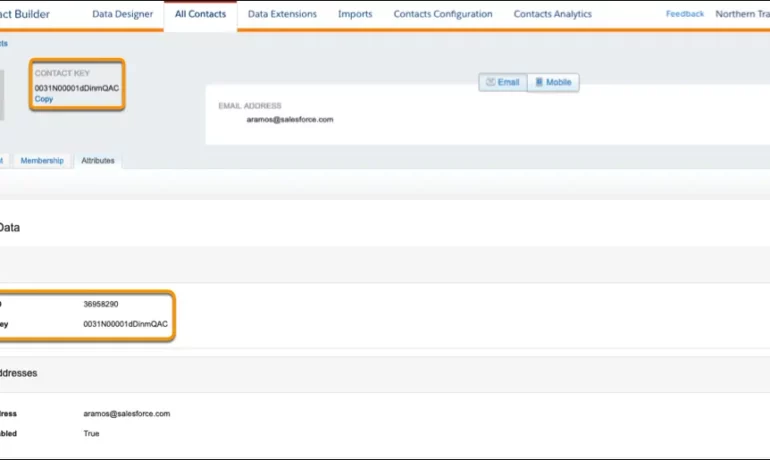
In need of help to implement requisite configuration updates to establish a usable data model for data segmentation that supports best practices utilization of Marketing Cloud features including Contact Builder, Email Studio and Journey Builder.

Read More
Marketing Cloud Website Activity Collection

Marketing Cloud Website Activity Collection

Leveraging Website Activity Data in Salesforce Marketing Cloud Understanding how users interact with your website is essential for delivering personalized customer experiences. Salesforce Marketing Cloud (SFMC) offers robust tools to capture website activity and transform this data into actionable insights, enhancing your marketing strategies. This guide walks you through the process of collecting website activity data in SFMC. Marketing Cloud Website Activity Collection Before diving into the setup process, it’s important to understand the benefits of collecting website activity data: Now, let’s explore how to set up website activity tracking in Salesforce Marketing Cloud. Set Up Marketing Cloud Website Activity Collection Step 1: Install Salesforce Marketing Cloud Tracking Code To begin collecting website activity, install the Salesforce Marketing Cloud tracking code on your website. Known as the “Web Collect” code, this script captures visitor behavior data and sends it to SFMC. Step 2: Configure Data Extensions After installing the tracking code, set up data extensions in SFMC to store the website activity data you collect. Step 3: Set Up Behavioral Triggers To maximize the value of your data, set up behavioral triggers in SFMC. These triggers can automatically send personalized communications based on specific website actions. Step 4: Leverage Advertising Studio for Retargeting To further enhance your marketing efforts, use Advertising Studio to create retargeting campaigns based on website activity data. Step 5: Monitor and Optimize After setting up website activity tracking, regularly monitor the performance of your campaigns and the quality of your collected data. Final Thoughts Collecting website activity data in Salesforce Marketing Cloud enables you to understand customer behavior better and deliver more personalized experiences. By following these steps—installing the tracking code, configuring data extensions, setting up behavioral triggers, and leveraging retargeting—you can effectively harness website activity data to elevate your marketing efforts. Start implementing these strategies today to unlock the full potential of Salesforce Marketing Cloud and drive deeper engagement and conversions. Like Related Posts AI Automated Offers with Marketing Cloud Personalization AI-Powered Offers Elevate the relevance of each customer interaction on your website and app through Einstein Decisions. Driven by a Read more Salesforce OEM AppExchange Expanding its reach beyond CRM, Salesforce.com has launched a new service called AppExchange OEM Edition, aimed at non-CRM service providers. Read more The Salesforce Story In Marc Benioff’s own words How did salesforce.com grow from a start up in a rented apartment into the world’s Read more Salesforce Jigsaw Salesforce.com, a prominent figure in cloud computing, has finalized a deal to acquire Jigsaw, a wiki-style business contact database, for Read more

Read More

Salesforce Marketing Cloud Gamechanger

Why Choose Salesforce Marketing Cloud for Your Business? Before diving into the features, let’s explore what makes Salesforce Marketing Cloud (SFMC) a game-changer for businesses. At its core, SFMC streamlines marketing automation, handling tasks like email outreach and audience segmentation with ease. This efficiency allows you to focus on strategy instead of repetitive tasks. As marketing shifts toward personalization, understanding your customers is more important than ever. SFMC helps businesses analyze customer behaviors, purchasing patterns, and engagement trends, making it easier to deliver highly targeted campaigns. Now, let’s dive into the top five features that set Salesforce Marketing Cloud apart. 1. Journey Builder – Create Personalized Customer Journeys Every customer follows a unique path, and Journey Builder lets you design tailored experiences across multiple channels. It helps map out customer interactions, ensuring they receive the right message at the right time. For example, if you run an e-commerce store, Journey Builder can automatically trigger: Marketing Value: ✔ Enhances personalization, leading to higher engagement.✔ Automates follow-ups so no opportunity is missed. Use Case: A customer browses sneakers on your website but doesn’t purchase. With Journey Builder, you can set up an automated sequence: 2. Email Studio – Simplify Your Email Marketing Email remains one of the most effective marketing channels. With Email Studio, you can craft high-impact email campaigns using a drag-and-drop interface—no coding required. From newsletters to transactional emails, SFMC ensures your message reaches the right audience. You can also A/B test subject lines and layouts to optimize performance. Marketing Value: ✔ Personalized emails generate 6x more transactions than generic ones.✔ Built-in analytics help refine email strategies. Use Case: Instead of blasting the same email to all customers, SFMC lets you segment audiences: This targeted approach drives better results and improves ROI. 3. Audience Studio – Harness the Power of Data Keeping track of customer data across platforms can be overwhelming. Audience Studio centralizes data from multiple sources—your website, social media, and emails—into a unified customer profile. It then segments customers based on behaviors and preferences, making it easier to deliver hyper-targeted campaigns. Marketing Value: ✔ Better audience insights lead to more effective marketing.✔ Integrates data from different platforms into one dashboard. Use Case: Launching a new product? Audience Studio – now known as Data Cloud – can identify your most interested customers based on their browsing history and past purchases. This ensures your ad spend is focused on high-intent buyers instead of a general, broad, uninterested audience. 4. Mobile Studio – Reach Customers on Their Phones With over 50% of emails opened on mobile, a strong mobile strategy is crucial. Mobile Studio enables businesses to connect with customers via SMS, push notifications, and in-app messaging. Even better, messages can be personalized based on user behavior, ensuring relevance. Marketing Value: ✔ Engage customers on their most-used device.✔ Mobile marketing sees higher open and conversion rates than email. Use Case: With most users glued to their phones, Mobile Studio ensures your brand stays top of mind. 5. Analytics Builder – Measure Your Success Running campaigns is one thing, but knowing what’s working is what truly drives growth. Analytics Builder tracks campaign performance in real time, providing insights on open rates, clicks, and conversions. Its user-friendly dashboards allow businesses to quickly identify top-performing campaigns and optimize underperforming ones. Marketing Value: ✔ Data-driven decisions outperform guesswork.✔ Helps fine-tune campaigns for maximum ROI. Use Case: If email engagement is low, Analytics Builder may reveal that your CTA is too subtle. By refining the email design, click-through rates can improve almost instantly. Unlock the Full Potential of Salesforce Marketing Cloud Salesforce Marketing Cloud offers a powerful, data-driven marketing suite that elevates customer engagement and drives conversions. It is as important in B2B marketing as it is to B2C and creates amazing customer experiences. By leveraging tools like Journey Builder, Email Studio, and Audience Studio (now known as Salesforce Data Cloud), businesses can create personalized, automated campaigns that resonate with their customers. Want to maximize engagement and ROI? Salesforce Marketing Cloud is a gamechanger. Start exploring Salesforce Marketing Cloud today—because the future of marketing is all about smarter, more connected and data-driven experiences. Content updated February 2025. Like1 Related Posts AI Automated Offers with Marketing Cloud Personalization AI-Powered Offers Elevate the relevance of each customer interaction on your website and app through Einstein Decisions. Driven by a Read more Salesforce OEM AppExchange Expanding its reach beyond CRM, Salesforce.com has launched a new service called AppExchange OEM Edition, aimed at non-CRM service providers. Read more The Salesforce Story In Marc Benioff’s own words How did salesforce.com grow from a start up in a rented apartment into the world’s Read more Salesforce Jigsaw Salesforce.com, a prominent figure in cloud computing, has finalized a deal to acquire Jigsaw, a wiki-style business contact database, for Read more

Read More
Salesforce Marketing Cloud

Email Templates in Marketing Cloud

Take your email marketing endeavors to new and amazing heights with Salesforce Marketing Cloud (SFMC), leveraging the prowess of AI-driven personalization and streamlined campaign management. Email Templates in Marketing Cloud are a great tool. Salesforce Marketing Cloud empowers you to seamlessly integrate all your campaigns, from transactional to promotional messages, while efficiently managing your email sender score. With SFMC’s consolidated platform, you can effortlessly select the perfect content for each customer from a centralized library, ensuring a tailored and captivating experience. If you’re new to constructing Marketing Cloud Email templates, don’t worry! Free online resources are available to guide you through the process. Dive into the art of building reusable email templates in Salesforce Marketing Cloud with this comprehensive step-by-step insight: In the space of email marketing, timing is crucial, and SFMC understands this reality and aids you in getting the timing right. Whether it’s sending a timely thank-you note or a birthday greeting, SFMC equips email marketers with the necessary tools to respond promptly and efficiently to their subscribers’ needs. One such tool is the creation of reusable email templates, streamlining the process of crafting personalized and captivating email campaigns. Introduction to Salesforce Email Templates in Marketing Cloud A Salesforce email template serves as a structured foundation for email communications, providing email marketers with a canvas to build upon and personalize. These templates can be customized with brand elements, contact details, and content blocks, facilitating the creation of consistent and visually appealing emails. When digging into the creation of reusable email templates in SFMC, it’s beneficial to visualize the design in three separate layers: Creating Reusable Content Blocks in SFMC Email Studio and Content Builder Before diving into email template construction, it’s crucial to understand the creation of reusable content blocks in SFMC: Creating a Reusable Email Template in SFMC Content Builder: To craft a reusable email template in SFMC Content Builder, adhere to these steps: Modifying a Reusable Email Template in SFMC Content Builder To tweak an existing template: Creating an Email from a Salesforce HTML Email Template in SFMC Content Builder: To generate an email from a template: Saving an Existing Email Message as a Reusable Email Template in SFMC Content Builder Sometimes an email performs so well you want to save it as a reusable template. To preserve an existing email as a template: Mastering email template creation in Salesforce Marketing Cloud is pivotal for efficient and effective email marketing campaigns. By following this insight, you’ll be armed with the knowledge and tools to fashion compelling email templates that foster engagement and yield tangible results. By Tectonic’s Salesforce Marketing Solutions Architect Shannan Hearne Learn about Tectonic’s Marketing Cloud Salesforce Implementation Solutions. Like Related Posts AI Automated Offers with Marketing Cloud Personalization AI-Powered Offers Elevate the relevance of each customer interaction on your website and app through Einstein Decisions. Driven by a Read more Salesforce OEM AppExchange Expanding its reach beyond CRM, Salesforce.com has launched a new service called AppExchange OEM Edition, aimed at non-CRM service providers. Read more The Salesforce Story In Marc Benioff’s own words How did salesforce.com grow from a start up in a rented apartment into the world’s Read more Salesforce Jigsaw Salesforce.com, a prominent figure in cloud computing, has finalized a deal to acquire Jigsaw, a wiki-style business contact database, for Read more

Read More
Salesforce Success Story

Case Study: Healthcare Health Cloud Marketing Cloud Large Childrens Hospital

Large children’s hospital needs a usable data model and enhanced security to deliver excellent patient outcomes. Healthcare Health Cloud Marketing Cloud Large Childrens Hospital. Industry: Healthcare Client is a large children’s hospital with pediatric healthcare offering acute care. Problem: Implemented : Our solution? Results: In order to improve operations, provide physician-facing services, and move data—including PHI and PII—to the cloud, we have assisted healthcare providers in overcoming these obstacles. Salesforce offers all-inclusive solutions specifically designed to meet the demands of payers (insurance companies) and providers (healthcare organizations). Better health outcomes, more operational effectiveness, and increased patient engagement are the goals of these solutions. Salesforce solutions for the health and life sciences are tailored to the particular requirements of the medical industry. Salesforce offers digital transformation technology for health and life sciences industries. If you are considering a Salesforce healthcare implementation, contact Tectonic today. Like2 Related Posts AI Automated Offers with Marketing Cloud Personalization AI-Powered Offers Elevate the relevance of each customer interaction on your website and app through Einstein Decisions. Driven by a Read more Salesforce OEM AppExchange Expanding its reach beyond CRM, Salesforce.com has launched a new service called AppExchange OEM Edition, aimed at non-CRM service providers. Read more The Salesforce Story In Marc Benioff’s own words How did salesforce.com grow from a start up in a rented apartment into the world’s Read more Salesforce Jigsaw Salesforce.com, a prominent figure in cloud computing, has finalized a deal to acquire Jigsaw, a wiki-style business contact database, for Read more

Read More
Marketing Cloud

Key Components Of Salesforce Marketing Cloud Engagement

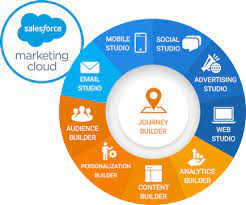
The key components of Salesforce Marketing Cloud Engagement are powerful marketing and personalization tools continually improving. The tools in Salesforce Marketing Cloud Engagement enable you to engage your customers with meaningful content. Key Components of Salesforce Marketing Cloud Engagement Journey Builder The Journey Builder empowers businesses to craft a seamless customer experience across various channels, encompassing mail, ads, web, and mobile platforms. This tool enables businesses to deliver a personalized experience at every stage of the customer lifecycle. Additionally, the Journey Builder ensures the synchronization of messages across all marketing channels, guaranteeing that customers receive relevant information at the right time, regardless of their location. Key functions of the Journey Builder include: Email Studio Email Studio, a user-friendly drag-and-drop tool, facilitates the creation of innovative and relevant emails. By categorizing profiles based on data, businesses can efficiently reach out to clients with customized emails, resulting in successful and profitable email campaigns. Mobile Studio Mobile Studio enables businesses to establish an omnichannel marketing strategy by seamlessly integrating mobile with other marketing channels. Marketers can reach customers through personalized messaging, SMS, push notifications, and group messages at any time and from any location. Advertising Studio Advertising Studio leverages customer data across marketing channels to build personalized customer experiences. It aids in managing retargeting, acquisition, and aligning marketing campaigns, connecting channels, harnessing customer data, and generating more leads. Marketing Cloud Intelligence Salesforce Marketing Cloud Intelligence connects and unifies all marketing data and analytics, providing a comprehensive view for marketers to optimize leads, increase pipeline growth, and ensure better conversions. This tool offers detailed analytics and insights into social media, email, sales platforms, and landing pages, facilitating data-driven decision-making. Cross-Channel Salesforce Marketing Solution Intelligence This solution enhances efficiency and reduces costs by offering a unified view of overall performance. Real-time analytics, dashboards, and insights are displayed across regions, teams, and business units. Marketing Cloud Personalization Personalization is a real-time engagement solution that helps organizations understand customer affinities, reduce acquisition costs, and increase conversion rates. AI-driven content, offers, and recommendations save time and optimize spend through automated A/B testing. Marketing Cloud Personalization is a real-time engagement solution for visualizing, tracking, and managing customer experiences. Additional Products: Salesforce Marketing Cloud Engagement Are you ready to get your prospects and customers more engaged? Employing the key components of Salesforce Marketing Cloud Engagement helps. Contact Tectonic today to explore a Salesforce Engagement solution. Like2 Related Posts AI Automated Offers with Marketing Cloud Personalization AI-Powered Offers Elevate the relevance of each customer interaction on your website and app through Einstein Decisions. Driven by a Read more 50 Advantages of Salesforce Sales Cloud According to the Salesforce 2017 State of Service report, 85% of executives with service oversight identify customer service as a Read more CRM Cloud Salesforce What is a CRM Cloud Salesforce? Salesforce Service Cloud is a customer relationship management (CRM) platform for Salesforce clients to Read more Salesforce Data Studio Data Studio Overview Salesforce Data Studio is Salesforce’s premier solution for audience discovery, data acquisition, and data provisioning, offering access Read more

Read More
Salesforce Marketing Cloud Journey Builder

Journey Builder Explained

In B2C marketing, the focus on Journey Builder within the Marketing Cloud framework is essential to take customers on journeys with personalized interactions depending on where they are at in the buying cycle. This tool empowers marketers to craft intricate marketing journeys that deliver personalized experiences to customers. Operating within Marketing Cloud, the journey tool orchestrates comprehensive customer journeys, facilitating interactions across multiple platforms such as email, mobile, advertising, and websites. It stands as a foundational element of Marketing Cloud, primarily tailored for B2C initiatives. Salesforce Journey Builder facilitates a deeper understanding of customers by triggering actions based on their unique behaviors and ensuring consistent messaging across channels. As consumers navigate seamlessly between platforms and devices, brands must offer personalized and seamless journeys to maximize customer lifetime value. To achieve this, marketers must address key questions: Answering these questions requires a comprehensive view of the customer journey, with actions aligned to evolving customer expectations. With Salesforce Marketing Cloud Journey Builder, marketers can attain a unified view of all customer interactions, optimizing end-to-end journeys. Journey Builder provides visibility into consumer interactions across marketing channels, including email, mobile, social ads, and more. By connecting these interactions, marketers gain insights for improved message crafting, campaign design, and automation, fostering seamless customer experiences and fostering loyalty. Interactions a customer may have with the brand throughout their journey include clicking on an ad, opening an email, making a purchase, conversing with customer support, and more. Journey Builder, as an event-driven tool, initiates conversations based on customer history, preferences, and real-time behavior, supporting visual mapping of simple or complex journeys. However, Journey Builder operates within Marketing Cloud and utilizes content and audiences from Email Studio, Mobile Studio, Advertising Studio, Content Builder, and Audience Builder. It leverages event-driven triggers to react to customer actions, such as downloading an app or leaving a shopping cart abandoned, thus enabling timely and relevant responses. Key features of Journey Builder include a user-friendly drag-and-drop interface, entry and filter criteria for swift actions, and powerful add-ons for enhanced functionality. Ultimately, Salesforce Journey Builder facilitates a seamless customer experience by guiding journeys, ensuring consistent messaging, adapting to evolving needs, and maintaining brand consistency across channels. Like1 Related Posts AI Automated Offers with Marketing Cloud Personalization AI-Powered Offers Elevate the relevance of each customer interaction on your website and app through Einstein Decisions. Driven by a Read more Salesforce OEM AppExchange Expanding its reach beyond CRM, Salesforce.com has launched a new service called AppExchange OEM Edition, aimed at non-CRM service providers. Read more The Salesforce Story In Marc Benioff’s own words How did salesforce.com grow from a start up in a rented apartment into the world’s Read more Salesforce Jigsaw Salesforce.com, a prominent figure in cloud computing, has finalized a deal to acquire Jigsaw, a wiki-style business contact database, for Read more

Read More
Marketing Cloud Admins

Marketing Cloud Admins

Salesforce Marketing Cloud Administrators play a key role in ensuring the success of an organization’s marketing efforts. Their responsibilities span system configuration, data management, campaign development, and execution. These professionals need a blend of technical expertise, strategic thinking, and keen attention to detail to effectively manage and optimize the Marketing Cloud environment. System Configuration and AdministrationMarketing Cloud Admins are responsible for setting up and configuring user accounts, defining roles and permissions, and customizing the system to meet specific organizational needs. They stay current on Salesforce updates, conducting system audits to maintain security and performance. Admins also oversee platform customization, aligning it with business goals. Data Management and SegmentationEffective data management is crucial for personalized marketing. Admins manage data imports, exports, and integration with other systems, ensuring data cleanliness and compliance with privacy regulations. They create audience segments based on specific criteria to enable targeted campaigns. Campaign Development and ExecutionAdmins work closely with marketing teams to develop and execute email, SMS, and social media campaigns. They set up customer journeys, implement automation, and ensure campaigns are delivered as planned. Monitoring performance and analyzing metrics allows admins to optimize campaigns and provide insights for future strategies. Integration and AutomationAdmins integrate Marketing Cloud with CRM systems, e-commerce platforms, and third-party apps. They streamline workflows by automating processes through tools like Journey Builder and Automation Studio, ensuring data consistency and efficiency. Troubleshooting and SupportAdmins provide technical support and troubleshoot issues related to system errors, data synchronization, and campaign delivery. They collaborate with Salesforce support to resolve complex problems, ensuring smooth operations and minimal downtime. Training and DocumentationTraining users on Marketing Cloud tools and developing comprehensive documentation are also key responsibilities. Admins ensure users are well-versed in the platform’s features and best practices, helping maintain consistent performance across teams. Monitoring and ReportingAdmins track key performance indicators (KPIs) and generate reports to analyze campaign success. By using tools like Analytics Builder, they offer data-driven insights that help improve marketing strategies and align them with business objectives. Skills Required for Salesforce Marketing Cloud AdminsAdmins must have strong technical aptitude, familiarity with Salesforce tools like Email Studio and Journey Builder, and proficiency in SQL, HTML, and APIs for system integration. Problem-solving skills are critical for diagnosing and resolving issues, and data management expertise is essential for organizing and analyzing marketing data. FAQs: If you are in need of Marketing Cloud assistance, contact Tectonic today. Content updated September 2024. Like Related Posts AI Automated Offers with Marketing Cloud Personalization AI-Powered Offers Elevate the relevance of each customer interaction on your website and app through Einstein Decisions. Driven by a Read more Salesforce OEM AppExchange Expanding its reach beyond CRM, Salesforce.com has launched a new service called AppExchange OEM Edition, aimed at non-CRM service providers. Read more The Salesforce Story In Marc Benioff’s own words How did salesforce.com grow from a start up in a rented apartment into the world’s Read more Salesforce Jigsaw Salesforce.com, a prominent figure in cloud computing, has finalized a deal to acquire Jigsaw, a wiki-style business contact database, for Read more

Read More
Improving customer experiences with Marketing Cloud Personalization

Understanding Marketing Cloud List

Understanding Marketing Cloud Lists: A Guide for Email Studio Users If you use Salesforce Marketing Cloud (SFMC) Email Studio, you may wonder: This guide explains lists, their types, and best practices for managing subscriber data. What Is a Marketing Cloud List? Lists are the default way to store subscriber data in Email Studio. They help: Key Considerations for Lists ✔ Best for small datasets (under 500,000 subscribers).✔ Not ideal for complex data (use Data Extensions instead).✔ Use cases: Preference centers, opt-outs, basic segmentation. Types of Email Studio Lists Marketing Cloud has two main list types: 1. Publication Lists 📍 Where to find them:Email Studio » Subscribers » Lists 2. Suppression Lists 📍 How to manage: When to Use Lists vs. Data Extensions Feature Lists Data Extensions Max Records 500,000 Unlimited Data Complexity Simple (subscriber status, preferences) Complex (transactional, relational data) Use Case Opt-outs, basic segmentation Advanced segmentation, dynamic content Performance Slower for large datasets Optimized for scalability 💡 Best Practice: How Admins Can Improve Data Quality Final Thoughts Marketing Cloud lists are great for basic subscriber management, but Data Extensions offer more flexibility for advanced use cases. By understanding the differences, you can optimize your email strategy for better deliverability and segmentation. 🚀 Next Steps: Need help? Check Salesforce’s official documentation or consult a Tectonic Marketing Cloud expert. Like Related Posts AI Automated Offers with Marketing Cloud Personalization AI-Powered Offers Elevate the relevance of each customer interaction on your website and app through Einstein Decisions. Driven by a Read more Salesforce OEM AppExchange Expanding its reach beyond CRM, Salesforce.com has launched a new service called AppExchange OEM Edition, aimed at non-CRM service providers. Read more The Salesforce Story In Marc Benioff’s own words How did salesforce.com grow from a start up in a rented apartment into the world’s Read more Salesforce Jigsaw Salesforce.com, a prominent figure in cloud computing, has finalized a deal to acquire Jigsaw, a wiki-style business contact database, for Read more

Read More
gettectonic.com