With Document Generation, you can generate contracts, proposals, quotes, reports, non-disclosure agreements, service agreements, and so on. You can generate documents using the specified sample client-side or server-side OmniScripts. You can also create your own OmniScripts by cloning and customizing the sample OmniScript to generate documents. When it comes to Salesforce Document Generation, you have several options.
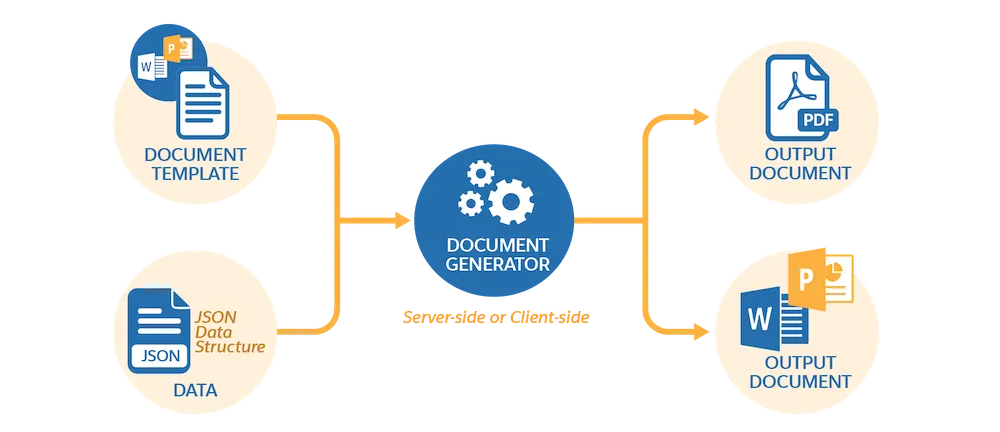
Client-Side document generation is a synchronous process that results in a downloadable preview of the generated documents. You can generate documents from Microsoft Word (.docx), Microsoft PowerPoint (.pptx), and Web templates. These templates can include values from any JSON-based data in the text, including data from any Salesforce object. You can optionally convert the resulting documents to .pdf format.
Server-Side document generation is available in both the OmniStudio Foundation and Salesforce Industries packages. Server-Side document generation is an asynchronous process that’s best for large and rendering-heavy documents and for document generation in batches. The Server-Side document generation service is secure and scalable and is hosted on Salesforce Hyperforce. The generated document is stored in your Salesforce org, and is attached to the object for which it’s generated. You can use Apex Classes, sample Integration Procedures, or a sample OmniScript to generate documents.
Client-Side document generation supports Customer Community Plus, Customer Community, and Partner Community users to generate documents using client-side OmniScripts.
Server-Side document generation supports Customer Community Plus, Customer Community, and Partner Community users to generate documents using the singleDocxServersideLwc server-side OmniScript.
With the right licenses, Document Generation is available in the Salesforce Industries package.
Can Salesforce create documents?
To create a document from the Global Actions menu, an admin must add the New Document global quick action to your publisher layouts. , and select New Document. Add content to your new document. You can @mentions users, documents, spreadsheets, folders, Salesforce data mentions, checklists, and more.
Is S-Docs free?
The free version of S-Docs allows you to create two templates without any restrictions on the number of Salesforce users. They are production ready and do not have an expiration date. The online resources are available for all support related questions.
Is Conga Composer free?
No, but there is a free trial. Conga Composer automates tedious business processes to get work done faster and easier in Salesforce.
Can Salesforce generate forms?
Salesforce has two basic features for creating specific forms. Third-party software makes it easy for you to create branded upload pages, multi-page forms, and a wide variety of documents. Salesforce Web-to-lead feature. Salesforce Web-to-case feature.
🔔🔔 Follow us on LinkedIn 🔔🔔

Who is Salesforce? Here is their story in their own words. From our inception, we've proudly embraced the identity of Read more

Salesforce Marketing Cloud Transactional Emails are immediate, automated, non-promotional messages crucial to business operations and customer satisfaction, such as order Read more

Salesforce has unveiled a comprehensive analytics solution tailored for wealth managers, home office professionals, and retail bankers, merging its Financial Read more

AI plays a crucial role in propensity score estimation as it can discern underlying patterns between treatments and confounding variables Read more