Salesforce Document Generation Archives - gettectonic.com
Salesforce Education Cloud Explained

Salesforce Education Cloud Explained

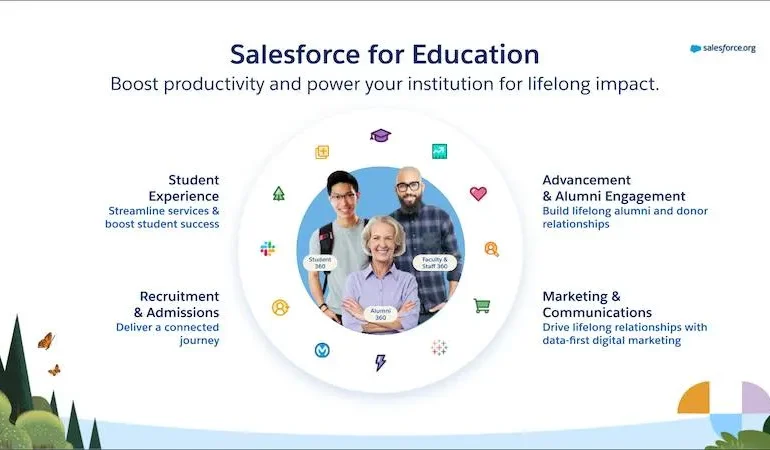
It’s back to school time. And there is no better time to discuss Salesforce Education Cloud! Powering the Learner Lifecycle with Pre-Built Apps Boost productivity with ready-to-use, customizable apps tailored for every stage of the learner journey. Instant Analytics and Intelligence Gain real-time insights to deliver personalized support for prospects, students, and alumni, right at your fingertips. Learner-Centric Data Foundation Accelerate your start with education-specific objects, logic, and automation built on the world’s leading CRM platform. Core Capabilities for Your Entire Institution Enhance the impact of faculty and staff with versatile features like scheduling and case management, adaptable across any department. Education Cloud: The AI-Driven CRM for Education Transform the educational experience with the #1 AI-powered CRM designed for learner and institutional success. Discover the key features of Education Cloud, which accelerates time to value for institutions of all sizes, making it easier to create personalized experiences for every lifelong learner. The Impact of Education Cloud Source: Forrester Total Economic Impact Report How Education Cloud Works Education Cloud offers comprehensive tools for various institutional needs, from managing households and relationships to scheduling appointments and supporting academic operations. Core Capabilities of Education Cloud Education Cloud is designed with flexibility to meet the evolving needs of your institution. Built on a learner-centric data foundation, it scales with your growth and provides each department with essential capabilities to maximize impact across the entire institution. Featured Capabilities Like Related Posts Who is Salesforce? Who is Salesforce? Here is their story in their own words. From our inception, we’ve proudly embraced the identity of Read more Salesforce Marketing Cloud Transactional Emails Salesforce Marketing Cloud Transactional Emails are immediate, automated, non-promotional messages crucial to business operations and customer satisfaction, such as order Read more Salesforce Unites Einstein Analytics with Financial CRM Salesforce has unveiled a comprehensive analytics solution tailored for wealth managers, home office professionals, and retail bankers, merging its Financial Read more AI-Driven Propensity Scores AI plays a crucial role in propensity score estimation as it can discern underlying patterns between treatments and confounding variables Read more

Read More
Salesforce Document Generation

Salesforce Document Generation

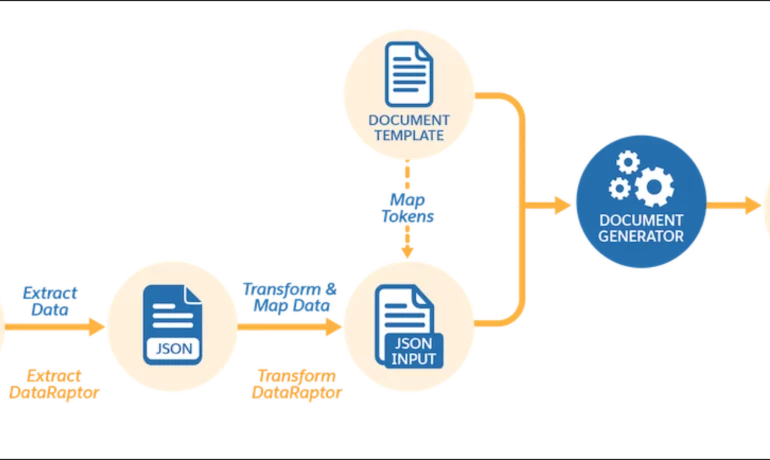
With Document Generation, you can generate contracts, proposals, quotes, reports, non-disclosure agreements, service agreements, and so on. You can generate documents using the specified sample client-side or server-side OmniScripts. You can also create your own OmniScripts by cloning and customizing the sample OmniScript to generate documents. When it comes to Salesforce Document Generation, you have several options. Client-Side document generation is a synchronous process that results in a downloadable preview of the generated documents. You can generate documents from Microsoft Word (.docx), Microsoft PowerPoint (.pptx), and Web templates. These templates can include values from any JSON-based data in the text, including data from any Salesforce object. You can optionally convert the resulting documents to .pdf format. Server-Side document generation is available in both the OmniStudio Foundation and Salesforce Industries packages. Server-Side document generation is an asynchronous process that’s best for large and rendering-heavy documents and for document generation in batches. The Server-Side document generation service is secure and scalable and is hosted on Salesforce Hyperforce. The generated document is stored in your Salesforce org, and is attached to the object for which it’s generated. You can use Apex Classes, sample Integration Procedures, or a sample OmniScript to generate documents. Client-Side document generation supports Customer Community Plus, Customer Community, and Partner Community users to generate documents using client-side OmniScripts. Server-Side document generation supports Customer Community Plus, Customer Community, and Partner Community users to generate documents using the singleDocxServersideLwc server-side OmniScript. With the right licenses, Document Generation is available in the Salesforce Industries package. Can Salesforce create documents? To create a document from the Global Actions menu, an admin must add the New Document global quick action to your publisher layouts. , and select New Document. Add content to your new document. You can @mentions users, documents, spreadsheets, folders, Salesforce data mentions, checklists, and more. Is S-Docs free? The free version of S-Docs allows you to create two templates without any restrictions on the number of Salesforce users. They are production ready and do not have an expiration date. The online resources are available for all support related questions. Is Conga Composer free? No, but there is a free trial. Conga Composer automates tedious business processes to get work done faster and easier in Salesforce. Can Salesforce generate forms? Salesforce has two basic features for creating specific forms. Third-party software makes it easy for you to create branded upload pages, multi-page forms, and a wide variety of documents. Salesforce Web-to-lead feature. Salesforce Web-to-case feature. Like2 Related Posts Who is Salesforce? Who is Salesforce? Here is their story in their own words. From our inception, we’ve proudly embraced the identity of Read more Salesforce Marketing Cloud Transactional Emails Salesforce Marketing Cloud Transactional Emails are immediate, automated, non-promotional messages crucial to business operations and customer satisfaction, such as order Read more Salesforce Unites Einstein Analytics with Financial CRM Salesforce has unveiled a comprehensive analytics solution tailored for wealth managers, home office professionals, and retail bankers, merging its Financial Read more AI-Driven Propensity Scores AI plays a crucial role in propensity score estimation as it can discern underlying patterns between treatments and confounding variables Read more

Read More
Salesforce Quip Sales Cloud Service Cloud

Quip, Sales Cloud, and Service Cloud

Quip Sales Cloud Service Cloud Quip, the document collaboration platform under Salesforce ownership, has recently announced a deeper integration into the core Sales Cloud and Service Cloud products of Salesforce. Quip helps sales teams accelerate business in real-time. Reimuip’s mobile-first content collaboration platform and word processing programs let’s you create, edit, discuss, and organize your team’s work — all in one place. This development is indeed big news, addressing the anticipation that followed Salesforce’s $750 million acquisition of Quip in 2016. The integration, now realized with Quip for Sales and Quip for Service, marks a transformative step for Quip. Quip’s cloud-based word process and collaboration software enhances Salesforce’s suite of productivity tools for business. This discussion will explore two pivotal aspects that distinguish the new Quip: Interface and Automation. Interface: Quip is now seamlessly embedded into the Salesforce console interface, offering a more integrated user experience. Automation: Using Quip gains the ability to leverage Salesforce Workflows, Approval Processes, and Lightning Flows configured by administrators. Quip for Sales Enhancing internal communication is crucial for sales teams to maintain strategic focus and present a professional image externally. Recognizing the limitations of static sales strategies, Quip meets the need for agility in sales teams to remain competitive. Quip transforms critical strategy documents into living plans, constantly updated with live data and adjusted collaboratively by the team within the context of the account. Use Cases Sales-specific use cases encompass: Account/Territory Plans Account hand-offs Proposal/Quote Feedback, linked to approval processes Pipeline Stage Required Documentation, aligned with the Sales Process Quip for Service With the simultaneous introduction of Quip for Service and the Einstein for Service announcement, there’s an increased focus on customer service transformation. The evolving landscape demands more from service agents, both in terms of diversified portfolios on the product side and elevated expectations from customers. Collaboration in service becomes imperative, especially as cases become less straightforward, requiring consideration of additional context in complex discussions. Use Cases Service-specific use cases include: Agent ‘Swarming’: Groups of agents collaborating on a single, complex case can engage in digital discussions. Knowledge Article Editing: Feedback from subject matter experts or the marketing department ensures content and messaging accuracy. Guided Actions for Case Resolution: Lightning Flows, exemplified by a Guided Actions flow, play a significant role in Service scenarios. The tighter integration of Quip and Salesforce’s Sales Cloud and Service Cloud signifies a strategic move that enhances user interface cohesion and introduces powerful automation capabilities, marking a noteworthy evolution for Quip. Like2 Related Posts Salesforce Marketing Cloud Transactional Emails Salesforce Marketing Cloud Transactional Emails are immediate, automated, non-promotional messages crucial to business operations and customer satisfaction, such as order Read more Tectonic’s Successful Salesforce Track Record Salesforce Technology Services Integrator – Tectonic has successfully delivered Salesforce in a variety of industries including Public Sector, Hospitality, Manufacturing, Read more Asset Management Salesforce Can Salesforce do asset management? You can manage assets in Consumer Goods (desktop) and in the Consumer Goods offline mobile Read more Lookup Relationship in Salesforce What is Lookup relationship in Salesforce? Salesforce’s lookup relationships is a significant capability that allows users to connect two objects Read more

Read More
Salesforce Document Generation

Generating Documents in Salesforce

Salesforce document generation poses a challenge for businesses, given the intricacies of integration involved. Fortunately, a variety of tools are available for generating documents in Salesforce, and Tectonic is well-equipped to assist in their successful implementation. Salesforce Industries Document Generation empowers businesses to craft and manage accurate documents linked to standard Salesforce objects, encompassing contracts, opportunities, orders, quotes, and custom objects. For a more dynamic approach, Salesforce OmniStudio Document Generation facilitates the creation of documents using Microsoft Word and Microsoft PowerPoint templates. These templates can incorporate values from any JSON-based data within the text, including data sourced from various Salesforce objects. This versatile tool enables the generation of contracts, proposals, quotes, reports, non-disclosure agreements, service agreements, and more. Salesforce Industries Document Generation seamlessly integrates with Vlocity Insurance, Vlocity Health, communications, media, energy, utilities, government, and beyond. Vlocity Analytics, another valuable component, offers pre-built measurement tools that seamlessly integrate with Salesforce Reports, Dashboards, and Einstein. The Salesforce AppExchange boasts an extensive array of over 200 document generation tools. Your Salesforce partner can assist in selecting, installing, and implementing the most suitable options based on your business requirements. With Document Generation, you can generate contracts, proposals, quotes, reports, non-disclosure agreements, job offers, service agreements, and so on. You can generate documents using the specified sample client-side or server-side OmniScripts. You can also create your own OmniScripts by cloning and customizing the sample OmniScript to generate documents. Client-Side document generation is a synchronous process that results in a downloadable preview of the generated documents. You can generate documents from Microsoft Word (.docx), Microsoft PowerPoint (.pptx), and Web templates. These templates can include values from any JSON-based data in the text, including data from any Salesforce object. You can optionally convert the resulting documents to .pdf format. Server-Side document generation is available in both the OmniStudio Foundation and Salesforce Industries packages. Server-Side document generation is an asynchronous process that’s best for large and rendering-heavy documents and for document generation in batches. The Server-Side document generation service is secure and scalable and is hosted on Salesforce Hyperforce. The generated document is stored in your Salesforce org, and is attached to the object for which it’s generated. You can use Apex Classes, sample Integration Procedures, or a sample OmniScript to generate documents. Client-Side document generation supports Customer Community Plus, Customer Community, and Partner Community users to generate documents using client-side OmniScripts. Server-Side document generation supports Customer Community Plus, Customer Community, and Partner Community users to generate documents using the singleDocxServersideLwc server-side OmniScript. With the right licenses, Document Generation is available in the Salesforce Industries package. Metering measures resource utilization levels and throttling controls resource access and use based on defined rules. Metering measures the number of server-side documents that are generated by an org hourly and daily. The default hourly and daily limits for processing server-side document generation requests are 1,000 per org and 24,000 per org respectively. Throttling maintains consistency and resilience of the server-side document generation service by managing incoming server-side document generation requests from multiple orgs. Throttling can also prevent service degradation caused by high volume of requests at peak hours by blocking requests that exceed the default limits. The request details are saved in the Document Generation Processes entity. You can retrieve the blocked requests and later retry the server-side document generation. No matter what your specific document generation needs, Tectonic simplifies the process of getting your system up and running seamlessly, whether it’s through Salesforce Quickstarts or comprehensive implementation services. Content updated in 2February 2024, Shannan Hearne. Like1 Related Posts Who is Salesforce? Who is Salesforce? Here is their story in their own words. From our inception, we’ve proudly embraced the identity of Read more Salesforce Marketing Cloud Transactional Emails Salesforce Marketing Cloud Transactional Emails are immediate, automated, non-promotional messages crucial to business operations and customer satisfaction, such as order Read more Salesforce Unites Einstein Analytics with Financial CRM Salesforce has unveiled a comprehensive analytics solution tailored for wealth managers, home office professionals, and retail bankers, merging its Financial Read more AI-Driven Propensity Scores AI plays a crucial role in propensity score estimation as it can discern underlying patterns between treatments and confounding variables Read more
Read More
gettectonic.com