Email Studio Archives - gettectonic.com - Page 2
Salesforce Marketing Cloud Email Studio

What is Email Studio in Marketing Cloud?

Enhance your account branding through the Sender Authentication Package (SAP), a tool provided by Marketing Cloud. SAP features include custom account branding, a private domain for email sending, a custom domain for CloudPages, a dedicated IP address, and reply mail management. Upon purchasing SAP, you will receive an email from mc-deliverability@mcld.salesforce.com 1–2 days after your contract activation. This email includes the SAP Quick Start Guide and a personalized form to set up your SAP.

Read More
Salesforce Campaigns

Campaign in Salesforce Marketing Cloud

What is a campaign in Salesforce Marketing Cloud? Campaigns help organize your marketing plan and assets. Plus, when you set up your campaign records effectively, they contain valuable data that you can use to optimize future efforts. What are campaigns in Salesforce Marketing Cloud for? A Salesforce Campaign in Marketing Cloud is a group of Leads and Contacts exposed to specific marketing communication(s). It stores essential performance metrics and means salespeople can quickly see the customers and prospects that received marketing activity. How do I send a Salesforce campaign from Marketing Cloud? In Marketing Cloud > Email Studio > Overview, open the email that you want to send and click ‘Send’ Select a ‘Send Classification’ then click ‘Next’ In the left pane, select ‘Salesforce Campaigns’ and then type the name of the desired campaign in the ‘Search’ field. Create a Marketing Cloud Campaign Why use campaigns in marketing cloud? Marketing Cloud Campaigns provide a way of grouping similar emails together. That way, Campaigns can be used in Datorama Reporting to present data for certain emails. What is campaign object in Salesforce? The Campaign object contains all the settings associated with how campaign records appear, the actions that users can take on campaigns, field access, and more. Create a campaign in the Campaigns app. Use tags in Marketing Cloud Engagement to categorize campaigns by any criteria, such as geography, marketing tactic, and product line. Where are my old Campaigns? I don’t see them on the campaign Overview tab.Campaigns that contain an email that has been sent automatically have their status set to Deployed. By default, the Overview tab only shows Campaigns with a status of In Process. To view older campaigns that have a status of Deployed, simply adjust the filter in the upper left.Setting the campaign status to Deployed now happens automatically when associated emails are sent. This feature was enabled in January 2014. Content updated January 2024. Like3 Related Posts Who is Salesforce? Who is Salesforce? Here is their story in their own words. From our inception, we’ve proudly embraced the identity of Read more Salesforce Marketing Cloud Transactional Emails Salesforce Marketing Cloud Transactional Emails are immediate, automated, non-promotional messages crucial to business operations and customer satisfaction, such as order Read more Salesforce Unites Einstein Analytics with Financial CRM Salesforce has unveiled a comprehensive analytics solution tailored for wealth managers, home office professionals, and retail bankers, merging its Financial Read more AI-Driven Propensity Scores AI plays a crucial role in propensity score estimation as it can discern underlying patterns between treatments and confounding variables Read more


Read More
Salesforce Marketing Cloud

What is the Difference in Lists and a Data Extensions in Salesforce Marketing Cloud

There are two different methods to store and segment subscriber data within Marketing Cloud: Lists and Data Extensions. Lists have limited functionality, whereas Data Extensions provide full flexibility to store and relate subscriber information. Salesforce Marketing Cloud lists and data extensions are the primary ways to manage your subscriber data. What is the difference between data extension and list in Marketing Cloud? In short, lists are best used for specific email sends lacking advanced data or segmentation, whereas data extensions can be used for basically any type of communication or data management need. If the goal is to organize data with simplicity, go for lists. What is data extension in Marketing Cloud? A data extension is a table that contains your data. With Marketing Cloud Connect, push tracking data from the Marketing Cloud back to your Sales or Service Cloud orgs using Salesforce data extensions (SFDEs). Data extensions are also filterable. What are the data extension limits for Marketing Cloud? There is currently no limit for the amount of rows that can exist within a Data Extension. This means that, without Row Based Data Retention, a Data extension can grow exponentially without any real upper limit. What is a list in Marketing Cloud? Lists are a default way of storing data in Marketing Cloud Email Studio. You can set different attributes for your customers by using lists, which represent a collection of customers and provide a simple method for audience segmentation. These attributes are used to store the position of the customer in a given list. List can be configured to send a welcome email when a subscriber opts in, and can have double opt-in. You will also hear groups mentioned. Groups are smaller segments of a list. When to Opt for Marketing Cloud Data Extensions There are two primary scenarios that distinctly indicate the need for utilizing a data extension rather than a list: Fluctuating Values Over Time: Data Relationship via a 3rd Data Point: Like Related Posts Who is Salesforce? Who is Salesforce? Here is their story in their own words. From our inception, we’ve proudly embraced the identity of Read more Salesforce Marketing Cloud Transactional Emails Salesforce Marketing Cloud Transactional Emails are immediate, automated, non-promotional messages crucial to business operations and customer satisfaction, such as order Read more Salesforce Unites Einstein Analytics with Financial CRM Salesforce has unveiled a comprehensive analytics solution tailored for wealth managers, home office professionals, and retail bankers, merging its Financial Read more AI-Driven Propensity Scores AI plays a crucial role in propensity score estimation as it can discern underlying patterns between treatments and confounding variables Read more

Read More
Marketing Cloud Filters

Marketing Cloud Filters

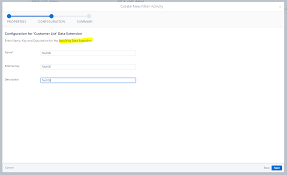
When crafting a filter, you establish conditions that the system assesses for each subscriber or data extension row to determine qualification for the segment. For each condition, you can choose the profile attribute, field column, or measure to evaluate, specify the operator for comparing values, and define the value for comparison.

Read More
Salesforce Contact Key

What is the Contact Key in Salesforce?

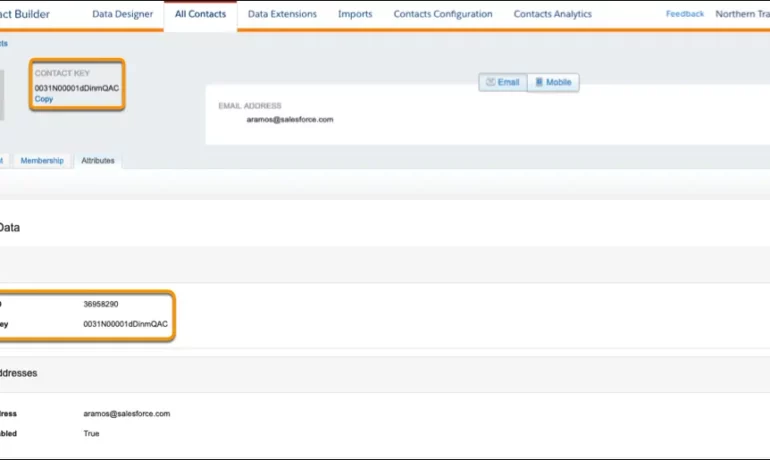
The contact key in Salesforce, also known as a subscriber key, is a unique identifier for a contact in Marketing Cloud MobilePush. Use this value to associate cross-channel addresses and subscriptions for a single contact. You can use the same key for a contact across multiple channels, such as email, SMS, and push messaging. What are contact keys? An immutable object that stores information about a single contact, such as the contact’s first name, phone numbers, and addresses. What is a Salesforce Subscriber key? A subscriber key is a text field that contains a value that uniquely identifies a subscriber in your Marketing Cloud account. A subscriber key is limited to 254 English characters. Avoid using email addresses as subscriber keys. What is the difference between subscriber key and contact key? This key is used to identify a single person across multiple channels inside of Marketing Cloud. In Email Studio, that key is called the “Subscriber Key”. In other channels, such as Mobile Connect or Mobile Push, that value is called “Contact Key”. What is the difference between contacts and subscribers? A subscriber in SFMC primarily represents an individual’s email communication preferences and is associated with email campaigns, while a contact represents a broader customer profile that includes information beyond email, allowing you to engage with customers across various channels. What is the difference between contact ID and contact key? The Contact Key gives you this ability and consistence. Existence of the contact key gives you the consistence of sending messages thru multiple channels and identify your contacts. Email and Text Message channels in our case. Contact ID is a unique number for your contacts in Salesforce Marketing Cloud. What is a subscriber key in Marketing Cloud? A subscriber is a person who has opted to receive communications from your organization. You can track information about subscribers using profile and preference attributes. Use the subscriber key to identify your subscribers in Marketing Cloud. Create lists or data extensions to store your subscribers. What is the difference between contact and subscriber in Marketing Cloud? Key Differences: Purpose: Contacts store customer data and facilitate segmentation and personalization efforts. Subscribers represent individuals who have subscribed to receive communications from your organization. Primary key is  a column or set of columns that uniquely identifies the record in the table. When a primary key is defined using multiple columns, the data from each column is used to determine whether a record/row is unique. Like Related Posts Who is Salesforce? Who is Salesforce? Here is their story in their own words. From our inception, we’ve proudly embraced the identity of Read more Salesforce Marketing Cloud Transactional Emails Salesforce Marketing Cloud Transactional Emails are immediate, automated, non-promotional messages crucial to business operations and customer satisfaction, such as order Read more Salesforce Unites Einstein Analytics with Financial CRM Salesforce has unveiled a comprehensive analytics solution tailored for wealth managers, home office professionals, and retail bankers, merging its Financial Read more AI-Driven Propensity Scores AI plays a crucial role in propensity score estimation as it can discern underlying patterns between treatments and confounding variables Read more

Read More
gettectonic.com