Event Monitoring Archives - gettectonic.com - Page 2
Security Identity and Privacy Summer 24 Release Notes

Security Identity and Privacy Summer 24 Release Notes

External Client App Manager, OAuth 2.0 token exchange handlers, and Event Log File Browser are each now available in Setup. Also, external client apps now support a bunch of new OAuth flows. Give users access to manage custom domains with a new, more targeted user permission. Create uninterrupted user experiences across Salesforce and custom interfaces with the new Single-Access UI Bridge API. Access your Data Cloud encryption policy status from the Security Center Encryption Policy metric. Scratch orgs on Salesforce Edge Network use partitioned domains. And Android mobile connected apps now require the Admin SDK private key and project ID from a Google Firebase project. Security Identity and Privacy Summer 24 Release Notes. Like Related Posts Who is Salesforce? Who is Salesforce? Here is their story in their own words. From our inception, we’ve proudly embraced the identity of Read more Salesforce Marketing Cloud Transactional Emails Salesforce Marketing Cloud Transactional Emails are immediate, automated, non-promotional messages crucial to business operations and customer satisfaction, such as order Read more Salesforce Unites Einstein Analytics with Financial CRM Salesforce has unveiled a comprehensive analytics solution tailored for wealth managers, home office professionals, and retail bankers, merging its Financial Read more AI-Driven Propensity Scores AI plays a crucial role in propensity score estimation as it can discern underlying patterns between treatments and confounding variables Read more

Read More
Summer 24 Salesforce Development Release Notes

Summer 24 Salesforce Development Release Notes

Whether you’re using Lightning components, Visualforce, Apex, or Salesforce APIs with your favorite programming language, these enhancements help you develop amazing applications, integrations, and packages for resale to other organizations. Summer 24 Salesforce Development Release Notes. Like Related Posts Who is Salesforce? Who is Salesforce? Here is their story in their own words. From our inception, we’ve proudly embraced the identity of Read more Salesforce Marketing Cloud Transactional Emails Salesforce Marketing Cloud Transactional Emails are immediate, automated, non-promotional messages crucial to business operations and customer satisfaction, such as order Read more Salesforce Unites Einstein Analytics with Financial CRM Salesforce has unveiled a comprehensive analytics solution tailored for wealth managers, home office professionals, and retail bankers, merging its Financial Read more AI-Driven Propensity Scores AI plays a crucial role in propensity score estimation as it can discern underlying patterns between treatments and confounding variables Read more

Read More
Account Planning With Salesforce

CRM Analytics Limits

When using CRM Analytics, keep these limits in mind. API Call Limits These limits apply to all supported editions. API Call Limit Maximum concurrent CRM Analytics API calls per org 100 Maximum CRM Analytics API calls per user per hour 10,000 Dataset Row Storage Allocations per License In Salesforce org, your total row storage limit for all registered datasets combined depends on your license combination. Each license allocates a different number of rows. Baseline Row Allocation Allocated Rows CRM Analytics Plus 10 billion CRM Analytics Growth 100 million Sales Analytics 25 million Service Analytics 25 million Event Monitoring Analytics 50 million B2B Marketing Analytics 25 million CRM Analytics for Financial Services Cloud 25 million CRM Analytics for Health Cloud 25 million Extra Data Rows license 100 million Your total row storage limit is a combination of your active licenses. For example: Because the CRM Analytics Plus license includes the Sales Analytics and Service Analytics licenses, your total row allocation remains 10 billion. Similarly, the CRM Analytics Growth license includes the Sales Analytics and the Service Analytics licenses, so your total row allocation remains 100 million. However, if you obtain another Sales Analytics or Services Analytics license, your row limit increases by 25 million for each added license. Dataset Row Limits Each dataset supports up to 2 billion rows. If your Salesforce org has less than 2 billion allocated rows, each dataset supports up to your org’s allocated rows. Dataset Field Limits Value Limit Maximum number of fields in a dataset 5,000 (including up to 1,000 date fields) Maximum number of decimal places for each value in a numeric field in a dataset (overflow limit) 17 decimal placesWhen a value exceeds the maximum number of decimal places, it overflows. Both 100,000,000,000,000,000 and 10,000,000,000,000,000.0 overflow because they use more than 17 decimal places. A number also overflows if it’s greater (or less) than the maximum (or minimum) supported value. 36,028,797,018,963,968 overflows because its value is greater than 36,028,797,018,963,967. -36,028,797,018,963,968 overflows because it’s less than -36,028,797,018,963,967.When a number overflows, the resulting behavior in CRM Analytics is unpredictable. Sometimes CRM Analytics throws an error. Sometimes it replaces a numeric value with a null value. And sometimes mathematical calculations, such as sums or averages, return incorrect results. Occasionally, CRM Analytics handles numbers up to 19 digits without overflowing because they are within the maximum value for a 64-bit signed integer (263 – 1). But numbers of these lengths aren’t guaranteed to process.As a best practice, stick with numbers that are 17 decimal places or fewer. If numbers that would overflow are necessary, setting lower precision and scale on the dataset containing the large numbers sometimes prevents overflow. If your org hasn’t enabled the handling of numeric values, the maximum number of decimal places for each value in a numeric field in a dataset is 16. All orgs created after Spring ’17 have Null Measure Handling enabled. Maximum value for each numeric field in a dataset, including decimal places 36,028,797,018,963,967For example, if three decimal places are used, the maximum value is 36,028,797,018,963.967 Minimum value for each numeric field in a dataset, including decimal places -36,028,797,018,963,968For example, if five decimal places are used, the minimum value is -36,028,797,018,9.63968 Maximum number of characters in a field 32,000 Data Sync Limits If you extract more than 100 objects in your dataflows, contact Salesforce Customer Support before you enable data sync. Value Limit Maximum number of concurrent data sync runs 3 Maximum number of objects that can be enabled for data sync, including local and remote objects 100 Maximum amount of time each data sync job can run for local objects 24 hours Maximum amount of time each data sync job can run for remote objects 12 hours Data sync limits for each job:Marketo Connector (Beta)NetSuite ConnectorZendesk Connector Up to 100,000 rows or 500 MB per object, whichever limit is reached first Data sync limits for each job:Amazon Athena ConnectorAWS RDS Oracle ConnectorDatabricks ConnectorGoogle Analytics ConnectorGoogle Analytics Core Reporting V4 ConnectorOracle Eloqua ConnectorSAP HANA Cloud ConnectorSAP HANA Connector Up to 10 million rows or 5 GB per object, whichever limit is reached first Data sync limits for each job*:AWS RDS Aurora MySQL ConnectorAWS RDS Aurora PostgresSQL ConnectorAWS RDS MariaDB ConnectorAWS RDS MySQL ConnectorAWS RDS PostgreSQL ConnectorAWS RDS SQL Server ConnectorGoogle Cloud Spanner ConnectorMicrosoft Azure Synapse Analytics ConnectorMicrosoft Dynamics CRM ConnectorSalesforce External ConnectorSalesforce Contacts Connector for Marketing Cloud EngagementSalesforce OAuth 2.0 Connector for Marketing Cloud Engagement Up to 20 million rows or 10 GB per object, whichever limit is reached first Data sync limits for each job*:Amazon Redshift ConnectorAmazon S3 ConnectorCustomer 360 Global Profile Data Connector (Beta)Google BigQuery for Legacy SQL ConnectorGoogle BigQuery Standard SQL ConnectorHeroku Postgres ConnectorMicrosoft Azure SQL Database ConnectorSnowflake Input Connector Up to 100 million rows or 50 GB per object, whichever limit is reached first *When using these connectors, Salesforce Government Cloud org data is protected in transit with advanced encryption and can sync up to 10 million rows or 5 GB for each connected object, whichever limit is reached first. Note When using a Salesforce local input connection, CRM Analytics bulk API usage doesn’t count towards Salesforce bulk API limits. Use of the external Salesforce connection and output connection impacts your limits. The dataflow submits a separate bulk API call to extract data from each Salesforce object. The dataflow uses a batch size of 100,000–250,000, depending on whether the dataflow or the bulk API chunks the data. As a result, to extract 1 million rows from an object, the dataflow creates 4–10 batches. Recipe and Dataflow Limits Important In Winter ‘24, recipe runs over 2 minutes are counted against the limit. Previously, the recipe run counts weren’t correct. For more information, see Known Issue – Recipe runs are not counting towards the daily maximum run limit. Value Limit Maximum amount of time each recipe or dataflow can run 48 hours Maximum number of recipes 1,000 Maximum number of dataflows definitions (with data sync enabled) 100 Maximum number of dataflow and recipe runs in a rolling


Read More
Shield

Salesforce Shield Explained

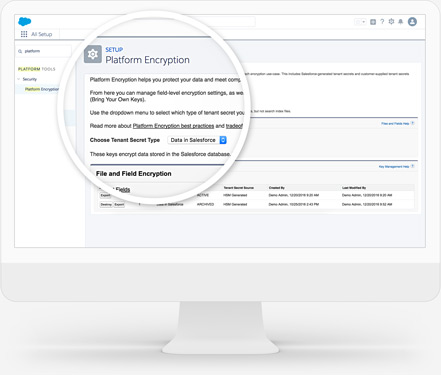
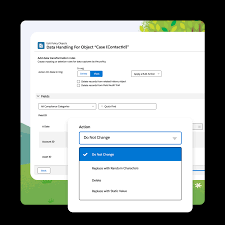
Salesforce Shield Explained: It is tailored for companies with heightened security and compliance considerations. Comprising four products that layer onto existing Salesforce products, it provides additional protection. These components include: Salesforce Shield is best explained is a encryption and event monitoring and field audit trail tool for your business. Block Unauthorized or Unlawful ActivityCreate real-time security rules in an org to prevent undesired events with Event Monitoring.Find and Classify Sensitive Data QuicklyDiscover and classify sensitive data in just a few clicks with Data Detect.Add Additional Security to Sensitive DataEncrypt sensitive data at rest and manage keys with Platform Encryption.Meet Compliance and Industry RegulationsView data as far back as a decade with Field Audit Trail. Protect critical information at scale. Identify, categorize and encrypt data to mitigate threats and avoid costs associated with data loss. Three Reasons to Use Data Detect1 Integrates Seamlessly With native Salesforce software for ease of implementation and cost savings.2 Identifies Sensitive Data regardless of what field it is in, so you can take the necessary steps to obfuscate or protect it3 Classifies Sensitive Fields Use convenient UI to update data classifications as you discover fields with sensitive data Like2 Related Posts Who is Salesforce? Who is Salesforce? Here is their story in their own words. From our inception, we’ve proudly embraced the identity of Read more Salesforce Marketing Cloud Transactional Emails Salesforce Marketing Cloud Transactional Emails are immediate, automated, non-promotional messages crucial to business operations and customer satisfaction, such as order Read more Salesforce Unites Einstein Analytics with Financial CRM Salesforce has unveiled a comprehensive analytics solution tailored for wealth managers, home office professionals, and retail bankers, merging its Financial Read more AI-Driven Propensity Scores AI plays a crucial role in propensity score estimation as it can discern underlying patterns between treatments and confounding variables Read more

Read More
Use Salesforce Data Protection Services

Use Salesforce Data Protection Services

Ensuring Data Security in Salesforce: Use Salesforce Data Protection Services How is Data Protected in Salesforce? Salesforce.com employs cutting-edge Internet security technology, including Secure Socket Layer (SSL) with server authentication and data encryption, ensuring the protection of user information during access via supported web browsers. Why Use Salesforce Data Protection Services? Data Security is imperative to meet evolving privacy standards and safeguard sensitive information shared over the internet. Unauthorized access could pose significant risks to the entire organization, making data security a crucial aspect. Salesforce GDPR Certification: Yes, Salesforce is GDPR certified, as confirmed in Section 11 of the Data Processing Addendum, where Salesforce commits to providing reasonable assistance to customers. Salesforce CCPA Compliance with Customer 360: Salesforce 360 facilitates CCPA compliance by seamlessly connecting Marketing Cloud to Sales Cloud, ensuring a cohesive flow of customer data across the organization. Introduction to Salesforce Shield: Salesforce Shield comprises three security tools – Shield Platform Encryption, Event Monitoring, and Field Audit Trail – embedded into critical business applications to enhance trust, compliance, and governance. Data Protection and Privacy Regulations: Salesforce assists companies in complying with various data protection and privacy regulations, including GDPR, CCPA, PIPA, LGPD, PIPEDA, and more, offering guidance on common privacy principles. Guidance for Data Management and Privacy Compliance: Salesforce provides tools for efficient data management and privacy compliance, covering aspects such as data deletion, consent management, restriction of processing, data access and portability, and privacy center functionalities. Encryption of Data at Rest with Salesforce Shield Platform Encryption: Salesforce Shield Platform Encryption encrypts data at rest within servers, databases, search index files, and the file system, preserving functionality and ensuring secure storage. Use Salesforce Data Protection Services: To enable Data Privacy and Protection in Salesforce, users can navigate through Lightning Experience or Salesforce Classic, accessing the setup and entering “Data Protection and Privacy” in the Quick Find box. Various Data Security Settings in Salesforce: Salesforce offers multiple data security settings, including Object-Level Security through profiles, Permission Sets, Permission Set Groups, Ownership-Based Sharing Rules, Criteria-Based Sharing Rules, and Guest User Sharing Rules. Salesforce Data Ownership and Digital Chain of Custody: Salesforce Data Ownership involves maintaining a Digital Chain of Custody, ensuring meticulous tracking of data through each replication process. This guarantees data remains under control and protected at all times. Salesforce and DLP Functionality: Salesforce does not have built-in Data Loss Prevention (DLP) functionality. It relies on third-party apps like Nightfall to provide DLP capabilities, crucial for maintaining compliance with regulations such as HIPAA and PCI. Like Related Posts Who is Salesforce? Who is Salesforce? Here is their story in their own words. From our inception, we’ve proudly embraced the identity of Read more Salesforce Marketing Cloud Transactional Emails Salesforce Marketing Cloud Transactional Emails are immediate, automated, non-promotional messages crucial to business operations and customer satisfaction, such as order Read more Salesforce Unites Einstein Analytics with Financial CRM Salesforce has unveiled a comprehensive analytics solution tailored for wealth managers, home office professionals, and retail bankers, merging its Financial Read more AI-Driven Propensity Scores AI plays a crucial role in propensity score estimation as it can discern underlying patterns between treatments and confounding variables Read more

Read More
Salesforce Shield Data Monitoring and Encryption

Salesforce Shield

Salesforce Shield is tailored for companies with heightened security and compliance considerations. Comprising four products that layer onto existing Salesforce products, it provides additional protection.  Shields are used to intercept specific attacks.  Shield is no different. Salesforce Shield is a trio of security tools that helps you build extra levels of trust, compliance, and governance right into your business-critical app. These components include: Is Salesforce Shield necessary? In this sense, Shield gives you a helping hand through tools like event monitoring and field audit trails. Not only do these features practically help you maintain the security of your Salesforce environment, but they’re also proof of your compliance. How do I use shield in Salesforce? What are the benefits of Salesforce Shield? Shield can help you protect your apps. Salesforce Shield is basically a set of security solutions that allows you to incorporate additional layers of trust, compliance, and governance into your mission-critical apps. Shield Platform Encryption, Event Monitoring, and Field Audit Trail are all included. Does Shield work with marketing cloud? You can use Salesforce Shield and Field-Level Encryption with Sales and Service Clouds. The Marketing Cloud does not offer Audit Trail or Event Monitoring via the Marketing Cloud app. However, Field-Level Encryption does encrypt data at rest and can support Platform Encryption users. Like Related Posts Who is Salesforce? Who is Salesforce? Here is their story in their own words. From our inception, we’ve proudly embraced the identity of Read more Salesforce Marketing Cloud Transactional Emails Salesforce Marketing Cloud Transactional Emails are immediate, automated, non-promotional messages crucial to business operations and customer satisfaction, such as order Read more Salesforce Unites Einstein Analytics with Financial CRM Salesforce has unveiled a comprehensive analytics solution tailored for wealth managers, home office professionals, and retail bankers, merging its Financial Read more AI-Driven Propensity Scores AI plays a crucial role in propensity score estimation as it can discern underlying patterns between treatments and confounding variables Read more

Read More
Event Monitoring in Salesforce

Event Monitoring in Salesforce

Leveraging Salesforce event monitoring is crucial for ensuring compliance with regulatory requirements and internal policies. By diligently tracking user activity, you can showcase your commitment to safeguarding sensitive data and upholding compliance standards. Event Monitoring, among the various tools offered by Salesforce to bolster data security, empowers you to delve into the granular details of user activities within your organization, referred to as events. This tool allows you to review information about individual events or observe trends, swiftly identifying abnormal behavior and securing your company’s data. The comprehensive scope of Event Monitoring encompasses various event types, including logins, logouts, web clicks in Salesforce Classic (URI), web clicks, performance metrics, and errors in Lightning Experience and the Salesforce mobile app (Lightning), Visualforce page loads, API calls, Apex executions, and report exports. These events are stored in event log files generated when an event occurs, accessible for viewing and downloading after 24 hours. The availability of event types and file retention duration depends on your Salesforce edition. Event Monitoring serves diverse purposes, such as monitoring data loss, detecting anomalous user behavior, and optimizing organizational performance. For instance, it can help uncover instances where a departing sales representative might have downloaded sensitive reports and shared them with a competitor, preventing potential revenue loss. Beyond identifying misconduct, Event Monitoring aids in increasing adoption by highlighting areas in your organization that may require additional attention. For example, it can reveal how users interact with newly introduced Visualforce pages, enabling you to gauge user engagement and make informed decisions for redevelopment or adoption efforts. Additionally, Event Monitoring assists in optimizing performance by providing insights into the causes of slow page performance. Whether attributed to network issues or application configuration, Event Monitoring aids in pinpointing the root causes and facilitating prompt resolution. Access to all event types is available through the EventLogFile object, LoginEvent object, Transaction Security, and the Event Monitoring Analytics App. To unlock the full potential of Event Monitoring, consider adding it as an add-on through your Salesforce sales representative or Account Executive. Content updated February 2024. Like2 Related Posts Who is Salesforce? Who is Salesforce? Here is their story in their own words. From our inception, we’ve proudly embraced the identity of Read more Salesforce Marketing Cloud Transactional Emails Salesforce Marketing Cloud Transactional Emails are immediate, automated, non-promotional messages crucial to business operations and customer satisfaction, such as order Read more Salesforce Unites Einstein Analytics with Financial CRM Salesforce has unveiled a comprehensive analytics solution tailored for wealth managers, home office professionals, and retail bankers, merging its Financial Read more AI-Driven Propensity Scores AI plays a crucial role in propensity score estimation as it can discern underlying patterns between treatments and confounding variables Read more

Read More
gettectonic.com