

Google Cloud Archives - gettectonic.com - Page 4
Google Analytics and Salesforce Integration

Google Analytics and Salesforce Integration

Syncing Google Analytics Data to CRM Analytics To integrate Google Analytics and Salesforce Integration using the Google Analytics connector, follow these steps: Important Note: As of July 1, 2023, the main product Google Analytics has been decommissioned and replaced with the new product Google Analytics 4 (GA4). The Salesforce announcement GA4 Set to Replace Universal Analytics gives an overview on this. Creating a Connection Required Settings: Google Analytics 4 Integration To sync Google Analytics 4 data to Salesforce Data Pipelines: Connector Considerations: Google Analytics Salesforce Sales Cloud Integration User Identification Analytics provides two methods to identify users: Required Salesforce Sales Cloud Objects and Fields: Integration Steps: Testing and Viewing Imported Data: Notes: Google Data Studio and Salesforce Integration Connecting Salesforce with Google Data Studio allows for powerful visualizations that combine sales and marketing data. This integration helps in understanding which channels generate the most leads and income. Google Analytics 4 Connection Setup: Connection Details: Advanced Properties: Considerations: By following these steps, you can seamlessly integrate Google Analytics data into your CRM Analytics and Salesforce Data Pipelines, ensuring robust data analysis and informed decision-making. Decide How to Identify Your Users: Analytics offers two ways to programmatically identify your users: Client ID and User-ID. To support Data Import for Salesforce Sales Cloud, you must implement Client ID. You may optionally choose to also implement User-ID. Client ID pseudonymously identifies a browser instance and is best suited for businesses focused on lead generation and new customer acquisition. User-ID enables the analysis of groups of sessions, across devices, using a unique, persistent, and non-personally identifiable ID string representing a user. This option is best for businesses with high rates of logged-in users. How to Import CRM/ERP Data with Google Analytics 4 Using a CSV File: Transitioning to Google Analytics 4: As of March 2023, Google has automatically created GA4 properties for users unless they opt-out. Until July 1, 2023, you can continue to use and collect new data in your Universal Analytics properties. After this date, you must export your historical reports as Universal Analytics will be phased out. How Does Google Help Salesforce Marketing Cloud Users? Google Analytics provides invaluable insights into user behavior, helping Salesforce Marketing Cloud users optimize campaigns and understand customer journeys. Integration with the Google platform allows businesses to combine offline sales data with digital analytics, optimizing digital marketing strategies and improving campaign effectiveness. Additional Integration: Using datasets from Google Analytics and Google BigQuery, businesses can create interactive Tableau CRM dashboards to visualize campaign activities and performance metrics. By following these guidelines, organizations can leverage Google Analytics data effectively within their Salesforce ecosystem, enhancing decision-making and strategic planning. Content updated July 2024. Like1 Related Posts Who is Salesforce? Who is Salesforce? Here is their story in their own words. From our inception, we’ve proudly embraced the identity of Read more Salesforce Marketing Cloud Transactional Emails Salesforce Marketing Cloud Transactional Emails are immediate, automated, non-promotional messages crucial to business operations and customer satisfaction, such as order Read more Salesforce Unites Einstein Analytics with Financial CRM Salesforce has unveiled a comprehensive analytics solution tailored for wealth managers, home office professionals, and retail bankers, merging its Financial Read more AI-Driven Propensity Scores AI plays a crucial role in propensity score estimation as it can discern underlying patterns between treatments and confounding variables Read more

Read More
Salesforce Success Story

Case Study: Salesforce Innovation for Hospitality

Major hospitality management firm, moves to the cloud and adopts Google Cloud and Salesforce to improve operational insights and decision-making. Tectonic assisted them to move to the cloud and obtatin quicker, actionable insights with business intelligence. Salesforce Innovation for Hospitality.

Read More
Cloud Based Managed Services

Cloud Based Managed Services

At Tectonic, our aim is to enable you to concentrate on your business operations while we handle the intricacies of technology. Our team oversees all technology assets and evaluates your IT systems to ensure your employees have the necessary equipment to support their work. We work diligently in the background to maintain the seamless functioning of your business, encompassing tasks such as consistent backups, 24/7 server monitoring, event logging, and more. Cloud Based Managed Services. Managed Cloud Cloud managed services, or managed cloud, refer to applications, services, or ecosystems in the cloud managed by a third-party organization. These services include IT tasks like engineering on demand, operations management, 24/7 help desk support, hosting, and implementation. Cloud-based service involves the organized administration of cloud computing products and services. It encompasses processes, strategies, policies, and technology used to control and maintain public and private clouds, hybrid clouds, or multicloud environments. Cloud infrastructure managed services involve companies like Microsoft, AWS, HubSpot, IBM, and Google Cloud. This allows businesses to receive personalized tech support from specialists in specific software providers. Examples of cloud-based services include file storage and backup, web-based email, and project management tools. SaaS cloud service providers include Dropbox, G Suite, Microsoft Office 365, and Slack. While cloud service providers are cost-effective, they lack the robustness of fully managed IT services. With Tectonic, managed cloud services provide scalable solutions, offering benefits like consistent backups, disaster recovery, and flexibility to adapt to changing business requirements without downtime. Managed services differ from SaaS as they go beyond software provision, often handling networking and hardware requirements. Managed cloud services offer hybrid IT and cloud administration, with providers offering unique values in areas like migration, optimization, security, and configuration. Advantages of Managed Cloud Service Providers (MCSPs) include resource optimization, cloud service integration, and predictable spending. However, potential drawbacks include high costs, optimization impacting performance, and security risks due to multi-tenancy. Amid the global COVID-19 pandemic, cloud adoption has surged, with companies embracing remote work models. Businesses increasingly partner with cloud managed service providers to optimize IT infrastructure, address regulatory compliance, and ensure security in the cloud environment. Local servers, physically located on-premises or in private data centers, are not considered cloud services. They host applications, websites, or services within a specific organization’s infrastructure. Like Related Posts Who is Salesforce? Who is Salesforce? Here is their story in their own words. From our inception, we’ve proudly embraced the identity of Read more Salesforce Marketing Cloud Transactional Emails Salesforce Marketing Cloud Transactional Emails are immediate, automated, non-promotional messages crucial to business operations and customer satisfaction, such as order Read more Salesforce Unites Einstein Analytics with Financial CRM Salesforce has unveiled a comprehensive analytics solution tailored for wealth managers, home office professionals, and retail bankers, merging its Financial Read more AI-Driven Propensity Scores AI plays a crucial role in propensity score estimation as it can discern underlying patterns between treatments and confounding variables Read more
Read More

Salesforce Integration: Enhancing Your CRM Capabilities

Salesforce is the world’s leading CRM platform, empowering businesses to streamline operations, enhance customer relationships, and drive growth. However, to maximize its potential, integrating Salesforce with third-party applications is essential. By connecting Salesforce with various external tools—such as MailChimp, QuickBooks, WhatsApp, and LinkedIn—organizations can improve efficiency, automate workflows, and unify data across departments. But how can businesses successfully integrate these applications into their Salesforce environment, and what challenges might they face? Let’s explore. What is Salesforce Integration? Salesforce integration refers to the process of connecting Salesforce with third-party applications to facilitate seamless data flow and process automation. These integrations leverage APIs to establish communication between systems, ensuring a unified experience across different business functions such as HR, finance, marketing, and sales. Why is Salesforce Integration Important? Integrating Salesforce with other systems offers several advantages, including: Common Salesforce Integrations and Use Cases Salesforce can be integrated with a variety of platforms to enhance functionality. Some key use cases include: Challenges in Salesforce App Integration While Salesforce integrations bring numerous benefits, they also come with challenges: Tools for Successful Salesforce Integration To facilitate smooth integrations, businesses can leverage the following tools: 1. Salesforce Native Tools These tools enable direct integrations with Salesforce products. Examples include: 2. App-Native Tools Many external applications offer built-in integrations with Salesforce, such as: 3. Third-Party Middleware For more complex integrations, middleware platforms help bridge gaps between systems: Best Practices for Salesforce Integration To ensure a smooth and successful integration, businesses should follow these best practices: Final Thoughts: Should You Integrate Salesforce with Third-Party Apps? Absolutely. Integrating Salesforce with external applications enhances its capabilities, drives efficiency, and unlocks new business opportunities. However, it’s crucial to implement these integrations through a certified Salesforce partner to minimize risks and ensure seamless execution. By following best practices and using the right tools, businesses can maximize their CRM investment and drive long-term success. FAQs Have more questions about Salesforce integration? Get in touch with our certified Salesforce consultants to explore the best integration solutions for your business. Like Related Posts Who is Salesforce? Who is Salesforce? Here is their story in their own words. From our inception, we’ve proudly embraced the identity of Read more Salesforce Marketing Cloud Transactional Emails Salesforce Marketing Cloud Transactional Emails are immediate, automated, non-promotional messages crucial to business operations and customer satisfaction, such as order Read more Salesforce Unites Einstein Analytics with Financial CRM Salesforce has unveiled a comprehensive analytics solution tailored for wealth managers, home office professionals, and retail bankers, merging its Financial Read more AI-Driven Propensity Scores AI plays a crucial role in propensity score estimation as it can discern underlying patterns between treatments and confounding variables Read more

Read More
Sensitive Information De-identification

Sensitive Information De-identification

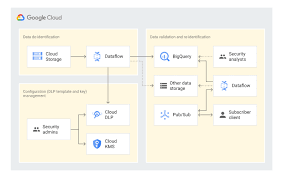
Using Google Cloud Data Loss Prevention with Salesforce for Sensitive Data Handling This insight discusses the transition from detecting and classifying sensitive data to preventing data loss using Google Cloud Data Loss Prevention (DLP). Sensitive Information De-identification for Salesforce is used as the data source to demonstrate how personal, health, credential, and financial information can be de-identified in unstructured data in near real-time. Overview of Google Cloud DLP Google Cloud DLP is a fully managed service designed to help discover, classify, and protect sensitive data. It easily transitions from detection to prevention by offering services that mask sensitive information and measure re-identification risk. Objective The goal was to demonstrate the ability to redact sensitive information in unstructured data at scale. Specifically, it aimed to determine whether sensitive data, such as credit card numbers, tax file numbers, and health care numbers, entered into Salesforce communications (Emails, Files, and Chatter) could be detected and redacted. Constraints Tested De-identifying Data with Google Cloud DLP API Instead of detailing the setup, this section focuses on the key areas of design. Google Design Decisions Supporting Disparate Data Sources with Multiple Integration Patterns and Redundant Design Salesforce Data Source De-identification targets include email addresses, Australian Medicare card numbers, GCP API keys, passwords, and credit card numbers. Credit card numbers are masked with asterisks, while other sensitive data is replaced with information types for readability (e.g., jane@secretemail.com becomes [redacted-email-address]). Sample Requests to Google De-identification Service JSON Structure to De-identify Text Using Google Cloud DLP API jsonCopy code{ // JSON structure } JSON Structure to De-identify Images Using Google Cloud DLP API jsonCopy code{ // JSON structure } Salesforce Design Decisions Redundancy and Batch Processing A scheduled batch job allows for recovery by polling unprocessed records. To handle large data volumes (e.g., 360,000 records over 5 days), the Salesforce BULK API is used to process queries and updates in large batch sizes, reducing the number of API calls. Sensitive Information De-identification Google Cloud Data Loss Prevention allows detecting and protecting assets with sensitive information, supporting a wide range of use cases across an enterprise. Proven Capabilities: Considerations and Lessons Learned Enhanced Email: Redacting tasks and EmailMessage records, handling read-only EmailMessage records by deleting and recreating them. Files: The architecture assumes files with sensitive data can be deleted and replaced with redacted versions. Audit Fields: Ensure setting CreatedDate and LastModifiedDate fields using original record dates. Field History Tracking: Avoid tracking fields intended for de-identification, tracking shadow fields instead. Image De-identification: Limited to JPEG, BMP, and PNG formats, with DOCX and PDF not yet supported. Like Related Posts Who is Salesforce? Who is Salesforce? Here is their story in their own words. From our inception, we’ve proudly embraced the identity of Read more Salesforce Marketing Cloud Transactional Emails Salesforce Marketing Cloud Transactional Emails are immediate, automated, non-promotional messages crucial to business operations and customer satisfaction, such as order Read more Salesforce Unites Einstein Analytics with Financial CRM Salesforce has unveiled a comprehensive analytics solution tailored for wealth managers, home office professionals, and retail bankers, merging its Financial Read more AI-Driven Propensity Scores AI plays a crucial role in propensity score estimation as it can discern underlying patterns between treatments and confounding variables Read more

Read More
salesforce integrations

Salesforce Integrations

How do you make Salesforce even better? Integrate it with all the third party apps you already use. From productivity to marketing to collaboration and beyond, now you can connect your Salesforce to the other tools you need to run your business. MuleSoft is Salesforce’s integration and automation technology and offers connectivity solutions for all of your apps. Learn more about Salesforce integrations. Streamline your team’s workflow and increase productivity by syncing G Suite by Google Cloud with Salesforce. Increase team collaboration and efficiency with the Slack and Salesforce integration. Increase sales while generating accurate financial data by integrating Quickbooks and Salesforce. Make it easier to manage email lists and contact records by connecting directly MailChimp to Salesforce. Target and engage the right buyers and save valuable time with the LinkedIn and Salesforce integration. Connect DocuSign to Salesforce and send, sign and track agreements and approvals on any device. Integrate Jira and Salesforce and make it easier to monitor the progress of your projects. Use the HelloSign integration to simplify the process for preparing and tracking e-signature documents. Build customer apps lightning fast, with the Salesforce and CodeScience integration. Connect ActiveCampaign and Salesforce to accelerate business growth with automated one to one experiences that connect across all channels and through the entire customer lifecycle. Sync documents to keep files updated and organized, with the Dropbox and Salesforce integration. This is just the beginning of the ways that integrating Salesforce with your other systems can increase employee productivity, automate data transfer, reduce human error, and make everyone happier. If you have questions about integrating your systems with Salesforce, contact Tectonic today. Like1 Related Posts Who is Salesforce? Who is Salesforce? Here is their story in their own words. From our inception, we’ve proudly embraced the identity of Read more Salesforce Marketing Cloud Transactional Emails Salesforce Marketing Cloud Transactional Emails are immediate, automated, non-promotional messages crucial to business operations and customer satisfaction, such as order Read more Salesforce Unites Einstein Analytics with Financial CRM Salesforce has unveiled a comprehensive analytics solution tailored for wealth managers, home office professionals, and retail bankers, merging its Financial Read more AI-Driven Propensity Scores AI plays a crucial role in propensity score estimation as it can discern underlying patterns between treatments and confounding variables Read more

Read More
gettectonic.com