What is the Contact Key in Salesforce?
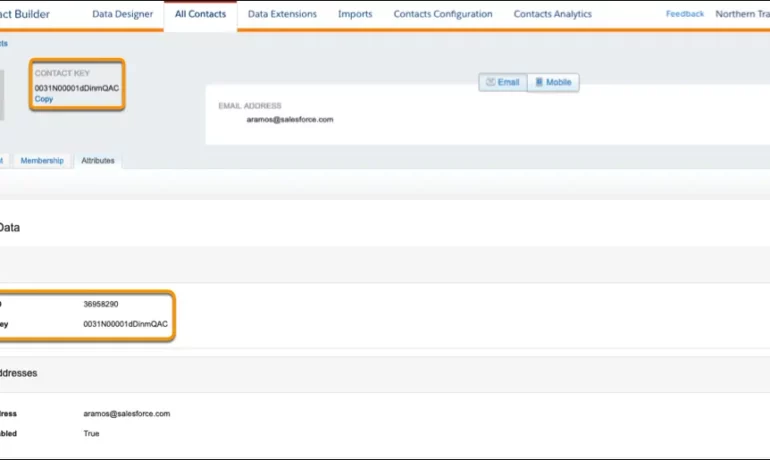
The contact key in Salesforce, also known as a subscriber key, is a unique identifier for a contact in Marketing Cloud MobilePush. Use this value to associate cross-channel addresses and subscriptions for a single contact. You can use the same key for a contact across multiple channels, such as email, SMS, and push messaging. What are contact keys? An immutable object that stores information about a single contact, such as the contact’s first name, phone numbers, and addresses. What is a Salesforce Subscriber key? A subscriber key is a text field that contains a value that uniquely identifies a subscriber in your Marketing Cloud account. A subscriber key is limited to 254 English characters. Avoid using email addresses as subscriber keys. What is the difference between subscriber key and contact key? This key is used to identify a single person across multiple channels inside of Marketing Cloud. In Email Studio, that key is called the “Subscriber Key”. In other channels, such as Mobile Connect or Mobile Push, that value is called “Contact Key”. What is the difference between contacts and subscribers? A subscriber in SFMC primarily represents an individual’s email communication preferences and is associated with email campaigns, while a contact represents a broader customer profile that includes information beyond email, allowing you to engage with customers across various channels. What is the difference between contact ID and contact key? The Contact Key gives you this ability and consistence. Existence of the contact key gives you the consistence of sending messages thru multiple channels and identify your contacts. Email and Text Message channels in our case. Contact ID is a unique number for your contacts in Salesforce Marketing Cloud. What is a subscriber key in Marketing Cloud? A subscriber is a person who has opted to receive communications from your organization. You can track information about subscribers using profile and preference attributes. Use the subscriber key to identify your subscribers in Marketing Cloud. Create lists or data extensions to store your subscribers. What is the difference between contact and subscriber in Marketing Cloud? Key Differences: Purpose: Contacts store customer data and facilitate segmentation and personalization efforts. Subscribers represent individuals who have subscribed to receive communications from your organization. Primary key is a column or set of columns that uniquely identifies the record in the table. When a primary key is defined using multiple columns, the data from each column is used to determine whether a record/row is unique. Like Related Posts Who is Salesforce? Who is Salesforce? Here is their story in their own words. From our inception, we’ve proudly embraced the identity of Read more Salesforce Marketing Cloud Transactional Emails Salesforce Marketing Cloud Transactional Emails are immediate, automated, non-promotional messages crucial to business operations and customer satisfaction, such as order Read more Salesforce Unites Einstein Analytics with Financial CRM Salesforce has unveiled a comprehensive analytics solution tailored for wealth managers, home office professionals, and retail bankers, merging its Financial Read more AI-Driven Propensity Scores AI plays a crucial role in propensity score estimation as it can discern underlying patterns between treatments and confounding variables Read more