
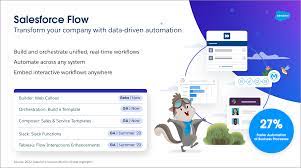
Salesforce Flow: For Efficiency with Automation
Salesforce Flow enables businesses to create very sophisticated solutions without the need for extensive coding, using a simple point-and-click interface. This capability is particularly beneficial for Salesforce Admins, offering functionalities akin to those of Salesforce developers. In this insight we will explore Salesforce Flow: Understanding Developer and Admin Contributions. Salesforce Flow Efficiency and Automation.
Salesforce Flow, originally known as Visual Flow, has evolved significantly with each Salesforce release, culminating in the intuitive Flow Builder interface available today. Its applications are expansive and continually expanding.
Key Capabilities of Salesforce Flow
Mass Updates: Easily handle batch processing to update thousands of records simultaneously based on specific criteria, significantly saving time and effort.
Automated Workflows: Construct intricate workflows with multiple steps and decision points, ensuring consistency and efficiency across business processes.
User-Friendly Interface: Designed to be intuitive, Flow Builder allows users of varying technical skill levels to create and manage workflows effortlessly.
Integration Capabilities: Seamlessly integrates with Salesforce products and third-party applications, enabling comprehensive solutions leveraging diverse data sources.
Continuous Improvement: With each Salesforce update, Flow receives new features and enhancements, continually enhancing its versatility and power.
Salesforce Flow serves as a pivotal tool for enhancing productivity and streamlining complex operations, making it indispensable for Salesforce Admins striving to optimize workflows.
Understanding Salesforce Flow in Detail
What is Salesforce Flow? Salesforce Flow Builder is a robust tool within the Salesforce ecosystem, enabling users to automate workflows and processes. These workflows encompass tasks such as sending emails, updating records, triggering other flows, executing Apex actions, and sending notifications. Flows can be initiated by various events, including user actions, record changes, and scheduled times.
Flows comprise elements such as actions, conditions, variables, and screens. The visual, drag-and-drop interface of Salesforce Flow Builder ensures accessibility for users without extensive coding knowledge while offering advanced capabilities for technical experts.
Types of Salesforce Flow
Screen Flows: Provide a step-by-step user interface to automate tasks, collect data, and guide users through processes. Ideal for systematically capturing and qualifying leads, Screen Flows are straightforward to set up and manage.
Record-Triggered Flows: Automate actions based on changes to Salesforce records, like creating, updating, or deleting records. These flows replace older tools like Workflow Rules and Process Builder, offering flexibility and ease of management.
Scheduled Flows: Run at specified times or intervals to automate routine tasks or periodic updates. Useful for scenarios such as sending reminders or performing batch operations.
Platform Event-Triggered Flows: Respond to events within the Salesforce platform in real-time, enabling instant automation based on critical business events. Requires technical proficiency in integrations and platform events.
Autolaunched Flows: Initiated by other processes or external systems without user interaction, making them essential for automating backend processes like updating records based on external triggers.
The Role of Salesforce Administrators
Salesforce Administrators play a major role in designing, implementing, and managing flows. Their responsibilities span from creating automated workflows to ensuring optimal flow performance and providing user training. Administrators leverage Flow to automate data entry, streamline approval processes, and set up notifications for critical events.
Collaboration Between Admins and Developers
Effective collaboration between Salesforce Administrators and Developers is important for creating efficient and robust flows. While Administrators focus on designing and implementing simpler flows, Developers enhance capabilities by integrating custom Apex code, performing advanced data manipulations, and optimizing flow performance. This collaboration ensures comprehensive solutions that meet both business requirements and technical standards.
Final Thoughts
Salesforce Flow closees the gap between manual operations and automated efficiency, enabling businesses to enhance accuracy, reduce operational bottlenecks, and adapt swiftly to market changes. By understanding the distinct contributions of Administrators and Developers and fostering a collaborative environment, organizations can design and implement innovative workflows that drive success and growth.
Embracing Salesforce Flow not only optimizes business processes but also positions organizations to thrive in dynamic market landscapes. Staying abreast of Salesforce automation advancements and best practices ensures sustained competitiveness and growth.

Who is Salesforce? Here is their story in their own words. From our inception, we've proudly embraced the identity of Read more

Salesforce Marketing Cloud Transactional Emails are immediate, automated, non-promotional messages crucial to business operations and customer satisfaction, such as order Read more

Salesforce has unveiled a comprehensive analytics solution tailored for wealth managers, home office professionals, and retail bankers, merging its Financial Read more

AI plays a crucial role in propensity score estimation as it can discern underlying patterns between treatments and confounding variables Read more





