

Asynchronous Archives - gettectonic.com - Page 2
Salesforce Flow Builder

Salesforce Flow Builder

Salesforce Flow Builder: Key Limitations & Workarounds (2024 Guide) While Salesforce Flow Builder is a powerful automation tool, it comes with important technical constraints that every admin and developer should understand. Here’s a concise breakdown of the most critical limitations and practical solutions: Core Limitations of Flow Builder 1. Execution Limits 2. Query & Data Operation Constraints 3. Performance Boundaries 4. Structural Constraints 5. Execution Order Challenges Additional Considerations Pro Tips for Optimization “The best flows are simple flows. When you hit these limits, it’s often a sign to reevaluate your architecture.” – Salesforce Architect’s Handbook Understanding these boundaries will help you design more efficient automations while knowing when to transition to code-based solutions. Like Related Posts Who is Salesforce? Who is Salesforce? Here is their story in their own words. From our inception, we’ve proudly embraced the identity of Read more Salesforce Marketing Cloud Transactional Emails Salesforce Marketing Cloud Transactional Emails are immediate, automated, non-promotional messages crucial to business operations and customer satisfaction, such as order Read more Salesforce Unites Einstein Analytics with Financial CRM Salesforce has unveiled a comprehensive analytics solution tailored for wealth managers, home office professionals, and retail bankers, merging its Financial Read more AI-Driven Propensity Scores AI plays a crucial role in propensity score estimation as it can discern underlying patterns between treatments and confounding variables Read more

Read More
salesforce bulk api

What is Salesforce Bulk API

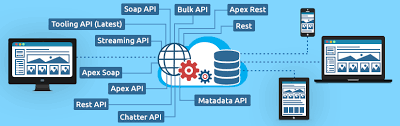
Salesforce Bulk API is a REST-based API designed for processing large volumes of data efficiently, allowing for asynchronous operations like inserting, updating, upserting, and deleting records in bulk. It’s optimized for handling large datasets and is often used with tools like Data Loader to import and export data in Salesforce.  More Details: Key Features and Benefits: How it Works: Bulk API vs. Batch API: While both handle large data volumes, Bulk API is generally used for asynchronous operations, while Batch API is more suitable for synchronous operations where you need to handle errors during the import. Bulk API processes records in batches asynchronously, allowing you to kick off the import and deal with errors later, while Batch API might be more suitable if you need to handle errors immediately during the import process.  Like Related Posts Who is Salesforce? Who is Salesforce? Here is their story in their own words. From our inception, we’ve proudly embraced the identity of Read more Salesforce Marketing Cloud Transactional Emails Salesforce Marketing Cloud Transactional Emails are immediate, automated, non-promotional messages crucial to business operations and customer satisfaction, such as order Read more Salesforce Unites Einstein Analytics with Financial CRM Salesforce has unveiled a comprehensive analytics solution tailored for wealth managers, home office professionals, and retail bankers, merging its Financial Read more AI-Driven Propensity Scores AI plays a crucial role in propensity score estimation as it can discern underlying patterns between treatments and confounding variables Read more

Read More
Salesforce JSON

Salesforce JSON

Today we are diving into JSON (JavaScript Object Notation) and exploring why it’s a crucial concept for you to understand. JSON is a data representation format widely used across the internet for APIs, configuration files, and various applications JSON Class Contains methods for serializing Apex objects into JSON format and deserializing JSON content that was serialized using the serialize method in this class. Usage Use the methods in the System.JSON class to perform round-trip JSON serialization and deserialization of Apex objects. Roundtrip Serialization and Deserialization Use the JSON class methods to perform roundtrip serialization and deserialization of your JSON content. These methods enable you to serialize objects into JSON-formatted strings and to deserialize JSON strings back into objects. What does JSON serialize do in Salesforce? JSON. serialize() accepts both Apex collections and objects, in any combination that’s convertible to legal JSON. String jsonString = JSON. What is the difference between JSON parse and JSON deserialize? The parser converts the JSON data into a data structure that can be easily processed by the programming language. On the other hand, JSON Deserialization is the process of converting JSON data into an object in a programming language. What is the difference between JSON and XML in Salesforce? JSON supports numbers, objects, strings, and Boolean arrays. XML supports all JSON data types and additional types like Boolean, dates, images, and namespaces. JSON has smaller file sizes and faster data transmission. XML tag structure is more complex to write and read and results in bulky files. Which is more secure XML or JSON? Generally speaking, JSON is more suitable for simple and small data, more readable and maintainable for web developers, faster and more efficient for web applications or APIs, supports native data types but lacks a standard schema language, and is more compatible with web technologies but less secure than XML. What is Salesforce JSON heap size limit? Salesforce enforces an Apex Heap Size Limit of 6MB for synchronous transactions and 12MB for asynchronous transactions. How to store JSON data in Salesforce object? If you need to store the actual JSON payload in Salesforce for audit purposes, Tectonic would recommend just using a Long Text Area field to store JSON content. You wouldn’t have any performance impacts when interacting with records, and if required you could add this to the layout of the child object storing this data. Like Related Posts Who is Salesforce? Who is Salesforce? Here is their story in their own words. From our inception, we’ve proudly embraced the identity of Read more Salesforce Marketing Cloud Transactional Emails Salesforce Marketing Cloud Transactional Emails are immediate, automated, non-promotional messages crucial to business operations and customer satisfaction, such as order Read more Salesforce Unites Einstein Analytics with Financial CRM Salesforce has unveiled a comprehensive analytics solution tailored for wealth managers, home office professionals, and retail bankers, merging its Financial Read more AI-Driven Propensity Scores AI plays a crucial role in propensity score estimation as it can discern underlying patterns between treatments and confounding variables Read more
Read More
Batch Job Behavior

Batch Job Behavior

By automating specific actions  that you’d normally have to manually initiate, batch jobs make processing large amount of data less tedious and time consuming. If you’ve ever noticed data from batch jobs processes ‘out of order,’ we’ll go over why that’s the case.  Inconsistent Batch Job Behavior Resolution Inconsistent behavior of batches is because batch Apex is an asynchronous process with no SLA, and many customers are sharing the resources, causing it to be slow.  Being an asynchronous process, the system will process the batches only when the system resources are available. There’s no way to prioritize a process, and we don’t provide a SLA for the execution.  Asynchronous Apex In a nutshell, asynchronous Apex is used to run processes in a separate thread, at a later time. An asynchronous process is a process or function that executes a task “in the background” without the user having to wait for the task to finish. You’ll typically use Asynchronous Apex for callouts to external systems, operations that require higher limits, and code that needs to run at a certain time. The key benefits of asynchronous processing include: User efficiency Let’s say you have a process that makes many calculations on a custom object whenever an Opportunity is created. The time needed to execute these calculations could range from a minor annoyance to a productivity blocker for the user. Since these calculations don’t affect what the user is currently doing, making them wait for a long running process is not an efficient use of their time. With asynchronous processing the user can get on with their work, the processing can be done in the background and the user can see the results at their convenience. Scalability By allowing some features of the platform to execute when resources become available at some point in the future, resources can be managed and scaled quickly. This allows the platform to handle more jobs using parallel processing. Higher Limits Asynchronous processes are started in a new thread, with higher governor and execution limits. And to be honest, doesn’t everyone want higher governor and execution limits? Asynchronous Apex comes in a number of different flavors. We’ll get into more detail for each one shortly, but here’s a high level overview. Type Overview Common Scenarios Future Methods Run in their own thread, and do not start until resources are available. Web service callout. Batch Apex Run large jobs that would exceed normal processing limits. Data cleansing or archiving of records. Queueable Apex Similar to future methods, but provide additional job chaining and allow more complex data types to be used. Performing sequential processing operations with external Web services. Scheduled Apex Schedule Apex to run at a specified time. Daily or weekly tasks. It’s also worth noting that these different types of asynchronous operations are not mutually exclusive. For instance, a common pattern is to kick off a Batch Apex job from a Scheduled Apex job. Increased Governor and Execution Limits One of the main benefits of running asynchronous Apex is higher governor and execution limits. For example, the number of SOQL queries is doubled from 100 to 200 queries when using asynchronous calls. The total heap size and maximum CPU time are similarly larger for asynchronous calls. Not only do you get higher limits with async, but also those governor limits are independent of the limits in the synchronous request that queued the async request initially. That’s a mouthful, but essentially, you have two separate Apex invocations, and more than double the processing capability. This comes in handy for instances when you want to do as much processing as you can in the current transaction but when you start to get close to governor limits, continue asynchronously. How Asynchronous Processing Works Asynchronous processing, in a multitenant environment, presents some challenges: Ensure fairness of processing Make sure every customer gets a fair share of processing resources. Ensure fault tolerance Make sure no asynchronous requests are lost due to equipment or software failures. The platform uses a queue-based asynchronous processing framework. This framework is used to manage asynchronous requests for multiple organizations within each instance. The request lifecycle is made up of three parts: Enqueue The request gets put into the queue. This could be an Apex batch request, future Apex request or one of many others. The platform will enqueue requests along with the appropriate data to process that request. Persistence The enqueued request is persisted. Requests are stored in persistent storage for failure recovery and to provide transactional capabilities. Dequeue The enqueued request is removed from the queue and processed. If the processing fails, transaction control ensures that requests are not lost. Each request is processed by a handler. The handler is the code that performs functions for a specific request type. Handlers are executed by a finite number of worker threads on each of the application servers that make up an instance. The threads request work from the queuing framework and when received, start a specific handler to do the work. Resource Conservation Asynchronous processing has lower priority than real-time interaction via the browser and API. To ensure there are sufficient resources to handle an increase in computing resources, the queuing framework monitors system resources such as server memory and CPU usage and reduce asynchronous processing when thresholds are exceeded. This is a fancy way of saying that the multitenant system protects itself. If an org tries to “gobble up” more than its share of resources, asynchronous processing is suspended until a normal threshold is reached. The long and short of it is that there’s no guarantee on processing time, but it’ll all work out in the end. Like Related Posts Who is Salesforce? Who is Salesforce? Here is their story in their own words. From our inception, we’ve proudly embraced the identity of Read more Salesforce Unites Einstein Analytics with Financial CRM Salesforce has unveiled a comprehensive analytics solution tailored for wealth managers, home office professionals, and retail bankers, merging its Financial Read more AI-Driven Propensity

Read More
Crucial Role of Data and Integration in AI at Dreamforce

Salesforce Data Integration

Salesforce Data Integration: A Comprehensive Guide Introduction Salesforce offers numerous tools to access, synchronize, and share data with external systems. However, selecting the right tool for your project is critical. This guide explores Salesforce’s data integration landscape, providing recommendations based on specific use cases—along with guidance on which tools to avoid. Scope of This Guide This decision guide focuses on data-level integrations involving Salesforce, covering: While these are just a subset of integration challenges faced by Salesforce Architects, future guides will address: Note: Many tools discussed here can also solve enterprise-wide integration challenges, but those use cases are beyond this guide’s scope. Key Takeaways Common Considerations for Choosing Data Integration Tools Before selecting a tool, evaluate these key factors: Area to Consider Key Questions Existing Tools & Landscape Is an ESB/ETL solution already in place? Are there compliance requirements? Are systems cloud or on-premise? Data Flow Does data need to move synchronously, asynchronously, or in batches? Should data be replicated? Which system is the source of truth? Implementation What’s the effort for non-Salesforce systems? Which teams will deliver integrations? What tools do they prefer? Maintainability Who will maintain the integration? What skills do they have (or need)? What’s the total cost of ownership? Data Volume Is it a large data volume (LDV) scenario? How frequent are bulk changes? What’s the impact of singleton updates? Limits Are complex transformations needed? Will data be combined from multiple sources? How often will integrations run per user? Overview of Data Integration Tools Tool Salesforce → External External → Salesforce Execution License Required? Apex Actions ✅ Yes ✅ Yes Server-side ❌ No Change Data Capture ✅ Yes ❌ No Server-side ❌ No* Custom Apex (REST/SOAP) ✅ Yes ✅ Yes Server-side ❌ No External Services ✅ Yes ❌ No Server-side ❌ No Generic Events (Legacy) ✅ Yes ❌ No Server-side ❌ No** Heroku Connect ✅ Yes ✅ Yes Server-side ✅ Yes MuleSoft Anypoint ✅ Yes ✅ Yes Server-side ✅ Yes MuleSoft Composer ✅ Yes ✅ Yes Server-side ✅ Yes Native Salesforce APIs ❌ No ✅ Yes Server-side ❌ No OmniScript ✅ Yes ✅ Yes Client-side**** ✅ Yes OmniStudio Integration ✅ Yes ✅ Yes Server-side ✅ Yes Outbound Messaging ⚠️ Not Ideal ❌ No Server-side ❌ No Platform Events ✅ Yes ✅ Yes Server-side ❌ No*** PushTopic (Legacy) ⚠️ Not Ideal ❌ No Server-side ❌ No** Salesforce Connect ✅ Yes ✅ Yes Server-side ✅ Yes ✅ = Recommended | ⚠️ = Possible but consider alternatives | ❌ = Not supported Notes: Other Tools (Not Primary Integration Solutions) While these tools support aspects of data movement, they should not be the foundation of an integration strategy: Final Recommendations By aligning the right tool with your use case, you can optimize performance, reduce technical debt, and ensure scalable integrations. Content updated April 2025. Like Related Posts Who is Salesforce? Who is Salesforce? Here is their story in their own words. From our inception, we’ve proudly embraced the identity of Read more Salesforce Marketing Cloud Transactional Emails Salesforce Marketing Cloud Transactional Emails are immediate, automated, non-promotional messages crucial to business operations and customer satisfaction, such as order Read more Salesforce Unites Einstein Analytics with Financial CRM Salesforce has unveiled a comprehensive analytics solution tailored for wealth managers, home office professionals, and retail bankers, merging its Financial Read more AI-Driven Propensity Scores AI plays a crucial role in propensity score estimation as it can discern underlying patterns between treatments and confounding variables Read more

Read More
Understanding Salesforce Integration

Understanding Salesforce Integration

What is Salesforce Integration? Salesforce Integration is the process of connecting two or more systems to streamline workflows and enhance data consistency across platforms. Consider situations where vital information is stored in one system but also needed in another. By integrating these systems, you ensure seamless data flow, improve efficiency, and enable smooth business processes. Why is Integration Important? In today’s digital landscape, businesses must continuously enhance efficiency and customer experience to stay competitive. Operating in isolation is no longer an option. Effective system integration ensures faster, scalable, and more reliable operations. What is an API? An API (Application Programming Interface) enables different applications to communicate with each other. For instance, when you use a mobile app, it connects to the internet, retrieves data from a server, and displays it in a readable format. The right API ensures this process runs smoothly and efficiently. Different types of APIs will be discussed later in the Salesforce Integration Capabilities section. Types of Salesforce Integration Architectures Each integration architecture has advantages and drawbacks. Here are the three main types: 1. Point-to-Point Integration This is a one-to-one integration model where each system has a direct connection to another. For example, a sales application sends order details separately to a billing system, a shipping application, and a tracking system. However, this approach is costly to maintain and lacks scalability, as adding new integrations requires extensive modifications. 2. Hub-and-Spoke Integration With this model, a central hub facilitates communication between systems. Instead of creating multiple direct integrations, each system only connects to the hub. This setup simplifies management and scalability compared to point-to-point integration. 3. Enterprise Service Bus (ESB) Integration An evolution of the hub-and-spoke model, ESB uses an integration engine to connect various applications. ESB provides: Each system connects through an adapter, making it easy to scale integrations as business needs evolve. Salesforce Integration Capabilities Understanding APIs and integration capabilities is crucial. Here are key Salesforce integration tools: 1. REST API Best for web or mobile applications, REST API operates using: It uses JSON or XML and functions synchronously, meaning it waits for a response before proceeding. 2. SOAP API SOAP API is suited for back-end system integrations requiring structured payloads. It uses XML and supports asynchronous communication, meaning it can process requests without waiting for immediate responses. 3. Bulk API Designed for handling large data volumes, Bulk API efficiently processes up to 100 million records within a 24-hour period. It is asynchronous, making it ideal for initial data migrations and batch processing. 4. Streaming API Built on the publish/subscribe model, Streaming API supports near real-time data updates. It includes: This API is essential for event-driven architectures. 5. Outbound Messages This declarative option sends messages to external systems when triggered by workflow rules or approval processes. It is asynchronous but requires acknowledgment from the receiving system. 6. Web Service Callouts Salesforce can initiate outbound requests to external systems for data validation or process execution. These callouts require Apex coding and can be synchronous or asynchronous. 7. Salesforce Connect Salesforce Connect enables real-time data access from external systems without storing the data in Salesforce. This “data virtualization” reduces storage costs and ensures up-to-date information is available when needed. 8. Heroku Connect Heroku Connect synchronizes data between Salesforce and Postgres databases, making it ideal for high-volume applications where not all data needs to reside in Salesforce. Salesforce Integration Patterns Integration patterns define how systems interact. Consider: 1. Remote Call-In External systems retrieve, update, or delete Salesforce data (e.g., an order management system updating Salesforce records). 2. Request and Reply Salesforce calls an external system and waits for a response before proceeding (e.g., address validation services). 3. Fire and Forget Salesforce sends a request but does not wait for a response (e.g., outbound messages and platform events). 4. Batch Data Synchronization Data is periodically synchronized between Salesforce and external systems in bulk (e.g., nightly updates to a data warehouse). 5. UI Update Based on Data Changes Salesforce UI updates dynamically when backend data changes (e.g., real-time case status updates for support agents). 6. Data Virtualization Salesforce displays external data in real time without storing it, reducing storage costs and improving efficiency (e.g., Salesforce Connect). Conclusion Salesforce integration streamlines business processes, enhances efficiency, and improves data consistency. Understanding integration architectures, capabilities, and patterns helps businesses select the right approach for their needs. By leveraging Salesforce’s integration tools, organizations can achieve seamless connectivity across their technology ecosystem. Like Related Posts Who is Salesforce? Who is Salesforce? Here is their story in their own words. From our inception, we’ve proudly embraced the identity of Read more Salesforce Marketing Cloud Transactional Emails Salesforce Marketing Cloud Transactional Emails are immediate, automated, non-promotional messages crucial to business operations and customer satisfaction, such as order Read more Salesforce Unites Einstein Analytics with Financial CRM Salesforce has unveiled a comprehensive analytics solution tailored for wealth managers, home office professionals, and retail bankers, merging its Financial Read more AI-Driven Propensity Scores AI plays a crucial role in propensity score estimation as it can discern underlying patterns between treatments and confounding variables Read more

Read More
Salesforce Integration

Salesforce Integrations Explained

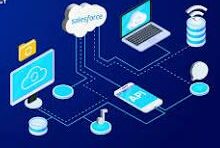
Introducing Salesforce Integration – Fundamental Concepts Before diving deep into more the complex aspects, let’s explore the basics of Salesforce Integrations, encompassing three key areas: integration types, integration capabilities, and integration patterns. When we talk about integration, it means to create a connection between a specific Salesforce instance and another database, third party product, or system. The connection can be inbound, outbound, or bi-directional, and you may be connecting to another database, another Salesforce instance, or another cloud-based data source. What is Integration? Salesforce Integration involves bringing together two or more systems to streamline distinct processes, enabling the efficient management of information across various business processes that span multiple systems.  Salesforce Integration is a process of connecting two or more applications. This provides both a sharing of data between systems and end user improved efficiency. Enterprise systems use many applications, many or most of which are not designed to work with one another out of the box. How many integrations does Salesforce have? Salesforce has over 3,000 integrations available on its AppExchange marketplace alone. Apart from those, you can use: low-code and no-code integrations like Coupler.io or Zapier for data automation. Why is Integration Important with Salesforce? In our digital era, enhancing efficiency and customer experience is crucial for competitiveness and user adoption. Integration ensures that systems work seamlessly together by fostering a scalable and faster collaborative environment. How do you make Salesforce even better? Integrate it with the apps you already use. From productivity to marketing to collaboration and beyond, now you can connect your Salesforce to the other tools you need to run your business. MuleSoft is Salesforce’s integration and automation technology and offers connectivity solutions for all of your apps. What is an API? API, or Application Programming Interface, facilitates communication between two applications. It enables the smooth exchange of data, ensuring processes occur without interruptions. Different API types will be covered in the ‘Salesforce Integration Capabilities’ section. Types of Salesforce Integration Architectures Three integration architectures come with both their benefits and drawbacks: Salesforce Integration Capabilities Consider the following aspects for efficient Salesforce integration: Understanding integration involves recognizing its fundamental concepts, including types, architectures, and capabilities.  Like Related Posts Who is Salesforce? Who is Salesforce? Here is their story in their own words. From our inception, we’ve proudly embraced the identity of Read more Salesforce Marketing Cloud Transactional Emails Salesforce Marketing Cloud Transactional Emails are immediate, automated, non-promotional messages crucial to business operations and customer satisfaction, such as order Read more Salesforce Unites Einstein Analytics with Financial CRM Salesforce has unveiled a comprehensive analytics solution tailored for wealth managers, home office professionals, and retail bankers, merging its Financial Read more AI-Driven Propensity Scores AI plays a crucial role in propensity score estimation as it can discern underlying patterns between treatments and confounding variables Read more
Read More

Event Consumers: The Responsive Core of Event-Driven Architecture Fundamentals of Event Consumers Event consumers are the reactive components in event-driven architecture (EDA) that subscribe to event channels and execute actions when state changes occur. These can be: They monitor for business-critical occurrences like: How Event-Driven Architecture Works Core EDA Characteristics ![EDA Architecture Diagram showing event flow from producers through routers to consumers] The Event Consumer Ecosystem Component Role Examples Event Producers Generate state change notifications POS systems, IoT sensors, API gateways Event Routers Channel events to appropriate consumers Kafka, AWS EventBridge, Azure Service Bus Event Consumers Execute business logic in response CRM systems, fraud detection services Event Processors Transform and analyze event streams AWS Lambda, Azure Functions Key Benefits of Event Consumers Event Delivery Models Publish-Subscribe (Pub/Sub) Event Streaming Industry-Specific Implementations E-Commerce Financial Services Healthcare Manufacturing Implementation Best Practices Future Evolution Emerging patterns in event consumption: “Event consumers are becoming the central nervous system of digital business,” says Gartner VP Analyst Mark Beyer. “Organizations that master event-driven patterns achieve 3-5x faster response to market changes compared to traditional architectures.” Like Related Posts Who is Salesforce? Who is Salesforce? Here is their story in their own words. From our inception, we’ve proudly embraced the identity of Read more Salesforce Unites Einstein Analytics with Financial CRM Salesforce has unveiled a comprehensive analytics solution tailored for wealth managers, home office professionals, and retail bankers, merging its Financial Read more AI-Driven Propensity Scores AI plays a crucial role in propensity score estimation as it can discern underlying patterns between treatments and confounding variables Read more Tectonic’s Successful Salesforce Track Record Salesforce Technology Services Integrator – Tectonic has successfully delivered Salesforce in a variety of industries including Public Sector, Hospitality, Manufacturing, Read more

Read More
Sensitive Information De-identification

Sensitive Information De-identification

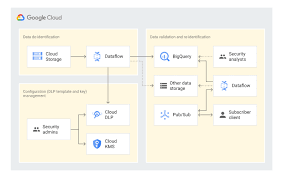
Using Google Cloud Data Loss Prevention with Salesforce for Sensitive Data Handling This insight discusses the transition from detecting and classifying sensitive data to preventing data loss using Google Cloud Data Loss Prevention (DLP). Sensitive Information De-identification for Salesforce is used as the data source to demonstrate how personal, health, credential, and financial information can be de-identified in unstructured data in near real-time. Overview of Google Cloud DLP Google Cloud DLP is a fully managed service designed to help discover, classify, and protect sensitive data. It easily transitions from detection to prevention by offering services that mask sensitive information and measure re-identification risk. Objective The goal was to demonstrate the ability to redact sensitive information in unstructured data at scale. Specifically, it aimed to determine whether sensitive data, such as credit card numbers, tax file numbers, and health care numbers, entered into Salesforce communications (Emails, Files, and Chatter) could be detected and redacted. Constraints Tested De-identifying Data with Google Cloud DLP API Instead of detailing the setup, this section focuses on the key areas of design. Google Design Decisions Supporting Disparate Data Sources with Multiple Integration Patterns and Redundant Design Salesforce Data Source De-identification targets include email addresses, Australian Medicare card numbers, GCP API keys, passwords, and credit card numbers. Credit card numbers are masked with asterisks, while other sensitive data is replaced with information types for readability (e.g., jane@secretemail.com becomes [redacted-email-address]). Sample Requests to Google De-identification Service JSON Structure to De-identify Text Using Google Cloud DLP API jsonCopy code{ // JSON structure } JSON Structure to De-identify Images Using Google Cloud DLP API jsonCopy code{ // JSON structure } Salesforce Design Decisions Redundancy and Batch Processing A scheduled batch job allows for recovery by polling unprocessed records. To handle large data volumes (e.g., 360,000 records over 5 days), the Salesforce BULK API is used to process queries and updates in large batch sizes, reducing the number of API calls. Sensitive Information De-identification Google Cloud Data Loss Prevention allows detecting and protecting assets with sensitive information, supporting a wide range of use cases across an enterprise. Proven Capabilities: Considerations and Lessons Learned Enhanced Email: Redacting tasks and EmailMessage records, handling read-only EmailMessage records by deleting and recreating them. Files: The architecture assumes files with sensitive data can be deleted and replaced with redacted versions. Audit Fields: Ensure setting CreatedDate and LastModifiedDate fields using original record dates. Field History Tracking: Avoid tracking fields intended for de-identification, tracking shadow fields instead. Image De-identification: Limited to JPEG, BMP, and PNG formats, with DOCX and PDF not yet supported. Like Related Posts Who is Salesforce? Who is Salesforce? Here is their story in their own words. From our inception, we’ve proudly embraced the identity of Read more Salesforce Marketing Cloud Transactional Emails Salesforce Marketing Cloud Transactional Emails are immediate, automated, non-promotional messages crucial to business operations and customer satisfaction, such as order Read more Salesforce Unites Einstein Analytics with Financial CRM Salesforce has unveiled a comprehensive analytics solution tailored for wealth managers, home office professionals, and retail bankers, merging its Financial Read more AI-Driven Propensity Scores AI plays a crucial role in propensity score estimation as it can discern underlying patterns between treatments and confounding variables Read more
Read More
Salesforce Document Generation

Generating Documents in Salesforce

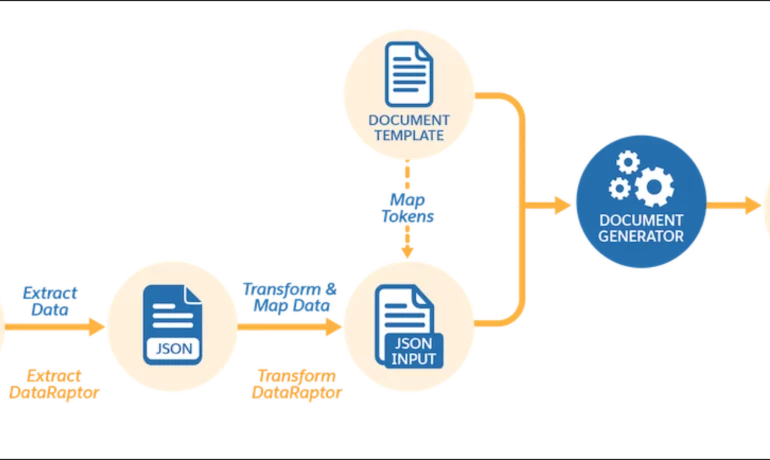
Salesforce document generation poses a challenge for businesses, given the intricacies of integration involved. Fortunately, a variety of tools are available for generating documents in Salesforce, and Tectonic is well-equipped to assist in their successful implementation. Salesforce Industries Document Generation empowers businesses to craft and manage accurate documents linked to standard Salesforce objects, encompassing contracts, opportunities, orders, quotes, and custom objects. For a more dynamic approach, Salesforce OmniStudio Document Generation facilitates the creation of documents using Microsoft Word and Microsoft PowerPoint templates. These templates can incorporate values from any JSON-based data within the text, including data sourced from various Salesforce objects. This versatile tool enables the generation of contracts, proposals, quotes, reports, non-disclosure agreements, service agreements, and more. Salesforce Industries Document Generation seamlessly integrates with Vlocity Insurance, Vlocity Health, communications, media, energy, utilities, government, and beyond. Vlocity Analytics, another valuable component, offers pre-built measurement tools that seamlessly integrate with Salesforce Reports, Dashboards, and Einstein. The Salesforce AppExchange boasts an extensive array of over 200 document generation tools. Your Salesforce partner can assist in selecting, installing, and implementing the most suitable options based on your business requirements. With Document Generation, you can generate contracts, proposals, quotes, reports, non-disclosure agreements, job offers, service agreements, and so on. You can generate documents using the specified sample client-side or server-side OmniScripts. You can also create your own OmniScripts by cloning and customizing the sample OmniScript to generate documents. Client-Side document generation is a synchronous process that results in a downloadable preview of the generated documents. You can generate documents from Microsoft Word (.docx), Microsoft PowerPoint (.pptx), and Web templates. These templates can include values from any JSON-based data in the text, including data from any Salesforce object. You can optionally convert the resulting documents to .pdf format. Server-Side document generation is available in both the OmniStudio Foundation and Salesforce Industries packages. Server-Side document generation is an asynchronous process that’s best for large and rendering-heavy documents and for document generation in batches. The Server-Side document generation service is secure and scalable and is hosted on Salesforce Hyperforce. The generated document is stored in your Salesforce org, and is attached to the object for which it’s generated. You can use Apex Classes, sample Integration Procedures, or a sample OmniScript to generate documents. Client-Side document generation supports Customer Community Plus, Customer Community, and Partner Community users to generate documents using client-side OmniScripts. Server-Side document generation supports Customer Community Plus, Customer Community, and Partner Community users to generate documents using the singleDocxServersideLwc server-side OmniScript. With the right licenses, Document Generation is available in the Salesforce Industries package. Metering measures resource utilization levels and throttling controls resource access and use based on defined rules. Metering measures the number of server-side documents that are generated by an org hourly and daily. The default hourly and daily limits for processing server-side document generation requests are 1,000 per org and 24,000 per org respectively. Throttling maintains consistency and resilience of the server-side document generation service by managing incoming server-side document generation requests from multiple orgs. Throttling can also prevent service degradation caused by high volume of requests at peak hours by blocking requests that exceed the default limits. The request details are saved in the Document Generation Processes entity. You can retrieve the blocked requests and later retry the server-side document generation. No matter what your specific document generation needs, Tectonic simplifies the process of getting your system up and running seamlessly, whether it’s through Salesforce Quickstarts or comprehensive implementation services. Content updated in 2February 2024, Shannan Hearne. Like1 Related Posts Who is Salesforce? Who is Salesforce? Here is their story in their own words. From our inception, we’ve proudly embraced the identity of Read more Salesforce Marketing Cloud Transactional Emails Salesforce Marketing Cloud Transactional Emails are immediate, automated, non-promotional messages crucial to business operations and customer satisfaction, such as order Read more Salesforce Unites Einstein Analytics with Financial CRM Salesforce has unveiled a comprehensive analytics solution tailored for wealth managers, home office professionals, and retail bankers, merging its Financial Read more AI-Driven Propensity Scores AI plays a crucial role in propensity score estimation as it can discern underlying patterns between treatments and confounding variables Read more
Read More
gettectonic.com