Automated Processes Archives - gettectonic.com - Page 2

Linus Torvalds Insights

Linus Torvalds Shares Insights on the Future of Programming with AI Linus Torvalds, the mastermind behind Linux and Git—two cornerstones of modern software development—recently shared his perspective on how artificial intelligence (AI) is reshaping the world of programming. His candid insights offer a balanced view of AI’s capabilities and limitations, coming from one of the industry’s most influential voices. If you prefer a quick breakdown over watching a full interview, here are the key takeaways from Torvalds’ conversation. AI in Programming: Evolution, Not Revolution Torvalds describes AI, particularly large language models (LLMs), as “autocorrect on steroids.” These tools excel at predicting the next word or line of code based on established patterns but aren’t “intelligent” in the human sense. Rather than a seismic shift, AI represents the next step in a long history of automation in coding. From the days of machine language to today’s high-level languages like Python and Rust, tools have continuously evolved to make developers’ lives easier. AI is just another link in this chain—helping write, refine, and debug code while boosting productivity. AI as a Developer’s Supercharged Assistant Far from being a replacement for human programmers, Torvalds sees AI as a powerful assistant. Tools like GitHub Copilot are already enhancing the coding process by suggesting fixes, spotting bugs, and speeding up routine tasks. The vision? A future where programmers can abstract tasks even further, possibly instructing AI in plain English. Imagine simply saying, “Build me a tool to manage my expenses,” and watching it happen. However, for now, AI is an incremental improvement, not a groundbreaking leap. The Shift Toward AI-Generated Code One of Torvalds’ more intriguing predictions is that AI may eventually write code in ways incomprehensible to human programmers. Since AI doesn’t require human-readable syntax, it could optimize code in ways that only it understands. In this scenario, developers might transition from writing code to managing AI systems that generate and refine it—shifting from hands-on creators to overseers of automated processes. AI in Code Review: Smarter Intern or Future Partner? When it comes to code review, AI’s potential is clear. Torvalds notes that AI could efficiently catch simple errors—like typos or syntax mistakes—freeing up human reviewers to focus on more complex logic and functionality. While AI might streamline tedious tasks, it’s far from perfect. Issues like “hallucinations,” where AI confidently produces incorrect results, highlight the need for human oversight. AI can assist, but it still requires developers to verify its output. A Balanced Take on AI and Jobs Torvalds dismisses fears of AI taking over programming jobs, pointing out that technological advancements historically create new opportunities rather than eliminate roles. AI, in his view, is less about replacing humans and more about augmenting their abilities. It’s a tool to make developers more efficient—not a harbinger of obsolescence. Final Thoughts: Embrace AI, But Stay Grounded Linus Torvalds envisions AI as a valuable, evolving tool for programmers, not a threat to their livelihood. While it’s set to change how we code, the shift will be gradual rather than revolutionary. Whether you’re a seasoned developer or a newcomer, now is the time to explore AI-powered tools, embrace their potential, and adapt to this new era of programming. Instead of fearing change, we can use AI to push the boundaries of what’s possible. Like Related Posts Who is Salesforce? Who is Salesforce? Here is their story in their own words. From our inception, we’ve proudly embraced the identity of Read more Salesforce Unites Einstein Analytics with Financial CRM Salesforce has unveiled a comprehensive analytics solution tailored for wealth managers, home office professionals, and retail bankers, merging its Financial Read more AI-Driven Propensity Scores AI plays a crucial role in propensity score estimation as it can discern underlying patterns between treatments and confounding variables Read more Tectonic’s Successful Salesforce Track Record Salesforce Technology Services Integrator – Tectonic has successfully delivered Salesforce in a variety of industries including Public Sector, Hospitality, Manufacturing, Read more
Read More
Constituent Service Toolkit in Public Sector Solutions

Constituent Service Toolkit in Public Sector Solutions

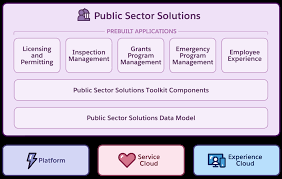
Explore the array of tools and components tailored for caseworkers, case managers, and other professionals to comprehend constituents’ needs and deliver exceptional customer service. Constituent Service Toolkit in Public Sector Solutions Public Sector Solutions offers a comprehensive suite of components, tools, and features designed to enhance the efficiency of caseworkers and other staff in addressing constituents’ concerns and issues. These tools provide valuable context for interactions with constituents and streamline actionable tasks, offering flexibility for customization to address diverse scenarios. Constituent Service Toolkit in Public Sector Solutions Whether handling inquiries about business license applications, social service benefits, or managing complaints and child welfare concerns, these tools empower users to efficiently navigate and resolve constituent service issues. Public Sector Solutions goes a step further by presenting a curated selection of these tools on a dedicated Lightning record page, facilitating a seamless start for users in utilizing these resources. Customize the page according to your agency’s specific needs, with limitless possibilities. Constituent Service Toolkit: Elevate customer service for constituents by providing tools that enhance the efficiency and effectiveness of caseworkers, case managers, and other users. Complete Common Service Tasks in Context with Action Launcher: Empower intake agents, caseworkers, and other users to access common service tasks through the Action Launcher Lightning web component. This tool allows users to perform tasks such as identity verification, referral intake, email communication, or call logging with a simple menu selection. Tailor the Action Launcher to meet specific needs and integrate it into frequently accessed record detail pages for quick and context-aware responses to constituent concerns. Protect Constituent Privacy and Reduce Fraud with Identity Verification and Audit Trail: Prioritize constituent privacy by implementing a flow to verify their identity before sharing sensitive information. Agents and service representatives can initiate this flow during phone calls, through messaging channels, or in person. Utilize the Audit Trail to monitor engagement interactions, analyze patterns, and detect potential fraud associated with identity verification. Receive Alerts on Records That Need Action: Stay informed about account and application records requiring attention with the Record Alerts component. Caseworkers, application reviewers, and other users receive notifications about person accounts, business accounts, or individual application records that demand action. The component organizes alerts by categories like type, priority, and severity, allowing users to dismiss or snooze alerts as needed. Deliver Service to Constituents from a Dedicated Account Lightning Record Page: Enhance caseworkers’ efficiency by providing relevant information and service tools through a dedicated Lightning record page for accounts. Key details about constituents are showcased through the Account card and Timeline component. The Action Launcher and Alerts components enable users to initiate common service actions and address pending record alerts. The Interaction Summary tab allows users to document notes from conversations and engagements with constituents. Create Start-to-Finish Automation to Address Service Requests from Constituents with Service Process Studio: Leverage Service Process Studio to design automated processes that efficiently respond to service requests from constituents, from intake to resolution. Utilize data attributes, OmniScript forms, Apex classes, and record-triggered flows to create automation for processing service requests, including tasks like updating a constituent’s address. Integration definitions enable seamless connectivity between service processes and external systems. Like1 Related Posts Who is Salesforce? Who is Salesforce? Here is their story in their own words. From our inception, we’ve proudly embraced the identity of Read more Salesforce Marketing Cloud Transactional Emails Salesforce Marketing Cloud Transactional Emails are immediate, automated, non-promotional messages crucial to business operations and customer satisfaction, such as order Read more Salesforce Unites Einstein Analytics with Financial CRM Salesforce has unveiled a comprehensive analytics solution tailored for wealth managers, home office professionals, and retail bankers, merging its Financial Read more AI-Driven Propensity Scores AI plays a crucial role in propensity score estimation as it can discern underlying patterns between treatments and confounding variables Read more

Read More
Salesforce Automation Guide

Salesforce Automation Guide

Salesforce Automation Guide. I cannot lie. There was a time when I thought the greatest thing about Salesforce was that it prevented leads from falling through the cracks. I was a marketing opps person. There was a time I thought readily available information at your fingertips and integration with an email platform was the greatest thing. I was in sales management. Today, as a Solutions Architect, I think Salesforce Automation Guide is the best. Automation provides the tools necessary to automate repetitive processes and daily tasks for your business, such as creating follow-up tasks, sending reminder emails, or updating records. Automations help users save critical time and reduce errors by creating automated processes to complete repetitive tasks. Below, you’ll find resources to help you decide which automations to use depending on your needs. An Intro to Salesforce Automation Before determining which automation best suits your business’s needs, you must first understand what automation means. These resources will help paint a clear picture of what the automation of processes, approvals, and tasks can look like for your organization. They aren’t just time savers. They can be game changers. Why Should You Love Automation?Check out this article highlighting the positive global impact of automation across different industries and countries. Review the customer story on how automation helped digitize an approval process during a time of especially high-volume requests. After reading this, you will understand why automation is so beneficial! Intro to AutomationExplore this documentation to get a high-level overview of the different automation methods. Automation Tools Salesforce provides multiple automation tools depending on the level of complexity needed to achieve your goals. These resources will help you understand which automation tool will best help you reach your business objectives. Automation Tool: FeaturesScroll down within this article to check out the matrix for a breakdown of all the features and actions supported within each automation tool: Approvals, Flow Builder, Einstein Next Best Action, and Apex. Automation Tool: Which One to UseView this video from one of the leading cloud experts that walks you through each automation tool and when and why to use each one. Architect Decision GuideThe Architect Decision Guide will help you evaluate the pros and cons of the different automation tools. Get recommendations from Salesforce product teams on which tools best address different use cases. Automation Implementation A hands-on approach is the best way to learn how to implement automation tools. Dig right in by exploring guided Trailhead modules that will help you understand the steps to enable these tools. Flow BasicsGet to know Flow Builder, the primary tool for creating flows. Learn when to use flows to automate business processes. Automate ApprovalsLearn how you can automate simple approval processes using Flow Builder. Automation Deep Dive As you begin to think about your automation journey, it is useful to study use cases to help guide your automation strategy and energy. Check out these resources to learn how to take your automations even further than you imagined to streamline your business processes. Building a Simple FlowExplore this video to learn how to build a simple visual flow using Flow Builder for a donation request example via an input screen, fields, and choices to collect required customer information. Five Pro Tips for Salesforce FlowFollow these quick tips to get up and running with Salesforce Flow. Troubleshooting Resources Before rolling out your automations to users, make sure you validate and test them just like any other customization. Should you encounter a bug while validating, don’t worry! These resources will guide you through troubleshooting tips if you run into any blockers during the validation process. Troubleshooting Flow Errors Using the Debug ButtonCheck out this helpful Salesforce video on how to fix errors using the Debug button in Flow Builder. Flow TroubleshootingFurther your education with this Trailhead module to learn how to diagnose and fix common flow issues. Go Further with Automation Manage ProductivityDetermine how much time you’re saving your team with the Process Automation Tracker in Salesforce AppExchange. Flow OrchestrationStreamline complex workflows with Flow Orchestration. Our experts will guide you on rolling out multi-step processes that interact with multiple users. Join the Customer Success CommunityConnect with Salesforce experts and other Trailblazers like you. The community is a great place to ask questions, get answers, and share your experiences. Become a TrailblazerConsider blazing your own trail by completing the Trailhead superbadge on process automation. Automation Use Case StridePride makes comfortable sneakers, designed and customized for its customers. The company’s online retail business has grown rapidly in the past year domestically; as a result, they have decided to use Salesforce to help launch their sneakers in international markets. Linda Rosenson, StridePride’s admin, needed to quickly set up Salesforce to create sales processes for all of the additional international markets. As Linda was creating these processes, the Sales Leaders asked her to include a discount on the sneakers if certain criteria were met to help promote sales for the new markets. The tricky part was, each market had its unique set of criteria and rules before the discount could be applied. After mapping out each region’s unique criteria for the discounts, Linda determined that tracking this all manually or on a document for sales reps would be a logistical nightmare. Linda began thinking of automation. She was determined to find a more efficient way to automatically apply the discounts if criteria were met, lessening the chance for human error or missteps. Her goal was to make the process as seamless and efficient as possible. Because Linda had already reviewed the resources on choosing the right automation tool, she knew that Salesforce Flow made the most sense for her use case. This flow would help automate the discount by evaluating criteria based on customer inputs and then automatically applying the discount if applicable. She could even create or update records, create quotes, and send emails through flow elements. She teamed up with StridePride’s business analyst to create a Salesforce Flow. Together, they had it up and running

Read More
Accounting Software That Integrates With Salesforce

Accounting Software Integration With Salesforce

Integrating accounting software with Salesforce streamlines financial processes and improves data visibility across departments. This integration allows for a more efficient flow of information, reducing manual data entry and potential errors, ultimately leading to better decision-making and a healthier bottom line.  Benefits and popular options: Benefits of Salesforce Accounting Integration: Popular Accounting Software Integrated with Salesforce: How it Works: Salesforce integrations with accounting software typically involve: By integrating accounting software with Salesforce, businesses can create a more efficient and streamlined workflow, leading to better financial management and improved business outcomes.  Like Related Posts Who is Salesforce? Who is Salesforce? Here is their story in their own words. From our inception, we’ve proudly embraced the identity of Read more Salesforce Marketing Cloud Transactional Emails Salesforce Marketing Cloud Transactional Emails are immediate, automated, non-promotional messages crucial to business operations and customer satisfaction, such as order Read more Salesforce Unites Einstein Analytics with Financial CRM Salesforce has unveiled a comprehensive analytics solution tailored for wealth managers, home office professionals, and retail bankers, merging its Financial Read more AI-Driven Propensity Scores AI plays a crucial role in propensity score estimation as it can discern underlying patterns between treatments and confounding variables Read more

Read More
Salesforce Automation

Using Automation Tools in Salesforce

Automation streamlines repetitive tasks in your business, such as creating follow-up messages or sending reminder emails, saving critical time and reducing errors. Salesforce offers four main automation tools to help businesses optimize their processes and enhance efficiency: Workflow Rules, Process Builder, Flow, and Apex. While these tools can significantly improve productivity, there are additional resources to further enhance automation capabilities. Salesforce Automation Tools Overview Salesforce provides multiple automation tools to streamline business processes and save time. Here’s an overview of some of these tools: Workflow Rules: These rules automate simple business processes by setting criteria and actions based on record changes in Salesforce. Process Builder: This tool allows you to create more complex automated processes using a graphical interface, including triggering actions based on multiple criteria. Flow: Flow enables you to automate even more sophisticated processes by guiding users through screens and automating complex logic, similar to building a program. Apex: For developers, Apex provides a powerful programming language to create custom automation solutions tailored to specific business needs. Each of these tools has its strengths and use cases, allowing businesses to choose the most appropriate tool for their requirements. Salesforce Workflow Automation To automate workflows in Salesforce, you can utilize several options: Process Builder: This tool enables you to create automated processes triggered by various Salesforce events, allowing for more advanced workflow automation. Salesforce Automation Rules Automation rules in Salesforce are criteria-based rules that identify matching prospects and apply predefined actions to them. These rules help streamline and automate lead management processes, ensuring timely actions are taken based on prospect criteria. Automating Tasks in Salesforce Salesforce Macros provide a way to automate repetitive tasks for your team, allowing you to solve customer issues with a single click. The Macro Builder enables you to define the logic behind these automated tasks, improving efficiency and productivity. Choosing the Right Automation in Salesforce Flow Builder is a versatile tool for automating repetitive business processes in Salesforce. Additional features such as approval processes, Flow Orchestration, Einstein Next Best Action, and Apex can further enhance automation capabilities based on specific business requirements. Salesforce Automation Technology Overview Salesforce automation technology encompasses tools and software platforms designed to automate various tasks expected of sales teams, such as data entry and email communication. By reducing manual workload, these technologies help sales teams focus more on revenue-generating activities. The Power of Automation in Salesforce Salesforce offers a comprehensive suite of automation tools that empower users to automate processes and approvals without writing any code. These tools provide guided visual experiences and behind-the-scenes automation, enabling businesses to streamline operations efficiently. In conclusion, Salesforce provides a range of automation tools and technologies to help businesses streamline processes, save time, and improve productivity. Understanding the capabilities of these tools and choosing the right ones for your specific requirements can greatly enhance your automation efforts. Like Related Posts Who is Salesforce? Who is Salesforce? Here is their story in their own words. From our inception, we’ve proudly embraced the identity of Read more Salesforce Marketing Cloud Transactional Emails Salesforce Marketing Cloud Transactional Emails are immediate, automated, non-promotional messages crucial to business operations and customer satisfaction, such as order Read more Salesforce Unites Einstein Analytics with Financial CRM Salesforce has unveiled a comprehensive analytics solution tailored for wealth managers, home office professionals, and retail bankers, merging its Financial Read more AI-Driven Propensity Scores AI plays a crucial role in propensity score estimation as it can discern underlying patterns between treatments and confounding variables Read more

Read More
Salesforce Manufacturing Cloud

Benefits of Salesforce Manufacturing Cloud

Salesforce Manufacturing Cloud is a custom, industry specific solutions platform that helps you manage your entire book-of-business and customer service lifecycle, while increasing collaboration and visibility between sales, operations, and partners. Here are the Benefits of Salesforce Manufacturing Cloud. Salesforce Manufacturing Cloud offers numerous benefits that contribute to the efficient and seamless operation of your manufacturing businesses. One key advantage is the streamlining of business operations. By connecting different departments, the platform facilitates instant and automatic order submission, significantly improving overall efficiency. Manufacturing Cloud Salesforce Manufacturing Cloud provides a comprehensive view of operations, offering valuable insights into company and market changes. This visibility enables quick reactions to emerging trends, ensuring your business stays agile and responsive in a dynamic market environment. The time saved will help you stay ahead of market changes that may slow your competition down, improving your competitive advantage. The platform also plays a crucial role in improving sales forecasting. By providing visibility into all your customer interactions, Salesforce Manufacturing Cloud enables robust sales forecasts, empowering businesses to make informed decisions about their sales strategies. Moreover, the platform encourages the adoption of modernized processes, bridging costly gaps in traditional manufacturing operations. This modernization not only improves operational efficiency but also contributes to market responsiveness. Connected and streamlined operations facilitate quick responses to market changes, allowing businesses to adapt swiftly to evolving conditions.  Salesforce Manufacturing Cloud keeps your business moving forward, adopting modern and automated processes that save time and money. Automation Automation within Salesforce Manufacturing Cloud eliminates costly manual steps, reducing the risk of simple human errors. This is particularly crucial in scenarios where simple data entry mistakes, such as adding an extra zero to a fulfillment order, can lead to significant financial losses. The platform ensures reliable data, enabling seamless collaboration between Sales and Operations. Not only does this create smooth internal operations, but it also increases customer satisfaction. Instant access to reporting within the Manufacturing Cloud platform provides valuable insights into product performance, allowing businesses to create accurate predictions. Manufacturers can identify top-selling products, address underperforming items, and stay abreast of market trends. This information enables effective resource allocation and prompt issue resolution, preventing prolonged and costly production problems. Accurately tracking customer demand within Salesforce Manufacturing Cloud ensures optimal production levels. A 360-degree customer view of operations prevents overproduction or underproduction, striking a balance that avoids financial losses and customer dissatisfaction. The platform helps maintain an optimal level of stock on hand. The automated digital processes for contract management offered by Salesforce Manufacturing Cloud enable instant updates to client agreements. This eliminates version-control chaos caused by separate updates from various parties. A Salesforce single source of truth ensures unified operations, reduces legal liability, and ensures that all departments adhere to the same specifications. Implementing an automated system to track leads throughout the sales process is another benefit of Salesforce Manufacturing Cloud. Automating lead tracking provides valuable insights into the effectiveness of your sales strategies. Identification of attrition points triggers alerts, allowing manufacturers to address issues promptly. Sales teams can adjust strategies to prevent prospects from falling out of the pipeline, ultimately boosting sales and adding revenue to the bottom line. If your manufacturing operations could benefit from Salesforce Manufacturing Cloud, contact Tectonic to learn more. Like2 Related Posts Who is Salesforce? Who is Salesforce? Here is their story in their own words. From our inception, we’ve proudly embraced the identity of Read more Salesforce Marketing Cloud Transactional Emails Salesforce Marketing Cloud Transactional Emails are immediate, automated, non-promotional messages crucial to business operations and customer satisfaction, such as order Read more Salesforce Unites Einstein Analytics with Financial CRM Salesforce has unveiled a comprehensive analytics solution tailored for wealth managers, home office professionals, and retail bankers, merging its Financial Read more AI-Driven Propensity Scores AI plays a crucial role in propensity score estimation as it can discern underlying patterns between treatments and confounding variables Read more

Read More
Salesforce Automation

Salesforce Automation

In today’s fast-paced business landscape, efficiency reigns supreme, and the optimization of processes is paramount for success. Salesforce automation tools stand as indispensable allies in this pursuit, empowering businesses to automate repetitive tasks, eliminate errors, and liberate valuable time for employees to focus on mission-critical endeavors. From sales to marketing and customer service, Salesforce offers a comprehensive suite of automation tools designed to enhance efficiency, productivity, and ultimately, profitability. This insight serves as a guide to the value and various components of Salesforce automation. At the core of Salesforce’s effectiveness lies its sophisticated suite of automation tools, reshaping how organizations manage and streamline their sales operations. For administrators entrusted with overseeing the Salesforce environment, mastering these automation tools transcends mere skill; it’s a strategic necessity. Salesforce Automation Tools empower administrators to craft and deploy intricate workflows, facilitating seamless coordination of tasks and processes within the CRM platform. From lead generation to deal closure, these tools offer a comprehensive array of features that can metamorphose manual, time-consuming tasks into streamlined, automated processes. As businesses aspire for agility and efficiency in their operations, administrators assume the role of architects, leveraging Salesforce automation tools to erect a robust foundation for success. This deep dive into Salesforce Automation Tools aims to arm administrators with the knowledge and insights required to navigate the platform’s intricacies adeptly. We will dive into the fundamental components of automation, including workflow rules, process builder, and flow builder, unraveling their functionalities and showcasing how they can be tailored to suit specific business requirements. Through real-world examples and practical guidance, this exploration seeks to empower administrators to unleash the full potential of Salesforce Automation Tools, transforming them into proficient conductors of the CRM symphony. As we embark on this journey, administrators will cultivate a comprehensive understanding of Salesforce’s automation capabilities, enabling them to optimize processes, enhance productivity, and elevate the overall user experience. Whether you’re a seasoned Salesforce administrator or a newcomer to the platform, this deep dive promises invaluable insights and hands-on expertise to navigate the dynamic realm of Salesforce automation with confidence and proficiency. What is Salesforce Automation? Salesforce automation represents a sophisticated sales management solution that automates pivotal sales components such as lead management, sales forecasting, and team performance management. Leveraging Software-as-a-Service (SaaS) products enables the automation of repetitive and redundant tasks and processes. Workflow rules enable organizations to design and enforce business processes systematically. For example, as leads progress through the sales pipeline, workflow rules can automatically assign tasks to sales representatives, update opportunity stages, and notify relevant stakeholders. By establishing these rules, administrators lay the groundwork for a more streamlined and error-resistant workflow, allowing teams to focus on high-impact activities while the system handles routine, rule-based tasks. Understanding the foundations of Salesforce automation through workflow rules is crucial for administrators seeking to optimize their CRM environment. As businesses evolve, the ability to adapt and scale automation becomes paramount. This foundational knowledge not only empowers administrators to create efficient workflows but also sets the stage for exploring more advanced automation tools within the Salesforce ecosystem, ensuring a robust and responsive foundation for the dynamic world of CRM. Centralized Data Storage and Enhanced Lead Tracking Centralizing customer-related data stands as one of the most significant advantages of Salesforce automation. This consolidation facilitates streamlined lead tracking, performance monitoring, and revenue prediction. By automating non-revenue-generating tasks, which can consume up to two-thirds of a sales representative’s time, sales teams can redirect their efforts towards high-impact, revenue-generating activities, thereby fostering overall business growth. Automated Sales Processes: Boosting Productivity The automation of repetitive sales processes emerges as a direct response to research indicating the imperative to enhance sales productivity. Through automation, sales representatives can leverage their time more effectively, focusing on tasks that directly contribute to revenue generation and organizational success. Understanding the Crucial Role of Salesforce Automation The importance of Salesforce automation cannot be overstated in the realm of sales management. By offering centralized data storage, streamlined lead tracking, and enhanced performance monitoring, Salesforce automation revolutionizes the sales landscape. Discover – Controllers in Salesforce: What It Is, Types and Features. Key Benefits of Salesforce Automation The benefits of Salesforce automation are manifold. Firstly, it facilitates the consolidation of customer-related data, enabling efficient lead tracking, reminder setting, and performance monitoring. Additionally, automation saves time and minimizes errors, allowing sales representatives to concentrate on revenue-generating activities such as deal closure and client relationship building. Moreover, Salesforce automation ensures a personalized and consistent customer experience, empowering sales reps to tailor interactions based on customer preferences and behaviors. Furthermore, Salesforce automation fosters efficient collaboration and communication within sales teams, providing a centralized platform for accessing essential information and insights. Additionally, it offers valuable analytics and insights to optimize sales strategies, analyzing customer behavior, sales performance, and market trends to drive revenue growth. Components of Salesforce Automation Lead Management: Involves collecting, tracking, and analyzing customer data and interactions to streamline the sales pipeline and convert leads into customers. Sales Forecasting: Enables organizations to make educated decisions and prepare for future development by forecasting sales revenue based on market analysis and demands. Team Performance Management: Involves monitoring sales team performance, identifying areas for improvement, and providing feedback and coaching to enhance team performance. Email and Social Media Marketing: Automates marketing platforms to communicate better with consumers and prospects, customizing campaigns based on customer preferences and behaviors. Workflow and Approval Processes: Ensures that sales processes follow established procedures and workflows, reducing manual errors and enhancing organizational performance. Data and Analytics: Tracks key performance indicators (KPIs) and provides actionable insights to inform decision-making and drive revenue growth. Streamlining Appointment Scheduling: Assists in scheduling sales appointments efficiently, mitigating the risk of double-booking meetings. Prioritizing Leads: Analyzes leads based on various metrics to maximize sales and productivity. Salesforce automation has revolutionized sales operations, fostering efficiency, effectiveness, and customer-centricity. As technology continues to evolve, Salesforce automation remains a critical tool for businesses striving to stay ahead of the competition and achieve their sales goals. In the dynamic world of Salesforce, administrators

Read More
Salesforce Slack Integration

Workflows for Salesforce Slack

We all rely on processes to keep our teams organized and propel work forward. However, manual processes can be cumbersome, with work often getting lost in the chaos of Slack DMs or crowded team channels. Imagine if there were a way to structure processes into forms within Slack, allowing people to fill them out and automatically route requests to the appropriate individuals for follow-up. This is where Slack workflows come into play. What are Workflows for Salesforce Slack? A workflow is a multi-step process within your company, representing the sequence of tasks undertaken to achieve a business objective. Examples of Workflows for Salesforce Slack include: Workflows have a sequence of steps: Each workflow consists of multiple stages that typically occur in a specific order. Workflow Automation: Workflow automation is the use of software to streamline multi-step, multi-team workflows, ensuring the correct steps are followed, and tasks are completed efficiently. Types of Workflow Automation: Benefits of Workflow Automation in Slack: By incorporating workflow automation into Slack, teams can enhance efficiency, maintain structure, and reduce the risk of tasks getting lost or delayed. Contact Tectonic to learn more about Slack integration. Like1 Related Posts Who is Salesforce? Who is Salesforce? Here is their story in their own words. From our inception, we’ve proudly embraced the identity of Read more Salesforce Marketing Cloud Transactional Emails Salesforce Marketing Cloud Transactional Emails are immediate, automated, non-promotional messages crucial to business operations and customer satisfaction, such as order Read more Salesforce Unites Einstein Analytics with Financial CRM Salesforce has unveiled a comprehensive analytics solution tailored for wealth managers, home office professionals, and retail bankers, merging its Financial Read more AI-Driven Propensity Scores AI plays a crucial role in propensity score estimation as it can discern underlying patterns between treatments and confounding variables Read more

Read More
gettectonic.com