Data Archives - gettectonic.com - Page 114
Salesforce Genie Announced

Salesforce Genie Announced

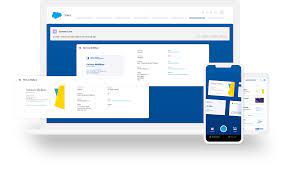
Salesforce Genie announced this year is an innovative data platform recently unveiled at Dreamforce 2022, heralding the world’s first real-time CRM. Genie is the driving force behind Salesforce’s entire Customer 360 platform, delivering hyper-scale, real-time data capabilities. With Genie, any business can harness the power of data to create magical customer experiences, offering seamless, personalized interactions across sales, service, marketing, and commerce. It adapts effortlessly to evolving customer needs. Consider scenarios we encounter daily: the frustration of lengthy customer support calls navigating purchase history, or the challenge of locating specific items on cluttered e-commerce websites. These situations underscore the demand for real-time updates in every customer interaction, a demand that Genie aims to fulfill. In the last 12 hours alone, the volume of stored customer data worldwide has doubled, explaining the delays in customer support. However, with Salesforce Genie, businesses can make sense of their data regardless of source, system, or channel. This unified data drives unprecedented levels of personalization, akin to magic. Salesforce Genie’s Key Features: Genie is pivotal for various industries leveraging Salesforce, like banks managing vast customer records and administrative tasks. Salesforce aims to enhance data utilization without altering existing approaches. Comparison with Salesforce CDP: Genie transcends traditional Customer Data Platforms (CDPs) by: How Genie Works: Genie ingests and stores real-time data streams at scale, integrating them seamlessly with Salesforce data. It consolidates data from diverse channels, legacy systems via MuleSoft, and proprietary data lakes through connectors. Core Pillars of Salesforce Genie: Salesforce Genie’s Extensibility: Genie partners with leading data providers such as Snowflake and Amazon SageMaker, enabling seamless integration and real-time data sharing without data movement. Unified Customer 360 Use Cases: Genie unifies data across Salesforce’s Customer 360 products for various departments: In essence, Salesforce Genie revolutionizes data integration and utilization, enabling businesses to deliver unparalleled customer experiences across all touchpoints. Like1 Related Posts Who is Salesforce? Who is Salesforce? Here is their story in their own words. From our inception, we’ve proudly embraced the identity of Read more Salesforce Marketing Cloud Transactional Emails Salesforce Marketing Cloud Transactional Emails are immediate, automated, non-promotional messages crucial to business operations and customer satisfaction, such as order Read more Salesforce Unites Einstein Analytics with Financial CRM Salesforce has unveiled a comprehensive analytics solution tailored for wealth managers, home office professionals, and retail bankers, merging its Financial Read more AI-Driven Propensity Scores AI plays a crucial role in propensity score estimation as it can discern underlying patterns between treatments and confounding variables Read more


Read More
Turn on the Slack Slash Command

Turn on the Slack Slash Command

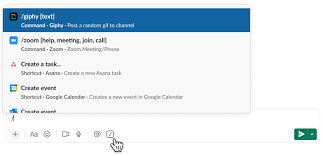
Introducing the Power of Slash Commands in Slack With the simple use of a slash and a command, you can seamlessly access data from connected apps without ever leaving Slack. The Service Cloud for Slack app streamlines workflows for service teams, enabling them to create new Salesforce records directly from Slack. This reduces the need for context switching and empowers teams to resolve issues swiftly within Slack’s integrated environment. Turn on the Slack Slash Command. Simplified, Unified Experience While workflows may originate from various sources and involve different types of data, the end goal remains consistent: a simplified, unified experience for users. Slash commands act as triggers, allowing users to summon your app with a quick text input in Slack’s message composer. Note that slash commands cannot be invoked within message threads, providing clarity in communication channels. How Slash Commands Work When a slash command is triggered, Slack sends a payload of data to the associated app, providing valuable context for further action. This interaction enables the app to respond accordingly, leveraging the information provided in the payload to deliver relevant insights or perform specified tasks. Applications of Slash Commands Whether it’s creating a to-do list, managing tasks, or initiating specific actions, slash commands offer a structured approach to app interactions within Slack. By understanding the structure and usage of slash commands, developers can tailor their apps to meet the unique needs of their audience. Turn on the Slack Slash Command To get started with slash commands: Response Process As part of the response process, apps should: This ensures a smooth user experience and facilitates seamless communication between Slack and connected apps. Conclusion – Turn on the Slack Slash Command Slash commands offer a convenient way to interact with apps directly from Slack, enhancing productivity and collaboration. By following best practices and understanding the nuances of command creation and response handling, developers can unlock the full potential of slash commands to enrich the Slack experience for users. Like Related Posts Who is Salesforce? Who is Salesforce? Here is their story in their own words. From our inception, we’ve proudly embraced the identity of Read more Salesforce Marketing Cloud Transactional Emails Salesforce Marketing Cloud Transactional Emails are immediate, automated, non-promotional messages crucial to business operations and customer satisfaction, such as order Read more Salesforce Unites Einstein Analytics with Financial CRM Salesforce has unveiled a comprehensive analytics solution tailored for wealth managers, home office professionals, and retail bankers, merging its Financial Read more AI-Driven Propensity Scores AI plays a crucial role in propensity score estimation as it can discern underlying patterns between treatments and confounding variables Read more

Read More

Attribution with Google Tag Manager and Custom Code

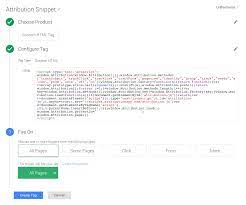
Utilizing Google Tag Manager with Custom Code If you’re already using Google Tag Manager (GTM) on your website, you can leverage it to store UTM parameters in a browser cookie. This stored data can then be extracted and populated into hidden form fields, which are sent to Salesforce upon form submission. Attribution with Google Tag Manager and Custom Code. Here’s a step-by-step guide to the process: Attribution with Google Tag Manager and Custom Code Pros: Cons: Limitations: Implementing Attribution Snippets with GTM Across All Pages To implement attribution snippets using GTM, follow these steps: Adding Attributes in Google Tag Manager: Adding a Custom HTML Tag in GTM: Adding Code to GTM: Optimizing GTM Performance Differentiating GTM and Google Analytics Testing GTM Code Employ a Tag Debugger: Attribution with Google Tag Manager and Custom Code Changes Is your business ready for the changes coming to Google’s data measurement infrastructure? You probably rely on Google Analytics as a marvelous tool to understand your customers and better target their needs across both your web and mobile app platforms. But with changes on the way from Google, particularly with some legacy mobile app tracking and measurement platforms, the stability of your analytics might be at risk if you’re not prepared. What’s changing? The current version of Google Tag Manager (version 4, or “Legacy”) for mobile apps will no longer be supported by Google as of March 2020. But, limitations on the functionality of GTM version 4 have already begun. Due to these limitations and hard dates for deprecation, everyone will need to upgrade to Google Tag Manager version 5. This requires the implementation of new GTM and Firebase Software Development Kits and a switch from the current GTM in-app, data layer approach to the new Firebase, event-based, data collection process. When will service be affected? Here are the key dates and milestones shared by Google, subject to change (though unlikely): Will analytics measurement be affected? Yes, for your mobile applications in particular. For your business to maintain uninterrupted Google Analytics tracking, you must make changes in the app source code. You’ll have to migrate the current data layer code in-app to Firebase-syntax data collection code, install a new Firebase SDK (if not already in place), create new GTM v5 containers, and test the new set-up for reliability to avoid any interruptions. InfoTrust can provide you with assistance to make this process as painless as possible. Please note, if you are already using Firebase Analytics and/or the newer version of Google Tag Manager for mobile apps, v5 (Firebase powered events and data collection), there is nothing to worry about and you are already in the safe zone. These dates are only meant to deprecate the measurement tracking for **Google Tag Manager v4 Legacy Containers** in mobile apps. This DOES NOT mean you have to move to Firebase Analytics and it DOES NOT mean GA for mobile apps is going away. Simply the means of collecting data in the app, if using GTM, is going through an upgraded version. You will need to update your source code to use the new GTM v5 SDK and Firebase event code, as described later but feel free to continue using GA as normal (if deployed in the new GTM v5 Firebase-powered containers). Benefits of Switching It’s not all bad news. Though the migration to GTM v5 will take some work, there are some major advantages. Most importantly, switching ensures uninterupted information flow to Google Analytics, so you never lose touch with your customers. Also, this isn’t just a cosmetic change; the switch to version 5 comes with more tags, new GTM capabilities, and new Firebase analytics UI capabilities. Why InfoTrust? If you’re still using version 4 of Google Tag Manager, this could be a complex project that requires input from many different parts of your business from IT to software development to analytics to marketing. Migrating platforms may be a little annoying, but it’s much less annoying than losing access to the key analytics tools or data you rely on to understand your customers and make strategic business decisions. Switching prevents headaches later and unlocks useful new features now. InfoTrust can help your organization come up with a solid migration plan, help work with your engineers to fully test and configure all the reporting + data measurement, and partner with your team to make the most out of the data collection and mobile application data you will continue to capture. If you have any questions about any aspect of this process, don’t think twice about reaching out. We’d love to help. InfoTrust is here to make sure you’re data confident. Like1 Related Posts Who is Salesforce? Who is Salesforce? Here is their story in their own words. From our inception, we’ve proudly embraced the identity of Read more Salesforce Marketing Cloud Transactional Emails Salesforce Marketing Cloud Transactional Emails are immediate, automated, non-promotional messages crucial to business operations and customer satisfaction, such as order Read more Salesforce Unites Einstein Analytics with Financial CRM Salesforce has unveiled a comprehensive analytics solution tailored for wealth managers, home office professionals, and retail bankers, merging its Financial Read more AI-Driven Propensity Scores AI plays a crucial role in propensity score estimation as it can discern underlying patterns between treatments and confounding variables Read more
Read More
Mastering Salesforce SOQL

Mastering Salesforce SOQL

Mastering SOQL: A Guide to Querying Salesforce Data Understanding SOQL Basics Salesforce Object Query Language (SOQL) is the powerful tool you’ll use to retrieve specific records from your Salesforce database. Similar to SQL’s SELECT statement but optimized for Salesforce, SOQL follows this basic structure: sql Copy Download SELECT Field1, Field2 FROM ObjectName WHERE conditions ORDER BY Field1 For quick reference to standard fields, consult the Salesforce Fields Reference. Crafting Effective WHERE Clauses Comparison Operators SOQL provides robust filtering capabilities with these operators: Example: sql Copy Download SELECT Name FROM Account WHERE AnnualRevenue > 1000000 AND Industry = ‘Technology’ Logical Operators Combine conditions with: Example: sql Copy Download SELECT Id, Name FROM Contact WHERE (Department = ‘Sales’ OR Department = ‘Marketing’) AND NOT Title LIKE ‘%Intern%’ Advanced Query Techniques Result Limiting Date Handling For date fields (YYYY-MM-DD format): sql Copy Download SELECT Id FROM Opportunity WHERE CloseDate = 2023-12-31 For datetime fields: sql Copy Download SELECT Id FROM Case WHERE CreatedDate = 2023-01-15T14:30:00Z Use .to_date() for date conversion and .strftime() for datetime formatting in formulas. Practical Implementation Triggers and Actions Workato provides specialized triggers and actions for SOQL: Basic queries: Full query support: Remember: Always include the ID field in SELECT statements for triggers. Setting Up Scheduled Queries Example scheduled query: sql Copy Download SELECT Id, Name, Status__c FROM Custom_Object__c WHERE LastModifiedDate = TODAY ORDER BY CreatedDate DESC LIMIT 200 Key Differences from SQL By mastering these SOQL techniques, you’ll efficiently extract exactly the data you need from your Salesforce org while working within the platform’s unique architecture. Like Related Posts Who is Salesforce? Who is Salesforce? Here is their story in their own words. From our inception, we’ve proudly embraced the identity of Read more Salesforce Marketing Cloud Transactional Emails Salesforce Marketing Cloud Transactional Emails are immediate, automated, non-promotional messages crucial to business operations and customer satisfaction, such as order Read more Salesforce Unites Einstein Analytics with Financial CRM Salesforce has unveiled a comprehensive analytics solution tailored for wealth managers, home office professionals, and retail bankers, merging its Financial Read more AI-Driven Propensity Scores AI plays a crucial role in propensity score estimation as it can discern underlying patterns between treatments and confounding variables Read more
Read More
Batch Job Behavior

Batch Job Behavior

By automating specific actions  that you’d normally have to manually initiate, batch jobs make processing large amount of data less tedious and time consuming. If you’ve ever noticed data from batch jobs processes ‘out of order,’ we’ll go over why that’s the case.  Inconsistent Batch Job Behavior Resolution Inconsistent behavior of batches is because batch Apex is an asynchronous process with no SLA, and many customers are sharing the resources, causing it to be slow.  Being an asynchronous process, the system will process the batches only when the system resources are available. There’s no way to prioritize a process, and we don’t provide a SLA for the execution.  Asynchronous Apex In a nutshell, asynchronous Apex is used to run processes in a separate thread, at a later time. An asynchronous process is a process or function that executes a task “in the background” without the user having to wait for the task to finish. You’ll typically use Asynchronous Apex for callouts to external systems, operations that require higher limits, and code that needs to run at a certain time. The key benefits of asynchronous processing include: User efficiency Let’s say you have a process that makes many calculations on a custom object whenever an Opportunity is created. The time needed to execute these calculations could range from a minor annoyance to a productivity blocker for the user. Since these calculations don’t affect what the user is currently doing, making them wait for a long running process is not an efficient use of their time. With asynchronous processing the user can get on with their work, the processing can be done in the background and the user can see the results at their convenience. Scalability By allowing some features of the platform to execute when resources become available at some point in the future, resources can be managed and scaled quickly. This allows the platform to handle more jobs using parallel processing. Higher Limits Asynchronous processes are started in a new thread, with higher governor and execution limits. And to be honest, doesn’t everyone want higher governor and execution limits? Asynchronous Apex comes in a number of different flavors. We’ll get into more detail for each one shortly, but here’s a high level overview. Type Overview Common Scenarios Future Methods Run in their own thread, and do not start until resources are available. Web service callout. Batch Apex Run large jobs that would exceed normal processing limits. Data cleansing or archiving of records. Queueable Apex Similar to future methods, but provide additional job chaining and allow more complex data types to be used. Performing sequential processing operations with external Web services. Scheduled Apex Schedule Apex to run at a specified time. Daily or weekly tasks. It’s also worth noting that these different types of asynchronous operations are not mutually exclusive. For instance, a common pattern is to kick off a Batch Apex job from a Scheduled Apex job. Increased Governor and Execution Limits One of the main benefits of running asynchronous Apex is higher governor and execution limits. For example, the number of SOQL queries is doubled from 100 to 200 queries when using asynchronous calls. The total heap size and maximum CPU time are similarly larger for asynchronous calls. Not only do you get higher limits with async, but also those governor limits are independent of the limits in the synchronous request that queued the async request initially. That’s a mouthful, but essentially, you have two separate Apex invocations, and more than double the processing capability. This comes in handy for instances when you want to do as much processing as you can in the current transaction but when you start to get close to governor limits, continue asynchronously. How Asynchronous Processing Works Asynchronous processing, in a multitenant environment, presents some challenges: Ensure fairness of processing Make sure every customer gets a fair share of processing resources. Ensure fault tolerance Make sure no asynchronous requests are lost due to equipment or software failures. The platform uses a queue-based asynchronous processing framework. This framework is used to manage asynchronous requests for multiple organizations within each instance. The request lifecycle is made up of three parts: Enqueue The request gets put into the queue. This could be an Apex batch request, future Apex request or one of many others. The platform will enqueue requests along with the appropriate data to process that request. Persistence The enqueued request is persisted. Requests are stored in persistent storage for failure recovery and to provide transactional capabilities. Dequeue The enqueued request is removed from the queue and processed. If the processing fails, transaction control ensures that requests are not lost. Each request is processed by a handler. The handler is the code that performs functions for a specific request type. Handlers are executed by a finite number of worker threads on each of the application servers that make up an instance. The threads request work from the queuing framework and when received, start a specific handler to do the work. Resource Conservation Asynchronous processing has lower priority than real-time interaction via the browser and API. To ensure there are sufficient resources to handle an increase in computing resources, the queuing framework monitors system resources such as server memory and CPU usage and reduce asynchronous processing when thresholds are exceeded. This is a fancy way of saying that the multitenant system protects itself. If an org tries to “gobble up” more than its share of resources, asynchronous processing is suspended until a normal threshold is reached. The long and short of it is that there’s no guarantee on processing time, but it’ll all work out in the end. Like Related Posts Who is Salesforce? Who is Salesforce? Here is their story in their own words. From our inception, we’ve proudly embraced the identity of Read more Salesforce Unites Einstein Analytics with Financial CRM Salesforce has unveiled a comprehensive analytics solution tailored for wealth managers, home office professionals, and retail bankers, merging its Financial Read more AI-Driven Propensity

Read More
Salesforce Manufacturing Cloud

Benefits of Salesforce Manufacturing Cloud

Salesforce Manufacturing Cloud is a custom, industry specific solutions platform that helps you manage your entire book-of-business and customer service lifecycle, while increasing collaboration and visibility between sales, operations, and partners. Here are the Benefits of Salesforce Manufacturing Cloud. Salesforce Manufacturing Cloud offers numerous benefits that contribute to the efficient and seamless operation of your manufacturing businesses. One key advantage is the streamlining of business operations. By connecting different departments, the platform facilitates instant and automatic order submission, significantly improving overall efficiency. Manufacturing Cloud Salesforce Manufacturing Cloud provides a comprehensive view of operations, offering valuable insights into company and market changes. This visibility enables quick reactions to emerging trends, ensuring your business stays agile and responsive in a dynamic market environment. The time saved will help you stay ahead of market changes that may slow your competition down, improving your competitive advantage. The platform also plays a crucial role in improving sales forecasting. By providing visibility into all your customer interactions, Salesforce Manufacturing Cloud enables robust sales forecasts, empowering businesses to make informed decisions about their sales strategies. Moreover, the platform encourages the adoption of modernized processes, bridging costly gaps in traditional manufacturing operations. This modernization not only improves operational efficiency but also contributes to market responsiveness. Connected and streamlined operations facilitate quick responses to market changes, allowing businesses to adapt swiftly to evolving conditions.  Salesforce Manufacturing Cloud keeps your business moving forward, adopting modern and automated processes that save time and money. Automation Automation within Salesforce Manufacturing Cloud eliminates costly manual steps, reducing the risk of simple human errors. This is particularly crucial in scenarios where simple data entry mistakes, such as adding an extra zero to a fulfillment order, can lead to significant financial losses. The platform ensures reliable data, enabling seamless collaboration between Sales and Operations. Not only does this create smooth internal operations, but it also increases customer satisfaction. Instant access to reporting within the Manufacturing Cloud platform provides valuable insights into product performance, allowing businesses to create accurate predictions. Manufacturers can identify top-selling products, address underperforming items, and stay abreast of market trends. This information enables effective resource allocation and prompt issue resolution, preventing prolonged and costly production problems. Accurately tracking customer demand within Salesforce Manufacturing Cloud ensures optimal production levels. A 360-degree customer view of operations prevents overproduction or underproduction, striking a balance that avoids financial losses and customer dissatisfaction. The platform helps maintain an optimal level of stock on hand. The automated digital processes for contract management offered by Salesforce Manufacturing Cloud enable instant updates to client agreements. This eliminates version-control chaos caused by separate updates from various parties. A Salesforce single source of truth ensures unified operations, reduces legal liability, and ensures that all departments adhere to the same specifications. Implementing an automated system to track leads throughout the sales process is another benefit of Salesforce Manufacturing Cloud. Automating lead tracking provides valuable insights into the effectiveness of your sales strategies. Identification of attrition points triggers alerts, allowing manufacturers to address issues promptly. Sales teams can adjust strategies to prevent prospects from falling out of the pipeline, ultimately boosting sales and adding revenue to the bottom line. If your manufacturing operations could benefit from Salesforce Manufacturing Cloud, contact Tectonic to learn more. Like2 Related Posts Who is Salesforce? Who is Salesforce? Here is their story in their own words. From our inception, we’ve proudly embraced the identity of Read more Salesforce Marketing Cloud Transactional Emails Salesforce Marketing Cloud Transactional Emails are immediate, automated, non-promotional messages crucial to business operations and customer satisfaction, such as order Read more Salesforce Unites Einstein Analytics with Financial CRM Salesforce has unveiled a comprehensive analytics solution tailored for wealth managers, home office professionals, and retail bankers, merging its Financial Read more AI-Driven Propensity Scores AI plays a crucial role in propensity score estimation as it can discern underlying patterns between treatments and confounding variables Read more
Read More
Salesforce Page Design

Compact Page Layouts in Salesforce

Compact page layouts in Salesforce serve to showcase the essential fields of a record when minimal details are required. They dictate which fields appear in the highlights panel at the top of a record. A compact layout displays a record’s key fields at a glance in the Salesforce mobile app, Lightning Experience, and in the Outlook and Gmail integrations. Lightning Pages For users employing Lightning Pages, ensure that the Highlights Panel Component is included on your page to ensure visibility. Navigate to the Object Manager, select the Object, go to Compact Layouts, and create a new layout. After naming the Compact Layout, add the desired fields for viewing. Note that a compact layout can only include fields from its object or fields that may be utilizing a formula as a cross-object reference to another object. Salesforce fields not present in SOAP API cannot be added to compact layouts in the Salesforce mobile app. Compact Page Layouts in Salesforce Compact layouts also influence how records are displayed in the Salesforce mobile app, helping users quickly recognize pertinent information on mobile screens. These layouts enable a tailored view of records, emphasizing the information users need at a glance. While compact layouts support all field types, it’s worth noting that they exclude text area, long text area, rich text area, and multi-select picklist fields. Like Related Posts Who is Salesforce? Who is Salesforce? Here is their story in their own words. From our inception, we’ve proudly embraced the identity of Read more Salesforce Marketing Cloud Transactional Emails Salesforce Marketing Cloud Transactional Emails are immediate, automated, non-promotional messages crucial to business operations and customer satisfaction, such as order Read more Salesforce Unites Einstein Analytics with Financial CRM Salesforce has unveiled a comprehensive analytics solution tailored for wealth managers, home office professionals, and retail bankers, merging its Financial Read more AI-Driven Propensity Scores AI plays a crucial role in propensity score estimation as it can discern underlying patterns between treatments and confounding variables Read more
Read More
Salesforce Marketing Cloud

Custom Preference Center in Salesforce Marketing Cloud

Improve your customer relationships by seamlessly integrating the Salesforce core Individual object with the Marketing Cloud profile center and subscription center when creating a custom preference center. Consider the following design considerations to optimize this process: Understanding the Preference Center: A preference center serves as a centralized contact management tool, empowering customers to: Customizing a Preference Center: As the dynamics of the relationship between a company and its customers evolve over time, influencing customer contact preferences, businesses should: Key Instances When a Preference Center Is Crucial: Common Data Considerations: Evaluate hosting options, considering platforms such as SFMC, EHI, Lacek, or Salesforce Experience Cloud. Address data model concerns by determining: Contact Governance: Contact governance involves guiding principles for enterprise-wide data management and contact strategy. To ensure a customer-first approach and streamline data management, consider: Creating a Custom Preference Center: Engage marketing and technology teams for segmentation, language, and channel considerations. Even with light initial adoption, align goals and priorities across brands to move into gathering technical requirements and scoping the project. SFMC Custom Preference Center: In Salesforce Marketing Cloud (SFMC), a custom preference center allows subscribers to choose the type and frequency of email messages they wish to receive, enabling them to “opt down” instead of unsubscribing completely. Importance of Preference Management: Preference management in marketing cloud is crucial for: Like3 Related Posts Who is Salesforce? Who is Salesforce? Here is their story in their own words. From our inception, we’ve proudly embraced the identity of Read more Salesforce Marketing Cloud Transactional Emails Salesforce Marketing Cloud Transactional Emails are immediate, automated, non-promotional messages crucial to business operations and customer satisfaction, such as order Read more Salesforce Unites Einstein Analytics with Financial CRM Salesforce has unveiled a comprehensive analytics solution tailored for wealth managers, home office professionals, and retail bankers, merging its Financial Read more AI-Driven Propensity Scores AI plays a crucial role in propensity score estimation as it can discern underlying patterns between treatments and confounding variables Read more

Read More
Salesforce Genie

Salesforce Announces Genie

San Francisco – September 20, 2022 – Salesforce (NYSE: CRM), the global leader in CRM, today unveiled Salesforce Genie, a hyperscale real-time data platform that powers the entire Salesforce Customer 360 platform. With Genie, every company can turn data into customer magic, delivering seamless, highly personalized experiences across sales, service, marketing, and commerce that continuously adapt to changing customer information and needs in real time. Today, 71% of customers expect every interaction with a business to be personalized. However, data remains siloed and duplicative across most companies. Companies on average have 976 separate applications to run their business — that’s potentially 976 versions of a single customer, leading to disconnected digital experiences. Responding to customer needs in real time is more critical than ever, but is becoming more challenging as the amount of data created, captured, replicated, and consumed each year is expected to more than double by 2026. Companies must seamlessly connect digital and real-world customer interactions in order to provide the most relevant, personalized, and compelling experiences, in every moment. A sales rep can no longer rely on in-person communication to close a large deal — reps need real-time insights about every customer, based on real-time and historical data, to act on the most relevant information in the moment, every time. A service agent runs the risk of losing a valuable customer if they lack a complete, real-time view across every touchpoint — every agent needs a source of real-time customer truth. With real-time patient data, healthcare providers can deliver proactive guidance and care recommendations.  “Genie makes every part of Customer 360 more automated, intelligent, and real time.” DAVID SCHMAIER, PRESIDENT AND CHIEF PRODUCT OFFICER, SALESFORCE “Every business leader wants to take advantage of real-time data to create compelling, personalized customer experiences — milliseconds matter in this new digital-first world,” said David Schmaier, President and Chief Product Officer, Salesforce. “That’s why we built Genie, our most significant innovation ever on the Salesforce Platform. Genie makes every part of Customer 360 more automated, intelligent, and real time.” Salesforce Genie: Unify data to build a real-time customer graph and single source of truth As the heart of real-time Customer 360, Salesforce Genie ingests and stores real-time data streams at massive scale and combines it with Salesforce transactional data. Genie includes built-in connectors that bring in data from every channel (mobile, web, APIs), legacy data through MuleSoft, and historical data from proprietary data lakes. Like Related Posts Who is Salesforce? Who is Salesforce? Here is their story in their own words. From our inception, we’ve proudly embraced the identity of Read more Salesforce Marketing Cloud Transactional Emails Salesforce Marketing Cloud Transactional Emails are immediate, automated, non-promotional messages crucial to business operations and customer satisfaction, such as order Read more Salesforce Unites Einstein Analytics with Financial CRM Salesforce has unveiled a comprehensive analytics solution tailored for wealth managers, home office professionals, and retail bankers, merging its Financial Read more AI-Driven Propensity Scores AI plays a crucial role in propensity score estimation as it can discern underlying patterns between treatments and confounding variables Read more
Read More
Python Alongside Salesforce

Python Alongside Salesforce

Salesforce can integrate with Python, though the platform primarily relies on its proprietary languages and frameworks for core development. Python, however, plays a crucial role in enhancing Salesforce’s capabilities through integrations, automation, data analysis, and extending functionalities via external applications. Here’s an overview of how Python works within the Salesforce ecosystem: 1. Salesforce’s Core Development Stack Before exploring Python’s use, it’s important to understand the key development tools within Salesforce: These tools are the foundation for Salesforce development. However, Python complements Salesforce by enabling integrations and automation that go beyond these native tools. 2. Python in Salesforce Integrations Python shines when integrating Salesforce with other systems, automating workflows, and extending functionality. Here’s how: a. API Interactions Salesforce’s REST and SOAP APIs allow external systems to communicate with Salesforce data. Python, with its powerful libraries, is excellent for interfacing with these APIs. Key Libraries: Example: Extracting Data via API: pythonCopy codefrom simple_salesforce import Salesforce # Connect to Salesforce sf = Salesforce(username=’your_username’, password=’your_password’, security_token=’your_token’) # Query Salesforce data accounts = sf.query(“SELECT Id, Name FROM Account LIMIT 10”) for account in accounts[‘records’]: print(account[‘Name’]) b. Data Processing and Analysis Python’s data manipulation libraries like Pandas and NumPy make it ideal for processing Salesforce data. Example: Data Cleaning and Analysis: pythonCopy codeimport pandas as pd from simple_salesforce import Salesforce # Connect to Salesforce sf = Salesforce(username=’your_username’, password=’your_password’, security_token=’your_token’) # Fetch data query = “SELECT Id, Name, AnnualRevenue FROM Account” accounts = sf.query_all(query) df = pd.DataFrame(accounts[‘records’]).drop(columns=[‘attributes’]) # Process data df[‘AnnualRevenue’] = df[‘AnnualRevenue’].fillna(0) high_revenue_accounts = df[df[‘AnnualRevenue’] > 1000000] print(high_revenue_accounts) 3. Automation and Scripting Python can automate Salesforce-related tasks, improving productivity and reducing manual effort. This can involve automating data updates, generating reports, or scheduling backups. Example: Automating Data Backup: pythonCopy codeimport schedule import time from simple_salesforce import Salesforce def backup_salesforce_data(): sf = Salesforce(username=’your_username’, password=’your_password’, security_token=’your_token’) query = “SELECT Id, Name, CreatedDate FROM Contact” contacts = sf.query_all(query) df = pd.DataFrame(contacts[‘records’]).drop(columns=[‘attributes’]) df.to_csv(‘contacts_backup.csv’, index=False) print(“Salesforce data backed up successfully.”) # Schedule the backup schedule.every().day.at(“00:00”).do(backup_salesforce_data) while True: schedule.run_pending() time.sleep(1) 4. Building External Applications Using platforms like Heroku, developers can build external applications in Python that integrate with Salesforce, extending its functionality for custom portals or advanced analytics. Example: Web App Integrating with Salesforce: pythonCopy codefrom flask import Flask, request, jsonify from simple_salesforce import Salesforce app = Flask(__name__) @app.route(‘/get_accounts’, methods=[‘GET’]) def get_accounts(): sf = Salesforce(username=’your_username’, password=’your_password’, security_token=’your_token’) accounts = sf.query(“SELECT Id, Name FROM Account LIMIT 10”) return jsonify(accounts[‘records’]) if __name__ == ‘__main__’: app.run(debug=True) 5. Data Integration and ETL Python is commonly used in ETL (Extract, Transform, Load) processes that involve Salesforce data. Tools like Apache Airflow allow you to create complex data pipelines for integrating Salesforce data with external databases. Example: ETL Pipeline with Airflow: pythonCopy codefrom airflow import DAG from airflow.operators.python_operator import PythonOperator from simple_salesforce import Salesforce import pandas as pd from datetime import datetime def extract_salesforce_data(): sf = Salesforce(username=’your_username’, password=’your_password’, security_token=’your_token’) query = “SELECT Id, Name, CreatedDate FROM Opportunity” opportunities = sf.query_all(query) df = pd.DataFrame(opportunities[‘records’]).drop(columns=[‘attributes’]) df.to_csv(‘/path/to/data/opportunities.csv’, index=False) default_args = { ‘owner’: ‘airflow’, ‘start_date’: datetime(2023, 1, 1), ‘retries’: 1, } dag = DAG(‘salesforce_etl’, default_args=default_args, schedule_interval=’@daily’) extract_task = PythonOperator( task_id=’extract_salesforce_data’, python_callable=extract_salesforce_data, dag=dag, ) extract_task 6. Machine Learning and Predictive Analytics Python’s machine learning libraries, such as Scikit-learn and TensorFlow, enable predictive analytics on Salesforce data. This helps in building models for sales forecasting, lead scoring, and customer behavior analysis. Example: Predicting Lead Conversion: pythonCopy codeimport pandas as pd from sklearn.model_selection import train_test_split from sklearn.ensemble import RandomForestClassifier from simple_salesforce import Salesforce # Fetch Salesforce data sf = Salesforce(username=’your_username’, password=’your_password’, security_token=’your_token’) query = “SELECT Id, LeadSource, AnnualRevenue, NumberOfEmployees, Converted FROM Lead” leads = sf.query_all(query) df = pd.DataFrame(leads[‘records’]).drop(columns=[‘attributes’]) # Preprocess and split data df = pd.get_dummies(df, columns=[‘LeadSource’]) X = df.drop(‘Converted’, axis=1) y = df[‘Converted’] X_train, X_test, y_train, y_test = train_test_split(X, y, test_size=0.2, random_state=42) # Train model model = RandomForestClassifier(n_estimators=100, random_state=42) model.fit(X_train, y_train) # Evaluate accuracy accuracy = model.score(X_test, y_test) print(f”Model Accuracy: {accuracy * 100:.2f}%”) 7. Best Practices for Using Python with Salesforce To maximize the efficiency and security of Python with Salesforce: 8. Recommended Learning Resources By leveraging Python alongside Salesforce, organizations can automate tasks, integrate systems, and enhance their data analytics, all while boosting productivity. Content updated August 2024. Like Related Posts Who is Salesforce? Who is Salesforce? Here is their story in their own words. From our inception, we’ve proudly embraced the identity of Read more Salesforce Marketing Cloud Transactional Emails Salesforce Marketing Cloud Transactional Emails are immediate, automated, non-promotional messages crucial to business operations and customer satisfaction, such as order Read more Salesforce Unites Einstein Analytics with Financial CRM Salesforce has unveiled a comprehensive analytics solution tailored for wealth managers, home office professionals, and retail bankers, merging its Financial Read more AI-Driven Propensity Scores AI plays a crucial role in propensity score estimation as it can discern underlying patterns between treatments and confounding variables Read more
Read More
Business Card Scanner App Salesforce

Business Card Scanner App Salesforce

Does Salesforce offer a business card scanner? Business Card Scanner App Salesforce. Indeed, WorldCard Cloud stands out as the premier Salesforce business card scanner. Leveraging OCR (Optical Character Recognition) technology, it swiftly transforms business card information into digital data, seamlessly saving it to Salesforce Leads and Contacts. Additionally, Zero Keyboard recently introduced its Salesforce Business Card Scanner as a standalone product, boasting several notable features: Similarly, LiiD offers a Salesforce-compatible business card scanner, accessible through their website or directly from the AppExchange platform. For users seeking a cost-effective solution, the free Scan to Salesforce app provides a convenient option. With support for scanning up to four business cards simultaneously via its mobile app (available on iOS and Android), users can effortlessly upload the data to Salesforce with a single click. However, it’s worth noting that Scan to Salesforce will be discontinued after May 31, 2024, with new installations no longer available. Business Card Scanner App Salesforce It’s essential to acknowledge that focusing solely on tools that sync with Salesforce may limit options. Exploring tools that integrate with Outlook expands the scope of possibilities. Subsequently, users can utilize the Outlook to Salesforce tool provided by Salesforce to synchronize data between the two platforms seamlessly. Content updated January 2024. Like Related Posts Who is Salesforce? Who is Salesforce? Here is their story in their own words. From our inception, we’ve proudly embraced the identity of Read more Salesforce Marketing Cloud Transactional Emails Salesforce Marketing Cloud Transactional Emails are immediate, automated, non-promotional messages crucial to business operations and customer satisfaction, such as order Read more Salesforce Unites Einstein Analytics with Financial CRM Salesforce has unveiled a comprehensive analytics solution tailored for wealth managers, home office professionals, and retail bankers, merging its Financial Read more AI-Driven Propensity Scores AI plays a crucial role in propensity score estimation as it can discern underlying patterns between treatments and confounding variables Read more

Read More
gettectonic.com