

Eloqua Archives - gettectonic.com
Account Planning With Salesforce

CRM Analytics Limits

When using CRM Analytics, keep these limits in mind. API Call Limits These limits apply to all supported editions. API Call Limit Maximum concurrent CRM Analytics API calls per org 100 Maximum CRM Analytics API calls per user per hour 10,000 Dataset Row Storage Allocations per License In Salesforce org, your total row storage limit for all registered datasets combined depends on your license combination. Each license allocates a different number of rows. Baseline Row Allocation Allocated Rows CRM Analytics Plus 10 billion CRM Analytics Growth 100 million Sales Analytics 25 million Service Analytics 25 million Event Monitoring Analytics 50 million B2B Marketing Analytics 25 million CRM Analytics for Financial Services Cloud 25 million CRM Analytics for Health Cloud 25 million Extra Data Rows license 100 million Your total row storage limit is a combination of your active licenses. For example: Because the CRM Analytics Plus license includes the Sales Analytics and Service Analytics licenses, your total row allocation remains 10 billion. Similarly, the CRM Analytics Growth license includes the Sales Analytics and the Service Analytics licenses, so your total row allocation remains 100 million. However, if you obtain another Sales Analytics or Services Analytics license, your row limit increases by 25 million for each added license. Dataset Row Limits Each dataset supports up to 2 billion rows. If your Salesforce org has less than 2 billion allocated rows, each dataset supports up to your org’s allocated rows. Dataset Field Limits Value Limit Maximum number of fields in a dataset 5,000 (including up to 1,000 date fields) Maximum number of decimal places for each value in a numeric field in a dataset (overflow limit) 17 decimal placesWhen a value exceeds the maximum number of decimal places, it overflows. Both 100,000,000,000,000,000 and 10,000,000,000,000,000.0 overflow because they use more than 17 decimal places. A number also overflows if it’s greater (or less) than the maximum (or minimum) supported value. 36,028,797,018,963,968 overflows because its value is greater than 36,028,797,018,963,967. -36,028,797,018,963,968 overflows because it’s less than -36,028,797,018,963,967.When a number overflows, the resulting behavior in CRM Analytics is unpredictable. Sometimes CRM Analytics throws an error. Sometimes it replaces a numeric value with a null value. And sometimes mathematical calculations, such as sums or averages, return incorrect results. Occasionally, CRM Analytics handles numbers up to 19 digits without overflowing because they are within the maximum value for a 64-bit signed integer (263 – 1). But numbers of these lengths aren’t guaranteed to process.As a best practice, stick with numbers that are 17 decimal places or fewer. If numbers that would overflow are necessary, setting lower precision and scale on the dataset containing the large numbers sometimes prevents overflow. If your org hasn’t enabled the handling of numeric values, the maximum number of decimal places for each value in a numeric field in a dataset is 16. All orgs created after Spring ’17 have Null Measure Handling enabled. Maximum value for each numeric field in a dataset, including decimal places 36,028,797,018,963,967For example, if three decimal places are used, the maximum value is 36,028,797,018,963.967 Minimum value for each numeric field in a dataset, including decimal places -36,028,797,018,963,968For example, if five decimal places are used, the minimum value is -36,028,797,018,9.63968 Maximum number of characters in a field 32,000 Data Sync Limits If you extract more than 100 objects in your dataflows, contact Salesforce Customer Support before you enable data sync. Value Limit Maximum number of concurrent data sync runs 3 Maximum number of objects that can be enabled for data sync, including local and remote objects 100 Maximum amount of time each data sync job can run for local objects 24 hours Maximum amount of time each data sync job can run for remote objects 12 hours Data sync limits for each job:Marketo Connector (Beta)NetSuite ConnectorZendesk Connector Up to 100,000 rows or 500 MB per object, whichever limit is reached first Data sync limits for each job:Amazon Athena ConnectorAWS RDS Oracle ConnectorDatabricks ConnectorGoogle Analytics ConnectorGoogle Analytics Core Reporting V4 ConnectorOracle Eloqua ConnectorSAP HANA Cloud ConnectorSAP HANA Connector Up to 10 million rows or 5 GB per object, whichever limit is reached first Data sync limits for each job*:AWS RDS Aurora MySQL ConnectorAWS RDS Aurora PostgresSQL ConnectorAWS RDS MariaDB ConnectorAWS RDS MySQL ConnectorAWS RDS PostgreSQL ConnectorAWS RDS SQL Server ConnectorGoogle Cloud Spanner ConnectorMicrosoft Azure Synapse Analytics ConnectorMicrosoft Dynamics CRM ConnectorSalesforce External ConnectorSalesforce Contacts Connector for Marketing Cloud EngagementSalesforce OAuth 2.0 Connector for Marketing Cloud Engagement Up to 20 million rows or 10 GB per object, whichever limit is reached first Data sync limits for each job*:Amazon Redshift ConnectorAmazon S3 ConnectorCustomer 360 Global Profile Data Connector (Beta)Google BigQuery for Legacy SQL ConnectorGoogle BigQuery Standard SQL ConnectorHeroku Postgres ConnectorMicrosoft Azure SQL Database ConnectorSnowflake Input Connector Up to 100 million rows or 50 GB per object, whichever limit is reached first *When using these connectors, Salesforce Government Cloud org data is protected in transit with advanced encryption and can sync up to 10 million rows or 5 GB for each connected object, whichever limit is reached first. Note When using a Salesforce local input connection, CRM Analytics bulk API usage doesn’t count towards Salesforce bulk API limits. Use of the external Salesforce connection and output connection impacts your limits. The dataflow submits a separate bulk API call to extract data from each Salesforce object. The dataflow uses a batch size of 100,000–250,000, depending on whether the dataflow or the bulk API chunks the data. As a result, to extract 1 million rows from an object, the dataflow creates 4–10 batches. Recipe and Dataflow Limits Important In Winter ‘24, recipe runs over 2 minutes are counted against the limit. Previously, the recipe run counts weren’t correct. For more information, see Known Issue – Recipe runs are not counting towards the daily maximum run limit. Value Limit Maximum amount of time each recipe or dataflow can run 48 hours Maximum number of recipes 1,000 Maximum number of dataflows definitions (with data sync enabled) 100 Maximum number of dataflow and recipe runs in a rolling

Read More

Eloqua Salesforce Integration

About Salesforce integration with Oracle Eloqua Synchronizes accounts, contacts, leads and opportunities in Salesforce with Oracle Eloqua. For more information, see Data imports from Salesforce to Oracle Eloqua. Uses contact data in Oracle Eloqua to update contacts and generate sales leads in Salesforce. However, the integration of Oracle Eloqua with Salesforce comes with certain limitations that can have adverse effects on businesses. In this blog post, we will explore these limitations and how Salesforce Marketing Cloud can serve as a solution. Limitations: 1. Integration Process 2. Flexibility and Customization 3. Data Synchronization 4. User Experience and Interface 5. API Limitations Like Related Posts Who is Salesforce? Who is Salesforce? Here is their story in their own words. From our inception, we’ve proudly embraced the identity of Read more Salesforce Marketing Cloud Transactional Emails Salesforce Marketing Cloud Transactional Emails are immediate, automated, non-promotional messages crucial to business operations and customer satisfaction, such as order Read more Salesforce Unites Einstein Analytics with Financial CRM Salesforce has unveiled a comprehensive analytics solution tailored for wealth managers, home office professionals, and retail bankers, merging its Financial Read more AI-Driven Propensity Scores AI plays a crucial role in propensity score estimation as it can discern underlying patterns between treatments and confounding variables Read more

Read More
Marketing Cloud Lead Scoring

Marketing Cloud Lead Scoring

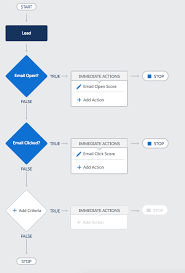
The acquisition of Exacttarget, now known as Salesforce Marketing Cloud, in 2012 caused a stir in the industry. It wasn’t due to Salesforce’s reputation for acquiring top martech products and teams, but rather because Salesforce had predominantly focused on B2B2B, while Exacttarget was firmly established in the B2C realm. Nonetheless, the acquisition also brought in Pardot, one of the leading marketing automation platforms for B2B marketing at that time. So, why did Salesforce make this move? They recognized that B2C-style marketing was on the verge of becoming the norm in B2B environments. This approach emphasizes storytelling and creating experiences over simple transactions. Salesforce Marketing Cloud enriches email journeys with SMS, advertising, social engagement, and more. Today, it ranks among the top three choices for enterprises, counting clients like Adidas and American Express among its roster. However, like any product, Marketing Cloud has its acknowledged limitations, especially when competing with Marketo, Eloqua, or Hubspot in fiercely contested deals. One significant challenge for B2B marketers is Marketing Cloud’s lead scoring and website tracking functionalities—critical tools for achieving superior sales and marketing alignment and executing client-driven, behavioral marketing campaigns. Lead scoring is a tactic used in marketing and sales to prioritize potential customers (leads) based on their likelihood to convert into paying customers. The aim is to focus the sales team’s efforts on leads most likely to convert, thereby enhancing the efficiency of the sales process and maximizing revenue. Lead scoring involves assigning a numerical value or score to each lead based on various factors and behaviors indicating their level of interest and engagement with your products or services. These factors include demographics, behavioral data, engagement metrics, lead source, intent, scoring models, explicit data, and negative signals. Once leads are scored, they can be categorized into different segments or tiers, such as “Hot,” “Warm,” and “Cold,” or Marketing Qualified or Sales Qualified, allowing sales teams to prioritize their efforts accordingly. Lead scoring facilitates more effective collaboration between marketing and sales teams, leading to improved conversion rates and overall revenue generation. The significance of lead scoring cannot be overstated. According to Marketing Sherpa, 61% of B2B marketers send any lead directly to sales without a lead qualification strategy, while sales reps ignore 70% of all leads from marketing, leading to significant inefficiencies and considered a top-three time-waster for sales teams. To address this issue and achieve sales and marketing alignment, businesses can take several steps, including defining their Ideal Customer Profile (ICP or Persona), tailoring communication and content to attract the right leads, collecting necessary data to qualify leads effectively, and identifying which leads match their profile and are ready to be handed over to the sales team. Analyze the steps in your customer jouneys by ICP or Persona and assign a score to the possible disposition of each step. While a bit stressful this is a great exercise in measuring historical data to see what really moves the needle in your sales cycles. While some steps are within a company’s control, others require technological support. One key tool for this is lead activity tracking, which collects data on lead engagement. Additionally, a lead scoring mechanism is needed to quantify lead interest and fit objectively. Unfortunately, Salesforce Marketing Cloud doesn’t offer satisfactory native functionality for activity tracking and lead scoring. However, there are several options to successfully track lead scoring within Salesforce, such as SalesWings, Marketing Cloud Connect and Process Automation, Marketing Cloud Journey Builder, and Marketing Cloud Personalization Builder and Predictive Intelligence, among others. Each option offers unique features and advantages, enabling businesses to tailor their lead scoring strategies to their specific needs and objectives. While Salesforce Marketing Cloud may lack native lead scoring capabilities, there are powerful ways to drive sales and marketing interactions effectively. The key is to base decisions on core marketing automation features and keep the goal of lead scoring in mind to align sales and marketing teams and personalize the customer experience based on intent. When a visitor goes to your website with the tracking code installed, a cookie is dropped with a unique ID and session ID. The cookie adds an ID to all Collect calls. The cookie tracks the user until it’s removed or cleared. The Collect Tracking Code pixel identifies itself as an invisible image, and it doesn’t affect the user experience of website visitors who use a screen reader. Configurations vary by product and use case. Collect Tracking Code monitors the variables and events that you select at the contact level. Considerations Salesforce Marketing Cloud may lack native lead scoring capabilities, there are powerful ways to drive sales and marketing interactions effectively. Base your decision on core marketing automation features and keep the goal of lead scoring in mind to align your sales and marketing teams and personalize the customer experience based on intent. All solution product descriptions are provided by their respective owners. Content updated May 2024. Like1 Related Posts Who is Salesforce? Who is Salesforce? Here is their story in their own words. From our inception, we’ve proudly embraced the identity of Read more Salesforce Marketing Cloud Transactional Emails Salesforce Marketing Cloud Transactional Emails are immediate, automated, non-promotional messages crucial to business operations and customer satisfaction, such as order Read more Salesforce Unites Einstein Analytics with Financial CRM Salesforce has unveiled a comprehensive analytics solution tailored for wealth managers, home office professionals, and retail bankers, merging its Financial Read more AI-Driven Propensity Scores AI plays a crucial role in propensity score estimation as it can discern underlying patterns between treatments and confounding variables Read more

Read More
gettectonic.com