

Google Data Studio Archives - gettectonic.com
Google Analytics and Salesforce Integration

Google Analytics and Salesforce Integration

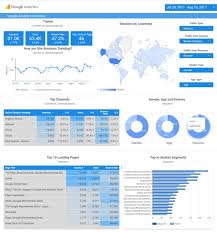
Syncing Google Analytics Data to CRM Analytics To integrate Google Analytics and Salesforce Integration using the Google Analytics connector, follow these steps: Important Note: As of July 1, 2023, the main product Google Analytics has been decommissioned and replaced with the new product Google Analytics 4 (GA4). The Salesforce announcement GA4 Set to Replace Universal Analytics gives an overview on this. Creating a Connection Required Settings: Google Analytics 4 Integration To sync Google Analytics 4 data to Salesforce Data Pipelines: Connector Considerations: Google Analytics Salesforce Sales Cloud Integration User Identification Analytics provides two methods to identify users: Required Salesforce Sales Cloud Objects and Fields: Integration Steps: Testing and Viewing Imported Data: Notes: Google Data Studio and Salesforce Integration Connecting Salesforce with Google Data Studio allows for powerful visualizations that combine sales and marketing data. This integration helps in understanding which channels generate the most leads and income. Google Analytics 4 Connection Setup: Connection Details: Advanced Properties: Considerations: By following these steps, you can seamlessly integrate Google Analytics data into your CRM Analytics and Salesforce Data Pipelines, ensuring robust data analysis and informed decision-making. Decide How to Identify Your Users: Analytics offers two ways to programmatically identify your users: Client ID and User-ID. To support Data Import for Salesforce Sales Cloud, you must implement Client ID. You may optionally choose to also implement User-ID. Client ID pseudonymously identifies a browser instance and is best suited for businesses focused on lead generation and new customer acquisition. User-ID enables the analysis of groups of sessions, across devices, using a unique, persistent, and non-personally identifiable ID string representing a user. This option is best for businesses with high rates of logged-in users. How to Import CRM/ERP Data with Google Analytics 4 Using a CSV File: Transitioning to Google Analytics 4: As of March 2023, Google has automatically created GA4 properties for users unless they opt-out. Until July 1, 2023, you can continue to use and collect new data in your Universal Analytics properties. After this date, you must export your historical reports as Universal Analytics will be phased out. How Does Google Help Salesforce Marketing Cloud Users? Google Analytics provides invaluable insights into user behavior, helping Salesforce Marketing Cloud users optimize campaigns and understand customer journeys. Integration with the Google platform allows businesses to combine offline sales data with digital analytics, optimizing digital marketing strategies and improving campaign effectiveness. Additional Integration: Using datasets from Google Analytics and Google BigQuery, businesses can create interactive Tableau CRM dashboards to visualize campaign activities and performance metrics. By following these guidelines, organizations can leverage Google Analytics data effectively within their Salesforce ecosystem, enhancing decision-making and strategic planning. Content updated July 2024. Like1 Related Posts Who is Salesforce? Who is Salesforce? Here is their story in their own words. From our inception, we’ve proudly embraced the identity of Read more Salesforce Marketing Cloud Transactional Emails Salesforce Marketing Cloud Transactional Emails are immediate, automated, non-promotional messages crucial to business operations and customer satisfaction, such as order Read more Salesforce Unites Einstein Analytics with Financial CRM Salesforce has unveiled a comprehensive analytics solution tailored for wealth managers, home office professionals, and retail bankers, merging its Financial Read more AI-Driven Propensity Scores AI plays a crucial role in propensity score estimation as it can discern underlying patterns between treatments and confounding variables Read more
Read More
Marketing Cloud Intelligence For Data Integration

Marketing Cloud Intelligence For Data Integration

What exactly is Salesforce Datorama, now referred to as Marketing Cloud Intelligence? It is a versatile, cloud-based marketing data platform offering a suite of solutions aimed at enhancing data integration, reporting, analysis, and optimization. Marketing Cloud Intelligence For Data Integration. However, the question arises: Does Marketing Cloud Intelligence truly deliver the cloud-based Marketing Intelligence as Salesforce touts? Let’s dive into what this platform offers and dissect its capabilities without the fluff. Understanding the Platform: Salesforce’s Marketing Cloud Intelligence, formerly known as Datorama, serves as an analytics tool meticulously designed to integrate and visualize various forms of marketing performance data. It strikes a balance, catering to both analytically inclined marketers and seasoned analysts seeking to bridge data with conventional BI tools like Tableau. Flexible SaaS with Tailored Customization: Despite its Software-as-a-Service (SaaS) nature, Datorama surprises with its flexibility. It can function autonomously, handling data storage, modeling, ETL, and visualization, or seamlessly integrate with other platforms like Azure Databricks or Looker. While it accommodates numerous data use cases, its primary focus remains on Performance Marketing. Marketing Cloud Intelligence often gets misclassified as a traditional Business Intelligence or Analytics platform, but it truly excels in data management. For those contemplating its adoption, familiarity with its functionalities through resources like “Getting to Know Marketing Cloud Intelligence” or video walkthroughs is encouraged. Transition to Marketing Cloud Intelligence: The rebranding from Datorama to Marketing Cloud Intelligence was proposed in early 2022, gaining momentum recently. Despite the name change, the platform’s features and capabilities remain intact. Origins and Evolution: Originating from an Israeli-based technology firm in 2012, Datorama swiftly gained traction under the stewardship of its founders Ran Sarig, Efi Cohen, and Katrin Ribant. In 2018, Salesforce acquired Datorama, integrating it into the Marketing Cloud suite alongside Account, Engagement, Personalization, and Data Cloud platforms. However, as of February 2, 2023, the original founders and core engineering teams have moved on, possibly signaling a shift in the platform’s trajectory. Functionalities and Capabilities: Marketing Cloud Intelligence boasts robust data onboarding and connectivity features, with a rich assortment of connectors and retrieval mechanisms supporting popular data management platforms like SAP Hana, AWS, Oracle, Vertica, and SQL Server. It excels in ingesting and managing aggregated marketing performance data, with the capacity to handle event-level data as well. Pricing and Competitors: While its pricing model revolves around data row consumption and user seats, the platform may become cost-prohibitive at higher volumes. However, recent enhancements like Data Lake offer expanded row count flexibility without escalating costs. Its primary competitors include Domo, Adverity, NinjaCat, Improvado, Looker, PowerBI, and Google Data Studio. Use Cases and Industries: Marketing Cloud Intelligence serves marketers and advertisers across various industries, including communications, media, technology, healthcare, finance, manufacturing, automotive, retail, and publishing. Its versatility lies in supporting six specific marketing data use cases, ranging from building a single source of data to producing informative dashboards. Continuous Evolution: With frequent product releases, Marketing Cloud Intelligence remains dynamic, adapting to evolving market needs and technological advancements. Its commitment to enhancing analytics, visualization, connectivity, and marketplace apps ensures its relevance in the ever-changing landscape of marketing data management. Future Outlook: As Salesforce navigates the competitive analytics space, the future of Marketing Cloud Intelligence remains intriguing. While challenges like pricing pressures persist, the platform’s integration within the Marketing Cloud ecosystem and ongoing enhancements hint at a promising trajectory. Whether it evolves into a fully integrated analytics solution or retains its standalone utility, only time will tell. But one thing is certain: Salesforce’s promotion of Marketing Cloud Intelligence will continue to shape its evolution and market positioning moving forward. Like1 Related Posts Who is Salesforce? Who is Salesforce? Here is their story in their own words. From our inception, we’ve proudly embraced the identity of Read more Salesforce Marketing Cloud Transactional Emails Salesforce Marketing Cloud Transactional Emails are immediate, automated, non-promotional messages crucial to business operations and customer satisfaction, such as order Read more Salesforce Unites Einstein Analytics with Financial CRM Salesforce has unveiled a comprehensive analytics solution tailored for wealth managers, home office professionals, and retail bankers, merging its Financial Read more AI-Driven Propensity Scores AI plays a crucial role in propensity score estimation as it can discern underlying patterns between treatments and confounding variables Read more

Read More
Google Data Studio and Salesforce

Google Data Studio and Salesforce

Does Google Data Studio integrate with Salesforce? Yes, Google Data Studio seamlessly integrates with Salesforce, enabling you to consolidate sales and marketing data for insightful analysis. Through powerful visualizations, you can discern which channels drive the most leads and revenue, empowering you to refine your marketing strategies effectively. At Xappex, they don’t just develop software; they revolutionize your Salesforce data interaction experience. Trusted by thousands of enterprises globally, their cutting-edge admin tools effortlessly fuse Salesforce with Excel, Google Data Studio and Google Sheets, ensuring efficient and intuitive data management. Empower your team with Xappex and embark on a journey where time-saving meets robust Salesforce data management. Available since December 2019, the Google Data Studio connector facilitates the utilization of Salesforce databases as data sources for your reports and dashboards. Whether leveraging existing reports, extracting data from specific objects, or crafting custom SOQL queries for precise data extraction, this connector provides flexibility and efficiency in data visualization. Additionally, the connector is accessible via windsor.ai, offering further convenience and accessibility. Integrating Salesforce with Looker Studio presents numerous advantages by amalgamating CRM data with advanced analytics and visualization capabilities. Streamline your sales processes, gain deeper insights into customer data, and leverage predictive modeling to forecast future sales trends based on historical Salesforce data. Moreover, Google Data Studio allows seamless report sharing within your organization or with external parties, facilitating collaboration on business strategies and progress tracking, particularly for larger teams. Regarding the transition from Google Data Studio to Looker Studio, while the brand name has changed, the capabilities, interface, and functionality remain unchanged. Looker Studio continues to offer robust data visualization tools and analytics capabilities, ensuring continuity in data-driven decision-making processes. Content updated October 2023. Like Related Posts Agiloft Salesforce Integration Optimize organizational efficiency, performance, and value by automating contracts with Agiloft Contract Lifecycle Management Software. Regain control and streamline processes Read more Demandbase Salesforce Integration The integration of Demandbase with Salesforce creates a seamless connection between Demandbase One and your Salesforce CRM, establishing a bidirectional Read more Box and Salesforce Integration What is Box and Salesforce integration? Together, Box and Salesforce integration bring you seamless solutions that make it easy for Read more Salesforce Integrations How do you make Salesforce even better? Integrate it with all the third party apps you already use. From productivity Read more

Read More
gettectonic.com