

NetSuite Archives - gettectonic.com
AI Agents Are the Future of Enterprise

Persona-Centric Intelligence at Scale

The CIO’s Playbook for AI Success: Persona-Centric Intelligence at Scale The New Imperative: AI That Works the Way Your Teams Do In today’s digital-first economy, AI isn’t just a tool—it’s the operating system of modern business. But too many enterprises treat AI as a one-size-fits-all solution, leading to low adoption, wasted investment, and fragmented value. The winning strategy? Persona-based AI—designing intelligence that adapts to how different roles actually work. From Siloed to Strategic: The Evolution of Enterprise AI The Problem With Platform-Locked AI Most organizations deploy AI in disconnected pockets—Salesforce for sales, Workday for HR, SAP for finance. This creates:🔴 Duplicated efforts (multiple AI models doing similar tasks)🔴 Inconsistent insights (CRM AI says one thing, ERP AI another)🔴 Vendor lock-in (intelligence trapped in specific systems) The Solution: System-Agnostic Intelligence Forward-thinking CIOs are shifting to centralized AI “as a service”—decoupling intelligence from individual platforms to power seamless, cross-functional workflows. Example: 4 Pillars of a Persona-Based AI Strategy 1. Role-Specific Intelligence AI should augment, not disrupt existing workflows:🔹 Sales Reps: Real-time deal coaching, automated lead scoring🔹 Customer Support: AI-generated case summaries, sentiment-triggered escalations🔹 HR Teams: Smart resume screening, personalized onboarding bots Real-World Impact: *”Salesforce’s Agentforce cuts rep ramp time by 40% with AI role-plays tailored to each rep’s deal pipeline.”* 2. Generative AI That Works Behind the Scenes GenAI isn’t just for drafting emails—it’s automating high-value workflows:✔ Marketing: Dynamically localizing campaign creatives✔ Legal: Auto-redlining contracts against playbooks✔ IT: Converting trouble tickets into executable scripts Key Consideration: Guardrails matter—implement strict controls for data privacy and IP protection. 3. Edge AI for Real-Time Action Smart Cities Example:📍 Problem: Mumbai’s traffic gridlock costs $22B/year in lost productivity📍 AI Solution: Edge-powered cameras + sensors dynamically reroute vehicles without cloud latency📍 Outcome: 30% faster emergency response times Enterprise Use Cases: 4. Intelligent Automation: The Silent Productivity Engine Combining RPA + AI automates complex processes end-to-end:🔸 Finance: Invoice matching → fraud detection → payment approvals🔸 Supply Chain: Demand forecasting → autonomous PO generation🔸 IT: Self-healing network alerts → auto-remediation The CIO Action Plan 1. Audit Existing AI Deployments 2. Build a Central AI Layer 3. Start With High-Impact Personas Prioritize roles where AI drives measurable ROI:🎯 Field Service Techs: AR-guided repairs + parts forecasting🎯 Account Managers: Churn risk alerts + upsell scripts 4. Measure What Matters Track persona-specific metrics: The Future Is Adaptive The next frontier? “Living Intelligence”—AI that evolves with user behavior: *”By 2026, persona-driven AI will boost enterprise productivity by 35%.”*—Gartner “The best AI doesn’t feel like AI—it feels like a smarter way to work.” Like Related Posts Who is Salesforce? Who is Salesforce? Here is their story in their own words. From our inception, we’ve proudly embraced the identity of Read more Salesforce Marketing Cloud Transactional Emails Salesforce Marketing Cloud Transactional Emails are immediate, automated, non-promotional messages crucial to business operations and customer satisfaction, such as order Read more Salesforce Unites Einstein Analytics with Financial CRM Salesforce has unveiled a comprehensive analytics solution tailored for wealth managers, home office professionals, and retail bankers, merging its Financial Read more AI-Driven Propensity Scores AI plays a crucial role in propensity score estimation as it can discern underlying patterns between treatments and confounding variables Read more
Read More

Agentforce Aids Distribution

Good360’s manual processes slowed their ability to distribute essential goods to communities in crisis. Agentforce will speed up distribution and automate donation matching for greater impact. About Good360 Good360 is a nonprofit organization on a mission to close the need gap. They work with corporate donors and nonprofit partners to put essential items like clothing and household items to great use. The Challenge for Good360 Manual processes hinder Good360’s efforts to get product donations to the people who need them. Good360 has been bridging the gap between surplus and demand since 1983, when it was founded to help distribute million worth of donated office equipment to nonprofits. What started as a single act of generosity has grown into a nationwide operation that’s distributed more than $18 billion in essential products, helped more than 100 million people, and kept all those excess goods out of landfills in the process. With millions of people in the U.S. living in poverty and natural disasters increasing in frequency and intensity, demand for their services will only continue to grow. From distributing emergency supplies to communities devastated by Hurricane Helene in Georgia to bringing comfort to NICU families in Florida, Good360’s impact is widely varied and deeply felt. Their challenge isn’t typically a lack of donations, rather, it’s ensuring that donations reach the right people at the right time. When a corporation notifies Good360 that a donation is ready, the matching team must manually search their network of tens of thousands of nonprofit partners to assess which ones have an urgent need for that type of donation. Then, they have to calculate possible shipping distances, contact the nonprofit to check whether the donation is still essential, and verify the shipping destination. Good360’s work plays a significant role in disaster recovery where every second counts. Even though this work is urgent, only two employees are dedicated to coordinating disaster-related donation matching. “The people who join Good360 are motivated to make a difference, they’re laser-focused on furthering our mission” said Stephane Moulec, Good360’s Chief Technology Officer. “Operations are part of what we do, but anything that streamlines admin so our employees can spend more time on building relationships with nonprofit partners and affected communities is a huge win.” With thousands of truckloads of goods coming in every year, this laborious matching process constrained the number of donations they were able to accept and distribute. “Globally, a significant amount of goods that could be matched to disaster survivors end up going to the landfill,” said Moulec. “Good360 is here to change that.” Good360 is determined to maximize every donation while reducing their carbon footprint and keeping operational costs low. They knew that with the right solution, they could increase the number of donations they’re able to accept, streamline distribution, and ensure critical supplies reach people faster. How Salesforce Helps Good360 Agentforce-powered resource matching is expected to triple Good360’s disaster recovery impact. Good360 is taking their mission to the next level with Agentforce — the agentic layer of the Salesforce Platform. To get goods to disaster-affected communities faster, they’re building a resource-matching agent that automates the donation routing process. Agentforce prioritizes communities that could use the donation most while recommending the nearest location, to reduce fuel consumption. Powered by Data Cloud, which harmonizes data from Nonprofit Cloud and third-party systems like NetSuite, Agentforce will instantly analyze donor, partner nonprofit, community, and logistics data to generate a curated list of top matches for each donation. Nonprofit Cloud unifies data for incoming donations, nonprofit profiles, and fundraising, while the prebuilt connection with NetSuite streamlines inventory, procurement, and business transactions — which will give Agentforce access to critical operational and financial data. Plus, Agentforce’s deep integration with Nonprofit Cloud ensures every donation is properly cataloged and placed where it makes the most sense, considering everything from travel distance and storage to cause alignment. “It was so fast and easy to ground our agents in the right data and test as we went,” said Lashowna Dukes, Good360’s Senior Salesforce Administrator. “We were confident in the logic of the outputs.” For example, if a sportswear company donates 15,000 pairs of unworn children’s shoes to a post-hurricane recovery effort, Agentforce will compile a list of nearby nonprofit partners that supply clothing to children. Instead of manually sorting through their network of tens of thousands of partner nonprofits, the matching team can immediately start outreach based on Agentforce’s recommendations. Once a nonprofit is selected, Agentforce will automatically update Nonprofit Cloud records, schedule shipments with third-party transportation vendors, and provide real-time email updates through Nonprofit Cloud to both the donor and recipient nonprofit. Its integration with Salesforce Maps allows Good360 to visualize the locations of donated products and partner nonprofits, making it easier to optimize routes and reduce transportation emissions. “With resource-matching agents, we’ll transform how we allocate and ship donations, reduce waste, cut our carbon footprint, and deliver disaster relief,” said Moulec. “We estimate this will save our employees over 1,000 hours annually, allowing them to focus on critical frontline response.” With Agentforce, Good360 will be able to connect disaster-affected communities with essential supplies up to three times faster with a goal of reducing its carbon footprint by 20%. It was so fast and easy to ground our agents in the right data and test as we went. We knew we could trust the outputs. Lashowna Dukes Senior Salesforce Administrator, Good360 AI agents will give Good360 the power to scale their impact without stretching their staff. Optimized resource matching is just the start. Good360 sees big potential for Agentforce to support fundraising by handling research, data collection, and impact analysis — freeing up staff to focus on building relationships with donors and nonprofit partners. With hundreds of corporate donors and tens of thousands of nonprofit partners, Agentforce can help Good360 tap into their full network more consistently — something that isn’t possible with manual processes. For example, it can turn unstructured inputs like chats and emails with donors and nonprofit partners into insights for better

Read More
Databricks Tools

Databricks Launches Lakeflow Connect to Simplify Enterprise Data Ingestion

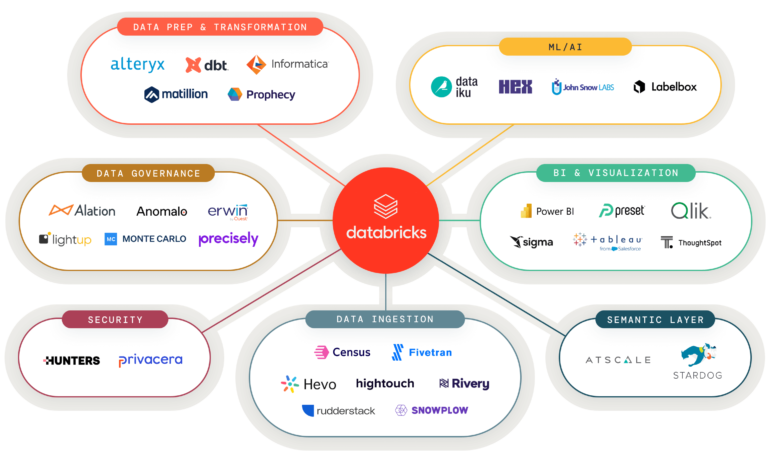
San Francisco, [April 2, 2025] – Databricks has taken a major step toward streamlining enterprise data integration with the general availability of Lakeflow Connect, its new low-code/no-code connector system. The initial release features preconfigured integrations with Salesforce and Workday, with plans to expand support to additional SaaS platforms, databases, and file sources in the coming months. Simplifying the Data Ingestion Challenge Data ingestion—the process of moving data from source systems into analytics environments—has long been a complex, resource-intensive task for enterprises. Traditional approaches require stitching together multiple tools (such as Apache Kafka or CDC solutions) and maintaining custom pipelines, often leading to scalability issues and high operational overhead. Lakeflow Connect aims to eliminate these pain points by providing: “Customers need this data, but before Lakeflow Connect, they were forced to rely on third-party tools that often failed at scale—or build custom solutions,” said Michael Armbrust, Distinguished Software Engineer at Databricks. “Now, ingestion is point-and-click within Databricks.” Why Salesforce and Workday First? The choice of initial connectors reflects the growing demand for real-time, structured data to power AI and generative AI applications. According to Kevin Petrie, Analyst at BARC U.S., more than 90% of AI leaders are experimenting with structured data, and nearly two-thirds use real-time feeds for model training. “Salesforce and Workday provide exactly the type of data needed for real-time ML and GenAI,” Petrie noted. “Databricks is smart to simplify access in this way.” Competitive Differentiation While other vendors offer connector solutions (e.g., Qlik’s Connector Factory), Lakeflow Connect stands out through: “Serverless compute is quietly important,” said Donald Farmer, Principal at TreeHive Strategy. “It’s not just about scalability—rapid startup times are critical for reducing pipeline latency.” The Road Ahead Databricks has already outlined plans to expand Lakeflow Connect with connectors for: Though the company hasn’t committed to a timeline, Armbrust hinted at upcoming announcements at the Data + AI Summit in June. Broader Vision: Democratizing Data Engineering Beyond ingestion, Databricks is focused on unifying the data engineering lifecycle. “Historically, you needed deep Spark or Scala expertise to build production-grade pipelines,” Armbrust said. “Now, we’re enabling SQL users—or even UI-only users—to achieve the same results.” Looking further ahead, Petrie suggested Databricks could enhance cross-team collaboration for agentic AI development, integrating Lakeflow with Mosaic AI and MLflow to bridge data, model, and application lifecycles. The Bottom LineLakeflow Connect marks a strategic move by Databricks to reduce friction in data pipelines—addressing a key bottleneck for enterprises scaling AI initiatives. As the connector ecosystem grows, it could further solidify Databricks’ position as an end-to-end platform for data and AI. For more details, visit Databricks.com. Key Takeaways:✅ Now Available: Salesforce & Workday connectors✅ Serverless, governed, and scalable ingestion✅ Future integrations with Google Analytics, ServiceNow, and more✅ June previews expected at Data + AI Summit Like Related Posts Who is Salesforce? Who is Salesforce? Here is their story in their own words. From our inception, we’ve proudly embraced the identity of Read more Salesforce Marketing Cloud Transactional Emails Salesforce Marketing Cloud Transactional Emails are immediate, automated, non-promotional messages crucial to business operations and customer satisfaction, such as order Read more Salesforce Unites Einstein Analytics with Financial CRM Salesforce has unveiled a comprehensive analytics solution tailored for wealth managers, home office professionals, and retail bankers, merging its Financial Read more AI-Driven Propensity Scores AI plays a crucial role in propensity score estimation as it can discern underlying patterns between treatments and confounding variables Read more

Read More
NetSuite Salesforce Collaboration

NetSuite Salesforce Collaboration

NetSuite Bets on Strategic Growth and Embraces Collaboration with Salesforce Growing on All Fronts At SuiteWorld 2024, the theme, “All Systems Grow,” reflected a pivotal moment for NetSuite. While the event lacked groundbreaking announcements, it showcased a fulfillment of past promises and a notable strategic shift toward openness and collaboration. Oracle and NetSuite are now welcoming competitors as partners, signaling a move toward interoperability that could redefine their market positioning. With over 40,000 customers, NetSuite continues its strong growth in the ERP space, particularly among SMBs. The company’s Q3 sales surged 20% year-over-year, underlining its momentum in the mid-market. Beyond traditional ERP capabilities, NetSuite’s expanded suite of solutions positions it as more than just an ERP provider. Delivering on AI Innovations While there were no splashy acquisitions, NetSuite made significant strides by rolling out 170 new modules and features, many leveraging AI. These enhancements blend predictive AI and generative AI to increase accuracy and user productivity. These updates aim to elevate both the platform’s quality and the efficiency of its users. Redwood Design: A Transformative User Experience NetSuite is adopting Oracle’s Redwood design language, promising a more intuitive and user-friendly interface. While Redwood is not new, its phased rollout within NetSuite is a significant step forward. Notable Additions: SuiteProcurement and Salesforce Integration SuiteProcurement: NetSuite’s new procurement automation solution integrates directly with Amazon Business and Staples Business Advantage, automating ordering, invoicing, approvals, and deliveries. Plans are underway to expand vendor support, offering broader applicability in the future. Salesforce Partnership: NetSuite’s most significant announcement was its strategic partnership with Salesforce, enabling real-time data exchange between the platforms. Evan Goldberg, NetSuite’s founder and EVP, explained the rationale:“It’s up to the customer to decide what software they want to use.” The partnership reflects NetSuite’s commitment to addressing customer needs, with more SaaS integrations expected in the future. Expanding Field Service Management (FSM) NetSuite’s Field Service Management (FSM) capabilities, acquired last year, are now better integrated into its platform. While development progress has been slower than anticipated, significant enhancements are expected in the coming year, leveraging Oracle technology to extend FSM’s functionality across industries. And Field Service Management is available in Salesforce, as well. Positioned for Continued SMB Growth NetSuite’s investments are yielding results, as demonstrated by its rapid growth and deeper integration of Oracle technology. The NetSuite Analytics Data Warehouse and Enterprise Performance Management are driving adoption among existing users, showcasing the platform’s scalability. NetSuite’s ability to quickly integrate Oracle updates into its infrastructure gives it a competitive edge, ensuring customers benefit from the latest innovations without delays. With its robust feature set, AI-powered tools, and strategic partnerships like the one with Salesforce, NetSuite has strengthened its position as a go-to ERP platform for SMBs. Its consistent 20% year-over-year growth indicates a bright future, making it an increasingly attractive option for mid-market businesses. Like Related Posts Who is Salesforce? Who is Salesforce? Here is their story in their own words. From our inception, we’ve proudly embraced the identity of Read more Salesforce Marketing Cloud Transactional Emails Salesforce Marketing Cloud Transactional Emails are immediate, automated, non-promotional messages crucial to business operations and customer satisfaction, such as order Read more Salesforce Unites Einstein Analytics with Financial CRM Salesforce has unveiled a comprehensive analytics solution tailored for wealth managers, home office professionals, and retail bankers, merging its Financial Read more AI-Driven Propensity Scores AI plays a crucial role in propensity score estimation as it can discern underlying patterns between treatments and confounding variables Read more

Read More
Account Planning With Salesforce

CRM Analytics Limits

When using CRM Analytics, keep these limits in mind. API Call Limits These limits apply to all supported editions. API Call Limit Maximum concurrent CRM Analytics API calls per org 100 Maximum CRM Analytics API calls per user per hour 10,000 Dataset Row Storage Allocations per License In Salesforce org, your total row storage limit for all registered datasets combined depends on your license combination. Each license allocates a different number of rows. Baseline Row Allocation Allocated Rows CRM Analytics Plus 10 billion CRM Analytics Growth 100 million Sales Analytics 25 million Service Analytics 25 million Event Monitoring Analytics 50 million B2B Marketing Analytics 25 million CRM Analytics for Financial Services Cloud 25 million CRM Analytics for Health Cloud 25 million Extra Data Rows license 100 million Your total row storage limit is a combination of your active licenses. For example: Because the CRM Analytics Plus license includes the Sales Analytics and Service Analytics licenses, your total row allocation remains 10 billion. Similarly, the CRM Analytics Growth license includes the Sales Analytics and the Service Analytics licenses, so your total row allocation remains 100 million. However, if you obtain another Sales Analytics or Services Analytics license, your row limit increases by 25 million for each added license. Dataset Row Limits Each dataset supports up to 2 billion rows. If your Salesforce org has less than 2 billion allocated rows, each dataset supports up to your org’s allocated rows. Dataset Field Limits Value Limit Maximum number of fields in a dataset 5,000 (including up to 1,000 date fields) Maximum number of decimal places for each value in a numeric field in a dataset (overflow limit) 17 decimal placesWhen a value exceeds the maximum number of decimal places, it overflows. Both 100,000,000,000,000,000 and 10,000,000,000,000,000.0 overflow because they use more than 17 decimal places. A number also overflows if it’s greater (or less) than the maximum (or minimum) supported value. 36,028,797,018,963,968 overflows because its value is greater than 36,028,797,018,963,967. -36,028,797,018,963,968 overflows because it’s less than -36,028,797,018,963,967.When a number overflows, the resulting behavior in CRM Analytics is unpredictable. Sometimes CRM Analytics throws an error. Sometimes it replaces a numeric value with a null value. And sometimes mathematical calculations, such as sums or averages, return incorrect results. Occasionally, CRM Analytics handles numbers up to 19 digits without overflowing because they are within the maximum value for a 64-bit signed integer (263 – 1). But numbers of these lengths aren’t guaranteed to process.As a best practice, stick with numbers that are 17 decimal places or fewer. If numbers that would overflow are necessary, setting lower precision and scale on the dataset containing the large numbers sometimes prevents overflow. If your org hasn’t enabled the handling of numeric values, the maximum number of decimal places for each value in a numeric field in a dataset is 16. All orgs created after Spring ’17 have Null Measure Handling enabled. Maximum value for each numeric field in a dataset, including decimal places 36,028,797,018,963,967For example, if three decimal places are used, the maximum value is 36,028,797,018,963.967 Minimum value for each numeric field in a dataset, including decimal places -36,028,797,018,963,968For example, if five decimal places are used, the minimum value is -36,028,797,018,9.63968 Maximum number of characters in a field 32,000 Data Sync Limits If you extract more than 100 objects in your dataflows, contact Salesforce Customer Support before you enable data sync. Value Limit Maximum number of concurrent data sync runs 3 Maximum number of objects that can be enabled for data sync, including local and remote objects 100 Maximum amount of time each data sync job can run for local objects 24 hours Maximum amount of time each data sync job can run for remote objects 12 hours Data sync limits for each job:Marketo Connector (Beta)NetSuite ConnectorZendesk Connector Up to 100,000 rows or 500 MB per object, whichever limit is reached first Data sync limits for each job:Amazon Athena ConnectorAWS RDS Oracle ConnectorDatabricks ConnectorGoogle Analytics ConnectorGoogle Analytics Core Reporting V4 ConnectorOracle Eloqua ConnectorSAP HANA Cloud ConnectorSAP HANA Connector Up to 10 million rows or 5 GB per object, whichever limit is reached first Data sync limits for each job*:AWS RDS Aurora MySQL ConnectorAWS RDS Aurora PostgresSQL ConnectorAWS RDS MariaDB ConnectorAWS RDS MySQL ConnectorAWS RDS PostgreSQL ConnectorAWS RDS SQL Server ConnectorGoogle Cloud Spanner ConnectorMicrosoft Azure Synapse Analytics ConnectorMicrosoft Dynamics CRM ConnectorSalesforce External ConnectorSalesforce Contacts Connector for Marketing Cloud EngagementSalesforce OAuth 2.0 Connector for Marketing Cloud Engagement Up to 20 million rows or 10 GB per object, whichever limit is reached first Data sync limits for each job*:Amazon Redshift ConnectorAmazon S3 ConnectorCustomer 360 Global Profile Data Connector (Beta)Google BigQuery for Legacy SQL ConnectorGoogle BigQuery Standard SQL ConnectorHeroku Postgres ConnectorMicrosoft Azure SQL Database ConnectorSnowflake Input Connector Up to 100 million rows or 50 GB per object, whichever limit is reached first *When using these connectors, Salesforce Government Cloud org data is protected in transit with advanced encryption and can sync up to 10 million rows or 5 GB for each connected object, whichever limit is reached first. Note When using a Salesforce local input connection, CRM Analytics bulk API usage doesn’t count towards Salesforce bulk API limits. Use of the external Salesforce connection and output connection impacts your limits. The dataflow submits a separate bulk API call to extract data from each Salesforce object. The dataflow uses a batch size of 100,000–250,000, depending on whether the dataflow or the bulk API chunks the data. As a result, to extract 1 million rows from an object, the dataflow creates 4–10 batches. Recipe and Dataflow Limits Important In Winter ‘24, recipe runs over 2 minutes are counted against the limit. Previously, the recipe run counts weren’t correct. For more information, see Known Issue – Recipe runs are not counting towards the daily maximum run limit. Value Limit Maximum amount of time each recipe or dataflow can run 48 hours Maximum number of recipes 1,000 Maximum number of dataflows definitions (with data sync enabled) 100 Maximum number of dataflow and recipe runs in a rolling

Read More
gettectonic.com