

Omniscript Archives - gettectonic.com - Page 2
Crucial Role of Data and Integration in AI at Dreamforce

Salesforce Data Integration

Salesforce Data Integration: A Comprehensive Guide Introduction Salesforce offers numerous tools to access, synchronize, and share data with external systems. However, selecting the right tool for your project is critical. This guide explores Salesforce’s data integration landscape, providing recommendations based on specific use cases—along with guidance on which tools to avoid. Scope of This Guide This decision guide focuses on data-level integrations involving Salesforce, covering: While these are just a subset of integration challenges faced by Salesforce Architects, future guides will address: Note: Many tools discussed here can also solve enterprise-wide integration challenges, but those use cases are beyond this guide’s scope. Key Takeaways Common Considerations for Choosing Data Integration Tools Before selecting a tool, evaluate these key factors: Area to Consider Key Questions Existing Tools & Landscape Is an ESB/ETL solution already in place? Are there compliance requirements? Are systems cloud or on-premise? Data Flow Does data need to move synchronously, asynchronously, or in batches? Should data be replicated? Which system is the source of truth? Implementation What’s the effort for non-Salesforce systems? Which teams will deliver integrations? What tools do they prefer? Maintainability Who will maintain the integration? What skills do they have (or need)? What’s the total cost of ownership? Data Volume Is it a large data volume (LDV) scenario? How frequent are bulk changes? What’s the impact of singleton updates? Limits Are complex transformations needed? Will data be combined from multiple sources? How often will integrations run per user? Overview of Data Integration Tools Tool Salesforce → External External → Salesforce Execution License Required? Apex Actions ✅ Yes ✅ Yes Server-side ❌ No Change Data Capture ✅ Yes ❌ No Server-side ❌ No* Custom Apex (REST/SOAP) ✅ Yes ✅ Yes Server-side ❌ No External Services ✅ Yes ❌ No Server-side ❌ No Generic Events (Legacy) ✅ Yes ❌ No Server-side ❌ No** Heroku Connect ✅ Yes ✅ Yes Server-side ✅ Yes MuleSoft Anypoint ✅ Yes ✅ Yes Server-side ✅ Yes MuleSoft Composer ✅ Yes ✅ Yes Server-side ✅ Yes Native Salesforce APIs ❌ No ✅ Yes Server-side ❌ No OmniScript ✅ Yes ✅ Yes Client-side**** ✅ Yes OmniStudio Integration ✅ Yes ✅ Yes Server-side ✅ Yes Outbound Messaging ⚠️ Not Ideal ❌ No Server-side ❌ No Platform Events ✅ Yes ✅ Yes Server-side ❌ No*** PushTopic (Legacy) ⚠️ Not Ideal ❌ No Server-side ❌ No** Salesforce Connect ✅ Yes ✅ Yes Server-side ✅ Yes ✅ = Recommended | ⚠️ = Possible but consider alternatives | ❌ = Not supported Notes: Other Tools (Not Primary Integration Solutions) While these tools support aspects of data movement, they should not be the foundation of an integration strategy: Final Recommendations By aligning the right tool with your use case, you can optimize performance, reduce technical debt, and ensure scalable integrations. Content updated April 2025. Like Related Posts Who is Salesforce? Who is Salesforce? Here is their story in their own words. From our inception, we’ve proudly embraced the identity of Read more Salesforce Marketing Cloud Transactional Emails Salesforce Marketing Cloud Transactional Emails are immediate, automated, non-promotional messages crucial to business operations and customer satisfaction, such as order Read more Salesforce Unites Einstein Analytics with Financial CRM Salesforce has unveiled a comprehensive analytics solution tailored for wealth managers, home office professionals, and retail bankers, merging its Financial Read more AI-Driven Propensity Scores AI plays a crucial role in propensity score estimation as it can discern underlying patterns between treatments and confounding variables Read more
Read More
Salesforce Document Generation

Generating Documents in Salesforce

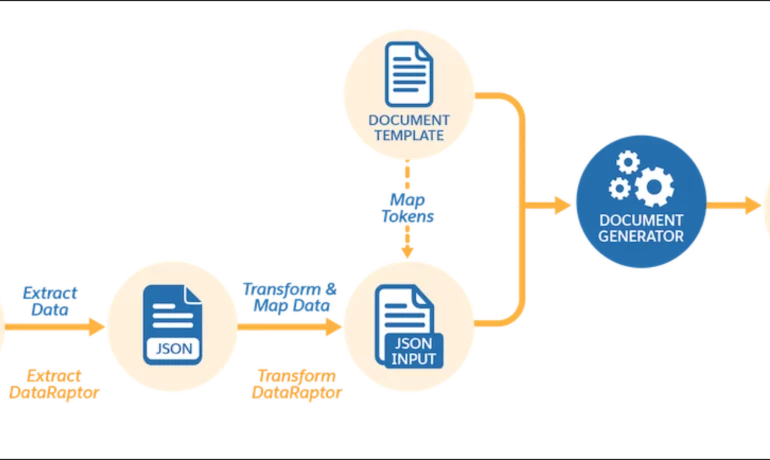
Salesforce document generation poses a challenge for businesses, given the intricacies of integration involved. Fortunately, a variety of tools are available for generating documents in Salesforce, and Tectonic is well-equipped to assist in their successful implementation. Salesforce Industries Document Generation empowers businesses to craft and manage accurate documents linked to standard Salesforce objects, encompassing contracts, opportunities, orders, quotes, and custom objects. For a more dynamic approach, Salesforce OmniStudio Document Generation facilitates the creation of documents using Microsoft Word and Microsoft PowerPoint templates. These templates can incorporate values from any JSON-based data within the text, including data sourced from various Salesforce objects. This versatile tool enables the generation of contracts, proposals, quotes, reports, non-disclosure agreements, service agreements, and more. Salesforce Industries Document Generation seamlessly integrates with Vlocity Insurance, Vlocity Health, communications, media, energy, utilities, government, and beyond. Vlocity Analytics, another valuable component, offers pre-built measurement tools that seamlessly integrate with Salesforce Reports, Dashboards, and Einstein. The Salesforce AppExchange boasts an extensive array of over 200 document generation tools. Your Salesforce partner can assist in selecting, installing, and implementing the most suitable options based on your business requirements. With Document Generation, you can generate contracts, proposals, quotes, reports, non-disclosure agreements, job offers, service agreements, and so on. You can generate documents using the specified sample client-side or server-side OmniScripts. You can also create your own OmniScripts by cloning and customizing the sample OmniScript to generate documents. Client-Side document generation is a synchronous process that results in a downloadable preview of the generated documents. You can generate documents from Microsoft Word (.docx), Microsoft PowerPoint (.pptx), and Web templates. These templates can include values from any JSON-based data in the text, including data from any Salesforce object. You can optionally convert the resulting documents to .pdf format. Server-Side document generation is available in both the OmniStudio Foundation and Salesforce Industries packages. Server-Side document generation is an asynchronous process that’s best for large and rendering-heavy documents and for document generation in batches. The Server-Side document generation service is secure and scalable and is hosted on Salesforce Hyperforce. The generated document is stored in your Salesforce org, and is attached to the object for which it’s generated. You can use Apex Classes, sample Integration Procedures, or a sample OmniScript to generate documents. Client-Side document generation supports Customer Community Plus, Customer Community, and Partner Community users to generate documents using client-side OmniScripts. Server-Side document generation supports Customer Community Plus, Customer Community, and Partner Community users to generate documents using the singleDocxServersideLwc server-side OmniScript. With the right licenses, Document Generation is available in the Salesforce Industries package. Metering measures resource utilization levels and throttling controls resource access and use based on defined rules. Metering measures the number of server-side documents that are generated by an org hourly and daily. The default hourly and daily limits for processing server-side document generation requests are 1,000 per org and 24,000 per org respectively. Throttling maintains consistency and resilience of the server-side document generation service by managing incoming server-side document generation requests from multiple orgs. Throttling can also prevent service degradation caused by high volume of requests at peak hours by blocking requests that exceed the default limits. The request details are saved in the Document Generation Processes entity. You can retrieve the blocked requests and later retry the server-side document generation. No matter what your specific document generation needs, Tectonic simplifies the process of getting your system up and running seamlessly, whether it’s through Salesforce Quickstarts or comprehensive implementation services. Content updated in 2February 2024, Shannan Hearne. Like1 Related Posts Who is Salesforce? Who is Salesforce? Here is their story in their own words. From our inception, we’ve proudly embraced the identity of Read more Salesforce Marketing Cloud Transactional Emails Salesforce Marketing Cloud Transactional Emails are immediate, automated, non-promotional messages crucial to business operations and customer satisfaction, such as order Read more Salesforce Unites Einstein Analytics with Financial CRM Salesforce has unveiled a comprehensive analytics solution tailored for wealth managers, home office professionals, and retail bankers, merging its Financial Read more AI-Driven Propensity Scores AI plays a crucial role in propensity score estimation as it can discern underlying patterns between treatments and confounding variables Read more

Read More
gettectonic.com