

Salesforce Inspections Feature Archives - gettectonic.com
Manage Customer Relationships with Experience Cloud

Prerequisites to Use Inspections Feature in Salesforce’s Public Sector Solutions

Configure and use the inspections feature in Salesforce’s public sector solution to evaluate regulatory code compliance and record violations through onsite visits. Configure and use assessments for complex inspections, investigations, evaluations, screenings, and audits, onsite or virtually. Salesforce solutions for public sector, government, and tribal nations has evolved! Inspections Prerequisites Available in: Lightning ExperienceAvailable in: Enterprise, Performance, Unlimited, and Developer Editions with Public Sector Solutions Before you set up inspections feature in Salesforce’s Public Sector Solution, complete the following prerequisites. Prepare your org before you start to configure regulatory codes, assessment indicators, inspectionand violation types, and other inspection entities. If you are using Salesforce for the Public Sector and want to learn more about the Inspections feature, contact Tectonic today. Public Sector Solutions provides two frameworks to help you to determine whether an applicant qualifies for a business license, permit, program, or benefit: inspections and assessments. Inspections are designed to evaluate regulatory compliance, such as whether a business meets fire or heath and safety regulations. Like Related Posts Salesforce Marketing Cloud Transactional Emails Salesforce Marketing Cloud Transactional Emails are immediate, automated, non-promotional messages crucial to business operations and customer satisfaction, such as order Read more Tectonic’s Successful Salesforce Track Record Salesforce Technology Services Integrator – Tectonic has successfully delivered Salesforce in a variety of industries including Public Sector, Hospitality, Manufacturing, Read more Asset Management Salesforce Can Salesforce do asset management? You can manage assets in Consumer Goods (desktop) and in the Consumer Goods offline mobile Read more Lookup Relationship in Salesforce What is Lookup relationship in Salesforce? Salesforce’s lookup relationships is a significant capability that allows users to connect two objects Read more
Read More
Salesforce Inspector Chrome Reloaded

Salesforce Inspector Chrome Reloaded

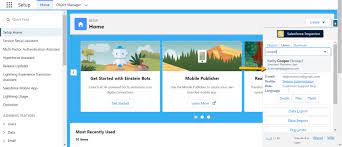
Salesforce Inspector Chrome Reloaded represents a significant advancement in the arsenal of tools available to Salesforce administrators and developers. As a Chrome extension, it seamlessly and easily integrates into the Salesforce user interface, offering a suite of productivity-enhancing features that streamline data and metadata inspection tasks. Developed as an evolution of the original Salesforce Inspector extension by Søren Krabbe, this reloaded version introduces several new functionalities designed to cater to the evolving needs of Salesforce professionals. One of the greatest features of Salesforce Inspector Chrome Reloaded is the Shortcut tab, which serves as a convenient hub for users to execute quick searches for specific flows, profiles, or permission sets. This functionality significantly reduces the time spent navigating through Salesforce menus, allowing users to locate essential components with ease. Additionally, the extension empowers administrators to manage the usage of Salesforce Inspector through a connected app, providing enhanced control over access and usage permissions. The introduction of the “Shortcut” tab adds another layer of efficiency to the user experience by providing instant access to key setup menu options. This intuitive interface redesign ensures that users can navigate through Salesforce configurations seamlessly, without the need for excessive clicks or searches. Moreover, the ability to copy Ids directly when exporting data and viewing all data pages further enhances the usability of the extension, allowing for smoother data management workflows. Furthermore, Salesforce Inspector Reloaded incorporates links to permission set assignments from the User tab, enabling administrators to efficiently manage user permissions and access levels. Additionally, the inclusion of new SObject setup links from the Object tab offers quick access to essential configuration settings, enhancing productivity and reducing the time required to perform administrative tasks. Beyond its user interface enhancements, Salesforce Inspector Chrome Reloaded also delivers an improved user experience through its redesigned interface. The updated design prioritizes clarity and accessibility, ensuring that users can navigate through the extension effortlessly and focus on their tasks without distractions. Overall, Salesforce Inspector Reloaded represents a significant leap forward in the realm of Salesforce productivity tools. By offering a comprehensive suite of features tailored to the needs of administrators and developers, this extension empowers users to maximize their efficiency and effectiveness when working with Salesforce data and metadata. Whether you’re a seasoned developer, a seasoned administrator, or a consultant, Salesforce Inspector Reloaded is poised to become an indispensable companion in your Salesforce journey, revolutionizing the way you interact with the platform and enhancing your productivity every step of the way. Like1 Related Posts Who is Salesforce? Who is Salesforce? Here is their story in their own words. From our inception, we’ve proudly embraced the identity of Read more Salesforce Marketing Cloud Transactional Emails Salesforce Marketing Cloud Transactional Emails are immediate, automated, non-promotional messages crucial to business operations and customer satisfaction, such as order Read more Salesforce Unites Einstein Analytics with Financial CRM Salesforce has unveiled a comprehensive analytics solution tailored for wealth managers, home office professionals, and retail bankers, merging its Financial Read more AI-Driven Propensity Scores AI plays a crucial role in propensity score estimation as it can discern underlying patterns between treatments and confounding variables Read more

Read More
gettectonic.com