
SSO Archives - gettectonic.com - Page 20
Causes of Data Loss

Causes of Data Loss

Amidst the unprecedented challenges faced by organizations worldwide, many are swiftly enacting their business continuity plans to mitigate operational disruptions. Unquestionably, a cornerstone of these plans is data protection and recovery, especially for companies reliant on Salesforce for critical data storage. The potential impact of data loss or compromise on business operations cannot be overstated and could reverberate throughout the entire organization. Despite the current global situation, it’s essential to recognize that the majority of Salesforce data loss incidents aren’t tied to major disasters. Instead, they often stem from everyday mishaps. The key is to anticipate these incidents and implement robust recovery strategies. Let’s examine the top four causes of data loss in Salesforce, as revealed by insights gathered from 2,000 Salesforce customers: Human Error: Integration Errors: Migration Errors: Bad Code: The repercussions of data loss within an organization are far-reaching, encompassing increased labor costs, reputational damage, revenue loss, and compliance fines. Moreover, the longer Salesforce data remains inaccessible, the greater the risk and costs associated with data loss. To safeguard against such risks, a comprehensive backup and recovery solution is imperative. While native options like the Recycle Bin or Weekly Export offer limited capabilities, a proactive approach, such as leveraging Salesforce AppExchange partner solutions like Own, significantly enhances data protection and recovery readiness. In conclusion, while Salesforce ensures robust platform security and availability, data protection ultimately rests with the end user. As Salesforce discontinues its last-resort data recovery service, organizations must prioritize proactive backup and recovery practices to safeguard critical data and maintain business continuity effectively. Explore comprehensive solutions like Own to bolster your data protection efforts and mitigate the impact of potential data loss incidents. Like Related Posts Who is Salesforce? Who is Salesforce? Here is their story in their own words. From our inception, we’ve proudly embraced the identity of Read more Salesforce Marketing Cloud Transactional Emails Salesforce Marketing Cloud Transactional Emails are immediate, automated, non-promotional messages crucial to business operations and customer satisfaction, such as order Read more Salesforce Unites Einstein Analytics with Financial CRM Salesforce has unveiled a comprehensive analytics solution tailored for wealth managers, home office professionals, and retail bankers, merging its Financial Read more AI-Driven Propensity Scores AI plays a crucial role in propensity score estimation as it can discern underlying patterns between treatments and confounding variables Read more

Read More
Salesforce Contact Key

What is the Contact Key in Salesforce?

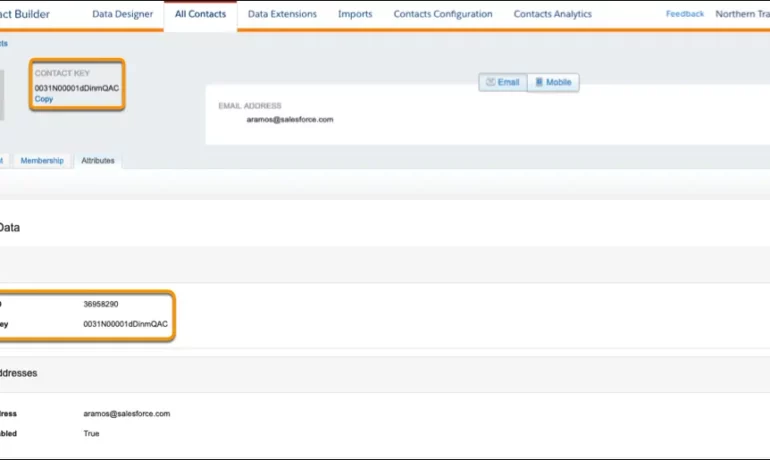
The contact key in Salesforce, also known as a subscriber key, is a unique identifier for a contact in Marketing Cloud MobilePush. Use this value to associate cross-channel addresses and subscriptions for a single contact. You can use the same key for a contact across multiple channels, such as email, SMS, and push messaging. What are contact keys? An immutable object that stores information about a single contact, such as the contact’s first name, phone numbers, and addresses. What is a Salesforce Subscriber key? A subscriber key is a text field that contains a value that uniquely identifies a subscriber in your Marketing Cloud account. A subscriber key is limited to 254 English characters. Avoid using email addresses as subscriber keys. What is the difference between subscriber key and contact key? This key is used to identify a single person across multiple channels inside of Marketing Cloud. In Email Studio, that key is called the “Subscriber Key”. In other channels, such as Mobile Connect or Mobile Push, that value is called “Contact Key”. What is the difference between contacts and subscribers? A subscriber in SFMC primarily represents an individual’s email communication preferences and is associated with email campaigns, while a contact represents a broader customer profile that includes information beyond email, allowing you to engage with customers across various channels. What is the difference between contact ID and contact key? The Contact Key gives you this ability and consistence. Existence of the contact key gives you the consistence of sending messages thru multiple channels and identify your contacts. Email and Text Message channels in our case. Contact ID is a unique number for your contacts in Salesforce Marketing Cloud. What is a subscriber key in Marketing Cloud? A subscriber is a person who has opted to receive communications from your organization. You can track information about subscribers using profile and preference attributes. Use the subscriber key to identify your subscribers in Marketing Cloud. Create lists or data extensions to store your subscribers. What is the difference between contact and subscriber in Marketing Cloud? Key Differences: Purpose: Contacts store customer data and facilitate segmentation and personalization efforts. Subscribers represent individuals who have subscribed to receive communications from your organization. Primary key is  a column or set of columns that uniquely identifies the record in the table. When a primary key is defined using multiple columns, the data from each column is used to determine whether a record/row is unique. Like Related Posts Who is Salesforce? Who is Salesforce? Here is their story in their own words. From our inception, we’ve proudly embraced the identity of Read more Salesforce Marketing Cloud Transactional Emails Salesforce Marketing Cloud Transactional Emails are immediate, automated, non-promotional messages crucial to business operations and customer satisfaction, such as order Read more Salesforce Unites Einstein Analytics with Financial CRM Salesforce has unveiled a comprehensive analytics solution tailored for wealth managers, home office professionals, and retail bankers, merging its Financial Read more AI-Driven Propensity Scores AI plays a crucial role in propensity score estimation as it can discern underlying patterns between treatments and confounding variables Read more

Read More
Salesforce Supports Babies and Their Families

Set Up Record Alerts

Set up the components required for Record Alerts, including OmniStudio FlexCard components and integration procedures, custom severity values, and alert categories. Like Related Posts Who is Salesforce? Who is Salesforce? Here is their story in their own words. From our inception, we’ve proudly embraced the identity of Read more Salesforce Marketing Cloud Transactional Emails Salesforce Marketing Cloud Transactional Emails are immediate, automated, non-promotional messages crucial to business operations and customer satisfaction, such as order Read more Salesforce Unites Einstein Analytics with Financial CRM Salesforce has unveiled a comprehensive analytics solution tailored for wealth managers, home office professionals, and retail bankers, merging its Financial Read more AI-Driven Propensity Scores AI plays a crucial role in propensity score estimation as it can discern underlying patterns between treatments and confounding variables Read more
Read More
Salesforce Objects

Lookup Relationship in Salesforce

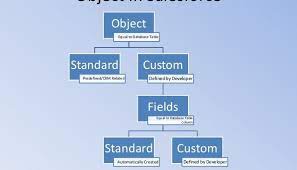
What is Lookup relationship in Salesforce? Salesforce’s lookup relationships is a significant capability that allows users to connect two objects and establish a parent-child relationship between them. To effectively manage records, this feature is essential for organizing your data. What are the different types of lookup relationships in Salesforce? A Lookup relationship is a type of relationship that simply joins two things together such that you may “look up” one object using the associated elements on another object. There are two types of lookup relationships in salesforce that is: one-to-one and one-to-many. A one-to-one relationship might be a contact related to an account. A one-to-many relationship might be locations related to an account. What does a lookup relationship do? With a lookup relationship, you can: Link two different objects. Link an object with itself (except for the user object; see the Hierarchical section in this topic). For example, link a custom object called Bug with itself to show how two different bugs are related to the same problem. What is the basic difference between lookup relationship and master detail relationship? It does not depend on any other objects, whereas a master-detail relationship has an association with other records. On the other hand, the lookup relationship is just a reference. It can be even blank or NULL. In the database, we can pull the data from particular fields based on the reference keys easily. How many Lookup relationships are allowed in an object in Salesforce? You can have a maximum of 40 lookups on an object. You can have a maximum of two master details on an object. No cascade delete. How does lookup work in Salesforce? Lookup fields appear with the search icon on record edit pages. Clicking the icon opens a lookup search dialog that allows you to search for the record that you want to associate with the record you’re editing. There are two main types of lookups: standard and enhanced. Like Related Posts Who is Salesforce? Who is Salesforce? Here is their story in their own words. From our inception, we’ve proudly embraced the identity of Read more Salesforce Marketing Cloud Transactional Emails Salesforce Marketing Cloud Transactional Emails are immediate, automated, non-promotional messages crucial to business operations and customer satisfaction, such as order Read more Salesforce Unites Einstein Analytics with Financial CRM Salesforce has unveiled a comprehensive analytics solution tailored for wealth managers, home office professionals, and retail bankers, merging its Financial Read more AI-Driven Propensity Scores AI plays a crucial role in propensity score estimation as it can discern underlying patterns between treatments and confounding variables Read more

Read More
salesforce asset management

Asset Management Salesforce

Can Salesforce do asset management? You can manage assets in Consumer Goods (desktop) and in the Consumer Goods offline mobile app in Salesforce. Let’s understand the process in detail. Create Asset Templates and Asset Types: Before you create assets, ensure that admins have created asset templates and asset types. Assets are items, such as refrigerators or freezers, that you place at a customer location (retail store) to increase your sales. Assets are also items you use in your business such as vehicles or computers. As an asset’s owner, you’re responsible for the maintenance, repair, or any other services required for the asset. Managing assets efficiently can help reduce customer complaints and, in turn, increase your brand value. By actively tracking your assets’ conditions, you can budget better, reduce losses, and ensure employee safety. What is the use of asset object in Salesforce? So, Assets are used quite frequently by sales, customer service in your back office. Assets are a standard object. It comes out-of-the-box with Salesforce. And being a standard object we can add custom fields, validation rules, record types, multiple page layouts. How do I create an asset for a product in Salesforce? Create an Asset What is the asset state period in Salesforce? An asset state period represents a time span when an asset has the same quantity, amount, and monthly recurring revenue (MRR). An asset has as many asset state periods as there are changes to it (asset actions) during its lifecycle. The dashboard and related pages show the current asset state period. What is the difference between subscription and asset in Salesforce? Use subscriptions to keep records of subscription products you’ve quoted or sold. Use assets to keep records of stand-alone products you’ve quoted or sold. You can use these records later to manage amendments and renewals to your opportunities and orders. How do I enable assets in Salesforce? Enable Asset Scheduling in Salesforce Scheduler How do I create an asset in Salesforce CPQ? Salesforce CPQ creates assets when you click Contracted on an opportunity or order. The asset creation process varies based on your account’s renewal model and the value of the asset conversion field on the product you’re contracting. How do you renew assets in Salesforce CPQ? Select the assets you want to renew, and then click Renew. Salesforce CPQ creates a renewal quote, associates it with a renewal opportunity, and opens the quote line editor. Edit the quantities of the assets from your original quote as needed. You can also add new products. What is an asset state? Asset State denotes the different states of assets in the organization such as assets in Use, In Store, Expired and so on. Apart from the default asset states, you can create custom ones. You can also enable or disable ownership and scan for custom asset states you create. Note that Salesforce also has a Digital Asset Management (DAM) capability. Where is asset library in Salesforce? To view asset files in Files home, select Libraries and then select Asset Library . To view and edit asset files in Setup, enter Asset Files in the Quick Find box, then select Asset Files. For more information on Salesforce Asset Management, contact Tectonic today. Like1 Related Posts Who is Salesforce? Who is Salesforce? Here is their story in their own words. From our inception, we’ve proudly embraced the identity of Read more Salesforce Marketing Cloud Transactional Emails Salesforce Marketing Cloud Transactional Emails are immediate, automated, non-promotional messages crucial to business operations and customer satisfaction, such as order Read more Salesforce Unites Einstein Analytics with Financial CRM Salesforce has unveiled a comprehensive analytics solution tailored for wealth managers, home office professionals, and retail bankers, merging its Financial Read more AI-Driven Propensity Scores AI plays a crucial role in propensity score estimation as it can discern underlying patterns between treatments and confounding variables Read more
Read More
Salesforce

Who is Salesforce?

Who is Salesforce? Here is their story in their own words. From our inception, we’ve proudly embraced the identity of a customer-centric company. Since the very day we opened our doors, customer focus has been the guiding force behind every decision we make. It’s the catalyst for our growth and the driving factor behind our customers’ success. Our commitment involves developing technologies, fostering partnerships, and building communities that enable companies to establish profound connections with their customers, transforming every business into a customer-centric entity. While the world evolves, our unwavering commitment to customer focus remains constant. New technologies, social trends, and immediate priorities may emerge, but the essence of the customer—discerning, demanding, and eager to be impressed—endures. Our mission is to assist you in meeting your customers where they are, fostering unwavering loyalty to your company through thick and thin. Our role is to construct bridges between companies and customers, recognizing that meaningful connections are the linchpin of business success. We are dedicated to delivering on this mission. Empowering every department to prioritize customers is our goal, facilitated by Customer 360—the world’s leading CRM. We provide a platform where every team member can access a unified source of truth, enhancing collaboration with integrated capabilities that facilitate crucial conversations and decisions where they matter most. With Tableau, we empower companies to unearth profound insights and take data-driven actions to better serve their customers. Every product in our portfolio plays a pivotal role in establishing connections that drive success, with the potential to channel that success into positive change. HISTORY In 1999, Salesforce founders launched a revolutionary customer relationship management (CRM) system from a small San Francisco apartment. Their groundbreaking approach involved hosting all software and critical customer data on the internet, pioneering the “software as a service” (SaaS) model that quickly spread across the tech industry. Cultivating Trust Early adopters took a leap of faith in embracing our cloud-based model, and trust became a cornerstone. Over the decades, our product has evolved, becoming an essential service for some of the world’s most significant businesses, governments, and organizations. Trust and relationships have become invaluable commodities. Core Values Our core values drive our actions and unite us as a company: This content was updated in 2023. Like Related Posts Salesforce Marketing Cloud Transactional Emails Salesforce Marketing Cloud Transactional Emails are immediate, automated, non-promotional messages crucial to business operations and customer satisfaction, such as order Read more Salesforce Unites Einstein Analytics with Financial CRM Salesforce has unveiled a comprehensive analytics solution tailored for wealth managers, home office professionals, and retail bankers, merging its Financial Read more AI-Driven Propensity Scores AI plays a crucial role in propensity score estimation as it can discern underlying patterns between treatments and confounding variables Read more Tectonic’s Successful Salesforce Track Record Salesforce Technology Services Integrator – Tectonic has successfully delivered Salesforce in a variety of industries including Public Sector, Hospitality, Manufacturing, Read more

Read More
gettectonic.com