
15Feb
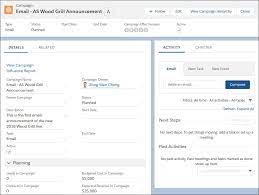
Set Up Campaigns in Salesforce
A Salesforce Campaign is a feature that tracks opportunities and leads associated with your marketing initiatives.
A Salesforce Campaign is a feature that tracks opportunities and leads associated with your marketing initiatives.
Salesforce Marketing Cloud stands out as a comprehensive solution for digital marketers seeking to elevate their strategies and drive sales. With its array of features, platforms, and products, Marketing Cloud offers unparalleled benefits and competitive advantage in the market landscape.

Tectonic, as your Salesforce implementation partner, ensures a tailored Salesforce solution aligned with your business needs. Through a proprietary discovery process, we customize a solution that encompasses essential elements of your business model while eliminating unnecessary components and technical debt.
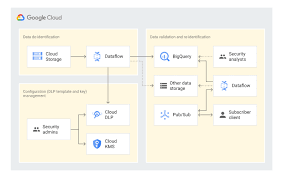
Using Google Cloud Data Loss Prevention with Salesforce for Sensitive Data Handling This insight discusses the transition from detecting and classifying sensitive data to preventing data loss using Google Cloud Data Loss Prevention (DLP). Sensitive Information De-identification for Salesforce is used as the data source to demonstrate how personal, health, credential, and financial information can be de-identified in unstructured data in near real-time. Overview of Google Cloud DLP Google Cloud DLP is a fully managed service designed to help discover, classify, and protect sensitive data. It easily transitions from detection to prevention by offering services that mask sensitive information and measure re-identification risk. Objective The goal was to demonstrate the ability to redact sensitive information in unstructured data at scale. Specifically, it aimed to determine whether sensitive data, such as credit card numbers, tax file numbers, and health care numbers, entered into Salesforce communications (Emails, Files, and Chatter) could be detected and redacted. Constraints Tested De-identifying Data with Google Cloud DLP API Instead of detailing the setup, this section focuses on the key areas of design. Google Design Decisions Supporting Disparate Data Sources with Multiple Integration Patterns and Redundant Design Salesforce Data Source De-identification targets include email addresses, Australian Medicare card numbers, GCP API keys, passwords, and credit card numbers. Credit card numbers are masked with asterisks, while other sensitive data is replaced with information types for readability (e.g., jane@secretemail.com becomes [redacted-email-address]). Sample Requests to Google De-identification Service JSON Structure to De-identify Text Using Google Cloud DLP API jsonCopy code{ // JSON structure } JSON Structure to De-identify Images Using Google Cloud DLP API jsonCopy code{ // JSON structure } Salesforce Design Decisions Redundancy and Batch Processing A scheduled batch job allows for recovery by polling unprocessed records. To handle large data volumes (e.g., 360,000 records over 5 days), the Salesforce BULK API is used to process queries and updates in large batch sizes, reducing the number of API calls. Sensitive Information De-identification Google Cloud Data Loss Prevention allows detecting and protecting assets with sensitive information, supporting a wide range of use cases across an enterprise. Proven Capabilities: Considerations and Lessons Learned Enhanced Email: Redacting tasks and EmailMessage records, handling read-only EmailMessage records by deleting and recreating them. Files: The architecture assumes files with sensitive data can be deleted and replaced with redacted versions. Audit Fields: Ensure setting CreatedDate and LastModifiedDate fields using original record dates. Field History Tracking: Avoid tracking fields intended for de-identification, tracking shadow fields instead. Image De-identification: Limited to JPEG, BMP, and PNG formats, with DOCX and PDF not yet supported. Like Related Posts Who is Salesforce? Who is Salesforce? Here is their story in their own words. From our inception, we’ve proudly embraced the identity of Read more Salesforce Marketing Cloud Transactional Emails Salesforce Marketing Cloud Transactional Emails are immediate, automated, non-promotional messages crucial to business operations and customer satisfaction, such as order Read more Salesforce Unites Einstein Analytics with Financial CRM Salesforce has unveiled a comprehensive analytics solution tailored for wealth managers, home office professionals, and retail bankers, merging its Financial Read more AI-Driven Propensity Scores AI plays a crucial role in propensity score estimation as it can discern underlying patterns between treatments and confounding variables Read more

What is a campaign in Salesforce Marketing Cloud? Campaigns help organize your marketing plan and assets. Plus, when you set up your campaign records effectively, they contain valuable data that you can use to optimize future efforts. What are campaigns in Salesforce Marketing Cloud for? A Salesforce Campaign in Marketing Cloud is a group of Leads and Contacts exposed to specific marketing communication(s). It stores essential performance metrics and means salespeople can quickly see the customers and prospects that received marketing activity. How do I send a Salesforce campaign from Marketing Cloud? In Marketing Cloud > Email Studio > Overview, open the email that you want to send and click ‘Send’ Select a ‘Send Classification’ then click ‘Next’ In the left pane, select ‘Salesforce Campaigns’ and then type the name of the desired campaign in the ‘Search’ field. Create a Marketing Cloud Campaign Why use campaigns in marketing cloud? Marketing Cloud Campaigns provide a way of grouping similar emails together. That way, Campaigns can be used in Datorama Reporting to present data for certain emails. What is campaign object in Salesforce? The Campaign object contains all the settings associated with how campaign records appear, the actions that users can take on campaigns, field access, and more. Create a campaign in the Campaigns app. Use tags in Marketing Cloud Engagement to categorize campaigns by any criteria, such as geography, marketing tactic, and product line. Where are my old Campaigns? I don’t see them on the campaign Overview tab.Campaigns that contain an email that has been sent automatically have their status set to Deployed. By default, the Overview tab only shows Campaigns with a status of In Process. To view older campaigns that have a status of Deployed, simply adjust the filter in the upper left.Setting the campaign status to Deployed now happens automatically when associated emails are sent. This feature was enabled in January 2014. Content updated January 2024. Like3 Related Posts Who is Salesforce? Who is Salesforce? Here is their story in their own words. From our inception, we’ve proudly embraced the identity of Read more Salesforce Marketing Cloud Transactional Emails Salesforce Marketing Cloud Transactional Emails are immediate, automated, non-promotional messages crucial to business operations and customer satisfaction, such as order Read more Salesforce Unites Einstein Analytics with Financial CRM Salesforce has unveiled a comprehensive analytics solution tailored for wealth managers, home office professionals, and retail bankers, merging its Financial Read more AI-Driven Propensity Scores AI plays a crucial role in propensity score estimation as it can discern underlying patterns between treatments and confounding variables Read more
Vaccine Cloud for Providers helps to connect people with thousands of vaccination sites. A scalable workflow simplifies vaccine administration. Vaccine Cloud was built to play a central role in connecting vaccines to people equitably and efficiently. Vaccine Cloud will help health authorities, healthcare providers, and organizations more safely and efficiently manage vaccine programs at scale. With Vaccine Cloud, customers will be able to design, build, integrate, and manage their vaccine programs end-to-end, with a platform that is trusted, flexible, and can be deployed quickly. Vaccine Cloud provides solutions like Health Command Center, Vaccine Inventory Management, Vaccination Appointment Scheduling, Clinical Vaccine Administration, Vaccination Outcome Monitoring, Public Health Notifications, and Digital Health Credentials to help customers build and scale their vaccine administration management capabilities to address the next phase of this global pandemic. Work.com for Vaccines has now become Vaccine Cloud. Work.com for Vaccines was developed and launched to support public sector customers and their vaccination management needs. Work.com for Vaccines was critical in helping governments and public health agencies scale vaccine management and distribution as vaccines were waiting to be approved for use around the world. As authorized COVID-19 vaccines have become available, there is shifting demand for vaccine management technology that can address all the needs of customers at scale, not just across public sector but also among healthcare providers, retail pharmacies, businesses, nonprofits, educational institutions, and other organizations. Vaccine Cloud is our solution to address these growing needs across industries and organizations. Vaccine Cloud is a set of solutions aimed at addressing a variety of challenges that governments, healthcare providers and employers will face for vaccine administration. Vaccine Cloud includes capabilities across the Salesforce Customer 360 portfolio including technology powered by Tableau and MuleSoft that can be leveraged by our AppExchange ecosystem of partners to support vaccine administration needs, including: Salesforce has implemented technical and administrative security measures to protect our services and our customers’ data. We strongly encourage customers to follow security best practices and use available tools to strengthen the security of their Salesforce instance. Security does not start and end with Salesforce — it is a trusted partnership with our customers. Salesforce offers our customers controllable features that permit them to configure the security settings of their respective instances as they deem appropriate for the sensitivity of their data. Customers can implement features such as field-level security, profiles and permission sets, two-factor authentication, and IP whitelisting. For more information on the application security features Salesforce provides, please refer to this help article on Protecting Your Salesforce Organization. Salesforce designs products with privacy in mind, so that our products not only comply with our own legal obligations, but also can be used by our customers while they comply with their own legal obligations. Compliance is always a shared partnership between Salesforce and its customers, meaning that while Salesforce commits to complying with its own obligations, customers are responsible for ensuring that their use of our products is appropriate for their own legal requirements. To help customers meet their compliance goals, we have created a number of dedicated resources for customers to learn more about their obligations, such as Salesforce’s privacy website, which includes FAQs on local and industry-specific privacy laws, and additional resources, such as Data Protection Impact Assessments, to help enable customer success. Being a trusted advisor to our customers is a top priority for Salesforce. However, it remains the responsibility of each customer to get their own legal advice when implementing and using Salesforce products, including Work.com. It is important for customers to take into account their own particular use cases to ensure compliance with local healthcare laws, certification requirements, and any other applicable laws or guidance. Vaccine Cloud helps public health authorities, healthcare providers, and nonprofits quickly scale vaccine operations, from recipient registration and scheduling to inventory management and public health outreach. San Francisco — January 27, 2021 — Salesforce, [NYSE: CRM], the global leader in CRM, today announced Vaccine Cloud, technology to help government agencies, healthcare organizations, businesses, nonprofits and educational institutions more rapidly, safely and efficiently deploy and manage their vaccine programs. Today, international, federal, state and local agencies, healthcare providers and nonprofits worldwide are using Salesforce technology specifically for vaccine administration, including Northwell Health, Illinois’ Lake County, University of Massachusetts Amherst, Gavi, the Vaccine Alliance and more. Now that safe and effective COVID-19 vaccines are available, every country, state and city is rapidly establishing vaccination programs to get shots in the arms of billions of people. However, many government agencies and healthcare organizations don’t have the technology infrastructure in place to handle the complexity, speed and scale necessary for vaccine administration, such as inventory and logistics management, getting people registered and scheduled for their vaccines, and recipient outreach and vaccine outcome monitoring. Governments are also partnering with private sector companies to help manage this mass vaccination effort, and these businesses need the same technology infrastructure to help deliver safe, efficient and effective vaccine administrations and programs. “The biggest challenge the world faces right now is orchestrating the distribution of billions of vaccine doses. Technology can play a critical role in ensuring it’s done efficiently, effectively, and equitably,” said Bret Taylor, President and COO of Salesforce. “We’re proud to be supporting organizations through their recovery and helping to protect people from the effects of COVID-19.” President Biden moves COVID-19 vaccine availability deadline for American adults to April 19; Salesforce Vaccine Cloud adds asynchronous bookings on more channels to meet surge. Salesforce on Thursday released a free update to Vaccine Cloud users that enables preregistration for COVID-19 appointments to meet a coming sign-up rush as most U.S. adults will be eligible for their shots April 19. The Salesforce vaccine distribution system, released in January, now can accept preregistrations for COVID-19 vaccinations. The site will notify people as appointments become available, and process them through a personalized, single-use link. The system also can create appointments and push notifications through multiple channels such as text and email, where before it was web-based. The asynchronous
There are two different methods to store and segment subscriber data within Marketing Cloud: Lists and Data Extensions. Lists have limited functionality, whereas Data Extensions provide full flexibility to store and relate subscriber information. Salesforce Marketing Cloud lists and data extensions are the primary ways to manage your subscriber data. What is the difference between data extension and list in Marketing Cloud? In short, lists are best used for specific email sends lacking advanced data or segmentation, whereas data extensions can be used for basically any type of communication or data management need. If the goal is to organize data with simplicity, go for lists. What is data extension in Marketing Cloud? A data extension is a table that contains your data. With Marketing Cloud Connect, push tracking data from the Marketing Cloud back to your Sales or Service Cloud orgs using Salesforce data extensions (SFDEs). Data extensions are also filterable. What are the data extension limits for Marketing Cloud? There is currently no limit for the amount of rows that can exist within a Data Extension. This means that, without Row Based Data Retention, a Data extension can grow exponentially without any real upper limit. What is a list in Marketing Cloud? Lists are a default way of storing data in Marketing Cloud Email Studio. You can set different attributes for your customers by using lists, which represent a collection of customers and provide a simple method for audience segmentation. These attributes are used to store the position of the customer in a given list. List can be configured to send a welcome email when a subscriber opts in, and can have double opt-in. You will also hear groups mentioned. Groups are smaller segments of a list. When to Opt for Marketing Cloud Data Extensions There are two primary scenarios that distinctly indicate the need for utilizing a data extension rather than a list: Fluctuating Values Over Time: Data Relationship via a 3rd Data Point: Like Related Posts Who is Salesforce? Who is Salesforce? Here is their story in their own words. From our inception, we’ve proudly embraced the identity of Read more Salesforce Marketing Cloud Transactional Emails Salesforce Marketing Cloud Transactional Emails are immediate, automated, non-promotional messages crucial to business operations and customer satisfaction, such as order Read more Salesforce Unites Einstein Analytics with Financial CRM Salesforce has unveiled a comprehensive analytics solution tailored for wealth managers, home office professionals, and retail bankers, merging its Financial Read more AI-Driven Propensity Scores AI plays a crucial role in propensity score estimation as it can discern underlying patterns between treatments and confounding variables Read more

Both Journey Builder and Automation Studio are robust tools available to Marketing Cloud customers. However, determining when to use each one and how they complement each other can sometimes be confusing. Automation Studio primarily focuses on ETL (Extract, Transform, Load) processes in marketing automation. It enables marketers to integrate data from various systems and automate tasks for segmentation and email campaign deployment. With Automation Studio, marketers can create highly advanced automated segmentation using data filters and queries, making it ideal for repetitive processes. It also allows users to execute SQL queries to retrieve and store data extension information. On the other hand, Journey Builder is a user-friendly, drag-and-drop tool designed for creating personalized, engagement-based customer journeys. It facilitates individualized, multi-channel communications at scale and provides goal and success measurements for monitoring and management. Unlike Automation, Journey Builder offers more opportunities for testing strategies and optimizing messages based on real-time engagement and interaction. One key difference between the two tools is that Journey Builder offers built-in goal reporting, providing real-time insights into campaign performance and customer engagement. Another distinction is that while Automation Studio relies on batch processing, Journey Builder allows individuals to enter journeys on an individual level, enabling real-time monitoring and action based on customer behavior. To decide which tool to use, consider the following questions: In many cases, it’s not a matter of choosing between Journey Builder vs Automation Studio but rather leveraging both tools together. By combining the powerful segmentation capabilities of Automation Studio with the personalized journey creation features of Journey Builder, marketers can deliver highly targeted and personalized messaging to their customers. Automation Studio is best for complex segmentation at scale, while Journey Builder guides customers through customized journeys based on Marketing Cloud data. Ultimately, using both tools together allows marketers to create seamless, personalized experiences for their customers. Like1 Related Posts Who is Salesforce? Who is Salesforce? Here is their story in their own words. From our inception, we’ve proudly embraced the identity of Read more Salesforce Marketing Cloud Transactional Emails Salesforce Marketing Cloud Transactional Emails are immediate, automated, non-promotional messages crucial to business operations and customer satisfaction, such as order Read more Salesforce Unites Einstein Analytics with Financial CRM Salesforce has unveiled a comprehensive analytics solution tailored for wealth managers, home office professionals, and retail bankers, merging its Financial Read more AI-Driven Propensity Scores AI plays a crucial role in propensity score estimation as it can discern underlying patterns between treatments and confounding variables Read more
Digital Business Support Systems (BSS) play a critical role in managing essential functions such as billing, rating and charging, customer experience, CRM, fulfillment, and revenue management within communications service providers (CSPs). However, the scope of a comprehensive digital BSS stack extends beyond these core functionalities to enable, monetize, and manage new digital services and partnerships. This transformation is particularly crucial for CSPs transitioning into digital service providers (DSPs), especially in anticipation of the 5G era. Let’s delve into how a robust digital BSS transformation solution can drive profitability. Anticipating Customer Churn Telecom companies can leverage advanced analytics across BSS, OSS, CRM, and other systems to extract actionable insights from customer usage, transactions, complaints, billing, and social media data. Predictive modeling identifies potential churners, enabling targeted offers, promotions, and services aimed at retaining and nurturing loyal customers. Personalizing Customer Experiences Today’s digital consumers expect personalized interactions. Implementing a digital BSS stack empowers telecom companies to capture and utilize interaction data for tailored customer engagements. Whether resolving network issues, rewarding loyalty, or suggesting relevant offers, AI and deep learning algorithms ensure real-time responses that enhance customer satisfaction and increase ARPU (Average Revenue Per User). Innovating Service Offerings Cloud-based services are increasingly popular among consumers and businesses. A robust BSS solution allows operators to seamlessly integrate these services with traditional offerings, fostering innovation and boosting ARPU. Driving Agility and Efficiency A cloud-based BSS solution enhances business agility to support emerging technologies such as IoT and M2M systems. It streamlines partnership management and product launches in complex market landscapes, enabling providers to swiftly seize new opportunities. Retaining Profitable Customers Customer acquisition costs highlight the importance of retaining profitable customers. Integrated BSS and OSS applications provide telecom companies with comprehensive insights into customer behavior, facilitating convergent billing, tiered pricing models, and targeted incentives that enhance customer loyalty and lifetime value. Boosting Average Revenue Per User (ARPU) Telecom companies strive to increase ARPU by introducing compelling new services. Integration of customer-facing BSS systems with service delivery mechanisms accelerates provisioning and enables the launch of innovative offerings that drive revenue growth. In conclusion, a modernized and robust BSS infrastructure is indispensable for telecom companies looking to differentiate their services, elevate customer experiences, and capitalize on evolving market dynamics. By harnessing advanced analytics, embracing cloud-based solutions, and integrating diverse systems, telcos can unlock growth opportunities and enhance profitability in a competitive marketplace. Like Related Posts Who is Salesforce? Who is Salesforce? Here is their story in their own words. From our inception, we’ve proudly embraced the identity of Read more Salesforce Marketing Cloud Transactional Emails Salesforce Marketing Cloud Transactional Emails are immediate, automated, non-promotional messages crucial to business operations and customer satisfaction, such as order Read more Salesforce Unites Einstein Analytics with Financial CRM Salesforce has unveiled a comprehensive analytics solution tailored for wealth managers, home office professionals, and retail bankers, merging its Financial Read more AI-Driven Propensity Scores AI plays a crucial role in propensity score estimation as it can discern underlying patterns between treatments and confounding variables Read more

Customers embark on a journey from initial discovery to becoming repeat buyers, progressing through seven essential sales pipeline stages: Throughout the sales pipeline stages, sales leaders can identify opportunities to better engage customers and enhance the likelihood of successful purchases. Contact Tectonic today to discover how Salesforce can help fill your sales pipeline. Like Related Posts Who is Salesforce? Who is Salesforce? Here is their story in their own words. From our inception, we’ve proudly embraced the identity of Read more Salesforce Marketing Cloud Transactional Emails Salesforce Marketing Cloud Transactional Emails are immediate, automated, non-promotional messages crucial to business operations and customer satisfaction, such as order Read more Salesforce Unites Einstein Analytics with Financial CRM Salesforce has unveiled a comprehensive analytics solution tailored for wealth managers, home office professionals, and retail bankers, merging its Financial Read more AI-Driven Propensity Scores AI plays a crucial role in propensity score estimation as it can discern underlying patterns between treatments and confounding variables Read more
Marketo Engage and Salesforce integration forms a seamless email marketing partnership, ensuring synchronization of your sales and marketing data. Marketo constantly syncs with Salesforce, operating throughout the day. The synchronization process involves periodic intervals with a 5-minute pause before resuming. During a single sync session, Marketo makes 25 API calls to check if your Salesforce objects need updating. This bidirectional sync between Salesforce and Marketo pertains exclusively to leads, contacts, and Salesforce campaigns. Any changes made in either Salesforce or Marketo in these categories are mirrored in both systems. However, all other syncs occur solely from Salesforce to Marketo. To sync a Marketo field to Salesforce, follow these steps: For optimal syncing between Salesforce and Marketo, adhere to best practices: Marketo and Salesforce Marketing Cloud catered to different marketer needs initially, with Marketo primarily designed for Business to Business (B2B) solutions and Marketing Cloud positioned as a Business to Consumer (B2C) platform. Integrating Marketo with Salesforce enhances the sales process, streamlining the work of the sales team to identify and channel leads more efficiently through the sales funnel. Marketo is one of many marketing automation platforms that can be integrated with Salesforce. Like1 Related Posts Who is Salesforce? Who is Salesforce? Here is their story in their own words. From our inception, we’ve proudly embraced the identity of Read more Salesforce Marketing Cloud Transactional Emails Salesforce Marketing Cloud Transactional Emails are immediate, automated, non-promotional messages crucial to business operations and customer satisfaction, such as order Read more Salesforce Unites Einstein Analytics with Financial CRM Salesforce has unveiled a comprehensive analytics solution tailored for wealth managers, home office professionals, and retail bankers, merging its Financial Read more AI-Driven Propensity Scores AI plays a crucial role in propensity score estimation as it can discern underlying patterns between treatments and confounding variables Read more

Einstein Automate is a robust end-to-end automation solution within Salesforce, offering increased productivity benefits for individuals, account executives, and businesses alike. A central element, Salesforce Flow, transforms business processes by facilitating seamless interactions for both customers and employees. The incorporation of Flow Builder ensures the creation of automated business processes is both easy and efficient, enabling streamlined enterprise-scale automation from testing to monitoring. With low to no code potential. Salesforce Flow distinguishes itself with user-friendly features, employing easy-to-use visual elements and reusable building blocks. Combined with Automate, enables the creation of large-scale automations within Salesforce. The solution bridges disconnected systems and integrates siloed data sources into a cohesive workflow, leading to improved customer experiences and enhanced business agility through guided interactions for the sales team. Sales reps are engaged in non-selling activities up to 66% of the work day. That’s totally no bueno. Get them back on track and shorten sales cycles with Einstein Automate. The introduction of Einstein Automate from Salesforce brings notable benefits. Studies reveal that automating manual processes with tools like Salesforce Flow and Automate saves employees four hours per week, enabling a shift of focus toward higher-value, deal closing tasks. Einstein Automate facilitates the automation of repetitive tasks, provides self-service portals, guides employee workflows, and activates intelligent recommendations for next-best actions on leads and accounts. The platform offers reusable building blocks, including logic, data, action, and screen components, which can be employed to construct business logic. Automate enables the creation of workflows across Salesforce and external systems, utilizing platform events, External Services, and MuleSoft. Screen flows can be designed to guide user interactions and collect user inputs. Einstein Automate streamlines process lifecycle management, encompassing low-code debugging, troubleshooting, performance monitoring, and usage analysis. Businesses can benefit from pre-built automation components and configure industry best practices through Salesforce’s AppExchange of pre-built solutions. One great feature is Einstein Automated Contacts. As a comprehensive add-on solution for Salesforce, Einstein Automate empowers businesses to improve productivity, efficiency, and customer experiences by seamlessly automating manual processes. For a deeper understanding of how Salesforce’s Einstein Automate and Flow can optimize your Salesforce instance, connect with Tectonic. We predict there are great things on the Salesforce road map for Einstein Automate and Flow. Content updated June 2025, Shannan Hearne. Like Related Posts Who is Salesforce? Who is Salesforce? Here is their story in their own words. From our inception, we’ve proudly embraced the identity of Read more Salesforce Marketing Cloud Transactional Emails Salesforce Marketing Cloud Transactional Emails are immediate, automated, non-promotional messages crucial to business operations and customer satisfaction, such as order Read more Salesforce Unites Einstein Analytics with Financial CRM Salesforce has unveiled a comprehensive analytics solution tailored for wealth managers, home office professionals, and retail bankers, merging its Financial Read more AI-Driven Propensity Scores AI plays a crucial role in propensity score estimation as it can discern underlying patterns between treatments and confounding variables Read more
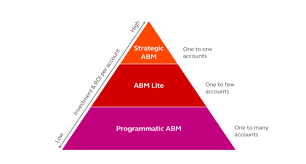
Account-based marketing (ABM) stands out as a highly effective B2B strategy concentrating on specific or key customers or accounts. Rather than casting a widespread net to generate leads for campaigns, ABM opts for personalized approaches to engage accounts uniquely, fostering trust and amplifying the lifetime value of customer relationships. ABM reaches beyond the confines of the marketing team, requiring close collaboration across marketing, sales, and service teams to target accounts effectively and ensure a seamless experience. Three distinct ABM programs—1-to-1, 1-to-few, and 1-to-many—allow flexibility aligned with specific business goals. To execute a winning ABM strategy, the essential components include a customer relationship management (CRM) solution and a marketing automation platform, delivering personalized and timely messages to designated accounts at optimal moments. Salesforce CRM, coupled with Salesforce Marketing Cloud or Salesforce Account Engagement, are robust toolsets for account-based marketing. Incorporating AI tools like Salesforce Einstein enhances the efficiency of identifying target accounts, offering valuable insights and a clear framework for engaging the most promising accounts. After pinpointing the desired accounts and comprehending their needs and preferences, these accounts can serve as templates to construct lookalike audiences for one-to-few or one-to-many ABM programs. At its very core, ABM revolves around being account-centric, placing your buyers at the focal point of each interaction. For businesses ready to embrace account-based marketing, Tectonic is ready to assist in tailoring your CRM and marketing automation platform. Offering optimization, implementation, and ongoing managed services for the Salesforce platform, Tectonic ensures a seamless integration of ABM into your business strategy. Contact us today. Like1 Related Posts Who is Salesforce? Who is Salesforce? Here is their story in their own words. From our inception, we’ve proudly embraced the identity of Read more Salesforce Marketing Cloud Transactional Emails Salesforce Marketing Cloud Transactional Emails are immediate, automated, non-promotional messages crucial to business operations and customer satisfaction, such as order Read more Salesforce Unites Einstein Analytics with Financial CRM Salesforce has unveiled a comprehensive analytics solution tailored for wealth managers, home office professionals, and retail bankers, merging its Financial Read more AI-Driven Propensity Scores AI plays a crucial role in propensity score estimation as it can discern underlying patterns between treatments and confounding variables Read more

Transform your system of record into a system of engagement to manage mission-critical programs effectively. Achieve superior long-term outcomes by incorporating apps that seamlessly connect EHR data, treatment plans, and patient preferences. Utilize top-tier commercial CRM capabilities while adhering to compliance standards such as FedRAMP, DoD IL2/4, SOC, and more. Ensure stakeholders have secure access to critical information on any device, allowing IT to focus on innovation and employees to engage with collaborative tools.

Marketing Data Sharing helps you restrict which Salesforce records sync to Pardot by defining rules based on specific criteria. For example, if you only want leads marked as “Marketable” to sync, MDS allows you to enforce that restriction.


