Google Drive Archives - gettectonic.com - Page 2
Government-Citizen Communication

Government-Citizen Communication

Engaging Citizens and Influencing Behavior: A Public Sector Strategy Engaging citizens and influencing their behavior to achieve mission-critical outcomes follows a model similar to the traditional marketing funnel used in the private sector. By adapting this approach, government communicators can drive tangible results that contribute to the overall well-being of society. Government-Citizen Communication. Public Sector Communication Objectives: In today’s digital age, citizens expect timely, personalized communication. To meet this demand, government agencies must deliver the right message through the right channels at the right time. A failure to do so risks reduced engagement, which can negatively affect the success of public programs. Expanding Audience Reach To maximize citizen engagement, it’s crucial to focus on reaching a broader audience rather than narrowing it. A key question for communicators and their teams to ask is: “How broad is our audience?” This is an essential aspect of the funnel that ensures wider reach and greater impact. Communication Methods Public sector communication often utilizes a mix of channels, including radio, newspapers, television, and social media, to connect with the public. Collaboration is vital in this sector, requiring effective communication tools to coordinate across teams, departments, and agencies. As technology evolves, new tools are enhancing how public servants communicate and collaborate. Technology-Driven Collaboration Tools Several communication and collaboration tools are reshaping how the public sector operates: Best Practices for Government-Citizen Communication To foster effective engagement, government agencies should implement the following best practices: Secure, Customizable Citizen Communication Solutions Governments can benefit from a secure, open-source communication tool tailored to public sector needs. Such solutions ensure compliance with data protection laws and foster trust between citizens and government institutions, enhancing public service delivery and digital engagement. Tectonic’s Conclusion For optimal citizen engagement, government communicators must focus on expanding their audience reach and utilizing advanced communication tools. In doing so, they can enhance collaboration, drive citizen involvement, and ensure the success of critical public programs. Like Related Posts Who is Salesforce? Who is Salesforce? Here is their story in their own words. From our inception, we’ve proudly embraced the identity of Read more Salesforce Marketing Cloud Transactional Emails Salesforce Marketing Cloud Transactional Emails are immediate, automated, non-promotional messages crucial to business operations and customer satisfaction, such as order Read more Salesforce Unites Einstein Analytics with Financial CRM Salesforce has unveiled a comprehensive analytics solution tailored for wealth managers, home office professionals, and retail bankers, merging its Financial Read more AI-Driven Propensity Scores AI plays a crucial role in propensity score estimation as it can discern underlying patterns between treatments and confounding variables Read more


Read More
Create a Salesforce Approval Process

Create a Salesforce Approval Process

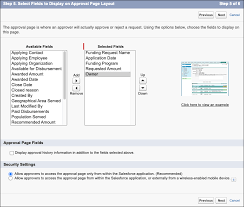
Streamlining Your Salesforce Approval Process: Top Options Create a Salesforce Approval Process – an essential for tasks such as: This insight explores the top methods for implementing a Salesforce approval process in your organization. Option 1: Manually Send Opportunities Over Email or Slack The classic approach is manually sending approval requests via email or Slack, starting with a simple “Hey, can you approve this?” message. This method can be effective if the volume of requests is low. Pros: Cons: Many businesses using this method eventually seek more efficient systems to avoid cluttered inboxes and disorganized processes. Option 2: Use a Google Sheet Another option is to manage the approval process through a Google Sheet. Sales reps and managers add new deal information to the sheet, which acts as a central repository for tracking approval statuses without email chains. Pros: Cons: The manual nature of this method often leads to abandonment, as it can slow down the sales workflow and burden reps with administrative tasks. Option 3: Salesforce Approvals Salesforce offers native approval functions, allowing users to create approval processes involving various stakeholders. Approvals can be managed via email or directly within Salesforce. Pros: Cons: While Salesforce Approvals improve upon manual methods, they still have limitations in notifying stakeholders and tracking responses efficiently. Option 4: Use Rattle Rattle is an automation tool that integrates Salesforce with Slack to streamline the approval process. Custom Slack alerts trigger when deal information in Salesforce changes, notifying sales managers of approval needs. Pros: Cons: Rattle offers a blend of accountability and speed, enabling sales reps to focus on clients while managers receive timely approval notifications and can make decisions quickly. Choosing the Best Option Now that we’ve reviewed several methods for implementing a Salesforce approval process, it’s time to determine the best fit for your organization. Consider the following steps: By selecting a dynamic approval process tailored to your needs, you’ll free up your sales team to focus on bringing in and closing more deals, enhancing overall productivity and efficiency. Like Related Posts Who is Salesforce? Who is Salesforce? Here is their story in their own words. From our inception, we’ve proudly embraced the identity of Read more Salesforce Marketing Cloud Transactional Emails Salesforce Marketing Cloud Transactional Emails are immediate, automated, non-promotional messages crucial to business operations and customer satisfaction, such as order Read more Salesforce Unites Einstein Analytics with Financial CRM Salesforce has unveiled a comprehensive analytics solution tailored for wealth managers, home office professionals, and retail bankers, merging its Financial Read more AI-Driven Propensity Scores AI plays a crucial role in propensity score estimation as it can discern underlying patterns between treatments and confounding variables Read more

Read More
Create Approval Process in Salesforce

Create Approval Process in Salesforce

Implementing a Salesforce Approval Process: Options and Considerations to Create Approval Process in Salesforce An approval process is necessary for: This insight explores top options for implementing a Salesforce approval process within your company. Option 1: Manual Email or Slack Notifications The classic approach involves emailing or using Slack to request approvals. It’s straightforward and free, making it accessible for teams handling fewer approval requests. Pros: Cons: Option 2: Google Sheets Integration Another method involves using Google Sheets to manage approvals. Sales reps and managers input deal details for approval and track status in a centralized document. Pros: Cons: The drawback of both methods is their manual nature and limited integration with Salesforce, which can hinder sales workflow efficiency and lead to approval delays. Option 3: Salesforce Approvals Salesforce provides a native approval functionality where users create processes (e.g., discount matrices) requiring multiple stakeholders to approve at designated levels. Pros: Cons: While Salesforce Approvals streamline the process compared to manual methods, they still rely on user actions for notifications and responses, lacking full automation. Choosing the Right Option Evaluate each method’s pros and cons to determine the best fit for your company’s needs. Consider: By establishing a dynamic approval process aligned with your business requirements, you can empower your sales team to focus more on client acquisition and less on administrative tasks. Choose wisely to optimize efficiency and decision-making within your organization. Like Related Posts Who is Salesforce? Who is Salesforce? Here is their story in their own words. From our inception, we’ve proudly embraced the identity of Read more Salesforce Marketing Cloud Transactional Emails Salesforce Marketing Cloud Transactional Emails are immediate, automated, non-promotional messages crucial to business operations and customer satisfaction, such as order Read more Salesforce Unites Einstein Analytics with Financial CRM Salesforce has unveiled a comprehensive analytics solution tailored for wealth managers, home office professionals, and retail bankers, merging its Financial Read more AI-Driven Propensity Scores AI plays a crucial role in propensity score estimation as it can discern underlying patterns between treatments and confounding variables Read more
Read More
Salesforce Google Drive Integration

Google Drive Integration with Salesforce

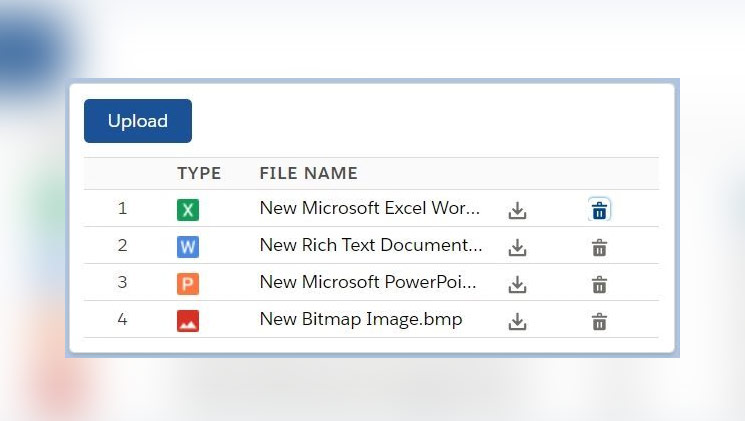
Maximize your company’s investment in both Salesforce and Google Drive by bringing your users’ collaborative documents directly to your Salesforce records! Google Drive integration with Salesforce is simple. As Salesforce analyzes data and generates reports, this integration proves beneficial with real-time updates, business process optimization, multi-level data security, increased storage, and reduced cost. The Salesforce AppExchange provides numerous connector options for joining Salesforce and Google Drive.  If you are torn in the selection or implementation process, contact Tectonic today. Quickly automate workflows with Salesforce and Google Drive using Zapier’s templates. CData Sync provides a straightforward way to continuously pipeline your Salesforce & Force.com data to any Database, Data Lake, or Data Warehouse, making it easily available to Analytics, Reporting, AI, and Machine Learning including Google Drive. Automate document management in Salesforce with XfilesPro. By integrating to your desired external cloud storage such as SharePoint, AWS S3, OneDrive, and Google Drive. Enjoy better collaboration, folder structures, large-volume file offloading, and more. One of many Google Drive integration to Salesforce available on the AppExchange. Integrate Google Drive & Salesforce to increase your team’s productivity. Link Google Drive files & folders to Salesforce records. Use Flow to create folders. Generate Google Docs, Sheets, Slides, MS Word, & PDFs from Salesforce data. Like Related Posts Who is Salesforce? Who is Salesforce? Here is their story in their own words. From our inception, we’ve proudly embraced the identity of Read more Salesforce Marketing Cloud Transactional Emails Salesforce Marketing Cloud Transactional Emails are immediate, automated, non-promotional messages crucial to business operations and customer satisfaction, such as order Read more Salesforce Unites Einstein Analytics with Financial CRM Salesforce has unveiled a comprehensive analytics solution tailored for wealth managers, home office professionals, and retail bankers, merging its Financial Read more AI-Driven Propensity Scores AI plays a crucial role in propensity score estimation as it can discern underlying patterns between treatments and confounding variables Read more
Read More
Salesforce and Google Calendar

Sync Google Calendar with Salesforce

Lightning Sync is specifically designed to synchronize only your primary Google Calendar with Salesforce. Verify with your administrator whether your sync configuration is configured to synchronize private events. Is there synchronization between Google Drive and Salesforce? Effortlessly associate Google Drive files and folders with Salesforce records for convenient access and sharing. Additionally, access and modify Google Drive files directly within Salesforce using the Drive Connect File Viewer. How does Salesforce collaborate with Google? Salesforce maintains its leadership position in business, philanthropy, and workplace satisfaction by leveraging Google Workspace for real-time collaboration among dispersed teams and partners. Salesforce stands out as the leading provider of Customer Relationship Management (CRM) software globally. Steps to sync Google Calendar with Salesforce: Can Google Calendar function as a CRM? No, but you can integrate your CRM system with Google Calendar. This integration allows you to add events from your calendar to a CRM task and vice versa, ensuring that your team stays informed about important company events. If you are interested in syncing Google Calendar or other Google tools to your Salesforce org, contact Tectonic today. Like1 Related Posts Who is Salesforce? Who is Salesforce? Here is their story in their own words. From our inception, we’ve proudly embraced the identity of Read more Salesforce Marketing Cloud Transactional Emails Salesforce Marketing Cloud Transactional Emails are immediate, automated, non-promotional messages crucial to business operations and customer satisfaction, such as order Read more Salesforce Unites Einstein Analytics with Financial CRM Salesforce has unveiled a comprehensive analytics solution tailored for wealth managers, home office professionals, and retail bankers, merging its Financial Read more AI-Driven Propensity Scores AI plays a crucial role in propensity score estimation as it can discern underlying patterns between treatments and confounding variables Read more
Read More
Salesforce Integration

Salesforce Integrations for Sales and Marketing Teams

First Understand Salesforce Integrations Salesforce integrations involve establishing seamless connections between Salesforce and diverse third-party applications. These applications range from marketing automation tools and customer service software to accounting programs. The purpose is to facilitate a smooth exchange of data, ultimately enhancing Salesforce’s overall functionality. Salesforce integrations for sales and marketing teams brings all the applications needed for the relationship with prospects into one place. Salesforce’s Integration Ecosystem While Salesforce boasts a robust integration ecosystem, featuring over 3,000 integrations available on its AppExchange marketplace. Users can leverage various integration approaches: Salesforce Integrations for Sales and Marketing While there’s no complete universal list of essential Salesforce integrations for sales and marketing, several widely-used integrations cater to diverse needs: No-code Data Automation Integrations: Analytics and Reporting Integrations: Email Marketing Automation Integration: Data Storage Integration: Communications Apps Integrations: Project Management Tools Integration: Account Management Integration: CRM Tools Integration: Helpdesk Integrations: Feedback Tools Integration: These integrations facilitate efficient data handling, analytics, communication, project management, and more within sales and marketing teams. Integrations for Sales and Marketing Tools Salesforce seamlessly integrates with various tools relevant to Sales and Marketing teams, including but not limited to: Salesforce Integration with Teams and Workday The Salesforce AppExchange Salesforce’s Role in Sales and Marketing Salesforce Marketing Cloud Salesforce and ERP Integration Digital Marketing and Salesforce Salesforce’s Role in Marketing Automation Content updated November 2023. Like Related Posts Who is Salesforce? Who is Salesforce? Here is their story in their own words. From our inception, we’ve proudly embraced the identity of Read more Salesforce Marketing Cloud Transactional Emails Salesforce Marketing Cloud Transactional Emails are immediate, automated, non-promotional messages crucial to business operations and customer satisfaction, such as order Read more Salesforce Unites Einstein Analytics with Financial CRM Salesforce has unveiled a comprehensive analytics solution tailored for wealth managers, home office professionals, and retail bankers, merging its Financial Read more AI-Driven Propensity Scores AI plays a crucial role in propensity score estimation as it can discern underlying patterns between treatments and confounding variables Read more

Read More
Salesforce Slack

What is Slack?

Chances are a co-worker has at least once offered to “Slack” you something—whether it’s a file, a work order, or a phone number. The first time I heard this phrase, I was concerned about potential physical harm, only to learn that “Slack” refers to a messaging application for businesses and much more.  This insight takes a deep dive into Salesforce’s collaborative tool. Slack is a messaging app for businesses that connects people to the information they need.  Many companies utilize Slack from Salesforce as a centralized hub for various purposes. From project collaboration to casual “water cooler” conversations. This is especially vital for remote teams spread across different locations and time zones. At Tectonic, we’ve integrated Slack channels for accounts and Salesforce tools. For projects, events, webinars, and training, fostering seamless communication. Slack is becoming increasingly popular for its compatibility with Salesforce and numerous applications, across diverse workplaces. As opposed to text messaging or emails, Slack is an efficient messaging app making it easier to communicate and organize conversations. To understand Slack, it’s helpful to distinguish between its two primary communication forms. Channels and direct messages (DMs). Slack channels are tailored by users to bring the right people together. By facilitating the sharing of information, files, thoughts, and project details. In contrast, direct messages are private, one-off conversations ideal for topics outside specific channels. Conversations within the channels are transparent and accessible to everyone, except for private channels, marked with a lock symbol. Direct messages, on the other hand, are suited for smaller, individual conversations. Starting a new conversation in the platform is as simple as clicking the compose button and drafting a message. It can be for a specific channel or individual. Mentioning a team member using @team-members-name ensures that they see your message and are notified when it is posted. Emojis Slack’s wide variety of emoji reactions add a fun element, with commonly used emojis like eyes or check marks indicating engagement or task completion. Custom emojis can be created for personalized use or to trigger automated workflows within your Salesforce project.  The eyes emoji, for example, typically means the message reader is taking at a look at whatever was referenced in the post.   Slack customization is a key aspect of its effectiveness. Updating your profile, integrating with your calendar for availability status, and setting relevant notifications. Utilizing shortcuts, apps, and integrations can enhance collaboration efficiency. Tectonic conducts a comprehensive discovery of your organization’s processes to recommend tailored ways this tool can boost your overall efficiency. Sharing files is easy, with seamless integration with popular file storage tools like Dropbox and Google Drive. Slack’s scheduling feature allows you to compose messages and schedule delivery at more appropriate times, making it a valuable organizational time management tool. Users can set their in and out of office times. Thus silencing notifications outside working hours. Slack also has a mobile app so users can stay connected from anywhere. Chat-based Collaboration Comparisons This chat-based collaboration tool that emphasizes communication. Whereas Microsoft Teams is a comprehensive collaboration suite that offers chat, video conference, and integrated document management.  Teams is a part of the Microsoft ecosystem, while Slack is a standalone tool from Salesforce with robust third party integrations. The primary difference between Google Chat and Slack includes search and customization options and the amount of storage offered. Slack offers more customization options, Google Chat offers unlimited storage in Business and Enterprise plans. Slack differs from Skype in that it takes communication to the level of collaboration by bringing together teams, tools, and workflows in a single platform. The sweet spot for Slack seems to be in companies with 20-50 employees. Many businesses are moving away from email and into channels, Away from legacy suites and onto customizable platforms that can connect more easily.  In 2019 the platform broke the 12 million user daily activity level and continues to grow by about 37% every year. Cross-channel Integrations Slack offers thousands of cross-channel integrations with other apps, not just email and Salesforce. This collaborative tool was developed by Slack Technologies, owned by Salesforce. It offers freemium and paid subscription services, and offers text messaging, file and media sharing, voice and video calls, and group chat for team collaboration. Slack has the capacity to support an unlimited number of users per organization, channels per workspace, and over 100,000 users on a channel. All content in the channels is searchable. Thereby making it an easy repository for conversations which ultimately contain a lot of information users want to reference back to.  Slack also offers bookmarking of content, pinning of content and other assorted features for information organization. Default Slack settings encrypt data at rest and data in transit. Data is further protected with tools like Slack Enterprise Key Management, audit logs, and integrations with top data loss prevention providers. Slack received its official name in 2012 from Stewart Butterfield. He replaced the product codename of linefeed with the communication tool which he said was derived from Searchable Log of All Conversation and Knowledge. If you’re curious about how Slack can enhance your Salesforce experience, reach out to Tectonic for a free quote or demo today. Like Related Posts Who is Salesforce? Who is Salesforce? Here is their story in their own words. From our inception, we’ve proudly embraced the identity of Read more Salesforce Marketing Cloud Transactional Emails Salesforce Marketing Cloud Transactional Emails are immediate, automated, non-promotional messages crucial to business operations and customer satisfaction, such as order Read more Salesforce Unites Einstein Analytics with Financial CRM Salesforce has unveiled a comprehensive analytics solution tailored for wealth managers, home office professionals, and retail bankers, merging its Financial Read more AI-Driven Propensity Scores AI plays a crucial role in propensity score estimation as it can discern underlying patterns between treatments and confounding variables Read more
Read More
gettectonic.com