Graph Databases Archives - gettectonic.com
How Graph Databases and AI Agents Are Redefining Modern Data Strategy

How Graph Databases and AI Agents Are Redefining Modern Data Strategy

The Data Tightrope: How Graph Databases and AI Agents Are Redefining Modern Data Strategy The Data Leader’s Dilemma: Speed vs. Legacy Today’s data leaders face an impossible balancing act: The gap between expectation and reality is widening. Businesses demand faster insights, deeper connections, and decisions that can’t wait—yet traditional databases weren’t built for this dynamic world. The Problem with Traditional Databases Relational databases force data into predefined tables, stripping away context and relationships. Need to analyze new connections? Prepare for:✔ Schema redesigns✔ Costly ETL pipelines✔ Slow, complex joins Result: Data becomes siloed, insights are delayed, and innovation stalls. Graph Databases: The Flexible Future of Data What Makes Graphs Different? Unlike rigid tables, graph databases store data as: Example: An e-commerce graph instantly reveals: No joins. No schema redesigns. Just direct, real-time traversal. Why Graphs Are Winning Now The Next Leap: AI-Powered, Self-Evolving Graphs Static graphs are powerful—but AI agents make them intelligent. How AI Agents Supercharge Graphs From Static Data to Living Knowledge Traditional graphs:❌ Manually updated❌ Fixed structure❌ Limited to known queries AI-augmented graphs:✅ Self-learning (adds/removes connections dynamically)✅ Adapts to new questions✅ Gets smarter with every query The Business Impact: Smarter, Faster, Cheaper 1. Break Down Silos Without Rebuilding Pipelines 2. Autonomous Decision-Making 3. Democratized Intelligence The Future: Graphs as Invisible Infrastructure In 2–3 years, AI-powered graphs will be as essential as cloud storage—ubiquitous, self-maintaining, and silently powering:✔ Hyper-personalized customer experiences✔ Real-time risk mitigation✔ Cross-functional insights How to Start Today The Bottom Line Static data is dead. The future belongs to dynamic, self-learning graphs powered by AI. The question isn’t if you’ll adopt this approach—it’s how fast you can start. → Innovators will leverage graphs as competitive moats.→ Laggards will drown in unconnected data. Like Related Posts AI Automated Offers with Marketing Cloud Personalization AI-Powered Offers Elevate the relevance of each customer interaction on your website and app through Einstein Decisions. Driven by a Read more Salesforce OEM AppExchange Expanding its reach beyond CRM, Salesforce.com has launched a new service called AppExchange OEM Edition, aimed at non-CRM service providers. Read more The Salesforce Story In Marc Benioff’s own words How did salesforce.com grow from a start up in a rented apartment into the world’s Read more Salesforce Jigsaw Salesforce.com, a prominent figure in cloud computing, has finalized a deal to acquire Jigsaw, a wiki-style business contact database, for Read more

Read More
Why AI Won't Kill SaaS

Essential Framework for Enterprise AI Development

LangChain: The Essential Framework for Enterprise AI Development The Challenge: Bridging LLMs with Enterprise Systems Large language models (LLMs) hold immense potential, but their real-world impact is limited without seamless integration into existing software stacks. Developers face three key hurdles: 🔹 Data Access – LLMs struggle to query databases, APIs, and real-time streams.🔹 Workflow Orchestration – Complex AI apps require multi-step reasoning.🔹 Accuracy & Hallucinations – Models need grounding in trusted data sources. Enter LangChain – the open-source framework that standardizes LLM integration, making AI applications scalable, reliable, and production-ready. LangChain Core: Prompts, Tools & Chains 1. Prompts – The Starting Point 2. Tools – Modular Building Blocks LangChain provides pre-built integrations for:✔ Data Search (Tavily, SerpAPI)✔ Code Execution (Python REPL)✔ Math & Logic (Wolfram Alpha)✔ Custom APIs (Connect to internal systems) 3. Chains – Multi-Step Workflows Chain Type Use Case Generic Basic prompt → LLM → output Utility Combine tools (e.g., search → analyze → summarize) Async Parallelize tasks for speed Example: python Copy Download chain = ( fetch_financial_data_from_API → analyze_with_LLM → generate_report → email_results ) Supercharging LangChain with Big Data Apache Spark: High-Scale Data Processing Apache Kafka: Event-Driven AI Enterprise Architecture: text Copy Download Kafka (Real-Time Events) → Spark (Batch Processing) → LangChain (LLM Orchestration) → Business Apps 3 Best Practices for Production 1. Deploy with LangServe 2. Debug with LangSmith 3. Automate Feedback Loops When to Use LangChain vs. Raw Python Scenario LangChain Pure Python Quick Prototyping ✅ Low-code templates ❌ Manual wiring Complex Workflows ✅ Built-in chains ❌ Reinvent the wheel Enterprise Scaling ✅ Spark/Kafka integration ❌ Custom glue code Criticism Addressed: The Future: LangChain as the AI Orchestration Standard With retrieval-augmented generation (RAG) and multi-agent systems gaining traction, LangChain’s role is expanding: 🔮 Autonomous Agents – Chains that self-prompt for complex tasks.🔮 Semantic Caching – Reduce LLM costs by reusing past responses.🔮 No-Code Builders – Business users composing AI workflows visually. Bottom Line: LangChain isn’t just for researchers—it’s the missing middleware for enterprise AI. “LangChain does for LLMs what Kubernetes did for containers—it turns prototypes into production.” Like Related Posts AI Automated Offers with Marketing Cloud Personalization AI-Powered Offers Elevate the relevance of each customer interaction on your website and app through Einstein Decisions. Driven by a Read more Salesforce OEM AppExchange Expanding its reach beyond CRM, Salesforce.com has launched a new service called AppExchange OEM Edition, aimed at non-CRM service providers. Read more The Salesforce Story In Marc Benioff’s own words How did salesforce.com grow from a start up in a rented apartment into the world’s Read more Salesforce Jigsaw Salesforce.com, a prominent figure in cloud computing, has finalized a deal to acquire Jigsaw, a wiki-style business contact database, for Read more

Read More
Gen AI Unleased With Vector Database

Knowledge Graphs and Vector Databases

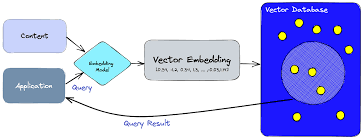
The Role of Knowledge Graphs and Vector Databases in Retrieval-Augmented Generation (RAG) In the dynamic AI landscape, Retrieval-Augmented Generation (RAG) systems are revolutionizing data retrieval by combining artificial intelligence with external data sources to deliver contextual, relevant outputs. Two core technologies driving this innovation are Knowledge Graphs and Vector Databases. While fundamentally different in their design and functionality, these tools complement one another, unlocking new potential for solving complex data problems across industries. Understanding Knowledge Graphs: Connecting the Dots Knowledge Graphs organize data into a network of relationships, creating a structured representation of entities and how they interact. These graphs emphasize understanding and reasoning through data, offering explainable and highly contextual results. How They Work Strengths Limitations Applications Vector Databases: The Power of Similarity In contrast, Vector Databases thrive in handling unstructured data such as text, images, and audio. By representing data as high-dimensional vectors, they excel at identifying similarities, enabling semantic understanding. How They Work Strengths Limitations Applications Combining Knowledge Graphs and Vector Databases: A Hybrid Approach While both technologies excel independently, their combination can amplify RAG systems. Knowledge Graphs bring reasoning and structure, while Vector Databases offer rapid, similarity-based retrieval, creating hybrid systems that are more intelligent and versatile. Example Use Cases Knowledge Graphs vs. Vector Databases: Key Differences Feature Knowledge Graphs Vector Databases Data Type Structured Unstructured Core Strength Relational reasoning Similarity-based retrieval Explainability High Low Scalability Limited for large datasets Efficient for massive datasets Flexibility Schema-dependent Schema-free Challenges in Implementation Future Trends: The Path to Convergence As AI evolves, the distinction between Knowledge Graphs and Vector Databases is beginning to blur. Emerging trends include: This convergence is paving the way for smarter, more adaptive systems that can handle both structured and unstructured data seamlessly. Conclusion Knowledge Graphs and Vector Databases represent two foundational technologies in the realm of Retrieval-Augmented Generation. Knowledge Graphs excel at reasoning through structured relationships, while Vector Databases shine in unstructured data retrieval. By combining their strengths, organizations can create hybrid systems that offer unparalleled insights, efficiency, and scalability. In a world where data continues to grow in complexity, leveraging these complementary tools is essential. Whether building intelligent healthcare systems, enhancing recommendation engines, or powering semantic search, the synergy between Knowledge Graphs and Vector Databases is unlocking the next frontier of AI innovation, transforming how industries harness the power of their data. Like Related Posts AI Automated Offers with Marketing Cloud Personalization AI-Powered Offers Elevate the relevance of each customer interaction on your website and app through Einstein Decisions. Driven by a Read more Salesforce OEM AppExchange Expanding its reach beyond CRM, Salesforce.com has launched a new service called AppExchange OEM Edition, aimed at non-CRM service providers. Read more The Salesforce Story In Marc Benioff’s own words How did salesforce.com grow from a start up in a rented apartment into the world’s Read more Salesforce Jigsaw Salesforce.com, a prominent figure in cloud computing, has finalized a deal to acquire Jigsaw, a wiki-style business contact database, for Read more

Read More
LLMs Turn CSVs into Knowledge Graphs

LLMs Turn CSVs into Knowledge Graphs

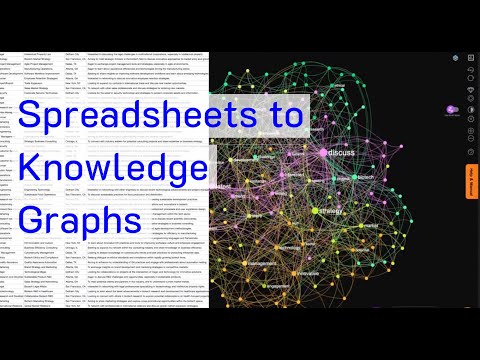
Neo4j Runway and Healthcare Knowledge Graphs Recently, Neo4j Runway was introduced as a tool to simplify the migration of relational data into graph structures. LLMs Turn CSVs into Knowledge Graphs. According to its GitHub page, “Neo4j Runway is a Python library that simplifies the process of migrating your relational data into a graph. It provides tools that abstract communication with OpenAI to run discovery on your data and generate a data model, as well as tools to generate ingestion code and load your data into a Neo4j instance.” In essence, by uploading a CSV file, the LLM identifies the nodes and relationships, automatically generating a Knowledge Graph. Knowledge Graphs in healthcare are powerful tools for organizing and analyzing complex medical data. These graphs structure information to elucidate relationships between different entities, such as diseases, treatments, patients, and healthcare providers. Applications of Knowledge Graphs in Healthcare Integration of Diverse Data Sources Knowledge graphs can integrate data from various sources such as electronic health records (EHRs), medical research papers, clinical trial results, genomic data, and patient histories. Improving Clinical Decision Support By linking symptoms, diagnoses, treatments, and outcomes, knowledge graphs can enhance clinical decision support systems (CDSS). They provide a comprehensive view of interconnected medical knowledge, potentially improving diagnostic accuracy and treatment effectiveness. Personalized Medicine Knowledge graphs enable the development of personalized treatment plans by correlating patient-specific data with broader medical knowledge. This includes understanding relationships between genetic information, disease mechanisms, and therapeutic responses, leading to more tailored healthcare interventions. Drug Discovery and Development In pharmaceutical research, knowledge graphs can accelerate drug discovery by identifying potential drug targets and understanding the biological pathways involved in diseases. Public Health and Epidemiology Knowledge graphs are useful in public health for tracking disease outbreaks, understanding epidemiological trends, and planning interventions. They integrate data from various public health databases, social media, and other sources to provide real-time insights into public health threats. Neo4j Runway Library Neo4j Runway is an open-source library created by Alex Gilmore. The GitHub repository and a blog post describe its features and capabilities. Currently, the library supports OpenAI LLM for parsing CSVs and offers the following features: The library eliminates the need to write Cypher queries manually, as the LLM handles all CSV-to-Knowledge Graph conversions. Additionally, Langchain’s GraphCypherQAChain can be used to generate Cypher queries from prompts, allowing for querying the graph without writing a single line of Cypher code. Practical Implementation in Healthcare To test Neo4j Runway in a healthcare context, a simple dataset from Kaggle (Disease Symptoms and Patient Profile Dataset) was used. This dataset includes columns such as Disease, Fever, Cough, Fatigue, Difficulty Breathing, Age, Gender, Blood Pressure, Cholesterol Level, and Outcome Variable. The goal was to provide a medical report to the LLM to get diagnostic hypotheses. Libraries and Environment Setup pythonCopy code# Install necessary packages sudo apt install python3-pydot graphviz pip install neo4j-runway # Import necessary libraries import numpy as np import pandas as pd from neo4j_runway import Discovery, GraphDataModeler, IngestionGenerator, LLM, PyIngest from IPython.display import display, Markdown, Image Load Environment Variables pythonCopy codeload_dotenv() OPENAI_API_KEY = os.getenv(‘sk-openaiapikeyhere’) NEO4J_URL = os.getenv(‘neo4j+s://your.databases.neo4j.io’) NEO4J_PASSWORD = os.getenv(‘yourneo4jpassword’) Load and Prepare Medical Data pythonCopy codedisease_df = pd.read_csv(‘/home/user/Disease_symptom.csv’) disease_df.columns = disease_df.columns.str.strip() for i in disease_df.columns: disease_df[i] = disease_df[i].astype(str) disease_df.to_csv(‘/home/user/disease_prepared.csv’, index=False) Data Description for the LLM pythonCopy codeDATA_DESCRIPTION = { ‘Disease’: ‘The name of the disease or medical condition.’, ‘Fever’: ‘Indicates whether the patient has a fever (Yes/No).’, ‘Cough’: ‘Indicates whether the patient has a cough (Yes/No).’, ‘Fatigue’: ‘Indicates whether the patient experiences fatigue (Yes/No).’, ‘Difficulty Breathing’: ‘Indicates whether the patient has difficulty breathing (Yes/No).’, ‘Age’: ‘The age of the patient in years.’, ‘Gender’: ‘The gender of the patient (Male/Female).’, ‘Blood Pressure’: ‘The blood pressure level of the patient (Normal/High).’, ‘Cholesterol Level’: ‘The cholesterol level of the patient (Normal/High).’, ‘Outcome Variable’: ‘The outcome variable indicating the result of the diagnosis or assessment for the specific disease (Positive/Negative).’ } Data Analysis and Model Creation pythonCopy codedisc = Discovery(llm=llm, user_input=DATA_DESCRIPTION, data=disease_df) disc.run() # Instantiate and create initial graph data model gdm = GraphDataModeler(llm=llm, discovery=disc) gdm.create_initial_model() gdm.current_model.visualize() Adjust Relationships pythonCopy codegdm.iterate_model(user_corrections=”’ Let’s think step by step. Please make the following updates to the data model: 1. Remove the relationships between Patient and Disease, between Patient and Symptom and between Patient and Outcome. 2. Change the Patient node into Demographics. 3. Create a relationship HAS_DEMOGRAPHICS from Disease to Demographics. 4. Create a relationship HAS_SYMPTOM from Disease to Symptom. If the Symptom value is No, remove this relationship. 5. Create a relationship HAS_LAB from Disease to HealthIndicator. 6. Create a relationship HAS_OUTCOME from Disease to Outcome. ”’) # Visualize the updated model gdm.current_model.visualize().render(‘output’, format=’png’) img = Image(‘output.png’, width=1200) display(img) Generate Cypher Code and YAML File pythonCopy code# Instantiate ingestion generator gen = IngestionGenerator(data_model=gdm.current_model, username=”neo4j”, password=’yourneo4jpasswordhere’, uri=’neo4j+s://123654888.databases.neo4j.io’, database=”neo4j”, csv_dir=”/home/user/”, csv_name=”disease_prepared.csv”) # Create ingestion YAML pyingest_yaml = gen.generate_pyingest_yaml_string() gen.generate_pyingest_yaml_file(file_name=”disease_prepared”) # Load data into Neo4j instance PyIngest(yaml_string=pyingest_yaml, dataframe=disease_df) Querying the Graph Database cypherCopy codeMATCH (n) WHERE n:Demographics OR n:Disease OR n:Symptom OR n:Outcome OR n:HealthIndicator OPTIONAL MATCH (n)-[r]->(m) RETURN n, r, m Visualizing Specific Nodes and Relationships cypherCopy codeMATCH (n:Disease {name: ‘Diabetes’}) WHERE n:Demographics OR n:Disease OR n:Symptom OR n:Outcome OR n:HealthIndicator OPTIONAL MATCH (n)-[r]->(m) RETURN n, r, m MATCH (d:Disease) MATCH (d)-[r:HAS_LAB]->(l) MATCH (d)-[r2:HAS_OUTCOME]->(o) WHERE l.bloodPressure = ‘High’ AND o.result=’Positive’ RETURN d, properties(d) AS disease_properties, r, properties(r) AS relationship_properties, l, properties(l) AS lab_properties Automated Cypher Query Generation with Gemini-1.5-Flash To automatically generate a Cypher query via Langchain (GraphCypherQAChain) and retrieve possible diseases based on a patient’s symptoms and health indicators, the following setup was used: Initialize Vertex AI pythonCopy codeimport warnings import json from langchain_community.graphs import Neo4jGraph with warnings.catch_warnings(): warnings.simplefilter(‘ignore’) NEO4J_USERNAME = “neo4j” NEO4J_DATABASE = ‘neo4j’ NEO4J_URI = ‘neo4j+s://1236547.databases.neo4j.io’ NEO4J_PASSWORD = ‘yourneo4jdatabasepasswordhere’ # Get the Knowledge Graph from the instance and the schema kg = Neo4jGraph( url=NEO4J_URI, username=NEO4J_USERNAME, password=NEO4J_PASSWORD, database=NEO4J_DATABASE ) kg.refresh_schema() print(textwrap.fill(kg.schema, 60)) schema = kg.schema Initialize Vertex AI pythonCopy codefrom langchain.prompts.prompt import PromptTemplate from langchain.chains import GraphCypherQAChain from langchain.llms import VertexAI vertexai.init(project=”your-project”, location=”us-west4″) llm = VertexAI(model=”gemini-1.5-flash”) Create the Prompt Template pythonCopy codeprompt_template = “”” Let’s think step by

Read More
How Data Cloud Vector Databases Work

How Data Cloud Vector Databases Work

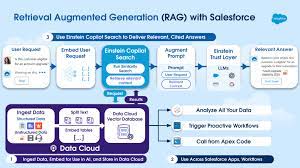
How Data Cloud Vector Databases Work 1. Ingest Unstructured Data in Data Cloud With the help of a new, unstructured data pipeline, relevant unstructured data for case deflection, such as product manuals or upgrade eligibility knowledge articles, can be ingested in Data Cloud and stored as unstructured data model objects. 2. Chunk and Transform Data for Use in AI In Data Cloud, teams will then be able to select the data that they want to use in processes like search, chunking this data into small segments before converting it into embeddings – numeric representations of data optimized for use in AI algorithms.  This is done through the Einstein Trust Layer, which securely calls a special type of LLM called an “embedding model” to create the embeddings. It is then indexed for use in search across the Einstein 1 platform alongside structured data. How Data Cloud Vector Databases Work. 3. Store Embeddings in Data Cloud Vector Database In addition to supporting chunking and indexing of data, Data Cloud now natively supports storage of embeddings – a concept called “vector storage”. This frees up time for teams to innovate with AI instead of managing and securing an integration to an external vector database. 4. Analyze and Act on Unstructured Data Use familiar platform tools like Flow, Apex, and Tableau to use unstructured data, such as clustering customer feedback by semantic similarity and creating automations that alert teams when sentiment changes significantly. 5. Deploy AI Search in Einstein Copilot to Deflect Cases With relevant data, such as knowledge articles, securely embedded and stored in Data Cloud’s vector database, this data can also be activated for use in Einstein AI Search within Einstein Copilot. When a customer visits a self-service portal and asks for details on how to return a product, for example, the Einstein Copilot performs semantic search by converting the user query into an embedding, after which it compares that query to the embedded data in Data Cloud, retrieving the most semantically relevant information for use in its answer while citing the sources it pulled from. The end result is AI-powered search capable of understanding the intent behind a question and retrieving not just article links but exact passages that best answer the question, all of which are summarized through a customer’s preferred LLM into a concise, actionable answer – boosting customer satisfaction while deflecting cases. Like1 Related Posts AI Automated Offers with Marketing Cloud Personalization AI-Powered Offers Elevate the relevance of each customer interaction on your website and app through Einstein Decisions. Driven by a Read more Salesforce OEM AppExchange Expanding its reach beyond CRM, Salesforce.com has launched a new service called AppExchange OEM Edition, aimed at non-CRM service providers. Read more The Salesforce Story In Marc Benioff’s own words How did salesforce.com grow from a start up in a rented apartment into the world’s Read more Salesforce Jigsaw Salesforce.com, a prominent figure in cloud computing, has finalized a deal to acquire Jigsaw, a wiki-style business contact database, for Read more

Read More
gettectonic.com