Marketing Archives - gettectonic.com - Page 56
marketing cloud utm parameters

What Are UTM Parameters in Marketing Cloud

What Are UTM Parameters in Marketing Cloud? UTM parameters are essential for tracking the effectiveness of your marketing messages by linking user clicks to actions on your website within Marketing Cloud. Once set up, the Marketing Cloud Engagement tool automatically adds these parameters to the URLs in your messages, enabling detailed performance tracking. You can track five key UTM parameters: source, medium, campaign, term, and content. These parameters are captured in Google Analytics reports, offering insights into your marketing efforts, such as total goal conversions, bounce rate, and average time spent on your site. What is a UTM Code? A UTM (Urchin Tracking Module) code is a text string appended to a URL to help monitor the performance of digital marketing campaigns. UTM codes include up to five key parameters: Campaign, Source, Medium, Content, and Term. UTM Parameter Channel Support: Example URL with UTM Parameters: arduinoCopy codehttps://www.example.com?utm_source=sfmc&utm_medium=email&utm_campaign=TestCampaign&utm_term=MyLink123&utm_content=123456&utm_id=f521708e-db6e-478b-9731-8243a692c2d5&sfmc_id=245678&sfmc_activityid=598741568 Parameter Breakdown: For more on UTM parameters, refer to the Google Analytics documentation. Configuring UTM Parameters in Marketing Cloud Engagement In Google Analytics 4 (GA4), UTM parameters are automatically appended to links in all sent messages unless the domain or subdomain is not on the allowlist in Journey Builder Settings. They will also not apply if click tracking is disabled. Adding UTM Parameters in Salesforce To track UTM parameters in Salesforce, follow these steps: Tracking UTM Parameters in Salesforce There are four primary methods to track UTM parameters and attribution data within Salesforce: Content updated March 2023. Like Related Posts Who is Salesforce? Who is Salesforce? Here is their story in their own words. From our inception, we’ve proudly embraced the identity of Read more Salesforce Marketing Cloud Transactional Emails Salesforce Marketing Cloud Transactional Emails are immediate, automated, non-promotional messages crucial to business operations and customer satisfaction, such as order Read more Salesforce Unites Einstein Analytics with Financial CRM Salesforce has unveiled a comprehensive analytics solution tailored for wealth managers, home office professionals, and retail bankers, merging its Financial Read more AI-Driven Propensity Scores AI plays a crucial role in propensity score estimation as it can discern underlying patterns between treatments and confounding variables Read more

Read More
Salesforce Marketing Cloud Email Studio

What is Email Studio in Marketing Cloud?

Enhance your account branding through the Sender Authentication Package (SAP), a tool provided by Marketing Cloud. SAP features include custom account branding, a private domain for email sending, a custom domain for CloudPages, a dedicated IP address, and reply mail management. Upon purchasing SAP, you will receive an email from mc-deliverability@mcld.salesforce.com 1–2 days after your contract activation. This email includes the SAP Quick Start Guide and a personalized form to set up your SAP.

Read More
Progressive Profiling in Salesforce Marketing Cloud

Progressive Profiling in Salesforce Marketing Cloud

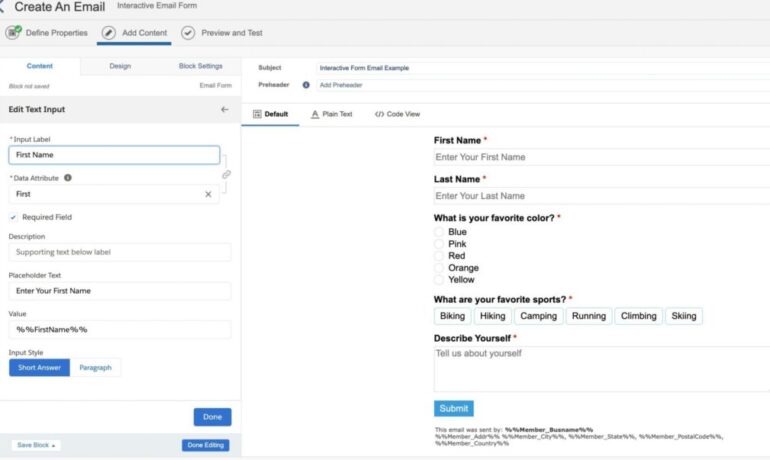
In the world of marketing, the primary focus revolves around data accumulation. The more data collected, the deeper the understanding of prospects or customers, leading to the creation of a more comprehensive individual profile. Enter Progressive Profiling in Salesforce Marketing Cloud. Progressive profiling emerges as an effective method for data collection, enabling the gradual enrichment of an individual’s profile over time. This approach prevents overwhelming data collection methods that could potentially drive prospects away. Or at least prevent them from filling out your forms. While Progressive Profiling is a built-in feature in Pardot, Marketing Cloud Consultants and Admins often seek ways to implement it. In this insight, we’ll demonstrate how to achieve Progressive Profiling in Marketing Cloud through a custom solution on CloudPages, deviating from conventional Smart Capture Forms. Progressive Profiling in Salesforce Marketing Cloud: Use Case Let’s outline the use case: a landing page/cloud page that unfolds as follows: First Visit: Display a simple form with fields for First Name, Last Name, and Email Address. Second Visit: Present the same form but accompany it with a ‘Welcome Back’ message. Third Visit: If the prospect submits the form and returns later, showcase a different form with additional fields like company name and service feedback, posing the question, “do you like our service?” How Progressive Profiling Works First Visit: Set a cookie when a user visits the landing page. Second Visit: Check for the existence of a cookie; if present, display the welcome message with the form. Third Visit and Beyond: Upon form submission, add values to a data extension (including the cookie). Subsequent visits involve checking for the cookie’s presence in the data extension, revealing different form fields if applicable. Setting Up Progressive Profiling in Marketing Cloud Step 1: Create a Data Extension Establish a data extension to store form values. Step 2: Create the CloudPage Utilize the provided code snippet. Step 3: Test the Progressive Profiling A demo video showcases the testing process. Considerations GDPR and Privacy: Adhere to GDPR laws; ensure explicit consent for placing cookies and tracking individuals. Consult your legal team for additional disclaimer requirements. Google Chrome Same Site Cookie Change: Be mindful of changes in Google Chrome’s Same Site Cookie policy, adjusting the code in SSJS accordingly to comply with Chrome version 76 or later. Cache and Browser Changes: Note that clearing the cache or switching browsers generates a new cookie, displaying the original form. This insight hopes to elucidate the implementation of Progressive Profiling in Marketing Cloud through a custom solution on CloudPages, leveraging SSJS and other elements. While gaining Progressive Profiling functionality, strategic consideration of the fields to request at each stage is crucial before implementing any technology. Like Related Posts Who is Salesforce? Who is Salesforce? Here is their story in their own words. From our inception, we’ve proudly embraced the identity of Read more Salesforce Marketing Cloud Transactional Emails Salesforce Marketing Cloud Transactional Emails are immediate, automated, non-promotional messages crucial to business operations and customer satisfaction, such as order Read more Salesforce Unites Einstein Analytics with Financial CRM Salesforce has unveiled a comprehensive analytics solution tailored for wealth managers, home office professionals, and retail bankers, merging its Financial Read more AI-Driven Propensity Scores AI plays a crucial role in propensity score estimation as it can discern underlying patterns between treatments and confounding variables Read more
Read More
Salesforce Marketing Cloud Journey Builder

Can Your Object Trigger a Salesforce Journey?

Many times marketers are challenged to create a customer journey based on data points or events that haven’t currently been captured in the Salesforce platform. Once you create an object in Salesforce, you have to determine if your object can successfully trigger a Salesforce journey. These easy steps help you quickly answer the question: can your Salesforce object trigger a Salesforce journey. Most, but not all, Experience Cloud objects can be used for creating journeys. This list includes the available objects along with a description, their eligibility status, API object, and use cases (as appropriate). Experience Cloud Objects Object Description Status API Example Use Case Sites and Membership Network A site and its settings Not Workflow-enabledNot Replicable Network NetworkMember Individual user memberships Workflow-enabledReplicable NetworkMember Triggers when a new member joins the community NetworkMemberGroup List of profiles and permission sets added to a site (not related to Chatter groups) Not Workflow-enabledNot Replicable NetworkMemberGroup Chatter Groups CollaborationGroup A Chatter group Workflow-enabledNot Replicable CollaborationGroup CollaborationGroupMember Member of a Chatter group Workflow-enabledReplicable CollaborationGroupMember Triggers when a user joins a Chatter Group in the Community CollaborationGroupFeed A single item on a Chatter group feed Not Workflow-enabledReplicable CollaborationGroupFeed Feeds FeedItem Entry in the feed Workflow-enabledReplicable FeedItem Triggers when user asks a question or makes another type of feed post FeedComment Comment added to a feed by a user Not Workflow-enabledReplicable FeedComment Topics Topic A topic Workflow-enabledReplicable Topic TopicAssignment Relationship between a topic and an entity Workflow-enabledReplicable TopicAssignment Triggers when a user posts a question on a specific topic, or adds a topic to any FeedItem EntitySubscription Subscription for following a record or another user Not Workflow-enabledReplicable EntitySubscription Triggers when a user follows a topic, user, or record Cases Case Service case Workflow-enabledReplicable Case Triggers when a user opens or updates a case Like Related Posts Who is Salesforce? Who is Salesforce? Here is their story in their own words. From our inception, we’ve proudly embraced the identity of Read more Salesforce Marketing Cloud Transactional Emails Salesforce Marketing Cloud Transactional Emails are immediate, automated, non-promotional messages crucial to business operations and customer satisfaction, such as order Read more Salesforce Unites Einstein Analytics with Financial CRM Salesforce has unveiled a comprehensive analytics solution tailored for wealth managers, home office professionals, and retail bankers, merging its Financial Read more AI-Driven Propensity Scores AI plays a crucial role in propensity score estimation as it can discern underlying patterns between treatments and confounding variables Read more

Read More
Salesforce Loyalty Management

Salesforce Loyalty Management Explained

In January 2021, Salesforce unveiled Loyalty Management, aiming to assist businesses in actively engaging and rewarding their customers. Employing a user-friendly interface without the need for coding, the platform empowers businesses to construct scalable loyalty programs. This flexibility extends to the creation of diverse programs, such as tiered memberships or points-per-purchase. Loyalty Management is adaptable, allowing configuration to seamlessly integrate with Experience Cloud for customer sign-ups and Marketing Cloud for content delivery. With Loyalty Management as an end-to-end solution that helps you create intelligent, personalized engagements that increase customer loyalty. Loyalty Management is versatile and can cater to B2B and B2C business needs in any industry. With the Loyalty Management app, create and set up loyalty programs.  Loyalty Management lets you configure programs that fit the exact needs of your business and your customers. “Businesses in every industry are tasked with reimagining their loyalty strategies and Salesforce is equipped to help them with a flexible platform that helps them create unique programs. Loyalty Management, built on the Salesforce platform, helps organizations deliver innovative programs for customer recognition, reward, and retention. Nurture relationships and create lasting loyalty on the world’s #1 CRM. With Loyalty Management, your business can engage with customers in meaningful ways — bringing value to their experience and to your business. Leverage Customer 360 to deliver unique experiences with Salesforce customer loyalty. Generate a single source of truth for members that enables personalization at scale and weaves loyalty throughout the customer experience. Make loyalty a business strategy informed by the power of Salesforce Customer 360 Get a unified view of your program members to engage them with relevant and personalized experiences Make loyalty more than a program and bring it into every touch point in the customer or partner journey Deliver more dynamic and personal loyalty experiences for customers by removing silos and connecting member data across multiple systems. Create a consistent customer reward program experience — rewarding them for their engagement and their loyalty across every interaction and touch point they have with your business. Like1 Related Posts Who is Salesforce? Who is Salesforce? Here is their story in their own words. From our inception, we’ve proudly embraced the identity of Read more Salesforce Marketing Cloud Transactional Emails Salesforce Marketing Cloud Transactional Emails are immediate, automated, non-promotional messages crucial to business operations and customer satisfaction, such as order Read more Salesforce Unites Einstein Analytics with Financial CRM Salesforce has unveiled a comprehensive analytics solution tailored for wealth managers, home office professionals, and retail bankers, merging its Financial Read more AI-Driven Propensity Scores AI plays a crucial role in propensity score estimation as it can discern underlying patterns between treatments and confounding variables Read more
Read More
gettectonic.com