
OmniStudio Archives - gettectonic.com - Page 2
License and Permitting Management for Businesses

Streamlining Public Sector Licensing, Permitting, and Inspections with Salesforce

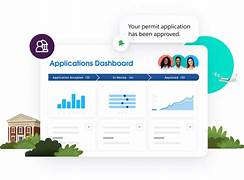
Salesforce Public Sector Solutions enhances the efficiency of licensing, permitting, and inspection processes. From online application submission to automated review and approval, the platform streamlines every step, ensuring a seamless experience for both government agencies and constituents. At the core of these processes are two key application types, represented as objects: Constituent Accounts and Business Representation Each applicant is represented by an Account object: Business accounts store essential details such as company name, URL, addresses, number of employees, industry, and more. They are closely linked to: Together, these objects provide a comprehensive view of the business and its stakeholders. Application Submission and Processing Constituents apply for licenses and permits through an Experience Cloud portal. The application process is built using OmniStudio, which facilitates guided, interactive user experiences. Regulatory Authorities and Compliance Licensing and permitting are governed by regulatory authorities, each with specific requirements. These entities and their rules are structured within Public Sector Solutions using various objects: Example:The Board of Barbering and Cosmetology (Regulatory Authority) grants: Inspections, Violations, and Fees Government agencies inspect businesses and residences to ensure compliance. The inspection process involves: Junction objects facilitate many-to-many relationships, ensuring regulatory codes, violations, and assessment indicators are interconnected. Managing Multiple Licenses and Dependencies Many businesses require multiple permits, often issued in a specific sequence. The Business Regulatory Authorization Type Dependency object manages these dependencies, allowing agencies to enforce structured licensing processes. For example, a restaurant may require: The Experience Cloud portal displays these dependencies, enabling businesses to understand and complete the necessary steps efficiently. Streamlined Inspections with Action Plans Public Sector Solutions enhances inspector efficiency with Action Plans, which outline predefined tasks for each inspection. Handling Public Complaints Public complaints against businesses are managed within the Public Complaint object. Complaints trigger regulatory investigations involving: By integrating these elements, Public Sector Solutions ensures that licensing, permitting, and regulatory compliance processes are efficient, transparent, and easily managed. Like Related Posts Who is Salesforce? Who is Salesforce? Here is their story in their own words. From our inception, we’ve proudly embraced the identity of Read more Salesforce Marketing Cloud Transactional Emails Salesforce Marketing Cloud Transactional Emails are immediate, automated, non-promotional messages crucial to business operations and customer satisfaction, such as order Read more Salesforce Unites Einstein Analytics with Financial CRM Salesforce has unveiled a comprehensive analytics solution tailored for wealth managers, home office professionals, and retail bankers, merging its Financial Read more AI-Driven Propensity Scores AI plays a crucial role in propensity score estimation as it can discern underlying patterns between treatments and confounding variables Read more


Read More
Crucial Role of Data and Integration in AI at Dreamforce

Salesforce Data Integration

Salesforce Data Integration: A Comprehensive Guide Introduction Salesforce offers numerous tools to access, synchronize, and share data with external systems. However, selecting the right tool for your project is critical. This guide explores Salesforce’s data integration landscape, providing recommendations based on specific use cases—along with guidance on which tools to avoid. Scope of This Guide This decision guide focuses on data-level integrations involving Salesforce, covering: While these are just a subset of integration challenges faced by Salesforce Architects, future guides will address: Note: Many tools discussed here can also solve enterprise-wide integration challenges, but those use cases are beyond this guide’s scope. Key Takeaways Common Considerations for Choosing Data Integration Tools Before selecting a tool, evaluate these key factors: Area to Consider Key Questions Existing Tools & Landscape Is an ESB/ETL solution already in place? Are there compliance requirements? Are systems cloud or on-premise? Data Flow Does data need to move synchronously, asynchronously, or in batches? Should data be replicated? Which system is the source of truth? Implementation What’s the effort for non-Salesforce systems? Which teams will deliver integrations? What tools do they prefer? Maintainability Who will maintain the integration? What skills do they have (or need)? What’s the total cost of ownership? Data Volume Is it a large data volume (LDV) scenario? How frequent are bulk changes? What’s the impact of singleton updates? Limits Are complex transformations needed? Will data be combined from multiple sources? How often will integrations run per user? Overview of Data Integration Tools Tool Salesforce → External External → Salesforce Execution License Required? Apex Actions ✅ Yes ✅ Yes Server-side ❌ No Change Data Capture ✅ Yes ❌ No Server-side ❌ No* Custom Apex (REST/SOAP) ✅ Yes ✅ Yes Server-side ❌ No External Services ✅ Yes ❌ No Server-side ❌ No Generic Events (Legacy) ✅ Yes ❌ No Server-side ❌ No** Heroku Connect ✅ Yes ✅ Yes Server-side ✅ Yes MuleSoft Anypoint ✅ Yes ✅ Yes Server-side ✅ Yes MuleSoft Composer ✅ Yes ✅ Yes Server-side ✅ Yes Native Salesforce APIs ❌ No ✅ Yes Server-side ❌ No OmniScript ✅ Yes ✅ Yes Client-side**** ✅ Yes OmniStudio Integration ✅ Yes ✅ Yes Server-side ✅ Yes Outbound Messaging ⚠️ Not Ideal ❌ No Server-side ❌ No Platform Events ✅ Yes ✅ Yes Server-side ❌ No*** PushTopic (Legacy) ⚠️ Not Ideal ❌ No Server-side ❌ No** Salesforce Connect ✅ Yes ✅ Yes Server-side ✅ Yes ✅ = Recommended | ⚠️ = Possible but consider alternatives | ❌ = Not supported Notes: Other Tools (Not Primary Integration Solutions) While these tools support aspects of data movement, they should not be the foundation of an integration strategy: Final Recommendations By aligning the right tool with your use case, you can optimize performance, reduce technical debt, and ensure scalable integrations. Content updated April 2025. Like Related Posts Who is Salesforce? Who is Salesforce? Here is their story in their own words. From our inception, we’ve proudly embraced the identity of Read more Salesforce Marketing Cloud Transactional Emails Salesforce Marketing Cloud Transactional Emails are immediate, automated, non-promotional messages crucial to business operations and customer satisfaction, such as order Read more Salesforce Unites Einstein Analytics with Financial CRM Salesforce has unveiled a comprehensive analytics solution tailored for wealth managers, home office professionals, and retail bankers, merging its Financial Read more AI-Driven Propensity Scores AI plays a crucial role in propensity score estimation as it can discern underlying patterns between treatments and confounding variables Read more

Read More
Salesforce Einstein

Connect Salesforce to an External API with No Code

Effortlessly establish seamless integration between your Salesforce org and an external API, all without writing a single line of code. Harness the capabilities of declarative tools in conjunction with OpenAPI specifications to define the functionality of the external API. Connect Salesforce to an external API for increased productivity. External Services will autonomously generate invocable actions directly within Salesforce. Whether you prefer low-code, process-driven integrations or aim to enhance your Apex integrations, External Services efficiently handles outbound integrations from Salesforce. Invoke these actions seamlessly from Apex, integrate them into flows, or include them in Einstein bots for smooth interaction with the external API source. Connect Salesforce to an external API to access these benefits. To begin, register OpenAPI 2.0 or OpenAPI 3.0 schemas within External Services. The operations imported from your registered schema effortlessly transform into invocable actions, accessible in Apex or as External Services action types within user-friendly automation tools like Flow Builder, Orchestrator, Einstein bots, or OmniStudio Assets. External Services particularly excels in handling RESTful services hosted externally, especially when the API specification aligns with OpenAPI 2.0 or OpenAPI 3.0 JSON schema formats. Low-code and no-code solutions for Salesforce allow you to build and deploy applications without needing extensive or any coding knowledge. These tools can help to save your business time and money when it comes to software development as well as allow non-technical users to create and customize applications. Like Related Posts Who is Salesforce? Who is Salesforce? Here is their story in their own words. From our inception, we’ve proudly embraced the identity of Read more Salesforce Marketing Cloud Transactional Emails Salesforce Marketing Cloud Transactional Emails are immediate, automated, non-promotional messages crucial to business operations and customer satisfaction, such as order Read more Salesforce Unites Einstein Analytics with Financial CRM Salesforce has unveiled a comprehensive analytics solution tailored for wealth managers, home office professionals, and retail bankers, merging its Financial Read more AI-Driven Propensity Scores AI plays a crucial role in propensity score estimation as it can discern underlying patterns between treatments and confounding variables Read more
Read More
Salesforce Supports Babies and Their Families

Set Up Record Alerts

Set up the components required for Record Alerts, including OmniStudio FlexCard components and integration procedures, custom severity values, and alert categories. Like Related Posts Who is Salesforce? Who is Salesforce? Here is their story in their own words. From our inception, we’ve proudly embraced the identity of Read more Salesforce Marketing Cloud Transactional Emails Salesforce Marketing Cloud Transactional Emails are immediate, automated, non-promotional messages crucial to business operations and customer satisfaction, such as order Read more Salesforce Unites Einstein Analytics with Financial CRM Salesforce has unveiled a comprehensive analytics solution tailored for wealth managers, home office professionals, and retail bankers, merging its Financial Read more AI-Driven Propensity Scores AI plays a crucial role in propensity score estimation as it can discern underlying patterns between treatments and confounding variables Read more

Read More
Salesforce Document Generation

Generating Documents in Salesforce

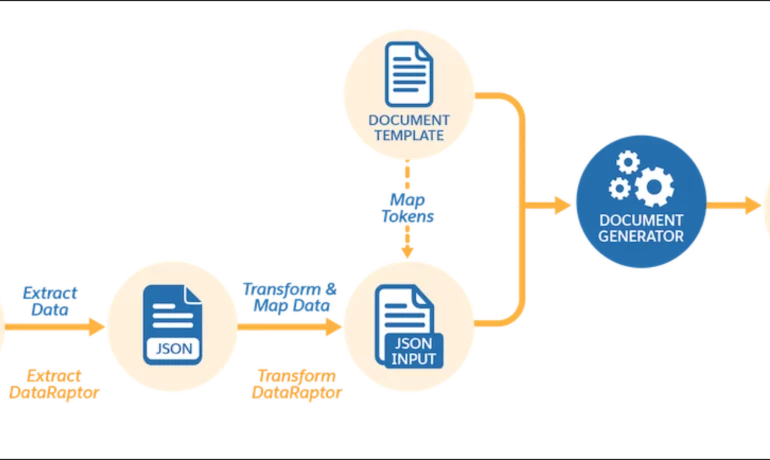
Salesforce document generation poses a challenge for businesses, given the intricacies of integration involved. Fortunately, a variety of tools are available for generating documents in Salesforce, and Tectonic is well-equipped to assist in their successful implementation. Salesforce Industries Document Generation empowers businesses to craft and manage accurate documents linked to standard Salesforce objects, encompassing contracts, opportunities, orders, quotes, and custom objects. For a more dynamic approach, Salesforce OmniStudio Document Generation facilitates the creation of documents using Microsoft Word and Microsoft PowerPoint templates. These templates can incorporate values from any JSON-based data within the text, including data sourced from various Salesforce objects. This versatile tool enables the generation of contracts, proposals, quotes, reports, non-disclosure agreements, service agreements, and more. Salesforce Industries Document Generation seamlessly integrates with Vlocity Insurance, Vlocity Health, communications, media, energy, utilities, government, and beyond. Vlocity Analytics, another valuable component, offers pre-built measurement tools that seamlessly integrate with Salesforce Reports, Dashboards, and Einstein. The Salesforce AppExchange boasts an extensive array of over 200 document generation tools. Your Salesforce partner can assist in selecting, installing, and implementing the most suitable options based on your business requirements. With Document Generation, you can generate contracts, proposals, quotes, reports, non-disclosure agreements, job offers, service agreements, and so on. You can generate documents using the specified sample client-side or server-side OmniScripts. You can also create your own OmniScripts by cloning and customizing the sample OmniScript to generate documents. Client-Side document generation is a synchronous process that results in a downloadable preview of the generated documents. You can generate documents from Microsoft Word (.docx), Microsoft PowerPoint (.pptx), and Web templates. These templates can include values from any JSON-based data in the text, including data from any Salesforce object. You can optionally convert the resulting documents to .pdf format. Server-Side document generation is available in both the OmniStudio Foundation and Salesforce Industries packages. Server-Side document generation is an asynchronous process that’s best for large and rendering-heavy documents and for document generation in batches. The Server-Side document generation service is secure and scalable and is hosted on Salesforce Hyperforce. The generated document is stored in your Salesforce org, and is attached to the object for which it’s generated. You can use Apex Classes, sample Integration Procedures, or a sample OmniScript to generate documents. Client-Side document generation supports Customer Community Plus, Customer Community, and Partner Community users to generate documents using client-side OmniScripts. Server-Side document generation supports Customer Community Plus, Customer Community, and Partner Community users to generate documents using the singleDocxServersideLwc server-side OmniScript. With the right licenses, Document Generation is available in the Salesforce Industries package. Metering measures resource utilization levels and throttling controls resource access and use based on defined rules. Metering measures the number of server-side documents that are generated by an org hourly and daily. The default hourly and daily limits for processing server-side document generation requests are 1,000 per org and 24,000 per org respectively. Throttling maintains consistency and resilience of the server-side document generation service by managing incoming server-side document generation requests from multiple orgs. Throttling can also prevent service degradation caused by high volume of requests at peak hours by blocking requests that exceed the default limits. The request details are saved in the Document Generation Processes entity. You can retrieve the blocked requests and later retry the server-side document generation. No matter what your specific document generation needs, Tectonic simplifies the process of getting your system up and running seamlessly, whether it’s through Salesforce Quickstarts or comprehensive implementation services. Content updated in 2February 2024, Shannan Hearne. Like1 Related Posts Who is Salesforce? Who is Salesforce? Here is their story in their own words. From our inception, we’ve proudly embraced the identity of Read more Salesforce Marketing Cloud Transactional Emails Salesforce Marketing Cloud Transactional Emails are immediate, automated, non-promotional messages crucial to business operations and customer satisfaction, such as order Read more Salesforce Unites Einstein Analytics with Financial CRM Salesforce has unveiled a comprehensive analytics solution tailored for wealth managers, home office professionals, and retail bankers, merging its Financial Read more AI-Driven Propensity Scores AI plays a crucial role in propensity score estimation as it can discern underlying patterns between treatments and confounding variables Read more

Read More
gettectonic.com