

- gettectonic.com - Page 5
Microsoft Copilot

Microsoft Copilot

The fundamental capabilities of collaboration platforms have remained largely unchanged since the pandemic began. These platforms typically offer video conferencing, desktop sharing, and text chat, creating a virtual approximation of in-person meetings. While this setup effectively allows teams to collaborate across distances, it raises the question: Is this all there is to the collaboration experience? Enter Copilot. Microsoft is pioneering a new era of collaboration, where AI assistants help users prioritize meetings, manage follow-ups on action items, and integrate meeting outputs into future tasks. This evolution is particularly promising for knowledge workers who are overwhelmed by constant meetings. Copilot aims to redefine the collaboration experience, promising increased productivity and a more strategic approach to meetings. However, OpenAI, Microsoft’s prominent AI partner, is making moves to disrupt the enterprise space as well. OpenAI recently launched ChatGPT Enterprise, which now boasts 600,000 users, including clients from 93% of the Fortune 500. This week, OpenAI also acquired the videoconferencing startup Multi, sparking speculation that the company may integrate collaboration features directly into ChatGPT. Multi’s unique approach to videoconferencing—described as “multiplayer” and drawing parallels to gaming rather than traditional meetings—hints at a potential shift in how meetings are experienced. The Multi tool, set to be discontinued in July following the acquisition, was tailored for software developers, focusing on screen sharing and leveraging Zoom’s video capabilities. Yet, the concept of enhanced document collaboration extends beyond software developers. Integrating document collaboration with AI-driven features like summarization, and linking this to advanced language models, could revolutionize the collaboration experience. This approach promises to streamline the collaborative process, focusing on the work at hand with new functionalities. That said, not all meetings revolve around documents. Many are simply conversations—often the ones people prefer to avoid. Therefore, refining how meetings are managed and integrating them into users’ work lives will remain crucial, even as new technologies enhance screen sharing and video capabilities. So, where does this leave traditional video services? The quest for meeting equity and AI-enhanced directors will likely continue to refine the experience, striving for the “next best thing to being there.” As the collaboration platform evolves, any outdated elements will become more apparent. Ultimately, collaboration is a multifaceted experience, and technology will play a key role in its continued advancement. Like Related Posts Who is Salesforce? Who is Salesforce? Here is their story in their own words. From our inception, we’ve proudly embraced the identity of Read more Salesforce Marketing Cloud Transactional Emails Salesforce Marketing Cloud Transactional Emails are immediate, automated, non-promotional messages crucial to business operations and customer satisfaction, such as order Read more Salesforce Unites Einstein Analytics with Financial CRM Salesforce has unveiled a comprehensive analytics solution tailored for wealth managers, home office professionals, and retail bankers, merging its Financial Read more AI-Driven Propensity Scores AI plays a crucial role in propensity score estimation as it can discern underlying patterns between treatments and confounding variables Read more


Read More
Thoughts on Workday With Illuminate

Thoughts on Workday With Illuminate

Workday Expands AI Across HR and Finance Platforms with ‘Illuminate’ Workday is significantly enhancing its AI capabilities within its HR and finance platforms through a new set of updates called Illuminate. These updates aim to improve automation and increase productivity by embedding AI more broadly across various HR processes. From routine tasks like content generation to complex problem-solving, Workday’s AI now identifies inefficiencies in HR workflows and offers recommendations for improvement. Thoughts on Workday With Illuminate follow. A key feature of Illuminate is a series of AI agents designed to assist in areas such as succession planning. These agents can suggest internal candidates that HR teams might overlook, helping organizations identify potential leaders within their workforce. During a press briefing ahead of the Workday Rising conference, TechTarget asked if the AI agent used in succession planning could fully capture the intricacies of the employee experience and assess leadership potential. David Somers, Chief Product Officer at Workday, acknowledged the sensitivity of succession planning but emphasized that AI is used to augment—not replace—human decision-making. The agents provide recommendations, while the final hiring decisions still involve talent acquisition professionals and interview panels. Workday’s updates include tools for a wide range of tasks, from content summarization to more advanced capabilities such as detecting bottlenecks in onboarding processes and suggesting optimizations. “These AI agents will streamline common business workflows, boosting productivity and freeing up users to focus on strategic, meaningful work,” Somers explained. While AI has long been part of Workday’s offerings, generative AI is now driving rapid transformation in HR practices. Workday’s Illuminate platform combines data with contextual insights, offering features like compensation data tailored to a company’s specific information. Users can access these AI capabilities through Workday Assistant, a generative AI chatbot that integrates with Microsoft Teams and Slack. This tool will be generally available early next year, making it easier for teams to interact with Workday’s AI-powered systems. HR industry expert Josh Bersin sees Workday’s Illuminate as part of a broader trend of AI agents in the HR space, similar to SAP’s Joule. He believes Workday’s new AI agents will be a major focus for the company, though building out all the necessary Workday transactions into these tools will take time. Bersin does not foresee trust issues among Workday users regarding Illuminate, noting that the platform isn’t open to non-Workday data, which limits concerns around data security. Bersin’s own AI assistant, Galileo, is also expected to integrate with Workday’s platform in the future, further enhancing its capabilities. rativAccording to recent Gartner surveys from March and June, the majority of HR leaders are adopting AI in their organizations. Only 15% of respondents indicated they had no plans to incorporate generative AI into their HR processes, signaling widespread acceptance of AI tools like those Workday is rolling out with Illuminate. Like Related Posts Who is Salesforce? Who is Salesforce? Here is their story in their own words. From our inception, we’ve proudly embraced the identity of Read more Salesforce Unites Einstein Analytics with Financial CRM Salesforce has unveiled a comprehensive analytics solution tailored for wealth managers, home office professionals, and retail bankers, merging its Financial Read more AI-Driven Propensity Scores AI plays a crucial role in propensity score estimation as it can discern underlying patterns between treatments and confounding variables Read more Tectonic’s Successful Salesforce Track Record Salesforce Technology Services Integrator – Tectonic has successfully delivered Salesforce in a variety of industries including Public Sector, Hospitality, Manufacturing, Read more
Read More
Salesforce Underwriting Solutions

Salesforce Underwriting Solutions

Merchant Cash Advance Solutions: Enhancing Underwriting with Salesforce In today’s fast-paced financial services industry, efficient and effective underwriting is more crucial than ever. Merchant cash advances (MCAs) have emerged as a popular alternative funding option for businesses that might not qualify for traditional loans. This insight explores how integrating Salesforce with MCA software can streamline underwriting, strengthen lender-borrower relationships, and boost overall operational efficiency. Understanding Merchant Cash Advances Merchant cash advances offer businesses upfront capital in exchange for a portion of future sales. Unlike traditional loans, MCAs are often easier to secure and come with flexible repayment options tied to daily credit card receipts. However, the unique structure of MCAs brings challenges to underwriting, due to the diversity in business models and cash flow patterns. The Role of Underwriting in MCA Underwriting is a vital step in the lending process, assessing the risk associated with providing funds to a borrower. For MCAs, underwriting involves evaluating a business’s revenue streams, creditworthiness, and overall financial health. Traditional underwriting methods can be cumbersome and slow, often causing delays in funding. Challenges in Traditional Underwriting Methods The Power of Salesforce in Streamlining Underwriting Salesforce offers powerful solutions that integrate seamlessly with MCA software, effectively addressing these challenges: Benefits of Integrating MCA Software with Salesforce Key Features to Look for in MCA Software Integrated with Salesforce When choosing an MCA solution integrated with Salesforce, consider features such as: Conclusion Integrating merchant cash advance solutions with Salesforce offers a transformative approach to streamlining underwriting processes in this niche financing sector. By automating workflows, centralizing data management, enhancing communication channels, and improving overall efficiency—all while ensuring compliance—lenders can gain a competitive edge and deliver exceptional service to their clients. If you are searching for a Merchant Cash Advance, Underwriting, or financial services solution contact Tectonic today. Like Related Posts Who is Salesforce? Who is Salesforce? Here is their story in their own words. From our inception, we’ve proudly embraced the identity of Read more Salesforce Marketing Cloud Transactional Emails Salesforce Marketing Cloud Transactional Emails are immediate, automated, non-promotional messages crucial to business operations and customer satisfaction, such as order Read more Salesforce Unites Einstein Analytics with Financial CRM Salesforce has unveiled a comprehensive analytics solution tailored for wealth managers, home office professionals, and retail bankers, merging its Financial Read more AI-Driven Propensity Scores AI plays a crucial role in propensity score estimation as it can discern underlying patterns between treatments and confounding variables Read more

Read More
Salesforce Email Deliverability Settings

Salesforce Email Deliverability Settings

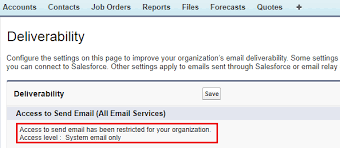
Salesforce Email Deliverability Settings: Managing Communication in Sandboxes Salesforce provides administrators with control over the types of emails that can be sent from their environments, especially within sandbox environments used for development and testing. These email deliverability settings ensure that sensitive or erroneous emails don’t reach actual users during development. Below, we’ll dive into the details of these settings and explain their impact. Email Deliverability Settings in Salesforce Where to Find Deliverability Settings: Note: If Salesforce has restricted your ability to change these settings, they may not be editable. Three Access Levels for Email Deliverability Salesforce offers three key deliverability settings that control email access in your organization: The Importance of the “System Email Only” Setting The System Email Only setting is particularly valuable in sandbox environments. When testing workflows, triggers, or automations in a sandbox, this setting ensures only critical system emails (e.g., password resets) are sent, preventing development or test emails from reaching real users. New Sandboxes Default to System Email Only Since Salesforce’s Spring ’13 release, new and refreshed sandboxes default to the System Email Only setting. This helps prevent accidental email blasts during testing. For sandboxes created before Spring ’13, the default setting is All Email, but it’s recommended to switch to System Email Only to avoid sending test emails. Example: If you’re testing a custom email alert in a sandbox for a retail company, this setting allows you to safely test without worrying about sending emails to actual customers. Bounce Management in Salesforce Bounce management helps you track and manage email deliverability issues, particularly for emails sent via Salesforce or through an email relay. Key Points for Managing Bounces: Creating Custom Bounce Reports in Lightning Experience If the standard bounce reports aren’t available in your organization, or if you’re using Salesforce Lightning, you can create custom reports using the Email Bounced Reason and Email Bounced Date fields. To create a report in Lightning: By configuring Salesforce email deliverability settings and managing bounces, administrators can ensure smooth, secure communication across their organization—especially when working in sandbox environments. These tools help maintain control over outbound emails, protecting users from erroneous communication while providing valuable insights into email performance. Like Related Posts Who is Salesforce? Who is Salesforce? Here is their story in their own words. From our inception, we’ve proudly embraced the identity of Read more Salesforce Marketing Cloud Transactional Emails Salesforce Marketing Cloud Transactional Emails are immediate, automated, non-promotional messages crucial to business operations and customer satisfaction, such as order Read more Salesforce Unites Einstein Analytics with Financial CRM Salesforce has unveiled a comprehensive analytics solution tailored for wealth managers, home office professionals, and retail bankers, merging its Financial Read more AI-Driven Propensity Scores AI plays a crucial role in propensity score estimation as it can discern underlying patterns between treatments and confounding variables Read more

Read More
AI-Powered Contact Center Landscape

AI-Powered Contact Center Landscape

Navigating the AI-Powered Contact Center Landscape: A Roadmap for Success With thousands of solutions in the contact center ecosystem, each claiming to offer “AI-powered, next-generation technology,” it’s easy to feel overwhelmed. Many of these claims are valid, as AI and machine learning are transforming contact centers and improving customer experiences. But with so many options and combinations of AI-powered solutions, how can you be sure you’re making the right decision? The answer is that it’s almost impossible without help. Trying to research and evaluate every solution on your own could take months or even years—by which time, the technology will have evolved. Plus, if you rely solely on information from manufacturers or software providers, you may only get a one-sided perspective that leads to “CCaaS FOMO” (Fear of Missing Out). A More Objective Approach to the Contact Center Journey While we can’t claim to be 100% unbiased, we take a unique approach. We start with your business, understanding your specific needs, culture, and processes before introducing solutions that fit. Not every top-rated solution is right for your business, and the roadmap below outlines how we help you navigate this complex landscape. 1. Involving Key Stakeholders The first step is ensuring you have the right people involved—those with a vested interest in the contact center‘s success. It’s helpful to break these roles into three categories: Having clear roles and expectations helps streamline the process and ensures everyone is on the same page. 2. Conducting a Contact Center Assessment This discovery phase is crucial for identifying the key drivers behind your business needs. Each contact center is different, even within the same industry. That’s why a one-size-fits-all scorecard won’t work. It’s beneficial to bring in a third-party consultant with broad industry knowledge to conduct an assessment, offering valuable insights that help create a clear vision. 3. Creating a Unique Scorecard Once you’ve completed your assessment, stakeholders can work together to establish a customized scorecard that reflects your business objectives. Whether customer service is your primary focus or you’re more telemarketing-heavy, this scorecard ensures that your solution is tailored to your specific needs. It’s also important to involve contributors and advocates in the process to gain widespread buy-in. 4. Scheduling Solution Demonstrations With a solid scorecard in hand, it’s time to identify and evaluate vendors. A contact center consultant can help streamline this process. Scoring each solution based on how well it aligns with your goals keeps the focus on substance over flash, ensuring the right solution for your business. 5. Analyzing Scorecard Data When reviewing the scorecard data, stakeholders should ask key questions: This analysis ensures that decisions are data-driven and aligned with business goals. 6. Finalizing Vendor Selection-AI-Powered Contact Center Landscape Once the data is compiled and a consensus is reached, it’s time to move forward with a contract proposal. Beyond the solution itself, discuss critical details like implementation timelines, ongoing support, and maintenance to set clear expectations and ensure accountability. Financial Modeling: Justifying the Investment Looking at your goals through a financial lens helps quantify the benefits of your contact center investment. For example, reducing average handling time by just 12 seconds across the company might result in cost-neutral savings. Similarly, reducing call abandonment by even half a percentage point can have a significant impact. These financial considerations help justify ROI and set expectations. Partnering with Tectonic: Expertise You Can Trust At Tectonic, we live and breathe contact centers. Our team of experts comes directly from this world, so we understand the challenges and opportunities. We’re here to help you navigate the complexities of the contact center ecosystem and bring clarity to your CCaaS journey. Contact us today to get started! For more resources, visit our blog or explore our AI solutions to elevate your customer experience. Like Related Posts Who is Salesforce? Who is Salesforce? Here is their story in their own words. From our inception, we’ve proudly embraced the identity of Read more Salesforce Marketing Cloud Transactional Emails Salesforce Marketing Cloud Transactional Emails are immediate, automated, non-promotional messages crucial to business operations and customer satisfaction, such as order Read more Salesforce Unites Einstein Analytics with Financial CRM Salesforce has unveiled a comprehensive analytics solution tailored for wealth managers, home office professionals, and retail bankers, merging its Financial Read more AI-Driven Propensity Scores AI plays a crucial role in propensity score estimation as it can discern underlying patterns between treatments and confounding variables Read more
Read More
Critical Field Service Challenges with Connected Data and AI

Critical Field Service Challenges with Connected Data and AI

Set Up for Success: Tackling Critical Field Service Challenges with Connected Data and AI Today’s customers demand faster, more personalized service, and field service is no exception. Research shows that 74% of mobile workers report that customer expectations have risen, with 73% noting an increased demand for a personal touch. This is shaping key trends in the field service industry. Trend #1: Rising Customer Expectations Amid a Shrinking Workforce Field service teams are grappling with rising customer expectations while dealing with a declining mobile workforce. In fact, 74% of mobile workers report increasing workloads. Given that mobile workers are often the only in-person company representatives, they face intense pressure to deliver exceptional service. At the same time, fewer young people are entering skilled trades, with applications dropping nearly 50% from 2020 to 2022, while seasoned technicians are retiring. This has led to high burnout rates, with 57% of mobile workers experiencing job-related fatigue. Trend #2: Connected Data Empowers Mobile Workers Mobile workers thrive when equipped with connected data. Yet, they spend only 32% of their time interacting with customers, as much of their time is consumed by manual tasks and disjointed systems. With the right technology, mobile workers can access up-to-date customer information through a CRM mobile app, streamlining processes and enabling more personalized service. Connected data also improves sustainability, with features like route optimization and drones reducing time on the road and minimizing worker stress. Trend #3: AI is Revolutionizing Field Service AI is rapidly transforming field service operations. Today, 79% of service organizations are investing in AI, and 83% of decision-makers plan to increase their AI investments next year. AI helps mobile teams save time and cut costs by analyzing customer data to generate personalized responses and streamline processes. By automating workflows with AI, mobile workers can deliver faster, more efficient service. AI-generated summaries of asset history and service interactions help prepare workers before they arrive at a job site, enabling better service and potential upsell opportunities. What’s Next in Field Service? Technologies like generative AI, augmented reality, and mobile solutions are shaping the future of field service. Companies that embrace these innovations now will gain a competitive edge. Like Related Posts Who is Salesforce? Who is Salesforce? Here is their story in their own words. From our inception, we’ve proudly embraced the identity of Read more Salesforce Unites Einstein Analytics with Financial CRM Salesforce has unveiled a comprehensive analytics solution tailored for wealth managers, home office professionals, and retail bankers, merging its Financial Read more AI-Driven Propensity Scores AI plays a crucial role in propensity score estimation as it can discern underlying patterns between treatments and confounding variables Read more Tectonic’s Successful Salesforce Track Record Salesforce Technology Services Integrator – Tectonic has successfully delivered Salesforce in a variety of industries including Public Sector, Hospitality, Manufacturing, Read more

Read More
Agentforce Advances Copilot and Prompt Builder

Agentforce Advances Copilot and Prompt Builder

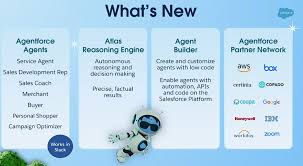
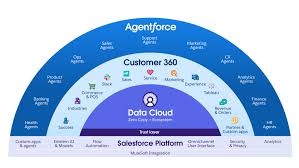
Agentforce was the highlight of the week in San Francisco during Salesforce’s annual Dreamforce conference—and for good reason! Agentforce Advances Copilot and Prompt Builder and that is truly exciting. Agentforce represents a groundbreaking solution that promises to transform how individuals and organizations interact with their CRM. However, as with any major product announcement, it raises many questions. This was evident during Dreamforce, where admins and developers, eager to dive into Agentforce, had numerous queries. Here’s an in-depth look at what Agentforce is, how it operates, and how organizations can leverage it to automate processes and drive value today. Agentforce Advances Copilot and Prompt Builder Many Dreamforce attendees who anticipated hearing more about Einstein Copilot were surprised by the introduction of Agents just before the event. However, understanding the distinctions between the legacy Einstein Copilot and the new Agentforce is crucial. Agentforce Advances Copilot and Prompt Builder. Agentforce Agents are essentially a rebranding of Copilot Agents but with an essential enhancement: they expand the functionality of Copilot to create autonomous agents capable of tasks such as summarizing or generating content and taking specific actions. Here are some key changes in terminology: Just like Einstein Copilot, Agents use user input—an “utterance”—entered into the Agentforce chat interface. The agent translates this utterance into a series of actions based on configurable instructions, and then executes the plan, providing a response. Understanding Agents: Topics A key difference between Einstein Copilot and Agentforce is the addition of “Topics.” Topics allow for greater flexibility and support a broader range of actions. They organize tasks by business function, helping Agents first determine the appropriate topic and then identify the necessary actions. This topic layer reduces confusion and ensures the correct action is taken. With this structure, Agentforce can support many more custom actions compared to Copilot’s 15-20, significantly expanding capabilities. Understanding Agents: Actions Actions in Agentforce function similarly to those in Einstein Copilot. These are the tasks an agent executes once it has identified the right plan. Out-of-the-box actions are available right away, providing a quick win for organizations looking to implement standard actions like opportunity summarization or sales emails. For more customized use cases, organizations can create bespoke actions using Apex, Flows, Prompts, or Service Catalog items (currently in beta). Understanding Agents: Prompts Whenever an LLM is used, prompts are necessary to provide the right input. Thoughtfully engineered prompts are essential for getting accurate, useful responses from LLMs. This is a key part of leveraging Agent Actions effectively, ensuring better results, reducing errors, and driving productive agent behavior. Prompt Builder plays a crucial role, allowing users to build, test, and refine prompts for Agent Actions, creating a seamless experience between generative AI and Salesforce workflows. How Generative AI and Agentforce Enhance CRM GenAI tools like Agentforce offer exciting enhancements to Salesforce organizations in several ways: However, these benefits are realized only when CRM users adopt and adapt to AI-assisted workflows. Organizations must prioritize change management and training, as most users will need to adjust to this new AI-powered way of working. If your company has already embraced AI, then you are halfway there. If AI hasn’t been introduced to the workforce you need to get started yesterday. Getting Started with Agentforce With all the buzz around Dreamforce, it’s no surprise that many organizations are eager to start using Agentforce. Fortunately, there are immediate opportunities to leverage these tools. The recommended approach is to begin with standard Agent actions, testing out-of-the-box features like opportunity summarization or creating close plans. From there, organizations can make incremental tweaks to customize actions for their specific needs. We have all come to expect that just as quickly as we include agentic ai into our processes and flows, Salesforce will add additional features and capabilities. As teams become more familiar with developing and deploying Agent actions, more complex use cases will become manageable, transforming the traditional point-and-click Salesforce experience into a more intelligent, agent-driven platform. Already I find myself asking, “is this an agent person or an ai-agent”? The day is coming, no doubt, when the question will be reversed. Tectonic’s AI Experts Can Help Interested in learning more about Agentforce or need guidance on getting started? Tectonic specializes in AI and analytics solutions within CRM, helping organizations unlock significant productivity gains through AI-based tools that optimize business processes. We are excited to enable you to enable Agentforce to Advance Copilot and Prompt Builder By Tectonic’s Solutions Architect, Shannan Hearne Like1 Related Posts Who is Salesforce? Who is Salesforce? Here is their story in their own words. From our inception, we’ve proudly embraced the identity of Read more Salesforce Marketing Cloud Transactional Emails Salesforce Marketing Cloud Transactional Emails are immediate, automated, non-promotional messages crucial to business operations and customer satisfaction, such as order Read more Salesforce Unites Einstein Analytics with Financial CRM Salesforce has unveiled a comprehensive analytics solution tailored for wealth managers, home office professionals, and retail bankers, merging its Financial Read more AI-Driven Propensity Scores AI plays a crucial role in propensity score estimation as it can discern underlying patterns between treatments and confounding variables Read more

Read More
Salesforce Channel Order App

Salesforce Channel Order App

Salesforce’s platform powers over 4.2 million apps, and Salesforce AppExchange offers more than 4,000 solutions. These numbers highlight Salesforce’s extensive ecosystem, with the Salesforce Channel Order App (COA) playing a crucial role for businesses managing complex partner relationships and order processes. This insight looks into the Salesforce Channel Order App, exploring its purpose, when and why you should use it, core features, who benefits from it, and best practices to maximize its potential. What is the Salesforce Channel Order App? The Salesforce Channel Order App is designed to streamline and automate order management across various sales channels, whether direct, through distribution partners, or a reseller network. It simplifies what would typically be a labor-intensive process by centralizing data, automating tasks, and providing real-time visibility into orders. This results in tighter control over order workflows and enhanced partner collaboration. When to Use the Salesforce Channel Order App The Salesforce Channel Order App is most effective for businesses that manage high volumes of orders from multiple channels. It’s especially useful in industries like technology, consumer goods, and manufacturing, where multi-channel sales are integral to operations. Key Use Cases: Core Features of the Salesforce Channel Order App Who Benefits from Salesforce Channel Order App? The Salesforce Channel Order App is particularly beneficial for industries where managing orders from multiple partners is crucial. Key beneficiaries include: Best Practices for Using Salesforce Channel Order App To get the most out of Salesforce Channel Order App, consider the following best practices: Final Take The Salesforce Channel Order App is an essential tool for businesses relying on channel partners to drive sales. By automating and streamlining the order management process, COA helps businesses improve efficiency, reduce errors, and ensure orders are fulfilled accurately and on time. Whether you’re a manufacturer, technology provider, or consumer goods company, adopting COA enables better order management and strengthens relationships with partners—setting your business up for long-term success. Like Related Posts Who is Salesforce? Who is Salesforce? Here is their story in their own words. From our inception, we’ve proudly embraced the identity of Read more Salesforce Marketing Cloud Transactional Emails Salesforce Marketing Cloud Transactional Emails are immediate, automated, non-promotional messages crucial to business operations and customer satisfaction, such as order Read more Salesforce Unites Einstein Analytics with Financial CRM Salesforce has unveiled a comprehensive analytics solution tailored for wealth managers, home office professionals, and retail bankers, merging its Financial Read more AI-Driven Propensity Scores AI plays a crucial role in propensity score estimation as it can discern underlying patterns between treatments and confounding variables Read more

Read More
Bye Klarna

Bye Klarna

Fintech firm Klarna is cutting ties with two major enterprise software providers, opting to automate its services using AI, and hints that more cuts could follow. Klarna co-founder and CEO Sebastian Siemiatkowski discussed the move during a recent conference call, as reported by Seeking Alpha. The company has already stopped using Salesforce, a platform that helps businesses manage sales and marketing data, and has also removed Workday, an HR and hiring platform, from its tech stack, according to a spokesperson from Klarna. This shift towards AI-driven automation is part of a larger strategy at Klarna. “We have multiple large-scale initiatives combining AI, standardization, and simplification that will allow us to eliminate several SaaS providers,” a company spokesperson said, though they did not specify which providers or services might be next. Founded in 2005, Klarna provides payment processing for e-commerce and reports over 150 million active users worldwide. Despite posting a net loss of $241 million last year—down from nearly $1 billion in 2022—the company reported a reduced loss of $32 million for the first half of 2024. With reports suggesting that Goldman Sachs has been tapped to underwrite Klarna’s potential IPO, the company’s focus on AI could strengthen its profitability prospects. This isn’t Klarna’s first AI initiative. Earlier in 2024, the company introduced an AI-powered customer service assistant in collaboration with OpenAI, which reportedly handled 2.3 million interactions in its first month and replaced the work of 700 agents. Klarna was among the early adopters of OpenAI’s enterprise ChatGPT package, and the company claims that 90% of its employees use the tool daily for process automation. Klarna’s decision to drop Salesforce and Workday is part of a broader effort to replace third-party SaaS solutions with internally developed applications, likely built on OpenAI’s infrastructure. Siemiatkowski stated in the August call, “We are shutting down a lot of our SaaS providers as we are able to consolidate.” However, not everyone is convinced. HR technology analyst Josh Bersin questioned whether Klarna could successfully replace a robust platform like Workday. “Workday systems have decades of workflows and complex data structures, including payroll and attendance,” he told Inc.. Bersin warned that developing an in-house system could lead Klarna into a “black hole of features,” with a poor user experience as a result. Many in the tech world share Bersin’s skepticism, with some suggesting the move is more of a PR tactic as Klarna gears up for its IPO. Investors and executives voiced doubts on social media, with financial insights account BuccoCapital posting on X, “Is it actually the best use of capital to rebuild in-house? Feels like a massive distraction,” while Ryan Jones, CEO of Flighty, called the move “free marketing.” Critics also point out that Klarna has downsized its workforce significantly, reducing its headcount by 1,200 over the past year, and Siemiatkowski has hinted at further reductions, suggesting the company could benefit from cutting staff from 3,800 to 2,000 employees. Siemiatkowski remains adamant that AI will allow Klarna to maintain growth despite these cuts. Bersin also noted that many tech giants have struggled to build their own HR platforms, citing examples like Google, which recently abandoned its internally developed HR software, and Amazon, which undergoes similar cycles regularly. “Microsoft,” Bersin added, “spends money on their own products but partners with SAP for HR software.” If Klarna does succeed in developing an in-house HR platform, it would be an achievement where even some of the biggest tech companies have fallen short. Like Related Posts Who is Salesforce? Who is Salesforce? Here is their story in their own words. From our inception, we’ve proudly embraced the identity of Read more Salesforce Marketing Cloud Transactional Emails Salesforce Marketing Cloud Transactional Emails are immediate, automated, non-promotional messages crucial to business operations and customer satisfaction, such as order Read more Salesforce Unites Einstein Analytics with Financial CRM Salesforce has unveiled a comprehensive analytics solution tailored for wealth managers, home office professionals, and retail bankers, merging its Financial Read more AI-Driven Propensity Scores AI plays a crucial role in propensity score estimation as it can discern underlying patterns between treatments and confounding variables Read more
Read More
Collaborative Business Intelligence

Collaborative Business Intelligence

Collaborative Business Intelligence: Connecting Data and Teams In today’s data-driven world, the ability to interact with business intelligence (BI) tools is essential for making informed decisions. Collaborative business intelligence (BI), also known as social BI, allows users to engage with their organization’s data and communicate with data experts through the same platforms where they already collaborate. While self-service BI empowers users to generate insights, understanding the data’s context is critical to avoid misunderstandings that can derail decision-making. Collaborative BI integrates BI tools with collaboration platforms to bridge the gap between data analysis and communication, reducing the risks of misinterpretation. Traditional Business Intelligence Traditional BI involves the use of technology to analyze data and present insights clearly. Before BI platforms became widespread, data scientists and statisticians handled data analysis, making it challenging for non-technical professionals to digest the insights. BI evolved to automate visualizations, such as charts and dashboards, making data more accessible to business users. Previously, BI reports were typically available only to high-level executives. However, modern self-service BI tools democratize access, enabling more users—regardless of technical expertise—to create reports and visualize data, fostering better decision-making across the organization. The Emergence of Collaborative BI Collaborative BI is a growing trend, combining BI applications with collaboration tools. This approach allows users to work together synchronously or asynchronously within a shared platform, making it easier to discuss data reports in real time or leave comments for others to review. Whether it’s through Slack, Microsoft Teams, or social media apps, users can receive and discuss BI insights within their usual communication channels. This seamless integration of BI and collaboration tools offers a competitive edge, simplifying the process of sharing knowledge and clarifying data without switching between applications. Key Benefits of Collaborative Business Intelligence Leading Collaborative BI Platforms Here’s a look at some of the top collaborative BI platforms driving innovation in the market: Conclusion Collaborative BI empowers organizations by improving decision-making, democratizing data access, optimizing data quality, and ensuring data security. By integrating BI tools with collaboration platforms, businesses can streamline their operations, foster a culture of data-driven decision-making, and enhance overall efficiency. Choosing the right platform is key to maximizing the benefits of collaborative BI. Like Related Posts Who is Salesforce? Who is Salesforce? Here is their story in their own words. From our inception, we’ve proudly embraced the identity of Read more Salesforce Marketing Cloud Transactional Emails Salesforce Marketing Cloud Transactional Emails are immediate, automated, non-promotional messages crucial to business operations and customer satisfaction, such as order Read more Salesforce Unites Einstein Analytics with Financial CRM Salesforce has unveiled a comprehensive analytics solution tailored for wealth managers, home office professionals, and retail bankers, merging its Financial Read more AI-Driven Propensity Scores AI plays a crucial role in propensity score estimation as it can discern underlying patterns between treatments and confounding variables Read more

Read More
Apple New AI

Apple New AI

Apple Unveils New AI Features at “Glowtime” Event In typical fashion, Apple revealed its latest product updates on Monday with a pre-recorded keynote titled “Glowtime,” referencing the glowing ring around the screen when Apple Intelligence is activated. Though primarily a hardware event, the real highlight was the suite of AI-powered features coming to the new iPhone models this fall. The 98-minute presentation covered updates to iPhones, AirPods, and the Apple Watch, with Apple Intelligence being the thread tying together user experiences across all devices. MacRumors has published a detailed list of all announcements, including the sleep apnea detection feature for the Apple Watch and new hearing health tools for AirPods Pro 2. Key AI Developments for Brand Marketers Apple Intelligence was first introduced at its WWDC event in June, focusing on using Apple’s large language model (LLM) to perform tasks on-device with personalized results. It draws from user data in native apps like Calendar and Mail, enabling AI to handle tasks like image generation, photo searches, and AI-generated notifications. The keynote also introduced a new “Visual Intelligence” feature for iPhone 16 models, acting as a native visual search tool. By pressing the new “camera control” button, users can access this feature to perform searches directly from their camera, such as getting restaurant info or recognizing a dog breed. Apple’s AI-powered visual search offers a strategic opportunity for brands. The information for local businesses is pulled from Apple Maps, which relies on sources like Yelp and Foursquare. Brands should ensure their listings are well-maintained on these platforms and consider optimizing their digital presence for visual search tools like Google Lens, which integrates with Apple’s search. The Camera as an Input Device and the Rise of Spatial Content The camera’s role as an input device has been expanding, with Apple emphasizing photography as a key feature of its new iPhones. This year, the iPhone 16 introduces a new camera control button, offering enhanced haptic feedback for smoother control. Third-party apps like Snapchat will also benefit from this addition, giving users more refined camera capabilities. More importantly, iPhone 16 models can now capture spatial content, including both photos and audio, optimized for the Vision Pro mixed-reality headset. Apple’s move to integrate spatial content aligns with its goal to position the iPhone as a professional creator tool. Brands can capitalize on this by exploring augmented reality (AR) features or creating immersive user-generated content experiences. Apple’s Measured Approach to AI While Apple is clearly pushing AI, it is taking a cautious, phased approach. Though the new iPhones will hit the market soon, the full range of Apple Intelligence features will roll out gradually, starting in October with tools like the AI writing assistant and photo cleanup. More advanced features will debut next spring. This measured approach allows Apple to fine-tune its AI, avoiding rushed releases that could compromise user experience. For brands, this offers a lesson in pacing AI adoption: prioritize quality and customer experience over speed. Rather than rushing to integrate AI, companies should take time to understand how it can meaningfully enhance user interactions, focusing on trust and consistency to maintain customer loyalty. By following Apple’s lead and gradually introducing AI capabilities, brands can build trust, sustain anticipation, and ensure they offer technology that genuinely improves the customer experience. Like Related Posts Who is Salesforce? Who is Salesforce? Here is their story in their own words. From our inception, we’ve proudly embraced the identity of Read more Salesforce Unites Einstein Analytics with Financial CRM Salesforce has unveiled a comprehensive analytics solution tailored for wealth managers, home office professionals, and retail bankers, merging its Financial Read more AI-Driven Propensity Scores AI plays a crucial role in propensity score estimation as it can discern underlying patterns between treatments and confounding variables Read more Tectonic’s Successful Salesforce Track Record Salesforce Technology Services Integrator – Tectonic has successfully delivered Salesforce in a variety of industries including Public Sector, Hospitality, Manufacturing, Read more
Read More
xAI for Scientific Discovery

xAI for Scientific Discovery

xAI: Advancing AI for Scientific Discovery xAI is dedicated to developing artificial intelligence that accelerates human scientific discovery, driven by a mission to enhance our understanding of the universe. Led by Elon Musk, CEO of Tesla and SpaceX, the xAI team comprises pioneers who have contributed to key advancements in AI, including the Adam optimizer, Batch Normalization, Layer Normalization, and the discovery of adversarial examples. Our team has introduced transformative technologies such as Transformer-XL, Autoformalization, the Memorizing Transformer, Batch Size Scaling, μTransfer, and SimCLR. These innovations have played crucial roles in breakthroughs like AlphaStar, AlphaCode, Inception, Minerva, GPT-3.5, and GPT-4. Dan Hendrycks, director of the Center for AI Safety, serves as an advisor to xAI. We also collaborate closely with X Corp to bring our AI technologies to over 500 million users of the X app. Timeline of Key Milestones – xAI for Scientific Discovery Like Related Posts Who is Salesforce? Who is Salesforce? Here is their story in their own words. From our inception, we’ve proudly embraced the identity of Read more Salesforce Marketing Cloud Transactional Emails Salesforce Marketing Cloud Transactional Emails are immediate, automated, non-promotional messages crucial to business operations and customer satisfaction, such as order Read more Salesforce Unites Einstein Analytics with Financial CRM Salesforce has unveiled a comprehensive analytics solution tailored for wealth managers, home office professionals, and retail bankers, merging its Financial Read more AI-Driven Propensity Scores AI plays a crucial role in propensity score estimation as it can discern underlying patterns between treatments and confounding variables Read more

Read More
Chatbot-less AI-ifying

Chatbot-less AI-ifying

AI-ify Your Product Without Adding a Chatbot: Inspiration from Top AI Use Cases Artificial intelligence doesn’t always need to look like a chatbot. Some of the most innovative implementations of AI have created intuitive user experiences (UX) without relying on traditional conversational interfaces. Here are seven standout patterns from leading companies and startups that demonstrate how AI can elevate your product in ways that feel natural and empowering for users. These are just a preview of the 24 trending AI-UX patterns featured in the “Trending AI-UX Patterns” ebook by AIverse—perfect for borrowing (or expensing to your company). Pattern 1: Linear Back-and-Forth (Classic Chat) While chat interfaces revolutionized access to AI, this pattern is just the beginning. Think of ChatGPT—its conversational simplicity opened the door to powerful LLMs for non-tech audiences. But beyond basic chat, consider integrating generative UI commands or API-based functionality into your product to transform linear data access into something seamless and engaging. Pattern 2: Non-Linear Conversations Inspired by Subform, this pattern mirrors how humans think—connecting ideas in a web, not a straight line. Non-linear exploration allows users to navigate through information like dots on a map, offering a flexible, intuitive flow. For example, imagine an AI that surfaces related ideas or actions based on user input—ideal for creative tools or brainstorming apps. Pattern 3: Context Bundling Why stop at simple text input when you can bundle context visually? Figma’s dual-tone matrix simplifies tone adjustments for text by letting users drag across a 2D grid. It eliminates the need for complex prompts while maintaining control over customization. Think of ways to integrate pre-bundled prompts directly into your UI to create an intuitive, visually driven experience. Pattern 4: Living Documents Tools like Elicit bring AI into familiar interfaces like spreadsheets by enhancing workflows without disrupting them. Elicit’s bulk data extraction uses subtle animations and transparency—highlighting “low confidence” answers for clarity. This hybrid approach integrates AI in a way that feels natural and predictable, making it a great choice for data-heavy tools or reporting systems. Pattern 5: Work With Me One of the most human-centered AI patterns comes from Granola, which uses meeting summaries based on your rough notes. Instead of overwhelming users with full transcriptions, it creates concise, actionable insights, perfectly blending human oversight with AI-powered efficiency. This pattern exemplifies the “human-in-the-loop” trend, ensuring collaboration between the user and AI. Pattern 6: Highlight and Curate Take inspiration from Lex’s “@lex” comment feature, which allows users to highlight and comment directly in the flow of their work—no app switching or disruption required. By building on familiar text-interaction patterns, this approach integrates AI subtly, offering suggestions or enhancements without breaking the user’s autonomy. Pattern 7: Invisible AI (Agentive UX) AI can work quietly in the background until needed, as demonstrated by Ford’s lane assist. This feature seamlessly takes control during critical moments (e.g., steering) and hands it back to the user effortlessly. Visual, auditory, and haptic feedback make the transition intuitive and reassuring. This “agentive” pattern is perfect for products where AI acts as a silent partner, ready to assist only when necessary. Tectonic Conclusions These patterns prove that AI can elevate your product without resorting to a chatbot. Whether through non-linear exploration, visual bundling, or seamless agentive experiences, the key is to integrate AI in a way that feels intuitive, empowering, and aligned with user needs. Like Related Posts Who is Salesforce? Who is Salesforce? Here is their story in their own words. From our inception, we’ve proudly embraced the identity of Read more Salesforce Unites Einstein Analytics with Financial CRM Salesforce has unveiled a comprehensive analytics solution tailored for wealth managers, home office professionals, and retail bankers, merging its Financial Read more AI-Driven Propensity Scores AI plays a crucial role in propensity score estimation as it can discern underlying patterns between treatments and confounding variables Read more Tectonic’s Successful Salesforce Track Record Salesforce Technology Services Integrator – Tectonic has successfully delivered Salesforce in a variety of industries including Public Sector, Hospitality, Manufacturing, Read more
Read More
Visualforce Pages in Salesforce

Visualforce Pages in Salesforce

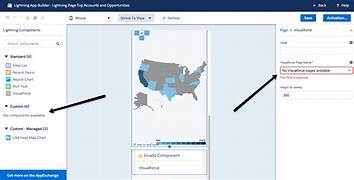
Visualforce Pages in Salesforce Visualforce Pages in Salesforce function as custom web pages that you can design to present data and functionality tailored to your organization’s needs. They offer a way to create and display information in a format that fits your specific requirements. Why Visualforce Pages Matter Visualforce Pages enable you to showcase data in unique ways, making them ideal for presenting information that doesn’t fit into the standard Salesforce interface. By customizing the layout and behavior of these pages, you can ensure the data and features are displayed in a way that best supports your organization’s goals. How Visualforce Pages Function Visualforce Pages are developed using a combination of HTML, Apex, and Visualforce components: Common Use Cases Visualforce Pages can be utilized for: Example of a Visualforce Page Here’s a basic example of a Visualforce Page: htmlCopy code<apex:page controller=”MyController”> <h1>Welcome to My Custom Page</h1> <apex:outputText value=”{!customMessage}” /> <apex:commandButton action=”{!doSomething}” value=”Click Me” /> </apex:page> Writing Apex CodeIn this example, the page displays a title, a custom message from the server using Apex, and a button that performs a server-side action when clicked. Visualforce Pages offer a robust method for enhancing and personalizing your Salesforce experience. They enable you to create user-friendly interfaces, display customized data, and integrate external services, providing tailored solutions that address your organization’s specific needs. Like Related Posts Who is Salesforce? Who is Salesforce? Here is their story in their own words. From our inception, we’ve proudly embraced the identity of Read more Salesforce Marketing Cloud Transactional Emails Salesforce Marketing Cloud Transactional Emails are immediate, automated, non-promotional messages crucial to business operations and customer satisfaction, such as order Read more Salesforce Unites Einstein Analytics with Financial CRM Salesforce has unveiled a comprehensive analytics solution tailored for wealth managers, home office professionals, and retail bankers, merging its Financial Read more AI-Driven Propensity Scores AI plays a crucial role in propensity score estimation as it can discern underlying patterns between treatments and confounding variables Read more

Read More
gettectonic.com