
, Author at gettectonic.com - Page 175
salesforce integrations

Salesforce Integrations

How do you make Salesforce even better? Integrate it with all the third party apps you already use. From productivity to marketing to collaboration and beyond, now you can connect your Salesforce to the other tools you need to run your business. MuleSoft is Salesforce’s integration and automation technology and offers connectivity solutions for all of your apps. Learn more about Salesforce integrations. Streamline your team’s workflow and increase productivity by syncing G Suite by Google Cloud with Salesforce. Increase team collaboration and efficiency with the Slack and Salesforce integration. Increase sales while generating accurate financial data by integrating Quickbooks and Salesforce. Make it easier to manage email lists and contact records by connecting directly MailChimp to Salesforce. Target and engage the right buyers and save valuable time with the LinkedIn and Salesforce integration. Connect DocuSign to Salesforce and send, sign and track agreements and approvals on any device. Integrate Jira and Salesforce and make it easier to monitor the progress of your projects. Use the HelloSign integration to simplify the process for preparing and tracking e-signature documents. Build customer apps lightning fast, with the Salesforce and CodeScience integration. Connect ActiveCampaign and Salesforce to accelerate business growth with automated one to one experiences that connect across all channels and through the entire customer lifecycle. Sync documents to keep files updated and organized, with the Dropbox and Salesforce integration. This is just the beginning of the ways that integrating Salesforce with your other systems can increase employee productivity, automate data transfer, reduce human error, and make everyone happier. If you have questions about integrating your systems with Salesforce, contact Tectonic today. Like1 Related Posts Who is Salesforce? Who is Salesforce? Here is their story in their own words. From our inception, we’ve proudly embraced the identity of Read more Salesforce Marketing Cloud Transactional Emails Salesforce Marketing Cloud Transactional Emails are immediate, automated, non-promotional messages crucial to business operations and customer satisfaction, such as order Read more Salesforce Unites Einstein Analytics with Financial CRM Salesforce has unveiled a comprehensive analytics solution tailored for wealth managers, home office professionals, and retail bankers, merging its Financial Read more AI-Driven Propensity Scores AI plays a crucial role in propensity score estimation as it can discern underlying patterns between treatments and confounding variables Read more
Read More
Salesforce Heroku

Heroku Explained

scale modern apps. Their platform is characterized by its elegance, flexibility, and user-friendly nature, providing developers with the simplest path to bring their apps to market.

Read More
Salesforce Dialer

Lightning Dialer Salesforce

What is Lightning Dialer Salesforce? Lightning Dialer Salesforce offers an outbound calling product with the option to add inbound calling functionality. You can pay for just the total number of minutes your entire org uses (in blocks of 1,000 minutes). Salesforce recommends first choosing the right Sales Dialer edition for your business needs. Is Salesforce dialer a VOIP? Telephony integration enhances communication and streamlines workflows by allowing users to handle calls, track call data, and access customer information all in one place. Telephony in Salesforce is done through a VOIP (voice over internet protocol) service. What is the difference between power dialer and auto dialer? Power dialing focuses on having a live rep for every moment of every call, so no calls can be made when agents are busy. They connect less qualified prospects to sales reps. With auto dialers, each prospect has to show interest before speaking to a salesperson. Multi-tasking with Lightning Dialer lets your Reps multi-task, all while speaking to your customers and take notes, bundle products, and finalize details. 2. Boost connect and Receive inbound calls: Lightning Dialer also allows your customer service reps to receive Inbound calls at only a little extra cost. Salesforce Lightning Dialer is now Sales Dialer. Content updated February 2024. Like1 Related Posts Who is Salesforce? Who is Salesforce? Here is their story in their own words. From our inception, we’ve proudly embraced the identity of Read more Salesforce Marketing Cloud Transactional Emails Salesforce Marketing Cloud Transactional Emails are immediate, automated, non-promotional messages crucial to business operations and customer satisfaction, such as order Read more Salesforce Unites Einstein Analytics with Financial CRM Salesforce has unveiled a comprehensive analytics solution tailored for wealth managers, home office professionals, and retail bankers, merging its Financial Read more AI-Driven Propensity Scores AI plays a crucial role in propensity score estimation as it can discern underlying patterns between treatments and confounding variables Read more

Read More

Box and Salesforce Integration

What is Box and Salesforce integration? Together, Box and Salesforce integration bring you seamless solutions that make it easy for teams to securely collaborate on the most critical content in Box, without leaving Salesforce. It easily connects with other Apps to share and store the data. Box allows users to create, edit, update, and share files/folders with Salesforce. It has a highly secured authentication process and a customizable user permission to access the files/folders. Your teams and customers expect amazing digital experiences, no matter what tools they use — which means you must deliver a consistent content experience across every app. Together, Box and Salesforce bring you seamlessly integrated solutions. The result? Better customer engagements, faster resolution on support cases, and seamless signatures so organizations can quickly go from quote to cash. Content is at the core of business today — and a driving force for your sales teams. Our integration empowers sales reps to collaborate on content directly in Salesforce, while your organization’s documents are centralized in Box to streamline processes, engage customers, and accelerate sales cycles. With Box for Salesforce, account teams can easily and securely access and share relevant files from any device, no matter if they’re at home, in the office, or out in the field. Box – Secure File Sharing — From file creation and sharing, to e-signing and retention — one secure place for it all.  Like Related Posts Who is Salesforce? Who is Salesforce? Here is their story in their own words. From our inception, we’ve proudly embraced the identity of Read more Salesforce Marketing Cloud Transactional Emails Salesforce Marketing Cloud Transactional Emails are immediate, automated, non-promotional messages crucial to business operations and customer satisfaction, such as order Read more Salesforce Unites Einstein Analytics with Financial CRM Salesforce has unveiled a comprehensive analytics solution tailored for wealth managers, home office professionals, and retail bankers, merging its Financial Read more AI-Driven Propensity Scores AI plays a crucial role in propensity score estimation as it can discern underlying patterns between treatments and confounding variables Read more
Read More
Salesforce Contact Key

What is the Contact Key in Salesforce?

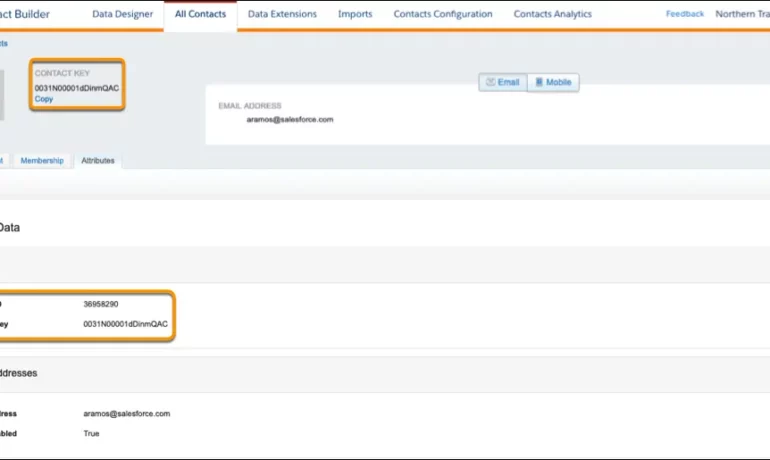
The contact key in Salesforce, also known as a subscriber key, is a unique identifier for a contact in Marketing Cloud MobilePush. Use this value to associate cross-channel addresses and subscriptions for a single contact. You can use the same key for a contact across multiple channels, such as email, SMS, and push messaging. What are contact keys? An immutable object that stores information about a single contact, such as the contact’s first name, phone numbers, and addresses. What is a Salesforce Subscriber key? A subscriber key is a text field that contains a value that uniquely identifies a subscriber in your Marketing Cloud account. A subscriber key is limited to 254 English characters. Avoid using email addresses as subscriber keys. What is the difference between subscriber key and contact key? This key is used to identify a single person across multiple channels inside of Marketing Cloud. In Email Studio, that key is called the “Subscriber Key”. In other channels, such as Mobile Connect or Mobile Push, that value is called “Contact Key”. What is the difference between contacts and subscribers? A subscriber in SFMC primarily represents an individual’s email communication preferences and is associated with email campaigns, while a contact represents a broader customer profile that includes information beyond email, allowing you to engage with customers across various channels. What is the difference between contact ID and contact key? The Contact Key gives you this ability and consistence. Existence of the contact key gives you the consistence of sending messages thru multiple channels and identify your contacts. Email and Text Message channels in our case. Contact ID is a unique number for your contacts in Salesforce Marketing Cloud. What is a subscriber key in Marketing Cloud? A subscriber is a person who has opted to receive communications from your organization. You can track information about subscribers using profile and preference attributes. Use the subscriber key to identify your subscribers in Marketing Cloud. Create lists or data extensions to store your subscribers. What is the difference between contact and subscriber in Marketing Cloud? Key Differences: Purpose: Contacts store customer data and facilitate segmentation and personalization efforts. Subscribers represent individuals who have subscribed to receive communications from your organization. Primary key is  a column or set of columns that uniquely identifies the record in the table. When a primary key is defined using multiple columns, the data from each column is used to determine whether a record/row is unique. Like Related Posts Who is Salesforce? Who is Salesforce? Here is their story in their own words. From our inception, we’ve proudly embraced the identity of Read more Salesforce Marketing Cloud Transactional Emails Salesforce Marketing Cloud Transactional Emails are immediate, automated, non-promotional messages crucial to business operations and customer satisfaction, such as order Read more Salesforce Unites Einstein Analytics with Financial CRM Salesforce has unveiled a comprehensive analytics solution tailored for wealth managers, home office professionals, and retail bankers, merging its Financial Read more AI-Driven Propensity Scores AI plays a crucial role in propensity score estimation as it can discern underlying patterns between treatments and confounding variables Read more
Read More
Salesforce analytics insurance

Cool Ways to Use Surveys With Salesforce

Leveraging survey forms is an effective way to gather real-life insights from individuals crucial to your organization. Salesforce facilitates survey integration either through Salesforce Surveys and Feedback Management (add-on license) or by seamlessly integrating web forms with Salesforce. Storing feedback in your CRM, linked to comprehensive contact information, is an obvious advantage. Salesforce surveys give you real-time feedback.  However, adopting an integrated web form approach offers additional benefits. Here are seven ideas to enhance your survey integration with Salesforce, ensuring valuable customer insights: Integrating survey forms with Salesforce is a strategic move to enhance customer experience and internal processes. Implementing these tips will not only improve the effectiveness of your Salesforce surveys but also align internal practices with best standards. Choose a tip that fits your needs and contributes to the success of your Salesforce surveys. Like Related Posts Who is Salesforce? Who is Salesforce? Here is their story in their own words. From our inception, we’ve proudly embraced the identity of Read more Salesforce Marketing Cloud Transactional Emails Salesforce Marketing Cloud Transactional Emails are immediate, automated, non-promotional messages crucial to business operations and customer satisfaction, such as order Read more Salesforce Unites Einstein Analytics with Financial CRM Salesforce has unveiled a comprehensive analytics solution tailored for wealth managers, home office professionals, and retail bankers, merging its Financial Read more AI-Driven Propensity Scores AI plays a crucial role in propensity score estimation as it can discern underlying patterns between treatments and confounding variables Read more

Read More
Salesforce AI Einstein Next Best Action

Salesforce AI Einstein Next Best Action

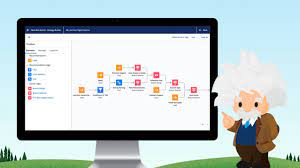
Salesforce AI Einstein Next Best Action is a feature designed to identify the most effective actions available to agents and customers in real-time. Operating as a recommendation engine powered by extensive data analysis, it facilitates a dynamic workflow aimed at optimizing the customer pipeline. Tailoring recommendations to specific individuals at opportune moments is made effortless with Einstein Next Best Action. This Salesforce Platform feature enables the configuration of business rules and filters to present the most suitable course of action for any user. It offers a diverse range of recommended actions directly accessible within Salesforce, enhancing decision-making processes. Salesforce AI Einstein Next Best Action for Personalization Personalizing the customer experience: Next Best Action (NBA) empowers organizations to customize their interactions with customers based on individual preferences, behaviors, and historical data. This fosters a more personalized and pertinent experience, ultimately boosting customer satisfaction and fostering loyalty. What is Einstein’s Next Best Action for upselling? NBA continuously evaluates real-time customer data to deliver personalized recommendations for the most effective actions to take, whether it involves cross-selling, upselling, or addressing a customer concern. These recommendations consider various factors such as customer history, product usage, and behavioral patterns. Salesforce AI Einstein Next Best Action Cost Is Einstein Next Best Action free? Einstein Next Best Action operates on a usage-based entitlement model. Every organization receives a monthly allotment of free Next Best Action requests. If usage exceeds this free allowance or any purchased entitlements, Salesforce communicates with the organization to discuss additional options for their contract. Next Best Action is a paid Salesforce product but also offers free usage for up to 5000 requests each month. What is the Next Best Action strategy? Next-best-action marketing, also known as best next action or recommended action, is a customer-centric marketing approach that assesses various actions applicable to a specific customer and determines the most favorable course of action. It’s a subset of next-best-action decision-making focused on optimizing customer interactions. The Salesforce Einstein feature is being renamed Agentforce. Conent editingd June 2025, Shannan Hearne. Like1 Related Posts Who is Salesforce? Who is Salesforce? Here is their story in their own words. From our inception, we’ve proudly embraced the identity of Read more Salesforce Marketing Cloud Transactional Emails Salesforce Marketing Cloud Transactional Emails are immediate, automated, non-promotional messages crucial to business operations and customer satisfaction, such as order Read more Salesforce Unites Einstein Analytics with Financial CRM Salesforce has unveiled a comprehensive analytics solution tailored for wealth managers, home office professionals, and retail bankers, merging its Financial Read more AI-Driven Propensity Scores AI plays a crucial role in propensity score estimation as it can discern underlying patterns between treatments and confounding variables Read more
Read More
Salesforce Supports Babies and Their Families

Set Up Record Alerts

Set up the components required for Record Alerts, including OmniStudio FlexCard components and integration procedures, custom severity values, and alert categories. Like Related Posts Who is Salesforce? Who is Salesforce? Here is their story in their own words. From our inception, we’ve proudly embraced the identity of Read more Salesforce Marketing Cloud Transactional Emails Salesforce Marketing Cloud Transactional Emails are immediate, automated, non-promotional messages crucial to business operations and customer satisfaction, such as order Read more Salesforce Unites Einstein Analytics with Financial CRM Salesforce has unveiled a comprehensive analytics solution tailored for wealth managers, home office professionals, and retail bankers, merging its Financial Read more AI-Driven Propensity Scores AI plays a crucial role in propensity score estimation as it can discern underlying patterns between treatments and confounding variables Read more
Read More
How Good is Our Data

Agiloft Salesforce Integration

Optimize organizational efficiency, performance, and value by automating contracts with Agiloft Contract Lifecycle Management Software. Regain control and streamline processes through seamless integration with Salesforce. Read on about Agiloft Salesforce integration to learn more. Agiloft’s core platform offers direct integrations that facilitate interaction within your daily tools. Collaborate effortlessly in Microsoft Teams, Outlook, and Office, exchange data seamlessly in Salesforce, and create actionable dashboards in Tableau or Power BI. Integration works in two directions: inbound and outbound. Inbound integration occurs when an external system initiates contact with Salesforce, while outbound integration involves Salesforce initiating contact with an external system. Wondering about the cloud aspect? Agiloft is purposefully designed as a pure web application with full multi-tenancy support. It stands out by being available as a Hosted Cloud service and also for deployment on-premise, providing flexibility to suit your specific needs. Agiloft Salesforce integration is one of the many Salesforce integrations Tectonic can handle. Extend your Salesforce CRM Experience by adding a no-code, AI-powered Contract Lifecycle Management (CLM) solution. Eliminate red tape and automate the contracting process Full Salesforce integration with one-click contract creation of proposals, MSAs, and other agreements as well as automated approval processes integrated with email, SMS, and e-signature. Minimize revenue leakage from contracts Keep track of performance obligations, contract end-dates, renewals, and invoicing as well as recommend actions to maximize revenue. Build custom dashboards to track KPIs and issue alerts as required. Like Related Posts Who is Salesforce? Who is Salesforce? Here is their story in their own words. From our inception, we’ve proudly embraced the identity of Read more Salesforce Marketing Cloud Transactional Emails Salesforce Marketing Cloud Transactional Emails are immediate, automated, non-promotional messages crucial to business operations and customer satisfaction, such as order Read more Salesforce Unites Einstein Analytics with Financial CRM Salesforce has unveiled a comprehensive analytics solution tailored for wealth managers, home office professionals, and retail bankers, merging its Financial Read more AI-Driven Propensity Scores AI plays a crucial role in propensity score estimation as it can discern underlying patterns between treatments and confounding variables Read more

Read More
Salesforce Document Generation

Generating Documents in Salesforce

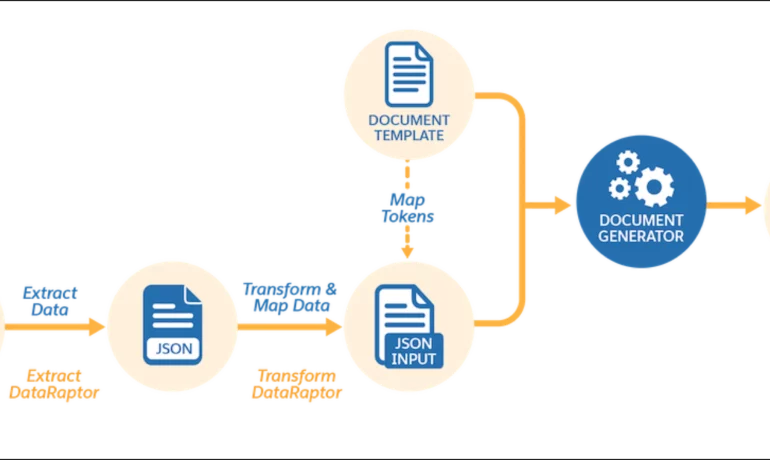
Salesforce document generation poses a challenge for businesses, given the intricacies of integration involved. Fortunately, a variety of tools are available for generating documents in Salesforce, and Tectonic is well-equipped to assist in their successful implementation. Salesforce Industries Document Generation empowers businesses to craft and manage accurate documents linked to standard Salesforce objects, encompassing contracts, opportunities, orders, quotes, and custom objects. For a more dynamic approach, Salesforce OmniStudio Document Generation facilitates the creation of documents using Microsoft Word and Microsoft PowerPoint templates. These templates can incorporate values from any JSON-based data within the text, including data sourced from various Salesforce objects. This versatile tool enables the generation of contracts, proposals, quotes, reports, non-disclosure agreements, service agreements, and more. Salesforce Industries Document Generation seamlessly integrates with Vlocity Insurance, Vlocity Health, communications, media, energy, utilities, government, and beyond. Vlocity Analytics, another valuable component, offers pre-built measurement tools that seamlessly integrate with Salesforce Reports, Dashboards, and Einstein. The Salesforce AppExchange boasts an extensive array of over 200 document generation tools. Your Salesforce partner can assist in selecting, installing, and implementing the most suitable options based on your business requirements. With Document Generation, you can generate contracts, proposals, quotes, reports, non-disclosure agreements, job offers, service agreements, and so on. You can generate documents using the specified sample client-side or server-side OmniScripts. You can also create your own OmniScripts by cloning and customizing the sample OmniScript to generate documents. Client-Side document generation is a synchronous process that results in a downloadable preview of the generated documents. You can generate documents from Microsoft Word (.docx), Microsoft PowerPoint (.pptx), and Web templates. These templates can include values from any JSON-based data in the text, including data from any Salesforce object. You can optionally convert the resulting documents to .pdf format. Server-Side document generation is available in both the OmniStudio Foundation and Salesforce Industries packages. Server-Side document generation is an asynchronous process that’s best for large and rendering-heavy documents and for document generation in batches. The Server-Side document generation service is secure and scalable and is hosted on Salesforce Hyperforce. The generated document is stored in your Salesforce org, and is attached to the object for which it’s generated. You can use Apex Classes, sample Integration Procedures, or a sample OmniScript to generate documents. Client-Side document generation supports Customer Community Plus, Customer Community, and Partner Community users to generate documents using client-side OmniScripts. Server-Side document generation supports Customer Community Plus, Customer Community, and Partner Community users to generate documents using the singleDocxServersideLwc server-side OmniScript. With the right licenses, Document Generation is available in the Salesforce Industries package. Metering measures resource utilization levels and throttling controls resource access and use based on defined rules. Metering measures the number of server-side documents that are generated by an org hourly and daily. The default hourly and daily limits for processing server-side document generation requests are 1,000 per org and 24,000 per org respectively. Throttling maintains consistency and resilience of the server-side document generation service by managing incoming server-side document generation requests from multiple orgs. Throttling can also prevent service degradation caused by high volume of requests at peak hours by blocking requests that exceed the default limits. The request details are saved in the Document Generation Processes entity. You can retrieve the blocked requests and later retry the server-side document generation. No matter what your specific document generation needs, Tectonic simplifies the process of getting your system up and running seamlessly, whether it’s through Salesforce Quickstarts or comprehensive implementation services. Content updated in 2February 2024, Shannan Hearne. Like1 Related Posts Who is Salesforce? Who is Salesforce? Here is their story in their own words. From our inception, we’ve proudly embraced the identity of Read more Salesforce Marketing Cloud Transactional Emails Salesforce Marketing Cloud Transactional Emails are immediate, automated, non-promotional messages crucial to business operations and customer satisfaction, such as order Read more Salesforce Unites Einstein Analytics with Financial CRM Salesforce has unveiled a comprehensive analytics solution tailored for wealth managers, home office professionals, and retail bankers, merging its Financial Read more AI-Driven Propensity Scores AI plays a crucial role in propensity score estimation as it can discern underlying patterns between treatments and confounding variables Read more

Read More
Salesforce

An Intro to Salesforce Acronyms

Following is an intro to Salesforce acronyms that you will encounter when discussing Salesforce CRM. Acronym Meaning Definition AKA Also Known As Due to name changes Salesforce has made to some products and also the slang/pet names the Salesforce community adorn certain functionality, these three letters have crept into our vocabulary. BA Business Analyst Business Analysts are the people in your organization who are asking ‘why’ (why a process happens the way it does) to understand what the business needs from its technology. As an organization grows, it typically demands larger and more complex software solutions. That’s where BAs come in. BSS Business Support System “Solutions which streamline operations, reduce costs, and help businesses create more innovative products by centralizing customer data and automating processes.” (source) CTA Certified Technical Architect Nope, not “call to action” as you may have guessed! CTAs are the ‘elite’ among Salesforce professionals. CTAs have proven they have the knowledge, skills, and capabilities to design and build high-performance technical solutions on the Salesforce platform. The grueling exam is the highest certification and ultimate test; even though it’s been around since 2012, only a few hundred professionals have earned their CTA creds. DF Dreamforce Dreamforce is Salesforce’s flagship conference – but a conference like no other! Tickets to this annual event are highly sought-after because of the learning and networking opportunities available to the 170,000+ attendees (not to mention the legendary parties, too!) FKA Formerly Known As Due to the name changes Salesforce has made to some products, these three letters have started to creep into our vocabulary to avoid confusion, bringing the person we’re speaking to along with us. EE Enterprise Edition You will commonly hear these Salesforce editions: Professional, Enterprise, and Unlimited. Enterprise Edition (EE) is where most organizations opt to start from, where you gain access to the features that most organizations need. GA General Availability The release status where a feature has been formally released. This happens by its inclusion in a Salesforce release cycle (Spring, Summer, Winter). Support will be available as technical support teams have been briefed on the functionality. (It comes after the Pilot and Beta phases). IaaS Infrastructure as a Service “Self-service models for accessing, monitoring, and managing remote datacenter infrastructures, such as compute (virtualized or bare metal), storage, networking, and networking services (e.g. firewalls). Salesforce does not offer Infrastructure-as-a-Service (IaaS) services. It is a customer of them, primarily Amazon Web Services.” (source) KPI Key Performance Indicator “A Key Performance Indicator is a measurable value that demonstrates how effectively a company is achieving key business objectives.” (source)Admins play a key role in KPI tracking, tasked to build Salesforce dashboards that demonstrate business trends. LEX Lightning Experience Salesforce revamped the product interface around 2015 after having a relatively consistent look and feel for its 16 years in operation. Salesforce Lightning was designed to be a big improvement in user experience – to boost user productivity and make CRM a pleasure to use. Most organizations have now transitioned to Salesforce Lightning from Classic. LOB Line of Business Line of Business could often come up when planning Salesforce projects. For example, Sales, Marketing, etc. When it comes to packaging, you can either split by project (let’s say Quote to Cash broadly) or by LOB. PaaS Platform as a Service “A set of cloud-based services that enable business users and developers to build applications at speed…As it’s a cloud-based service there’s no need to worry about the set-up and maintenance of servers, patching, upgrades, authentication.” (source)Salesforce characteristics that make it PaaS include a Mobile Software Development Kit (SDK), managed cloud database, and point-and-click app building. PE Professional Edition You will commonly hear these Salesforce editions: Professional, Enterprise, and Unlimited. QA Quality Assurance QA is a stage of testing/test automation, which is essential to manage risk and deliver quality Salesforce releases on time. The quality of any Salesforce customizations is your responsibility – not Salesforce’s! QA teams will stress-test the system’s functionality and report any bugs that need to be resolved. ROI Return on Investment As the name suggests, this is the return (the revenue) that an organization has gained as a direct result of an investment (budget spent). This is heard in the Salesforce ecosystem in multiple contexts – it could be an investment into a new Salesforce product, enhancement project, or AppExchange app. It could be RevOps teams performing ROI reporting across their marketing and sales data. SaaS Software as a Service Salesforce set out to be SaaS through and through! A third-party provider, like Salesforce, hosts your CRM and related applications for your users to access over the internet. In the case of Salesforce, licenses to access the service are typically billed annually, with a contractual commitment of one to three years. That’s why SaaS was revolutionary in the beginning, as companies were no longer locked into one system, with the possibility to switch providers without investing in the IT infrastructure themselves! SDLC Software Development Lifecycle “A process that produces software with the highest quality and lowest cost in the shortest time possible.” (source)As Salesforce is a platform that businesses extend according to their evolving needs, you may hear this term! SFDC Salesforce dot com Salesforce pioneered cloud CRM, so it was always referred to as ‘Salesforce dot-com’ in the early days to emphasize its online accessibility and to distinguish itself from premise offerings. The acronym still sticks today, especially among serving community members. SLACK SearchableLog of All Communication and Knowledge This might seem like a strange entry on this list, but Salesforce’s workplace instant messaging/collaboration platform is, in fact, an acronym, standing for “Searchable Log of All Communication and Knowledge”. Yes, Slack is a real word you’ll find in the dictionary, often used in slang – to “slack off” or “cut me some slack”. Don’t you think these associations drum up collaborative, highly responsive, productive, happy teams? You’re right – it all sounds dull. SME Subject Matter Expert This is an individual with specialized knowledge in a specific area.

Read More
CRM analytics

What is the definition of a CRM?

Customer relationship management (definition of a CRM) is a set of integrated, data-driven software solutions that help manage, track, and store information related to your company’s current and potential customers. What is CRM Software? Customer relationship management (CRM) is a technology for managing all your company’s relationships and interactions with customers and potential customers. The goal is simple: Improve business relationships. What is the basic idea of CRM? CRM is the strategy you put in place to manage all your company’s relationships and interactions with both customers and potential customers. The term also refers to the systems and processes you use to help you do that. Managed well, CRM has the power to directly improve profitability. From Wikipedia, the free encyclopedia: Customer relationship management (CRM) is a process in which a business or other organization administers its interactions with customers, typically using data analysis to study large amounts of information.[1] CRM systems compile data from a range of different communication channels, including a company’s website, telephone (which many softwares come with a softphone), email, live chat, marketing materials and more recently, social media.[2] They allow businesses to learn more about their target audiences and how to better cater to their needs, thus retaining customers and driving sales growth.[3] CRM may be used with past, present or potential customers. The concepts, procedures, and rules that a corporation follows when communicating with its consumers are referred to as CRM. This complete connection covers direct contact with customers, such as sales and service-related operations, forecasting, and the analysis of consumer patterns and behaviors, from the perspective of the company.[4] According to Gartner, the global CRM market size is estimated at $69 billion in 2020.[5][6] Salesforce is a CRM on steroids. Like Related Posts Who is Salesforce? Who is Salesforce? Here is their story in their own words. From our inception, we’ve proudly embraced the identity of Read more Salesforce Marketing Cloud Transactional Emails Salesforce Marketing Cloud Transactional Emails are immediate, automated, non-promotional messages crucial to business operations and customer satisfaction, such as order Read more Salesforce Unites Einstein Analytics with Financial CRM Salesforce has unveiled a comprehensive analytics solution tailored for wealth managers, home office professionals, and retail bankers, merging its Financial Read more AI-Driven Propensity Scores AI plays a crucial role in propensity score estimation as it can discern underlying patterns between treatments and confounding variables Read more

Read More
gettectonic.com