
, Author at gettectonic.com - Page 19
Approvers and Approver Groups in Salesforce

Approvers and Approver Groups in Salesforce

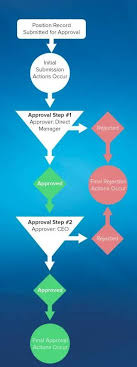
Approvers and Approver Groups in Salesforce. An approver in Salesforce CPQ Advanced Approvals is a user who receives approval request emails and can either approve or reject the request. An approver record can represent an individual user or a group of users. Utilizing approver groups (like Salesforce queues) is beneficial when you need to route approvals to all members of a specific team. REQUIRED Salesforce CPQ EDITIONSAvailable in: Salesforce CPQ Summer ‘16 and later with Advanced Approvals 3.1 and later For instance, you can create an approver group that includes all managers in the accounting department. This group can then be associated with an approval rule triggered by a quote with a net total of $750,000 or more. Consequently, each accounting manager will receive an email notification regarding the request. Assign Approvers Dynamically Based on Criteria You can specify an approver dynamically based on a formula or specific criteria. For instance, you might want the approver to be the regional manager associated with a sales rep’s opportunity. If the regional manager changes, the approval will automatically reference the new manager. To set up a dynamic approver: Add a custom formula field to your quote or opportunity that references the ID of the approver’s user record.Include this formula field in your approval rule setup.Delegate Approvers Delegated approvers are designated users who receive approval requests on behalf of another user for a predefined period, typically during the original approver’s absence. To delegate approvers: Specify the user to whom you want to delegate in the “Delegated Approver” field.Set the start and end dates for the delegation period.Ensure that delegated approvers have the necessary permissions and access to the approval objects page layout, including the ability to approve or reject requests. Approver Fields Depending on page layouts and field-level security settings, not all approver fields may be visible or editable. Delegated Approver: This field designates the user receiving approval requests instead of the primary approver for a limited time. Delegation End: Specifies the date after which delegated approvers no longer receive requests.Delegation Start: Specifies the date from which delegated approvers start receiving requests.Group ID: If the approver represents a group, this field references the Group record’s ID.Unanimous: Indicates that approval from all group members is required for the request to be considered approved.User: If the approver is an individual user, this field references the User record. Approval Rules Approval rules dictate which users or groups receive approval requests and the email templates used for notifications upon approval or rejection. When a sales rep submits a record for approval, Salesforce CPQ evaluates all active approval rules associated with that record’s object. If the approval conditions are met, the corresponding rule triggers, and Salesforce CPQ sends an approval request email to the designated approver(s) as defined in the rule. Each approval rule can optionally include lookups to request templates, approval templates, and rejection templates, allowing for customized email notifications based on specific conditions. Interested in creating automated approvals or approver groups in your Salesforce org? Contact Tectonic today. Like1 Related Posts Who is Salesforce? Who is Salesforce? Here is their story in their own words. From our inception, we’ve proudly embraced the identity of Read more Salesforce Marketing Cloud Transactional Emails Salesforce Marketing Cloud Transactional Emails are immediate, automated, non-promotional messages crucial to business operations and customer satisfaction, such as order Read more Salesforce Unites Einstein Analytics with Financial CRM Salesforce has unveiled a comprehensive analytics solution tailored for wealth managers, home office professionals, and retail bankers, merging its Financial Read more AI-Driven Propensity Scores AI plays a crucial role in propensity score estimation as it can discern underlying patterns between treatments and confounding variables Read more
Read More
Harnessing Sales Data

Harnessing Sales Data

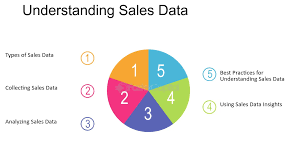
Harnessing Sales Data for Better Insights and Rapid Deal Closure Sales data is a critical asset for gaining insights and closing deals swiftly. With the ever-expanding data footprint, including customer response rates, leads in the pipeline, and quota attainment, tracking these metrics is essential. Ignoring them can be detrimental, as nearly all sales professionals recognize the importance of real-time data in meeting customer expectations, according to the Trends in Data and Analytics for Sales Report. However, concerns about data setup for generative AI and data accuracy persist. Sixty-three percent of sales professionals report that their company’s data isn’t optimized for AI, and only 42% are confident in their data’s accuracy. The demand for sales data has become a focal point for sales leaders and representatives, who increasingly rely on data to enhance customer engagement and productivity through trusted sources and AI integration. What is Sales Data? Sales data encompasses two main categories: external data, which includes information about prospects such as demographics, interests, behavior, and engagement; and internal sales data, including deal attributes and sales performance metrics. This data helps inform deal actions, assess progress toward sales targets or key performance indicators (KPIs), and supports tools like AI to enhance efficiency. Why is Sales Data Important? Sales data provides a measurable framework for all sales activities, enabling the setting of performance benchmarks and targets. It helps identify risks in the pipeline and highlights opportunities for upselling or fostering competition among sales reps. The data is also crucial for leveraging generative AI, which can automate tasks such as email drafting and sales pitch creation, provided the data is accurate and well-organized. Types of Sales Data Collecting and Utilizing Sales Data To effectively collect and utilize sales data, invest in a CRM system that serves as a centralized data repository with analytics capabilities. Automate data collection within the CRM, integrate data from other tools, and prioritize the security of sensitive information. Visualizing data through dashboards can help track progress toward business goals and make informed decisions. Real-Life Application: A Case Study A global consulting firm used sales data to enhance win rates and accelerate deal velocity. By integrating CRM analytics with data from various sources, the firm identified key deal attributes impacting success and adjusted strategies accordingly. The use of AI-driven “opportunity scores” further enabled the firm to monitor deal health and optimize resource allocation. Essential Tools for Harnessing Sales Data Turning Sales Data into Actionable Insights Regularly reviewing CRM-generated insights and adjusting strategies based on these insights is crucial for closing more deals and delivering consistent value to customers. By focusing on data-driven decision-making, sales teams can stay competitive and meet evolving customer needs. Like Related Posts Who is Salesforce? Who is Salesforce? Here is their story in their own words. From our inception, we’ve proudly embraced the identity of Read more Salesforce Marketing Cloud Transactional Emails Salesforce Marketing Cloud Transactional Emails are immediate, automated, non-promotional messages crucial to business operations and customer satisfaction, such as order Read more Salesforce Unites Einstein Analytics with Financial CRM Salesforce has unveiled a comprehensive analytics solution tailored for wealth managers, home office professionals, and retail bankers, merging its Financial Read more AI-Driven Propensity Scores AI plays a crucial role in propensity score estimation as it can discern underlying patterns between treatments and confounding variables Read more
Read More
Constituent Service Toolkit in Public Sector Solutions

Constituent Service Toolkit in Public Sector Solutions

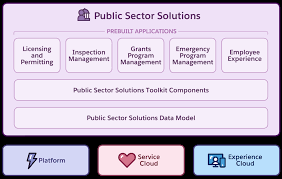
Explore the array of tools and components tailored for caseworkers, case managers, and other professionals to comprehend constituents’ needs and deliver exceptional customer service. Constituent Service Toolkit in Public Sector Solutions Public Sector Solutions offers a comprehensive suite of components, tools, and features designed to enhance the efficiency of caseworkers and other staff in addressing constituents’ concerns and issues. These tools provide valuable context for interactions with constituents and streamline actionable tasks, offering flexibility for customization to address diverse scenarios. Constituent Service Toolkit in Public Sector Solutions Whether handling inquiries about business license applications, social service benefits, or managing complaints and child welfare concerns, these tools empower users to efficiently navigate and resolve constituent service issues. Public Sector Solutions goes a step further by presenting a curated selection of these tools on a dedicated Lightning record page, facilitating a seamless start for users in utilizing these resources. Customize the page according to your agency’s specific needs, with limitless possibilities. Constituent Service Toolkit: Elevate customer service for constituents by providing tools that enhance the efficiency and effectiveness of caseworkers, case managers, and other users. Complete Common Service Tasks in Context with Action Launcher: Empower intake agents, caseworkers, and other users to access common service tasks through the Action Launcher Lightning web component. This tool allows users to perform tasks such as identity verification, referral intake, email communication, or call logging with a simple menu selection. Tailor the Action Launcher to meet specific needs and integrate it into frequently accessed record detail pages for quick and context-aware responses to constituent concerns. Protect Constituent Privacy and Reduce Fraud with Identity Verification and Audit Trail: Prioritize constituent privacy by implementing a flow to verify their identity before sharing sensitive information. Agents and service representatives can initiate this flow during phone calls, through messaging channels, or in person. Utilize the Audit Trail to monitor engagement interactions, analyze patterns, and detect potential fraud associated with identity verification. Receive Alerts on Records That Need Action: Stay informed about account and application records requiring attention with the Record Alerts component. Caseworkers, application reviewers, and other users receive notifications about person accounts, business accounts, or individual application records that demand action. The component organizes alerts by categories like type, priority, and severity, allowing users to dismiss or snooze alerts as needed. Deliver Service to Constituents from a Dedicated Account Lightning Record Page: Enhance caseworkers’ efficiency by providing relevant information and service tools through a dedicated Lightning record page for accounts. Key details about constituents are showcased through the Account card and Timeline component. The Action Launcher and Alerts components enable users to initiate common service actions and address pending record alerts. The Interaction Summary tab allows users to document notes from conversations and engagements with constituents. Create Start-to-Finish Automation to Address Service Requests from Constituents with Service Process Studio: Leverage Service Process Studio to design automated processes that efficiently respond to service requests from constituents, from intake to resolution. Utilize data attributes, OmniScript forms, Apex classes, and record-triggered flows to create automation for processing service requests, including tasks like updating a constituent’s address. Integration definitions enable seamless connectivity between service processes and external systems. Like1 Related Posts Who is Salesforce? Who is Salesforce? Here is their story in their own words. From our inception, we’ve proudly embraced the identity of Read more Salesforce Marketing Cloud Transactional Emails Salesforce Marketing Cloud Transactional Emails are immediate, automated, non-promotional messages crucial to business operations and customer satisfaction, such as order Read more Salesforce Unites Einstein Analytics with Financial CRM Salesforce has unveiled a comprehensive analytics solution tailored for wealth managers, home office professionals, and retail bankers, merging its Financial Read more AI-Driven Propensity Scores AI plays a crucial role in propensity score estimation as it can discern underlying patterns between treatments and confounding variables Read more
Read More
Technologies for Field Services

Technologies for Field Services

Technologies for Field Services are fast evolving. Here are the four technologies shaping the future of field service: In summary, these technologies are revolutionizing field service operations by enabling predictive maintenance, seamless communication, and smarter decision-making, ultimately improving customer satisfaction and driving business success. Like Related Posts Who is Salesforce? Who is Salesforce? Here is their story in their own words. From our inception, we’ve proudly embraced the identity of Read more Salesforce Marketing Cloud Transactional Emails Salesforce Marketing Cloud Transactional Emails are immediate, automated, non-promotional messages crucial to business operations and customer satisfaction, such as order Read more Salesforce Unites Einstein Analytics with Financial CRM Salesforce has unveiled a comprehensive analytics solution tailored for wealth managers, home office professionals, and retail bankers, merging its Financial Read more AI-Driven Propensity Scores AI plays a crucial role in propensity score estimation as it can discern underlying patterns between treatments and confounding variables Read more
Read More
Why Use Marketing Cloud Mobile Connect

Why Use Marketing Cloud Mobile Connect

Understanding Mobile Connect in Marketing Cloud: Why Use Marketing Cloud Mobile Connect Why Use Marketing Cloud Mobile Connect? Mobile Connect serves as Marketing Cloud’s SMS and MMS messaging tool. It enables the sending of mass text messages either to its standard Mobile Contact list or through established Data Extensions. For Data Extensions, ensure the presence of a Phone field and a Locale field. How does Mobile Connect Work? Mobile Connect simplifies the user experience by verifying the end user through their mobile phone number. This process allows users to confirm their identity online and authorize transactions, sharing only essential personal data required for completing the transaction securely. Getting Started with Mobile Connect: Guidelines and Resources for Mobile Connect: MobileConnect Features: Why Use Marketing Cloud Mobile Connect SMS is the most underrated channel. If we consider the success rates of SMS deliverability, open rate and click rate over the past years you would understand why. Countless companies are going back to SMS in order to maintain a high frequency of engagement with their customers and reach tough geographic markets. Even with the promising future of SMS, the questions are always the same: is it easy/budget-friendly to use this channel in my marketing campaigns? Which use cases are best suited for my business objectives? Is an SMS a medium that can deliver commercial benefits, or just a transactional one? MobileConnect doesn’t actually send messages directly to the subscriber’s mobile phone, however. In order to send messages, MobileConnect pushes a message to partners, known as Aggregators, who then push the message out to the local phone Carriers via their SMS gateways, for the final delivery to the subscriber’s mobile phone. Like1 Related Posts Who is Salesforce? Who is Salesforce? Here is their story in their own words. From our inception, we’ve proudly embraced the identity of Read more Salesforce Marketing Cloud Transactional Emails Salesforce Marketing Cloud Transactional Emails are immediate, automated, non-promotional messages crucial to business operations and customer satisfaction, such as order Read more Salesforce Unites Einstein Analytics with Financial CRM Salesforce has unveiled a comprehensive analytics solution tailored for wealth managers, home office professionals, and retail bankers, merging its Financial Read more AI-Driven Propensity Scores AI plays a crucial role in propensity score estimation as it can discern underlying patterns between treatments and confounding variables Read more

Read More
Salesforce Bot Planning

Salesforce Bot Planning

Careful Planning: Key to an Effective Bot and Happy Customers When building your bot, thoughtful planning is essential to ensure it efficiently serves customers and meets their needs. Supported Editions Technical Planning Voice and Tone Planning Careful planning in these areas will help ensure your Einstein Bot delivers a smooth, efficient experience for your customers. Like Related Posts Who is Salesforce? Who is Salesforce? Here is their story in their own words. From our inception, we’ve proudly embraced the identity of Read more Salesforce Marketing Cloud Transactional Emails Salesforce Marketing Cloud Transactional Emails are immediate, automated, non-promotional messages crucial to business operations and customer satisfaction, such as order Read more Salesforce Unites Einstein Analytics with Financial CRM Salesforce has unveiled a comprehensive analytics solution tailored for wealth managers, home office professionals, and retail bankers, merging its Financial Read more AI-Driven Propensity Scores AI plays a crucial role in propensity score estimation as it can discern underlying patterns between treatments and confounding variables Read more

Read More
Where Will AI Take Us?

Where Will AI Take Us?

Author Jeremy Wagstaff wrote a very thought provoking article on the future of AI, and how much of it we could predict based on the past. This insight expands on that article. Artificial Intelligence (AI) refers to the simulation of human intelligence in machines that are programmed to think and learn. These machines can perform tasks that typically require human intelligence, such as visual perception, speech recognition, decision-making, and language translation. Many people think of artificial intelligence in the vein of how they personally use it. Some people don’t even realize when they are using it. Artificial intelligence has long been a concept in human mythology and literature. Our imaginations have been grabbed by the thought of sentient machines constructed by humans, from Talos, the enormous bronze automaton (self-operating machine) that safeguarded the island of Crete in Greek mythology, to the spacecraft-controlling HAL in 2001: A Space Odyssey. Artificial Intelligence comes in a variety of flavors, if you will. Artificial intelligence can be categorized in several ways, including by capability and functionality: You likely weren’t even aware of all of the above categorizations of artificial intelligence. Most of us still would sub set into generative ai, a subset of narrow AI, predictive ai, and reactive ai. Reflect on the AI journey through the Three C’s – Computation, Cognition, and Communication – as the guiding pillars for understanding the transformative potential of AI. Gain insights into how these concepts converge to shape the future of technology. Beyond a definition, what really is artificial intelligence, who makes it, who uses it, what does it do and how. Artificial Intelligence Companies – A Sampling AI and Its Challenges Artificial intelligence (AI) presents a novel and significant challenge to the fundamental ideas underpinning the modern state, affecting governance, social and mental health, the balance between capitalism and individual protection, and international cooperation and commerce. Addressing this amorphous technology, which lacks a clear definition yet pervades increasing facets of life, is complex and daunting. It is essential to recognize what should not be done, drawing lessons from past mistakes that may not be reversible this time. In the 1920s, the concept of a street was fluid. People viewed city streets as public spaces open to anyone not endangering or obstructing others. However, conflicts between ‘joy riders’ and ‘jay walkers’ began to emerge, with judges often siding with pedestrians in lawsuits. Motorist associations and the car industry lobbied to prioritize vehicles, leading to the construction of vehicle-only thoroughfares. The dominance of cars prevailed for a century, but recent efforts have sought to reverse this trend with ‘complete streets,’ bicycle and pedestrian infrastructure, and traffic calming measures. Technology, such as electric micro-mobility and improved VR/AR for street design, plays a role in this transformation. The guy digging out a road bed for chariots and Roman armies likely considered none of this. Addressing new technology is not easy to do, and it’s taken changes to our planet’s climate, a pandemic, and the deaths of tens of millions of people in traffic accidents (3.6 million in the U.S. since 1899). If we had better understood the implications of the first automobile technology, perhaps we could have made better decisions. Similarly, society should avoid repeating past mistakes with AI. The market has driven AI’s development, often prioritizing those who stand to profit over consumers. You know, capitalism. The rapid adoption and expansion of AI, driven by commercial and nationalist competition, have created significant distortions. Companies like Nvidia have soared in value due to AI chip sales, and governments are heavily investing in AI technology to gain competitive advantages. Listening to AI experts highlights the enormity of the commitment being made and reveals that these experts, despite their knowledge, may not be the best sources for AI guidance. The size and impact of AI are already redirecting massive resources and creating new challenges. For example, AI’s demand for energy, chips, memory, and talent is immense, and the future of AI-driven applications depends on the availability of computing resources. The rise in demand for AI has already led to significant industry changes. Data centers are transforming into ‘AI data centers,’ and the demand for specialized AI chips and memory is skyrocketing. The U.S. government is investing billions to boost its position in AI, and countries like China are rapidly advancing in AI expertise. China may be behind in physical assets, but it is moving fast on expertise, generating almost half of the world’s top AI researchers (Source: New York Times). The U.S. has just announced it will provide chip maker Intel with $20 billion in grants and loans to boost the country’s position in AI. Nvidia is now the third largest company in the world, entirely because its specialized chips account for more than 70 percent of AI chip sales. Memory-maker Micro has mostly run out of high-bandwidth memory (HBM) stocks because of the chips’ usage in AI—one customer paid $600 million up-front to lock in supply, according to a story by Stack. Back in January, the International Energy Agency forecast that data centers may more than double their electrical consumption by 2026 (Source: Sandra MacGregor, Data Center Knowledge). AI is sucking up all the payroll: Those tech workers who don’t have AI skills are finding fewer roles and lower salaries—or their jobs disappearing entirely to automation and AI (Source: Belle Lin at WSJ). Sam Altman of OpenAI sees a future where demand for AI-driven apps is limited only by the amount of computing available at a price the consumer is willing o pay. “Compute is going to be the currency of the future. I think it will be maybe the most precious commodity in the world, and I think we should be investing heavily to make a lot more compute.” Sam Altman, OpenAI CEO This AI buildup is reminiscent of past technological transformations, where powerful interests shaped outcomes, often at the expense of broader societal considerations. Consider early car manufacturers. They focused on a need for factories, components, and roads.

Read More
Salesforce and Catchlight Integration

Salesforce and Catchlight Integration

Leverage data and insights from Catchlight directly in Salesforce Quickly enrich and score your leads based on unique data and insights. With Salesforce and Catchlight Integration. Enrich Leads Through the Catchlight app on Salesforce, you can quickly and easily add data and insights to lead profiles, giving marketing, business development, and advisors a unique view into the background and anticipated needs of your leads. Lead enrichment data may include estimated investable assets and income, age range, home ownership, education and employment history, life events, personal interests, hobbies, and more. All of this data can help business development representatives and advisors make more meaningful connections with prospects.  Don’t forget the old saying, its not always who you know but what you know that is important. Route Leads Using Catchlight’s unique profile insights, leads can be routed to the right resource or added to the proper campaign based on existing workflows.  For example, a new lead enters Salesforce and through the Catchlight enrichment process, it is found that the lead is a business owner, nearing retirement, and has $1M+ in investable assets.  This new lead can be routed to the advisor best equipped to help this individual with their specific goals.  Explore Leads Not only will the Catchlight app on Salesforce enrich net new leads, you can also build enriched profiles for existing records. Adding additional data and insights on existing leads can give you a new perspective on old names. You’ll be able to create segments such as HENRYs who have received company stock, or affluent/mass affluent white collar professionals who may be in the market for estate planning. Defining segments with Catchlight insights can help improve your nurture campaigns helping to ensure that you are delivering the right messages, to the right prospects, at the right time. All enabled by Catchlight. Like Related Posts Who is Salesforce? Who is Salesforce? Here is their story in their own words. From our inception, we’ve proudly embraced the identity of Read more Salesforce Marketing Cloud Transactional Emails Salesforce Marketing Cloud Transactional Emails are immediate, automated, non-promotional messages crucial to business operations and customer satisfaction, such as order Read more Salesforce Unites Einstein Analytics with Financial CRM Salesforce has unveiled a comprehensive analytics solution tailored for wealth managers, home office professionals, and retail bankers, merging its Financial Read more AI-Driven Propensity Scores AI plays a crucial role in propensity score estimation as it can discern underlying patterns between treatments and confounding variables Read more
Read More
Create a Service Provider Portal in PSS

Create a Service Provider Portal in PSS

Develop a provider portal for certified service providers to manage constituent referral requests, track service delivery, update their information, and collaborate with agencies and constituents effectively. Create a Service Provider Portal in PSS to easily track and manage referral requests. Caseworkers often lack direct insight into the progress of constituents’ benefits and their interactions with service providers, relying on providers to keep them informed. Conversely, providers struggle to maintain updated credentials, contract renewal status, and other information for agencies. To tackle these challenges, establish a portal to aid service providers in managing and monitoring their services while granting agencies and constituents real-time visibility into provider data and processes. This collaborative platform fosters efficient and transparent partnerships. While Public Sector Solutions does not offer a custom template, any Experience Cloud site template, such as the Build Your Own (LWR) template, can be utilized to create the portal for service providers. With the Provider Management for Partner permission set, providers gain access to Provider Management objects and features. Consider the following access-related requirements for the portal: Create a Service Provider Portal in PSS Service providers can leverage the portal in various ways, including: Like1 Related Posts Who is Salesforce? Who is Salesforce? Here is their story in their own words. From our inception, we’ve proudly embraced the identity of Read more Salesforce Marketing Cloud Transactional Emails Salesforce Marketing Cloud Transactional Emails are immediate, automated, non-promotional messages crucial to business operations and customer satisfaction, such as order Read more Salesforce Unites Einstein Analytics with Financial CRM Salesforce has unveiled a comprehensive analytics solution tailored for wealth managers, home office professionals, and retail bankers, merging its Financial Read more AI-Driven Propensity Scores AI plays a crucial role in propensity score estimation as it can discern underlying patterns between treatments and confounding variables Read more

Read More
Big Marketing Strategies for Small Businesses

Big Marketing Strategies for Small Businesses

Smart Marketing Strategies for SMBs and Startups on a Budget Running a small or medium-sized business (SMB) or startup means finding creative ways to attract customers while maximizing limited resources. While marketing on a tight budget may seem challenging, the right approach can turn constraints into opportunities. Read on to discover great big tactics for little businesses. With a mix of technology and creativity, you can effectively grow your business without overspending. In fact, 76% of SMBs are investing more in technology this year than last. With a strategic mindset and the right tools, budget-conscious marketing can be just as impactful as big-budget campaigns. Build a Cost-Effective Website Start your marketing journey with a free or low-cost website—your business’s digital storefront. You don’t need a massive investment to make your site engaging and effective. With easy-to-use ecommerce platforms, you can create a clean, user-friendly site that connects with your audience. How to Make Your Website Shine: Leverage SEO and Content Marketing Search engine optimization (SEO) and content marketing are your best allies in boosting online visibility without high costs. A well-optimized website with valuable content can drive organic traffic and increase engagement. SEO Tips for SMBs: Maximize Google My Business (GMB) Google My Business is a free tool that enhances your visibility in local searches. Keep your profile updated with accurate contact details, business hours, and engaging photos to build credibility and attract local customers. How to Optimize GMB: Personalize Email Marketing Campaigns Email marketing is a cost-effective way to stay connected with customers. A well-crafted email strategy fosters engagement and brand loyalty. Email Marketing Best Practices: Invest in a CRM System A customer relationship management (CRM) tool helps streamline communication, track leads, and improve customer interactions. Platforms like Starter Suite make it easy to follow up with potential customers and create targeted marketing campaigns. Why Use a CRM? Optimize Social Media Marketing Social media is a powerful and free tool for brand awareness, but success depends on consistency and strategy. Focus on platforms where your target audience is most active. Social Media Best Practices: Leverage Video and Podcasts Encourage Customer Testimonials Nothing builds trust like genuine customer reviews and testimonials. Positive feedback can influence potential buyers and reinforce credibility. How to Gather Great Testimonials: Pro Tip: Use AI-powered tools to generate surveys, craft follow-up emails, and request reviews efficiently. Track Progress with Analytics Marketing efforts should be data-driven. Tools like Google Analytics and CRM platforms provide insights into customer behavior, traffic sources, and campaign effectiveness. How to Use Analytics: Market Your SMB Like a Pro—Without a Big Budget Effective marketing doesn’t require a massive budget—just smart strategies and the right tools. By building a strong online presence, leveraging cost-effective marketing channels, and connecting with customers personally, you can make a lasting impact. Get started with Starter Suite today to streamline your marketing and grow your business with ease. If you have read this far, you may be concerned you don’t have the manpower to make these changes. Tectonic is here to help. Contact us today! Like Related Posts Who is Salesforce? Who is Salesforce? Here is their story in their own words. From our inception, we’ve proudly embraced the identity of Read more Salesforce Marketing Cloud Transactional Emails Salesforce Marketing Cloud Transactional Emails are immediate, automated, non-promotional messages crucial to business operations and customer satisfaction, such as order Read more Salesforce Unites Einstein Analytics with Financial CRM Salesforce has unveiled a comprehensive analytics solution tailored for wealth managers, home office professionals, and retail bankers, merging its Financial Read more AI-Driven Propensity Scores AI plays a crucial role in propensity score estimation as it can discern underlying patterns between treatments and confounding variables Read more
Read More
Salesforce Success Story

Case Study: Healthcare Health Cloud Marketing Cloud Large Childrens Hospital

Large children’s hospital needs a usable data model and enhanced security to deliver excellent patient outcomes. Healthcare Health Cloud Marketing Cloud Large Childrens Hospital. Industry: Healthcare Client is a large children’s hospital with pediatric healthcare offering acute care. Problem: Implemented : Our solution? Results: In order to improve operations, provide physician-facing services, and move data—including PHI and PII—to the cloud, we have assisted healthcare providers in overcoming these obstacles. Salesforce offers all-inclusive solutions specifically designed to meet the demands of payers (insurance companies) and providers (healthcare organizations). Better health outcomes, more operational effectiveness, and increased patient engagement are the goals of these solutions. Salesforce solutions for the health and life sciences are tailored to the particular requirements of the medical industry. Salesforce offers digital transformation technology for health and life sciences industries. If you are considering a Salesforce healthcare implementation, contact Tectonic today. Like2 Related Posts Who is Salesforce? Who is Salesforce? Here is their story in their own words. From our inception, we’ve proudly embraced the identity of Read more Salesforce Marketing Cloud Transactional Emails Salesforce Marketing Cloud Transactional Emails are immediate, automated, non-promotional messages crucial to business operations and customer satisfaction, such as order Read more Salesforce Unites Einstein Analytics with Financial CRM Salesforce has unveiled a comprehensive analytics solution tailored for wealth managers, home office professionals, and retail bankers, merging its Financial Read more AI-Driven Propensity Scores AI plays a crucial role in propensity score estimation as it can discern underlying patterns between treatments and confounding variables Read more
Read More
End of Support for Workflow Rules and Process Builder

End of Support for Workflow Rules and Process Builder

Every month Salesforce announces retirement and sundowning of products and features. For long-time Salesforce power users, this one feels like the end of an era. Salesforce has announced the end of support for Workflow Rules and Process Builder in 2025. Scheduled Paths are a replacement for Scheduled Actions in Process Builder and Time-Based Workflow Rules. And they even have some new and improved features like support for minutes! Flows can now call other sub-flows, a much-longed-for replacement for Process Builder’s ability to call Flows. End of Support for Workflow Rules and Process Builder Salesforce will no longer be supporting Workflow Rules and Process Builder on December 31, 2025, and we recommend that you migrate your automation to Flow Builder by that time. Have you taken advantage of all the powerful features of Flow? Not yet? Have no fear, and go with the Flow! We’ve curated a comprehensive guide of resources to take you from zero to hero on your journey with us to migrate your organization from Workflow Rules and/or Process Builder onto the newer and more powerful engine of Flow! Why move to Flow? What’s happening with Workflow Rules and Process Builder? Salesforce is starting the process of moving away from Workflow Rules and Process Builder, and transitioning to the more feature-rich functionality of Flow. You’re also probably wondering why Salesforce is retiring Workflow Rules and Process Builder. Salesforce wants to focus development on a modern, extensible, low-code automation solution in Flow Builder, which led to retire the previous features. What does this change mean for me?  If you have active Workflow Rules or Process Builder processes running after 2025, they will no longer receive customer support or bug fixes. What action can I take? We recommend implementing a plan to migrate any active rules or processes to Flow Builder before the deadline. Depending on the complexity of your org, this migration may take a significant amount of time and testing, so we recommend starting now. To assist in the migration process, we have a Migrate to Flow tool and extensive support resources available. What happens if I don’t take action? After December 31, 2025, Workflow Rules and Process Builder may continue to function and execute existing automation, but customer support will not be available, and bugs will not be fixed. How do I identify affected users? You can identify whether you have active workflow rules by going to Setup | Process Automation | Workflow Rules and sorting the Active column for checkmarks. You can identify whether you have active Process Builder processes by going to Setup | Process Automation | Process Builder and sorting the Status column for Active. If you have more questions, open a case with support via Salesforce Help. To view all current and past retirements, see Salesforce Product & Feature Retirements. What does the transition to Flows entail? The transition is set to take place in multiple phases. The first phase began with the Winter ’22 release, wherein the ability to create net-new Workflow Rules was turned off. In Summer ‘23 release the ability to create net-new processes in Process Builder will be disabled. In the last phase, Workflow Rules and Process Builder will go away entirely, and any platform automation will be leveraging Flow. This phased approach will allow administrators ample time to transition to Flow with as minimal effort as possible. What changed in the Winter ’22 release? As of Winter ’22, we’ve blocked the creation of Workflow Rules. You can still activate, deactivate, and edit any existing Workflow Rules. To test and create Workflow Rules for use in managed packages, developer orgs still allow you to create Workflow Rules. Process Builder has remained unaffected during this period. For new automation, use Flow. Link to Release Notes What changed in the Summer ’23 release? Starting in Summer ’23, Salesforce began blocking the creation of Process Builder Processes. Much like workflow rules above, you can still activate, deactivate, and edit any existing Processes. For new automation, use Flow. How can existing Workflow Rules & Processes be transitioned to Flow? A tool called “Migrate to Flow” allows you to covert existing Workflow Rules & Processes to Flow in an org, at the click of a button. More information about this tool can be found here. There are a few considerations to keep in mind as we roll out this tool. If your organization relies heavily on existing Workflow Rules or Process Builder, please consider starting the migration process today using the Migrate to Flow tool, rather than when the deadline approaches. This will also allow you to test the migrated Flows in small batches to ensure your organization’s needs are adequately met. How can I get started in Flow? For those with limited exposure to Flows, tinkering in a trailhead playground, demo org, or other non-production org is a great way to explore the capabilities of Flows. Once ready, admins can try creating any new automation needed in their organization in Flows rather than in Process Builder. Trailhead – The best place to start! Build Flows with Flow BuilderRecord-Triggered FlowsAutomate Your Business Processes with Salesforce Flow Automation Home Page – Watch videos, read blog posts, or explore other Trailhead offerings related to Flows. Trailhead Community Topics – Join the discussion!#Flow#Automation What about feature parity between Workflows/Processes and Flows? During the last few releases, many of the biggest parity gaps between Workflow Rules/Process Builder and Flow have been addressed already, including: Additionally, more and more gaps are being addressed with each new release. What about Approval Processes, Email Alerts, and other functionality operating on the workflow engine? There are no plans to retire any of these auxiliary features; however, each of them can be leveraged through flow (or Flow Orchestrator, in the case of approval processes), without the need to use processes or workflow rules at all. Flow Trailhead – Click Here Like1 Related Posts Who is Salesforce? Who is Salesforce? Here is their story in their own words. From our inception, we’ve proudly embraced the identity of Read

Read More
gettectonic.com