Salesforce Sales Cloud Archives - gettectonic.com - Page 13
Salesforce Sales Cloud

Salesforce Sales Cloud Advantages

What are Salesforce Sales Cloud advantages? Salesforce Sales Cloud is a customer relationship management (CRM) platform designed to support sales, marketing and customer support in both business-to-business (B2B) and business-to-customer (B2C) contexts. Advantages of Salesforce Sales Cloud: Salesforce Sales Cloud Advantages: Salesforce Sales Cloud is a prominent tool from the world of CRM that helps companies of all sizes and from different industry verticals sell smarter and quicker. A business that is looking for the best implementation of the sales cloud can employ a Salesforce consulting company and leverage myriad advantages, such as centralized customer data, improved collaboration, logging interactions, and business process automation. Whether you are from the manufacturing industry or the financial services sector, having a sales cloud is imperative for your business growth. Why? Let’s discuss and help you understand the importance of having an experienced consulting partner when you launch Salesforce Sales Cloud. What is So Special About Salesforce Sales Cloud? Businesses need a solution that can help in handling leads, contacts, accounts, and opportunities in a seamless manner. It is here that the Sales Cloud comes into play with its advanced capabilities and the power of AI. Not only does this cloud tool centralized customer data, but also aids collaboration among different teams. According to a report by Ventino teams, Sales Cloud has claimed 38.2 percent of the market share and leads as the best cloud solution. There are multiple reasons for its huge popularity among businesses; some of them are as follows – If you are considering leveraging Salesforce Sales Cloud in your organization, contact Tectonic today. Tectonic is please to announce our Sales Cloud Implementation Solutions. Like Related Posts Who is Salesforce? Who is Salesforce? Here is their story in their own words. From our inception, we’ve proudly embraced the identity of Read more Salesforce Marketing Cloud Transactional Emails Salesforce Marketing Cloud Transactional Emails are immediate, automated, non-promotional messages crucial to business operations and customer satisfaction, such as order Read more Salesforce Unites Einstein Analytics with Financial CRM Salesforce has unveiled a comprehensive analytics solution tailored for wealth managers, home office professionals, and retail bankers, merging its Financial Read more AI-Driven Propensity Scores AI plays a crucial role in propensity score estimation as it can discern underlying patterns between treatments and confounding variables Read more
Read More
Salesforce Order Management

Salesforce Order Management Explained

What is Salesforce Order Management? It’s a platform for managing orders, customer records, fulfillment, inventory visibility, payments and invoicing, and customer care.

Read More
Talkdesk Dialer for Salesforce

Talkdesk Dialer for Salesforce

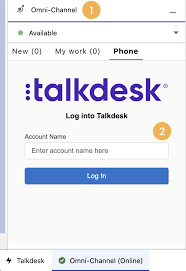
Forge Meaningful Customer Connections with Talkdesk Proactive Outbound Engagement™-Talkdesk Dialer for Salesforce Talkdesk Proactive Outbound Engagement™ is a comprehensive suite of outbound voice and digital capabilities integrated into the Talkdesk CX Cloud™ contact center platform. This suite includes versatile dialing modes tailored for every scenario, such as Talkdesk Preview Dialer, Talkdesk Dialer, Advanced Dialer, Talkdesk Dialer for Salesforce, and Automated Notifications. Maximize contact rates by reaching customers when and how they prefer to be contacted while ensuring high-quality interactions that reflect the level of service your customers deserve. Enhance Agent Productivity to Maximize Outbound Success Tools like the Talkdesk Preview Dialer can significantly increase outbound call volume, driving connect rates from 5 to 15 or more per hour and boosting revenue by up to 200-300%. Intelligently manage outbound call pacing to filter out unproductive calls like voicemails, busy signals, and no answers, optimizing agent productivity. Launch Strategic Campaigns Effortlessly Leverage highly configurable dialing options and advanced campaign management tools to maximize contact rates through precise targeting and segmentation. The Advanced Dialer supports customizable campaign and dialing configurations to accommodate virtually any outreach and retry strategy. Empower Agents with Smart Dialing Modes Equip agents with predictive, power, progressive, preview, and agentless dialing modes, complemented by a patented AI-driven answering machine detection algorithm. Salesforce Quick Campaign, part of the Talkdesk Dialer for Salesforce™ product, allows manual selection of Salesforce records for dialing using preview or power dialing modes. Streamlined List Management for Seamless Operations Set up calling lists effortlessly by uploading a CSV file or pushing records from Salesforce, other CRMs, or business systems via an API. Web leads can be seamlessly integrated into ongoing campaigns for immediate dialing, ensuring every hot lead is promptly engaged. Ensure Quality Connections with Talkdesk Dialer for Salesforce™ Talkdesk Dialer, fully embedded within the Salesforce UI, offers power and preview dialing to balance productivity with call quality and personalized customer interactions. Deliver Efficient and Proactive Notifications Go beyond voice calls with Talkdesk Automated Notifications, anticipating customer needs through automated event-triggered SMS notifications. Configure rules and content for each notification to deliver highly personalized messages that enhance efficiency and customer satisfaction. Robust Reporting and Insights While pre-set out-of-the-box reporting tools are currently unavailable for Talkdesk Dialer for Salesforce, Salesforce users can leverage standard Salesforce reporting functionality to create custom reports. Talkdesk Dialer™ is designed to automate the dialing process, maximize outbound call volume, and facilitate meaningful connections with customers while ensuring compliance with regulatory requirements. Learn more about our solutions crafted to optimize every customer interaction at talkdesk.com. Like1 Related Posts Who is Salesforce? Who is Salesforce? Here is their story in their own words. From our inception, we’ve proudly embraced the identity of Read more Salesforce Marketing Cloud Transactional Emails Salesforce Marketing Cloud Transactional Emails are immediate, automated, non-promotional messages crucial to business operations and customer satisfaction, such as order Read more Salesforce Unites Einstein Analytics with Financial CRM Salesforce has unveiled a comprehensive analytics solution tailored for wealth managers, home office professionals, and retail bankers, merging its Financial Read more AI-Driven Propensity Scores AI plays a crucial role in propensity score estimation as it can discern underlying patterns between treatments and confounding variables Read more
Read More
Salesforce Scheduler

Salesforce Scheduler

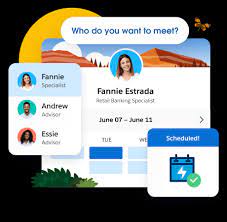
Salesforce Scheduler provides the objects required for appointment scheduling and an app that makes it easy to set up Scheduler. It provides preconfigured, customizable flows and rules that provide appointment booking experience. It also provides business APIs to create appointment booking experiences.

Read More
Salesforce Document Generation

Generating Documents in Salesforce

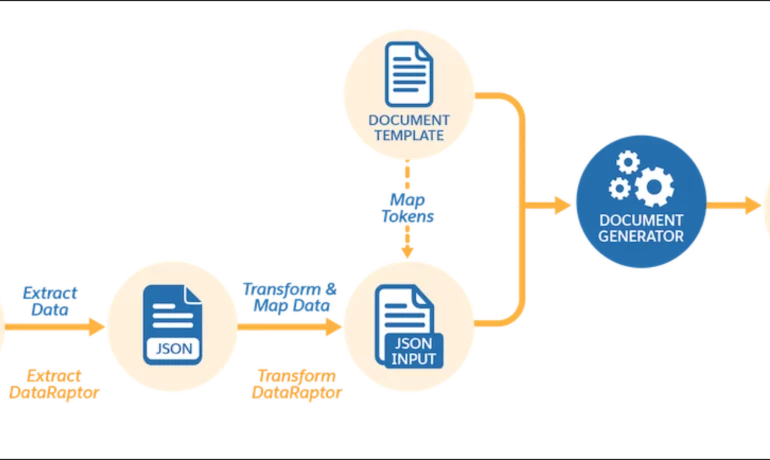
Salesforce document generation poses a challenge for businesses, given the intricacies of integration involved. Fortunately, a variety of tools are available for generating documents in Salesforce, and Tectonic is well-equipped to assist in their successful implementation. Salesforce Industries Document Generation empowers businesses to craft and manage accurate documents linked to standard Salesforce objects, encompassing contracts, opportunities, orders, quotes, and custom objects. For a more dynamic approach, Salesforce OmniStudio Document Generation facilitates the creation of documents using Microsoft Word and Microsoft PowerPoint templates. These templates can incorporate values from any JSON-based data within the text, including data sourced from various Salesforce objects. This versatile tool enables the generation of contracts, proposals, quotes, reports, non-disclosure agreements, service agreements, and more. Salesforce Industries Document Generation seamlessly integrates with Vlocity Insurance, Vlocity Health, communications, media, energy, utilities, government, and beyond. Vlocity Analytics, another valuable component, offers pre-built measurement tools that seamlessly integrate with Salesforce Reports, Dashboards, and Einstein. The Salesforce AppExchange boasts an extensive array of over 200 document generation tools. Your Salesforce partner can assist in selecting, installing, and implementing the most suitable options based on your business requirements. With Document Generation, you can generate contracts, proposals, quotes, reports, non-disclosure agreements, job offers, service agreements, and so on. You can generate documents using the specified sample client-side or server-side OmniScripts. You can also create your own OmniScripts by cloning and customizing the sample OmniScript to generate documents. Client-Side document generation is a synchronous process that results in a downloadable preview of the generated documents. You can generate documents from Microsoft Word (.docx), Microsoft PowerPoint (.pptx), and Web templates. These templates can include values from any JSON-based data in the text, including data from any Salesforce object. You can optionally convert the resulting documents to .pdf format. Server-Side document generation is available in both the OmniStudio Foundation and Salesforce Industries packages. Server-Side document generation is an asynchronous process that’s best for large and rendering-heavy documents and for document generation in batches. The Server-Side document generation service is secure and scalable and is hosted on Salesforce Hyperforce. The generated document is stored in your Salesforce org, and is attached to the object for which it’s generated. You can use Apex Classes, sample Integration Procedures, or a sample OmniScript to generate documents. Client-Side document generation supports Customer Community Plus, Customer Community, and Partner Community users to generate documents using client-side OmniScripts. Server-Side document generation supports Customer Community Plus, Customer Community, and Partner Community users to generate documents using the singleDocxServersideLwc server-side OmniScript. With the right licenses, Document Generation is available in the Salesforce Industries package. Metering measures resource utilization levels and throttling controls resource access and use based on defined rules. Metering measures the number of server-side documents that are generated by an org hourly and daily. The default hourly and daily limits for processing server-side document generation requests are 1,000 per org and 24,000 per org respectively. Throttling maintains consistency and resilience of the server-side document generation service by managing incoming server-side document generation requests from multiple orgs. Throttling can also prevent service degradation caused by high volume of requests at peak hours by blocking requests that exceed the default limits. The request details are saved in the Document Generation Processes entity. You can retrieve the blocked requests and later retry the server-side document generation. No matter what your specific document generation needs, Tectonic simplifies the process of getting your system up and running seamlessly, whether it’s through Salesforce Quickstarts or comprehensive implementation services. Content updated in 2February 2024, Shannan Hearne. Like1 Related Posts Who is Salesforce? Who is Salesforce? Here is their story in their own words. From our inception, we’ve proudly embraced the identity of Read more Salesforce Marketing Cloud Transactional Emails Salesforce Marketing Cloud Transactional Emails are immediate, automated, non-promotional messages crucial to business operations and customer satisfaction, such as order Read more Salesforce Unites Einstein Analytics with Financial CRM Salesforce has unveiled a comprehensive analytics solution tailored for wealth managers, home office professionals, and retail bankers, merging its Financial Read more AI-Driven Propensity Scores AI plays a crucial role in propensity score estimation as it can discern underlying patterns between treatments and confounding variables Read more

Read More
Salesforce Content Builder

Salesforce Content Builder

Salesforce Content Builder empowers you to craft compelling emails and landing page templates, complete with reusable and interactive content blocks. This cross-channel content management tool serves as the central hub for consolidating images, documents, and content, streamlining your marketing efforts. Curious about the content possibilities? With Salesforce Content Builder, you can gather images, documents, and content in one place within Marketing Cloud. Leverage the Einstein generative AI to craft subject lines and body copy for messages. Additionally, explore the Typeface integration option to generate customized images for a truly tailored message. Salesforce Marketing Cloud Content Builder is Salesforce’s cross-channel content management tool that allows you to consolidate images, documents, and content in a single location for use. Content Builder consolidates images, documents, and content in a single location for use in Marketing Cloud. Navigating to Content Builder in Salesforce is simple. Access the setup by hovering over your username in the Marketing Cloud toolbar, then select Setup. From there, search for Content Builder Settings. Concerned about file size? Content Builder accommodates files up to 5 MB for all file types. Looking to enhance your search and filtering experience in Content Builder? The tool offers various methods. Navigate through folders under Content to locate specific files within the structure. Alternatively, utilize the Filters tab to display content based on criteria in categories that suit your needs. Content updated February 2023. Like1 Related Posts Salesforce Marketing Cloud Transactional Emails Salesforce Marketing Cloud Transactional Emails are immediate, automated, non-promotional messages crucial to business operations and customer satisfaction, such as order Read more Perfect Drip Campaign In an ideal world, you effortlessly conquer the lead generation challenges with one creative arm tied behind your back, craft Read more Asset Management Salesforce Can Salesforce do asset management? You can manage assets in Consumer Goods (desktop) and in the Consumer Goods offline mobile Read more Lookup Relationship in Salesforce What is Lookup relationship in Salesforce? Salesforce’s lookup relationships is a significant capability that allows users to connect two objects Read more

Read More
Salesforce Listview

Listview in Salesforce

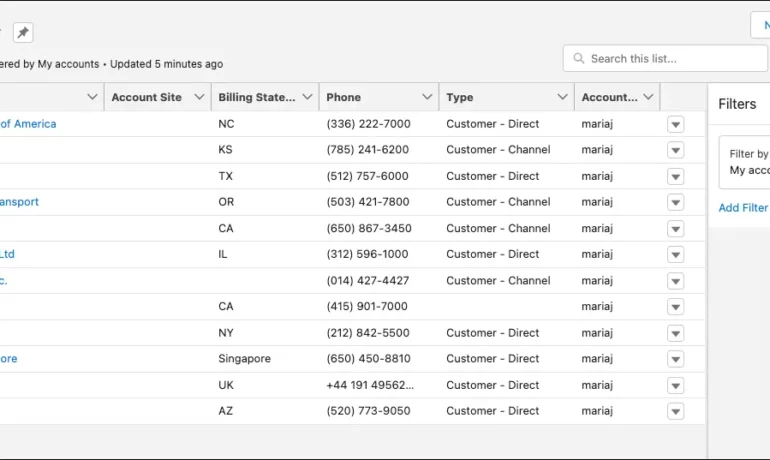
What is a listview in Salesforce? A list view is a filtered list of records where you can view records for one object at a time. For example, a list of Contacts, Accounts, or Opportunities. What are the benefits of list view in Salesforce? In a list view, you see only the data that you have access to. You can see records that you own, have read or write access to, or are shared with you. List views also include records owned by or shared with users in roles below you in the Salesforce hierarchy. What is the difference between report and Listview in Salesforce? While List Views are ideal for day-to-day tasks and offer quick access to relevant data, they cannot perform data analysis or generate summary reports. Reports, on the other hand, require an understanding of the data structure to create, and they’re only available to Salesforce users with the appropriate permissions enabled. Why use ListView? ListView builder is useful when you have a large number of items that can change dynamically, as it only builds the child records that are currently visible. It also allows you to easily scroll through the list of items. Column , on the other hand, is a layout widget that arranges its children vertically. What is the limitation of Listview in Salesforce? Due to SOQL limitations, list views are limited to first 2,000 records returned by the filter criteria. To confirm that the list view contains more than 2000 records you can create a report with the same criteria as list view to get the exact record count. Can you share a list view in Salesforce? Name the Public Group via the “Label” field. Select Users under the “Search” drop-down. Add the specific user(s) with whom you want to share the list view. Click Save. Content updated July 2025, Shannan Hearne Like Related Posts Who is Salesforce? Who is Salesforce? Here is their story in their own words. From our inception, we’ve proudly embraced the identity of Read more Salesforce Marketing Cloud Transactional Emails Salesforce Marketing Cloud Transactional Emails are immediate, automated, non-promotional messages crucial to business operations and customer satisfaction, such as order Read more Salesforce Unites Einstein Analytics with Financial CRM Salesforce has unveiled a comprehensive analytics solution tailored for wealth managers, home office professionals, and retail bankers, merging its Financial Read more AI-Driven Propensity Scores AI plays a crucial role in propensity score estimation as it can discern underlying patterns between treatments and confounding variables Read more

Read More
Salesforce Objects

Lookup Relationship in Salesforce

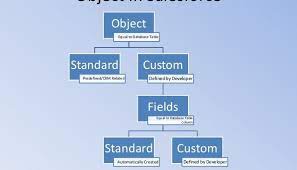
What is Lookup relationship in Salesforce? Salesforce’s lookup relationships is a significant capability that allows users to connect two objects and establish a parent-child relationship between them. To effectively manage records, this feature is essential for organizing your data. What are the different types of lookup relationships in Salesforce? A Lookup relationship is a type of relationship that simply joins two things together such that you may “look up” one object using the associated elements on another object. There are two types of lookup relationships in salesforce that is: one-to-one and one-to-many. A one-to-one relationship might be a contact related to an account. A one-to-many relationship might be locations related to an account. What does a lookup relationship do? With a lookup relationship, you can: Link two different objects. Link an object with itself (except for the user object; see the Hierarchical section in this topic). For example, link a custom object called Bug with itself to show how two different bugs are related to the same problem. What is the basic difference between lookup relationship and master detail relationship? It does not depend on any other objects, whereas a master-detail relationship has an association with other records. On the other hand, the lookup relationship is just a reference. It can be even blank or NULL. In the database, we can pull the data from particular fields based on the reference keys easily. How many Lookup relationships are allowed in an object in Salesforce? You can have a maximum of 40 lookups on an object. You can have a maximum of two master details on an object. No cascade delete. How does lookup work in Salesforce? Lookup fields appear with the search icon on record edit pages. Clicking the icon opens a lookup search dialog that allows you to search for the record that you want to associate with the record you’re editing. There are two main types of lookups: standard and enhanced. Like Related Posts Who is Salesforce? Who is Salesforce? Here is their story in their own words. From our inception, we’ve proudly embraced the identity of Read more Salesforce Marketing Cloud Transactional Emails Salesforce Marketing Cloud Transactional Emails are immediate, automated, non-promotional messages crucial to business operations and customer satisfaction, such as order Read more Salesforce Unites Einstein Analytics with Financial CRM Salesforce has unveiled a comprehensive analytics solution tailored for wealth managers, home office professionals, and retail bankers, merging its Financial Read more AI-Driven Propensity Scores AI plays a crucial role in propensity score estimation as it can discern underlying patterns between treatments and confounding variables Read more
Read More
salesforce asset management

Asset Management Salesforce

Can Salesforce do asset management? You can manage assets in Consumer Goods (desktop) and in the Consumer Goods offline mobile app in Salesforce. Let’s understand the process in detail. Create Asset Templates and Asset Types: Before you create assets, ensure that admins have created asset templates and asset types. Assets are items, such as refrigerators or freezers, that you place at a customer location (retail store) to increase your sales. Assets are also items you use in your business such as vehicles or computers. As an asset’s owner, you’re responsible for the maintenance, repair, or any other services required for the asset. Managing assets efficiently can help reduce customer complaints and, in turn, increase your brand value. By actively tracking your assets’ conditions, you can budget better, reduce losses, and ensure employee safety. What is the use of asset object in Salesforce? So, Assets are used quite frequently by sales, customer service in your back office. Assets are a standard object. It comes out-of-the-box with Salesforce. And being a standard object we can add custom fields, validation rules, record types, multiple page layouts. How do I create an asset for a product in Salesforce? Create an Asset What is the asset state period in Salesforce? An asset state period represents a time span when an asset has the same quantity, amount, and monthly recurring revenue (MRR). An asset has as many asset state periods as there are changes to it (asset actions) during its lifecycle. The dashboard and related pages show the current asset state period. What is the difference between subscription and asset in Salesforce? Use subscriptions to keep records of subscription products you’ve quoted or sold. Use assets to keep records of stand-alone products you’ve quoted or sold. You can use these records later to manage amendments and renewals to your opportunities and orders. How do I enable assets in Salesforce? Enable Asset Scheduling in Salesforce Scheduler How do I create an asset in Salesforce CPQ? Salesforce CPQ creates assets when you click Contracted on an opportunity or order. The asset creation process varies based on your account’s renewal model and the value of the asset conversion field on the product you’re contracting. How do you renew assets in Salesforce CPQ? Select the assets you want to renew, and then click Renew. Salesforce CPQ creates a renewal quote, associates it with a renewal opportunity, and opens the quote line editor. Edit the quantities of the assets from your original quote as needed. You can also add new products. What is an asset state? Asset State denotes the different states of assets in the organization such as assets in Use, In Store, Expired and so on. Apart from the default asset states, you can create custom ones. You can also enable or disable ownership and scan for custom asset states you create. Note that Salesforce also has a Digital Asset Management (DAM) capability. Where is asset library in Salesforce? To view asset files in Files home, select Libraries and then select Asset Library . To view and edit asset files in Setup, enter Asset Files in the Quick Find box, then select Asset Files. For more information on Salesforce Asset Management, contact Tectonic today. Like1 Related Posts Who is Salesforce? Who is Salesforce? Here is their story in their own words. From our inception, we’ve proudly embraced the identity of Read more Salesforce Marketing Cloud Transactional Emails Salesforce Marketing Cloud Transactional Emails are immediate, automated, non-promotional messages crucial to business operations and customer satisfaction, such as order Read more Salesforce Unites Einstein Analytics with Financial CRM Salesforce has unveiled a comprehensive analytics solution tailored for wealth managers, home office professionals, and retail bankers, merging its Financial Read more AI-Driven Propensity Scores AI plays a crucial role in propensity score estimation as it can discern underlying patterns between treatments and confounding variables Read more
Read More
Salesforce Marketing Cloud

Salesforce Marketing Cloud Transactional Emails

Salesforce Marketing Cloud Transactional Emails are immediate, automated, non-promotional messages crucial to business operations and customer satisfaction, such as order confirmation emails, shipping notifications, confirmations, etc. The Transactional Messaging API in Marketing Cloud, an upgraded version of Triggered Sends in Email Studio, offers enhanced scalability and flexibility. However, with increased flexibility comes the responsibility of monitoring these mission-critical emails. Let’s explore how to set up this monitoring process. Salesforce AppExchange Mastery: Note: This guide assumes familiarity with the Transactional Messaging API and covers advanced topics. If you’re new to the Transactional Messaging API, consider checking out the Trailhead Module for basics. Marketing Cloud Transactional Messaging API vs Triggered Sends: The Transactional Messaging API in Marketing Cloud boasts advantages over its predecessor, Triggered Sends in Email Studio: However, there are notable limitations: Transactional Messages Performance with Intelligence Reports for Marketing Cloud: The second limitation, monitoring transactional messages, is critical for business operations and customer satisfaction. Event Notification Service (ENS) serves as the solution, sending notifications for specific events in Marketing Cloud, such as the failure to send transactional emails. Step-by-Step Solution: Step 1: Create the VerificationKey Data Extension: Set up a Data Extension named “TransactionalSendsVerificationKey” to temporarily store the Verification Key required for URL Callback verification. Step 2: Creating the Callback CloudPage: Establish a CloudPage to receive events from ENS. Initially, the CloudPage stores the verification code. Step 3: Create and Verify the Callback: Create and verify the callback in Marketing Cloud by registering a new URL Callback and completing the details with the CloudPage URL. Step 4: Create the ENS Log Data Extension: Create a Data Extension called “TransactionalSendsMonitor” to store details of notifications from ENS. Step 5: Modify the Callback CloudPage to Process Events: Update the Callback CloudPage code to process notification payloads and store them in the “TransactionalSendsMonitor” Data Extension. Step 6: Create the Monitoring Automation: Build an automation with a verification activity to count the number of rows in the monitoring Data Extension. This solution enables the monitoring of critical emails, providing a streamlined process for troubleshooting. Transactional email journeys can also be created. Send Salesforce Marketing Cloud transaction emails with Journey Builder. Create a Transactional Send Journey Like2 Related Posts Who is Salesforce? Who is Salesforce? Here is their story in their own words. From our inception, we’ve proudly embraced the identity of Read more Salesforce Unites Einstein Analytics with Financial CRM Salesforce has unveiled a comprehensive analytics solution tailored for wealth managers, home office professionals, and retail bankers, merging its Financial Read more AI-Driven Propensity Scores AI plays a crucial role in propensity score estimation as it can discern underlying patterns between treatments and confounding variables Read more Tectonic’s Successful Salesforce Track Record Salesforce Technology Services Integrator – Tectonic has successfully delivered Salesforce in a variety of industries including Public Sector, Hospitality, Manufacturing, Read more
Read More
gettectonic.com