Approval Process Archives - gettectonic.com - Page 2
Oracle Fusion Cloud

Oracle Fusion Cloud

Oracle has unveiled over 50 role-based AI agents in the Oracle Fusion Cloud Applications Suite as of Wednesday. This suite offers a range of applications designed to help enterprises manage various functions. The newly introduced AI agents aim to assist employees and managers by automating business processes. According to Oracle executives at the CloudWorld 2024 conference in Las Vegas, these agents are tailored to improve efficiency across different functions. In Oracle Fusion Cloud Human Capital Management, the AI agents support shift scheduling, assist with hiring, manage requests to fill or create new positions, and help employees understand their benefits. In Oracle Fusion Cloud Supply Chain, Manufacturing AI Agents provide contextual insights and recommendations for handling order requests and suggest maintenance and repair actions for various assets. The AI agents within Oracle Fusion Cloud Customer Experience assist with planning and research tasks, automate contract workflow and approval processes, and facilitate communication with sales representatives. Oracle has yet to announce the release date for these AI agents. The Next Stage of GenAIThe introduction of AI agents represents an evolution of generative AI, moving beyond chatbots to technology that performs tasks autonomously. “These AI agents are engineered to automate routine tasks and offer personalized insights and recommendations,” noted Sid Nag, Gartner Research analyst. This development underscores a shift in the generative AI market from ideation to practical implementation. “These are very pragmatic and practical ideas,” said Mark Beccue, an analyst at TechTarget’s Enterprise Strategy Group. “It’s a use case we’ve been anticipating, where AI helps complete tasks effectively.” Oracle’s AI Agents for its Fusion Cloud Applications Suite align with the vision for enterprise software vendors, Beccue added. ServiceNow AI AgentsOracle is not alone in embedding AI agents into business applications. On September 10, ServiceNow announced plans to integrate agentic workflows into its platform. The initial AI Agent applications from ServiceNow will focus on Customer Service Management and IT Service Management. These agents are designed to identify and resolve issues independently while still being overseen by human operators. ServiceNow’s AI Agents are expected to launch in November 2024 as part of a limited release. The company also introduced the Now Assist Skill Kit, enabling enterprises to develop custom generative AI skills tailored to specific business needs. Single Task vs. Multitask AgentsA key consideration with AI agents is whether they can handle single tasks or multitask across multiple applications. Mark Beccue suggests that the ability to perform tasks across various applications could lead to a new user interface where AI agents manage tasks seamlessly across different systems. “It’s a vision for the future of AI agents,” Beccue remarked. It remains to be seen how these AI agents will address industry-specific regulations and compliance requirements, particularly in highly regulated sectors such as finance. Additional AI FeaturesOracle has also introduced new AI capabilities in other applications. Oracle Cloud ERP now includes predictive cash forecasting, narrative reporting, and automated transaction records within Oracle Fusion Cloud Sustainability. In Oracle Cloud CX, new features include assisted authoring to help sales teams engage buyers with AI-generated content and advanced AI capabilities in Oracle CX Unity for detecting signals based on role, title, and topic engagement. Like Related Posts Who is Salesforce? Who is Salesforce? Here is their story in their own words. From our inception, we’ve proudly embraced the identity of Read more Salesforce Unites Einstein Analytics with Financial CRM Salesforce has unveiled a comprehensive analytics solution tailored for wealth managers, home office professionals, and retail bankers, merging its Financial Read more AI-Driven Propensity Scores AI plays a crucial role in propensity score estimation as it can discern underlying patterns between treatments and confounding variables Read more Tectonic’s Successful Salesforce Track Record Salesforce Technology Services Integrator – Tectonic has successfully delivered Salesforce in a variety of industries including Public Sector, Hospitality, Manufacturing, Read more
Read More
License and Permitting Management for Businesses

License and Permitting Management for Businesses

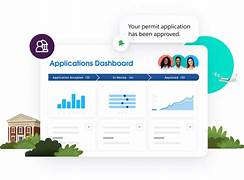
Citizens and residents today are more connected than ever and expect to interact with government just as they do with other industries—through a variety of modern channels with swift response times. License and Permitting Management for Businesses is an innovative solution. Public Sector Solutions for License and Permit Management for businesses empowers government entities to engage more effectively with residents, fostering economic growth and thriving communities. Digital Experiences: From a resident building a new home to an entrepreneur opening a new business, every constituent can easily identify the necessary licenses and permits for their project through a single online platform. Applications: Applicants can swiftly complete all necessary forms, which dynamically update based on user input, making the entire process straightforward and efficient. Automation Tools: Salesforce automation tools ensure that once an application is submitted, the constituent receives an automated email confirmation, and the reviewer is notified of the new application, streamlining communication. Kanban Employee View: Seamless handoffs for application review and approvals are facilitated by a Kanban-style dashboard where government reviewers can view all applications ready for review in one centralized location. Reviewers can also track the status of applications, ensuring the right colleague reviews and moves them forward. Service Console: When a reviewer accepts an application, they can access a comprehensive view of all essential details, such as status, guided actions, and uploaded files, all in one place. This clarity ensures that employees know the next steps in the review process, such as scheduling a required inspection before final approval. Collaboration: If additional information is needed, reviewers can easily collaborate with applicants in real-time, with all communications documented in one place. Applicants can view updates and messages when they log back into the portal, ensuring transparency and efficiency. Distributing Licenses and Permits: After final approval, the license or permit is generated and automatically emailed to the applicant. It is also made available in the constituent’s portal for easy access. This process keeps constituents informed with clear visibility into every step of the application approval process, while government employees are equipped to support community growth through enhanced collaboration with constituents and other departments. Dashboards and Analytics: Salesforce Analytics provides senior executives with a comprehensive view of agency and department-level permit statuses, including details by geography, type, status, and more, offering a holistic perspective on applications and active licenses and permits. Like Related Posts Who is Salesforce? Who is Salesforce? Here is their story in their own words. From our inception, we’ve proudly embraced the identity of Read more Salesforce Marketing Cloud Transactional Emails Salesforce Marketing Cloud Transactional Emails are immediate, automated, non-promotional messages crucial to business operations and customer satisfaction, such as order Read more Salesforce Unites Einstein Analytics with Financial CRM Salesforce has unveiled a comprehensive analytics solution tailored for wealth managers, home office professionals, and retail bankers, merging its Financial Read more AI-Driven Propensity Scores AI plays a crucial role in propensity score estimation as it can discern underlying patterns between treatments and confounding variables Read more

Read More
Salesforce for Public Loan Management

Salesforce for Public Loan Management

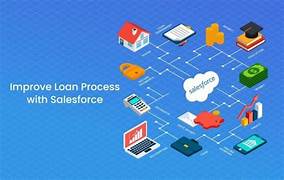
Public Loan Management Solutions: Optimized with Salesforce Technology In the dynamic world of financial services, public loan management has become increasingly important as organizations aim to improve efficiency, transparency, and borrower satisfaction. Leveraging cutting-edge technology is key to achieving these goals, and Salesforce offers a powerful platform for optimizing public loan management. This article explores how Salesforce’s capabilities can streamline and enhance various aspects of public loan management. The Role of Loan Boarding in Public Loan Management Loan boarding is a critical step where approved loans are entered into the system. This process typically includes data entry, document verification, and compliance checks. Salesforce’s customizable objects and automation features simplify this process by automating workflows, ensuring all necessary documents are collected and verified before the loan is boarded. Integrating external systems allows real-time data updates, minimizing errors and reducing manual intervention. Streamlining Handoff and Approval Processes Loan applications often require multiple approvals from stakeholders, which can be time-consuming and prone to delays. Salesforce facilitates efficient communication and collaboration through tools like Chatter, which allows instant messaging and file sharing. This ensures all stakeholders stay informed about application status changes, eliminating the need to switch between different platforms and speeding up the approval process. Disbursement Efficiency Timely fund disbursement is vital for maintaining borrower trust. Salesforce can automate disbursement processes by integrating payment gateways, accelerating fund transfers while providing borrowers with real-time updates on their disbursements. This enhances transparency and improves borrower satisfaction. Effective Management of Amortization Schedules Amortization schedules detail the repayment of loans over time, including both principal and interest. Salesforce’s reporting tools, combined with custom formulas, enable organizations to generate accurate, customized amortization schedules. These schedules can be easily updated if loan terms change, ensuring borrowers and lenders have up-to-date information. Simplifying Repayment Schedules Repayment schedules are essential for managing loan payments. Salesforce’s task management features allow organizations to automate reminders for upcoming payments, while borrowers can access personalized portals to view their schedules, promoting transparency and accountability. Customizable Loan Templates In public lending, creating flexible yet standardized loan templates is essential. Salesforce allows organizations to design customizable templates that meet both organizational policies and borrower needs, reducing onboarding time and improving efficiency. Comprehensive Document Management Managing loan-related documents is often challenging due to regulatory requirements and varying documentation needs. Salesforce’s integrated document management tools, such as Files and Content Libraries, provide secure storage and easy retrieval of documents, ensuring compliance and simplifying audits. Automating Interest Accruals and Invoicing Interest accruals require accurate tracking to ensure transparency for both lenders and borrowers. Salesforce’s invoicing automation ensures that billing cycles align with interest accruals, reducing administrative overhead and improving financial accuracy. Efficient Payment Processing and Waterfall Management Payment processing is essential for collecting repayments and adhering to waterfall structures, which determine how funds are allocated (e.g., to principal vs. interest). Salesforce integrates with NACHA/ACH for seamless payment processing and offers batch import capabilities for external payment records, improving cash flow management. Portfolio Management and Risk Assessment Managing a large portfolio of loans involves monitoring performance and assessing risks. Salesforce’s real-time analytics, reports, and dashboards provide managers with insights into portfolio performance, enabling data-driven decisions regarding portfolio adjustments, repayment patterns, and borrower risk. Enhancing Borrower Communication Consistent, clear communication is vital throughout the loan lifecycle, from initial inquiry to final repayment. Salesforce automates alerts and task assignments to ensure no critical communications are missed, keeping borrowers engaged and informed at every stage. Conclusion Salesforce technology offers a transformative approach to public loan management by enhancing operational efficiency, improving borrower experiences, and streamlining processes. Whether through automating document management, optimizing approval workflows, or managing payment cycles, Salesforce provides public lending organizations with the tools they need to deliver reliable, transparent, and efficient loan services to their constituents. By adopting Salesforce for public loan management, organizations not only improve internal operations but also elevate the borrower experience, ultimately contributing to community development and financial inclusion on a national scale. Like Related Posts Who is Salesforce? Who is Salesforce? Here is their story in their own words. From our inception, we’ve proudly embraced the identity of Read more Salesforce Marketing Cloud Transactional Emails Salesforce Marketing Cloud Transactional Emails are immediate, automated, non-promotional messages crucial to business operations and customer satisfaction, such as order Read more Salesforce Unites Einstein Analytics with Financial CRM Salesforce has unveiled a comprehensive analytics solution tailored for wealth managers, home office professionals, and retail bankers, merging its Financial Read more AI-Driven Propensity Scores AI plays a crucial role in propensity score estimation as it can discern underlying patterns between treatments and confounding variables Read more

Read More
Loan Boarding and Approval

Loan Boarding and Approval

Streamlining Loan Boarding and Approval Processes with Salesforce Technology The financial services industry is undergoing a rapid transformation, driven by the need for greater efficiency and improved customer experiences. One area where this shift is particularly evident is in the loan boarding and approval processes. Leveraging Salesforce technology, financial institutions can streamline these essential workflows, enhancing both speed and accuracy while delivering a superior borrower experience. Understanding Loan Boarding Loan boarding is the process of transitioning a loan from its origination phase into servicing. This involves several key steps, including data entry, document management, and compliance checks. Traditionally, this process has been manual, cumbersome, and prone to errors. However, Salesforce offers robust capabilities that allow organizations to automate and optimize these tasks, significantly reducing inefficiencies. Automating Data Entry Salesforce facilitates automated data entry through its customizable forms and integration capabilities. Tools like Salesforce Flow and Apex enable businesses to create workflows that automatically populate fields based on predefined criteria or data extracted from documents using Optical Character Recognition (OCR) technology. This automation reduces manual errors and accelerates the loan boarding process. Efficient Document Management Effective document management is crucial in loan boarding. Salesforce provides a centralized platform for secure storage and easy access to all necessary documents. Features like Salesforce Files enable organizations to manage documentation efficiently, allowing for easy retrieval, sharing, and version control. This streamlined document management ensures that all relevant information is readily available throughout the loan lifecycle. Streamlining Handoff and Approval Processes After a loan is boarded, it must go through a series of approvals before disbursement. The handoff between departments such as underwriting and risk assessment can cause delays if not properly managed. Salesforce’s collaborative tools facilitate seamless communication among stakeholders, ensuring a smooth transition through the approval process. Customizable Approval Workflows Salesforce allows for the creation of customizable approval workflows, enabling organizations to define specific criteria for each stage of loan approval. This flexibility ensures that loans are reviewed by the appropriate personnel based on their complexity or risk profile. Automated alerts notify relevant team members when their input is needed, minimizing bottlenecks and keeping the process moving efficiently. Enhanced Visibility with Real-Time Dashboards One of Salesforce’s standout features is its ability to generate real-time dashboards that provide insights into various stages of the loan process. Stakeholders can monitor key metrics, such as the average time for approvals or the number of loans pending at each stage, through intuitive visualizations. This transparency promotes quicker decision-making and fosters accountability within the team. Seamless Disbursement Process Once loans are approved, the disbursement phase is the next critical step. Salesforce’s integration capabilities with payment processing systems, such as NACHA/ACH solutions, allow organizations to automate fund transfers directly within the platform, streamlining the disbursement process. Automating Payment Processing Automated triggers for payments can be set up within Salesforce, reducing the need for manual intervention. This automation speeds up the disbursement process and minimizes the risk of errors associated with manual data entry during fund transfers, ensuring a smooth and reliable process. Comprehensive Portfolio Management Managing a large loan portfolio requires meticulous tracking of various elements, including amortization schedules, repayments, interest accruals, and fees. Salesforce excels in these areas, offering tools to manage all aspects of a loan portfolio effectively. Dynamic Amortization and Repayment Schedules Salesforce enables the creation of dynamic amortization schedules tailored to individual borrower agreements, easily accessible via custom borrower portals. These portals enhance borrower engagement by providing real-time information about repayment obligations and remaining balances, improving transparency and customer satisfaction. Fee Automation Automating fee calculations within Salesforce reduces administrative burdens and ensures accurate billing according to agreed-upon terms. This feature helps avoid discrepancies and delays, providing a seamless experience for both the lender and the borrower. Risk Management and Collections In today’s volatile economic environment, effective risk management is essential for financial institutions. Salesforce’s advanced analytics and performance rating tools allow organizations to proactively identify potential risks before they escalate, enabling more informed lending decisions. Performance and Risk Ratings By analyzing historical data, Salesforce enables lenders to assign risk ratings based on borrowers’ past behaviors and external market conditions. This data-driven approach supports more accurate and strategic lending decisions, helping to mitigate risk. Effective Collections Strategies For overdue accounts, Salesforce’s task management features automate reminders and follow-ups, ensuring timely communication and effective debt recovery. Maintaining open communication channels with borrowers during the collections process is crucial for preserving relationships and achieving successful outcomes. Conclusion: Embracing Digital Transformation By embracing digital transformation through Salesforce technology, financial institutions can significantly streamline their loan boarding and approval processes. This not only enhances operational efficiency but also positions them competitively in a tech-driven marketplace, delivering the high-quality service that today’s consumers demand. Salesforce’s powerful tools enable institutions to meet the unique needs of their borrowers effectively, ensuring both efficiency and excellence in service delivery. Like Related Posts Who is Salesforce? Who is Salesforce? Here is their story in their own words. From our inception, we’ve proudly embraced the identity of Read more Salesforce Marketing Cloud Transactional Emails Salesforce Marketing Cloud Transactional Emails are immediate, automated, non-promotional messages crucial to business operations and customer satisfaction, such as order Read more Salesforce Unites Einstein Analytics with Financial CRM Salesforce has unveiled a comprehensive analytics solution tailored for wealth managers, home office professionals, and retail bankers, merging its Financial Read more AI-Driven Propensity Scores AI plays a crucial role in propensity score estimation as it can discern underlying patterns between treatments and confounding variables Read more

Read More
benefits of salesforce flow automation

Benefits of Salesforce Flow Automation

Salesforce Flow Automation offers robust tools to streamline operations, enhance productivity, and improve accuracy. Whether you’re new to Salesforce or refining existing workflows, here are five top tips for maximizing the benefits of Salesforce Flow Automation. 1. Define Clear Objectives Before creating any flows, clearly define your automation goals, whether it’s reducing manual data entry, accelerating approval processes, or ensuring consistent customer follow-ups. Having specific objectives will keep your flow design focused and help you measure the impact of your automation. 2. Leverage Pre-Built Flow Templates Salesforce provides a range of pre-built flow templates tailored to common business needs, saving time and effort. Start with these templates and customize them to suit your unique requirements, allowing you to implement efficient solutions without building from scratch. 3. Optimize Decision Elements Decision elements in Salesforce Flow enable branching logic based on set conditions. Use them to direct the flow according to specific criteria, such as routing different approval paths based on deal value or service type. This targeted approach ensures each scenario is handled effectively. 4. Thoroughly Test Before Deployment Testing is a critical part of the automation process. Before launching a new flow, test it in a sandbox environment to catch any issues. Cover a range of scenarios and edge cases to confirm that the flow works as expected, helping avoid disruptions and ensuring a smooth transition into live use. 5. Monitor and Continuously Improve Automation is an evolving process. After deploying flows, monitor their performance to ensure they’re achieving desired outcomes. Use Salesforce’s reporting tools to track metrics like completion rates and processing times. With this data, you can fine-tune your flows to boost efficiency and adapt to changing business needs. By following these tips, you can unlock the full potential of Salesforce Flow Automation, leading to streamlined processes and better business outcomes. Embrace automation to reduce manual work and keep focus on driving core business growth. Like Related Posts Who is Salesforce? Who is Salesforce? Here is their story in their own words. From our inception, we’ve proudly embraced the identity of Read more Salesforce Marketing Cloud Transactional Emails Salesforce Marketing Cloud Transactional Emails are immediate, automated, non-promotional messages crucial to business operations and customer satisfaction, such as order Read more Salesforce Unites Einstein Analytics with Financial CRM Salesforce has unveiled a comprehensive analytics solution tailored for wealth managers, home office professionals, and retail bankers, merging its Financial Read more AI-Driven Propensity Scores AI plays a crucial role in propensity score estimation as it can discern underlying patterns between treatments and confounding variables Read more

Read More
Can We Customize Manufacturing Cloud For Our Business

Can We Customize Manufacturing Cloud For Our Business?

Yes, Salesforce Manufacturing Cloud Can Be Customized to Meet Your Business Needs Salesforce Manufacturing Cloud is designed to be highly customizable, allowing manufacturing organizations to tailor it to their unique business requirements. Whether it’s adapting the platform to fit specific workflows, integrating with third-party systems, or enhancing reporting capabilities, Salesforce provides robust customization options to meet the specific needs of manufacturers. Here are key ways Salesforce Manufacturing Cloud can be customized: 1. Custom Data Models and Objects Salesforce allows you to create custom objects and fields to track data beyond the standard model. This flexibility enables businesses to manage unique production metrics or product configurations seamlessly within the platform. Customization Options: 2. Sales Agreement Customization Sales Agreements in Salesforce Manufacturing Cloud can be tailored to reflect your business’s specific contract terms and pricing models. You can adjust agreement structures, including the customization of terms, conditions, and rebate tracking. Customization Options: 3. Custom Workflows and Automation Salesforce offers tools like Flow Builder and Process Builder, allowing manufacturers to automate routine tasks and create custom workflows that streamline operations. Customization Options: 4. Integration with Third-Party Systems Salesforce Manufacturing Cloud can integrate seamlessly with ERP systems (like SAP or Oracle), inventory management platforms, and IoT devices to ensure a smooth data flow across departments. Integration Options: 5. Custom Reports and Dashboards With Salesforce’s robust reporting tools, you can create custom reports and dashboards that provide real-time insights into key performance indicators (KPIs) relevant to your manufacturing operations. Customization Options: 6. Custom User Interfaces Salesforce Lightning allows you to customize user interfaces to meet the needs of different roles within your organization, such as production managers or sales teams. This ensures users have quick access to relevant data. Customization Options: Conclusion Salesforce Manufacturing Cloud provides a wide range of customization options to suit the unique needs of your manufacturing business. Whether it’s adjusting data models, automating processes, or integrating with external systems, Manufacturing Cloud can be tailored to meet your operational goals. By leveraging these customizations, manufacturers can optimize their operations, improve data accuracy, and gain real-time insights to boost efficiency. If you need help customizing Salesforce Manufacturing Cloud, Service Cloud, or Sales Cloud for your business, our Salesforce Manufacturing Cloud Services team is here to assist. Like Related Posts Who is Salesforce? Who is Salesforce? Here is their story in their own words. From our inception, we’ve proudly embraced the identity of Read more Salesforce Marketing Cloud Transactional Emails Salesforce Marketing Cloud Transactional Emails are immediate, automated, non-promotional messages crucial to business operations and customer satisfaction, such as order Read more Salesforce Unites Einstein Analytics with Financial CRM Salesforce has unveiled a comprehensive analytics solution tailored for wealth managers, home office professionals, and retail bankers, merging its Financial Read more AI-Driven Propensity Scores AI plays a crucial role in propensity score estimation as it can discern underlying patterns between treatments and confounding variables Read more

Read More
Public Sector Loan Management

Public Sector Loan Management

Optimizing Public Sector Loan Management with Salesforce Effective loan management is vital for public sector financial operations, ensuring that funds are allocated efficiently and responsibly. As public entities face increasing demands for transparency and accountability, leveraging technology becomes essential. Salesforce, a leading customer relationship management (CRM) platform, offers robust solutions tailored to enhance loan management processes in the public sector. This article explores how Salesforce optimizes key aspects of loan management, with a focus on the Loan Boarding, Handoff, and Approval Process. Understanding Loan Boarding in Public Sector Finance Loan boarding refers to the initial steps of creating a new loan within an organization’s financial system. In the public sector, where loans often involve multiple stakeholders and complex regulations, a streamlined boarding process is critical. Salesforce’s customizable workflows and automation capabilities enable organizations to reduce manual entry errors and improve overall efficiency. Streamlined Data Entry Salesforce allows organizations to create custom fields that capture essential data points, such as borrower information, loan amounts, interest rates, and terms. When a loan application is submitted through a portal integrated with Salesforce, the platform automatically populates relevant fields, minimizing repetitive data entry and human error. Enhanced Collaboration Salesforce’s collaborative features, like Chatter, enable seamless communication between departments, such as finance, compliance, and risk management. Teams can access real-time information and discuss applications directly on the platform, eliminating the need for delays caused by emails or meetings and expediting the approval process. The Handoff Process: Ensuring Smooth Transitions Once a loan application is successfully boarded, it must be handed off to various stakeholders for review and approval. Without proper management, this process can become bottlenecked. Salesforce provides tools that automate notifications and reminders, ensuring smooth handoffs at each stage of the approval process. Automated Alerts and Task Management Salesforce’s task management system assigns specific tasks to team members and sets deadlines for completion. Automated alerts ensure no step in the approval process is overlooked, minimizing delays caused by human error or oversight and keeping the process on track. Approval Process: Simplifying Decision-Making In public sector lending, the approval process often requires multiple levels of scrutiny due to regulatory requirements. Salesforce’s powerful reporting capabilities allow decision-makers to quickly analyze applications based on predefined criteria, such as creditworthiness and compliance metrics. Custom Approval Workflows Salesforce enables organizations to design custom workflows that reflect their unique approval hierarchies. For instance, loans that require additional scrutiny based on size or risk can easily be routed to the appropriate stakeholders, ensuring compliance and mitigating risks. Document Management: Keeping Everything Organized Effective loan management relies on accurate documentation throughout the loan lifecycle, from application to repayment. Salesforce’s document management features enhance organization and compliance: Conclusion Optimizing public sector loan management with Salesforce offers substantial benefits in efficiency, accountability, and adaptability. From seamless loan boarding to enhanced collaboration, streamlined approvals, and robust document management, Salesforce provides a comprehensive solution for public sector financial operations. By leveraging these technological advancements, public sector organizations can effectively manage loans from application to repayment, ensure compliance, and build trust with the constituents they serve. Salesforce’s capabilities position public entities for operational success while maintaining the high standards required for public financing. Like Related Posts Who is Salesforce? Who is Salesforce? Here is their story in their own words. From our inception, we’ve proudly embraced the identity of Read more Salesforce Marketing Cloud Transactional Emails Salesforce Marketing Cloud Transactional Emails are immediate, automated, non-promotional messages crucial to business operations and customer satisfaction, such as order Read more Salesforce Unites Einstein Analytics with Financial CRM Salesforce has unveiled a comprehensive analytics solution tailored for wealth managers, home office professionals, and retail bankers, merging its Financial Read more AI-Driven Propensity Scores AI plays a crucial role in propensity score estimation as it can discern underlying patterns between treatments and confounding variables Read more

Read More
Salesforce Flow Efficiency and Automation

Salesforce Flow Efficiency and Automation

Salesforce Flow: For Efficiency with Automation Salesforce Flow enables businesses to create very sophisticated solutions without the need for extensive coding, using a simple point-and-click interface. This capability is particularly beneficial for Salesforce Admins, offering functionalities akin to those of Salesforce developers. In this insight we will explore Salesforce Flow: Understanding Developer and Admin Contributions. Salesforce Flow Efficiency and Automation. Salesforce Flow, originally known as Visual Flow, has evolved significantly with each Salesforce release, culminating in the intuitive Flow Builder interface available today. Its applications are expansive and continually expanding. Key Capabilities of Salesforce Flow Mass Updates: Easily handle batch processing to update thousands of records simultaneously based on specific criteria, significantly saving time and effort. Automated Workflows: Construct intricate workflows with multiple steps and decision points, ensuring consistency and efficiency across business processes. User-Friendly Interface: Designed to be intuitive, Flow Builder allows users of varying technical skill levels to create and manage workflows effortlessly. Integration Capabilities: Seamlessly integrates with Salesforce products and third-party applications, enabling comprehensive solutions leveraging diverse data sources. Continuous Improvement: With each Salesforce update, Flow receives new features and enhancements, continually enhancing its versatility and power. Salesforce Flow serves as a pivotal tool for enhancing productivity and streamlining complex operations, making it indispensable for Salesforce Admins striving to optimize workflows. Understanding Salesforce Flow in Detail What is Salesforce Flow? Salesforce Flow Builder is a robust tool within the Salesforce ecosystem, enabling users to automate workflows and processes. These workflows encompass tasks such as sending emails, updating records, triggering other flows, executing Apex actions, and sending notifications. Flows can be initiated by various events, including user actions, record changes, and scheduled times. Flows comprise elements such as actions, conditions, variables, and screens. The visual, drag-and-drop interface of Salesforce Flow Builder ensures accessibility for users without extensive coding knowledge while offering advanced capabilities for technical experts. Types of Salesforce Flow Screen Flows: Provide a step-by-step user interface to automate tasks, collect data, and guide users through processes. Ideal for systematically capturing and qualifying leads, Screen Flows are straightforward to set up and manage. Record-Triggered Flows: Automate actions based on changes to Salesforce records, like creating, updating, or deleting records. These flows replace older tools like Workflow Rules and Process Builder, offering flexibility and ease of management. Scheduled Flows: Run at specified times or intervals to automate routine tasks or periodic updates. Useful for scenarios such as sending reminders or performing batch operations. Platform Event-Triggered Flows: Respond to events within the Salesforce platform in real-time, enabling instant automation based on critical business events. Requires technical proficiency in integrations and platform events. Autolaunched Flows: Initiated by other processes or external systems without user interaction, making them essential for automating backend processes like updating records based on external triggers. The Role of Salesforce Administrators Salesforce Administrators play a major role in designing, implementing, and managing flows. Their responsibilities span from creating automated workflows to ensuring optimal flow performance and providing user training. Administrators leverage Flow to automate data entry, streamline approval processes, and set up notifications for critical events. Collaboration Between Admins and Developers Effective collaboration between Salesforce Administrators and Developers is important for creating efficient and robust flows. While Administrators focus on designing and implementing simpler flows, Developers enhance capabilities by integrating custom Apex code, performing advanced data manipulations, and optimizing flow performance. This collaboration ensures comprehensive solutions that meet both business requirements and technical standards. Final Thoughts Salesforce Flow closees the gap between manual operations and automated efficiency, enabling businesses to enhance accuracy, reduce operational bottlenecks, and adapt swiftly to market changes. By understanding the distinct contributions of Administrators and Developers and fostering a collaborative environment, organizations can design and implement innovative workflows that drive success and growth. Embracing Salesforce Flow not only optimizes business processes but also positions organizations to thrive in dynamic market landscapes. Staying abreast of Salesforce automation advancements and best practices ensures sustained competitiveness and growth. Like1 Related Posts Who is Salesforce? Who is Salesforce? Here is their story in their own words. From our inception, we’ve proudly embraced the identity of Read more Salesforce Marketing Cloud Transactional Emails Salesforce Marketing Cloud Transactional Emails are immediate, automated, non-promotional messages crucial to business operations and customer satisfaction, such as order Read more Salesforce Unites Einstein Analytics with Financial CRM Salesforce has unveiled a comprehensive analytics solution tailored for wealth managers, home office professionals, and retail bankers, merging its Financial Read more AI-Driven Propensity Scores AI plays a crucial role in propensity score estimation as it can discern underlying patterns between treatments and confounding variables Read more

Read More
Technical Debt

Understanding and Managing Technical Debt in Salesforce

Salesforce is a powerful and dynamic CRM platform with a vast array of tools and features. Given its complexity, users must make critical decisions daily—whether creating custom objects, automating workflows, nurturing leads, or developing applications. Each choice impacts how effectively Salesforce is utilized, influencing both short-term success and long-term sustainability. However, users often opt for the quickest solution rather than the most robust one. While this may provide immediate results, it can lead to inefficiencies and challenges over time. This is where technical debt comes into play. What Is Technical Debt in Salesforce? Technical debt refers to the hidden cost an organization incurs when prioritizing speed over quality in software development and system configuration. It results from taking shortcuts that may seem convenient at first but ultimately require additional work—often in the form of rework, maintenance, or system inefficiencies. A Real-World Analogy Imagine you’re on a trek and encounter two paths leading to the same destination. The shorter route is steep and exhausting, while the longer path includes rest stops and is easier on your body. Although the shorter path may seem efficient, it leaves you drained. Similarly, in Salesforce, quick fixes—such as writing redundant code, skipping documentation, or excessive customization—may seem efficient initially but create long-term complications, leading to technical debt. Common Causes of Technical Debt in Salesforce Types of Technical Debt in Salesforce Identifying and Measuring Technical Debt To assess technical debt, consider both business-related and technical questions: Business-Related Questions Technical Questions How to Avoid Technical Debt in Salesforce Final Thoughts Technical debt is an inevitable challenge in any complex system, but with proactive planning and best practices, it can be minimized. The key is to prioritize sustainability over speed—choosing well-structured, scalable solutions rather than quick fixes that may lead to costly rework in the future. By maintaining best practices, regular system reviews, and strategic planning, organizations can optimize their Salesforce environment for efficiency, scalability, and long-term success. Like Related Posts Who is Salesforce? Who is Salesforce? Here is their story in their own words. From our inception, we’ve proudly embraced the identity of Read more Salesforce Marketing Cloud Transactional Emails Salesforce Marketing Cloud Transactional Emails are immediate, automated, non-promotional messages crucial to business operations and customer satisfaction, such as order Read more Salesforce Unites Einstein Analytics with Financial CRM Salesforce has unveiled a comprehensive analytics solution tailored for wealth managers, home office professionals, and retail bankers, merging its Financial Read more AI-Driven Propensity Scores AI plays a crucial role in propensity score estimation as it can discern underlying patterns between treatments and confounding variables Read more

Read More
Public Sector Approval Process Queue

Public Sector Approval Process Queue

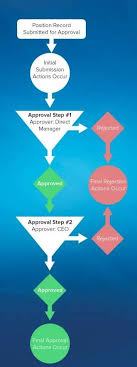
Share the workload effectively by establishing queues in Public Sector Solutions to enable reviewers to access ready-to-process applications. This involves creating queues with assigned members based on user roles, such as a queue for application reviewers managing initial approval steps. Multiple queues, like those for compliance officers handling onsite inspections, can be created. During the approval process, the queue takes ownership of the application record, allowing any member to advance the approval steps. In Salesforce, a public sector approval process queue allows multiple approvers to manage a backlog of applications. The queue owns the application record during the approval process, and any member of the queue can take action to complete a step. Here’s a step-by-step guide to creating a queue: To enhance communication, create an email template and enable email approval responses in Setup’s Process Automation Settings. Now, your reps can efficiently manage activities through the Cadences tab, where details and targets for each cadence are visible. Cadences in Salesforce guide reps through prospecting steps, streamlining outreach and ensuring timely logging of activities. To create a branched cadence for varied outreach based on call or email outcomes, utilize the Cadence Builder. This tool enables the addition of email, call, wait periods, or custom steps. Branching is achieved through call or listener branch steps, ensuring tailored outreach steps based on outcomes. Finally, Salesforce users can activate cadences after creation, and both reps and managers can add prospects directly from lead, contact, or person account detail pages. The Sales Engagements component on these pages enhances visibility, allowing reps to act on the next sales step conveniently. In summary, Salesforce’s Cadence Builder Classic streamlines prospecting and opportunity nurturing, while queues optimize workload distribution in Public Sector Solutions. Effective use of cadences and queues contributes to a well-organized and responsive sales process. Like Related Posts Who is Salesforce? Who is Salesforce? Here is their story in their own words. From our inception, we’ve proudly embraced the identity of Read more Salesforce Marketing Cloud Transactional Emails Salesforce Marketing Cloud Transactional Emails are immediate, automated, non-promotional messages crucial to business operations and customer satisfaction, such as order Read more Salesforce Unites Einstein Analytics with Financial CRM Salesforce has unveiled a comprehensive analytics solution tailored for wealth managers, home office professionals, and retail bankers, merging its Financial Read more AI-Driven Propensity Scores AI plays a crucial role in propensity score estimation as it can discern underlying patterns between treatments and confounding variables Read more

Read More
Approvers and Approver Groups in Salesforce

Approvers and Approver Groups in Salesforce

Approvers and Approver Groups in Salesforce. An approver in Salesforce CPQ Advanced Approvals is a user who receives approval request emails and can either approve or reject the request. An approver record can represent an individual user or a group of users. Utilizing approver groups (like Salesforce queues) is beneficial when you need to route approvals to all members of a specific team. REQUIRED Salesforce CPQ EDITIONSAvailable in: Salesforce CPQ Summer ‘16 and later with Advanced Approvals 3.1 and later For instance, you can create an approver group that includes all managers in the accounting department. This group can then be associated with an approval rule triggered by a quote with a net total of $750,000 or more. Consequently, each accounting manager will receive an email notification regarding the request. Assign Approvers Dynamically Based on Criteria You can specify an approver dynamically based on a formula or specific criteria. For instance, you might want the approver to be the regional manager associated with a sales rep’s opportunity. If the regional manager changes, the approval will automatically reference the new manager. To set up a dynamic approver: Add a custom formula field to your quote or opportunity that references the ID of the approver’s user record.Include this formula field in your approval rule setup.Delegate Approvers Delegated approvers are designated users who receive approval requests on behalf of another user for a predefined period, typically during the original approver’s absence. To delegate approvers: Specify the user to whom you want to delegate in the “Delegated Approver” field.Set the start and end dates for the delegation period.Ensure that delegated approvers have the necessary permissions and access to the approval objects page layout, including the ability to approve or reject requests. Approver Fields Depending on page layouts and field-level security settings, not all approver fields may be visible or editable. Delegated Approver: This field designates the user receiving approval requests instead of the primary approver for a limited time. Delegation End: Specifies the date after which delegated approvers no longer receive requests.Delegation Start: Specifies the date from which delegated approvers start receiving requests.Group ID: If the approver represents a group, this field references the Group record’s ID.Unanimous: Indicates that approval from all group members is required for the request to be considered approved.User: If the approver is an individual user, this field references the User record. Approval Rules Approval rules dictate which users or groups receive approval requests and the email templates used for notifications upon approval or rejection. When a sales rep submits a record for approval, Salesforce CPQ evaluates all active approval rules associated with that record’s object. If the approval conditions are met, the corresponding rule triggers, and Salesforce CPQ sends an approval request email to the designated approver(s) as defined in the rule. Each approval rule can optionally include lookups to request templates, approval templates, and rejection templates, allowing for customized email notifications based on specific conditions. Interested in creating automated approvals or approver groups in your Salesforce org? Contact Tectonic today. Like1 Related Posts Who is Salesforce? Who is Salesforce? Here is their story in their own words. From our inception, we’ve proudly embraced the identity of Read more Salesforce Marketing Cloud Transactional Emails Salesforce Marketing Cloud Transactional Emails are immediate, automated, non-promotional messages crucial to business operations and customer satisfaction, such as order Read more Salesforce Unites Einstein Analytics with Financial CRM Salesforce has unveiled a comprehensive analytics solution tailored for wealth managers, home office professionals, and retail bankers, merging its Financial Read more AI-Driven Propensity Scores AI plays a crucial role in propensity score estimation as it can discern underlying patterns between treatments and confounding variables Read more

Read More
End of Support for Workflow Rules and Process Builder

End of Support for Workflow Rules and Process Builder

Every month Salesforce announces retirement and sundowning of products and features. For long-time Salesforce power users, this one feels like the end of an era. Salesforce has announced the end of support for Workflow Rules and Process Builder in 2025. Scheduled Paths are a replacement for Scheduled Actions in Process Builder and Time-Based Workflow Rules. And they even have some new and improved features like support for minutes! Flows can now call other sub-flows, a much-longed-for replacement for Process Builder’s ability to call Flows. End of Support for Workflow Rules and Process Builder Salesforce will no longer be supporting Workflow Rules and Process Builder on December 31, 2025, and we recommend that you migrate your automation to Flow Builder by that time. Have you taken advantage of all the powerful features of Flow? Not yet? Have no fear, and go with the Flow! We’ve curated a comprehensive guide of resources to take you from zero to hero on your journey with us to migrate your organization from Workflow Rules and/or Process Builder onto the newer and more powerful engine of Flow! Why move to Flow? What’s happening with Workflow Rules and Process Builder? Salesforce is starting the process of moving away from Workflow Rules and Process Builder, and transitioning to the more feature-rich functionality of Flow. You’re also probably wondering why Salesforce is retiring Workflow Rules and Process Builder. Salesforce wants to focus development on a modern, extensible, low-code automation solution in Flow Builder, which led to retire the previous features. What does this change mean for me?  If you have active Workflow Rules or Process Builder processes running after 2025, they will no longer receive customer support or bug fixes. What action can I take? We recommend implementing a plan to migrate any active rules or processes to Flow Builder before the deadline. Depending on the complexity of your org, this migration may take a significant amount of time and testing, so we recommend starting now. To assist in the migration process, we have a Migrate to Flow tool and extensive support resources available. What happens if I don’t take action? After December 31, 2025, Workflow Rules and Process Builder may continue to function and execute existing automation, but customer support will not be available, and bugs will not be fixed. How do I identify affected users? You can identify whether you have active workflow rules by going to Setup | Process Automation | Workflow Rules and sorting the Active column for checkmarks. You can identify whether you have active Process Builder processes by going to Setup | Process Automation | Process Builder and sorting the Status column for Active. If you have more questions, open a case with support via Salesforce Help. To view all current and past retirements, see Salesforce Product & Feature Retirements. What does the transition to Flows entail? The transition is set to take place in multiple phases. The first phase began with the Winter ’22 release, wherein the ability to create net-new Workflow Rules was turned off. In Summer ‘23 release the ability to create net-new processes in Process Builder will be disabled. In the last phase, Workflow Rules and Process Builder will go away entirely, and any platform automation will be leveraging Flow. This phased approach will allow administrators ample time to transition to Flow with as minimal effort as possible. What changed in the Winter ’22 release? As of Winter ’22, we’ve blocked the creation of Workflow Rules. You can still activate, deactivate, and edit any existing Workflow Rules. To test and create Workflow Rules for use in managed packages, developer orgs still allow you to create Workflow Rules. Process Builder has remained unaffected during this period. For new automation, use Flow. Link to Release Notes What changed in the Summer ’23 release? Starting in Summer ’23, Salesforce began blocking the creation of Process Builder Processes. Much like workflow rules above, you can still activate, deactivate, and edit any existing Processes. For new automation, use Flow. How can existing Workflow Rules & Processes be transitioned to Flow? A tool called “Migrate to Flow” allows you to covert existing Workflow Rules & Processes to Flow in an org, at the click of a button. More information about this tool can be found here. There are a few considerations to keep in mind as we roll out this tool. If your organization relies heavily on existing Workflow Rules or Process Builder, please consider starting the migration process today using the Migrate to Flow tool, rather than when the deadline approaches. This will also allow you to test the migrated Flows in small batches to ensure your organization’s needs are adequately met. How can I get started in Flow? For those with limited exposure to Flows, tinkering in a trailhead playground, demo org, or other non-production org is a great way to explore the capabilities of Flows. Once ready, admins can try creating any new automation needed in their organization in Flows rather than in Process Builder. Trailhead – The best place to start! Build Flows with Flow BuilderRecord-Triggered FlowsAutomate Your Business Processes with Salesforce Flow Automation Home Page – Watch videos, read blog posts, or explore other Trailhead offerings related to Flows. Trailhead Community Topics – Join the discussion!#Flow#Automation What about feature parity between Workflows/Processes and Flows? During the last few releases, many of the biggest parity gaps between Workflow Rules/Process Builder and Flow have been addressed already, including: Additionally, more and more gaps are being addressed with each new release. What about Approval Processes, Email Alerts, and other functionality operating on the workflow engine? There are no plans to retire any of these auxiliary features; however, each of them can be leveraged through flow (or Flow Orchestrator, in the case of approval processes), without the need to use processes or workflow rules at all. Flow Trailhead – Click Here Like1 Related Posts Who is Salesforce? Who is Salesforce? Here is their story in their own words. From our inception, we’ve proudly embraced the identity of Read

Read More
Advances in Public Sector Solutions

Salesforce Announces Advances in Public Sector Solutions

Explore the diverse new ways in which advances in Public Sector Solutions revolutionize the provision of public services. Establish interactive application forms and deploy them on an Experience Cloud site accessible to constituents. Develop automated approval processes for efficient application review. Employ dynamic assessments for evaluating applications, and generate care plans and referrals to assist constituents in need. Utilize a trial Salesforce PSS org to explore the product and prepare for implementation. Discover the synergy between the Salesforce platform, a dedicated data model, and a suite of common components that facilitate the implementation of a solution tailored to your agency’s needs. Whether implementing Public Sector Solutions for a municipality, state, province, or at the federal or national level, each public agency has distinct requirements for serving constituents through digital tools and workflows. Public Sector Solutions avoids a one-size-fits-all approach, allowing you to combine various components and tools to create a customized solution for you and your constituents. Salesforce Platform: The cloud-based Salesforce platform, encompassing Sales Cloud, Service Cloud, and Experience Cloud, forms the foundation of Public Sector Solutions and is inclusive with the product. Offering relationship management, case management, collaboration, integration, and data insight capabilities, the platform provides a 360-degree view of constituents for more effective service, management, and interaction. Adhering to stringent data security regulations, the platform allows quick deployment and scalability, with flexibility for expansion. Data Model: The Public Sector Solutions data model is tailored for government agencies, encompassing objects for defining regulatory agencies, authorization types, codes, constituents as business or person accounts, visits, complaints, violations, and more. Whether managing licenses and permits, conducting inspections, or overseeing social services programs, the data model accommodates diverse governmental tasks. Industry Common Layer: A suite of no-code and low-code components and tools, including OmniStudio, Action Plans, Document Tracking and Approvals, OmniStudio Document Generation, Business Rules Engine, and more, enables automation of traditionally paper-based processes. Common layer components facilitate the creation of dynamic forms, application reviews, complex policy decisions, and more. Prebuilt Apps: These elements culminate in several prebuilt applications, each addressing specific needs: Contact Tectonic today to explore Salesforce public sector solutions. Like1 Related Posts Who is Salesforce? Who is Salesforce? Here is their story in their own words. From our inception, we’ve proudly embraced the identity of Read more Salesforce Marketing Cloud Transactional Emails Salesforce Marketing Cloud Transactional Emails are immediate, automated, non-promotional messages crucial to business operations and customer satisfaction, such as order Read more Salesforce Unites Einstein Analytics with Financial CRM Salesforce has unveiled a comprehensive analytics solution tailored for wealth managers, home office professionals, and retail bankers, merging its Financial Read more AI-Driven Propensity Scores AI plays a crucial role in propensity score estimation as it can discern underlying patterns between treatments and confounding variables Read more

Read More
Knowledge Management for Agents

Knowledge Management for Agents

Consider the invaluable contributions of your most seasoned and high-performing agents and field service technicians to your organization. They possess an in-depth understanding of your product or service, efficiently tackle common customer issues, and can transform challenging interactions into positive ones. These experienced professionals also serve as mentors to junior staff and become indispensable sources of information when your knowledge management for agents system lacks organization. Now, contemplate the potential repercussions if these individuals were to leave your company. The departure of their knowledge and expertise puts customer satisfaction in jeopardy. The recruitment of replacement talent requires substantial time, money, and resources. Moreover, the onboarding process for new hires entails a significant time investment. The stakes for your business are high. Imagine if you could capture and preserve the expertise of your employees, making it easily accessible to you and others. The good news is that, to a large extent, you can achieve this through strategic knowledge management. Let’s dig into the details. What is knowledge management? Knowledge management involves capturing, organizing, and distributing critical information for customer support. Ideally, this knowledge resides in a centralized digital library accessible to agents, field service technicians, and customers from any location, ensuring prompt and high-quality service. However, in many companies, frequently asked questions (FAQs) and knowledge base articles guide contact center agents and field service technicians. Yet, the challenge lies in the timely update of this information, potential duplications, and undocumented topics. Much of the knowledge essential for effective customer support is often stored solely in employees’ minds or dispersed across multiple systems and devices. Leveraging technology and artificial intelligence (AI) allows you to swiftly capture and share this knowledge across your team. Generative AI can draft knowledge articles, subject to your company’s review and approval process, streamlining the process and keeping pace with the ever-evolving landscape of knowledge needed for quality customer support. Additionally, the resources created can be shared in your self-service portal, enabling customers to find answers independently and contributing to cost savings. Bonus features like Einstein Search Answers utilize knowledge-grounded generative AI to surface relevant responses in your self-service portal or agent console. Types of knowledge to capture Before documenting institutional knowledge, consider the various types employed by agents and field service workers: Benefits of knowledge management Documenting, centralizing, and consistently updating institutional knowledge yields numerous benefits, including: Knowledge management use cases and examples While your organization likely employs some form of knowledge management, there’s room for improvement. Examples of knowledge management applications include: How to get started with knowledge management Embark on your knowledge management journey with these steps: In conclusion, knowledge management is foundational for successful customer support operations and plays a crucial role in maximizing the benefits of AI. It offers a structured approach to handling information and proves to be a worthwhile investment, enhancing team capabilities, customer satisfaction, operational efficiency, and employee knowledge retention. Like Related Posts Who is Salesforce? Who is Salesforce? Here is their story in their own words. From our inception, we’ve proudly embraced the identity of Read more Salesforce Marketing Cloud Transactional Emails Salesforce Marketing Cloud Transactional Emails are immediate, automated, non-promotional messages crucial to business operations and customer satisfaction, such as order Read more Salesforce Unites Einstein Analytics with Financial CRM Salesforce has unveiled a comprehensive analytics solution tailored for wealth managers, home office professionals, and retail bankers, merging its Financial Read more AI-Driven Propensity Scores AI plays a crucial role in propensity score estimation as it can discern underlying patterns between treatments and confounding variables Read more

Read More
Salesforce Automation Guide

Salesforce Automation Guide

Salesforce Automation Guide. I cannot lie. There was a time when I thought the greatest thing about Salesforce was that it prevented leads from falling through the cracks. I was a marketing opps person. There was a time I thought readily available information at your fingertips and integration with an email platform was the greatest thing. I was in sales management. Today, as a Solutions Architect, I think Salesforce Automation Guide is the best. Automation provides the tools necessary to automate repetitive processes and daily tasks for your business, such as creating follow-up tasks, sending reminder emails, or updating records. Automations help users save critical time and reduce errors by creating automated processes to complete repetitive tasks. Below, you’ll find resources to help you decide which automations to use depending on your needs. An Intro to Salesforce Automation Before determining which automation best suits your business’s needs, you must first understand what automation means. These resources will help paint a clear picture of what the automation of processes, approvals, and tasks can look like for your organization. They aren’t just time savers. They can be game changers. Why Should You Love Automation?Check out this article highlighting the positive global impact of automation across different industries and countries. Review the customer story on how automation helped digitize an approval process during a time of especially high-volume requests. After reading this, you will understand why automation is so beneficial! Intro to AutomationExplore this documentation to get a high-level overview of the different automation methods. Automation Tools Salesforce provides multiple automation tools depending on the level of complexity needed to achieve your goals. These resources will help you understand which automation tool will best help you reach your business objectives. Automation Tool: FeaturesScroll down within this article to check out the matrix for a breakdown of all the features and actions supported within each automation tool: Approvals, Flow Builder, Einstein Next Best Action, and Apex. Automation Tool: Which One to UseView this video from one of the leading cloud experts that walks you through each automation tool and when and why to use each one. Architect Decision GuideThe Architect Decision Guide will help you evaluate the pros and cons of the different automation tools. Get recommendations from Salesforce product teams on which tools best address different use cases. Automation Implementation A hands-on approach is the best way to learn how to implement automation tools. Dig right in by exploring guided Trailhead modules that will help you understand the steps to enable these tools. Flow BasicsGet to know Flow Builder, the primary tool for creating flows. Learn when to use flows to automate business processes. Automate ApprovalsLearn how you can automate simple approval processes using Flow Builder. Automation Deep Dive As you begin to think about your automation journey, it is useful to study use cases to help guide your automation strategy and energy. Check out these resources to learn how to take your automations even further than you imagined to streamline your business processes. Building a Simple FlowExplore this video to learn how to build a simple visual flow using Flow Builder for a donation request example via an input screen, fields, and choices to collect required customer information. Five Pro Tips for Salesforce FlowFollow these quick tips to get up and running with Salesforce Flow. Troubleshooting Resources Before rolling out your automations to users, make sure you validate and test them just like any other customization. Should you encounter a bug while validating, don’t worry! These resources will guide you through troubleshooting tips if you run into any blockers during the validation process. Troubleshooting Flow Errors Using the Debug ButtonCheck out this helpful Salesforce video on how to fix errors using the Debug button in Flow Builder. Flow TroubleshootingFurther your education with this Trailhead module to learn how to diagnose and fix common flow issues. Go Further with Automation Manage ProductivityDetermine how much time you’re saving your team with the Process Automation Tracker in Salesforce AppExchange. Flow OrchestrationStreamline complex workflows with Flow Orchestration. Our experts will guide you on rolling out multi-step processes that interact with multiple users. Join the Customer Success CommunityConnect with Salesforce experts and other Trailblazers like you. The community is a great place to ask questions, get answers, and share your experiences. Become a TrailblazerConsider blazing your own trail by completing the Trailhead superbadge on process automation. Automation Use Case StridePride makes comfortable sneakers, designed and customized for its customers. The company’s online retail business has grown rapidly in the past year domestically; as a result, they have decided to use Salesforce to help launch their sneakers in international markets. Linda Rosenson, StridePride’s admin, needed to quickly set up Salesforce to create sales processes for all of the additional international markets. As Linda was creating these processes, the Sales Leaders asked her to include a discount on the sneakers if certain criteria were met to help promote sales for the new markets. The tricky part was, each market had its unique set of criteria and rules before the discount could be applied. After mapping out each region’s unique criteria for the discounts, Linda determined that tracking this all manually or on a document for sales reps would be a logistical nightmare. Linda began thinking of automation. She was determined to find a more efficient way to automatically apply the discounts if criteria were met, lessening the chance for human error or missteps. Her goal was to make the process as seamless and efficient as possible. Because Linda had already reviewed the resources on choosing the right automation tool, she knew that Salesforce Flow made the most sense for her use case. This flow would help automate the discount by evaluating criteria based on customer inputs and then automatically applying the discount if applicable. She could even create or update records, create quotes, and send emails through flow elements. She teamed up with StridePride’s business analyst to create a Salesforce Flow. Together, they had it up and running

Read More
gettectonic.com