Approval Process Archives - gettectonic.com - Page 3
process mining salesforce

Unlocking Salesforce Efficiency with Process Mining

The Hidden Power of Your Event Data Every click, field update, and approval in Salesforce leaves a digital footprint. Process mining transforms these breadcrumbs into actionable intelligence, revealing how your organization actually operates versus how you think it operates. Why Leading Enterprises Are Adopting Process Mining How Process Mining Revolutionizes Salesforce 1. Process X-Ray Vision Example: A medical device company discovered their quote approval process had 37 variations, with 68% bypassing compliance checks. 2. AI-Driven Optimization Engine Modern tools like Celonis and Hubbl don’t just diagnose—they prescribe: 3. Closed-Loop Improvement Top Process Mining Solutions for Salesforce Tool Key Strength Best For Celonis Enterprise-scale process intelligence Global deployments Hubbl Native Salesforce integration with AI nudges User adoption Apromore Open-source customization Technical teams Processity Compliance-focused analytics Healthcare/Finance Transformational Use Cases Sales Operations Service Cloud Health Cloud Implementation Roadmap “Process mining is like putting your Salesforce org under an MRI—you finally see all the blockages and irregularities that were invisible before.”— VP of Business Systems, Fortune 500 Tech Company Like Related Posts Who is Salesforce? Who is Salesforce? Here is their story in their own words. From our inception, we’ve proudly embraced the identity of Read more Salesforce Marketing Cloud Transactional Emails Salesforce Marketing Cloud Transactional Emails are immediate, automated, non-promotional messages crucial to business operations and customer satisfaction, such as order Read more Salesforce Unites Einstein Analytics with Financial CRM Salesforce has unveiled a comprehensive analytics solution tailored for wealth managers, home office professionals, and retail bankers, merging its Financial Read more AI-Driven Propensity Scores AI plays a crucial role in propensity score estimation as it can discern underlying patterns between treatments and confounding variables Read more

Read More
Create a Salesforce Approval Process

Create a Salesforce Approval Process

Streamlining Your Salesforce Approval Process: Top Options Create a Salesforce Approval Process – an essential for tasks such as: This insight explores the top methods for implementing a Salesforce approval process in your organization. Option 1: Manually Send Opportunities Over Email or Slack The classic approach is manually sending approval requests via email or Slack, starting with a simple “Hey, can you approve this?” message. This method can be effective if the volume of requests is low. Pros: Cons: Many businesses using this method eventually seek more efficient systems to avoid cluttered inboxes and disorganized processes. Option 2: Use a Google Sheet Another option is to manage the approval process through a Google Sheet. Sales reps and managers add new deal information to the sheet, which acts as a central repository for tracking approval statuses without email chains. Pros: Cons: The manual nature of this method often leads to abandonment, as it can slow down the sales workflow and burden reps with administrative tasks. Option 3: Salesforce Approvals Salesforce offers native approval functions, allowing users to create approval processes involving various stakeholders. Approvals can be managed via email or directly within Salesforce. Pros: Cons: While Salesforce Approvals improve upon manual methods, they still have limitations in notifying stakeholders and tracking responses efficiently. Option 4: Use Rattle Rattle is an automation tool that integrates Salesforce with Slack to streamline the approval process. Custom Slack alerts trigger when deal information in Salesforce changes, notifying sales managers of approval needs. Pros: Cons: Rattle offers a blend of accountability and speed, enabling sales reps to focus on clients while managers receive timely approval notifications and can make decisions quickly. Choosing the Best Option Now that we’ve reviewed several methods for implementing a Salesforce approval process, it’s time to determine the best fit for your organization. Consider the following steps: By selecting a dynamic approval process tailored to your needs, you’ll free up your sales team to focus on bringing in and closing more deals, enhancing overall productivity and efficiency. Like Related Posts Who is Salesforce? Who is Salesforce? Here is their story in their own words. From our inception, we’ve proudly embraced the identity of Read more Salesforce Marketing Cloud Transactional Emails Salesforce Marketing Cloud Transactional Emails are immediate, automated, non-promotional messages crucial to business operations and customer satisfaction, such as order Read more Salesforce Unites Einstein Analytics with Financial CRM Salesforce has unveiled a comprehensive analytics solution tailored for wealth managers, home office professionals, and retail bankers, merging its Financial Read more AI-Driven Propensity Scores AI plays a crucial role in propensity score estimation as it can discern underlying patterns between treatments and confounding variables Read more

Read More
AI Potential to Improve Prior Authorizations

AI Potential to Improve Prior Authorizations

AI’s Potential to Reduce Provider Burdens in the Prior Authorization Process Artificial intelligence (AI) has the potential to significantly ease the documentation and substantiation burdens providers face during the prior authorization process. Prior authorization, a critical step where health plans approve or deny coverage for services or prescriptions before they’re administered, is a key cost-control mechanism in the U.S. healthcare system. While it helps payers avoid unnecessary spending, the process poses significant challenges, especially for healthcare providers tasked with gathering and submitting documentation. AI Potential to Improve Prior Authorizations examined. Historically, prior authorization has been a major regulatory challenge for providers, surpassing other issues such as electronic health record (EHR) interoperability and compliance with the No Surprises Act. Despite its cumbersome nature, prior authorization isn’t likely to be eliminated, as it plays a crucial role in balancing healthcare affordability and access to quality care. AI Potential to Improve Prior Authorizations The transactional nature of many prior authorization tasks makes them ripe for automation. Increasingly, stakeholders are turning to AI and other technology-driven solutions to streamline the process, making it less burdensome for providers. How AI Can Streamline Prior Authorization AI has already been applied to various aspects of healthcare, from automating hospital discharges to alleviating the administrative burdens of nurses. When applied to prior authorization, AI can speed up the approval process for both providers and payers, reducing delays in patient care and lowering administrative costs. Health insurance companies are already beginning to leverage AI to expedite prior authorization and claims decisions. However, concerns are growing over whether the use of AI in these areas complies with state and federal regulations. For example, a 2023 AMA Annual Meeting resolution cited an investigation revealing that Cigna doctors denied over 300,000 claims in two months, spending an average of just 1.2 seconds per case using AI. UnitedHealthcare has also employed AI to make “fast, efficient, and streamlined coverage decisions,” raising questions about whether these decisions adhere to regulatory standards for fairness and accuracy. AMA’s Call for Oversight on AI in Prior Authorization Recognizing the risks, the American Medical Association (AMA) has called for increased regulatory oversight of AI in prior authorization. Specifically, the AMA advocates for: AI could potentially reduce the time-consuming, manual tasks associated with prior authorization. However, as AMA Trustee Dr. Marilyn Heine cautioned, “AI is not a silver bullet.” The increasing reliance on AI for prior authorization must not add to the already overwhelming volume of requirements that burden physicians and hinder patient care. Nor can it increase the threat of cyberattacks. Fixing Prior Authorization: AMA’s Role Addressing the challenges of prior authorization is a key part of the AMA’s Recovery Plan for America’s Physicians. The organization is committed to reducing the overuse of prior authorization and improving the fairness of existing processes, ensuring that the use of AI in healthcare supports—not hinders—patient care. To that end, the AMA continues to research the costs and impacts of prior authorization on healthcare providers and patients. To learn more about the proper use of AI in medicine and the AMA’s efforts to reform prior authorization, visit the AMA’s resources on healthcare AI. Content updated September 2024. Like Related Posts Who is Salesforce? Who is Salesforce? Here is their story in their own words. From our inception, we’ve proudly embraced the identity of Read more Salesforce Unites Einstein Analytics with Financial CRM Salesforce has unveiled a comprehensive analytics solution tailored for wealth managers, home office professionals, and retail bankers, merging its Financial Read more AI-Driven Propensity Scores AI plays a crucial role in propensity score estimation as it can discern underlying patterns between treatments and confounding variables Read more Tectonic’s Successful Salesforce Track Record Salesforce Technology Services Integrator – Tectonic has successfully delivered Salesforce in a variety of industries including Public Sector, Hospitality, Manufacturing, Read more

Read More
Revolutionizing Public Sector Efficiency

Revolutionizing Public Sector Efficiency

Salesforce: Transforming and Revolutionizing Public Sector Efficiency Salesforce, known worldwide as the premier CRM solution, continues to innovate with its adaptable features tailored to diverse audiences. It excels in delivering cutting-edge solutions, addressing unique needs across various industries and sectors. Particularly, the public sector stands to gain substantial benefits from Salesforce’s capabilities, offering a suite of solutions poised to optimize operations within any public office setting. Understanding the Role of Salesforce in the Public Sector The public sector encompasses the administrative segment responsible for managing essential citizen concerns at state, local, federal, and governmental agency levels. While carrying out critical tasks, these entities can significantly enhance efficiency with the right tools. Salesforce is dedicated to optimizing and streamlining processes within the public sector, recognizing its vital importance. Government offices face similar expectations to private enterprises, with citizens anticipating service quality on par with commercial experiences. Therefore, public entities must deliver efficiency, agility, and direct engagement to demonstrate proximity to the populace. In response to these expectations, Salesforce has developed a range of solutions tailored to the specific demands of the public sector. Revolutionizing Public Sector Efficiency Salesforce’s offerings for the public sector include meticulously crafted applications designed to meet its unique requirements. These flexible and secure e-government tools aim to revolutionize the sector’s experience, providing a comprehensive view of citizens and enhancing the efficacy of public employees. By simplifying processes and fostering innovation, these solutions drive efficiency at both organizational and individual levels, facilitating smoother operations. Integrated into Public Sector Solutions, these offerings leverage Salesforce’s standard functionalities and Service Cloud capabilities. Additionally, they enable the creation of an Experience Cloud site, allowing citizens seamless access to government services. Known as a Citizen Portal. Some of the available solutions cater to general tasks managed by public sector agencies, including: Thanks to these solutions, citizens can effortlessly navigate various processes, such as applying for licenses or permits. Through an online portal accessible at all times, individuals can interact seamlessly with public service agencies. Intelligent forms dynamically adjust based on user input, simplifying the submission process. From an employee standpoint, work processes are streamlined, with all citizen requests conveniently consolidated in one location. The system offers recommendations to guide employees, simplifies task delegation, and ensures seamless collaboration across departments. Key Advantages of Salesforce Solutions for the Public Sector Salesforce solutions offer numerous advantages to the public sector, aligning with citizens’ and employees’ current demands. These include: Salesforce emerges as an invaluable ally in the public sector’s modernization journey, transforming processes to be more agile and efficient. For organizations seeking to implement Salesforce solutions tailored for the public sector, the Tectonic team stands ready to assist. In the ever-evolving landscape of public administration and government services, the need for advanced, secure, and user-friendly technology solutions has never been more crucial. Enter Salesforce Public Sector Cloud—a dynamic platform designed to transform how government agencies engage with citizens, deliver services, and drive efficiency in their operations. Overview of Salesforce Public Sector Cloud: Salesforce Public Sector Cloud is a specialized offering tailored to meet the unique needs of government entities at all levels. Whether it’s federal, state, or local government agencies, the platform is engineered to enhance collaboration, streamline processes, and ultimately improve the delivery of public services. Key Features and Capabilities: Real-World Impact: Several government agencies have already embraced Salesforce Public Sector Cloud, realizing tangible benefits in their day-to-day operations. From improved citizen satisfaction to streamlined internal processes, the impact of this cloud solution is evident across various use cases. Challenges and Considerations: While Salesforce Public Sector Cloud offers numerous advantages, it’s essential to consider potential challenges. These may include customization complexities, data migration issues, and the need for comprehensive training for government personnel. A thoughtful and well-executed implementation strategy is crucial to overcoming these challenges. Salesforce Introduces Public Sector Einstein 1 for Service: Salesforce today announced Public Sector Einstein 1 for Service, including CRM, trusted AI, and data capabilities. What’s new in compliance: Salesforce also now offers several Federal Risk and Authorization Management Program (FedRAMP) compliant tools to help government agencies drive efficiency and productivity while meeting regulatory requirements. These tools include:  Content updated April 2024. Like Related Posts Who is Salesforce? Who is Salesforce? Here is their story in their own words. From our inception, we’ve proudly embraced the identity of Read more Salesforce Marketing Cloud Transactional Emails Salesforce Marketing Cloud Transactional Emails are immediate, automated, non-promotional messages crucial to business operations and customer satisfaction, such as order Read more Salesforce Unites Einstein Analytics with Financial CRM Salesforce has unveiled a comprehensive analytics solution tailored for wealth managers, home office professionals, and retail bankers, merging its Financial Read more AI-Driven Propensity Scores AI plays a crucial role in propensity score estimation as it can discern underlying patterns between treatments and confounding variables Read more

Read More
Salesforce Home Page Customization

Why Customize Salesforce?

You should customize Salesforce to tailor the CRM platform to your specific business needs, optimize operations, enhance data management, improve user experience, and drive business growth and efficiency.  Here’s a more detailed breakdown of why Salesforce customization is beneficial: 1. Aligning with Unique Business Needs: 2. Enhancing Efficiency and Productivity: 3. Driving Business Growth and Competitive Advantage: Like Related Posts Who is Salesforce? Who is Salesforce? Here is their story in their own words. From our inception, we’ve proudly embraced the identity of Read more Salesforce Marketing Cloud Transactional Emails Salesforce Marketing Cloud Transactional Emails are immediate, automated, non-promotional messages crucial to business operations and customer satisfaction, such as order Read more Salesforce Unites Einstein Analytics with Financial CRM Salesforce has unveiled a comprehensive analytics solution tailored for wealth managers, home office professionals, and retail bankers, merging its Financial Read more AI-Driven Propensity Scores AI plays a crucial role in propensity score estimation as it can discern underlying patterns between treatments and confounding variables Read more

Read More
Designing the Salesforce Approval Request Page

Designing the Salesforce Approval Request Page

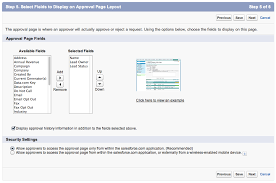
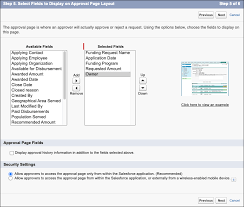
Designing the Salesforce Approval Request Page The approval request page allows approvers to respond to approval requests. Customize which fields appear on the page and their order specifically for this approval process. Required Editions: Options for Designing the Salesforce Approval Request Page: Designing the Approval Request Page Like1 Related Posts Who is Salesforce? Who is Salesforce? Here is their story in their own words. From our inception, we’ve proudly embraced the identity of Read more Salesforce Marketing Cloud Transactional Emails Salesforce Marketing Cloud Transactional Emails are immediate, automated, non-promotional messages crucial to business operations and customer satisfaction, such as order Read more Salesforce Unites Einstein Analytics with Financial CRM Salesforce has unveiled a comprehensive analytics solution tailored for wealth managers, home office professionals, and retail bankers, merging its Financial Read more AI-Driven Propensity Scores AI plays a crucial role in propensity score estimation as it can discern underlying patterns between treatments and confounding variables Read more

Read More
Salesforce Automation

Using Automation Tools in Salesforce

Automation streamlines repetitive tasks in your business, such as creating follow-up messages or sending reminder emails, saving critical time and reducing errors. Salesforce offers four main automation tools to help businesses optimize their processes and enhance efficiency: Workflow Rules, Process Builder, Flow, and Apex. While these tools can significantly improve productivity, there are additional resources to further enhance automation capabilities. Salesforce Automation Tools Overview Salesforce provides multiple automation tools to streamline business processes and save time. Here’s an overview of some of these tools: Workflow Rules: These rules automate simple business processes by setting criteria and actions based on record changes in Salesforce. Process Builder: This tool allows you to create more complex automated processes using a graphical interface, including triggering actions based on multiple criteria. Flow: Flow enables you to automate even more sophisticated processes by guiding users through screens and automating complex logic, similar to building a program. Apex: For developers, Apex provides a powerful programming language to create custom automation solutions tailored to specific business needs. Each of these tools has its strengths and use cases, allowing businesses to choose the most appropriate tool for their requirements. Salesforce Workflow Automation To automate workflows in Salesforce, you can utilize several options: Process Builder: This tool enables you to create automated processes triggered by various Salesforce events, allowing for more advanced workflow automation. Salesforce Automation Rules Automation rules in Salesforce are criteria-based rules that identify matching prospects and apply predefined actions to them. These rules help streamline and automate lead management processes, ensuring timely actions are taken based on prospect criteria. Automating Tasks in Salesforce Salesforce Macros provide a way to automate repetitive tasks for your team, allowing you to solve customer issues with a single click. The Macro Builder enables you to define the logic behind these automated tasks, improving efficiency and productivity. Choosing the Right Automation in Salesforce Flow Builder is a versatile tool for automating repetitive business processes in Salesforce. Additional features such as approval processes, Flow Orchestration, Einstein Next Best Action, and Apex can further enhance automation capabilities based on specific business requirements. Salesforce Automation Technology Overview Salesforce automation technology encompasses tools and software platforms designed to automate various tasks expected of sales teams, such as data entry and email communication. By reducing manual workload, these technologies help sales teams focus more on revenue-generating activities. The Power of Automation in Salesforce Salesforce offers a comprehensive suite of automation tools that empower users to automate processes and approvals without writing any code. These tools provide guided visual experiences and behind-the-scenes automation, enabling businesses to streamline operations efficiently. In conclusion, Salesforce provides a range of automation tools and technologies to help businesses streamline processes, save time, and improve productivity. Understanding the capabilities of these tools and choosing the right ones for your specific requirements can greatly enhance your automation efforts. Like Related Posts Who is Salesforce? Who is Salesforce? Here is their story in their own words. From our inception, we’ve proudly embraced the identity of Read more Salesforce Marketing Cloud Transactional Emails Salesforce Marketing Cloud Transactional Emails are immediate, automated, non-promotional messages crucial to business operations and customer satisfaction, such as order Read more Salesforce Unites Einstein Analytics with Financial CRM Salesforce has unveiled a comprehensive analytics solution tailored for wealth managers, home office professionals, and retail bankers, merging its Financial Read more AI-Driven Propensity Scores AI plays a crucial role in propensity score estimation as it can discern underlying patterns between treatments and confounding variables Read more

Read More
Create Approval Process in Salesforce

Create Approval Process in Salesforce

Implementing a Salesforce Approval Process: Options and Considerations to Create Approval Process in Salesforce An approval process is necessary for: This insight explores top options for implementing a Salesforce approval process within your company. Option 1: Manual Email or Slack Notifications The classic approach involves emailing or using Slack to request approvals. It’s straightforward and free, making it accessible for teams handling fewer approval requests. Pros: Cons: Option 2: Google Sheets Integration Another method involves using Google Sheets to manage approvals. Sales reps and managers input deal details for approval and track status in a centralized document. Pros: Cons: The drawback of both methods is their manual nature and limited integration with Salesforce, which can hinder sales workflow efficiency and lead to approval delays. Option 3: Salesforce Approvals Salesforce provides a native approval functionality where users create processes (e.g., discount matrices) requiring multiple stakeholders to approve at designated levels. Pros: Cons: While Salesforce Approvals streamline the process compared to manual methods, they still rely on user actions for notifications and responses, lacking full automation. Choosing the Right Option Evaluate each method’s pros and cons to determine the best fit for your company’s needs. Consider: By establishing a dynamic approval process aligned with your business requirements, you can empower your sales team to focus more on client acquisition and less on administrative tasks. Choose wisely to optimize efficiency and decision-making within your organization. Like Related Posts Who is Salesforce? Who is Salesforce? Here is their story in their own words. From our inception, we’ve proudly embraced the identity of Read more Salesforce Marketing Cloud Transactional Emails Salesforce Marketing Cloud Transactional Emails are immediate, automated, non-promotional messages crucial to business operations and customer satisfaction, such as order Read more Salesforce Unites Einstein Analytics with Financial CRM Salesforce has unveiled a comprehensive analytics solution tailored for wealth managers, home office professionals, and retail bankers, merging its Financial Read more AI-Driven Propensity Scores AI plays a crucial role in propensity score estimation as it can discern underlying patterns between treatments and confounding variables Read more

Read More
revenue cloud

CPQ Revenue Cloud Billing Salesforce

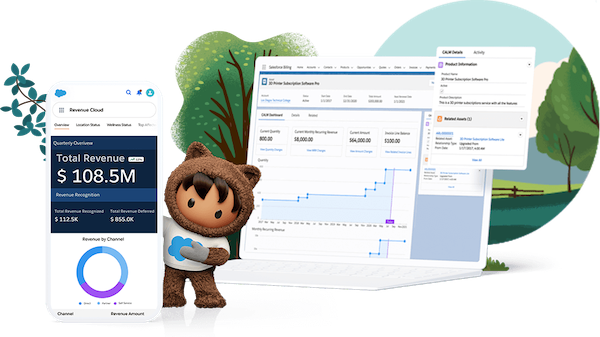
Unleash the Power of Salesforce CPQ for Seamless Product Configuration: CPQ Revenue Cloud Billing Salesforce Maximize the potential of Salesforce CPQ to effortlessly configure all your products. Empower sales representatives with the knowledge to provide accurate quotes through guided product discovery, solution selling, and advanced configuration logic. Boost sales productivity by seamlessly integrating configure, price, and quote capabilities into your CRM system. Quickly generate quotes with guided selling flows, product bundles, and discounting rules while ensuring business risk mitigation through built-in controls, approval workflows, and compliance measures. CPQ Revenue Cloud Billing Salesforce: Elevate your sales operations with Salesforce CPQ and Revenue Cloud, driving growth and efficiency across all sales channels while ensuring seamless customer interactions and comprehensive revenue management. Like1 Related Posts Who is Salesforce? Who is Salesforce? Here is their story in their own words. From our inception, we’ve proudly embraced the identity of Read more Salesforce Marketing Cloud Transactional Emails Salesforce Marketing Cloud Transactional Emails are immediate, automated, non-promotional messages crucial to business operations and customer satisfaction, such as order Read more Salesforce Unites Einstein Analytics with Financial CRM Salesforce has unveiled a comprehensive analytics solution tailored for wealth managers, home office professionals, and retail bankers, merging its Financial Read more AI-Driven Propensity Scores AI plays a crucial role in propensity score estimation as it can discern underlying patterns between treatments and confounding variables Read more

Read More
Salesforce Managed Services

Automation Tools in Salesforce

What are the types of automation in Salesforce? What are the Automation Tools in Salesforce? The automation capabilities offered by Salesforce are based on two main categories: process automation (workflows) and data operations (data loading and cleansing). There are four main automation tools that Salesforce offers, each tailored to a specific purpose. What is an automation tool in Salesforce? Automation provides the tools necessary to automate repetitive processes and tasks for your business, such as creating a follow-up task, sending a reminder email, or updating a record. Automations can help users save critical time and reduce errors by creating processes to complete repetitive tasks. The Top 8 Best Salesforce Automation Tools What is data automation in Salesforce? Healthy automation enables users to focus on high-value work and reduces time spent on repetitive, manual tasks or complex data entry. Most often, automation means translating business processes from one form to another: from paper-based form to digital form, from an old system to a new one. What is the power of automation in Salesforce? By adopting Salesforce automation, you save time and resources, which can be redirected to more productive tasks. Sales automation can reduce daily administrative time by 14%. Moreover, it significantly enhances deal closure rates by 30% and boosts sales productivity by 14.5%. Why is Salesforce difficult to automate? Here are some of the reasons why Salesforce is difficult to automate from a technical perspective: Frequent system updates: Salesforce regularly update their platform to enhance user experiences or fix underlying issues. Unfortunately, these changes can impact user customizations and even standard uses of the platform. This is one reason many Salesforce customers opt to have a Salesforce Managed Service Provider. Disadvantages of Salesforce Flow Limited Customization and Complexity: While Salesforce Flow is considered user-friendly, it may not offer the customization and complexity required for some advanced automation tasks. Businesses with highly specific needs might find Flow somewhat restrictive. Which three components are used to automate a process in Salesforce? Use Flow Builder to automate most of your organization’s repetitive business processes. More features can provide further automation functionality, including approval processes, Flow Orchestration, Einstein Next Best Action, and Apex. Note: Use Flow Builder instead of Process Builder and workflow rules. Content updated January 2024. Like2 Related Posts Who is Salesforce? Who is Salesforce? Here is their story in their own words. From our inception, we’ve proudly embraced the identity of Read more Salesforce Marketing Cloud Transactional Emails Salesforce Marketing Cloud Transactional Emails are immediate, automated, non-promotional messages crucial to business operations and customer satisfaction, such as order Read more Salesforce Unites Einstein Analytics with Financial CRM Salesforce has unveiled a comprehensive analytics solution tailored for wealth managers, home office professionals, and retail bankers, merging its Financial Read more AI-Driven Propensity Scores AI plays a crucial role in propensity score estimation as it can discern underlying patterns between treatments and confounding variables Read more

Read More
Digital Transformation for Life Sciences

Digital Transformation for Life Sciences

In hindsight, one remarkable aspect of the COVID crisis was the speed with which vaccines passed through regulatory approval processes to address the pandemic emergency. Approvals that would typically take years were expedited to mere months, a pace not usually seen in the life sciences industry. It was an extraordinary situation, as Paul Shawah, Senior Vice President of Commercial Strategy at Veeva Systems, notes: “There were things that were unnaturally fast during COVID. There was a shifting of priorities, a shifting of focus. In some cases, you had the emergency approvals or the expedited approvals of the vaccines that you saw in the early days, so there was faster growth. Everything was kind of different in the COVID environment.” Today, the industry is not operating at that same rapid pace, but the impact of this acceleration remains significant: “What it did do is it challenged companies to think about why can’t we operate faster at a steady state? There was an old steady state, then there was COVID speed. The industry is trying to get to a new steady state. It won’t be as fast as during COVID because of unique circumstances, but expectations are now much higher. This drives a need to modernize systems, embrace the cloud, become more digital, and improve efficiency.” Companies like Veeva, alongside enterprise giants such as Salesforce, SAP, and Oracle, specialize in this market and play crucial roles in life sciences digitization. According to a McKinsey study, about 45% of tech spending in life sciences goes to three key technologies: applied Artificial Intelligence, industrialized Machine Learning, and Cloud Computing. Over 80% of the top 20 global pharma and medtech companies are operating in the cloud to some extent. However, a study by Accenture found that life sciences firms are among the lowest in achieving benefits from cloud investments, with only 43% satisfied with their results and less than a quarter confident that cloud migration initiatives will deliver the promised value within expected time frames. This presents both a challenge and an opportunity. Frank Defesche, SVP & GM of Life Sciences at Salesforce, sees it as the latter, stating: “The life sciences industry faces increased competition, evolving patient expectations, and ongoing pressure to bring devices and drugs to market faster. With rising drug costs, frustrated doctors, and varying regulatory scrutiny, life sciences organizations must find ways to do more with less.” The industry also contends with an unprecedented influx of data and disparate systems, making it difficult to move quickly. Addressing changes one by one is too slow and costly. Defesche believes that a systemic solution, fueled by connected data and Artificial Intelligence (AI), is key to overcoming these challenges. Paul Shawah of Veeva emphasizes the unique challenges of the life sciences sector: “Life sciences firms primarily do two things: discover and develop medicines, and commercialize them by educating doctors and getting the right drugs to patients. The drug development cycle includes clinical trials, managing everything related to drug safety, the manufacturing process, and ensuring quality. They also manage regulatory registrations. On the commercial side, it’s about reaching out to doctors and healthcare professionals.” Veeva’s Vault platform is designed for life sciences, with customers like Merck, Eli Lilly, and Boehringer Ingelheim. Shawah acknowledges it’s “still relatively early days” for cloud computing adoption but notes successes in areas like CRM, where Veeva achieved over 80% market share by standardizing processes and reducing technical debt. Other areas, like parts of the clinical trials process, remain largely untapped by cloud computing. Shawah sees opportunities to improve patient experiences and make the process more efficient. AI represents a significant area of opportunity. Shawah explains Veeva’s approach: “I’ll break AI into two categories: traditional AI, Machine Learning, and data science, which we’ve been doing for a long time, and generative AI, which is new. We’re focusing on finding use cases that create sustainable, repeatable value. We’re building capabilities into our Vault platform to support AI.” Joe Ferraro, VP of Product, Life Sciences at Salesforce, emphasizes AI’s critical role: “We are born out of the data and AI era, and we’re taking that philosophy into everything we do from a product standpoint. We aim to move from creating a system of record to a system of insight, using data and AI to transform how users interact with software.” Ferraro highlights the need for change: “Organizations told us, ‘Please don’t build the same thing we have now. We are mired in fragmented experiences. Our sales and marketing teams aren’t talking, and our medical and commercial teams don’t understand each other.’ Life Sciences Cloud aims to move the industry from these fragmented experiences to an end-to-end, AI-powered experience engine.” The COVID crisis highlighted the critical role of the life sciences industry. There’s a massive opportunity for digital transformation, whether through specialists like Veeva or enterprise players like Salesforce, Oracle, and SAP. Data must be the foundation of any solution, especially amidst the current AI hype cycle. Ensuring this data is well-managed is a crucial starting point for industry-wide change. Like Related Posts Who is Salesforce? Who is Salesforce? Here is their story in their own words. From our inception, we’ve proudly embraced the identity of Read more Salesforce Marketing Cloud Transactional Emails Salesforce Marketing Cloud Transactional Emails are immediate, automated, non-promotional messages crucial to business operations and customer satisfaction, such as order Read more Salesforce Unites Einstein Analytics with Financial CRM Salesforce has unveiled a comprehensive analytics solution tailored for wealth managers, home office professionals, and retail bankers, merging its Financial Read more AI-Driven Propensity Scores AI plays a crucial role in propensity score estimation as it can discern underlying patterns between treatments and confounding variables Read more

Read More
Salesforce Automation

Salesforce Automation

In today’s fast-paced business landscape, efficiency reigns supreme, and the optimization of processes is paramount for success. Salesforce automation tools stand as indispensable allies in this pursuit, empowering businesses to automate repetitive tasks, eliminate errors, and liberate valuable time for employees to focus on mission-critical endeavors. From sales to marketing and customer service, Salesforce offers a comprehensive suite of automation tools designed to enhance efficiency, productivity, and ultimately, profitability. This insight serves as a guide to the value and various components of Salesforce automation. At the core of Salesforce’s effectiveness lies its sophisticated suite of automation tools, reshaping how organizations manage and streamline their sales operations. For administrators entrusted with overseeing the Salesforce environment, mastering these automation tools transcends mere skill; it’s a strategic necessity. Salesforce Automation Tools empower administrators to craft and deploy intricate workflows, facilitating seamless coordination of tasks and processes within the CRM platform. From lead generation to deal closure, these tools offer a comprehensive array of features that can metamorphose manual, time-consuming tasks into streamlined, automated processes. As businesses aspire for agility and efficiency in their operations, administrators assume the role of architects, leveraging Salesforce automation tools to erect a robust foundation for success. This deep dive into Salesforce Automation Tools aims to arm administrators with the knowledge and insights required to navigate the platform’s intricacies adeptly. We will dive into the fundamental components of automation, including workflow rules, process builder, and flow builder, unraveling their functionalities and showcasing how they can be tailored to suit specific business requirements. Through real-world examples and practical guidance, this exploration seeks to empower administrators to unleash the full potential of Salesforce Automation Tools, transforming them into proficient conductors of the CRM symphony. As we embark on this journey, administrators will cultivate a comprehensive understanding of Salesforce’s automation capabilities, enabling them to optimize processes, enhance productivity, and elevate the overall user experience. Whether you’re a seasoned Salesforce administrator or a newcomer to the platform, this deep dive promises invaluable insights and hands-on expertise to navigate the dynamic realm of Salesforce automation with confidence and proficiency. What is Salesforce Automation? Salesforce automation represents a sophisticated sales management solution that automates pivotal sales components such as lead management, sales forecasting, and team performance management. Leveraging Software-as-a-Service (SaaS) products enables the automation of repetitive and redundant tasks and processes. Workflow rules enable organizations to design and enforce business processes systematically. For example, as leads progress through the sales pipeline, workflow rules can automatically assign tasks to sales representatives, update opportunity stages, and notify relevant stakeholders. By establishing these rules, administrators lay the groundwork for a more streamlined and error-resistant workflow, allowing teams to focus on high-impact activities while the system handles routine, rule-based tasks. Understanding the foundations of Salesforce automation through workflow rules is crucial for administrators seeking to optimize their CRM environment. As businesses evolve, the ability to adapt and scale automation becomes paramount. This foundational knowledge not only empowers administrators to create efficient workflows but also sets the stage for exploring more advanced automation tools within the Salesforce ecosystem, ensuring a robust and responsive foundation for the dynamic world of CRM. Centralized Data Storage and Enhanced Lead Tracking Centralizing customer-related data stands as one of the most significant advantages of Salesforce automation. This consolidation facilitates streamlined lead tracking, performance monitoring, and revenue prediction. By automating non-revenue-generating tasks, which can consume up to two-thirds of a sales representative’s time, sales teams can redirect their efforts towards high-impact, revenue-generating activities, thereby fostering overall business growth. Automated Sales Processes: Boosting Productivity The automation of repetitive sales processes emerges as a direct response to research indicating the imperative to enhance sales productivity. Through automation, sales representatives can leverage their time more effectively, focusing on tasks that directly contribute to revenue generation and organizational success. Understanding the Crucial Role of Salesforce Automation The importance of Salesforce automation cannot be overstated in the realm of sales management. By offering centralized data storage, streamlined lead tracking, and enhanced performance monitoring, Salesforce automation revolutionizes the sales landscape. Discover – Controllers in Salesforce: What It Is, Types and Features. Key Benefits of Salesforce Automation The benefits of Salesforce automation are manifold. Firstly, it facilitates the consolidation of customer-related data, enabling efficient lead tracking, reminder setting, and performance monitoring. Additionally, automation saves time and minimizes errors, allowing sales representatives to concentrate on revenue-generating activities such as deal closure and client relationship building. Moreover, Salesforce automation ensures a personalized and consistent customer experience, empowering sales reps to tailor interactions based on customer preferences and behaviors. Furthermore, Salesforce automation fosters efficient collaboration and communication within sales teams, providing a centralized platform for accessing essential information and insights. Additionally, it offers valuable analytics and insights to optimize sales strategies, analyzing customer behavior, sales performance, and market trends to drive revenue growth. Components of Salesforce Automation Lead Management: Involves collecting, tracking, and analyzing customer data and interactions to streamline the sales pipeline and convert leads into customers. Sales Forecasting: Enables organizations to make educated decisions and prepare for future development by forecasting sales revenue based on market analysis and demands. Team Performance Management: Involves monitoring sales team performance, identifying areas for improvement, and providing feedback and coaching to enhance team performance. Email and Social Media Marketing: Automates marketing platforms to communicate better with consumers and prospects, customizing campaigns based on customer preferences and behaviors. Workflow and Approval Processes: Ensures that sales processes follow established procedures and workflows, reducing manual errors and enhancing organizational performance. Data and Analytics: Tracks key performance indicators (KPIs) and provides actionable insights to inform decision-making and drive revenue growth. Streamlining Appointment Scheduling: Assists in scheduling sales appointments efficiently, mitigating the risk of double-booking meetings. Prioritizing Leads: Analyzes leads based on various metrics to maximize sales and productivity. Salesforce automation has revolutionized sales operations, fostering efficiency, effectiveness, and customer-centricity. As technology continues to evolve, Salesforce automation remains a critical tool for businesses striving to stay ahead of the competition and achieve their sales goals. In the dynamic world of Salesforce, administrators

Read More
Salesforce Distributed Marketing

Salesforce Distributed Marketing

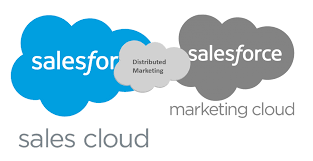
Salesforce Distributed Marketing bridges the gap between corporate marketing, employees, channel partners, and your brand, ensuring consistent experiences across various networks. Corporate marketers can create and share collaborative, on-brand content in Marketing Cloud Engagement, which distributed teams like advisers and partners can access, personalize, and send directly from CRM experiences such as Sales, Service, Financial Services, or Experience Cloud. Distributed Marketing is facilitated through a managed package installed in your CRM environment, allowing you to integrate Distributed Marketing content blocks into your Marketing Cloud Engagement environment effortlessly. Leveraging the power of Marketing Cloud Engagement, all communications are streamlined, enabling teams to engage with their customer base reliably and efficiently. As a marketer utilizing Distributed Marketing, you can: For advisors, partners, or dealers utilizing Distributed Marketing, the benefits include: Before installing Distributed Marketing for Marketing Cloud Engagement, it’s essential to review the required products, licenses, and permissions. Guided setups are available to quickly activate new workflows for your teams, covering installation, configuration, and content management. Distributed Marketing setup involves utilizing Marketing Cloud Engagement journeys and Salesforce campaigns within Sales, Service, Financial Services, and Experience Clouds. After installation and authentication configuration, setting up Distributed Marketing includes creating entry event data extensions, profile attributes, content, sender profiles, and journeys, along with customizing the Campaign page layout. By managing settings, administrators can enhance CRM with Marketing Cloud Engagement content, enabling the delivery of relevant, on-brand content at every touchpoint. Additionally, Distributed Marketing allows the extension of powerful content to distributed teams, ensuring safe and efficient interaction. Enhancing Distributed Marketing functionality is essential to align with your company’s needs. Custom personalization interactions can be created to extend the message personalization flow, while the payload can be extended to include more data for journey decisions and content personalization. Overall, Distributed Marketing provides tools, workflows, and experiences to better serve and engage your entire customer base, ensuring consistent brand experiences across various touchpoints and networks. Like1 Related Posts Who is Salesforce? Who is Salesforce? Here is their story in their own words. From our inception, we’ve proudly embraced the identity of Read more Salesforce Marketing Cloud Transactional Emails Salesforce Marketing Cloud Transactional Emails are immediate, automated, non-promotional messages crucial to business operations and customer satisfaction, such as order Read more Salesforce Unites Einstein Analytics with Financial CRM Salesforce has unveiled a comprehensive analytics solution tailored for wealth managers, home office professionals, and retail bankers, merging its Financial Read more AI-Driven Propensity Scores AI plays a crucial role in propensity score estimation as it can discern underlying patterns between treatments and confounding variables Read more

Read More
Salesforce Slack Integration

Workflows for Salesforce Slack

We all rely on processes to keep our teams organized and propel work forward. However, manual processes can be cumbersome, with work often getting lost in the chaos of Slack DMs or crowded team channels. Imagine if there were a way to structure processes into forms within Slack, allowing people to fill them out and automatically route requests to the appropriate individuals for follow-up. This is where Slack workflows come into play. What are Workflows for Salesforce Slack? A workflow is a multi-step process within your company, representing the sequence of tasks undertaken to achieve a business objective. Examples of Workflows for Salesforce Slack include: Workflows have a sequence of steps: Each workflow consists of multiple stages that typically occur in a specific order. Workflow Automation: Workflow automation is the use of software to streamline multi-step, multi-team workflows, ensuring the correct steps are followed, and tasks are completed efficiently. Types of Workflow Automation: Benefits of Workflow Automation in Slack: By incorporating workflow automation into Slack, teams can enhance efficiency, maintain structure, and reduce the risk of tasks getting lost or delayed. Contact Tectonic to learn more about Slack integration. Like1 Related Posts Who is Salesforce? Who is Salesforce? Here is their story in their own words. From our inception, we’ve proudly embraced the identity of Read more Salesforce Marketing Cloud Transactional Emails Salesforce Marketing Cloud Transactional Emails are immediate, automated, non-promotional messages crucial to business operations and customer satisfaction, such as order Read more Salesforce Unites Einstein Analytics with Financial CRM Salesforce has unveiled a comprehensive analytics solution tailored for wealth managers, home office professionals, and retail bankers, merging its Financial Read more AI-Driven Propensity Scores AI plays a crucial role in propensity score estimation as it can discern underlying patterns between treatments and confounding variables Read more

Read More
Salesforce Slack

Slack Process Automation

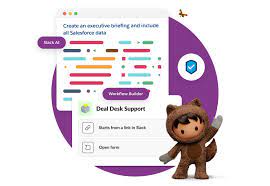
Salesforce’s Slack team collaboration tool extends beyond facilitating communication across channels; it empowers users to automate routine processes seamlessly through the Workflow Builder tool. This feature, available in Slack, offers a range of tools to streamline processes both within and outside Slack, all without the need for coding. Slack process automation improves the power and usage of the collaboration tool. The versatility of workflows is vast, accommodating simple to complex processes that can connect with various apps and services, not limited to Slack and Salesforce alone. With over 2,400 apps in the Slack App Directory, integration possibilities are extensive. Should a pre-built app fall short, customization options allow tailoring to specific business needs without the necessity for coding expertise. Building a workflow primarily requires identifying routine business processes suitable for automation, whether through app installation or custom Workflow Builder creation. The absence of coding prerequisites makes this accessible to a broader audience. Workflow Builder considers any series of sequential, repeatable tasks aimed at achieving a specific goal as a viable process for automation. Since Salesforce’s acquisition of Slack in 2021, the platform has become a pivotal collaboration tool within and beyond the Salesforce ecosystem. Its popularity has surged, particularly in remote-based work environments, where integrations with various applications synchronize data into Slack, providing a single, accurate source accessible to all team members. This, coupled with automation features directly accessible from the Slack app, significantly reduces manual task durations. Eight highly recommended Slack automations, facilitated through pre-built templates, cover various aspects, including recruiting, lead management, deal alerts, quote-to-invoice processes, project status tracking, time tracking, support case management, and even creative applications like hue light automation. Tectonic offers expertise in custom Slack integrations with Salesforce projects. Companies can explore how Slack enhances team collaboration and process automation by connecting with us. Slack Workflows Importantly, Slack workflows extend beyond Salesforce integration, working seamlessly with other platforms such as Zapier, Centro, Google Sheets, AttendanceBot, Polly, Datadog, Fellow, Automate.io, BirthdayBot, Jira, Workstreams, ToDoBot, Workast, Simple Poll, and more. The Workflow Builder feature enables the creation of predefined triggers and steps to automate processes directly within the Slack app. Triggers can be manually selected, initiated by emoticon selections, or set to run automatically. Once triggered, the workflow’s steps unfold in the selected order, allowing the seamless execution of various tasks. Process Automation in Slack The possibilities for automation using Workflow Builder in Slack are extensive, ranging from employee onboarding, customer support, content and communication review, to sales lead and marketing campaign management, request approval processes, and beyond. Slack, in conjunction with Tectonic, stands ready to bring these envisioned automations to life for organizations seeking enhanced efficiency and collaboration. Like Related Posts Who is Salesforce? Who is Salesforce? Here is their story in their own words. From our inception, we’ve proudly embraced the identity of Read more Salesforce Marketing Cloud Transactional Emails Salesforce Marketing Cloud Transactional Emails are immediate, automated, non-promotional messages crucial to business operations and customer satisfaction, such as order Read more Salesforce Unites Einstein Analytics with Financial CRM Salesforce has unveiled a comprehensive analytics solution tailored for wealth managers, home office professionals, and retail bankers, merging its Financial Read more AI-Driven Propensity Scores AI plays a crucial role in propensity score estimation as it can discern underlying patterns between treatments and confounding variables Read more

Read More
gettectonic.com