Cloud Archives - gettectonic.com - Page 67
Salesforce Marketing Cloud Email Studio

What is Email Studio in Marketing Cloud?

Enhance your account branding through the Sender Authentication Package (SAP), a tool provided by Marketing Cloud. SAP features include custom account branding, a private domain for email sending, a custom domain for CloudPages, a dedicated IP address, and reply mail management. Upon purchasing SAP, you will receive an email from mc-deliverability@mcld.salesforce.com 1–2 days after your contract activation. This email includes the SAP Quick Start Guide and a personalized form to set up your SAP.

Read More
Salesforce Service Cloud

Salesforce Service Acronyms

Here is a helpful glossary of terms you will hear when discussing Salesforce and Salesforce Service Cloud. ACW After Call Work Tasks that the agent needs to complete after the customer call has ended. Your job as a Salesforce Admin/Service Cloud Consultant is to make completing these tasks (eg. entering data, call outcome notes), as efficient as possible for the user. AHT Average Handle Time The average amount of time it takes for an agent to resolve a customer call/case. CTI Computer Telephony Integration Telephony (phone communication) can be directly integrated into Salesforce. This is a great win for Service (and Sales) departments who rely heavily on their phone, with features such as click to dial, call recording and screen pop available from 3rd party vendors. FCR First Contact Resolution Measures the % of cases that are solved on the first touchpoint with customer service.READ MORE: Create a Service Metrics Strategy. FSL Field Service (Lightning) An extension (add-on product) of Service Cloud that provides a comprehensive view of workforce management. Field Service involves providing services to customers beyond your office or site – which is referred to as in the “field”. Think about mobile employees, like service technicians, who carry out the service in-person; other people involved are service agents, dispatchers, and service managers. Salesforce dropped the “Lightning” from the product name, but the acronym is still widely used. IVR Interactive Voice Response An automated telephony system that interacts with callers, gathers information and routes calls to the appropriate recipients (source). People often refer to this as speaking to a bot before they get through to a human agent. KCS Knowledge-Centered Support A knowledge base that documents service agents’ experiences when solving cases, curated and made accessible to customers for self-service support should they encounter the same question or problem.Salesforce Experience Cloud is praised for encouraging collaboration and improvement between customers and agents in this way. PBX Private Branch Exchange System that routes calls to different agents. SLA Service-level Agreement A formal or informal contract between an organization and its customers which outlines what service they will receive and how long they will need to wait to receive that service each time. SLAs can be configured into Salesforce to prioritize cases and work orders. Like Related Posts Who is Salesforce? Who is Salesforce? Here is their story in their own words. From our inception, we’ve proudly embraced the identity of Read more Salesforce Marketing Cloud Transactional Emails Salesforce Marketing Cloud Transactional Emails are immediate, automated, non-promotional messages crucial to business operations and customer satisfaction, such as order Read more Salesforce Unites Einstein Analytics with Financial CRM Salesforce has unveiled a comprehensive analytics solution tailored for wealth managers, home office professionals, and retail bankers, merging its Financial Read more AI-Driven Propensity Scores AI plays a crucial role in propensity score estimation as it can discern underlying patterns between treatments and confounding variables Read more

Read More
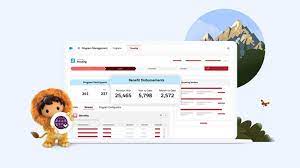
Salesforce Loyalty Management

Salesforce Loyalty Management Explained

In January 2021, Salesforce unveiled Loyalty Management, aiming to assist businesses in actively engaging and rewarding their customers. Employing a user-friendly interface without the need for coding, the platform empowers businesses to construct scalable loyalty programs. This flexibility extends to the creation of diverse programs, such as tiered memberships or points-per-purchase. Loyalty Management is adaptable, allowing configuration to seamlessly integrate with Experience Cloud for customer sign-ups and Marketing Cloud for content delivery. With Loyalty Management as an end-to-end solution that helps you create intelligent, personalized engagements that increase customer loyalty. Loyalty Management is versatile and can cater to B2B and B2C business needs in any industry. With the Loyalty Management app, create and set up loyalty programs.  Loyalty Management lets you configure programs that fit the exact needs of your business and your customers. “Businesses in every industry are tasked with reimagining their loyalty strategies and Salesforce is equipped to help them with a flexible platform that helps them create unique programs. Loyalty Management, built on the Salesforce platform, helps organizations deliver innovative programs for customer recognition, reward, and retention. Nurture relationships and create lasting loyalty on the world’s #1 CRM. With Loyalty Management, your business can engage with customers in meaningful ways — bringing value to their experience and to your business. Leverage Customer 360 to deliver unique experiences with Salesforce customer loyalty. Generate a single source of truth for members that enables personalization at scale and weaves loyalty throughout the customer experience. Make loyalty a business strategy informed by the power of Salesforce Customer 360 Get a unified view of your program members to engage them with relevant and personalized experiences Make loyalty more than a program and bring it into every touch point in the customer or partner journey Deliver more dynamic and personal loyalty experiences for customers by removing silos and connecting member data across multiple systems. Create a consistent customer reward program experience — rewarding them for their engagement and their loyalty across every interaction and touch point they have with your business. Like1 Related Posts Who is Salesforce? Who is Salesforce? Here is their story in their own words. From our inception, we’ve proudly embraced the identity of Read more Salesforce Marketing Cloud Transactional Emails Salesforce Marketing Cloud Transactional Emails are immediate, automated, non-promotional messages crucial to business operations and customer satisfaction, such as order Read more Salesforce Unites Einstein Analytics with Financial CRM Salesforce has unveiled a comprehensive analytics solution tailored for wealth managers, home office professionals, and retail bankers, merging its Financial Read more AI-Driven Propensity Scores AI plays a crucial role in propensity score estimation as it can discern underlying patterns between treatments and confounding variables Read more

Read More
Sensitive Information De-identification

Sensitive Information De-identification

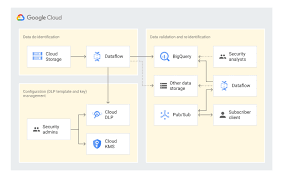
Using Google Cloud Data Loss Prevention with Salesforce for Sensitive Data Handling This insight discusses the transition from detecting and classifying sensitive data to preventing data loss using Google Cloud Data Loss Prevention (DLP). Sensitive Information De-identification for Salesforce is used as the data source to demonstrate how personal, health, credential, and financial information can be de-identified in unstructured data in near real-time. Overview of Google Cloud DLP Google Cloud DLP is a fully managed service designed to help discover, classify, and protect sensitive data. It easily transitions from detection to prevention by offering services that mask sensitive information and measure re-identification risk. Objective The goal was to demonstrate the ability to redact sensitive information in unstructured data at scale. Specifically, it aimed to determine whether sensitive data, such as credit card numbers, tax file numbers, and health care numbers, entered into Salesforce communications (Emails, Files, and Chatter) could be detected and redacted. Constraints Tested De-identifying Data with Google Cloud DLP API Instead of detailing the setup, this section focuses on the key areas of design. Google Design Decisions Supporting Disparate Data Sources with Multiple Integration Patterns and Redundant Design Salesforce Data Source De-identification targets include email addresses, Australian Medicare card numbers, GCP API keys, passwords, and credit card numbers. Credit card numbers are masked with asterisks, while other sensitive data is replaced with information types for readability (e.g., jane@secretemail.com becomes [redacted-email-address]). Sample Requests to Google De-identification Service JSON Structure to De-identify Text Using Google Cloud DLP API jsonCopy code{ // JSON structure } JSON Structure to De-identify Images Using Google Cloud DLP API jsonCopy code{ // JSON structure } Salesforce Design Decisions Redundancy and Batch Processing A scheduled batch job allows for recovery by polling unprocessed records. To handle large data volumes (e.g., 360,000 records over 5 days), the Salesforce BULK API is used to process queries and updates in large batch sizes, reducing the number of API calls. Sensitive Information De-identification Google Cloud Data Loss Prevention allows detecting and protecting assets with sensitive information, supporting a wide range of use cases across an enterprise. Proven Capabilities: Considerations and Lessons Learned Enhanced Email: Redacting tasks and EmailMessage records, handling read-only EmailMessage records by deleting and recreating them. Files: The architecture assumes files with sensitive data can be deleted and replaced with redacted versions. Audit Fields: Ensure setting CreatedDate and LastModifiedDate fields using original record dates. Field History Tracking: Avoid tracking fields intended for de-identification, tracking shadow fields instead. Image De-identification: Limited to JPEG, BMP, and PNG formats, with DOCX and PDF not yet supported. Like Related Posts Who is Salesforce? Who is Salesforce? Here is their story in their own words. From our inception, we’ve proudly embraced the identity of Read more Salesforce Marketing Cloud Transactional Emails Salesforce Marketing Cloud Transactional Emails are immediate, automated, non-promotional messages crucial to business operations and customer satisfaction, such as order Read more Salesforce Unites Einstein Analytics with Financial CRM Salesforce has unveiled a comprehensive analytics solution tailored for wealth managers, home office professionals, and retail bankers, merging its Financial Read more AI-Driven Propensity Scores AI plays a crucial role in propensity score estimation as it can discern underlying patterns between treatments and confounding variables Read more
Read More
Salesforce Campaigns

Campaign in Salesforce Marketing Cloud

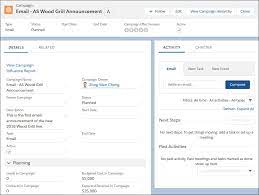
What is a campaign in Salesforce Marketing Cloud? Campaigns help organize your marketing plan and assets. Plus, when you set up your campaign records effectively, they contain valuable data that you can use to optimize future efforts. What are campaigns in Salesforce Marketing Cloud for? A Salesforce Campaign in Marketing Cloud is a group of Leads and Contacts exposed to specific marketing communication(s). It stores essential performance metrics and means salespeople can quickly see the customers and prospects that received marketing activity. How do I send a Salesforce campaign from Marketing Cloud? In Marketing Cloud > Email Studio > Overview, open the email that you want to send and click ‘Send’ Select a ‘Send Classification’ then click ‘Next’ In the left pane, select ‘Salesforce Campaigns’ and then type the name of the desired campaign in the ‘Search’ field. Create a Marketing Cloud Campaign Why use campaigns in marketing cloud? Marketing Cloud Campaigns provide a way of grouping similar emails together. That way, Campaigns can be used in Datorama Reporting to present data for certain emails. What is campaign object in Salesforce? The Campaign object contains all the settings associated with how campaign records appear, the actions that users can take on campaigns, field access, and more. Create a campaign in the Campaigns app. Use tags in Marketing Cloud Engagement to categorize campaigns by any criteria, such as geography, marketing tactic, and product line. Where are my old Campaigns? I don’t see them on the campaign Overview tab.Campaigns that contain an email that has been sent automatically have their status set to Deployed. By default, the Overview tab only shows Campaigns with a status of In Process. To view older campaigns that have a status of Deployed, simply adjust the filter in the upper left.Setting the campaign status to Deployed now happens automatically when associated emails are sent. This feature was enabled in January 2014. Content updated January 2024. Like3 Related Posts Who is Salesforce? Who is Salesforce? Here is their story in their own words. From our inception, we’ve proudly embraced the identity of Read more Salesforce Marketing Cloud Transactional Emails Salesforce Marketing Cloud Transactional Emails are immediate, automated, non-promotional messages crucial to business operations and customer satisfaction, such as order Read more Salesforce Unites Einstein Analytics with Financial CRM Salesforce has unveiled a comprehensive analytics solution tailored for wealth managers, home office professionals, and retail bankers, merging its Financial Read more AI-Driven Propensity Scores AI plays a crucial role in propensity score estimation as it can discern underlying patterns between treatments and confounding variables Read more

Read More
Salesforce Marketing Cloud

What is the Difference in Lists and a Data Extensions in Salesforce Marketing Cloud

There are two different methods to store and segment subscriber data within Marketing Cloud: Lists and Data Extensions. Lists have limited functionality, whereas Data Extensions provide full flexibility to store and relate subscriber information. Salesforce Marketing Cloud lists and data extensions are the primary ways to manage your subscriber data. What is the difference between data extension and list in Marketing Cloud? In short, lists are best used for specific email sends lacking advanced data or segmentation, whereas data extensions can be used for basically any type of communication or data management need. If the goal is to organize data with simplicity, go for lists. What is data extension in Marketing Cloud? A data extension is a table that contains your data. With Marketing Cloud Connect, push tracking data from the Marketing Cloud back to your Sales or Service Cloud orgs using Salesforce data extensions (SFDEs). Data extensions are also filterable. What are the data extension limits for Marketing Cloud? There is currently no limit for the amount of rows that can exist within a Data Extension. This means that, without Row Based Data Retention, a Data extension can grow exponentially without any real upper limit. What is a list in Marketing Cloud? Lists are a default way of storing data in Marketing Cloud Email Studio. You can set different attributes for your customers by using lists, which represent a collection of customers and provide a simple method for audience segmentation. These attributes are used to store the position of the customer in a given list. List can be configured to send a welcome email when a subscriber opts in, and can have double opt-in. You will also hear groups mentioned. Groups are smaller segments of a list. When to Opt for Marketing Cloud Data Extensions There are two primary scenarios that distinctly indicate the need for utilizing a data extension rather than a list: Fluctuating Values Over Time: Data Relationship via a 3rd Data Point: Like Related Posts Who is Salesforce? Who is Salesforce? Here is their story in their own words. From our inception, we’ve proudly embraced the identity of Read more Salesforce Marketing Cloud Transactional Emails Salesforce Marketing Cloud Transactional Emails are immediate, automated, non-promotional messages crucial to business operations and customer satisfaction, such as order Read more Salesforce Unites Einstein Analytics with Financial CRM Salesforce has unveiled a comprehensive analytics solution tailored for wealth managers, home office professionals, and retail bankers, merging its Financial Read more AI-Driven Propensity Scores AI plays a crucial role in propensity score estimation as it can discern underlying patterns between treatments and confounding variables Read more
Read More
gettectonic.com