GUI Archives - gettectonic.com - Page 2
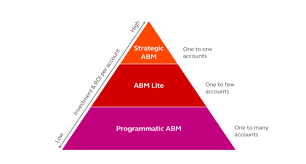
Account Based Marketing

The Ultimate Guide to ABM Email Templates That Convert

Crafting Hyper-Personalized ABM Emails That Get Responses Account-based marketing emails aren’t just messages—they’re strategic business conversations tailored to your most valuable accounts. These templates show you how to break through the noise with highly relevant, value-driven communication. Why ABM Emails Work Differently ✔ 87% higher response rates than generic emails✔ 3x more pipeline value from targeted accounts✔ 56% better conversion rates when properly personalized 1. Subject Lines That Demand Attention Personalized & Benefit-Driven Intriguing & Relevant Referencing Connections Pro Tip: Include the recipient’s name and company in 70% of subject lines for 22% higher open rates. 2. Email Body Structure That Converts The 4-Part ABM Email Framework 1. Personalized Hook (1 sentence)“Congrats on [Recent Achievement] – impressive growth in [Specific Metric]!” 2. Relevant Insight (2-3 sentences)“When we helped [Peer Company] with similar [Challenge], they achieved [Quantifiable Result] by [Unique Approach].” 3. Tailored Value Proposition“For [Account Name], this could mean [Specific Benefit 1] and [Specific Benefit 2] based on your [Unique Factor].” 4. Clear CTA with Social Proof*”When’s a good time for a 15-min chat? P.S. [Industry Leader] saw [Result] in [Timeframe].”* 3. Proven ABM Email Templates Template 1: The Executive Insight Email Subject: “[Industry Trend] impacting [Account Name]’s [Department]” Body:“Hi [First Name], Noticed [Account Name]’s focus on [Strategic Initiative] in your [Source]. With [Industry Trend] accelerating, many [Industry] leaders are seeing [Specific Impact]. We recently helped [Peer Company] navigate this by [Solution], achieving [Metric] in [Timeframe]. Would you have 20 minutes to discuss how this approach could support [Initiative]? Best,[Your Name][Your Position][Your Company]” Template 2: The Peer Comparison Email Subject: “How [Peer Company] achieved [Result] with [Solution]” Body:“Hi [First Name], [Peer Company] faced similar [Challenge] to what [Account Name] is managing around [Specific Issue]. Their solution? [Brief Case Study Summary]. *Three specific outcomes they gained: Would you be open to a quick call to explore if this approach could work for [Account Name]? [Your Name]” 4. Advanced ABM Email Strategies The Multi-Touch Sequence Interactive Elements That Boost Engagement 5. Measuring ABM Email Success Track these key metrics:✅ Open Rate (Target: 40-60%)✅ Response Rate (Target: 15-30%)✅ Meeting Booked Rate (Target: 5-15%)✅ Pipeline Influence (Measure account progression) Optimization Tip: A/B test every 5th email with different: Your ABM Email Checklist 🔹 Before Sending: 🔹 After Sending: “After implementing these ABM email strategies, we saw a 4x increase in meetings with target accounts and 35% faster deal velocity.”— Enterprise ABM Director Transform your ABM outreach from ignored to engaged with science-backed templates. Like Related Posts Who is Salesforce? Who is Salesforce? Here is their story in their own words. From our inception, we’ve proudly embraced the identity of Read more Salesforce Marketing Cloud Transactional Emails Salesforce Marketing Cloud Transactional Emails are immediate, automated, non-promotional messages crucial to business operations and customer satisfaction, such as order Read more Salesforce Unites Einstein Analytics with Financial CRM Salesforce has unveiled a comprehensive analytics solution tailored for wealth managers, home office professionals, and retail bankers, merging its Financial Read more AI-Driven Propensity Scores AI plays a crucial role in propensity score estimation as it can discern underlying patterns between treatments and confounding variables Read more


Read More

Salesforce Reports Explained

Salesforce Reports: A Complete Guide to Data Analysis & Insights What Are Salesforce Reports? Salesforce Reports empower users to access, analyze, and share critical business data stored in Salesforce. They transform raw data into actionable insights, helping teams track performance, identify trends, and make data-driven decisions. Reports can be customized, visualized in dashboards, and shared across teams for better collaboration. Key Types of Salesforce Reports Salesforce offers four main report types, each suited for different analytical needs: 1. Tabular Reports 2. Summary Reports 3. Matrix Reports 4. Joined Reports How to Create & Customize Reports Step 1: Navigate to the Reports Tab Step 2: Customize Your Report Step 3: Save & Share Advanced Analysis with Salesforce Reports Einstein Analytics Dynamic Filters Scheduled Reports Best Practices for Effective Reporting ✅ Define a Clear Purpose – What decision will this report drive?✅ Keep It User-Friendly – Use charts, summaries, and clear labels.✅ Ensure Data Accuracy – Regularly review filters & formulas.✅ Share Strategically – Grant access only to relevant stakeholders.✅ Automate Where Possible – Schedule reports to save time. Conclusion: Unlock the Power of Salesforce Reports Salesforce Reports turn raw data into strategic insights, helping businesses track performance, optimize processes, and drive growth. By mastering report types, customization, and sharing, teams can make faster, smarter decisions. Need help? Explore Salesforce’s Report Builder or check out Trailhead for hands-on training! Like Related Posts Who is Salesforce? Who is Salesforce? Here is their story in their own words. From our inception, we’ve proudly embraced the identity of Read more Salesforce Marketing Cloud Transactional Emails Salesforce Marketing Cloud Transactional Emails are immediate, automated, non-promotional messages crucial to business operations and customer satisfaction, such as order Read more Salesforce Unites Einstein Analytics with Financial CRM Salesforce has unveiled a comprehensive analytics solution tailored for wealth managers, home office professionals, and retail bankers, merging its Financial Read more AI-Driven Propensity Scores AI plays a crucial role in propensity score estimation as it can discern underlying patterns between treatments and confounding variables Read more
Read More
Salesforce Sales Enablement

Modern Sales Enablemen

The Ultimate Guide to Modern Sales Enablement: Driving Revenue Through Strategic Enablement Why Sales Enablement Matters More Than Ever In today’s competitive landscape, sales teams face unprecedented challenges: Sales enablement has evolved from basic training to a strategic revenue driver that:✔ Accelerates ramp time for new reps✔ Increases win rates by 20-30%✔ Boosts deal sizes through value-selling✔ Shortens sales cycles with battle-tested playbooks The 4 Pillars of High-Impact Enablement 1. Goal-Driven Enablement Stop generic training. Start with one revenue-critical KPI: Example: A SaaS company increased deal size 22% by training reps to lead with ROI calculators instead of discounts. 2. Behavior-Based Coaching Leverage AI and data to target specific skill gaps: 3. Technology Stack Integration Essential tools for measurable impact: Tool Key Benefit CRM Tracks enablement progress to revenue outcomes Conversation AI Surfaces coaching moments from calls/emails Enablement Platform Delivers contextual training in workflow Learning LMS Gamifies certifications & skill development Pro Tip: Integrate tools so reps learn while selling (e.g., Salesforce Sales Enablement auto-suggests battle cards during opp stages). 4. Continuous Optimization Quarterly enablement health checks: Best Practices for 2024 For Enablement Leaders For Sales Reps The Future: AI-Powered Enablement Leading organizations now deploy:🤖 Autonomous Coaching Agents – Real-time deal guidance📊 Predictive Content Recommendations – AI suggests optimal assets per stage🎯 Skill Gap Analytics – Prescriptive training based on deal outcomes “Enablement isn’t about training—it’s about engineering revenue behaviors.”– Sales Enablement Leader, Fortune 500 Tech Company Get Started Template Quarter 1 Enablement Plan markdown 1. **Goal**: Increase win rate by 15% 2. **Behavior Focus**: Executive stakeholder alignment 3. **Actions**: – Build “C-Suite Messaging” playbook – Train on discovery questioning frameworks – Implement call tracking for “business outcome” language 4. **Tools**: Salesforce Enablement + Gong 5. **Success Metrics**: – 25% more exec-level meetings booked – 10% higher win rate on deals with CFO engagement Content updated February 2025. Like Related Posts Who is Salesforce? Who is Salesforce? Here is their story in their own words. From our inception, we’ve proudly embraced the identity of Read more Salesforce Marketing Cloud Transactional Emails Salesforce Marketing Cloud Transactional Emails are immediate, automated, non-promotional messages crucial to business operations and customer satisfaction, such as order Read more Salesforce Unites Einstein Analytics with Financial CRM Salesforce has unveiled a comprehensive analytics solution tailored for wealth managers, home office professionals, and retail bankers, merging its Financial Read more AI-Driven Propensity Scores AI plays a crucial role in propensity score estimation as it can discern underlying patterns between treatments and confounding variables Read more
Read More
Salesforce Marketing Cloud Email Studio

What is Email Studio in Marketing Cloud?

Enhance your account branding through the Sender Authentication Package (SAP), a tool provided by Marketing Cloud. SAP features include custom account branding, a private domain for email sending, a custom domain for CloudPages, a dedicated IP address, and reply mail management. Upon purchasing SAP, you will receive an email from mc-deliverability@mcld.salesforce.com 1–2 days after your contract activation. This email includes the SAP Quick Start Guide and a personalized form to set up your SAP.

Read More
Sending Emails Through Salesforce

Journey Builder or Automation Studio

Both Journey Builder and Automation Studio are robust tools available to Marketing Cloud customers. However, determining when to use each one and how they complement each other can sometimes be confusing. Automation Studio primarily focuses on ETL (Extract, Transform, Load) processes in marketing automation. It enables marketers to integrate data from various systems and automate tasks for segmentation and email campaign deployment. With Automation Studio, marketers can create highly advanced automated segmentation using data filters and queries, making it ideal for repetitive processes. It also allows users to execute SQL queries to retrieve and store data extension information. On the other hand, Journey Builder is a user-friendly, drag-and-drop tool designed for creating personalized, engagement-based customer journeys. It facilitates individualized, multi-channel communications at scale and provides goal and success measurements for monitoring and management. Unlike Automation, Journey Builder offers more opportunities for testing strategies and optimizing messages based on real-time engagement and interaction. One key difference between the two tools is that Journey Builder offers built-in goal reporting, providing real-time insights into campaign performance and customer engagement. Another distinction is that while Automation Studio relies on batch processing, Journey Builder allows individuals to enter journeys on an individual level, enabling real-time monitoring and action based on customer behavior. To decide which tool to use, consider the following questions: In many cases, it’s not a matter of choosing between Journey Builder vs Automation Studio but rather leveraging both tools together. By combining the powerful segmentation capabilities of Automation Studio with the personalized journey creation features of Journey Builder, marketers can deliver highly targeted and personalized messaging to their customers. Automation Studio is best for complex segmentation at scale, while Journey Builder guides customers through customized journeys based on Marketing Cloud data. Ultimately, using both tools together allows marketers to create seamless, personalized experiences for their customers. Like1 Related Posts Who is Salesforce? Who is Salesforce? Here is their story in their own words. From our inception, we’ve proudly embraced the identity of Read more Salesforce Marketing Cloud Transactional Emails Salesforce Marketing Cloud Transactional Emails are immediate, automated, non-promotional messages crucial to business operations and customer satisfaction, such as order Read more Salesforce Unites Einstein Analytics with Financial CRM Salesforce has unveiled a comprehensive analytics solution tailored for wealth managers, home office professionals, and retail bankers, merging its Financial Read more AI-Driven Propensity Scores AI plays a crucial role in propensity score estimation as it can discern underlying patterns between treatments and confounding variables Read more

Read More
Salesforce Einstein and Einstein Automate

Say Hello to Einstein Automate

Einstein Automate is a robust end-to-end automation solution within Salesforce, offering increased productivity benefits for individuals, account executives, and businesses alike. A central element, Salesforce Flow, transforms business processes by facilitating seamless interactions for both customers and employees. The incorporation of Flow Builder ensures the creation of automated business processes is both easy and efficient, enabling streamlined enterprise-scale automation from testing to monitoring. With low to no code potential. Salesforce Flow distinguishes itself with user-friendly features, employing easy-to-use visual elements and reusable building blocks. Combined with Automate, enables the creation of large-scale automations within Salesforce. The solution bridges disconnected systems and integrates siloed data sources into a cohesive workflow, leading to improved customer experiences and enhanced business agility through guided interactions for the sales team. Sales reps are engaged in non-selling activities up to 66% of the work day. That’s totally no bueno. Get them back on track and shorten sales cycles with Einstein Automate. The introduction of Einstein Automate from Salesforce brings notable benefits. Studies reveal that automating manual processes with tools like Salesforce Flow and Automate saves employees four hours per week, enabling a shift of focus toward higher-value, deal closing tasks. Einstein Automate facilitates the automation of repetitive tasks, provides self-service portals, guides employee workflows, and activates intelligent recommendations for next-best actions on leads and accounts. The platform offers reusable building blocks, including logic, data, action, and screen components, which can be employed to construct business logic. Automate enables the creation of workflows across Salesforce and external systems, utilizing platform events, External Services, and MuleSoft. Screen flows can be designed to guide user interactions and collect user inputs. Einstein Automate streamlines process lifecycle management, encompassing low-code debugging, troubleshooting, performance monitoring, and usage analysis. Businesses can benefit from pre-built automation components and configure industry best practices through Salesforce’s AppExchange of pre-built solutions. One great feature is Einstein Automated Contacts. As a comprehensive add-on solution for Salesforce, Einstein Automate empowers businesses to improve productivity, efficiency, and customer experiences by seamlessly automating manual processes. For a deeper understanding of how Salesforce’s Einstein Automate and Flow can optimize your Salesforce instance, connect with Tectonic. We predict there are great things on the Salesforce road map for Einstein Automate and Flow. Content updated June 2025, Shannan Hearne. Like Related Posts Who is Salesforce? Who is Salesforce? Here is their story in their own words. From our inception, we’ve proudly embraced the identity of Read more Salesforce Marketing Cloud Transactional Emails Salesforce Marketing Cloud Transactional Emails are immediate, automated, non-promotional messages crucial to business operations and customer satisfaction, such as order Read more Salesforce Unites Einstein Analytics with Financial CRM Salesforce has unveiled a comprehensive analytics solution tailored for wealth managers, home office professionals, and retail bankers, merging its Financial Read more AI-Driven Propensity Scores AI plays a crucial role in propensity score estimation as it can discern underlying patterns between treatments and confounding variables Read more

Read More

AI in Sales Enablement

automation, and personalization to enhance sales processes, increase customer engagement, and drive revenue growth. Companies are working with AI to improve analysis of all customer contact points to both identify leads and weigh lead quality. That includes ingesting information from web pages, email campaigns, phone calls, and much more.

Read More
Salesforce Quickstart

Salesforce Quickstarts Explained

What is a Salesforce Quickstart? Salesforce Quickstarts are great for individual departments or small sales & customer service teams who want to get the most out of their Salesforce investment from day one. Tectonic refers to these as Salesforce Implementation Solutions. Small to medium-sized businesses who are looking for quick deployment and want to get started with Salesforce as soon as possible benefit greatly from Salesforce quickstarts. Quickstart packages have also been called Salesforce Jumpstarts, a program to help businesses quickly and efficiently implement Salesforce. In either case, these programs are an all-in-one solution including everything from initial setup and configuration to training and support. What is a Salesforce Quickstart Package from Tectonic? A Salesforce Quickstart Package is a streamlined implementation process designed for companies seeking swift implementation of Salesforce. This limited engagement focuses on crucial planning, decision-making, standard and custom configurations, and essential user and admin training. It is tailored for small to medium-sized businesses aiming for a prompt Salesforce deployment, covering sales, marketing, service, and more. A QuickStart Implementation is the fastest way to get your organization using Salesforce. It is a limited engagement that provides immediate benefits and a foundation for future digital transformation. Key Benefits What you’ll receive .Partner Assistance in Implementing Salesforce with Quickstart A Salesforce consulting partner, like Tectonic, can assist in assessing needs, configuring Quickstart packages, providing training and support, adopting best practices, and optimizing the Salesforce environment. Tectonic offers ready-to-launch Quickstart packages and Accelerators, ensuring faster system fulfillment, cost reduction, secure scaling, and enhanced customer experience. How do I use trailhead to learn Salesforce after a quickstart? In Trailhead, learning topics are broken down into modules and each module contains units. At the end of a unit, you’ll complete a quiz or hands-on challenge that will earn you points. Once you’ve completed all the units in a module, you’ll get a badge that is displayed on your profile.  Salesforce Trailhead is your first, free choice for Salesforce training.  Trailhead is a fantastic learning platform for new Trailblazers coming into the Salesforce ecosystem and existing Salesforce professionals who want to improve their skills and knowledge. Tectonic is please to announce Salesforce Service Cloud Implementation Solutions. Content updated April 2024. Like1 Related Posts Who is Salesforce? Who is Salesforce? Here is their story in their own words. From our inception, we’ve proudly embraced the identity of Read more Salesforce Marketing Cloud Transactional Emails Salesforce Marketing Cloud Transactional Emails are immediate, automated, non-promotional messages crucial to business operations and customer satisfaction, such as order Read more Salesforce Unites Einstein Analytics with Financial CRM Salesforce has unveiled a comprehensive analytics solution tailored for wealth managers, home office professionals, and retail bankers, merging its Financial Read more AI-Driven Propensity Scores AI plays a crucial role in propensity score estimation as it can discern underlying patterns between treatments and confounding variables Read more

Read More
gettectonic.com