JavaScript Archives - gettectonic.com
Intelligent Adoption Framework

Exploring Open-Source Agentic AI Frameworks

Exploring Open-Source Agentic AI Frameworks: A Comparative Overview Most developers have heard of CrewAI and AutoGen, but fewer realize there are dozens of open-source agentic frameworks available—many released just in the past year. To understand how these frameworks work and how easy they are to use, several of the more popular options were briefly tested. This article explores what each one offers, comparing them to the more established CrewAI and AutoGen. The focus is on LangGraph, Agno, SmolAgents, Mastra, PydanticAI, and Atomic Agents, examining their features, design choices, and underlying philosophies. What Agentic AI Entails Agentic AI revolves around building systems that enable large language models (LLMs) to access accurate knowledge, process data, and take action. Essentially, it uses natural language to automate tasks and workflows. While natural language processing (NLP) for automation isn’t new, the key advancement is the level of autonomy now possible. LLMs can handle ambiguity, make dynamic decisions, and adapt to unstructured tasks—capabilities that were previously limited. However, just because LLMs understand language doesn’t mean they inherently grasp user intent or execute tasks reliably. This is where engineering comes into play—ensuring systems function predictably. For those new to the concept, deeper explanations of Agentic AI can be found here and here. The Role of Frameworks At their very core, agentic frameworks assist with prompt engineering and data routing to and from LLMs. They also provide abstractions that simplify development. Without a framework, developers would manually define system prompts, instructing the LLM to return structured responses (e.g., API calls to execute). The framework then parses these responses and routes them to the appropriate tools. Frameworks typically help in two ways: Additionally, they may assist with: However, some argue that full frameworks can be overkill. If an LLM misuses a tool or the system breaks, debugging becomes difficult due to abstraction layers. Switching models can also be problematic if prompts are tailored to a specific one. This is why some developers end up customizing framework components—such as create_react_agent in LangGraph—for finer control. Popular Frameworks The most well-known frameworks are CrewAI and AutoGen: LangGraph, while less mainstream, is a powerful choice for developers. It uses a graph-based approach, where nodes represent agents or workflows connected via edges. Unlike AutoGen, it emphasizes structured control over agent behavior, making it better suited for deterministic workflows. That said, some criticize LangGraph for overly complex abstractions and a steep learning curve. Emerging Frameworks Several newer frameworks are gaining traction: Common Features Most frameworks share core functionalities: Key Differences Frameworks vary in several areas: Abstraction vs. Control Frameworks differ in abstraction levels and developer control: They also vary in agent autonomy: Developer Experience Debugging challenges exist: Final Thoughts The best way to learn is to experiment. While this overview highlights key differences, factors like enterprise scalability and operational robustness require deeper evaluation. Some developers argue that agent frameworks introduce unnecessary complexity compared to raw SDK usage. However, for those building structured AI systems, these tools offer valuable scaffolding—if chosen wisely. Like Related Posts AI Automated Offers with Marketing Cloud Personalization AI-Powered Offers Elevate the relevance of each customer interaction on your website and app through Einstein Decisions. Driven by a Read more Salesforce OEM AppExchange Expanding its reach beyond CRM, Salesforce.com has launched a new service called AppExchange OEM Edition, aimed at non-CRM service providers. Read more The Salesforce Story In Marc Benioff’s own words How did salesforce.com grow from a start up in a rented apartment into the world’s Read more Salesforce Jigsaw Salesforce.com, a prominent figure in cloud computing, has finalized a deal to acquire Jigsaw, a wiki-style business contact database, for Read more

Read More

Salesforce Supported Browsers – Summer ’25 Release Update

Browser Support for Lightning Experience Lightning Experience is available in Essentials, Group, Professional, Enterprise, Performance, Unlimited, and Developer editions. For the best mobile experience, Salesforce recommends using the Salesforce mobile app or accessing Lightning Experience via iPad Safari (with some limitations). Desktop & Laptop Browser Support Salesforce supports the latest stable versions of: ✅ Microsoft Edge (Chromium)✅ Google Chrome✅ Mozilla Firefox✅ Apple Safari Unsupported Browsers:❌ Internet Explorer (no longer supported)❌ Microsoft Edge (non-Chromium)❌ Incognito/private browsing modes Key Notes: Tablet Browser Support Device Supported Browser Notes iPadOS Safari (iOS 13+) Landscape mode only; no portrait switching. Android Salesforce Mobile App Browser access not supported. Important: Mobile (Phone) Support For the best experience, use the Salesforce mobile app. Third-Party Browser Extensions & JavaScript Libraries While some extensions can enhance Salesforce, DOM-manipulating extensions may cause instability. Recommendations: ✔ Check AppExchange for trusted partner extensions.✔ Use Salesforce-approved JavaScript libraries (uploaded as static resources).✔ For custom components: Risks: Salesforce Classic Browser Support Salesforce Classic is available in all editions but does not support mobile browsers—use the Salesforce mobile app instead. Supported Browsers: ✅ Microsoft Edge (Chromium)✅ Google Chrome✅ Mozilla Firefox✅ Apple Safari (except for Classic Console) Unsupported:❌ Internet Explorer 11 (deprecated after Dec 31, 2022)❌ Microsoft Edge (non-Chromium) CRM Analytics Browser Support Follows the same browser compatibility as Lightning Experience. Final Notes For more details, refer to Salesforce Help. Like Related Posts AI Automated Offers with Marketing Cloud Personalization AI-Powered Offers Elevate the relevance of each customer interaction on your website and app through Einstein Decisions. Driven by a Read more Salesforce OEM AppExchange Expanding its reach beyond CRM, Salesforce.com has launched a new service called AppExchange OEM Edition, aimed at non-CRM service providers. Read more The Salesforce Story In Marc Benioff’s own words How did salesforce.com grow from a start up in a rented apartment into the world’s Read more Salesforce Jigsaw Salesforce.com, a prominent figure in cloud computing, has finalized a deal to acquire Jigsaw, a wiki-style business contact database, for Read more

Read More
Mastering Decorators and Lifecycle Hooks in Salesforce LWC

Mastering Decorators and Lifecycle Hooks in Salesforce LWC

Introduction to LWC Core Concepts Lightning Web Components (LWC) in Salesforce leverage two fundamental JavaScript features to create efficient, reactive components: decorators and lifecycle hooks. These mechanisms work together to: Deep Dive into LWC Decorators 1. @api – The Public Interface Decorator Purpose: Enables component communication and exposes public properties/methods Key Characteristics: Implementation Patterns: javascript Copy // Child component exposing properties and methods import { LightningElement, api } from ‘lwc’; export default class Modal extends LightningElement { @api title = ‘Default Title’; // Public property with default @api show() { // Public method this.template.querySelector(‘.modal’).classList.remove(‘hidden’); } @api hide() { this.template.querySelector(‘.modal’).classList.add(‘hidden’); } } Best Practices: Performance Considerations: 2. @track – The Reactive Property Decorator (Legacy) Evolution of Reactivity: When to Use Today: Modern Alternatives: javascript Copy // Preferred immutable pattern (no @track needed) updateUser() { this.user = { …this.user, name: ‘Updated Name’ }; } // Array operations addItem(newItem) { this.items = […this.items, newItem]; } 3. @wire – The Data Service Decorator Core Functionality: Implementation Options: javascript Copy // Property syntax (automatic) @wire(getContacts) contacts; // Function syntax (manual control) @wire(getContacts) wiredContacts({ error, data }) { if (data) this.contacts = data; if (error) this.error = error; } Advanced Patterns: Lifecycle Hooks Demystified The Component Lifecycle Journey Practical Implementation Guide Component Communication Patterns Parent-to-Child: html Copy <!– Parent template –> <c-child public-property={value}></c-child> Run HTML Child-to-Parent: javascript Copy // Child component this.dispatchEvent(new CustomEvent(‘notify’, { detail: data })); Performance Optimization Techniques Common Anti-Patterns to Avoid Advanced Patterns and Best Practices State Management Strategies Testing Lifecycle Hooks Example Test Case: javascript Copy import { createElement } from ‘lwc’; import MyComponent from ‘c/myComponent’; describe(‘Lifecycle hooks’, () => { it(‘calls connectedCallback when inserted’, () => { const element = createElement(‘c-my-component’, { is: MyComponent }); spyOn(MyComponent.prototype, ‘connectedCallback’); document.body.appendChild(element); expect(MyComponent.prototype.connectedCallback).toHaveBeenCalled(); }); }); Real-World Component Examples Data Table with Sorting javascript Copy import { LightningElement, api } from ‘lwc’; export default class DataTable extends LightningElement { @api columns = []; @api data = []; sortBy(field) { this.data = […this.data].sort((a, b) => a[field] > b[field] ? 1 : -1 ); } } Dynamic Form Generator javascript Copy import { LightningElement, api } from ‘lwc’; export default class DynamicForm extends LightningElement { @api fields; values = {}; handleChange(event) { this.values = { …this.values, [event.target.name]: event.target.value }; } } Conclusion and Key Takeaways By mastering these concepts, developers can create robust, efficient Lightning Web Components that leverage the full power of the Salesforce platform while maintaining clean, maintainable code architecture. Like Related Posts AI Automated Offers with Marketing Cloud Personalization AI-Powered Offers Elevate the relevance of each customer interaction on your website and app through Einstein Decisions. Driven by a Read more Salesforce OEM AppExchange Expanding its reach beyond CRM, Salesforce.com has launched a new service called AppExchange OEM Edition, aimed at non-CRM service providers. Read more The Salesforce Story In Marc Benioff’s own words How did salesforce.com grow from a start up in a rented apartment into the world’s Read more Salesforce Jigsaw Salesforce.com, a prominent figure in cloud computing, has finalized a deal to acquire Jigsaw, a wiki-style business contact database, for Read more

Read More

Salesforce Functions

Salesforce Functions: A Retrospective on the Retired Serverless Solution What Was Salesforce Functions? Salesforce Functions (retired January 31, 2025) was a serverless compute platform that enabled developers to extend Salesforce with custom, elastically scalable logic using familiar programming languages like: Unlike traditional Apex development, Functions allowed teams to write, deploy, and scale business logic without managing infrastructure—all while integrating seamlessly with Apex, Flows, and Lightning Web Components (LWC). Key Features & Benefits (While Active) 1. Language Flexibility ✔ No Apex lock-in – Developers used preferred languages (Java, JS, TS) and tools.✔ Reuse existing code – Leverage libraries, frameworks, and open-source solutions. 2. Elastic, Serverless Scaling ✔ Auto-scaling – No capacity planning; Salesforce handled compute resources.✔ Pay-per-use model – Cost-efficient for variable workloads. 3. Native Salesforce Integration ✔ Trigger from Apex, Flows, or LWC – Seamlessly embed custom logic in Salesforce processes.✔ Secure & compliant – Built on Salesforce’s trusted infrastructure. 4. Reduced DevOps Overhead ✔ No server management – Salesforce handled deployment, scaling, and uptime.✔ Focus on business logic – No need to provision or monitor cloud resources. Why Was Salesforce Functions Retired? Salesforce officially sunset Functions on January 31, 2025, citing: Existing customers were required to migrate to alternative solutions before their contract terms ended. How It Worked (Before Retirement) Example Use Cases Migration Paths After Retirement Organizations previously using Functions were advised to transition to: Alternative Solution Best For Salesforce Code Builder Cloud-based development in VS Code. Einstein Automate Low-code/serverless automation with AI. External Cloud Functions AWS Lambda, Azure Functions + Salesforce Connect. Final Thoughts Salesforce Functions bridged a critical gap by letting developers break free from Apex while maintaining Salesforce’s security and scalability. Its retirement reflects Salesforce’s broader shift toward Hyperforce and cloud-agnostic development. Looking ahead? While Functions is no longer available, its legacy lives on in Salesforce’s evolving low-code and pro-code ecosystem. Key Takeaways:✔ Retired January 2025 – No new Functions could be created.✔ Enabled Java/JS/TS development – Without Apex limitations.✔ Migrate to Code Builder, Einstein Automate, or external cloud functions.✔ Part of Salesforce’s shift toward Hyperforce & cloud-native solutions. Next Steps for Former Users:➡ Audit existing Functions dependencies.➡ Evaluate Einstein Automate for low-code alternatives.➡ Explore Salesforce Code Builder for cloud-based development. Like Related Posts AI Automated Offers with Marketing Cloud Personalization AI-Powered Offers Elevate the relevance of each customer interaction on your website and app through Einstein Decisions. Driven by a Read more Salesforce OEM AppExchange Expanding its reach beyond CRM, Salesforce.com has launched a new service called AppExchange OEM Edition, aimed at non-CRM service providers. Read more The Salesforce Story In Marc Benioff’s own words How did salesforce.com grow from a start up in a rented apartment into the world’s Read more Salesforce Jigsaw Salesforce.com, a prominent figure in cloud computing, has finalized a deal to acquire Jigsaw, a wiki-style business contact database, for Read more

Read More
AI-Checking Agents

AI-Checking Agents

Introducing AI-Checking Agents: The Next Frontier in Software Quality Assurance The software industry has continually evolved in its pursuit of better quality assurance (QA) methods. While traditional approaches like unit testing and manual QA offer foundational tools, they often fail to meet the growing complexity of modern software. Automated testing and DevOps practices have helped, but these methods are still time-intensive, costly, and limited in scope. AI-Checking Agents. Enter AI-Checking Agents — an innovative solution leveraging generative AI to revolutionize software testing and quality assurance. These agents promise unprecedented coverage, speed, and efficiency, addressing the challenges of today’s demanding software ecosystems. Why AI-Checking Agents? Traditional QA methods fall short in delivering exhaustive coverage for the diverse behaviors and interactions of modern software. AI-Checking Agents close this gap by introducing: Synthetic Users: Revolutionizing User Experience (UX) Testing One of the most groundbreaking features of AI-Checking Agents is the ability to create synthetic users. These AI-driven personas simulate real-world user interactions, offering a novel approach to UX analysis. Key Features of Synthetic Users: UX Insights Delivered by Synthetic Users: Benefits of AI-Checking Agents in QA Integrating AI-Checking Agents with Existing QA Practices AI-Checking Agents are not a replacement for traditional methods but a powerful complement to existing practices: Transforming the Development Process AI-Checking Agents not only streamline QA but also enhance the overall development process: The Future of Quality Assurance AI-Checking Agents represent a paradigm shift in software testing, blending the best of AI-driven insights with traditional QA practices. By integrating these agents into their workflows, development teams can achieve: In a world of ever-evolving software demands, AI-Checking Agents are the key to achieving unparalleled speed, depth, and precision in quality assurance. Like Related Posts AI Automated Offers with Marketing Cloud Personalization AI-Powered Offers Elevate the relevance of each customer interaction on your website and app through Einstein Decisions. Driven by a Read more Salesforce OEM AppExchange Expanding its reach beyond CRM, Salesforce.com has launched a new service called AppExchange OEM Edition, aimed at non-CRM service providers. Read more The Salesforce Story In Marc Benioff’s own words How did salesforce.com grow from a start up in a rented apartment into the world’s Read more Salesforce Jigsaw Salesforce.com, a prominent figure in cloud computing, has finalized a deal to acquire Jigsaw, a wiki-style business contact database, for Read more

Read More
lightning web picker in salesforce

Lightning Record Picker in Salesforce

The lightning-record-picker component enhances the record selection process in Salesforce applications, offering a more intuitive and flexible experience for users. With its ability to handle larger datasets, customizable fields, and strong validation features, it is a powerful tool for developers to incorporate into their Salesforce applications.

Read More
Will AI Hinder Digital Transformation in Healthcare?

Poisoning Your Data

Protecting Your IP from AI Training: Poisoning Your Data As more valuable intellectual property (IP) becomes accessible online, concerns over AI vendors scraping content for training models without permission are rising. If you’re worried about AI theft and want to safeguard your assets, it’s time to consider “poisoning” your content—making it difficult or even impossible for AI systems to use it effectively. Key Principle: AI “Sees” Differently Than Humans AI processes data in ways humans don’t. While people view content based on context, AI “sees” data in raw, specific formats that can be manipulated. By subtly altering your content, you can protect it without affecting human users. Image Poisoning: Misleading AI Models For images, you can “poison” them to confuse AI models without impacting human perception. A great example of this is Nightshade, a tool designed to distort images so that they remain recognizable to humans but useless to AI models. This technique ensures your artwork or images can’t be replicated, and applying it across your visual content protects your unique style. For example, if you’re concerned about your images being stolen or reused by generative AI systems, you can embed misleading text into the image itself, which is invisible to human users but interpreted by AI as nonsensical data. This ensures that an AI model trained on your images will be unable to replicate them correctly. Text Poisoning: Adding Complexity for Crawlers Text poisoning requires more finesse, depending on the sophistication of the AI’s web crawler. Simple methods include: Invisible Text One easy method is to hide text within your page using CSS. This invisible content can be placed in sidebars, between paragraphs, or anywhere within your text: cssCopy code.content { color: black; /* Same as the background */ opacity: 0.0; /* Invisible */ display: none; /* Hidden in the DOM */ } By embedding this “poisonous” content directly in the text, AI crawlers might have difficulty distinguishing it from real content. If done correctly, AI models will ingest the irrelevant data as part of your content. JavaScript-Generated Content Another technique is to use JavaScript to dynamically alter the content, making it visible only after the page loads or based on specific conditions. This can frustrate AI crawlers that only read content after the DOM is fully loaded, as they may miss the hidden data. htmlCopy code<script> // Dynamically load content based on URL parameters or other factors </script> This method ensures that AI gets a different version of the page than human users. Honeypots for AI Crawlers Honeypots are pages designed specifically for AI crawlers, containing irrelevant or distorted data. These pages don’t affect human users but can confuse AI models by feeding them inaccurate information. For example, if your website sells cheese, you can create pages that only AI crawlers can access, full of bogus details about your cheese, thus poisoning the AI model with incorrect information. By adding these “honeypot” pages, you can mislead AI models that scrape your data, preventing them from using your IP effectively. Competitive Advantage Through Data Poisoning Data poisoning can also work to your benefit. By feeding AI models biased information about your products or services, you can shape how these models interpret your brand. For example, you could subtly insert favorable competitive comparisons into your content that only AI models can read, helping to position your products in a way that biases future AI-driven decisions. For instance, you might embed positive descriptions of your brand or products in invisible text. AI models would ingest these biases, making it more likely that they favor your brand when generating results. Using Proxies for Data Poisoning Instead of modifying your CMS, consider using a proxy server to inject poisoned data into your content dynamically. This approach allows you to identify and respond to crawlers more easily, adding a layer of protection without needing to overhaul your existing systems. A proxy can insert “poisoned” content based on the type of AI crawler requesting it, ensuring that the AI gets the distorted data without modifying your main website’s user experience. Preparing for AI in a Competitive World With the increasing use of AI for training and decision-making, businesses must think proactively about protecting their IP. In an era where AI vendors may consider all publicly available data fair game, implementing data poisoning should become a standard practice for companies concerned about protecting their content and ensuring it’s represented correctly in AI models. Businesses that take these steps will be better positioned to negotiate with AI vendors if they request data for training and will have a competitive edge if AI systems are used by consumers or businesses to make decisions about their products or services. Like Related Posts AI Automated Offers with Marketing Cloud Personalization AI-Powered Offers Elevate the relevance of each customer interaction on your website and app through Einstein Decisions. Driven by a Read more Salesforce OEM AppExchange Expanding its reach beyond CRM, Salesforce.com has launched a new service called AppExchange OEM Edition, aimed at non-CRM service providers. Read more The Salesforce Story In Marc Benioff’s own words How did salesforce.com grow from a start up in a rented apartment into the world’s Read more Salesforce Jigsaw Salesforce.com, a prominent figure in cloud computing, has finalized a deal to acquire Jigsaw, a wiki-style business contact database, for Read more

Read More
OpenAI Introduces Canvas

OpenAI Introduces Canvas

Don’t get spooked – OpenAI introduces Canvas—a fresh interface for collaborative writing and coding with ChatGPT, designed to go beyond simple conversation. Canvas opens in a separate window, enabling you and ChatGPT to work on projects side by side, creating and refining ideas in real time. This early beta provides an entirely new way of collaborating with AI—combining conversation with the ability to edit and enhance content together. Built on GPT-4o, Canvas can be selected in the model picker during the beta phase. Starting today, we’re rolling it out to ChatGPT Plus and Team users globally, with Enterprise and Education users gaining access next week. Once out of beta, Canvas will be available to all ChatGPT Free users. Enhancing Collaboration with ChatGPT While ChatGPT’s chat interface works well for many tasks, projects requiring editing and iteration benefit from more. Canvas provides a workspace designed for such needs. Here, ChatGPT can better interpret your objectives, offering inline feedback and suggestions across entire projects—similar to a copy editor or code reviewer. You control every aspect in Canvas, from direct editing to leveraging shortcuts like adjusting text length, debugging code, or quickly refining writing. You can also revert to previous versions with Canvas’s back button. OpenAI Introduces Canvas Canvas opens automatically when ChatGPT detects an ideal scenario, or you can prompt it by typing “use Canvas” in your request to begin working collaboratively on an existing project. Writing Shortcuts Include: Coding in Canvas Canvas makes coding revisions more transparent, streamlining the iterative coding process. Track ChatGPT’s edits more clearly and take advantage of features that make debugging and revising code simpler. OpenAI Introduces Canvas to a world of new possibilities for truly developing and working with artificial intelligence. Coding Shortcuts Include: Training the Model to Collaborate GPT-4o has been optimized to act as a collaborative partner, understanding when to open a Canvas, make targeted edits, or fully rewrite content. Our team implemented core behaviors to support a seamless experience, including: These improvements are backed by over 20 internal automated evaluations and refined with synthetic data generation techniques, allowing us to enhance response quality and interaction without relying on human-generated data. Key Challenges as OpenAI Introduces Canvas A core challenge was determining when to trigger Canvas. We trained GPT-4o to recognize prompts like “Write a blog post about the history of coffee beans” while avoiding over-triggering for simple Q&A requests. For writing tasks, we reached an 83% accuracy in correct Canvas triggers, and a 94% accuracy in coding tasks compared to baseline models. Fine-tuning continues to ensure targeted edits are favored over full rewrites when needed. Finally, improving comment generation required iterative adjustments and human evaluations, with the integrated Canvas model now outperforming baseline GPT-4o in accuracy by 30% and quality by 16%. What’s Next Canvas is the first major update to ChatGPT’s visual interface since launch, with more enhancements planned to make AI more versatile and accessible. Canvas is also integrated with Salesforce. Like Related Posts AI Automated Offers with Marketing Cloud Personalization AI-Powered Offers Elevate the relevance of each customer interaction on your website and app through Einstein Decisions. Driven by a Read more Salesforce OEM AppExchange Expanding its reach beyond CRM, Salesforce.com has launched a new service called AppExchange OEM Edition, aimed at non-CRM service providers. Read more The Salesforce Story In Marc Benioff’s own words How did salesforce.com grow from a start up in a rented apartment into the world’s Read more Salesforce Jigsaw Salesforce.com, a prominent figure in cloud computing, has finalized a deal to acquire Jigsaw, a wiki-style business contact database, for Read more

Read More
Triggering a Refresh of the Einstein Next Best Action

Triggering a Refresh of the Einstein Next Best Action

How to Force a Refresh of the Einstein Next Best Action Component User Question: “Hi folks, is there a way to force a refresh of the Einstein Next Best Action component in the service console? I tried re-executing my recommendation strategy flow, but the recommendation didn’t change, even though the flow picked a new one. I also triggered the lightning:nextBestActionsRefresh event from an Aura component, but that didn’t work either.” Triggering a Refresh of the Einstein Next Best Action (NBA) Component Einstein Next Best Action (NBA) is designed to react dynamically to changes in Salesforce, updating its recommendations. While refreshing the entire page works, there are more efficient methods to trigger a refresh in a more subtle, automatic way. Trigger 1: Automatic Refresh Based on Record Changes If a field on the record is modified, the NBA component automatically refreshes to show updated recommendations. Trigger 2: Refresh Triggered by Flow on the Same Page NBA also refreshes if a flow changes a related object. For example, if a flow modifies a related Survey record, the NBA component on the current record page will refresh. This smart refresh is facilitated by Salesforce’s Lightning cache, though it may not apply in all scenarios. Trigger 3: Community Cloud Event Integrations NBA can refresh via special event integrations in Salesforce Community Cloud pages. Trigger 4: Using a Lightning Component on the Same Page The NBA component listens for the lightning:nextBestActionsRefresh event. When triggered, it sends a new request to the NBA strategy execution endpoint. If the updated strategy returns new recommendations, the component refreshes automatically. This works on both Lightning Experience and Communities pages. To fire the event from a Lightning component, add this tag: htmlCopy code<aura:registerEvent name=”refreshEvent” type=”markup://lightning:nextBestActionsRefresh”/> Make sure the event includes the correct recordId in its payload. The component will only refresh if the event’s recordId matches the current record page. Example Code for Firing the Event: javascriptCopy codefunction(component, event, helper) { var appEvt = $A.get(“e.lightning:nextBestActionsRefresh”); if (!$A.util.isEmpty(component.get(“v.myRecordId”))) { appEvt.setParam(“recordId”, component.get(“v.myRecordId”)); } appEvt.fire(); } Trigger 5: Flow Firing the Application Event If your flow doesn’t modify related records but you still want to refresh NBA, you can trigger the nextBestActionsRefresh event from a Lightning component on a flow screen. This will prompt NBA to refresh. Trigger 6: Using Platform Events Platform events enable any event in Salesforce or an external system to trigger an NBA refresh. This is useful for real-time updates, like dynamically changing recommendations based on supply chain or ERP changes. One example involved updating recommendations based on customer sentiment detected during call recordings. By implementing these methods, you can ensure the NBA component remains responsive and up-to-date across various use cases. Like1 Related Posts AI Automated Offers with Marketing Cloud Personalization AI-Powered Offers Elevate the relevance of each customer interaction on your website and app through Einstein Decisions. Driven by a Read more Salesforce OEM AppExchange Expanding its reach beyond CRM, Salesforce.com has launched a new service called AppExchange OEM Edition, aimed at non-CRM service providers. Read more The Salesforce Story In Marc Benioff’s own words How did salesforce.com grow from a start up in a rented apartment into the world’s Read more Salesforce Jigsaw Salesforce.com, a prominent figure in cloud computing, has finalized a deal to acquire Jigsaw, a wiki-style business contact database, for Read more

Read More
Slack Automation with New Workflow Features

Slack Automation with New Workflow Features

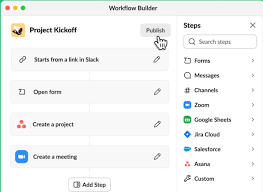
Salesforce Expands Slack Automation with New Workflow Features Salesforce has introduced new capabilities in Slack, allowing customers to build workflows that automatically trigger when an event occurs in third-party apps like PagerDuty, Asana, Bitbucket, and others. This update also enhances the user experience, making it more intuitive to create workflows in Slack. Users now have access to over 50 plug-and-play templates tailored to common productivity tasks. Additionally, developers gain access to more coding languages and tools for building custom workflows, which can be easily shared with their teams. Why It Matters Key Highlights Workflow Builder, Slack’s no-code automation tool, empowers users to streamline tasks directly within Slack, reducing the burden on IT teams. Salesforce highlights the following new features: From Slack’s Perspective Slack has also made it easier to customize workflows with expanded developer tools. Developers can now build custom steps using open APIs and new developer resources, integrating these steps into Workflow Builder. These tools support additional programming languages, including JavaScript, TypeScript, Python, and Java, further enhancing the flexibility of custom workflows. According to Rob Seaman, Slack’s Chief Product Officer, “At Slack, one of our product principles is ‘don’t make me think.’ We’re applying that to automation, making it intuitive and delightful for everyone. These new features empower both developers and end users to automate any business process across their apps seamlessly in Slack.” What This Means for Businesses As companies seek ways to increase productivity without overloading IT teams, automation has become a critical solution. Tools like Slack’s no-code Workflow Builder enable users of any skill level to automate repetitive tasks, freeing up time for more strategic work. This is particularly important in an era where skilled workers, especially in data science and programming, are in short supply. The expanded capabilities in Workflow Builder make it easier to create powerful workflows that integrate with third-party systems. In addition, Salesforce has expanded Slack AI, initially launched in April as an add-on for paying customers, to support multiple languages, including Japanese and Spanish. This ongoing development strengthens Slack’s position as a central hub for workplace automation. Like Related Posts AI Automated Offers with Marketing Cloud Personalization AI-Powered Offers Elevate the relevance of each customer interaction on your website and app through Einstein Decisions. Driven by a Read more Salesforce OEM AppExchange Expanding its reach beyond CRM, Salesforce.com has launched a new service called AppExchange OEM Edition, aimed at non-CRM service providers. Read more The Salesforce Story In Marc Benioff’s own words How did salesforce.com grow from a start up in a rented apartment into the world’s Read more Salesforce Jigsaw Salesforce.com, a prominent figure in cloud computing, has finalized a deal to acquire Jigsaw, a wiki-style business contact database, for Read more

Read More
Slack Operating System

Slack Operating System

Slack Advances Its Work Operating System with Enhanced Automation Capabilities With 3,000 workflows created this year alone, Rivian relies on Slack’s automation features to save time and boost team productivity. Slack Operating System are making a world of difference. Salesforce has announced new innovations in Slack, making it easier for users to build automations regardless of their technical expertise. Key Updates: Why This Matters: With 71% of business leaders under pressure to increase team productivity, and 70% of IT leaders concerned that rising business demands could stifle innovation, automation is crucial. A recent survey reveals that 77% of users believe automating routine tasks would significantly boost productivity. Companies need user-friendly, no-code automation solutions that enhance productivity without overburdening IT departments. A Closer Look: Slack’s Perspective: Rob Seaman, Chief Product Officer at Slack, stated, “At Slack, one of our product principles is ‘don’t make me think.’ We’re applying that principle to the traditionally technical and time-consuming area of automation, making it an intuitive and delightful productivity driver for everyone. These new features make Slack even more powerful, giving both developers and end users the tools they need to automate any business process across their work apps.” Customer Reaction: “Automation is a core capability that increases productivity and saves time for Rivian employees when doing repetitive work. Workflow Builder allows Slack users to easily create no-code automation at any experience level. Our Slack users created approximately 3,000 workflows in 2024, with heavy adoption in Production, Operation, and Service groups,” said Anoop Narang, Head of Digital Workplace & Solutions at Rivian. Availability: The enhancements to Workflow Builder are now generally available to all customers. Other app updates you might have missed. Slack 4.40.120 August 27, 2024 Bug Fixes Slack 4.39.95 July 29, 2024 Bug Fixes Slack 4.39.93 July 18, 2024 Bug Fixes Slack 4.39.90 July 8, 2024 Bug Fixes Slack 4.39.89 June 25, 2024 Bug Fixes Like Related Posts AI Automated Offers with Marketing Cloud Personalization AI-Powered Offers Elevate the relevance of each customer interaction on your website and app through Einstein Decisions. Driven by a Read more Salesforce OEM AppExchange Expanding its reach beyond CRM, Salesforce.com has launched a new service called AppExchange OEM Edition, aimed at non-CRM service providers. Read more The Salesforce Story In Marc Benioff’s own words How did salesforce.com grow from a start up in a rented apartment into the world’s Read more Salesforce Jigsaw Salesforce.com, a prominent figure in cloud computing, has finalized a deal to acquire Jigsaw, a wiki-style business contact database, for Read more

Read More
GitHub Copilot Autofix

GitHub Copilot Autofix

On Wednesday, GitHub announced the general availability of Copilot Autofix, an AI-driven tool designed to identify and remediate software vulnerabilities. Originally unveiled in March and tested in public beta, Copilot Autofix integrates GitHub’s CodeQL scanning engine with GPT-4, heuristics, and Copilot APIs to generate code suggestions for developers. The tool provides prompts based on CodeQL analysis and code snippets, allowing users to accept, edit, or reject the suggestions. In a blog post, Mike Hanley, GitHub’s Chief Security Officer and Senior Vice President of Engineering, highlighted the challenges developers and security teams face in addressing existing vulnerabilities. “Code scanning tools can find vulnerabilities, but the real issue is remediation, which requires security expertise and time—both of which are in short supply,” Hanley noted. “The problem isn’t finding vulnerabilities; it’s fixing them.” According to GitHub, the private beta of Copilot Autofix showed that users could respond to a CodeQL alert and automatically remediate a vulnerability in a pull request in just 28 minutes on average, compared to 90 minutes for manual remediation. The tool was even faster for common vulnerabilities like cross-site scripting, with remediation times averaging 22 minutes compared to three hours manually, and SQL injection flaws, which were fixed in 18 minutes on average versus almost four hours manually. Hanley likened the efficiency of Copilot Autofix in fixing vulnerabilities to the speed at which GitHub Copilot, their generative AI coding assistant released in 2022, produces code for developers. However, there have been concerns that GitHub Copilot and similar AI coding assistants could replicate existing vulnerabilities in the codebases they help generate. Industry analyst Katie Norton from IDC noted that while the replication of vulnerabilities is concerning, the rapid pace at which AI coding assistants generate new software could pose a more significant security issue. Chris Wysopal, CTO and co-founder of Veracode, echoed this concern, pointing out that faster coding speeds have led to more software being produced and a larger backlog of vulnerabilities for developers to manage. Norton also emphasized that AI-powered tools like Copilot Autofix could help alleviate the burden on developers by reducing these backlogs and enabling them to fix vulnerabilities without needing to be security experts. Other vendors, including Mobb and Snyk, have also developed AI-powered autoremediation tools. Initially supporting JavaScript, TypeScript, Java, and Python during its public beta, Copilot Autofix now also supports C#, C/C++, Go, Kotlin, Swift, and Ruby. Hanley also highlighted that Copilot Autofix would benefit the open-source software community. GitHub has previously provided open-source maintainers with free access to enterprise security tools for code scanning, secret scanning, and dependency management. Starting in September, Copilot Autofix will also be made available for free to these maintainers. “As the global home of the open-source community, GitHub is uniquely positioned to help maintainers detect and remediate vulnerabilities, making open-source software safer and more reliable for everyone,” Hanley said. Copilot Autofix is now available to all GitHub customers globally. Like Related Posts AI Automated Offers with Marketing Cloud Personalization AI-Powered Offers Elevate the relevance of each customer interaction on your website and app through Einstein Decisions. Driven by a Read more Salesforce OEM AppExchange Expanding its reach beyond CRM, Salesforce.com has launched a new service called AppExchange OEM Edition, aimed at non-CRM service providers. Read more The Salesforce Story In Marc Benioff’s own words How did salesforce.com grow from a start up in a rented apartment into the world’s Read more Salesforce Jigsaw Salesforce.com, a prominent figure in cloud computing, has finalized a deal to acquire Jigsaw, a wiki-style business contact database, for Read more

Read More
gettectonic.com