

Introduction to LWC Core Concepts
Lightning Web Components (LWC) in Salesforce leverage two fundamental JavaScript features to create efficient, reactive components: decorators and lifecycle hooks. These mechanisms work together to:
- Manage component communication and data flow
- Control rendering behavior and performance
- Handle initialization and cleanup
- React to changes in data or component state
Deep Dive into LWC Decorators
1. @api – The Public Interface Decorator
Purpose: Enables component communication and exposes public properties/methods
Key Characteristics:
- Marks properties/methods as publicly accessible
- Enables parent-to-child communication
- Supports reactive property binding
- Creates a contract for component consumers
Implementation Patterns:
javascript
Copy
// Child component exposing properties and methods
import { LightningElement, api } from 'lwc';

export default class Modal extends LightningElement {
    @api title = 'Default Title';  // Public property with default

    @api show() {  // Public method
        this.template.querySelector('.modal').classList.remove('hidden');
    }

    @api hide() {
        this.template.querySelector('.modal').classList.add('hidden');
    }
}
Best Practices:
- Design intentional, minimal public APIs
- Document all @api properties/methods thoroughly
- Treat @api properties as immutable within child components
- Use clear, descriptive names for public members
Performance Considerations:
- Avoid frequent updates to @api properties
- Consider debouncing for input properties
- Use immutable data patterns for complex objects
2. @track – The Reactive Property Decorator (Legacy)
Evolution of Reactivity:
- Early LWC: Required for all reactive properties
- Current LWC: Primitive properties reactive by default
- Modern Use: Only needed for specific object/array cases
When to Use Today:
- Direct modification of object properties
- Array mutations (push, splice, etc.)
- Complex nested object structures
Modern Alternatives:
javascript
Copy
// Preferred immutable pattern (no @track needed)
updateUser() {
    this.user = { ...this.user, name: 'Updated Name' };
}

// Array operations
addItem(newItem) {
    this.items = [...this.items, newItem];
}
3. @wire – The Data Service Decorator
Core Functionality:
- Reactive data binding to Salesforce data
- Supports Apex methods and Lightning Data Service
- Automatic UI updates when data changes
Implementation Options:
javascript
Copy
// Property syntax (automatic)
@wire(getContacts) contacts;

// Function syntax (manual control)
@wire(getContacts)
wiredContacts({ error, data }) {
    if (data) this.contacts = data;
    if (error) this.error = error;
}
Advanced Patterns:
- Reactive parameters with
$prefix - Combining multiple wire adapters
- Error handling strategies
- Performance optimization with debouncing
Lifecycle Hooks Demystified
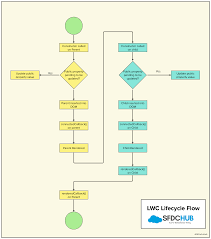
The Component Lifecycle Journey
- constructor()
- First hook called during component creation
- Ideal for non-reactive property initialization
- No DOM access available
- connectedCallback()
- Called when component is inserted into DOM
- Perfect for data loading and event setup
- May run multiple times if component is removed/re-added
- renderedCallback()
- Executes after every render cycle
- Use for DOM-dependent operations
- Caution: Can trigger infinite loops if misused
- disconnectedCallback()
- Cleanup hook when component is removed
- Essential for preventing memory leaks
- Remove event listeners, intervals, subscriptions
- errorCallback()
- Error boundary for child components
- Catches errors in child rendering/lifecycle hooks
- Enables graceful error handling
Practical Implementation Guide
Component Communication Patterns
Parent-to-Child:
html
Copy
<!-- Parent template -->
<c-child public-property={value}></c-child>
Run HTML
Child-to-Parent:
javascript
Copy
// Child component
this.dispatchEvent(new CustomEvent('notify', { detail: data }));
Performance Optimization Techniques
- Debouncing Input Handlers:javascriptCopy@api set searchTerm(value) { this._searchTerm = value; this.debouncedSearch(); }
- Conditional Rendering:htmlCopy<template if:true={isLoaded}> <!– Heavy content –> </template>Run HTML
- Efficient DOM Operations:javascriptCopyrenderedCallback() { if (!this.cachedElement) { this.cachedElement = this.template.querySelector(‘.target’); } }
Common Anti-Patterns to Avoid
- Infinite Render Loops:javascriptCopy// Bad – causes infinite loop renderedCallback() { this.someProperty = new Date(); }
- Direct DOM Manipulation:javascriptCopy// Avoid when possible this.template.querySelector(‘div’).style.color = ‘red’;
- Heavy Constructor Logic:javascriptCopy// Bad – slows component initialization constructor() { super(); this.processLargeDataSet(); }
Advanced Patterns and Best Practices
State Management Strategies
- Centralized State Pattern:javascriptCopyimport { LightningElement, wire } from ‘lwc’; import { store, connect } from ‘c/lwcStateManagement’; export default class ConnectedComponent extends LightningElement { @wire(store) state; connectedCallback() { connect(this); } }
- Event-based State Propagation:javascriptCopyhandleUpdate() { this.dispatchEvent(new CustomEvent(‘statechange’, { bubbles: true, composed: true, detail: { newState } })); }
Testing Lifecycle Hooks
Example Test Case:
javascript
Copy
import { createElement } from 'lwc';
import MyComponent from 'c/myComponent';

describe('Lifecycle hooks', () => {
    it('calls connectedCallback when inserted', () => {
        const element = createElement('c-my-component', { is: MyComponent });
        spyOn(MyComponent.prototype, 'connectedCallback');
        document.body.appendChild(element);
        expect(MyComponent.prototype.connectedCallback).toHaveBeenCalled();
    });
});
Real-World Component Examples
Data Table with Sorting
javascript
Copy
import { LightningElement, api } from 'lwc';

export default class DataTable extends LightningElement {
    @api columns = [];
    @api data = [];

    sortBy(field) {
        this.data = [...this.data].sort((a, b) =>
            a[field] > b[field] ? 1 : -1
        );
    }
}
Dynamic Form Generator
javascript
Copy
import { LightningElement, api } from 'lwc';

export default class DynamicForm extends LightningElement {
    @api fields;
    values = {};

    handleChange(event) {
        this.values = {
            ...this.values,
            [event.target.name]: event.target.value
        };
    }
}
Conclusion and Key Takeaways
- Decorators define component interfaces and data connections
@apifor public properties/methods@wirefor reactive data services@trackfor specific reactivity cases
- Lifecycle Hooks manage component state across its lifetime
- Initialize in
constructorandconnectedCallback - Handle rendering in
renderedCallback - Clean up in
disconnectedCallback - Catch errors with
errorCallback
- Initialize in
- Performance is critical
- Minimize DOM operations
- Debounce rapid updates
- Use immutable data patterns
- Testing should verify lifecycle behavior
- Confirm hook execution timing
- Validate cleanup procedures
- Verify error handling
By mastering these concepts, developers can create robust, efficient Lightning Web Components that leverage the full power of the Salesforce platform while maintaining clean, maintainable code architecture.

Who is Salesforce? Here is their story in their own words. From our inception, we've proudly embraced the identity of Read more

Salesforce Marketing Cloud Transactional Emails are immediate, automated, non-promotional messages crucial to business operations and customer satisfaction, such as order Read more

Salesforce has unveiled a comprehensive analytics solution tailored for wealth managers, home office professionals, and retail bankers, merging its Financial Read more

AI plays a crucial role in propensity score estimation as it can discern underlying patterns between treatments and confounding variables Read more





