Marketing Cloud Engagement Archives - gettectonic.com - Page 2
AI-Powered Smarter Media

AI-Powered Smarter Media

Transforming Retail Media: Personalization and Faster Monetization with Smarter Media Dentsu, a leading growth and transformation partner, has announced a strategic collaboration with Salesforce, the world’s #1 AI-powered CRM, to launch Smarter Media—an innovative solution designed to accelerate retail media monetization through personalized buying experiences powered by AI. Why Smarter Media Matters With shifting consumer priorities, personalized retail experiences are more critical than ever. Salesforce research highlights that: Smarter Media addresses this growing demand by enabling retailers to quickly adapt, offering tailored buying experiences that strengthen customer loyalty while driving revenue. What is Smarter Media? Smarter Media combines the power of Salesforce’s ecosystem—including Media Cloud, Sales Cloud, and Marketing Cloud Engagement—to deliver an end-to-end retail media solution. The platform assesses a brand’s retail media maturity, identifies gaps, and creates a roadmap to optimize media, technology, and skills. The solution simplifies access to advanced media technology, empowering brands to connect with customers 24/7, expand their customer base, and nurture long-term relationships. Key Features and Benefits 1. Comprehensive Assessment 2. AI-Powered Personalization 3. Built for Retail Media Success 4. Quick and Easy Adoption How Smarter Media Works Smarter Media combines Salesforce Sales Cloud’s leading sales and pipeline management tools with Media Cloud’s Advertising Sales Management application. The result is a solution that seamlessly supports both simple and complex retailer models: Real-World Value Across Retail By addressing challenges like fragmented media strategies and inaccessible technology, Smarter Media delivers transformative value for retailers: Driving Innovation Together Paul Lynch, Integrated Solutions Lead for Commerce and Retail at Dentsu UK&I, shared: “Smarter Media will democratize cutting-edge technology for brands by providing a one-stop solution to create personalized buying experiences. In today’s experience economy, maintaining compelling customer relationships has never been more vital.” Christopher Dean, SVP and GM for Communications, Media & Entertainment at Salesforce, added: “By combining Salesforce Media Cloud’s industry-specific solutions with Dentsu’s creative retail media expertise, we’re making advanced media technology accessible for retailers, helping them thrive in a competitive market.” The Future of Retail Media Smarter Media from Dentsu and Salesforce offers a transformative approach to retail media, empowering brands to deliver personalized experiences, improve customer loyalty, and accelerate revenue growth—all while leveraging cutting-edge AI and automation. With its ability to deliver value in just six months, Smarter Media is the ultimate solution for retailers looking to succeed in today’s fast-paced, customer-centric market. Like Related Posts Who is Salesforce? Who is Salesforce? Here is their story in their own words. From our inception, we’ve proudly embraced the identity of Read more Salesforce Marketing Cloud Transactional Emails Salesforce Marketing Cloud Transactional Emails are immediate, automated, non-promotional messages crucial to business operations and customer satisfaction, such as order Read more Salesforce Unites Einstein Analytics with Financial CRM Salesforce has unveiled a comprehensive analytics solution tailored for wealth managers, home office professionals, and retail bankers, merging its Financial Read more AI-Driven Propensity Scores AI plays a crucial role in propensity score estimation as it can discern underlying patterns between treatments and confounding variables Read more

Read More
Salesforce Einstein Features

Salesforce Einstein Features

Salesforce Einstein Discover the power of the #1 AI for CRM with Einstein. Built into the Salesforce Platform, Einstein uses powerful machine learning and large language models to personalize customer interactions and make employees more productive. With Einstein powering the Customer 360, teams can accelerate time to value, predict outcomes, and automatically generate content within the flow of work. Einstein is for everyone, empowering business users, Salesforce Admins and Developers to embed AI into every experience with low code. Salesforce Einstein Features. Einstein Copilot Sales Actions: Sell faster with an AI assistant in the flow of work.Call Exploration: Ask Einstein to synthesize important call information in seconds. Ask Einstein to identify important takeaways and customer sentiment, so you have the context you need to move deals forward.

 Sales Summaries: Summarize records to identify likelihood the deal will close, the competitors involved, key activities, and more. Forecast Guidance: Ask Einstein to inform your forecast and help you identify which deals need your attention. Close Plan: Generate a customized action plan personalized to your customer and sales process. Increase conversion rates with step-by-step guidance and milestones grounded in CRM data. Salesforce Einstein Features Sales Generative AI features: ° Knowledge Creation: ° Search Answers for Agents and Customers: Einstein Copilot Service Actions: Streamline service operations by drafting Knowledge articles and surfacing answers, grounded in knowledge, to the most commonly asked questions. Summarize support interactions to save agent time and formalize institutional knowledge. Surface generated answers to agents’ & customers’ questions that are grounded in your trusted Knowledge base directly into your search page. Search Answers for Agents is included in the Einstein for Service Add-on SKU and Search Answers for Customers is included in the Einstein 1 Service Edition.
Empower agents to deliver more personalized service and reach resolutions faster with an AI assistant built into the flow of work. You can leverage out-of-the-box actions like summarize conversations or answer questions with Knowledge or you can build custom actions to fit your unique business needs. Service Salesforce Einstein Features This Release Einstein CopilotSell faster with an AI assistant. No data requirements
Included in Einstein 1 Sales Edition. Einstein Copilot: Sales ActionsSell faster with an AI assistant.No data requirements. 
 Call explorer and meeting follow-up requires Einstein Conversation Insights.
Included in Einstein 1 Sales Edition. Generative AIBoost productivity by automating time-consuming tasks.No data requirements. 
 Call summaries and call explorer requires Einstein Conversation Insights.
Included in Einstein 1 Sales Edition. Einstein will use a global model until enough data is available for a local model. For a local model: ≥1,000 lead records created and ≥120 of those converted in the last 6 monthsEinstein Automated Contacts Automatically add new
contacts & events to your CRM≥ 30 business accounts. If you use Person Accounts, >= 50 percent of accounts must be business accounts Einstein Recommended ConnectionsGet insights about your teams network to see who knows your customers and can help out ona deal ≥ 2 users to be connected to Einstein Activity Capture
and Inbox (5 preferred) Einstein Forecasting Easily predict sales forecasts inside
of Salesforce Collaborative Forecasting enabled; use a standard fiscal year; measure forecasts by opportunity revenue; forecast hierarchy must include at least one forecasting enabled user who reports to a forecast manager; opportunities must be in Salesforce ≥ 24 months;Einstein Email Insights Prioritize your inbox with actionable intelligence Einstein Activity Capture enabledEinstein Activity Metiics (Activity 360) Get insight into the activities you enter
manually and automatically from Einstein
Activity Capture Einstein Activity Capture enabled Sales Analytics Get insights into the most common sales KPIs No data requirements. User specific requirements like browser and device apply Einstein Conveisation Insights Gain actionable insights from your sales calls with conversational intelligenceCall or video recordings from Lightning Dialer, Service Cloud Voice, Zoom and other supported CTI audio and video partners.Buyer Assistant Replace web-to-lead forms with real-time conversations. No data requirements – Sales Cloud UE or Sales Engagement. Einstein Opportunity ScoringEinstein Activity CaptuiePrioritize the opportunities most likely to convertAutomatically capture data & add to your CRMEinstein will use a global model until enough data is available for a local model. For a local model: ≥ 200 closed won and ≥ 200 closed lost opportunities in the last 2 years, each with a lifespan of at least 2 days≥ 30 accounts, contacts, or leads; Requires Gmail, Microsoft Exchange 2019, 2016, or 2013 Einstein Relationship Insights Speed prospecting with AI that researches for you. No data requirements. Einstein Next Best Action Deliver optimal recommendations at the point of maximumimpactNo data requirements. User specific requirements like browser and device apply Sales AIGenerate emails, prioritize leads & opportunities most likely to convert, uncover pipeline trends, predict sales forecasts, automate data capture, and more with Einstein for Sales. Generative AIPrompt BuilderEinstein Lead ScoringEinstein Opportunity ScoringEinstein Activity CaptureEinstein Automated ContactsEinstein Recommended ConnectionsEinstein ForecastingEinstein Email InsightsEinstein Activity Metrics (Activity 360)Sales AnalyticsEinstein Conversation InsightsBuyer Assistant Sales AIGenerative AI: 
Feature Why is it so Great? What do I need? Automate common questions and business processes to solve customer requests fasterBoost productivity by auto-generating service replies, summarizing conversations during escalations andtransfers or closed interactions, drafting knowledge articles, and surfacing relevant answers grounded inknowledge for agents’ and customers’ commonly asked questions. Deliver optimal recommendations at the point of maximum impactEliminate the guesswork with AI-powered recommendations for everyoneDecrease time spent on manual data entry for incoming cases and improve case field accuracy and completionAutomate case triage and solve customer requests fasterDecrease time spent selecting field values needed to close a case with chat conversations and improved field accuracySurface the best articles in real time to solve any customer’s questionEliminate time spent typing responses to the most common customer questionsGet insights into contact center operations, understand customers, and deliver enhanced customerexperiencesChat or Messaging channels, minimum of 20 examples for most languagesNo data requirements. User specific requirements like browser and device apply Make sure that your dataset has the minimum records to build a successful recommendation. Recipient Records need a minimum of 100 records,Recommended Item Records need a minimum of 10 records, andPositive Interaction Examples need a minimum of 400

Read More
Marketing Cloud Engagement

Salesforce Distributed Marketing Content

Salesforce Distributed Marketing Content empowers you to extend dynamic content to dispersed teams, fostering safe and efficient interaction with that content. Integrate one or more Distributed Marketing Content Blocks seamlessly with standard or custom content areas to facilitate collaborative moments within branded email messages. For instance, enable users to personalize holiday cards with personal notes and images or provide context to market update messages. Leverage Distributed Marketing alongside AMPscript to enable users to craft customized SMS messages. Salesforce Distributed Marketing Content While marketing teams retain control over message structure, ensuring coherence, brand alignment, and compliance, collaborative content augments this framework, granting distributed teams flexibility within set parameters – a concept Salesforce refers to as “flexibility within a framework.” The usage of Distributed Marketing content is flexible and can adapt over time. Since each message is independently configurable, you can initiate with existing assets and introduce collaborative elements as needed. Please note that Distributed Marketing employs JavaScript ES6 for message personalization, requiring the disabling of Prevent Cross-Site Tracking in Safari and third-party cookies in Chrome. Enable Email Personalization with Distributed Marketing Content Blocks Utilize Distributed Marketing Content Blocks within Marketing Cloud to create personalized sections of content for Distributed Marketing users. Enable Custom SMS Messages Incorporate AMPscript into SMS messages to empower users to compose and dispatch custom SMS messages through Distributed Marketing. Personalization Data Extension Distributed Marketing establishes personalization data extensions in Marketing Cloud to store user-entered personalization data for email messages. A personalization data extension is automatically generated when connecting a journey to a campaign or enabling a journey for quick send. Custom SMS messages are not stored here but are accessible in the journey’s event data extension. Legacy Personalization While Legacy Personalization options like Introduction, Conclusion, and Greeting are available, their usage will be supported until End of Support is announced. Like1 Related Posts Who is Salesforce? Who is Salesforce? Here is their story in their own words. From our inception, we’ve proudly embraced the identity of Read more Salesforce Marketing Cloud Transactional Emails Salesforce Marketing Cloud Transactional Emails are immediate, automated, non-promotional messages crucial to business operations and customer satisfaction, such as order Read more Salesforce Unites Einstein Analytics with Financial CRM Salesforce has unveiled a comprehensive analytics solution tailored for wealth managers, home office professionals, and retail bankers, merging its Financial Read more AI-Driven Propensity Scores AI plays a crucial role in propensity score estimation as it can discern underlying patterns between treatments and confounding variables Read more

Read More
Salesforce Marketing Cloud Account Engagement

Salesforce Marketing Cloud Engagement for Industries

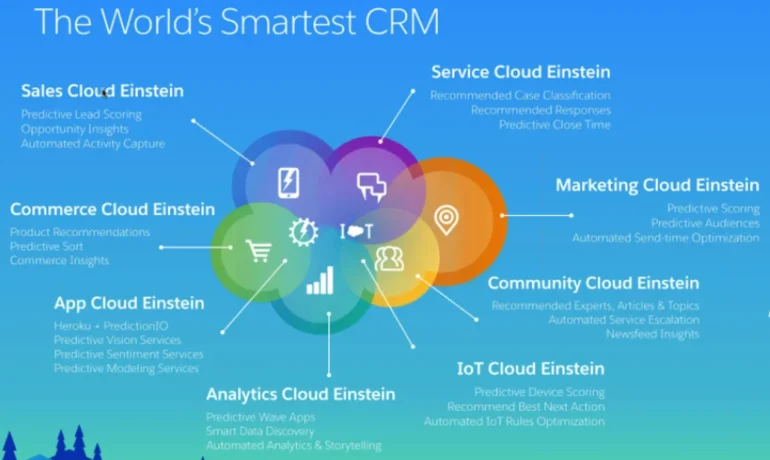
Customer and stakeholder expectations for communication have reached unprecedented levels in 2024. Every message now demands personalization, targeting, and relevance to foster enduring and meaningful relationships. How can you ensure that you meet these heightened expectations and cultivate lifelong connections with your customers? With Salesforce Marketing Cloud Engagement for Industries. Enter Marketing Cloud Engagement for Industries, a solution crafted by Salesforce to assist companies and organizations of any size in crafting personalized customer and stakeholder experiences through scalable email campaigns and data-driven insights. This robust offering provides a foundational framework for leveraging Marketing Cloud, offering pre-built tools, templates, and assets customized for your specific industry. The result? The ability to engage with your customers and stakeholders swiftly and effectively. This suite of outreach marketing tools helps you communicate with and engage your supporters, customers, contacts, and prospects. With Marketing Cloud Engagement for Industries, you receive a tailored package that includes: Additional tools are at your disposal to expedite the implementation of Marketing Cloud Engagement and minimize setup time. A user-friendly Get Started page walks you through the configuration process, and industry-specific assets—such as sample email templates and journeys—empower you to extract greater value from Marketing Cloud more efficiently. And Tectonic is ready to be your implementation partner. Contact Tectonic today for more information. If you are already using Marketing Cloud you can still add the Get Started page and pre-built assets. Note that to use Marketing Cloud Engagement for Industries does require the implementation of Salesforce Lightning Experience and My Domain for a more specific domain name in your Salesforce org. Connecting Marketing Cloud Engagement with Salesforce can be a complex process. Tectonic can help. Like2 Related Posts Who is Salesforce? Who is Salesforce? Here is their story in their own words. From our inception, we’ve proudly embraced the identity of Read more Salesforce Marketing Cloud Transactional Emails Salesforce Marketing Cloud Transactional Emails are immediate, automated, non-promotional messages crucial to business operations and customer satisfaction, such as order Read more Salesforce Unites Einstein Analytics with Financial CRM Salesforce has unveiled a comprehensive analytics solution tailored for wealth managers, home office professionals, and retail bankers, merging its Financial Read more AI-Driven Propensity Scores AI plays a crucial role in propensity score estimation as it can discern underlying patterns between treatments and confounding variables Read more
Read More
Account Planning With Salesforce

CRM Analytics Limits

When using CRM Analytics, keep these limits in mind. API Call Limits These limits apply to all supported editions. API Call Limit Maximum concurrent CRM Analytics API calls per org 100 Maximum CRM Analytics API calls per user per hour 10,000 Dataset Row Storage Allocations per License In Salesforce org, your total row storage limit for all registered datasets combined depends on your license combination. Each license allocates a different number of rows. Baseline Row Allocation Allocated Rows CRM Analytics Plus 10 billion CRM Analytics Growth 100 million Sales Analytics 25 million Service Analytics 25 million Event Monitoring Analytics 50 million B2B Marketing Analytics 25 million CRM Analytics for Financial Services Cloud 25 million CRM Analytics for Health Cloud 25 million Extra Data Rows license 100 million Your total row storage limit is a combination of your active licenses. For example: Because the CRM Analytics Plus license includes the Sales Analytics and Service Analytics licenses, your total row allocation remains 10 billion. Similarly, the CRM Analytics Growth license includes the Sales Analytics and the Service Analytics licenses, so your total row allocation remains 100 million. However, if you obtain another Sales Analytics or Services Analytics license, your row limit increases by 25 million for each added license. Dataset Row Limits Each dataset supports up to 2 billion rows. If your Salesforce org has less than 2 billion allocated rows, each dataset supports up to your org’s allocated rows. Dataset Field Limits Value Limit Maximum number of fields in a dataset 5,000 (including up to 1,000 date fields) Maximum number of decimal places for each value in a numeric field in a dataset (overflow limit) 17 decimal placesWhen a value exceeds the maximum number of decimal places, it overflows. Both 100,000,000,000,000,000 and 10,000,000,000,000,000.0 overflow because they use more than 17 decimal places. A number also overflows if it’s greater (or less) than the maximum (or minimum) supported value. 36,028,797,018,963,968 overflows because its value is greater than 36,028,797,018,963,967. -36,028,797,018,963,968 overflows because it’s less than -36,028,797,018,963,967.When a number overflows, the resulting behavior in CRM Analytics is unpredictable. Sometimes CRM Analytics throws an error. Sometimes it replaces a numeric value with a null value. And sometimes mathematical calculations, such as sums or averages, return incorrect results. Occasionally, CRM Analytics handles numbers up to 19 digits without overflowing because they are within the maximum value for a 64-bit signed integer (263 – 1). But numbers of these lengths aren’t guaranteed to process.As a best practice, stick with numbers that are 17 decimal places or fewer. If numbers that would overflow are necessary, setting lower precision and scale on the dataset containing the large numbers sometimes prevents overflow. If your org hasn’t enabled the handling of numeric values, the maximum number of decimal places for each value in a numeric field in a dataset is 16. All orgs created after Spring ’17 have Null Measure Handling enabled. Maximum value for each numeric field in a dataset, including decimal places 36,028,797,018,963,967For example, if three decimal places are used, the maximum value is 36,028,797,018,963.967 Minimum value for each numeric field in a dataset, including decimal places -36,028,797,018,963,968For example, if five decimal places are used, the minimum value is -36,028,797,018,9.63968 Maximum number of characters in a field 32,000 Data Sync Limits If you extract more than 100 objects in your dataflows, contact Salesforce Customer Support before you enable data sync. Value Limit Maximum number of concurrent data sync runs 3 Maximum number of objects that can be enabled for data sync, including local and remote objects 100 Maximum amount of time each data sync job can run for local objects 24 hours Maximum amount of time each data sync job can run for remote objects 12 hours Data sync limits for each job:Marketo Connector (Beta)NetSuite ConnectorZendesk Connector Up to 100,000 rows or 500 MB per object, whichever limit is reached first Data sync limits for each job:Amazon Athena ConnectorAWS RDS Oracle ConnectorDatabricks ConnectorGoogle Analytics ConnectorGoogle Analytics Core Reporting V4 ConnectorOracle Eloqua ConnectorSAP HANA Cloud ConnectorSAP HANA Connector Up to 10 million rows or 5 GB per object, whichever limit is reached first Data sync limits for each job*:AWS RDS Aurora MySQL ConnectorAWS RDS Aurora PostgresSQL ConnectorAWS RDS MariaDB ConnectorAWS RDS MySQL ConnectorAWS RDS PostgreSQL ConnectorAWS RDS SQL Server ConnectorGoogle Cloud Spanner ConnectorMicrosoft Azure Synapse Analytics ConnectorMicrosoft Dynamics CRM ConnectorSalesforce External ConnectorSalesforce Contacts Connector for Marketing Cloud EngagementSalesforce OAuth 2.0 Connector for Marketing Cloud Engagement Up to 20 million rows or 10 GB per object, whichever limit is reached first Data sync limits for each job*:Amazon Redshift ConnectorAmazon S3 ConnectorCustomer 360 Global Profile Data Connector (Beta)Google BigQuery for Legacy SQL ConnectorGoogle BigQuery Standard SQL ConnectorHeroku Postgres ConnectorMicrosoft Azure SQL Database ConnectorSnowflake Input Connector Up to 100 million rows or 50 GB per object, whichever limit is reached first *When using these connectors, Salesforce Government Cloud org data is protected in transit with advanced encryption and can sync up to 10 million rows or 5 GB for each connected object, whichever limit is reached first. Note When using a Salesforce local input connection, CRM Analytics bulk API usage doesn’t count towards Salesforce bulk API limits. Use of the external Salesforce connection and output connection impacts your limits. The dataflow submits a separate bulk API call to extract data from each Salesforce object. The dataflow uses a batch size of 100,000–250,000, depending on whether the dataflow or the bulk API chunks the data. As a result, to extract 1 million rows from an object, the dataflow creates 4–10 batches. Recipe and Dataflow Limits Important In Winter ‘24, recipe runs over 2 minutes are counted against the limit. Previously, the recipe run counts weren’t correct. For more information, see Known Issue – Recipe runs are not counting towards the daily maximum run limit. Value Limit Maximum amount of time each recipe or dataflow can run 48 hours Maximum number of recipes 1,000 Maximum number of dataflows definitions (with data sync enabled) 100 Maximum number of dataflow and recipe runs in a rolling

Read More
Contact Builder is responsible for aggregating customer data from multiple source into a single customer view, known as the contact model in marketing cloud. For more information refer to the official documentation. Audience Builder is a segmentation tool, that abstracts the traditional SQL process for building segments and allows marketers to build segments by dragging and dropping them. For more information, please refer to the the documentation. Contact Builder has been moved to the Audience Builder tab

Audience Builder Contact Builder

Contact Builder, formerly known as Audience Builder, is a robust tool within Marketing Cloud designed to manage data associated with contacts, referred to as ‘people’ records. This platform provides access to both demographic and behavioral information, which is organized into ‘attribute groups’ (such as abandoned carts), ‘events,’ and ‘populations,’ allowing for efficient segmentation of data. The primary distinction between Audience Builder and Contact Builder lies in their functionalities within Marketing Cloud. While Audience Builder focuses on segmenting data, Contact Builder serves as the tool for defining the data model within the Marketing Cloud ecosystem. Contact Builder is integral to data management within Marketing Cloud and will continue to play a central role in the platform’s operations. Marketing Cloud Audience Builder has empowered marketers to create finely segmented audiences based on behavioral and demographic data. With its retirement, the question arises: “What comes next?” To address this, Marketing Cloud offers engagement marketing tools powered by AI, enabling marketers to activate their data and deliver personalized campaigns at scale to enhance customer lifetime value. These tools include: Email Marketing: Cross-Channel Analytics: “After adopting Salesforce Marketing Cloud and using it to hyper-target our audience, we are able to reduce the waste of our current marketing budget and become more efficient with spending on initiatives that deliver better results“ Kyall MaiSVP & Chief Innovation Officer, Esquire Contact Builder vs. Audience Builder Contact Builder serves as the central hub for managing attribute values associated with each contact within Marketing Cloud. It maintains a comprehensive database of contact information and facilitates the organization and linkage of data from various sources, including ERP systems, CRM systems, and POS systems. This tool offers a unified view of customer interactions with the brand, enabling personalized communication across channels such as email, SMS, and push notifications. Audience Builder, now known as Contact Builder, dynamically creates targeted audiences based on stored attribute and behavioral values of contacts. These audiences are generated according to specific rules and criteria defined by the user. Audience Builder helps marketers segment contacts effectively, allowing for precise targeting or exclusion from marketing activities within Marketing Cloud Engagement. Key Features and Functions: Contact Builder: Audience Builder: While both Contact Builder and Audience Builder are essential components of Marketing Cloud, Contact Builder takes precedence as the primary tool for managing contact data and enabling personalized customer interactions. Audience Builder, now integrated into Contact Builder, continues to play a vital role in audience segmentation and targeting within Marketing Cloud Engagement. Contact Builder is responsible for aggregating customer data from multiple source into a single customer view, known as the contact model in marketing cloud. For more information refer to the official documentation. Audience Builder is a segmentation tool, that abstracts the traditional SQL process for building segments and allows marketers to build segments by dragging and dropping them. For more information, please refer to the the documentation. Contact Builder has been moved to the Audience Builder tab. Like1 Related Posts Who is Salesforce? Who is Salesforce? Here is their story in their own words. From our inception, we’ve proudly embraced the identity of Read more Salesforce Marketing Cloud Transactional Emails Salesforce Marketing Cloud Transactional Emails are immediate, automated, non-promotional messages crucial to business operations and customer satisfaction, such as order Read more Salesforce Unites Einstein Analytics with Financial CRM Salesforce has unveiled a comprehensive analytics solution tailored for wealth managers, home office professionals, and retail bankers, merging its Financial Read more AI-Driven Propensity Scores AI plays a crucial role in propensity score estimation as it can discern underlying patterns between treatments and confounding variables Read more
Read More
Marketing Cloud Admins

Generating PDFs of Marketing Cloud Emails

Rendering Emails as PDFs in Salesforce Marketing Cloud Converting Salesforce Marketing Cloud Engagement emails into PDFs can be a required step for documentation, compliance, and archiving. While Salesforce provides various solutions for PDF rendering, not all are fully compatible with Salesforce Marketing Cloud (SFMC). This insight explores different methods to convert emails into PDFs and automate the process wherever possible. Manual PDF Rendering For users who need a straightforward approach, saving an email as a PDF manually is an option: Using Chrome Extensions Several Chrome extensions can facilitate PDF conversion, including: Using Sejda for PDF Conversion Sejda is a free online tool that preserves links and other embedded elements while converting emails to PDFs. It can be an excellent solution for one-off conversions where maintaining interactivity is important. Email Archiving in Salesforce Salesforce offers an Email Archiving Add-On that can store emails for compliance and retrieval. However, this solution is more focused on archiving than rendering emails into PDFs. Automating PDF Rendering in SFMC For those looking to automate PDF generation, a structured approach using AWS services and SFMC data extensions is possible. Steps to Automate PDF Rendering Alternative AppExchange Solutions For those looking for pre-built solutions, Salesforce AppExchange offers various options, such as Sercante, which specializes in PDF generation and marketing automation integrations. Conclusion Converting emails to PDFs in SFMC can be done manually, with browser extensions, or through automated solutions using AWS services. The right choice depends on your needs, whether it’s one-time conversion, compliance archiving, or a fully automated workflow. Content updated February 2025. Like Related Posts Who is Salesforce? Who is Salesforce? Here is their story in their own words. From our inception, we’ve proudly embraced the identity of Read more Salesforce Marketing Cloud Transactional Emails Salesforce Marketing Cloud Transactional Emails are immediate, automated, non-promotional messages crucial to business operations and customer satisfaction, such as order Read more Salesforce Unites Einstein Analytics with Financial CRM Salesforce has unveiled a comprehensive analytics solution tailored for wealth managers, home office professionals, and retail bankers, merging its Financial Read more AI-Driven Propensity Scores AI plays a crucial role in propensity score estimation as it can discern underlying patterns between treatments and confounding variables Read more

Read More
gettectonic.com