

Salesforce Workflows Archives - gettectonic.com - Page 2
Einstein Chatbot

Einstein Chatbot

Businesses have increasingly adopted “chatbots” to provide quick answers to customer queries outside regular business hours or to route customers to the appropriate department after answering preliminary questions. While these chatbots can be useful, they often fall short in delivering the same level of value as human interaction, sometimes leading to frustration. Today, chatbots are advancing significantly, with Salesforce’s Einstein Service Agent leading this evolution. This technology offers notable benefits but also presents challenges that businesses must address for effective implementation. Advantages of Einstein Service Agent Seamless Integration with Salesforce: Unlike standalone AI tools, Einstein Service Agent leverages comprehensive customer profiles, purchase histories, and previous interactions to offer personalized responses. Its integration within established Salesforce workflows allows for rapid deployment, reducing both time and cost associated with implementation. Experience has shown that selecting technologies with built-in CRM or ERP integration is a significant advantage over those requiring separate integration efforts. Built on Salesforce’s Trust Layer: Einstein Service Agent ensures secure handling of customer data, adhering to relevant regulations. This enhances trust among businesses and their customers, facilitating smoother adoption. GenAI Capabilities: The AI can manage complex, multi-step tasks like processing returns or refunds, and deliver tailored responses based on specific customer needs, enhancing the overall customer experience. Scalability Across Salesforce Clouds: Einstein Service Agent is adaptable to various business needs and can evolve as those needs change. Whether a company expands, introduces new services, or shifts its customer service strategy, the agent can be scaled and customized to maintain long-term value and utility. Challenges in Implementing AI Agents Data Quality and Integration: The effectiveness of AI tools relies heavily on the quality of the data they access. Incomplete, outdated, or poorly maintained data can lead to inaccurate or ineffective responses. To address this, businesses should prioritize data quality through regular audits and ensure comprehensive and up-to-date customer information. Change Management and Employee Training: The introduction of AI can lead to resistance from employees concerned about job displacement or unfamiliarity with new technology. Businesses should invest in change management strategies, including clear communication about AI as a complement to, not a replacement for, human agents. Training programs should focus on helping employees work alongside AI tools, enhancing skills where human judgment and empathy are crucial. Balancing Customer Service: Over-reliance on AI may diminish the personal touch essential in customer service. AI should handle straightforward and repetitive inquiries, while more complex or sensitive issues should be escalated to human agents who can provide personalized responses. Considerations for a Successful Deployment Customization and Flexibility: Tailoring the AI to fit unique processes and customer service requirements may require additional configuration or custom development to align with the company’s goals and service expectations. Ethical and Bias Concerns: AI systems can unintentionally perpetuate biases present in their training data, leading to unfair interactions. Businesses must actively identify and mitigate biases, ensuring that their AI operates fairly and equitably. This includes regularly reviewing training data for biases, implementing safeguards, and maintaining a commitment to ethical AI practices. Customer Acceptance and User Experience: Some customers may be hesitant to interact with AI or have negative perceptions of automated service. To improve acceptance, businesses should design user-friendly AI interactions, ensure transparency, and provide clear options for escalating issues to human agents. Einstein Chatbot Implementing AI agents like Salesforce’s Einstein Service Agent can significantly enhance customer service efficiency, personalization, and scalability. However, businesses must carefully navigate challenges related to data quality, change management, and maintaining trust. A thoughtful approach to AI deployment can transform customer service operations and drive business growth. Like Related Posts Who is Salesforce? Who is Salesforce? Here is their story in their own words. From our inception, we’ve proudly embraced the identity of Read more Salesforce Marketing Cloud Transactional Emails Salesforce Marketing Cloud Transactional Emails are immediate, automated, non-promotional messages crucial to business operations and customer satisfaction, such as order Read more Salesforce Unites Einstein Analytics with Financial CRM Salesforce has unveiled a comprehensive analytics solution tailored for wealth managers, home office professionals, and retail bankers, merging its Financial Read more AI-Driven Propensity Scores AI plays a crucial role in propensity score estimation as it can discern underlying patterns between treatments and confounding variables Read more

Read More
Deep Dive Summer 24 Release

Deep Dive Summer 24 Release

Deep Dive Summer 24 Release Get ready, Salesforce fans! The Summer ’24 release is here, and it’s like Christmas morning for tech geeks. We’re talking about new features, enhancements, and improvements that will make you wonder how you ever lived without them. This Tectonic insight is your ultimate guide to all the exciting updates, changes, and key considerations for this release. So hang on tight to your keyboards and let’s dive into the Christmas treat bag of goodies coming your way! Key Highlights – Deep Dive Summer 24 Release What’s New in Einstein AI? 1. Einstein for Flow Meet your new best friend for building Salesforce workflows, Salesforce Flow. Just describe what you need in plain English, and Einstein will whip up the workflow for you. For example, say “Notify sales reps when a lead converts,” and boom, it’s done. Automation just got a whole lot easier and way cooler. How to: Einstein for Flow makes complex processes feel like a walk in the park, letting you deliver solutions faster than you can say “workflow.” Considerations: 2. Einstein for Formulas No more tearing your hair out over formula syntax errors. Einstein for Formulas will not only tell you what’s wrong but also suggest fixes, saving you from endless hours of debugging. How to: Einstein for Formulas cuts down errors and speeds up formula creation, making your life exponentially easier. Like easier squared. Easier to the nth degree. Considerations: UI/UX Enhancements 1. Add New Custom Fields to Dynamic Forms-Enabled Pages Say goodbye to limitations! You can now add new custom fields directly to Dynamic Forms-enabled pages, aligning fields with your ever-changing business needs. Considerations: 2. Use Blank Spaces to Align Fields on Dynamic Forms-Enabled Pages Finally, a way to make your Dynamic Forms pages look neat and tidy with blank spaces for perfect alignment. Considerations: 3. Set Conditional Visibility for Individual Tabs in Lightning App Builder Now you can make specific tabs visible based on user profiles, record types, or other criteria. Customization just got a whole lot more precise. Considerations: 4. Create Rich Text Headings in Lightning App Builder Make your headings pop with bold, italic, and varied font sizes. Your Lightning pages are about to get a visual upgrade. Considerations: Flow Updates 1. Automation Lightning App A one-stop shop for managing and executing all your automation tools and processes. Considerations: 2. Lock and Unlock Records with Action Gain more control over your processes by locking records during critical stages and unlocking them when done. Considerations: 3. Check for Matching Records (Upsert) When Creating Records Avoid duplicates by checking for existing records before creating new ones. One can never have too many de-dupe tools. Considerations: 4. Transform Your Data in Flows (Generally Available) Now generally available, perform calculations, data transformations, and more with the Transform element in Flow Builder. Considerations: Admin Enhancements 1. Field History Tracking Manage tracked objects and fields more efficiently with a centralized page in “Setup.” Considerations: 2. See What’s Enabled in Permission Sets and Permission Set Groups (Generally Available) Enhanced permission set viewing improves visibility and control over security configurations. Considerations: 3. Get a Summary of User’s Permissions and Access Quickly view user permissions, public groups, and queues from the user’s detail page. Help and Training Community: Salesforce is simplifying Permission Set management by phasing out Profiles. Data Cloud Vector Database Vector search capabilities allow the creation of searchable “vector embeddings” from unstructured data, enhancing AI applications’ understanding of semantic similarities and context. Considerations: Deep Dive Summer 24 Release The Salesforce Summer ’24 release is packed with features designed to enhance your Salesforce experience. From a sleek new interface to powerful automation tools, enhanced analytics, and expanded integration options, this release aims to elevate workflow efficiency and data protection. Jump into the exciting updates, and let’s make automation simpler and more user-friendly together! Like1 Related Posts Who is Salesforce? Who is Salesforce? Here is their story in their own words. From our inception, we’ve proudly embraced the identity of Read more Salesforce Marketing Cloud Transactional Emails Salesforce Marketing Cloud Transactional Emails are immediate, automated, non-promotional messages crucial to business operations and customer satisfaction, such as order Read more Salesforce Unites Einstein Analytics with Financial CRM Salesforce has unveiled a comprehensive analytics solution tailored for wealth managers, home office professionals, and retail bankers, merging its Financial Read more AI-Driven Propensity Scores AI plays a crucial role in propensity score estimation as it can discern underlying patterns between treatments and confounding variables Read more
Read More
Salesforce Hyperforce

Salesforce Hyperforce in 2025

Salesforce Hyperforce in 2025: The Multi-Cloud Revolution By 2025, 78% of enterprise customers have adopted Salesforce Hyperforce, running multi-cloud deployments across AWS, GCP, and Azure simultaneously. What began as a flexibility advantage has become the non-negotiable backbone of zero-trust security, enabling cross-cloud data residency that was unthinkable just months ago. This insight reveals the five critical security patterns top enterprises are implementing—and the third one is sparking fierce debate among compliance teams. Hyperforce in 2025: Market Dominance & Strategic Impact A. Key Milestones in Hyperforce’s 3-Year Evolution Since its 2022 acceleration, Hyperforce has shattered every single roadmap target: B. How Hyperforce Redefined Enterprise Cloud Strategy Enterprises no longer debate whether to migrate—they strategize which cloud to use for each workload. The result? Faster innovation, reduced vendor lock-in, and unprecedented flexibility. Multi-Cloud Mastery: AWS, GCP & Azure in Action A. Why Multi-Cloud is Now Mandatory B. AWS: Powering Compliance & Serverless Workflows C. GCP: AI & Analytics at Hyperscale D. Azure: Seamless Microsoft 365 Integration E. Performance Benchmarks: Which Cloud Wins? Metric AWS GCP Azure Transaction Speed 15ms 18ms 16ms Data Transfer Cost High Low Medium Global Availability 27 22 25 AI Integration Good Best Very Good AWS leads in speed, GCP dominates cost-efficiency, and Azure excels in enterprise integration. Security Breakthroughs: Zero-Trust & Data Sovereignty Enterprise Migration: How to Deploy at Scale A. Proven Migration Strategies B. Real-World Success Stories What’s Next? Hyperforce’s 2025 Roadmap Conclusion: Hyperforce is the Enterprise Standard Salesforce Hyperforce has redefined cloud infrastructure—delivering multi-cloud agility, ironclad security, and 43% cost savings. For finance, healthcare, and global enterprises, it’s no longer optional. Ready to future-proof your cloud strategy? [Inquire Now] to speak with a Hyperforce specialist. Leverage Tectonic’s Salesforce Development Services—migrate, secure, and scale with Hyperforce today! Like Related Posts Who is Salesforce? Who is Salesforce? Here is their story in their own words. From our inception, we’ve proudly embraced the identity of Read more Salesforce Marketing Cloud Transactional Emails Salesforce Marketing Cloud Transactional Emails are immediate, automated, non-promotional messages crucial to business operations and customer satisfaction, such as order Read more Salesforce Unites Einstein Analytics with Financial CRM Salesforce has unveiled a comprehensive analytics solution tailored for wealth managers, home office professionals, and retail bankers, merging its Financial Read more AI-Driven Propensity Scores AI plays a crucial role in propensity score estimation as it can discern underlying patterns between treatments and confounding variables Read more

Read More
Approvers and Approver Groups in Salesforce

Approvers and Approver Groups in Salesforce

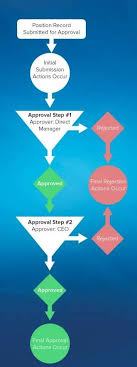
Approvers and Approver Groups in Salesforce. An approver in Salesforce CPQ Advanced Approvals is a user who receives approval request emails and can either approve or reject the request. An approver record can represent an individual user or a group of users. Utilizing approver groups (like Salesforce queues) is beneficial when you need to route approvals to all members of a specific team. REQUIRED Salesforce CPQ EDITIONSAvailable in: Salesforce CPQ Summer ‘16 and later with Advanced Approvals 3.1 and later For instance, you can create an approver group that includes all managers in the accounting department. This group can then be associated with an approval rule triggered by a quote with a net total of $750,000 or more. Consequently, each accounting manager will receive an email notification regarding the request. Assign Approvers Dynamically Based on Criteria You can specify an approver dynamically based on a formula or specific criteria. For instance, you might want the approver to be the regional manager associated with a sales rep’s opportunity. If the regional manager changes, the approval will automatically reference the new manager. To set up a dynamic approver: Add a custom formula field to your quote or opportunity that references the ID of the approver’s user record.Include this formula field in your approval rule setup.Delegate Approvers Delegated approvers are designated users who receive approval requests on behalf of another user for a predefined period, typically during the original approver’s absence. To delegate approvers: Specify the user to whom you want to delegate in the “Delegated Approver” field.Set the start and end dates for the delegation period.Ensure that delegated approvers have the necessary permissions and access to the approval objects page layout, including the ability to approve or reject requests. Approver Fields Depending on page layouts and field-level security settings, not all approver fields may be visible or editable. Delegated Approver: This field designates the user receiving approval requests instead of the primary approver for a limited time. Delegation End: Specifies the date after which delegated approvers no longer receive requests.Delegation Start: Specifies the date from which delegated approvers start receiving requests.Group ID: If the approver represents a group, this field references the Group record’s ID.Unanimous: Indicates that approval from all group members is required for the request to be considered approved.User: If the approver is an individual user, this field references the User record. Approval Rules Approval rules dictate which users or groups receive approval requests and the email templates used for notifications upon approval or rejection. When a sales rep submits a record for approval, Salesforce CPQ evaluates all active approval rules associated with that record’s object. If the approval conditions are met, the corresponding rule triggers, and Salesforce CPQ sends an approval request email to the designated approver(s) as defined in the rule. Each approval rule can optionally include lookups to request templates, approval templates, and rejection templates, allowing for customized email notifications based on specific conditions. Interested in creating automated approvals or approver groups in your Salesforce org? Contact Tectonic today. Like1 Related Posts Who is Salesforce? Who is Salesforce? Here is their story in their own words. From our inception, we’ve proudly embraced the identity of Read more Salesforce Marketing Cloud Transactional Emails Salesforce Marketing Cloud Transactional Emails are immediate, automated, non-promotional messages crucial to business operations and customer satisfaction, such as order Read more Salesforce Unites Einstein Analytics with Financial CRM Salesforce has unveiled a comprehensive analytics solution tailored for wealth managers, home office professionals, and retail bankers, merging its Financial Read more AI-Driven Propensity Scores AI plays a crucial role in propensity score estimation as it can discern underlying patterns between treatments and confounding variables Read more

Read More
End of Support for Workflow Rules and Process Builder

End of Support for Workflow Rules and Process Builder

Every month Salesforce announces retirement and sundowning of products and features. For long-time Salesforce power users, this one feels like the end of an era. Salesforce has announced the end of support for Workflow Rules and Process Builder in 2025. Scheduled Paths are a replacement for Scheduled Actions in Process Builder and Time-Based Workflow Rules. And they even have some new and improved features like support for minutes! Flows can now call other sub-flows, a much-longed-for replacement for Process Builder’s ability to call Flows. End of Support for Workflow Rules and Process Builder Salesforce will no longer be supporting Workflow Rules and Process Builder on December 31, 2025, and we recommend that you migrate your automation to Flow Builder by that time. Have you taken advantage of all the powerful features of Flow? Not yet? Have no fear, and go with the Flow! We’ve curated a comprehensive guide of resources to take you from zero to hero on your journey with us to migrate your organization from Workflow Rules and/or Process Builder onto the newer and more powerful engine of Flow! Why move to Flow? What’s happening with Workflow Rules and Process Builder? Salesforce is starting the process of moving away from Workflow Rules and Process Builder, and transitioning to the more feature-rich functionality of Flow. You’re also probably wondering why Salesforce is retiring Workflow Rules and Process Builder. Salesforce wants to focus development on a modern, extensible, low-code automation solution in Flow Builder, which led to retire the previous features. What does this change mean for me?  If you have active Workflow Rules or Process Builder processes running after 2025, they will no longer receive customer support or bug fixes. What action can I take? We recommend implementing a plan to migrate any active rules or processes to Flow Builder before the deadline. Depending on the complexity of your org, this migration may take a significant amount of time and testing, so we recommend starting now. To assist in the migration process, we have a Migrate to Flow tool and extensive support resources available. What happens if I don’t take action? After December 31, 2025, Workflow Rules and Process Builder may continue to function and execute existing automation, but customer support will not be available, and bugs will not be fixed. How do I identify affected users? You can identify whether you have active workflow rules by going to Setup | Process Automation | Workflow Rules and sorting the Active column for checkmarks. You can identify whether you have active Process Builder processes by going to Setup | Process Automation | Process Builder and sorting the Status column for Active. If you have more questions, open a case with support via Salesforce Help. To view all current and past retirements, see Salesforce Product & Feature Retirements. What does the transition to Flows entail? The transition is set to take place in multiple phases. The first phase began with the Winter ’22 release, wherein the ability to create net-new Workflow Rules was turned off. In Summer ‘23 release the ability to create net-new processes in Process Builder will be disabled. In the last phase, Workflow Rules and Process Builder will go away entirely, and any platform automation will be leveraging Flow. This phased approach will allow administrators ample time to transition to Flow with as minimal effort as possible. What changed in the Winter ’22 release? As of Winter ’22, we’ve blocked the creation of Workflow Rules. You can still activate, deactivate, and edit any existing Workflow Rules. To test and create Workflow Rules for use in managed packages, developer orgs still allow you to create Workflow Rules. Process Builder has remained unaffected during this period. For new automation, use Flow. Link to Release Notes What changed in the Summer ’23 release? Starting in Summer ’23, Salesforce began blocking the creation of Process Builder Processes. Much like workflow rules above, you can still activate, deactivate, and edit any existing Processes. For new automation, use Flow. How can existing Workflow Rules & Processes be transitioned to Flow? A tool called “Migrate to Flow” allows you to covert existing Workflow Rules & Processes to Flow in an org, at the click of a button. More information about this tool can be found here. There are a few considerations to keep in mind as we roll out this tool. If your organization relies heavily on existing Workflow Rules or Process Builder, please consider starting the migration process today using the Migrate to Flow tool, rather than when the deadline approaches. This will also allow you to test the migrated Flows in small batches to ensure your organization’s needs are adequately met. How can I get started in Flow? For those with limited exposure to Flows, tinkering in a trailhead playground, demo org, or other non-production org is a great way to explore the capabilities of Flows. Once ready, admins can try creating any new automation needed in their organization in Flows rather than in Process Builder. Trailhead – The best place to start! Build Flows with Flow BuilderRecord-Triggered FlowsAutomate Your Business Processes with Salesforce Flow Automation Home Page – Watch videos, read blog posts, or explore other Trailhead offerings related to Flows. Trailhead Community Topics – Join the discussion!#Flow#Automation What about feature parity between Workflows/Processes and Flows? During the last few releases, many of the biggest parity gaps between Workflow Rules/Process Builder and Flow have been addressed already, including: Additionally, more and more gaps are being addressed with each new release. What about Approval Processes, Email Alerts, and other functionality operating on the workflow engine? There are no plans to retire any of these auxiliary features; however, each of them can be leveraged through flow (or Flow Orchestrator, in the case of approval processes), without the need to use processes or workflow rules at all. Flow Trailhead – Click Here Like1 Related Posts Who is Salesforce? Who is Salesforce? Here is their story in their own words. From our inception, we’ve proudly embraced the identity of Read

Read More
New ChatGPT-4o

ChatGPT and Salesforce Explained

Supercharge Salesforce with ChatGPT: AI-Powered CRM Enhancements Integrating ChatGPT with Salesforce unlocks transformative potential across sales, service, marketing, and development—boosting efficiency, personalization, and decision-making. Here’s how businesses can harness generative AI to elevate their CRM strategy. 1. Automating Workflows & Boosting Productivity Workflow Optimization Accelerated Development AI-Generated Content 2. Smarter Customer Engagement Intelligent Lead Management Hyper-Personalized Communication Instant Customer Support 3. Data-Driven Sales & Marketing Predictive Sales Insights Laser-Targeted Campaigns AI-Powered Sales Forecasting 4. Seamless Salesforce Integration Einstein GPT + OpenAI Lightning Web Components (LWC) API Configuration 5. Real-World Use Cases Scenario AI Solution Outcome Case Summarization ChatGPT auto-generates case notes for agents. 50% faster resolution times. Dynamic Email Drafting AI crafts personalized responses in <10 seconds. 35% higher reply rates. Automated Reporting “Show me Q2 pipeline trends” → Instant dashboard. No-code analytics for all users. The Bottom Line By integrating ChatGPT with Salesforce, businesses can:✅ Reduce manual work with AI automation.✅ Enhance customer experiences through hyper-personalization.✅ Drive revenue growth with predictive insights. With Einstein GPT and custom LWC integrations, Salesforce users can deploy generative AI without complex coding—unlocking smarter, faster, and more scalable CRM operations. Ready to transform your Salesforce workflows? Start with a pilot in lead scoring, service automation, or sales forecasting today. Content updated June 2025. Like Related Posts Who is Salesforce? Who is Salesforce? Here is their story in their own words. From our inception, we’ve proudly embraced the identity of Read more Salesforce Marketing Cloud Transactional Emails Salesforce Marketing Cloud Transactional Emails are immediate, automated, non-promotional messages crucial to business operations and customer satisfaction, such as order Read more Salesforce Unites Einstein Analytics with Financial CRM Salesforce has unveiled a comprehensive analytics solution tailored for wealth managers, home office professionals, and retail bankers, merging its Financial Read more AI-Driven Propensity Scores AI plays a crucial role in propensity score estimation as it can discern underlying patterns between treatments and confounding variables Read more

Read More
Zendesk Launches AI Agent Builder

Scaling Your Salesforce Team with Staff Augmentation

As the demand for Salesforce experts continues to grow, businesses face challenges such as long hiring cycles, high recruitment costs, and skill shortages. These make it difficult to build a high-performing Salesforce team. However, there’s a smarter way to access top talent without the complexities of permanent hiring. The Power of Staff Augmentation Rather than relying on traditional Salesforce staffing firms, businesses can leverage staff augmentation to bring in experienced Salesforce professionals for short-term projects or ongoing support. This flexible approach helps organizations scale efficiently, reduce costs, and remain competitive. In this insight, we’ll explore how Salesforce staff augmentation enables businesses to build elite Salesforce teams and best practices for managing an augmented workforce. What Is Salesforce Staff Augmentation? Salesforce staff augmentation is a strategic staffing solution where companies hire external professionals to fill skill gaps temporarily or for specific projects. Instead of enduring lengthy hiring processes, firms can quickly onboard experienced Salesforce experts who match their project needs. Unlike outsourcing, which delegates entire projects to external agencies, staff augmentation keeps you in control—augmented professionals work alongside your internal team, ensuring seamless collaboration. Why Businesses Choose Staff Augmentation for Salesforce Teams Salesforce implementations, migrations, and customizations require specialized expertise. Companies are turning to staff augmentation because it offers a faster, more flexible alternative to traditional staffing agencies. Key Benefits: ✔ Immediate access to experts – No months-long recruitment process.✔ Cost efficiency – Avoid full-time salaries, benefits, and training expenses.✔ Scalability – Expand or reduce your team based on demand.✔ Expertise on demand – Get access to specialized skills without long-term commitments.✔ Seamless integration – Augmented staff work within your team, ensuring continuity. This model is ideal for companies facing fluctuating workloads, large-scale Salesforce projects, or critical skill gaps. Building a High-Performing Salesforce Team with Staff Augmentation Step 1: Identify the Skills You Need Before bringing in Salesforce professionals, define your requirements: By outlining these needs, you can ensure a smooth augmentation process and find professionals who align with your goals. Step 2: Choose the Right Staff Augmentation Partner Selecting a trusted staff augmentation provider is essential. Instead of relying on Salesforce staffing agencies, which often lack flexibility, choose a partner that provides on-demand Salesforce talent for both short-term and long-term projects. When evaluating partners, look for:✔ Salesforce talent expertise✔ Proven track record in placements✔ Flexible engagement models (short-term, long-term, or project-based)✔ Seamless onboarding and integration support By collaborating with a seasoned provider like Tectonic, companies can easily tap into pre-screened Salesforce professionals who match their project needs. Step 3: Ensure a Smooth Onboarding Process Once you’ve hired augmented staff, an effective onboarding process ensures smooth teamwork:✅ Provide access to essential tools and systems.✅ Define roles, responsibilities, and expectations.✅ Foster collaboration between in-house and augmented staff.✅ Assign mentors or key contacts for guidance. Structured onboarding enables augmented professionals to quickly contribute and stay aligned with your business objectives. Step 4: Continuously Evaluate and Optimize To maximize effectiveness, companies should regularly assess augmented professionals’ performance and impact: Optimizing your staff augmentation strategy over time ensures a high-performing Salesforce team that adapts to evolving business needs. Best Practices for Managing an Augmented Salesforce Team Unlike traditional Salesforce staffing firms, staff augmentation integrates professionals into daily operations rather than just placing hires. Encourage Collaboration Between In-House and Augmented Staff To ensure smooth communication and team cohesion:✔ Use collaboration tools like Slack, Microsoft Teams, or Salesforce Chatter.✔ Hold daily or weekly stand-ups to align goals.✔ Foster an inclusive culture where augmented staff feel valued.✔ Maintain clear guidelines for data access and security. Utilize Training and Upskilling Opportunities To maximize value, provide augmented staff with:✔ Salesforce training sessions and learning resources.✔ Opportunities to participate in internal knowledge-sharing.✔ Updates on new Salesforce features and releases. Upskilling both in-house and augmented professionals ensures your team remains highly skilled and adaptable. Overcoming Common Challenges in Staff Augmentation 1. Ensuring Smooth Team Integration 💡 Solution: Encourage open communication and structured onboarding to help new professionals integrate seamlessly. 2. Managing Security and Compliance Risks 💡 Solution: Implement Salesforce security best practices, such as role-based access control and Salesforce Shield to protect sensitive data. 3. Keeping External Talent Engaged and Motivated 💡 Solution: Provide incentives, involvement in key meetings, and professional development opportunities. 4. Addressing Communication Barriers 💡 Solution: Use structured meetings, clear guidelines, and collaboration tools to ensure seamless coordination. By leveraging Salesforce Shield, businesses can enhance security while ensuring compliance for external staff. Final Thoughts: Is Staff Augmentation Right for You? If your business needs immediate access to Salesforce expertise without long-term commitments, Salesforce staff augmentation is the perfect solution. By: …you can build a high-performing Salesforce team that drives your business forward. 💡 Need Salesforce specialists? Tectonic is a trusted Salesforce staff augmentation provider helping businesses scale efficiently and affordably. 📩 Ready to augment your Salesforce team? Contact us today to see how staff augmentation can transform your business! Like Related Posts Who is Salesforce? Who is Salesforce? Here is their story in their own words. From our inception, we’ve proudly embraced the identity of Read more Salesforce Marketing Cloud Transactional Emails Salesforce Marketing Cloud Transactional Emails are immediate, automated, non-promotional messages crucial to business operations and customer satisfaction, such as order Read more Salesforce Unites Einstein Analytics with Financial CRM Salesforce has unveiled a comprehensive analytics solution tailored for wealth managers, home office professionals, and retail bankers, merging its Financial Read more AI-Driven Propensity Scores AI plays a crucial role in propensity score estimation as it can discern underlying patterns between treatments and confounding variables Read more
Read More
Salesforce Slack Integration

Workflows for Salesforce Slack

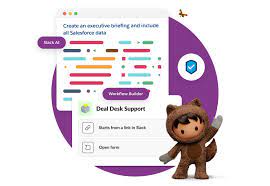
We all rely on processes to keep our teams organized and propel work forward. However, manual processes can be cumbersome, with work often getting lost in the chaos of Slack DMs or crowded team channels. Imagine if there were a way to structure processes into forms within Slack, allowing people to fill them out and automatically route requests to the appropriate individuals for follow-up. This is where Slack workflows come into play. What are Workflows for Salesforce Slack? A workflow is a multi-step process within your company, representing the sequence of tasks undertaken to achieve a business objective. Examples of Workflows for Salesforce Slack include: Workflows have a sequence of steps: Each workflow consists of multiple stages that typically occur in a specific order. Workflow Automation: Workflow automation is the use of software to streamline multi-step, multi-team workflows, ensuring the correct steps are followed, and tasks are completed efficiently. Types of Workflow Automation: Benefits of Workflow Automation in Slack: By incorporating workflow automation into Slack, teams can enhance efficiency, maintain structure, and reduce the risk of tasks getting lost or delayed. Contact Tectonic to learn more about Slack integration. Like1 Related Posts Who is Salesforce? Who is Salesforce? Here is their story in their own words. From our inception, we’ve proudly embraced the identity of Read more Salesforce Marketing Cloud Transactional Emails Salesforce Marketing Cloud Transactional Emails are immediate, automated, non-promotional messages crucial to business operations and customer satisfaction, such as order Read more Salesforce Unites Einstein Analytics with Financial CRM Salesforce has unveiled a comprehensive analytics solution tailored for wealth managers, home office professionals, and retail bankers, merging its Financial Read more AI-Driven Propensity Scores AI plays a crucial role in propensity score estimation as it can discern underlying patterns between treatments and confounding variables Read more

Read More

Salesforce Integration: Enhancing Your CRM Capabilities

Salesforce is the world’s leading CRM platform, empowering businesses to streamline operations, enhance customer relationships, and drive growth. However, to maximize its potential, integrating Salesforce with third-party applications is essential. By connecting Salesforce with various external tools—such as MailChimp, QuickBooks, WhatsApp, and LinkedIn—organizations can improve efficiency, automate workflows, and unify data across departments. But how can businesses successfully integrate these applications into their Salesforce environment, and what challenges might they face? Let’s explore. What is Salesforce Integration? Salesforce integration refers to the process of connecting Salesforce with third-party applications to facilitate seamless data flow and process automation. These integrations leverage APIs to establish communication between systems, ensuring a unified experience across different business functions such as HR, finance, marketing, and sales. Why is Salesforce Integration Important? Integrating Salesforce with other systems offers several advantages, including: Common Salesforce Integrations and Use Cases Salesforce can be integrated with a variety of platforms to enhance functionality. Some key use cases include: Challenges in Salesforce App Integration While Salesforce integrations bring numerous benefits, they also come with challenges: Tools for Successful Salesforce Integration To facilitate smooth integrations, businesses can leverage the following tools: 1. Salesforce Native Tools These tools enable direct integrations with Salesforce products. Examples include: 2. App-Native Tools Many external applications offer built-in integrations with Salesforce, such as: 3. Third-Party Middleware For more complex integrations, middleware platforms help bridge gaps between systems: Best Practices for Salesforce Integration To ensure a smooth and successful integration, businesses should follow these best practices: Final Thoughts: Should You Integrate Salesforce with Third-Party Apps? Absolutely. Integrating Salesforce with external applications enhances its capabilities, drives efficiency, and unlocks new business opportunities. However, it’s crucial to implement these integrations through a certified Salesforce partner to minimize risks and ensure seamless execution. By following best practices and using the right tools, businesses can maximize their CRM investment and drive long-term success. FAQs Have more questions about Salesforce integration? Get in touch with our certified Salesforce consultants to explore the best integration solutions for your business. Like Related Posts Who is Salesforce? Who is Salesforce? Here is their story in their own words. From our inception, we’ve proudly embraced the identity of Read more Salesforce Marketing Cloud Transactional Emails Salesforce Marketing Cloud Transactional Emails are immediate, automated, non-promotional messages crucial to business operations and customer satisfaction, such as order Read more Salesforce Unites Einstein Analytics with Financial CRM Salesforce has unveiled a comprehensive analytics solution tailored for wealth managers, home office professionals, and retail bankers, merging its Financial Read more AI-Driven Propensity Scores AI plays a crucial role in propensity score estimation as it can discern underlying patterns between treatments and confounding variables Read more

Read More
Salesforce Communications Cloud

What is Salesforce Communications Cloud?

Effective business communication is fundamental to success, playing a pivotal role in fostering robust customer relationships, promoting team collaboration, and driving revenue growth. Explore Salesforce Communications Cloud. In the current digital landscape, marked by rapid evolution in communication channels, businesses seek a comprehensive solution to streamline and enrich their communication processes. Consider Communications Cloud Explore Salesforce Communications Cloud—a groundbreaking offering from Salesforce, a leading provider of cloud-based solutions. Armed with a potent suite of tools and features, Communications Cloud empowers organizations to deliver personalized, seamless, and efficient communication experiences to both customers and employees. What is Salesforce Communications Cloud? Salesforce Communications Cloud stands as a comprehensive platform, enabling businesses to connect with customers, partners, and employees seamlessly across various channels. By consolidating communication channels such as email, SMS, social media, and voice into a unified platform, it facilitates the delivery of consistent and personalized communication experiences tailored to the target audience. Key Features of Salesforce Communications Cloud This platform boasts an array of features and tools that empower businesses to elevate their communication strategies. Some key features include: Benefits Implementing Salesforce Communications Cloud yields several advantages for businesses: Use Cases of Salesforce Communications Cloud The versatile applications of Salesforce Communications Cloud span various industries and business functions, including: Like Related Posts Salesforce Scheduler Salesforce Scheduler provides the objects required for appointment scheduling and an app that makes it easy to set up Scheduler. Read more Nonprofit Marketers Invest in Technology to Support and Drive Strategy While the demand for the creativity of marketers remains steadfast, the evolving digital landscape of constituent engagement necessitates an increased Read more Salesforce Communications Cloud for Service Providers Salesforce’s Communications Cloud facilitates the delivery of digital-first journeys. With seamless order processes, offering time and cost savings while enhancing Read more Introducing Salesforce Communications Cloud Introducing Communications Cloud from Salesforce: Revolutionize your digital-first journeys and streamline order processes to save time, cut costs, and enhance Read more

Read More
Salesforce Scheduler

Salesforce Scheduler

Salesforce Scheduler provides the objects required for appointment scheduling and an app that makes it easy to set up Scheduler. It provides preconfigured, customizable flows and rules that provide appointment booking experience. It also provides business APIs to create appointment booking experiences.

Read More
gettectonic.com