
04Mar
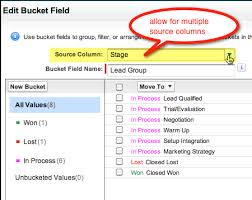
Mastering Salesforce Bucket Columns
Salesforce reporting helps Sales Operations teams analyze data—but large datasets in table format can quickly become overwhelming.
Salesforce reporting helps Sales Operations teams analyze data—but large datasets in table format can quickly become overwhelming.

Marketo Engage and Salesforce integration forms a seamless email marketing partnership, ensuring synchronization of your sales and marketing data. Marketo constantly syncs with Salesforce, operating throughout the day. The synchronization process involves periodic intervals with a 5-minute pause before resuming. During a single sync session, Marketo makes 25 API calls to check if your Salesforce objects need updating. This bidirectional sync between Salesforce and Marketo pertains exclusively to leads, contacts, and Salesforce campaigns. Any changes made in either Salesforce or Marketo in these categories are mirrored in both systems. However, all other syncs occur solely from Salesforce to Marketo. To sync a Marketo field to Salesforce, follow these steps: For optimal syncing between Salesforce and Marketo, adhere to best practices: Marketo and Salesforce Marketing Cloud catered to different marketer needs initially, with Marketo primarily designed for Business to Business (B2B) solutions and Marketing Cloud positioned as a Business to Consumer (B2C) platform. Integrating Marketo with Salesforce enhances the sales process, streamlining the work of the sales team to identify and channel leads more efficiently through the sales funnel. Marketo is one of many marketing automation platforms that can be integrated with Salesforce. Like1 Related Posts Who is Salesforce? Who is Salesforce? Here is their story in their own words. From our inception, we’ve proudly embraced the identity of Read more Salesforce Marketing Cloud Transactional Emails Salesforce Marketing Cloud Transactional Emails are immediate, automated, non-promotional messages crucial to business operations and customer satisfaction, such as order Read more Salesforce Unites Einstein Analytics with Financial CRM Salesforce has unveiled a comprehensive analytics solution tailored for wealth managers, home office professionals, and retail bankers, merging its Financial Read more AI-Driven Propensity Scores AI plays a crucial role in propensity score estimation as it can discern underlying patterns between treatments and confounding variables Read more

Marketing Data Sharing helps you restrict which Salesforce records sync to Pardot by defining rules based on specific criteria. For example, if you only want leads marked as “Marketable” to sync, MDS allows you to enforce that restriction.

Features of Sales Cloud Einstein are one of the most exciting. Do you wonder why?
Let’s look at Sales Cloud Einstein to provide insights into how it can empower your orga
Kiosk mode is a Salesforce Marketing Cloud Account Engagement form setting that stops a tracking cookie being placed on your browser when you submit a form. With Kiosk Mode enabled, no one gets cookied. A prospect’s form submissions are related to a prospect record via a unique browser cookie. However, sometimes you don’t want to cookie every visitor because it can cause one prospect’s information to be related to another prospect’s cookie. For example: you want to manually enter prospect data into a form from a signup sheet or have prospects fill out forms at a tradeshow booth. You can submit a form multiple times without causing visitor association changes by using Kiosk Mode, because it doesn’t cookie visitors. Enable Kiosk Mode on a per-form basis on the Advanced tab of the Look and Feel step. Locate KM You can find Kiosk Mode in MCAE by going to the “Look and Feel” section then selecting the “Advanced” settings. Just check the box to make sure it’s switched on. Utilize Salesforce Kiosk Mode Utilize kiosk mode when at live events and multiple people are completing your Marketing Cloud Account Engagement forms from the same device. Make sure all users who attend live events such as trade shows know how to enable this feature. Here is another example of Kiosk Mode. Imagine a convention hall where convention attendees scan their badge for entry. The convention organizers have set up an entry point with a row of tablets, and on each tablet screen is a check-in application, displaying both a scanner view and instructions prompting attendees to scan their badge. Attendees can easily hold their badge up to the scanner view, after which they receive a confirmation message (indicating that they may enter) or a warning message (indicating that there is an issue with their badge, and that they should head over to the information booth to get help). At the same conference, presenters at each booth in the convention hall need a way to collect leads and stay connected with conference attendees who express interest in their product or service. Each booth is outfitted with a tablet with a scanner view. Similar to what the attendees encountered when entering the conference. These scanners, however, scan an attendee’s badge for the purpose of collecting their information and sharing it with the booth presenter, so that after the conference the two parties can stay connected, finalize purchase discussions, and more. To implement these self-service scanning stations, conference organizers and booth presenters used BarcodeScanner in their applications. To seamlessly integrate their check-in and lead collection processes with Salesforce. Once scanned, the check-in application processes the barcode to find the associated registration record and verify that the person scanning the barcode is a registered conference attendee. The booth scanner scans barcodes, extracts embedded attendee data, and uses it to create leads in Salesforce. Whether you want to update an existing LWC component to use the self-service features of BarcodeScanner, or you’re creating a brand-new component, you only need to keep a few things in mind to get started. Content modified November 2022 to reflect Pardot’s name change. Like1 Related Posts Who is Salesforce? Who is Salesforce? Here is their story in their own words. From our inception, we’ve proudly embraced the identity of Read more Salesforce Marketing Cloud Transactional Emails Salesforce Marketing Cloud Transactional Emails are immediate, automated, non-promotional messages crucial to business operations and customer satisfaction, such as order Read more Salesforce Unites Einstein Analytics with Financial CRM Salesforce has unveiled a comprehensive analytics solution tailored for wealth managers, home office professionals, and retail bankers, merging its Financial Read more AI-Driven Propensity Scores AI plays a crucial role in propensity score estimation as it can discern underlying patterns between treatments and confounding variables Read more
What are Salesforce Sales Cloud advantages? Salesforce Sales Cloud is a customer relationship management (CRM) platform designed to support sales, marketing and customer support in both business-to-business (B2B) and business-to-customer (B2C) contexts. Advantages of Salesforce Sales Cloud: Salesforce Sales Cloud Advantages: Salesforce Sales Cloud is a prominent tool from the world of CRM that helps companies of all sizes and from different industry verticals sell smarter and quicker. A business that is looking for the best implementation of the sales cloud can employ a Salesforce consulting company and leverage myriad advantages, such as centralized customer data, improved collaboration, logging interactions, and business process automation. Whether you are from the manufacturing industry or the financial services sector, having a sales cloud is imperative for your business growth. Why? Let’s discuss and help you understand the importance of having an experienced consulting partner when you launch Salesforce Sales Cloud. What is So Special About Salesforce Sales Cloud? Businesses need a solution that can help in handling leads, contacts, accounts, and opportunities in a seamless manner. It is here that the Sales Cloud comes into play with its advanced capabilities and the power of AI. Not only does this cloud tool centralized customer data, but also aids collaboration among different teams. According to a report by Ventino teams, Sales Cloud has claimed 38.2 percent of the market share and leads as the best cloud solution. There are multiple reasons for its huge popularity among businesses; some of them are as follows – If you are considering leveraging Salesforce Sales Cloud in your organization, contact Tectonic today. Tectonic is please to announce our Sales Cloud Implementation Solutions. Like Related Posts Who is Salesforce? Who is Salesforce? Here is their story in their own words. From our inception, we’ve proudly embraced the identity of Read more Salesforce Marketing Cloud Transactional Emails Salesforce Marketing Cloud Transactional Emails are immediate, automated, non-promotional messages crucial to business operations and customer satisfaction, such as order Read more Salesforce Unites Einstein Analytics with Financial CRM Salesforce has unveiled a comprehensive analytics solution tailored for wealth managers, home office professionals, and retail bankers, merging its Financial Read more AI-Driven Propensity Scores AI plays a crucial role in propensity score estimation as it can discern underlying patterns between treatments and confounding variables Read more
With Salesforce Marketing Cloud Email Studio, you can effortlessly build and send personalized emails, ranging from basic newsletters to intricate campaigns. It allows you to deliver various types of messages, including promotional, transactional, and triggered messages, while also providing tracking and optimization tools to enhance performance.

How do you make Salesforce even better? Integrate it with all the third party apps you already use. From productivity to marketing to collaboration and beyond, now you can connect your Salesforce to the other tools you need to run your business. MuleSoft is Salesforce’s integration and automation technology and offers connectivity solutions for all of your apps. Learn more about Salesforce integrations. Streamline your team’s workflow and increase productivity by syncing G Suite by Google Cloud with Salesforce. Increase team collaboration and efficiency with the Slack and Salesforce integration. Increase sales while generating accurate financial data by integrating Quickbooks and Salesforce. Make it easier to manage email lists and contact records by connecting directly MailChimp to Salesforce. Target and engage the right buyers and save valuable time with the LinkedIn and Salesforce integration. Connect DocuSign to Salesforce and send, sign and track agreements and approvals on any device. Integrate Jira and Salesforce and make it easier to monitor the progress of your projects. Use the HelloSign integration to simplify the process for preparing and tracking e-signature documents. Build customer apps lightning fast, with the Salesforce and CodeScience integration. Connect ActiveCampaign and Salesforce to accelerate business growth with automated one to one experiences that connect across all channels and through the entire customer lifecycle. Sync documents to keep files updated and organized, with the Dropbox and Salesforce integration. This is just the beginning of the ways that integrating Salesforce with your other systems can increase employee productivity, automate data transfer, reduce human error, and make everyone happier. If you have questions about integrating your systems with Salesforce, contact Tectonic today. Like1 Related Posts Who is Salesforce? Who is Salesforce? Here is their story in their own words. From our inception, we’ve proudly embraced the identity of Read more Salesforce Marketing Cloud Transactional Emails Salesforce Marketing Cloud Transactional Emails are immediate, automated, non-promotional messages crucial to business operations and customer satisfaction, such as order Read more Salesforce Unites Einstein Analytics with Financial CRM Salesforce has unveiled a comprehensive analytics solution tailored for wealth managers, home office professionals, and retail bankers, merging its Financial Read more AI-Driven Propensity Scores AI plays a crucial role in propensity score estimation as it can discern underlying patterns between treatments and confounding variables Read more
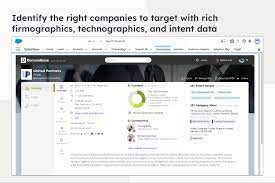
The integration of Demandbase with Salesforce creates a seamless connection between Demandbase One and your Salesforce CRM, establishing a bidirectional sync for efficient data exchange. Bidirectional sync means data can travel in both directions from one platform to the other.
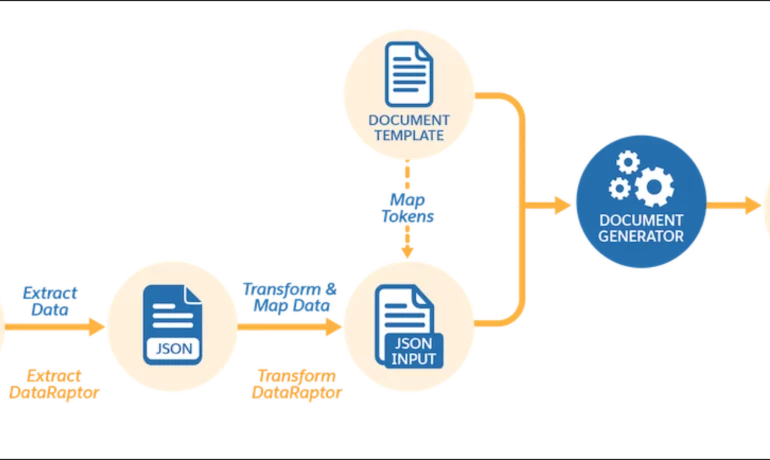
Salesforce document generation poses a challenge for businesses, given the intricacies of integration involved. Fortunately, a variety of tools are available for generating documents in Salesforce, and Tectonic is well-equipped to assist in their successful implementation. Salesforce Industries Document Generation empowers businesses to craft and manage accurate documents linked to standard Salesforce objects, encompassing contracts, opportunities, orders, quotes, and custom objects. For a more dynamic approach, Salesforce OmniStudio Document Generation facilitates the creation of documents using Microsoft Word and Microsoft PowerPoint templates. These templates can incorporate values from any JSON-based data within the text, including data sourced from various Salesforce objects. This versatile tool enables the generation of contracts, proposals, quotes, reports, non-disclosure agreements, service agreements, and more. Salesforce Industries Document Generation seamlessly integrates with Vlocity Insurance, Vlocity Health, communications, media, energy, utilities, government, and beyond. Vlocity Analytics, another valuable component, offers pre-built measurement tools that seamlessly integrate with Salesforce Reports, Dashboards, and Einstein. The Salesforce AppExchange boasts an extensive array of over 200 document generation tools. Your Salesforce partner can assist in selecting, installing, and implementing the most suitable options based on your business requirements. With Document Generation, you can generate contracts, proposals, quotes, reports, non-disclosure agreements, job offers, service agreements, and so on. You can generate documents using the specified sample client-side or server-side OmniScripts. You can also create your own OmniScripts by cloning and customizing the sample OmniScript to generate documents. Client-Side document generation is a synchronous process that results in a downloadable preview of the generated documents. You can generate documents from Microsoft Word (.docx), Microsoft PowerPoint (.pptx), and Web templates. These templates can include values from any JSON-based data in the text, including data from any Salesforce object. You can optionally convert the resulting documents to .pdf format. Server-Side document generation is available in both the OmniStudio Foundation and Salesforce Industries packages. Server-Side document generation is an asynchronous process that’s best for large and rendering-heavy documents and for document generation in batches. The Server-Side document generation service is secure and scalable and is hosted on Salesforce Hyperforce. The generated document is stored in your Salesforce org, and is attached to the object for which it’s generated. You can use Apex Classes, sample Integration Procedures, or a sample OmniScript to generate documents. Client-Side document generation supports Customer Community Plus, Customer Community, and Partner Community users to generate documents using client-side OmniScripts. Server-Side document generation supports Customer Community Plus, Customer Community, and Partner Community users to generate documents using the singleDocxServersideLwc server-side OmniScript. With the right licenses, Document Generation is available in the Salesforce Industries package. Metering measures resource utilization levels and throttling controls resource access and use based on defined rules. Metering measures the number of server-side documents that are generated by an org hourly and daily. The default hourly and daily limits for processing server-side document generation requests are 1,000 per org and 24,000 per org respectively. Throttling maintains consistency and resilience of the server-side document generation service by managing incoming server-side document generation requests from multiple orgs. Throttling can also prevent service degradation caused by high volume of requests at peak hours by blocking requests that exceed the default limits. The request details are saved in the Document Generation Processes entity. You can retrieve the blocked requests and later retry the server-side document generation. No matter what your specific document generation needs, Tectonic simplifies the process of getting your system up and running seamlessly, whether it’s through Salesforce Quickstarts or comprehensive implementation services. Content updated in 2February 2024, Shannan Hearne. Like1 Related Posts Who is Salesforce? Who is Salesforce? Here is their story in their own words. From our inception, we’ve proudly embraced the identity of Read more Salesforce Marketing Cloud Transactional Emails Salesforce Marketing Cloud Transactional Emails are immediate, automated, non-promotional messages crucial to business operations and customer satisfaction, such as order Read more Salesforce Unites Einstein Analytics with Financial CRM Salesforce has unveiled a comprehensive analytics solution tailored for wealth managers, home office professionals, and retail bankers, merging its Financial Read more AI-Driven Propensity Scores AI plays a crucial role in propensity score estimation as it can discern underlying patterns between treatments and confounding variables Read more


