

Sync Archives - gettectonic.com - Page 2
Marketing Cloud Next

Marketing Cloud Next

Marketing Cloud Next: The Dawn of Agentic Marketing Redefining Marketing in the AI Era Salesforce has unveiled Marketing Cloud Next — the world’s first full-funnel agentic marketing platform that transforms every customer interaction into an intelligent, two-way conversation. This isn’t just an upgrade; it’s a paradigm shift from static campaigns to dynamic, AI-driven engagement ecosystems. New UI New Functionality B2B and B2C on the same platform Built on core Why This Changes Everything “75% of marketers use AI, but only 32% see real impact. Agentic marketing closes this gap.” How Agentic Marketing Works The Old Way vs. The New Way Traditional Marketing Agentic Marketing Manual campaign builds AI assembles full campaigns from briefs One-way communications Dynamic two-way conversations Siloed channels Unified customer journey orchestration Post-campaign analytics Real-time autonomous optimization Generic personalization 1:1 micro-segmentation Example: An AI agent detects a high-value lead browsing pricing pages at 2 AM. It: Key Innovations in Marketing Cloud Next 1. Create: Campaigns at the Speed of Thought “P&G reduced campaign launch time from 3 weeks to 4 hours in beta tests.” 2. Engage: Always-On Conversations 3. Qualify: Smarter Lead Management 4. Optimize: Autonomous Performance The Technology Behind the Revolution Agentforce AI Architecture Real-World Impact Case Study: Global Retailer By the Numbers Getting Started Availability Migration Path “Early adopters see ROI in <90 days by focusing on high-friction processes first.” The Future of Marketing is Agentic With Marketing Cloud Next, Salesforce isn’t just adding AI features — it’s rearchitecting marketing around autonomous collaboration. This is the end of:❌ Spray-and-pray campaigns❌ Siloed channel strategies❌ Post-mortem analytics And the beginning of:✅ Self-optimizing customer journeys✅ Frictionless cross-team coordination✅ Real-time revenue impact visibility Ready to transform your marketing? Join the waitlist for exclusive early access. Contact Tecctonic on the form below. #MarketingInnovation #AI #Salesforce #CustomerExperience #DigitalTransformation Like Related Posts Who is Salesforce? Who is Salesforce? Here is their story in their own words. From our inception, we’ve proudly embraced the identity of Read more Salesforce Marketing Cloud Transactional Emails Salesforce Marketing Cloud Transactional Emails are immediate, automated, non-promotional messages crucial to business operations and customer satisfaction, such as order Read more Salesforce Unites Einstein Analytics with Financial CRM Salesforce has unveiled a comprehensive analytics solution tailored for wealth managers, home office professionals, and retail bankers, merging its Financial Read more AI-Driven Propensity Scores AI plays a crucial role in propensity score estimation as it can discern underlying patterns between treatments and confounding variables Read more

Read More
AI Agents and Open APIs

The Future of AI Agents

The Future of AI Agents: A Symphony of Digital Intelligence Forget simple chatbots—tomorrow’s AI agents will be force multipliers, seamlessly integrating into our workflows, anticipating needs, and orchestrating complex tasks with near-human intuition. Powered by platforms like Agentforce (Salesforce’s AI agent builder), these agents will evolve in five transformative ways: 1. Beyond Text: Multimodal AI That Sees, Hears, and Understands Today’s AI agents mostly process text, but the future belongs to multimodal AI—agents that interpret images, audio, and video, unlocking richer, real-world applications. How? Neural networks convert voice, images, and video into tokens that LLMs understand. Salesforce AI Research’s xGen-MM-Vid is already pioneering video comprehension. Soon, agents will respond to spoken commands, like:“Analyze Q2 sales KPIs—revenue growth, churn, CAC—summarize key insights, and recommend two fixes.”This isn’t just about speed; it’s about uncovering hidden patterns in data that humans might miss. 2. Agent-to-Agent (A2A) Collaboration: The Rise of AI Teams Today’s AI agents work solo. Tomorrow, specialized agents will collaborate like a well-oiled team, multiplying efficiency. Human oversight remains critical—not for micromanagement, but for ethics, strategy, and alignment with human goals. 3. Orchestrator Agents: The AI “Managers” of Tomorrow Teams need leaders—enter orchestrator agents, which coordinate specialized AIs like a restaurant GM oversees staff. Example: A customer service request triggers: The orchestrator integrates all inputs into a seamless, on-brand response. Why it matters: Orchestrators make AI systems scalable and adaptable. New tools? Just plug them in—no rebuilds required. 4. Smarter Reasoning: AI That Thinks Like You Today’s AI follows basic commands. Tomorrow’s will analyze, infer, and strategize like a human colleague. Example: A marketing AI could: Key Advances: As Anthropic’s Jared Kaplan notes, future agents will know when deep reasoning is needed—and when it’s overkill. 5. Infinite Memory: AI That Never Forgets Current AI has the memory of a goldfish—each interaction starts from scratch. Future agents will retain context across sessions, like a human recalling notes. Impact: The Bottom Line The next generation of AI agents won’t just assist—they’ll augment human potential, turning complex workflows into effortless collaborations. With multimodal perception, team intelligence, advanced reasoning, and infinite memory, they’ll redefine productivity across industries. The future isn’t just AI—it’s AI working for you, with you, and ahead of you. Like Related Posts Who is Salesforce? Who is Salesforce? Here is their story in their own words. From our inception, we’ve proudly embraced the identity of Read more Salesforce Marketing Cloud Transactional Emails Salesforce Marketing Cloud Transactional Emails are immediate, automated, non-promotional messages crucial to business operations and customer satisfaction, such as order Read more Salesforce Unites Einstein Analytics with Financial CRM Salesforce has unveiled a comprehensive analytics solution tailored for wealth managers, home office professionals, and retail bankers, merging its Financial Read more AI-Driven Propensity Scores AI plays a crucial role in propensity score estimation as it can discern underlying patterns between treatments and confounding variables Read more

Read More
Apex

Comprehensive Guide to Monitoring Apex Jobs in Salesforce

Why Monitoring Apex Jobs Matters Monitoring asynchronous Apex jobs is critical for maintaining Salesforce system health and performance. Batch processes, queueable jobs, and scheduled operations that fail or exceed limits can disrupt business operations. Proactive monitoring helps: Methods for Monitoring Apex Jobs 1. Using the Native Apex Jobs Dashboard Access Path: Key Features: Critical Data Points: Column Description Why It Matters Job Name Class/trigger name Identifies problem components Status Execution outcome Flags failures needing attention Total Batches Batch job iterations Reveals processing volume Submitted By Initiating user Tracks accidental executions Started/Finished Timestamps Calculates duration for optimization 2. Advanced Tracking with SOQL Queries For deeper analysis, query the AsyncApexJob object: sql Copy Download SELECT Id, ApexClass.Name, JobType, Status, CreatedDate, CompletedDate, NumberOfErrors, JobItemsProcessed, TotalJobItems, ExtendedStatus FROM AsyncApexJob WHERE CreatedDate = LAST_N_DAYS:1 ORDER BY CreatedDate DESC Key Fields Explained: 3. Proactive Monitoring with Custom Reports Recommended Report Type: Sample Report Filters: Best Practices for Effective Monitoring Troubleshooting Common Issues Problem Diagnostic Query Solution Stuck jobs WHERE Status = ‘Processing’ AND CreatedDate < LAST_N_HOURS:2 Abort via UI or API Batch job failures WHERE JobType = ‘BatchApex’ AND NumberOfErrors > 0 Check ExtendedStatus field Queueable job limits WHERE JobType = ‘Queueable’ AND CreatedDate = TODAY Implement queue depth monitoring Scheduled job overlaps WHERE JobType = ‘ScheduledApex’ AND Status = ‘Queued’ Adjust schedule frequencies Advanced Monitoring Options Conclusion Effective Apex job monitoring requires combining Salesforce’s native tools with custom queries and proactive alerting. By implementing these strategies, administrators can: ✔ Catch failures before users report them✔ Optimize job scheduling for better performance✔ Maintain clear audit trails of automated processes✔ Prevent governor limit issues Regular review of job metrics should be part of every Salesforce admin’s routine maintenance checklist to ensure system reliability and performance. Like Related Posts Who is Salesforce? Who is Salesforce? Here is their story in their own words. From our inception, we’ve proudly embraced the identity of Read more Salesforce Marketing Cloud Transactional Emails Salesforce Marketing Cloud Transactional Emails are immediate, automated, non-promotional messages crucial to business operations and customer satisfaction, such as order Read more Salesforce Unites Einstein Analytics with Financial CRM Salesforce has unveiled a comprehensive analytics solution tailored for wealth managers, home office professionals, and retail bankers, merging its Financial Read more AI-Driven Propensity Scores AI plays a crucial role in propensity score estimation as it can discern underlying patterns between treatments and confounding variables Read more
Read More
Financial Services Cloud and Core

AgentForce for Financial Services

Salesforce Revolutionizes Financial Services with AI-Powered Agentforce Platform AI Agents Take on Banking, Insurance, and Advisory Roles Salesforce has launched a suite of prebuilt AI agent templates designed to automate critical functions across financial services—from loan processing to insurance underwriting and wealth management. Embedded within Financial Services Cloud, these AI assistants aim to reduce administrative burdens, enhance customer experiences, and boost operational efficiency for banks, insurers, and investment firms. Key Features of Agentforce for Financial Services ✔ Prebuilt AI agents for loan officers, financial advisors, and insurance agents✔ 24/7 automated customer service (balance inquiries, claims processing, policy quotes)✔ Meeting intelligence (automated note-taking, follow-ups, and data-driven insights)✔ Regulatory compliance baked into every AI action✔ Seamless integration with core banking and CRM systems How AI Agents Transform Financial Workflows 1. Financial Advisors: Smarter, Faster Client Interactions 2. Banking & Insurance: Instant, Accurate Customer Service 3. Digital Loan Officers: Faster Approvals, Fewer Delays Why Financial Firms Need Specialized AI Agents Traditional customer service struggles with:❌ Long hold times❌ Repetitive data entry❌ Inconsistent compliance checks Agentforce AI solves these pain points by:✅ Reducing manual work (80%+ of routine tasks automated)✅ Improving accuracy (data-driven decisions, no human errors)✅ Ensuring compliance (built-in regulatory safeguards) Real-World Impact: “Agentforce has already transformed our service operations. The speed of deployment and immediate productivity gains have us exploring AI for claims and procurement next.”— Matt Brasch, VP of Digital Operations, Cumberland Mutual LLC The Future of AI in Finance Salesforce emphasizes that AI won’t replace human experts—it will empower them. By offloading repetitive tasks, financial professionals can focus on:✔ High-value client relationships✔ Complex decision-making✔ Strategic business growth Coming Next: Final Takeaway Salesforce’s Agentforce for Financial Services marks a major leap in AI-driven banking and insurance automation. Firms adopting this technology can expect:🔹 Faster customer service🔹 Higher advisor productivity🔹 Stronger compliance🔹 Increased revenue per employee Ready to deploy AI agents in your financial workflows? Contact Tectonic. Like Related Posts Who is Salesforce? Who is Salesforce? Here is their story in their own words. From our inception, we’ve proudly embraced the identity of Read more Salesforce Marketing Cloud Transactional Emails Salesforce Marketing Cloud Transactional Emails are immediate, automated, non-promotional messages crucial to business operations and customer satisfaction, such as order Read more Salesforce Unites Einstein Analytics with Financial CRM Salesforce has unveiled a comprehensive analytics solution tailored for wealth managers, home office professionals, and retail bankers, merging its Financial Read more AI-Driven Propensity Scores AI plays a crucial role in propensity score estimation as it can discern underlying patterns between treatments and confounding variables Read more
Read More
Sales Enablement

Salesforce’s Top Sales Enablement Tools

The 9 Best Sales Enablement Tools for 2025 Based on original research by Erin Hueffner, Writer at Salesforce Sales enablement software has become a must-have for high-performing sales teams. According to the Salesforce State of Sales report, adoption surged 48% in 2024, with 75% of reps crediting these tools for helping them meet quotas. But with so many options, how do you choose the right one? Below, we break down the top 9 sales enablement platforms—ranked by features, user ratings, and real-world impact. What Is Sales Enablement Software? Sales enablement tools help teams:✅ Train & onboard reps faster✅ Organize sales content (playbooks, case studies, scripts)✅ Track performance with CRM-linked analytics✅ Coach sellers with AI-driven insights The best platforms combine learning (LMS), content management (CMS), and CRM integration to drive measurable ROI. Who Uses Sales Enablement Tools? Key Benefits of Sales Enablement Software 🔹 Faster onboarding – Reduce ramp time for new hires.🔹 Higher win rates – AI recommends best-performing content.🔹 Larger deal sizes – Data reveals upselling opportunities.🔹 Shorter sales cycles – Right content at the right time. The 9 Best Sales Enablement Tools for 2025 (Ranked by G2 & Capterra ratings, features, and real-world impact) 1. Salesforce Sales Cloud Best for: End-to-end CRM-powered enablement⭐ Rating: 4.4/5 (G2) | ✅ Top Feature: AI-powered coaching (Agentforce) 2. Seismic Best for: Enterprise content & training unification⭐ Rating: 4.5/5 (G2) | ✅ Top Feature: AI-generated learning paths 3. Highspot Best for: AI-driven content recommendations⭐ Rating: 4.6/5 (Capterra) | ✅ Top Feature: Highspot Copilot (AI coaching) 4. Mindtickle Best for: Data-backed sales coaching⭐ Rating: 4.7/5 (G2) | ✅ Top Feature: AI role-play simulations 5. HubSpot Sales Hub Best for: SMBs needing CRM + enablement⭐ Rating: 4.3/5 (G2) | ✅ Top Feature: Conversation intelligence 6. Showpad Best for: Visual, interactive sales content⭐ Rating: 4.5/5 (G2) | ✅ Top Feature: AI-powered pitch coaching 7. Demodesk Best for: Virtual sales teams⭐ Rating: 4.6/5 (Capterra) | ✅ Top Feature: AI meeting summaries 8. ClientPoint Best for: Proposal & contract automation⭐ Rating: 4.4/5 (Capterra) | ✅ Top Feature: AI assistant (Meg) 9. Lessonly by Seismic Best for: Rapid sales training⭐ Rating: 4.5/5 (G2) | ✅ Top Feature: Microlearning modules Key Features to Look For 🔎 AI-powered coaching (e.g., call analysis, role-play feedback)📂 Smart content management (searchable, version-controlled libraries)📊 CRM integration (tie training to deal outcomes)📈 Predictive analytics (flag at-risk deals & skill gaps) How to Choose the Right Tool Final Verdict Sales enablement tools are no longer optional—they’re competitive necessities. The right platform can:✔ Cut ramp time by 50%+✔ Boost win rates by 20%✔ Reduce content search time by 80% Top Pick for 2025? Need AI coaching? Mindtickle & Demodesk lead the pack. Ready to enable your team? The right tool could be the difference between missing quota and smashing targets. Like Related Posts Who is Salesforce? Who is Salesforce? Here is their story in their own words. From our inception, we’ve proudly embraced the identity of Read more Salesforce Marketing Cloud Transactional Emails Salesforce Marketing Cloud Transactional Emails are immediate, automated, non-promotional messages crucial to business operations and customer satisfaction, such as order Read more Salesforce Unites Einstein Analytics with Financial CRM Salesforce has unveiled a comprehensive analytics solution tailored for wealth managers, home office professionals, and retail bankers, merging its Financial Read more AI-Driven Propensity Scores AI plays a crucial role in propensity score estimation as it can discern underlying patterns between treatments and confounding variables Read more

Read More

Revolutionizing Analytics: Summer ’25 Release Highlights

Next-Generation Analytics Across Salesforce The Summer ’25 release brings transformative updates to Salesforce’s analytics ecosystem, empowering organizations with smarter insights, enhanced accessibility, and seamless data integration. Here’s what’s new: Tableau Next: The Future of Enterprise Analytics (Available in Enterprise, Performance, and Unlimited editions) A unified analytics powerhouse combining Tableau’s visualization strengths with Data Cloud’s semantic layer and Agentforce’s contextual AI. Key Capabilities: Why It Matters:“Tableau Next represents the first truly agentic analytics platform – where insights automatically trigger business actions,” says Salesforce CPO. Lightning Reports & Dashboards: Smarter Refresh (Generally Available) Pro Tip: Combine selective refresh with new “sticky filters” (Winter ’25) for personalized views. Data Cloud Analytics: Deeper Insights Feature Impact Example Use Case Calculated Insights in Reports Apply AI-generated segments/metrics directly in reports Identify high-value customer cohorts 5-Dimensional Grouping Create granular summary reports Analyze marketing ROI by demographic layers Managed Package Deployment Distribute semantic model reports across orgs Roll out standardized financial reporting New Deployment Option: Migrate analytics via change sets (no API required) CRM Analytics: Performance Boost 🚀 3x Faster Queries 🔒 Secure Cloud Connections ♿ Accessibility First Einstein Discovery Update Retired Feature: Decision Optimization beta (after June 5, 2025)Recommended Alternative: Use Einstein Prediction Builder for optimization scenarios Tableau Ecosystem Updates Product Key Improvement Best For Tableau Cloud New embedded analytics SDK Enterprise deployments Tableau Desktop Enhanced geospatial analysis Advanced users Tableau Prep Smart data cleaning suggestions Data engineers Pro Tip: Embed Tableau dashboards in Lightning pages for contextual decision-making. Getting Started “These analytics innovations reduce time-to-insight by 40% in early adopters,” reports Salesforce Labs. Explore Summer ’25 Analytics DocumentationSchedule Release Readiness Consultation Which analytics upgrade will you implement first? Like Related Posts Who is Salesforce? Who is Salesforce? Here is their story in their own words. From our inception, we’ve proudly embraced the identity of Read more Salesforce Marketing Cloud Transactional Emails Salesforce Marketing Cloud Transactional Emails are immediate, automated, non-promotional messages crucial to business operations and customer satisfaction, such as order Read more Salesforce Unites Einstein Analytics with Financial CRM Salesforce has unveiled a comprehensive analytics solution tailored for wealth managers, home office professionals, and retail bankers, merging its Financial Read more AI-Driven Propensity Scores AI plays a crucial role in propensity score estimation as it can discern underlying patterns between treatments and confounding variables Read more

Read More

Salesforce Summer 25 Release Updates

Mandatory Changes Taking Effect 1. Modernized Record Experience in Aura Sites (Enforced) What’s Changing: Action Required: 2. Secure Roles Behavior & Sharing Group Updates in Sandboxes (Enforced) What’s Changing: Action Required: 3. LinkedIn Lead Capture Configuration Update (Enforced) Why the Change?LinkedIn is retiring its legacy Ads Lead Sync APIs, requiring Salesforce admins to reconfigure lead sync. Action Required: Deadline: 4. API Versions 21.0–30.0 Retirement (Enforced) What’s Happening? Action Required: 5. SAML Framework Upgrade (Enforced) Why the Change? Action Required: Key Takeaways ✅ Test modernized Aura components for compatibility.✅ Update “Roles and Subordinates” references in code.✅ Reconfigure LinkedIn Lead Sync before enforcement.✅ Upgrade legacy API integrations to avoid disruptions.✅ Validate SAML setups in Summer ’25 sandboxes. Need Help? Deadline: All updates take effect in Summer ’25. Act now to avoid service interruptions!  Like Related Posts Who is Salesforce? Who is Salesforce? Here is their story in their own words. From our inception, we’ve proudly embraced the identity of Read more Salesforce Marketing Cloud Transactional Emails Salesforce Marketing Cloud Transactional Emails are immediate, automated, non-promotional messages crucial to business operations and customer satisfaction, such as order Read more Salesforce Unites Einstein Analytics with Financial CRM Salesforce has unveiled a comprehensive analytics solution tailored for wealth managers, home office professionals, and retail bankers, merging its Financial Read more AI-Driven Propensity Scores AI plays a crucial role in propensity score estimation as it can discern underlying patterns between treatments and confounding variables Read more
Read More

Sales Productivity Revolution: Summer ’25 AI-Powered Selling

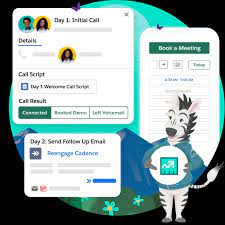
Transform Your Sales Team with Agentforce & AI 🚀 Next-Gen Sales Development with Agentforce SDR Impact: Early adopters report 40% more qualified meetings booked 🤖 Agentforce Deal Agent: Your AI Co-Pilot Feature Benefit Opportunity Audits Auto-review 100+ deal fields in seconds Smart Recommendations “90% of similar deals added Discount Approval” Approval Workflows Choose between manual or auto-updates Change Tracking Visual timeline of all AI-suggested modifications Case Study: Tech firm reduced deal cycle time by 22% using auto-field updates Conversation Intelligence 2.0 🎯 Einstein Conversation Insights flow Copy Download // Sample Flow Using Call Transcripts trigger: Call_Ended → Get_Transcript → Analyze_Sentiment → If Negative_Sentiment → Create_Case Else → Update_Opportunity_Stage New Capabilities: Compliance Note: Salesforce never records calls – integrate with your existing system Sales Operations Excellence 📊 Forecasting & Planning 📞 Communications Upgrade Partner Ecosystem Growth 🤝 Partner Central 2.0 Early Adopter Feedback: “Cut portal training time by 60%” Critical Updates ❗ LinkedIn Lead SyncReconfigure before Summer ’25 to avoid sync disruptions ❗ Activity ReportingPrepare for retirement of Activity 360 reports Getting Started “These tools help sellers focus 80% less on admin work and 80% more on selling,” says Salesforce SVP of Sales Cloud. Download Implementation Kit | Join AI Selling Bootcamp Which sales productivity feature will you deploy first? Like Related Posts Who is Salesforce? Who is Salesforce? Here is their story in their own words. From our inception, we’ve proudly embraced the identity of Read more Salesforce Marketing Cloud Transactional Emails Salesforce Marketing Cloud Transactional Emails are immediate, automated, non-promotional messages crucial to business operations and customer satisfaction, such as order Read more Salesforce Unites Einstein Analytics with Financial CRM Salesforce has unveiled a comprehensive analytics solution tailored for wealth managers, home office professionals, and retail bankers, merging its Financial Read more AI-Driven Propensity Scores AI plays a crucial role in propensity score estimation as it can discern underlying patterns between treatments and confounding variables Read more
Read More
AI Project Planning by Workflows

Salesforce Flow Explained

Salesforce Flow: The No-Code Automation Powerhouse Salesforce Flow revolutionizes business process automation by enabling visual, click-based workflow design—eliminating the need for complex coding. From simple task automation to intricate multi-system integrations, Flow empowers admins and business users to streamline operations, enhance accuracy, and boost productivity—all within the Salesforce ecosystem. Why Salesforce Flow? Key Benefits ✅ No-Code Simplicity – Build complex automations with drag-and-drop ease, reducing reliance on developers.✅ End-to-End Automation – Handle data updates, approvals, user guidance, and external integrations seamlessly.✅ Error Reduction – Minimize manual entry mistakes with automated, logic-driven workflows.✅ Flexible Triggers – Run flows on demand, on schedule, or in response to real-time record changes.✅ Enhanced User Experience – Guide employees through processes with intuitive, step-by-step screens. Types of Salesforce Flows & When to Use Them Flow Type Best For Screen Flows Interactive user interfaces (e.g., onboarding wizards, guided data entry). Record-Triggered Flows Auto-updating records on creation/modification (e.g., lead scoring, SLA tracking). Schedule-Triggered Flows Recurring tasks (e.g., nightly data syncs, batch record updates). Auto-Launched Flows API-triggered automations or sub-processes within larger workflows. Platform Event Flows Real-time integrations with external systems (e.g., ERP, payment gateways). Top Use Cases for Salesforce Flow 1. Automated Data Management 2. Smarter Approval Workflows 3. Guided User Journeys 4. Seamless Integrations 5. Advanced Business Logic Flow vs. Process Builder vs. Apex: Which to Use? Tool Complexity Best For Limitations Flow Low to High End-to-end automation, UI-guided processes. Not for ultra-high-volume transactions. Process Builder Low Simple record-triggered actions. Limited logic capabilities. Apex (Code) High Custom logic, heavy computations. Requires developer expertise. Pro Tip: Salesforce recommends migrating from Process Builder to Flow, as it offers greater flexibility and future-proofing. Getting Started with Salesforce Flow The Future of Automation Is Clicks, Not Code Salesforce Flow puts enterprise-grade automation in the hands of non-developers, accelerating digital transformation. By reducing manual work, cutting errors, and ensuring process consistency, it’s a game-changer for CRM efficiency. Ready to automate? Start with a simple Record-Triggered Flow today and scale up as your needs grow! Key Takeaways:✔ No-code automation for admins & business users.✔ Five flow types cover everything from UI guides to backend integrations.✔ Replaces Process Builder as Salesforce’s recommended automation tool.✔ Critical for CRM efficiency—saves time, reduces errors, and enforces best practices. Like Related Posts Who is Salesforce? Who is Salesforce? Here is their story in their own words. From our inception, we’ve proudly embraced the identity of Read more Salesforce Marketing Cloud Transactional Emails Salesforce Marketing Cloud Transactional Emails are immediate, automated, non-promotional messages crucial to business operations and customer satisfaction, such as order Read more Salesforce Unites Einstein Analytics with Financial CRM Salesforce has unveiled a comprehensive analytics solution tailored for wealth managers, home office professionals, and retail bankers, merging its Financial Read more AI-Driven Propensity Scores AI plays a crucial role in propensity score estimation as it can discern underlying patterns between treatments and confounding variables Read more

Read More

Revenue Cloud Summer ’25: The Ultimate Guide to Monetization Innovation

Transform Your Quote-to-Cash Operations Salesforce’s Summer ’25 release delivers 40+ revenue acceleration features across pricing, configuration, billing, and usage management. Here’s what revenue teams need to know: 🚀 Top 5 Game-Changers Deep Dive: Key Capabilities 📦 Product Catalog Revolution Feature Impact Default Catalog Views 35% faster product selection Attribute-Based Search Find SKUs 4x quicker Bundle Simplification 80% cleaner quote presentations Pro Tip: Use new auto-renewal triggers to boost recurring revenue by 22% (Salesforce benchmark) 💵 Pricing & Discounts What’s New: Customer Story: Telecom provider reduced pricing errors by 91% ⚙️ Configuration 2.0 apex Copy Download // Sample Constraint Rule (GA) ProductConfiguration.Constraint( Name: ‘Enterprise_Server_Combo’, Condition: ‘RAM_GB >= 64 WHEN CPU_Cores > 16’, Action: ‘AUTO_ADD_Backup_Service’ ) Benefits: 📊 Usage & Billing Token Economy Features: Billing Hub Updates: Implementation Toolkit ✅ Prebuilt Revenue Playbooks✅ Sandbox Enablement Kits✅ Admin Trailhead Modules (NEW) “These updates help enterprises monetize 30% faster while maintaining compliance,” says Salesforce VP of Revenue Cloud. Download Technical Specs | Join Release Webinar Ready to transform your revenue operations? Like Related Posts Who is Salesforce? Who is Salesforce? Here is their story in their own words. From our inception, we’ve proudly embraced the identity of Read more Salesforce Marketing Cloud Transactional Emails Salesforce Marketing Cloud Transactional Emails are immediate, automated, non-promotional messages crucial to business operations and customer satisfaction, such as order Read more Salesforce Unites Einstein Analytics with Financial CRM Salesforce has unveiled a comprehensive analytics solution tailored for wealth managers, home office professionals, and retail bankers, merging its Financial Read more AI-Driven Propensity Scores AI plays a crucial role in propensity score estimation as it can discern underlying patterns between treatments and confounding variables Read more
Read More
Streamline Data Collection from Connected Vehicles and Assets with AWS and Salesforce

Streamline Data Collection from Connected Vehicles and Assets with AWS and Salesforce

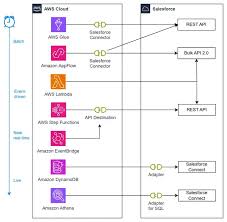
Unlock Real-Time Insights with AWS IoT and Salesforce Industry Clouds This guide explains how to gather, process, and distribute data from connected vehicles and industrial assets—such as manufacturing equipment or utility meters—into Salesforce Industry Cloud solutions using Amazon Web Services (AWS). Key AWS IoT Services for Data Collection By leveraging these services, businesses can integrate telemetry data into: Why This Integration Matters Strong customer relationships rely on real-time insights. Automakers, manufacturers, and utility providers can enhance customer interactions by unifying telemetry data with CRM workflows—enabling smarter marketing, sales, and service decisions. Prerequisites To integrate AWS IoT with Salesforce, you’ll need: AWS Services Salesforce Requirements Use Cases 1. Predictive Maintenance with AWS & Salesforce 2. In-Car Notifications 3. On-Demand Vehicle/Asset Health Insights 4. Data-Driven Customer Engagement Solution Architecture Data Flow Overview Implementation Steps 1. Set Up AWS IoT Rules 2. Configure Salesforce Event Handling 3. Enable Real-Time Analytics Conclusion By integrating AWS IoT with Salesforce Industry Clouds, businesses can:✔ Improve operational efficiency with predictive maintenance.✔ Enhance customer experiences through real-time alerts and diagnostics.✔ Drive data-driven decisions with unified analytics. Next Steps: Empower your teams with real-time IoT insights—start building today! Like Related Posts Who is Salesforce? Who is Salesforce? Here is their story in their own words. From our inception, we’ve proudly embraced the identity of Read more Salesforce Marketing Cloud Transactional Emails Salesforce Marketing Cloud Transactional Emails are immediate, automated, non-promotional messages crucial to business operations and customer satisfaction, such as order Read more Salesforce Unites Einstein Analytics with Financial CRM Salesforce has unveiled a comprehensive analytics solution tailored for wealth managers, home office professionals, and retail bankers, merging its Financial Read more AI-Driven Propensity Scores AI plays a crucial role in propensity score estimation as it can discern underlying patterns between treatments and confounding variables Read more

Read More
Autonomous AI Service Agents

The AI Agent Revolution

The AI Agent Revolution: How Tectonic is Unifying Disparate AI Systems for Enterprises AI agents are proliferating at breakneck speed—embedded in platforms, deployed as standalone apps, and built on proprietary or open-source SDKs. Yet as these intelligent systems multiply, enterprises face a critical challenge: getting them to communicate, collaborate, and scale effectively across complex IT environments. Recent moves by Tectonic, Salesforce, and Google Cloud highlight the next frontier of enterprise AI: seamless, cross-platform agent orchestration. We’ve reached an inflection point where human-AI synergy can transform business operations—but only if organizations can unify their agent ecosystems. The AI Agent Collaboration Challenge Today’s enterprises use AI agents for:✔ Salesforce’s Agentforce (CRM automation)✔ Google’s Agentspace (cloud-based workflows)✔ Custom agents (built on Vertex AI, OpenAI, or open-source models) But without interoperability, these agents operate in silos—limiting their potential. Tectonic bridges this gap with secure, enterprise-grade agent orchestration, enabling businesses to: Tectonic and Supported Agent OS: The Glue Holding AI Ecosystems Together Tectonic and Agent Operating Systems (OS) are business-focused platform for orchestrating AI agents across enterprise environments. An “agent operating system” (AOS) is a type of operating system designed to facilitate the development, deployment, and management of AI agents, which are software systems that can act autonomously to achieve goals. AOS systems aim to provide a platform for AI agents to operate efficiently and effectively, offering features like resource management, context switching, and tool integration. AIOS, for example, is a particular implementation of this concept that aims to address the challenges of managing large language model (LLM)-based AI agents How It Works Real-World Use Cases 1. Salesforce + Google Gemini: Smarter CRM Salesforce’s Agentforce now integrates Google Gemini, enabling:🔹 Better RAG (Retrieval-Augmented Generation) for faster, more accurate customer responses🔹 Predictive trend analysis embedded directly in CRM workflows Tectonic’s Role: Deploys multi-agent solutions that turn AI insights into actionable items—like auto-recommending next steps for sales teams. 2. Retail: Unified Customer Experiences A retailer combines: Result: Customers get instant, accurate updates on orders—no manual backend checks required. 3. Financial Services: AI-Powered Risk Analysis Banks use: Outcome: Suspicious transactions trigger automated compliance workflows without leaving Salesforce. Tectonic’s AI Activation Path: From Pilot to Production For enterprises ready to scale AI agents, Tectonic offers a rapid deployment framework:✅ Discovery and Road Mapping – Co-design high-impact use cases✅ Rapid Implementation – Deploy working agents in sandbox environments✅ Pre-Built Industry Libraries – Accelerate time-to-value The Future: Harmonized AI Ecosystems The biggest barrier to AI adoption isn’t technology—it’s fragmentation. With the Agent OS in place, businesses can finally:✔ Break down silos between Salesforce, Google Cloud, and custom AI✔ Automate complex workflows end-to-end✔ Scale AI responsibly with enterprise-grade governance The bottom line? AI agents are powerful alone—but unstoppable when unified. Ready to orchestrate your AI ecosystem?Discover how Tectonic’s Agentforce approach can transform your enterprise AI strategy. Like Related Posts Who is Salesforce? Who is Salesforce? Here is their story in their own words. From our inception, we’ve proudly embraced the identity of Read more Salesforce Marketing Cloud Transactional Emails Salesforce Marketing Cloud Transactional Emails are immediate, automated, non-promotional messages crucial to business operations and customer satisfaction, such as order Read more Salesforce Unites Einstein Analytics with Financial CRM Salesforce has unveiled a comprehensive analytics solution tailored for wealth managers, home office professionals, and retail bankers, merging its Financial Read more AI-Driven Propensity Scores AI plays a crucial role in propensity score estimation as it can discern underlying patterns between treatments and confounding variables Read more

Read More
Salesforce Anywhere

Salesforce Anywhere

Salesforce Anywhere: The Future of Remote Collaboration The New Era of Distributed Work Modern businesses rely on remote teams to drive productivity and growth. Salesforce Anywhere redefines remote collaboration by integrating powerful communication, file-sharing, and project management tools directly into Salesforce—keeping teams connected, customers engaged, and workflows streamlined—all from a single platform. Why Remote Teams Need Salesforce Anywhere Remote work introduces challenges that hinder productivity:❌ Scattered communications – Delayed responses, lost messages❌ Disconnected workflows – Manual updates, switching between tools❌ Low visibility – Missed deadlines, stagnant deals❌ Security risks – Data leaks from unsecured file-sharing Salesforce Anywhere solves these problems by unifying collaboration within Salesforce, so teams can:✔ Chat, share files, and track projects without leaving CRM records✔ Automate repetitive tasks to focus on high-value work✔ Get AI-powered alerts to prevent missed opportunities✔ Integrate with Slack, Teams, and Google Workspace for seamless workflows Key Features for Remote Productivity 1. Centralized Document & File Sharing Problem: Files scattered across email, cloud drives, and messaging apps slow down work.Solution: Business Impact:🔹 No more lost files or duplicate versions🔹 Faster access to critical documents🔹 Secure sharing without external tools 2. Workflow Automation Problem: Manual follow-ups, approvals, and task assignments waste time.Solution: Business Impact:🔹 30-50% faster deal progression🔹 Fewer missed follow-ups🔹 Reduced administrative workload 3. AI-Powered Alerts & Insights Problem: Remote teams miss critical signals (stagnant deals, unhappy customers).Solution: Business Impact:🔹 Proactive issue resolution🔹 Higher customer retention🔹 Better project on-time delivery 4. Seamless Tool Integrations Problem: Constant app-switching kills productivity.Solution: Business Impact:🔹 40% less time wasted switching apps🔹 Unified communication history🔹 Fewer missed updates Business Benefits at a Glance Challenge Salesforce Anywhere Solution Outcome Disconnected teams Real-time chat & file-sharing in CRM Stronger collaboration Manual workflows Automated task assignments Faster execution Missed insights AI-driven alerts Smarter decisions Tool fragmentation Slack/Teams/Google integrations Streamlined work Data security risks Enterprise-grade encryption Protected information Best Practices for Implementation The Bottom Line Salesforce Anywhere isn’t just another collaboration tool—it’s the only platform that embeds teamwork directly into your CRM. By eliminating app-switching, automating busywork, and surfacing AI-driven insights, it helps remote teams work faster, smarter, and more securely—all while strengthening customer relationships. 🚀 Ready to transform remote work? Get started with Salesforce Anywhere today. Like Related Posts Who is Salesforce? Who is Salesforce? Here is their story in their own words. From our inception, we’ve proudly embraced the identity of Read more Salesforce Marketing Cloud Transactional Emails Salesforce Marketing Cloud Transactional Emails are immediate, automated, non-promotional messages crucial to business operations and customer satisfaction, such as order Read more Salesforce Unites Einstein Analytics with Financial CRM Salesforce has unveiled a comprehensive analytics solution tailored for wealth managers, home office professionals, and retail bankers, merging its Financial Read more AI-Driven Propensity Scores AI plays a crucial role in propensity score estimation as it can discern underlying patterns between treatments and confounding variables Read more

Read More
gettectonic.com