Tableau Archives - gettectonic.com - Page 4
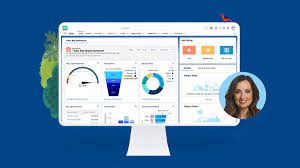
Account Planning With Salesforce

CRM Analytics Limits

When using CRM Analytics, keep these limits in mind. API Call Limits These limits apply to all supported editions. API Call Limit Maximum concurrent CRM Analytics API calls per org 100 Maximum CRM Analytics API calls per user per hour 10,000 Dataset Row Storage Allocations per License In Salesforce org, your total row storage limit for all registered datasets combined depends on your license combination. Each license allocates a different number of rows. Baseline Row Allocation Allocated Rows CRM Analytics Plus 10 billion CRM Analytics Growth 100 million Sales Analytics 25 million Service Analytics 25 million Event Monitoring Analytics 50 million B2B Marketing Analytics 25 million CRM Analytics for Financial Services Cloud 25 million CRM Analytics for Health Cloud 25 million Extra Data Rows license 100 million Your total row storage limit is a combination of your active licenses. For example: Because the CRM Analytics Plus license includes the Sales Analytics and Service Analytics licenses, your total row allocation remains 10 billion. Similarly, the CRM Analytics Growth license includes the Sales Analytics and the Service Analytics licenses, so your total row allocation remains 100 million. However, if you obtain another Sales Analytics or Services Analytics license, your row limit increases by 25 million for each added license. Dataset Row Limits Each dataset supports up to 2 billion rows. If your Salesforce org has less than 2 billion allocated rows, each dataset supports up to your org’s allocated rows. Dataset Field Limits Value Limit Maximum number of fields in a dataset 5,000 (including up to 1,000 date fields) Maximum number of decimal places for each value in a numeric field in a dataset (overflow limit) 17 decimal placesWhen a value exceeds the maximum number of decimal places, it overflows. Both 100,000,000,000,000,000 and 10,000,000,000,000,000.0 overflow because they use more than 17 decimal places. A number also overflows if it’s greater (or less) than the maximum (or minimum) supported value. 36,028,797,018,963,968 overflows because its value is greater than 36,028,797,018,963,967. -36,028,797,018,963,968 overflows because it’s less than -36,028,797,018,963,967.When a number overflows, the resulting behavior in CRM Analytics is unpredictable. Sometimes CRM Analytics throws an error. Sometimes it replaces a numeric value with a null value. And sometimes mathematical calculations, such as sums or averages, return incorrect results. Occasionally, CRM Analytics handles numbers up to 19 digits without overflowing because they are within the maximum value for a 64-bit signed integer (263 – 1). But numbers of these lengths aren’t guaranteed to process.As a best practice, stick with numbers that are 17 decimal places or fewer. If numbers that would overflow are necessary, setting lower precision and scale on the dataset containing the large numbers sometimes prevents overflow. If your org hasn’t enabled the handling of numeric values, the maximum number of decimal places for each value in a numeric field in a dataset is 16. All orgs created after Spring ’17 have Null Measure Handling enabled. Maximum value for each numeric field in a dataset, including decimal places 36,028,797,018,963,967For example, if three decimal places are used, the maximum value is 36,028,797,018,963.967 Minimum value for each numeric field in a dataset, including decimal places -36,028,797,018,963,968For example, if five decimal places are used, the minimum value is -36,028,797,018,9.63968 Maximum number of characters in a field 32,000 Data Sync Limits If you extract more than 100 objects in your dataflows, contact Salesforce Customer Support before you enable data sync. Value Limit Maximum number of concurrent data sync runs 3 Maximum number of objects that can be enabled for data sync, including local and remote objects 100 Maximum amount of time each data sync job can run for local objects 24 hours Maximum amount of time each data sync job can run for remote objects 12 hours Data sync limits for each job:Marketo Connector (Beta)NetSuite ConnectorZendesk Connector Up to 100,000 rows or 500 MB per object, whichever limit is reached first Data sync limits for each job:Amazon Athena ConnectorAWS RDS Oracle ConnectorDatabricks ConnectorGoogle Analytics ConnectorGoogle Analytics Core Reporting V4 ConnectorOracle Eloqua ConnectorSAP HANA Cloud ConnectorSAP HANA Connector Up to 10 million rows or 5 GB per object, whichever limit is reached first Data sync limits for each job*:AWS RDS Aurora MySQL ConnectorAWS RDS Aurora PostgresSQL ConnectorAWS RDS MariaDB ConnectorAWS RDS MySQL ConnectorAWS RDS PostgreSQL ConnectorAWS RDS SQL Server ConnectorGoogle Cloud Spanner ConnectorMicrosoft Azure Synapse Analytics ConnectorMicrosoft Dynamics CRM ConnectorSalesforce External ConnectorSalesforce Contacts Connector for Marketing Cloud EngagementSalesforce OAuth 2.0 Connector for Marketing Cloud Engagement Up to 20 million rows or 10 GB per object, whichever limit is reached first Data sync limits for each job*:Amazon Redshift ConnectorAmazon S3 ConnectorCustomer 360 Global Profile Data Connector (Beta)Google BigQuery for Legacy SQL ConnectorGoogle BigQuery Standard SQL ConnectorHeroku Postgres ConnectorMicrosoft Azure SQL Database ConnectorSnowflake Input Connector Up to 100 million rows or 50 GB per object, whichever limit is reached first *When using these connectors, Salesforce Government Cloud org data is protected in transit with advanced encryption and can sync up to 10 million rows or 5 GB for each connected object, whichever limit is reached first. Note When using a Salesforce local input connection, CRM Analytics bulk API usage doesn’t count towards Salesforce bulk API limits. Use of the external Salesforce connection and output connection impacts your limits. The dataflow submits a separate bulk API call to extract data from each Salesforce object. The dataflow uses a batch size of 100,000–250,000, depending on whether the dataflow or the bulk API chunks the data. As a result, to extract 1 million rows from an object, the dataflow creates 4–10 batches. Recipe and Dataflow Limits Important In Winter ‘24, recipe runs over 2 minutes are counted against the limit. Previously, the recipe run counts weren’t correct. For more information, see Known Issue – Recipe runs are not counting towards the daily maximum run limit. Value Limit Maximum amount of time each recipe or dataflow can run 48 hours Maximum number of recipes 1,000 Maximum number of dataflows definitions (with data sync enabled) 100 Maximum number of dataflow and recipe runs in a rolling
Read More
what is tableau gpt

What is Tableau GPT

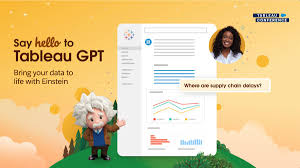
Tableau GPT is a suite of AI-powered features within the Tableau platform designed to simplify and democratize data analysis. It leverages generative AI to automate tasks, generate insights, and make data more accessible to a wider range of users, including those with less technical expertise.  Key features and capabilities of Tableau GPT: How Tableau GPT benefits users: Like Related Posts Who is Salesforce? Who is Salesforce? Here is their story in their own words. From our inception, we’ve proudly embraced the identity of Read more Salesforce Unites Einstein Analytics with Financial CRM Salesforce has unveiled a comprehensive analytics solution tailored for wealth managers, home office professionals, and retail bankers, merging its Financial Read more AI-Driven Propensity Scores AI plays a crucial role in propensity score estimation as it can discern underlying patterns between treatments and confounding variables Read more Tectonic’s Successful Salesforce Track Record Salesforce Technology Services Integrator – Tectonic has successfully delivered Salesforce in a variety of industries including Public Sector, Hospitality, Manufacturing, Read more

Read More
Line Charts

Line Charts

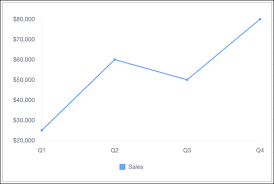
Line Charts: A Comprehensive Guide Overview Line charts are ideal for visualizing changes in values over time, such as weekly, quarterly, or monthly trends. They work best when you have: Availability Types of Line Charts 1. Standard Line Chart 2. Grouped Line Chart 3. Cumulative Line Chart 4. Grouped Cumulative Line Chart Customizing Line Charts In the Chart Editor, use the Customize tab to adjust: 1. Style 2. Series 3. Horizontal Axis 4. Vertical Axis Sample Data & Use Case Quarter Sales Q1 $25,000 Q2 $60,000 Q3 $50,000 Q4 $80,000 Example Visualization:A line chart plotting quarterly sales trends. Advanced Technique: Summed Line Graph Task: Create a line graph where one line represents the total sum of all other lines. Steps (Using Tableau Superstore Data Example) This creates a line chart with individual category trends and a summed total line. Key Takeaways Like Related Posts Who is Salesforce? Who is Salesforce? Here is their story in their own words. From our inception, we’ve proudly embraced the identity of Read more Salesforce Marketing Cloud Transactional Emails Salesforce Marketing Cloud Transactional Emails are immediate, automated, non-promotional messages crucial to business operations and customer satisfaction, such as order Read more Salesforce Unites Einstein Analytics with Financial CRM Salesforce has unveiled a comprehensive analytics solution tailored for wealth managers, home office professionals, and retail bankers, merging its Financial Read more AI-Driven Propensity Scores AI plays a crucial role in propensity score estimation as it can discern underlying patterns between treatments and confounding variables Read more

Read More
crm analytics

Understand Customer Service Analytics

Customer Service Analytics: Types, Use Cases & Key Benefits Customer service analytics transforms raw customer data into actionable insights—helping businesses improve support, boost retention, and drive revenue. With today’s complex customer journeys, analytics tools are essential for tracking interactions, predicting trends, and optimizing experiences. What Is Customer Service Analytics? Customer service analytics involves collecting and analyzing data from every touchpoint—support tickets, purchases, surveys, social media, and more. Companies use this data to: By leveraging analytics, businesses move from reactive problem-solving to proactive customer success strategies. 4 Key Types of Customer Service Analytics 1. Customer Experience (CX) Analytics What it does: Tracks key support metrics to assess performance and identify trends.Key metrics: Why it matters: 2. Customer Journey Analytics What it does: Maps the full customer lifecycle—from first contact to repeat purchases.Key data sources: Why it matters: 3. Customer Retention Analytics What it does: Measures loyalty and identifies churn risks.Key metrics: Why it matters: 4. Customer Engagement Analytics What it does: Tracks interactions across all channels (email, chat, social media).Key insights: Why it matters: Top 7 Customer Service Metrics to Track Metric What It Measures Why It Matters CSAT Customer satisfaction Gauges service quality First Response Time Speed of initial reply Impacts customer perception Time to Resolution Issue resolution speed Reduces frustration Customer Effort Score Ease of getting help Lower effort = higher loyalty Churn Rate Lost customers Identifies retention issues Lifetime Value (CLV) Customer profitability Guides long-term strategy Loyal Customer Rate Repeat buyers Measures brand advocacy How Analytics Improves Customer Service “Analytics turns raw data into stories—revealing relationships and driving smarter decisions.” – Susan Lahey Choosing the Right Analytics Software The best tools integrate data from all customer touchpoints, offering: Key takeaway: Don’t fear the data—embrace it. With the right analytics strategy, businesses can enhance CX, reduce churn, and boost revenue. Like Related Posts Who is Salesforce? Who is Salesforce? Here is their story in their own words. From our inception, we’ve proudly embraced the identity of Read more Salesforce Marketing Cloud Transactional Emails Salesforce Marketing Cloud Transactional Emails are immediate, automated, non-promotional messages crucial to business operations and customer satisfaction, such as order Read more Salesforce Unites Einstein Analytics with Financial CRM Salesforce has unveiled a comprehensive analytics solution tailored for wealth managers, home office professionals, and retail bankers, merging its Financial Read more AI-Driven Propensity Scores AI plays a crucial role in propensity score estimation as it can discern underlying patterns between treatments and confounding variables Read more

Read More

AI in Sales Enablement

automation, and personalization to enhance sales processes, increase customer engagement, and drive revenue growth. Companies are working with AI to improve analysis of all customer contact points to both identify leads and weigh lead quality. That includes ingesting information from web pages, email campaigns, phone calls, and much more.

Read More
Salesforce Health Cloud

Salesforce Health Cloud Information

Since its inception in 2016, Salesforce Health Cloud has evolved significantly, adapting to the intricacies of the sensitive and dynamic health industry. The latest addition to its offerings, Customer 360 for Health, represents a strategic move towards more empathetic care, bolstering patient trust and fostering team collaboration.

Read More
How Good is Our Data

Agiloft Salesforce Integration

Optimize organizational efficiency, performance, and value by automating contracts with Agiloft Contract Lifecycle Management Software. Regain control and streamline processes through seamless integration with Salesforce. Read on about Agiloft Salesforce integration to learn more. Agiloft’s core platform offers direct integrations that facilitate interaction within your daily tools. Collaborate effortlessly in Microsoft Teams, Outlook, and Office, exchange data seamlessly in Salesforce, and create actionable dashboards in Tableau or Power BI. Integration works in two directions: inbound and outbound. Inbound integration occurs when an external system initiates contact with Salesforce, while outbound integration involves Salesforce initiating contact with an external system. Wondering about the cloud aspect? Agiloft is purposefully designed as a pure web application with full multi-tenancy support. It stands out by being available as a Hosted Cloud service and also for deployment on-premise, providing flexibility to suit your specific needs. Agiloft Salesforce integration is one of the many Salesforce integrations Tectonic can handle. Extend your Salesforce CRM Experience by adding a no-code, AI-powered Contract Lifecycle Management (CLM) solution. Eliminate red tape and automate the contracting process Full Salesforce integration with one-click contract creation of proposals, MSAs, and other agreements as well as automated approval processes integrated with email, SMS, and e-signature. Minimize revenue leakage from contracts Keep track of performance obligations, contract end-dates, renewals, and invoicing as well as recommend actions to maximize revenue. Build custom dashboards to track KPIs and issue alerts as required. Like Related Posts Who is Salesforce? Who is Salesforce? Here is their story in their own words. From our inception, we’ve proudly embraced the identity of Read more Salesforce Marketing Cloud Transactional Emails Salesforce Marketing Cloud Transactional Emails are immediate, automated, non-promotional messages crucial to business operations and customer satisfaction, such as order Read more Salesforce Unites Einstein Analytics with Financial CRM Salesforce has unveiled a comprehensive analytics solution tailored for wealth managers, home office professionals, and retail bankers, merging its Financial Read more AI-Driven Propensity Scores AI plays a crucial role in propensity score estimation as it can discern underlying patterns between treatments and confounding variables Read more

Read More
gettectonic.com