
UX Archives - gettectonic.com - Page 6
Deep Dive Summer 24 Release

Deep Dive Summer 24 Release

Deep Dive Summer 24 Release Get ready, Salesforce fans! The Summer ’24 release is here, and it’s like Christmas morning for tech geeks. We’re talking about new features, enhancements, and improvements that will make you wonder how you ever lived without them. This Tectonic insight is your ultimate guide to all the exciting updates, changes, and key considerations for this release. So hang on tight to your keyboards and let’s dive into the Christmas treat bag of goodies coming your way! Key Highlights – Deep Dive Summer 24 Release What’s New in Einstein AI? 1. Einstein for Flow Meet your new best friend for building Salesforce workflows, Salesforce Flow. Just describe what you need in plain English, and Einstein will whip up the workflow for you. For example, say “Notify sales reps when a lead converts,” and boom, it’s done. Automation just got a whole lot easier and way cooler. How to: Einstein for Flow makes complex processes feel like a walk in the park, letting you deliver solutions faster than you can say “workflow.” Considerations: 2. Einstein for Formulas No more tearing your hair out over formula syntax errors. Einstein for Formulas will not only tell you what’s wrong but also suggest fixes, saving you from endless hours of debugging. How to: Einstein for Formulas cuts down errors and speeds up formula creation, making your life exponentially easier. Like easier squared. Easier to the nth degree. Considerations: UI/UX Enhancements 1. Add New Custom Fields to Dynamic Forms-Enabled Pages Say goodbye to limitations! You can now add new custom fields directly to Dynamic Forms-enabled pages, aligning fields with your ever-changing business needs. Considerations: 2. Use Blank Spaces to Align Fields on Dynamic Forms-Enabled Pages Finally, a way to make your Dynamic Forms pages look neat and tidy with blank spaces for perfect alignment. Considerations: 3. Set Conditional Visibility for Individual Tabs in Lightning App Builder Now you can make specific tabs visible based on user profiles, record types, or other criteria. Customization just got a whole lot more precise. Considerations: 4. Create Rich Text Headings in Lightning App Builder Make your headings pop with bold, italic, and varied font sizes. Your Lightning pages are about to get a visual upgrade. Considerations: Flow Updates 1. Automation Lightning App A one-stop shop for managing and executing all your automation tools and processes. Considerations: 2. Lock and Unlock Records with Action Gain more control over your processes by locking records during critical stages and unlocking them when done. Considerations: 3. Check for Matching Records (Upsert) When Creating Records Avoid duplicates by checking for existing records before creating new ones. One can never have too many de-dupe tools. Considerations: 4. Transform Your Data in Flows (Generally Available) Now generally available, perform calculations, data transformations, and more with the Transform element in Flow Builder. Considerations: Admin Enhancements 1. Field History Tracking Manage tracked objects and fields more efficiently with a centralized page in “Setup.” Considerations: 2. See What’s Enabled in Permission Sets and Permission Set Groups (Generally Available) Enhanced permission set viewing improves visibility and control over security configurations. Considerations: 3. Get a Summary of User’s Permissions and Access Quickly view user permissions, public groups, and queues from the user’s detail page. Help and Training Community: Salesforce is simplifying Permission Set management by phasing out Profiles. Data Cloud Vector Database Vector search capabilities allow the creation of searchable “vector embeddings” from unstructured data, enhancing AI applications’ understanding of semantic similarities and context. Considerations: Deep Dive Summer 24 Release The Salesforce Summer ’24 release is packed with features designed to enhance your Salesforce experience. From a sleek new interface to powerful automation tools, enhanced analytics, and expanded integration options, this release aims to elevate workflow efficiency and data protection. Jump into the exciting updates, and let’s make automation simpler and more user-friendly together! Like1 Related Posts Who is Salesforce? Who is Salesforce? Here is their story in their own words. From our inception, we’ve proudly embraced the identity of Read more Salesforce Marketing Cloud Transactional Emails Salesforce Marketing Cloud Transactional Emails are immediate, automated, non-promotional messages crucial to business operations and customer satisfaction, such as order Read more Salesforce Unites Einstein Analytics with Financial CRM Salesforce has unveiled a comprehensive analytics solution tailored for wealth managers, home office professionals, and retail bankers, merging its Financial Read more AI-Driven Propensity Scores AI plays a crucial role in propensity score estimation as it can discern underlying patterns between treatments and confounding variables Read more

Read More
Salesforce Feeding Post-Pandemic AI-Powered Digital Transformation

Salesforce Feeding Post-Pandemic AI-Powered Digital Transformation

The Digital Transformation Imperative: Salesforce’s AI Solutions The COVID-19 pandemic didn’t just accelerate digital transformation; it cemented it as an existential imperative for businesses across all industries. The sudden shift to remote work, digital customer engagement, and e-commerce highlighted the stark contrast between organizations that had prioritized digitization and those that hadn’t. In the post-pandemic era, digital agility has become synonymous with resilience and competitiveness. Salesforce Feeding Post-Pandemic AI-Powered Digital Transformation with unparalled innovation. However, the path to digital transformation remains challenging for many companies. Legacy systems, data silos, and manual processes continue to hinder adaptation and innovation at the pace demanded by today’s market and consumer. This has led to a certain weariness and skepticism around transformation initiatives, often perceived as an ever-receding target. Salesforce’s AI-Powered Integration Solutions Salesforce’s AI-powered integration solutions aim to revitalize the digital transformation journey. With tools like Einstein for Flow, Intelligent Document Processing (IDP), and Einstein for MuleSoft, Salesforce is embedding AI across its automation and integration portfolio to address some of the most difficult challenges in digitization. Anypoint Partner Manager: Harnessing AI for B2B Integration Salesforce’s latest MuleSoft offering, Anypoint Partner Manager, exemplifies this AI-centric approach. The cloud-native B2B integration solution leverages IDP to streamline partner onboarding and manage API and EDI-based transactions, addressing a key pain point for companies in complex supply chain ecosystems. “EDI has historically been that code-driven solution. You must really know the EDI spec,” noted Andrew Comstock, VP of Product Management at Salesforce. “Partner Manager actually brings the partner definition into a form, and you can just define that, save it, and you’re off and done. We can deploy all the applications that you need for you.” By using AI to extract and structure data from unstructured documents like invoices and purchase orders, Anypoint Partner Manager democratizes B2B integration, making it accessible to businesses beyond the traditional technology sector. The solution is now generally available. MuleSoft Accelerator for Salesforce Order Management: Bridging B2B and B2C Salesforce also introduced the MuleSoft Accelerator for Salesforce Order Management. This tool provides pre-built APIs, connectors, and templates to unify B2B and B2C orders from a centralized hub. By connecting Salesforce OMS with ERP systems in real-time, the accelerator enables end-to-end visibility across channels, a critical capability in today’s omnichannel environment. “For many companies, [order management] is super critical and vital,” emphasized Comstock. “The more that they can standardize and centralize that, the better visibility, controls, and governance they have.” The MuleSoft Accelerator for Salesforce OMS is now generally available. The AI Imperative in Digital Transformation Salesforce’s AI-powered integration solutions come at a time when businesses are grappling with the realities of the post-pandemic digital imperative. Automating complex B2B processes, unifying data flows across ecosystems, and extracting insights from unstructured data is no longer a luxury but a necessity for survival in the digital economy. Salesforce Feeding Post-Pandemic AI-Powered Digital Transformation “A lot of our successes are happening at companies that are not traditional technology companies. Using solutions like MuleSoft and Salesforce allows them to build those technologies better,” noted Comstock. In this context, AI is emerging as a key enabler of digital transformation at scale. By abstracting complexity and automating manual tasks, AI-powered integration tools like those from Salesforce are helping businesses overcome the hurdles that have long stymied digitization efforts. For companies still wrestling with the challenges of digital transformation, Salesforce’s AI-powered integration portfolio offers a glimmer of hope. By harnessing the power of large language models and other AI technologies to streamline integration and automation, Salesforce is providing a new path forward for organizations looking to thrive in the post-pandemic digital landscape. Salesforce Feeding Post-Pandemic AI-Powered Digital Transformation with Einstein, Mulesoft, Flow, and more. Like Related Posts Who is Salesforce? Who is Salesforce? Here is their story in their own words. From our inception, we’ve proudly embraced the identity of Read more Salesforce Marketing Cloud Transactional Emails Salesforce Marketing Cloud Transactional Emails are immediate, automated, non-promotional messages crucial to business operations and customer satisfaction, such as order Read more Salesforce Unites Einstein Analytics with Financial CRM Salesforce has unveiled a comprehensive analytics solution tailored for wealth managers, home office professionals, and retail bankers, merging its Financial Read more AI-Driven Propensity Scores AI plays a crucial role in propensity score estimation as it can discern underlying patterns between treatments and confounding variables Read more

Read More
AI Agents and Open APIs

AI Agents and Open APIs

How AI Agents and Open APIs Are Unlocking New Rebundling Opportunities While much of the 2023-24 excitement surrounding AI has focused on the capabilities of foundational models, the true potential of AI lies in reconfiguring value creation across vertical value chains, not just generating average marketing content. The Vertical AI Opportunity Most AI hype has centered on horizontal B2C applications, but the real transformative power of AI is in vertical B2B industries. This article delves into the opportunities within vertical AI and explores how companies can excel in this emerging space. Short-Term and Long-Term Strategies in Vertical AI In the short term, many vertical AI players focus on developing proprietary, fine-tuned models and user experiences to gain a competitive advantage. These niche models, trained on domain-specific data, often outperform larger foundational models in latency, accuracy, and cost. As models become more fine-tuned, changes in user experience (UX) must integrate these benefits into daily workflows, creating a flywheel effect. Vertical AI companies tend to operate as full-stack providers, integrating interfaces, proprietary models, and proprietary data. This level of integration enhances their defensibility because owning the user interface allows them to continually collect and refine data, improving the model. While this approach is effective in the short term, vertical AI players must consider the broader ecosystem to ensure long-term success. The Shift from Vertical to Horizontal Though vertical AI solutions may dominate in specific niches, long-term success requires moving beyond isolated verticals. Users ultimately prefer unified experiences that minimize switching between multiple platforms. To stay competitive in the long run, vertical AI players will need to evolve into horizontal solutions that integrate across broader ecosystems. Vertical Strategies and AI-Driven Rebundling Looking at the success of vertical SaaS over the last decade provides insight into the future of vertical AI. Companies like Square, Toast, and ServiceTitan have grown by first gaining adoption in a focused use case, then rapidly expanding by rebundling adjacent capabilities. This “rebundling” process—consolidating multiple unbundled capabilities into a comprehensive, customer-centric offering—helps vertical players establish themselves as the hub. The same principle applies to vertical AI, where the end game involves going vertical to later expand horizontally. AI’s Role in Rebundling The key to long-term competitive advantage in vertical AI lies not just in addressing a single pain point but in using AI agents to rebundle workflows. AI agents serve as a new hub for rebundling, enabling vertical AI players to integrate and coordinate diverse workflows across their solutions. Rebundling Workflows with AI Business workflows are often fragmented, spread across siloed software systems. Managers currently bundle these workflows together to meet business goals by coordinating across silos. But with advances in technology, B2B workflows are being transformed by increasing interoperability and the rise of AI agents. The Rebundling Power of AI Agents Unlike traditional software that automates specific tasks, AI agents focus on achieving broader goals. This enables them to take over the goal-seeking functions traditionally managed by humans, effectively unbundling goals from specific roles and establishing a new locus for rebundling. Vertical AI Players: Winners and Losers The effectiveness of vertical AI players will depend on the sophistication of their AI agents and the level of interoperability with third-party resources. Industries that offer high interoperability and sophisticated AI agents present the most significant opportunities for value creation. The End Game: From Vertical to Horizontal Ultimately, the goal for vertical AI players is to leverage their vertical advantage to develop a horizontal hub position. By using AI agents to rebundle workflows and integrate adjacent capabilities, vertical AI companies can transition from niche providers to central players in the broader ecosystem. This path—going vertical first to then expand horizontally—will define the winners in the AI-driven future of business transformation. Like Related Posts Who is Salesforce? Who is Salesforce? Here is their story in their own words. From our inception, we’ve proudly embraced the identity of Read more Salesforce Marketing Cloud Transactional Emails Salesforce Marketing Cloud Transactional Emails are immediate, automated, non-promotional messages crucial to business operations and customer satisfaction, such as order Read more Salesforce Unites Einstein Analytics with Financial CRM Salesforce has unveiled a comprehensive analytics solution tailored for wealth managers, home office professionals, and retail bankers, merging its Financial Read more AI-Driven Propensity Scores AI plays a crucial role in propensity score estimation as it can discern underlying patterns between treatments and confounding variables Read more

Read More
UX Principles for AI in Healthcare

Agentic Era of UX

The Agentic Era of UX The future of digital experience has arrived, but it’s fragmenting into countless micro-applications. The missing piece in AI user experience? The experience itself. It’s been almost a year and a half since generative AI burst onto the scene, heralded as transformative. But what have we actually seen in terms of user experience? Many companies released AI-powered summaries or search features, claimed them as revolutionary, and received applause—until the applause faded. The so-called “next era” of tech hasn’t yet delivered on its promise. We were given “the most profound technology since fire,” yet many implementations feel like candles that barely flicker. Many UX designers continue advocating for AI to solve genuine user needs. Technology must serve users, not just exist for its own sake. The core issue now is broader: AI has often been treated as a quick fix rather than a true UX transformation. Where user experience traditionally supports the entire journey, AI is being wedged into small, isolated tasks, losing the holistic perspective. For most companies, AI feels like a string of individual “use cases” rather than a full, cohesive UX meal. Many consulting firms push companies to prioritize use cases in terms of complexity and value, often resulting in chatbots that address a handful of user needs. There are notable exceptions, though. For example, Loom went beyond simple AI features to enhance the user’s entire workflow, supporting end-to-end functionality for video recording, transcription, editing, and even task management. Welcome to the Agentic Era of AI We’re now on the verge of the “agentic” era of AI. Industry leaders are abuzz with the potential of AI agents. OpenAI’s Sam Altman calls agents AI’s “killer function,” while other leaders predict this future is within reach, possibly within 3–18 months. The agentic promise is profound: AI agents, or “agentic workflows,” break down complex tasks into manageable steps, helping users complete intricate projects with autonomy. As Ezra Klein describes, imagine telling an AI to plan your child’s dragon-themed birthday party in Brooklyn, and the agent handles everything from booking to ordering the cake—transforming a casual AI prompt into tangible results. Today’s general-purpose models can’t handle this level of complexity independently. But agentic workflows make this possible by chaining AI actions, allowing systems to execute tasks step-by-step. A Vision for Agentic UX Design’s role in this era is to bring a vision of agentic UX to life. In traditional digital experiences, we build systems that assist users along their journey, but we still expect users to navigate the journey themselves. With an agentic UX, an AI partner supports the user at every step. This vision means UX will be defined by three pillars: Early examples are emerging, like Adobe’s Gen Studio, Intercom’s Copilot, and Dovetail’s Magic Experience, each taking steps toward a future where AI provides ongoing, meaningful support to users. An agentic UX doesn’t necessarily need to label itself “agent-powered.” Dovetail, for instance, offers a suite of “Magic” features where the AI partner plays a supporting role, from summarizing transcripts to highlighting key points. Over time, as AI evolves, these agents will assume greater responsibility in user journeys, shifting from supportive to proactive. Strategically Reinvent for the Agentic Era Adapting to the agentic era presents an opportunity—and a risk for those who ignore it. Currently, organizations are focused on laying the infrastructure for “AI readiness.” While that’s essential, it can obscure the longer-term vision of what’s possible. Until business leaders fully grasp the agentic UX’s potential, it’s up to design to step into a strategic role and make this vision vivid, relatable, and exciting. This requires more than launching a quick proof of concept; it demands a reimagining of digital experience. Here’s a recommended approach: It’s been a challenging year for design, with layoffs and value debates. But with the agentic era approaching, the strategic potential for UX is immense. Now is the time to rally, to guide organizations into a new era of digital experience where users are truly supported every step of the way. 4ox Like Related Posts Who is Salesforce? Who is Salesforce? Here is their story in their own words. From our inception, we’ve proudly embraced the identity of Read more Salesforce Unites Einstein Analytics with Financial CRM Salesforce has unveiled a comprehensive analytics solution tailored for wealth managers, home office professionals, and retail bankers, merging its Financial Read more AI-Driven Propensity Scores AI plays a crucial role in propensity score estimation as it can discern underlying patterns between treatments and confounding variables Read more Tectonic’s Successful Salesforce Track Record Salesforce Technology Services Integrator – Tectonic has successfully delivered Salesforce in a variety of industries including Public Sector, Hospitality, Manufacturing, Read more

Read More
Paradox of Writing With AI

Paradox of Writing With AI

It seems like some people honestly believe they can spot AI-generated content immediately, but that’s not always the case. Well-written content isn’t inherently AI-generated, and if it is AI-generated, that doesn’t necessarily mean it’s well-written. The quality of writing often depends more on the writer’s skill than the tools they use. Paradox of Writing With AI is that it will make a good writer better. And it will make a bad writer worse. The real difference in human versus AI content lies in the accessibility of writing tools and the lack of proper ethical regulation for their use. This ease of access makes it simple for people to feel entitled to judge written content. True, if you publish your writing – online or elsewhere – you open it up for judgement. But imagine if UX design or data applications were graded as indiscriminately—those discussions would likely be confined to experts rather than becoming public debates on social media condemning all well-written content. Good writing requires creativity, flair, and uniqueness, among other skills, to truly impress readers. Good writing is well-organized and flows well with consistent style or voice from beginning to end. Good writing is also free from mistakes and errors in spelling, punctuation and grammar. But that alone doesn’t make it engaging or meaningful. A good writer will brainstorm for great ideas and follow them up with research. A good writer can think of fresh angles to view a topic. A good writer is sure to re-write and self-edit to make a better draft. AI has been integrated into various tools and applications long before ChatGPT was launched. Search engines use it to provide relevant results; social media algorithms keep your favorite content visible; Siri and Alexa rely on natural language processing and speech recognition; Netflix and Spotify use AI recommendation systems to cater to your tastes, and so on. AI enhances human ideas, not just in writing, but across many fields. Writing With AI is Inevitable For instance, Chinese Nobel laureate Mo Yan surprised everyone at the 65th-anniversary celebration of Shouhuo magazine by revealing he uses ChatGPT. During his speech praising fellow author Yu Hua, he mentioned that he struggled to write a commendation and asked a doctoral student to use ChatGPT for help. This revelation caused quite a stir, as it was unexpected for a Nobel Prize winner to use AI for writing. Why shouldn’t he? If AI makes a good writer better, then most of us should be employing it. Mo Yan isn’t alone. Rie Kudan, the 17th winner of Japan’s Akutagawa Prize, admitted to using ChatGPT for her novel, Tokyo-to Dojo-to. She stated that about 5% of the book consists of AI-generated sentences. Kudan, who is introverted, shared that frequent interactions with the AI tool allowed her to express personal thoughts she couldn’t comfortably discuss with others. ChatGPT’s responses often sparked dialogue in her novel, adding a unique dimension to her writing process. Grammarly, another AI tool, is why some people’s writing doesn’t reflect their irritation when discussing AI-generated content online. Grammarly has been widely used for editing and proofreading, ensuring users’ writing maintains a promotional tone and corrects errors without sounding sarcastic or bored. The Problem with Sounding Alike & The Uniqueness of a Writer’s Voice A significant issue with AI-generated content is that many written works sound similar. Writers need to develop unique voices. While Jane Austen, Mary Shelley, and the Brontë sisters are admirable, emulating their ornate language can interfere with communication’s primary purpose. Excessive fanciness can make speech overly flamboyant, akin to Oscar Wilde’s works. However asking AI to work through your content and put it in the voice of a known writer, add humor, or change the tense is time saving. The problem isn’t that AI enables people to produce well-crafted content. Many individuals have exceptional writing skills and huge vocabularies. The real issue is the uniformity in everyone’s writing, a lack of diversity that AI can perpetuate. Yet, you only have to Google any topic and you will find many blog posts and articles that share the same view, and perhaps the same voice. Some discussions about AI resemble early 2000s conspiracy theories about cell phones. While the context has changed, the tone remains similar. The Importance of Creativity in Writing & Our Language Creativity is essential in writing. Even AI relies on human creativity. Without our input, machines would repeatedly generate the same content. Machine learning in AI is about learning from people. Our role is crucial, demonstrating the value of our unique voices. Developing a unique voice takes time and effort, which is why creatives like Kelly McKernan, Nicki Minaj, Elin Hilderbrand, and Jonathan Franzen are suing AI companies for copyright infringement. These unique voices significantly impact language evolution, and it’s vital for us to continue growing creatively. Writers play a crucial role in language evolution by creating new words or phrases that captivate readers. Over time, these innovations can enrich the language. A writer’s distinctive style can set trends, leading to significant changes in language use. This power must be used wisely. Famous writers’ narrative structures and dialogue usage can inspire others. For example, Dr. Seuss coined “nerd,” J.R.R. Tolkien introduced “tween,” Milton created “pandemonium”, novelist William Gibson first used “cyberspace”, Johnathon Swift gave us “yahoo” in Gulliver’s Travels, and Charles Dickens gave us “boredom.” The core of a good piece of writing is a great idea. With a strong core idea, the writer can easily layer the content around it. Content even can build the framework from which comes a whole new word. Content includes interesting examples to which the reader can relate. That content needs to be well-organized and clear in form so that the reader can easily see the message or find the intended meaning. In addition, the writing should have style and the right voice that matches its topic and theme while also reflecting what the author believes.  Writing Through the Centuries Writing has evolved over centuries, influencing language development. During

Read More
AI Then and Now

AI Then and Now

AI: Transforming User Interactions and Experiences Have you ever been greeted by a waitress who already knows your breakfast order? It’s a relief not to detail every aspect — temperature, how do you want your eggs, what kind of juice, bacon or sausage, etc. This example encapsulates the journey we’re navigating with AI today. AI Then and Now. This article isn’t about ordering breakfast; it’s about the evolution of user interactions, particularly how generative AI might evolve based on past trends in graphical user interfaces (GUIs) and emerging trends in AI interactions. We’ll explore the significance of context bundling, user curation, trust, and ecosystems as key trends in AI user experience in this Tectonic insight. From Commands to Conversations Let’s rewind to the early days of computing when users had to type precise commands in a Command-Line Interface (CLI). Imagine the challenge of remembering the exact command to open a file or copy data. This complexity meant that only a few people could use computers effectively. To reach a broader audience, a shift was necessary. You might think Apple’s creation of the mouse and drop down menues was the pinnacle of success, but truly the evolution predates Apple. Enter ELIZA in 1964, an early natural language processing program that engaged users in basic conversations through keyword recognition and scripted responses. Although groundbreaking, ELIZA’s interactions were far from flexible or scalable. Around the same time, Xerox PARC was developing the Graphical User Interface (GUI), later popularized by Apple in 1984 and Microsoft shortly thereafter. GUIs transformed computing by replacing complex commands with icons, menus, and windows navigable by a mouse. This innovation made computers accessible and intuitive for everyday tasks, laying the groundwork for technology’s universal role in our lives. Not only did it make computing accessible to the masses but it layed the foundation upon which every household would soon have one or more computers! The Evolution of AI Interfaces Just as early computing transitioned from the complexity of CLI to the simplicity of GUIs, we’re witnessing a parallel evolution in generative AI. User prompts are essentially mini-programs crafted in natural language, with the quality of outcomes depending on our prompt engineering skills. We are moving towards bundling complex inputs into simpler, more user-friendly interfaces with the complexity hidden in the background. Context Bundling Context bundling simplifies interactions by combining related information into a single command. This addresses the challenge of conveying complex instructions to achieve desired outcomes, enhancing efficiency and output quality by aligning user intent and machine understanding in one go. We’ve seen context bundling emerge across generative AI tools. For instance, sample prompts in Edge, Google Chrome’s tab manager, and trigger-words in Stable Diffusion fine-tune AI outputs. Context bundling isn’t always about conversation; it’s about achieving user goals efficiently without lengthy interactions. Context bundling is the difference in ordering the eggs versus telling the cook how to crack and prepare it. User Curation Despite advancements, there remains a spectrum of needs where users must refine outputs to achieve specific goals. This is especially true for tasks like researching, brainstorming, creating content, refining images, or editing. As context windows and multi-modal capabilities expand, guiding users through complexity becomes even more crucial. Humans constantly curate their experiences, whether by highlighting text in a book or picking out keywords in a conversation. Similarly, users interacting with ChatGPT often highlight relevant information to guide their next steps. By making it easier for users to curate and refine their outputs, AI tools can offer higher-quality results and enrich user experiences. User creation takes ordering breakfast from a manual conversational process to the click of a button on a vending-like system. Designing for Trust Trust is a significant barrier to the widespread adoption of generative AI. To build trust, we need to consider factors such as previous experiences, risk tolerance, interaction consistency, and social context. Without trust, in AI or your breakfast order, it becomes easier just to do it yourself. Trust is broken if the waitress brings you the wrong items, or if the artificial intelligence fails to meet your reasonable expectations. Context Ecosystems Generative AI has revolutionized productivity by lowering the barrier for users to start tasks, mirroring the benefits and journey of the GUI. However, modern UX has evolved beyond simple interfaces. The future of generative AI lies in creating ecosystems where AI tools collaborate with users in a seamless workflow. We see emergent examples like Edge, Chrome, and Pixel Assistant integrating AI functionality into their software. This integration goes beyond conversational windows, making AI aware of the software context and enhancing productivity. The Future of AI Interaction Generative AI will likely evolve to become a collaborator in our daily tasks. Tools like Grammarly and Github Copilot already show how AI can assist users in creating and refining content. As our comfort with AI grows, we may see generative AI managing both digital and physical aspects of our lives, augmenting reality and redefining productivity. The evolution of generative AI interactions is repeating the history of human-computer interaction. By creating better experiences that bundle context into simpler interactions, empower user curation, and augment known ecosystems, we can make generative AI more trustworthy, accessible, usable, and beneficial for everyone. Like Related Posts Who is Salesforce? Who is Salesforce? Here is their story in their own words. From our inception, we’ve proudly embraced the identity of Read more Salesforce Marketing Cloud Transactional Emails Salesforce Marketing Cloud Transactional Emails are immediate, automated, non-promotional messages crucial to business operations and customer satisfaction, such as order Read more Salesforce Unites Einstein Analytics with Financial CRM Salesforce has unveiled a comprehensive analytics solution tailored for wealth managers, home office professionals, and retail bankers, merging its Financial Read more AI-Driven Propensity Scores AI plays a crucial role in propensity score estimation as it can discern underlying patterns between treatments and confounding variables Read more
Read More
Communications Cloud Summer 24

Communications Cloud Summer 24

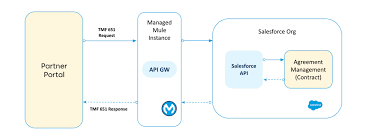
Salesforce Communications Cloud Summer ’24 Release: Elevating Business Performance and Workflow Efficiency With its Summer ’24 release, Salesforce Communications Cloud unveils an array of powerful new capabilities designed to elevate business performance and optimize workflow efficiency. In this blog, we’ll explore some of our favorite new features, including Field Service improvements that provide technicians with better insights and user experiences, new TM Forum API integrations, and Enterprise Sales Management (ESM) enhancements. Field Service Field Service for Industries optimizes field operations by equipping service teams with advanced tools, enabling companies to maximize asset lifetime value and enhance customer satisfaction. This release includes unique capabilities tailored for field technicians to help with work order execution and asset management. TM Forum In the latest Summer ’24 release, Salesforce has delivered two additional TM Forum APIs, enabling seamless integration of Communications Cloud instances with external systems. These include the TMF620 outbound Product Catalog Management and TMF651 inbound Agreement Management APIs. Enterprise Sales Management Conclusion The main features in the Summer ’24 release allow businesses to operate more efficiently, enhance user experience, and create an open and flexible platform with TM Forum APIs. There are also many other exciting enhancements such as CPQ API improvements, built-in diagnostic tools for EPC configuration, and more. Like Related Posts Who is Salesforce? Who is Salesforce? Here is their story in their own words. From our inception, we’ve proudly embraced the identity of Read more Salesforce Marketing Cloud Transactional Emails Salesforce Marketing Cloud Transactional Emails are immediate, automated, non-promotional messages crucial to business operations and customer satisfaction, such as order Read more Salesforce Unites Einstein Analytics with Financial CRM Salesforce has unveiled a comprehensive analytics solution tailored for wealth managers, home office professionals, and retail bankers, merging its Financial Read more AI-Driven Propensity Scores AI plays a crucial role in propensity score estimation as it can discern underlying patterns between treatments and confounding variables Read more

Read More
End of Support for Workflow Rules and Process Builder

End of Support for Workflow Rules and Process Builder

Every month Salesforce announces retirement and sundowning of products and features. For long-time Salesforce power users, this one feels like the end of an era. Salesforce has announced the end of support for Workflow Rules and Process Builder in 2025. Scheduled Paths are a replacement for Scheduled Actions in Process Builder and Time-Based Workflow Rules. And they even have some new and improved features like support for minutes! Flows can now call other sub-flows, a much-longed-for replacement for Process Builder’s ability to call Flows. End of Support for Workflow Rules and Process Builder Salesforce will no longer be supporting Workflow Rules and Process Builder on December 31, 2025, and we recommend that you migrate your automation to Flow Builder by that time. Have you taken advantage of all the powerful features of Flow? Not yet? Have no fear, and go with the Flow! We’ve curated a comprehensive guide of resources to take you from zero to hero on your journey with us to migrate your organization from Workflow Rules and/or Process Builder onto the newer and more powerful engine of Flow! Why move to Flow? What’s happening with Workflow Rules and Process Builder? Salesforce is starting the process of moving away from Workflow Rules and Process Builder, and transitioning to the more feature-rich functionality of Flow. You’re also probably wondering why Salesforce is retiring Workflow Rules and Process Builder. Salesforce wants to focus development on a modern, extensible, low-code automation solution in Flow Builder, which led to retire the previous features. What does this change mean for me?  If you have active Workflow Rules or Process Builder processes running after 2025, they will no longer receive customer support or bug fixes. What action can I take? We recommend implementing a plan to migrate any active rules or processes to Flow Builder before the deadline. Depending on the complexity of your org, this migration may take a significant amount of time and testing, so we recommend starting now. To assist in the migration process, we have a Migrate to Flow tool and extensive support resources available. What happens if I don’t take action? After December 31, 2025, Workflow Rules and Process Builder may continue to function and execute existing automation, but customer support will not be available, and bugs will not be fixed. How do I identify affected users? You can identify whether you have active workflow rules by going to Setup | Process Automation | Workflow Rules and sorting the Active column for checkmarks. You can identify whether you have active Process Builder processes by going to Setup | Process Automation | Process Builder and sorting the Status column for Active. If you have more questions, open a case with support via Salesforce Help. To view all current and past retirements, see Salesforce Product & Feature Retirements. What does the transition to Flows entail? The transition is set to take place in multiple phases. The first phase began with the Winter ’22 release, wherein the ability to create net-new Workflow Rules was turned off. In Summer ‘23 release the ability to create net-new processes in Process Builder will be disabled. In the last phase, Workflow Rules and Process Builder will go away entirely, and any platform automation will be leveraging Flow. This phased approach will allow administrators ample time to transition to Flow with as minimal effort as possible. What changed in the Winter ’22 release? As of Winter ’22, we’ve blocked the creation of Workflow Rules. You can still activate, deactivate, and edit any existing Workflow Rules. To test and create Workflow Rules for use in managed packages, developer orgs still allow you to create Workflow Rules. Process Builder has remained unaffected during this period. For new automation, use Flow. Link to Release Notes What changed in the Summer ’23 release? Starting in Summer ’23, Salesforce began blocking the creation of Process Builder Processes. Much like workflow rules above, you can still activate, deactivate, and edit any existing Processes. For new automation, use Flow. How can existing Workflow Rules & Processes be transitioned to Flow? A tool called “Migrate to Flow” allows you to covert existing Workflow Rules & Processes to Flow in an org, at the click of a button. More information about this tool can be found here. There are a few considerations to keep in mind as we roll out this tool. If your organization relies heavily on existing Workflow Rules or Process Builder, please consider starting the migration process today using the Migrate to Flow tool, rather than when the deadline approaches. This will also allow you to test the migrated Flows in small batches to ensure your organization’s needs are adequately met. How can I get started in Flow? For those with limited exposure to Flows, tinkering in a trailhead playground, demo org, or other non-production org is a great way to explore the capabilities of Flows. Once ready, admins can try creating any new automation needed in their organization in Flows rather than in Process Builder. Trailhead – The best place to start! Build Flows with Flow BuilderRecord-Triggered FlowsAutomate Your Business Processes with Salesforce Flow Automation Home Page – Watch videos, read blog posts, or explore other Trailhead offerings related to Flows. Trailhead Community Topics – Join the discussion!#Flow#Automation What about feature parity between Workflows/Processes and Flows? During the last few releases, many of the biggest parity gaps between Workflow Rules/Process Builder and Flow have been addressed already, including: Additionally, more and more gaps are being addressed with each new release. What about Approval Processes, Email Alerts, and other functionality operating on the workflow engine? There are no plans to retire any of these auxiliary features; however, each of them can be leveraged through flow (or Flow Orchestrator, in the case of approval processes), without the need to use processes or workflow rules at all. Flow Trailhead – Click Here Like1 Related Posts Who is Salesforce? Who is Salesforce? Here is their story in their own words. From our inception, we’ve proudly embraced the identity of Read

Read More
Learning AI

AI Success is a Team Sport

The contemporary workplace is currently experiencing a profound transformation. The Future of Jobs Report from the World Economic Forum predicts that AI will replace approximately 85 million jobs by 2025, while concurrently generating around 97 million AI-related jobs. AI Success is a Team Sport and will require hiring and training people. This significant shift necessitates a reevaluation of work dynamics, introducing new roles that involve collaboration between “humans, machines, and algorithms.” Amidst this transformative period, AI provides opportunities for organizations to reimagine existing roles, offer upskilling opportunities, and design innovative positions to meet evolving needs. For leaders in the data domain, the crucial task is to assess which jobs could benefit from AI. This requires a thorough understanding of organizational tasks, skills, and strategic goals, complemented by a scalable change management process to accommodate the growth of AI initiatives. To pinpoint relevant jobs, the following steps can be taken: Despite 67% of global business leaders considering the use of generative AI, an equal number of IT leaders acknowledge a skills gap among their employees. “I think most business leaders have a good sense of what the key jobs are inside their organizations. Of those key jobs, what are the good candidates for AI? I think it’s important for any executive—data or not—to understand what they are and plan accordingly.” SOLOMON KAHN DATA LEADERSHIP COLLABORATIVE  The implementation of AI necessitates a specialized team, encompassing roles from project managers to domain experts. The composition of the team depends on the project’s complexity, scope, budget, and overall strategic objectives. But to be sure, AI Success is a Team Sport. Key roles for AI initiatives include: AI acts as a disruptor to traditional business practices, and this disruption is viewed positively. The bonuses far outweigh the challenges. The new generation of user-friendly AI technologies, such as generative AI, has moved beyond the hype cycle, offering applications that generate personalized offers and automated chatbots capable of solving complex customer support issues. In this era powered by AI, data leaders play a pivotal role in driving transformative change. Like1 Related Posts Who is Salesforce? Who is Salesforce? Here is their story in their own words. From our inception, we’ve proudly embraced the identity of Read more Salesforce Marketing Cloud Transactional Emails Salesforce Marketing Cloud Transactional Emails are immediate, automated, non-promotional messages crucial to business operations and customer satisfaction, such as order Read more Salesforce Unites Einstein Analytics with Financial CRM Salesforce has unveiled a comprehensive analytics solution tailored for wealth managers, home office professionals, and retail bankers, merging its Financial Read more AI-Driven Propensity Scores AI plays a crucial role in propensity score estimation as it can discern underlying patterns between treatments and confounding variables Read more

Read More
UX Design Trends 2024

UX Design Trends 2024

Navigating Design Trends: AI, Discovery, Accessibility, and Collaboration. Salesforce UX Design Trends 2024. As we reflect on the past year and look ahead, design trends are emerging, signaling a pivotal moment in the intersection of creativity, usability, and AI. For developers, admins, architects, and business leaders, understanding these trends is crucial in shaping the future. Here are the four design trends steering this transformative journey: As we move forward, these design trends signify a paradigm shift, emphasizing the significance of AI, streamlined discovery, accessibility, and the growing collaboration between designers and developers. Navigating this transformative landscape requires an adaptable mindset and a commitment to ethical, inclusive design practices from the outset. When you work with Tectonic we take all these considerations to mind as we design or re-design your Salesforce org. Contact Tectonic today. UX Design Trends 2024 Like2 Related Posts Who is Salesforce? Who is Salesforce? Here is their story in their own words. From our inception, we’ve proudly embraced the identity of Read more Salesforce Marketing Cloud Transactional Emails Salesforce Marketing Cloud Transactional Emails are immediate, automated, non-promotional messages crucial to business operations and customer satisfaction, such as order Read more Salesforce Unites Einstein Analytics with Financial CRM Salesforce has unveiled a comprehensive analytics solution tailored for wealth managers, home office professionals, and retail bankers, merging its Financial Read more AI-Driven Propensity Scores AI plays a crucial role in propensity score estimation as it can discern underlying patterns between treatments and confounding variables Read more

Read More
Sales Cloud Innovation Driven by UX Design Principles

Sales Cloud Innovation Driven by UX Design Principles

Driving Sales Cloud Innovation Through UX Design Principles: Sales Cloud Innovation Driven by UX Design Principles Enhancing user experiences and driving innovation within Sales Cloud relies on the fundamental principles of UX design. The core philosophy revolves around understanding users’ needs and ensuring simplicity as the default, allowing for increased trust and success. Here’s how three foundational UX design principles guide the product design team at Salesforce: UX Design in Action: The principles of meeting users where they’re at, maintaining low walls and high ceilings, and favoring simplicity are integral to Sales Cloud’s UX design philosophy. By adhering to these principles, Sales Cloud strives to build confidence among users, fostering a collaborative approach to developing innovative and user-friendly products.  Sales Cloud administrators need to operate with the same thought process. Tectonic is proud to introduce our Sales Cloud Implementation Solutions. Content updated May 2024. Like1 Related Posts Who is Salesforce? Who is Salesforce? Here is their story in their own words. From our inception, we’ve proudly embraced the identity of Read more Salesforce Marketing Cloud Transactional Emails Salesforce Marketing Cloud Transactional Emails are immediate, automated, non-promotional messages crucial to business operations and customer satisfaction, such as order Read more Salesforce Unites Einstein Analytics with Financial CRM Salesforce has unveiled a comprehensive analytics solution tailored for wealth managers, home office professionals, and retail bankers, merging its Financial Read more AI-Driven Propensity Scores AI plays a crucial role in propensity score estimation as it can discern underlying patterns between treatments and confounding variables Read more

Read More
Account Planning With Salesforce

CRM Analytics Limits

When using CRM Analytics, keep these limits in mind. API Call Limits These limits apply to all supported editions. API Call Limit Maximum concurrent CRM Analytics API calls per org 100 Maximum CRM Analytics API calls per user per hour 10,000 Dataset Row Storage Allocations per License In Salesforce org, your total row storage limit for all registered datasets combined depends on your license combination. Each license allocates a different number of rows. Baseline Row Allocation Allocated Rows CRM Analytics Plus 10 billion CRM Analytics Growth 100 million Sales Analytics 25 million Service Analytics 25 million Event Monitoring Analytics 50 million B2B Marketing Analytics 25 million CRM Analytics for Financial Services Cloud 25 million CRM Analytics for Health Cloud 25 million Extra Data Rows license 100 million Your total row storage limit is a combination of your active licenses. For example: Because the CRM Analytics Plus license includes the Sales Analytics and Service Analytics licenses, your total row allocation remains 10 billion. Similarly, the CRM Analytics Growth license includes the Sales Analytics and the Service Analytics licenses, so your total row allocation remains 100 million. However, if you obtain another Sales Analytics or Services Analytics license, your row limit increases by 25 million for each added license. Dataset Row Limits Each dataset supports up to 2 billion rows. If your Salesforce org has less than 2 billion allocated rows, each dataset supports up to your org’s allocated rows. Dataset Field Limits Value Limit Maximum number of fields in a dataset 5,000 (including up to 1,000 date fields) Maximum number of decimal places for each value in a numeric field in a dataset (overflow limit) 17 decimal placesWhen a value exceeds the maximum number of decimal places, it overflows. Both 100,000,000,000,000,000 and 10,000,000,000,000,000.0 overflow because they use more than 17 decimal places. A number also overflows if it’s greater (or less) than the maximum (or minimum) supported value. 36,028,797,018,963,968 overflows because its value is greater than 36,028,797,018,963,967. -36,028,797,018,963,968 overflows because it’s less than -36,028,797,018,963,967.When a number overflows, the resulting behavior in CRM Analytics is unpredictable. Sometimes CRM Analytics throws an error. Sometimes it replaces a numeric value with a null value. And sometimes mathematical calculations, such as sums or averages, return incorrect results. Occasionally, CRM Analytics handles numbers up to 19 digits without overflowing because they are within the maximum value for a 64-bit signed integer (263 – 1). But numbers of these lengths aren’t guaranteed to process.As a best practice, stick with numbers that are 17 decimal places or fewer. If numbers that would overflow are necessary, setting lower precision and scale on the dataset containing the large numbers sometimes prevents overflow. If your org hasn’t enabled the handling of numeric values, the maximum number of decimal places for each value in a numeric field in a dataset is 16. All orgs created after Spring ’17 have Null Measure Handling enabled. Maximum value for each numeric field in a dataset, including decimal places 36,028,797,018,963,967For example, if three decimal places are used, the maximum value is 36,028,797,018,963.967 Minimum value for each numeric field in a dataset, including decimal places -36,028,797,018,963,968For example, if five decimal places are used, the minimum value is -36,028,797,018,9.63968 Maximum number of characters in a field 32,000 Data Sync Limits If you extract more than 100 objects in your dataflows, contact Salesforce Customer Support before you enable data sync. Value Limit Maximum number of concurrent data sync runs 3 Maximum number of objects that can be enabled for data sync, including local and remote objects 100 Maximum amount of time each data sync job can run for local objects 24 hours Maximum amount of time each data sync job can run for remote objects 12 hours Data sync limits for each job:Marketo Connector (Beta)NetSuite ConnectorZendesk Connector Up to 100,000 rows or 500 MB per object, whichever limit is reached first Data sync limits for each job:Amazon Athena ConnectorAWS RDS Oracle ConnectorDatabricks ConnectorGoogle Analytics ConnectorGoogle Analytics Core Reporting V4 ConnectorOracle Eloqua ConnectorSAP HANA Cloud ConnectorSAP HANA Connector Up to 10 million rows or 5 GB per object, whichever limit is reached first Data sync limits for each job*:AWS RDS Aurora MySQL ConnectorAWS RDS Aurora PostgresSQL ConnectorAWS RDS MariaDB ConnectorAWS RDS MySQL ConnectorAWS RDS PostgreSQL ConnectorAWS RDS SQL Server ConnectorGoogle Cloud Spanner ConnectorMicrosoft Azure Synapse Analytics ConnectorMicrosoft Dynamics CRM ConnectorSalesforce External ConnectorSalesforce Contacts Connector for Marketing Cloud EngagementSalesforce OAuth 2.0 Connector for Marketing Cloud Engagement Up to 20 million rows or 10 GB per object, whichever limit is reached first Data sync limits for each job*:Amazon Redshift ConnectorAmazon S3 ConnectorCustomer 360 Global Profile Data Connector (Beta)Google BigQuery for Legacy SQL ConnectorGoogle BigQuery Standard SQL ConnectorHeroku Postgres ConnectorMicrosoft Azure SQL Database ConnectorSnowflake Input Connector Up to 100 million rows or 50 GB per object, whichever limit is reached first *When using these connectors, Salesforce Government Cloud org data is protected in transit with advanced encryption and can sync up to 10 million rows or 5 GB for each connected object, whichever limit is reached first. Note When using a Salesforce local input connection, CRM Analytics bulk API usage doesn’t count towards Salesforce bulk API limits. Use of the external Salesforce connection and output connection impacts your limits. The dataflow submits a separate bulk API call to extract data from each Salesforce object. The dataflow uses a batch size of 100,000–250,000, depending on whether the dataflow or the bulk API chunks the data. As a result, to extract 1 million rows from an object, the dataflow creates 4–10 batches. Recipe and Dataflow Limits Important In Winter ‘24, recipe runs over 2 minutes are counted against the limit. Previously, the recipe run counts weren’t correct. For more information, see Known Issue – Recipe runs are not counting towards the daily maximum run limit. Value Limit Maximum amount of time each recipe or dataflow can run 48 hours Maximum number of recipes 1,000 Maximum number of dataflows definitions (with data sync enabled) 100 Maximum number of dataflow and recipe runs in a rolling

Read More
Communicating With Machines

Communicating With Machines

For as long as machines have existed, humans have struggled to communicate effectively with them. The rise of large language models (LLMs) has transformed this dynamic, making “prompting” the bridge between our intentions and AI’s actions. By providing pre-trained models with clear instructions and context, we can ensure they understand and respond correctly. As UX practitioners, we now play a key role in facilitating this interaction, helping humans and machines truly connect. The UX discipline was born alongside graphical user interfaces (GUIs), offering a way for the average person to interact with computers without needing to write code. We introduced familiar concepts like desktops, trash cans, and save icons to align with users’ mental models, while complex code ran behind the scenes. Now, with the power of AI and the transformer architecture, a new form of interaction has emerged—natural language communication. This shift has changed the design landscape, moving us from pure graphical interfaces to an era where text-based interactions dominate. As designers, we must reconsider where our focus should lie in this evolving environment. A Mental Shift In the era of command-based design, we focused on breaking down complex user problems, mapping out customer journeys, and creating deterministic flows. Now, with AI at the forefront, our challenge is to provide models with the right context for optimal output and refine the responses through iteration. Shifting Complexity to the Edges Successful communication, whether with a person or a machine, hinges on context. Just as you would clearly explain your needs to a salesperson to get the right product, AI models also need clear instructions. Expecting users to input all the necessary information in their prompts won’t lead to widespread adoption of these models. Here, UX practitioners play a critical role. We can design user experiences that integrate context—some visible to users, others hidden—shaping how AI interacts with them. This ensures that users can seamlessly communicate with machines without the burden of detailed, manual prompts. The Craft of Prompting As designers, our role in crafting prompts falls into three main areas: Even if your team isn’t building custom models, there’s still plenty of work to be done. You can help select pre-trained models that align with user goals and design a seamless experience around them. Understanding the Context Window A key concept for UX designers to understand is the “context window“—the information a model can process to generate an output. Think of it as the amount of memory the model retains during a conversation. Companies can use this to include hidden prompts, helping guide AI responses to align with brand values and user intent. Context windows are measured in tokens, not time, so even if you return to a conversation weeks later, the model remembers previous interactions, provided they fit within the token limit. With innovations like Gemini’s 2-million-token context window, AI models are moving toward infinite memory, which will bring new design challenges for UX practitioners. How to Approach Prompting Prompting is an iterative process where you craft an instruction, test it with the model, and refine it based on the results. Some effective techniques include: Depending on the scenario, you’ll either use direct, simple prompts (for user-facing interactions) or broader, more structured system prompts (for behind-the-scenes guidance). Get Organized As prompting becomes more common, teams need a unified approach to avoid conflicting instructions. Proper documentation on system prompting is crucial, especially in larger teams. This helps prevent errors and hallucinations in model responses. Prompt experimentation may reveal limitations in AI models, and there are several ways to address these: Looking Ahead The UX landscape is evolving rapidly. Many organizations, particularly smaller ones, have yet to realize the importance of UX in AI prompting. Others may not allocate enough resources, underestimating the complexity and importance of UX in shaping AI interactions. As John Culkin said, “We shape our tools, and thereafter, our tools shape us.” The responsibility of integrating UX into AI development goes beyond just individual organizations—it’s shaping the future of human-computer interaction. This is a pivotal moment for UX, and how we adapt will define the next generation of design. Content updated October 2024. Like Related Posts Who is Salesforce? Who is Salesforce? Here is their story in their own words. From our inception, we’ve proudly embraced the identity of Read more Salesforce Unites Einstein Analytics with Financial CRM Salesforce has unveiled a comprehensive analytics solution tailored for wealth managers, home office professionals, and retail bankers, merging its Financial Read more AI-Driven Propensity Scores AI plays a crucial role in propensity score estimation as it can discern underlying patterns between treatments and confounding variables Read more Tectonic’s Successful Salesforce Track Record Salesforce Technology Services Integrator – Tectonic has successfully delivered Salesforce in a variety of industries including Public Sector, Hospitality, Manufacturing, Read more

Read More
gettectonic.com