Salesforce Validation Rules
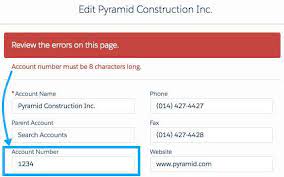
Essential Validation Rules for Salesforce Admins In this post, five essential validation rules that Salesforce admins should implement in their clients’ Salesforce orgs are discussed. Improve the quality of your data using validation rules. Validation rules verify that the data a user enters in a record meets the standards you specify before the user can save the record. Before digging into the specific rules this insight will highlight, let’s briefly review what validation rules are. What are Validation Rules in Salesforce? Validation rules in Salesforce are used to enforce data quality and consistency by validating the data entered by users before it is saved to the database. These rules consist of expressions or formulas that check the data against specified, required criteria. A validation rule can contain a formula or expression that evaluates the data in one or more fields and returns a value of “True” or “False”. Validation rules also include an error message to display to the user when the rule returns a value of “True” due to an invalid value. After you have defined validation rules: You can specify the error message to display when a record fails validation and where to display it. For example, your error message can be “The close date must occur after today’s date.” You can choose to display it near a field or at the top of the page. Like all other error messages, validation rule errors display in red text and begin with the word “Error”. 5 Validation Rules Examples Here are some important validation rules to configure in your Salesforce org: 1. The Account Number Must Be Numeric To ensure that users enter only numeric values in the Account Number field of the Account object, configure the following validation rule: plaintextCopy codeOR( ISBLANK(AccountNumber), NOT(ISNUMBER(AccountNumber)) ) If a text value is entered in the Account Number field, an error message will appear, as shown below: 2. Annual Revenue Range To restrict accounts with an annual revenue greater than a specific number, use the following rule: plaintextCopy codeOR( AnnualRevenue < 0, AnnualRevenue > 1000000 ) If the annual revenue entered exceeds 1 million, an error will be triggered, as illustrated below: 3. Close Date Must Be a Future Date To prevent sales reps from selecting past dates in the Opportunity Close Date field, implement this validation rule: plaintextCopy codeCloseDate < TODAY() Entering a past date in the Opportunity Close Date field will result in the following error: 4. Prevent Open Cases from Being Reset to New To stop service agents from changing the status of open cases to “New,” configure the following validation rule: plaintextCopy codeAND( ISCHANGED(Status), NOT(ISPICKVAL(PRIORVALUE(Status), “New”)), ISPICKVAL(Status, “New”) ) Attempting to reset the status of open cases to “New” will produce this error message: 5. Blank Email or Mobile To ensure that at least one communication detail (email or mobile number) is available on a contact record, use this validation rule: plaintextCopy codeAND( ISBLANK(Email), ISBLANK(MobilePhone) ) Leaving both email and mobile fields empty will generate the following error: Conclusion These validation rules are essential for maintaining data quality in your Salesforce org. If you have additional validation rules in mind, please share them in the comments below so everyone can benefit. Like Related Posts Who is Salesforce? Who is Salesforce? Here is their story in their own words. From our inception, we’ve proudly embraced the identity of Read more Salesforce Marketing Cloud Transactional Emails Salesforce Marketing Cloud Transactional Emails are immediate, automated, non-promotional messages crucial to business operations and customer satisfaction, such as order Read more Salesforce Unites Einstein Analytics with Financial CRM Salesforce has unveiled a comprehensive analytics solution tailored for wealth managers, home office professionals, and retail bankers, merging its Financial Read more AI-Driven Propensity Scores AI plays a crucial role in propensity score estimation as it can discern underlying patterns between treatments and confounding variables Read more