- gettectonic.com - Page 88
Salesforce Data Cloud

Salesforce Data Cloud License Offer

At Dreamforce 2023, Salesforce announced that Data Cloud free licenses are now included for all Enterprise Edition or above customers so they can become familiar with the new capabilities and develop use case ideas for Salesforce Data Cloud. Salesforce Data Cloud License Offer! Are you taking advantage of Salesforce Data Cloud’s customer 360 capabilities when it comes to intuitive, fast, efficient customer service? Today is the day! With the Salesforce Data Cloud Offer you can take advantage now! Data Cloud is the fastest growing organically built product in Salesforce’s history (Salesforce built it themselves, not via acquisitions). Data Cloud could be described as the ‘Holy Grail of CRM’, meaning that the data problem that’s existed since the earliest days of CRM is now finally solved. This is truly a 360 degree customer view. Why is Data Cloud important? A data cloud gives you an infrastructure for efficient data management across multiple systems at any scale. You can ensure data is available to anyone who needs it without compromising data integrity or security. There’s never been a better time to partner with Tectonic to explore Salesforce Data Cloud for your data and your business. Take advantage of the Data Cloud License Offer today. Like1 Related Posts Who is Salesforce? Who is Salesforce? Here is their story in their own words. From our inception, we’ve proudly embraced the identity of Read more Salesforce Marketing Cloud Transactional Emails Salesforce Marketing Cloud Transactional Emails are immediate, automated, non-promotional messages crucial to business operations and customer satisfaction, such as order Read more Salesforce Unites Einstein Analytics with Financial CRM Salesforce has unveiled a comprehensive analytics solution tailored for wealth managers, home office professionals, and retail bankers, merging its Financial Read more AI-Driven Propensity Scores AI plays a crucial role in propensity score estimation as it can discern underlying patterns between treatments and confounding variables Read more

Read More
Salesforce Logo

Spring ’24 Enhancements to Salesforce Analytics, Data Cloud, Einstein, and Net Zero Cloud

Discover the Spring ’24 Enhancements to Analytics Data Cloud Einstein and Net Zero Cloud Enhancements to Salesforce Analytics, Data Cloud, Einstein, and Net Zero Cloud in Spring’24. Reports and Dashboards for Data Cloud Enhancements Analytics Create custom report types, more core semantics, calculated insights, and date and time formulas. Analytics Collection Components Analytics Curate related analytics assets for better organization and easier consumption. Embed a specific collection directly into Lightning pages to easily access the insights you need right in your workflow. Enhanced Dashboard Customization Analytics Easily create and remember custom colors for widgets. Save hours in development time by applying layouts and colors to all widgets in a dashboard with just a few clicks. Revenue Intelligence Enhancements Analytics A new streamlined setup helps you get started even faster, and a library of KPI components lets you further customize Forecast Insights. To better understand conversation rates, use the new Win Rate Funnel view. Data Graphs Data Cloud Combine multiple data model objects and calculated insights into a unified view. New Profile API improves query performance to power near real-time use cases across Customer 360. Bring Your Own Lake with Snowflake Data Cloud Share data between Data Cloud and Snowflake with zero-ETL. With Data Federation, you can now share your data bidirectionally and access Snowflake datasets in Salesforce to enrich your unified customer profiles and unlock new insights. Bring Your Own Lake with Google BigQuery Data Cloud Share data between Data Cloud and Google BigQuery with zero-ETL. With seamless data access, you can enrich your unified customer profiles with BigQuery datasets, helping you unlock new insights and better power your Google Analytics and AI models. Streaming Data Ingest for Salesforce CRM Connector Data Cloud Ingest changes to Salesforce standard and custom objects in near real-time with streaming data ingest for the Salesforce CRM Connector. Now, existing batch ingestion checks for more frequent updates to your Salesforce objects. Einstein Copilot Einstein Embed Einstein Copilot—a conversational AI assistant—across all Salesforce applications to help teams be more productive. Automate steps or tasks with out-of-the-box actions, or create custom actions that call flows, Apex, or MuleSoft APIs. Prompt Builder Einstein Create, test, and refine prompt templates easily without code. Ground prompts with dynamic CRM data, including merge fields and flows. Invoke prompted workflows across the Einstein 1 Platform through Flow, Lightning Web Components, and Apex. ESG (Environmental, Social, and Governance) Disclosure Authoring with Generative AI Net Zero Cloud Use Einstein to generate more efficient Corporate Sustainability Reporting Directive (CSRD), Global Reporting Initiative (GRI), and Carbon Disclosure Project (CDP) reports. Einstein can access and use the internal information you’ve uploaded to Net Zero Cloud to write and answer specific questions required for these reporting standards. Disclosure and Compliance Hub Plugin for Microsoft Word Net Zero Cloud Net Zero Cloud now provides sustainability managers more flexibility to support multiple authoring formats using Microsoft Word Office 365. Multiuser collaboration, easy navigation, and rich text support create a cleaner and easier experience. Marginal Abatement Cost Visualizations Net Zero Cloud With marginal abatement cost visualizations, customers can gain insights into required investments for various programs and forecast future emissions based on the cost to offset carbon. Sustainability Program Visualizations Net Zero Cloud Visualize the combined effects of multiple environmental, social, and corporate governance (ESG) initiatives and gain a deeper understanding into different ESG projects and specific metrics within these projects. Improved Emissions Factors Management Net Zero Cloud Automatically integrate emissions factors from Net Zero Marketplace into Net Zero Cloud to easily manage and apply the data, for improved transparency and visibility in one location. Stay tuned to Tectonic’s Insights for more details and news from Salesforce. Enhancements to Salesforce Analytics, Data Cloud, Einstein, and Net Zero Cloud. Like1 Related Posts Who is Salesforce? Who is Salesforce? Here is their story in their own words. From our inception, we’ve proudly embraced the identity of Read more Salesforce Marketing Cloud Transactional Emails Salesforce Marketing Cloud Transactional Emails are immediate, automated, non-promotional messages crucial to business operations and customer satisfaction, such as order Read more Salesforce Unites Einstein Analytics with Financial CRM Salesforce has unveiled a comprehensive analytics solution tailored for wealth managers, home office professionals, and retail bankers, merging its Financial Read more AI-Driven Propensity Scores AI plays a crucial role in propensity score estimation as it can discern underlying patterns between treatments and confounding variables Read more

Read More
Salesforce Logo

Spring ’24 Enhancements for Salesforce Sales Cloud and Service Cloud

Enhancements for Salesforce Sales Cloud and Service Cloud in Spring ’24 release. Einstein Copilot Sales Actions Sales Cloud Introducing our conversational AI assistant for sales. Empower sellers to be more productive at every step of the sales cycle as they research customers and prospects, follow up after meetings, and keep the CRM current. Call Exploration Sales Cloud Analyze sales conversations with generative call exploration. The conversational interface helps you quickly understand more about a sales call and how to follow-up and move the deal along. Forecast Groups Sales Cloud Group forecasts to align with selling motions or business segments. With a single view, see total attainment across the business and sales organization to drive forecast accuracy. Seller Home Sales Cloud Allow a sales team to see their most important customer data in one place. Keep sales teams informed of their real-time contributions to the business, setting their own individual weekly goals and identifying where to accelerate connecting with their customers. Maps Lite Sales Cloud Visualize up to 50 accounts, contacts, or leads within your CRM with Maps Lite, now available in Sales Cloud Unlimited. You no longer need to manually look up where your customers are located before planning out events and focusing campaigns. Enablement for Partners Sales Cloud Onboard partners faster and help them gain relevant product knowledge with outcome-based enablement. Tie partner activities to performance and metrics within the Salesforce PRM (partner relationship management) experience. Build and implement partner enablement programs that motivate and engage them to learn as they generate revenue and move business. Search Answers Service Cloud Deflect more cases by surfacing answers to agents’ and customers’ questions directly in the Community Portal or Agent Console using generative AI. Rather than combing through multiple, lengthy knowledge articles, get precise answers grounded in trusted knowledge articles with Search Answers. We provide citations for the answers that Einstein generates. Service Cloud Einstein: Knowledge Enhancements Service Cloud Use generative AI to quickly draft knowledge articles based on case data, saving agents time. Once the knowledge article is drafted, it goes through a standard review and approval process to ensure accuracy and relevance, which helps formalize institutional knowledge. Service Intelligence Enhancements Service Cloud Allow agents to proactively take action with out-of-the-box Customer Effort Score and an AI-model for Propensity to Escalate. Meanwhile, Feature Management makes it easy to identify which knowledge articles deliver value and drive efficiency. Unified Messaging for WhatsApp Service Cloud Turn one-way marketing promotional messages into two-way service conversations within the same WhatsApp thread for better engagement, higher conversions, and faster resolutions. Meet your customers where they are–and go from “do not reply” to “please reply.” Document Builder Service Cloud Create impactful, tailored service documents with Document Builder, which adapts to various use cases like service reports, asset certificates, and quotes. User-friendly and loaded with Lightning web components, Document Builder lets you embed images, customize content, and go global with language localization. Tailor your documents to match your workflow, from one asset to many, and speak your customers’ language effortlessly. Stay tuned to Tectonic’s Insights for more details and news from Salesforce. Enhancements for Salesforce Sales Cloud and Service Cloud in Spring ’24. Like Related Posts Salesforce Marketing Cloud Transactional Emails Salesforce Marketing Cloud Transactional Emails are immediate, automated, non-promotional messages crucial to business operations and customer satisfaction, such as order Read more Asset Management Salesforce Can Salesforce do asset management? You can manage assets in Consumer Goods (desktop) and in the Consumer Goods offline mobile Read more Lookup Relationship in Salesforce What is Lookup relationship in Salesforce? Salesforce’s lookup relationships is a significant capability that allows users to connect two objects Read more What is Salesforce? Salesforce is cloud-based CRM software. It makes it easier for companies to find more prospects, close more deals, and connect Read more

Read More
Einstein 1 Unveiled

Salesforce Einstein 1 Platform

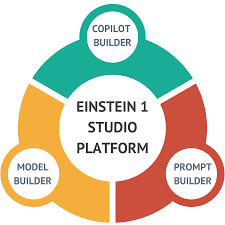
Welcome to the dawn of a bold new era in enterprise Artificial Intelligence, where the world demands a platform unlike any other. Enter Salesforce Einstein 1, the pinnacle of innovation, designed to navigate terabytes of disparate data seamlessly, offer freedom in AI model selection, and integrate directly into your workflow—all while upholding customer trust. Einstein 1 Platform serves as the nexus of your data, AI, CRM, development, and security needs, consolidating them into a singular, robust framework. This empowers IT, administrators, and developers alike with an adaptable AI platform, facilitating rapid development of transformative applications and automation. Within Einstein 1 lies an array of artificial intelligence tools, reflecting the modular architecture of the core Salesforce platform. From standardized to custom solutions, Einstein 1 caters to diverse needs. Examples include out-of-the-box AI features like sales email generation in Sales Cloud and service replies in Service Cloud. Since its unveiling as Genie, now Data Cloud, at Dreamforce ‘22, Salesforce has propelled this product to the forefront of its mission. The conversation has shifted from Customer 360 to encompass AI + CRM + Data—a strategic pivot poised for success in 2024 and beyond. But what does this transformation entail? Data Cloud has been a focal point of Salesforce’s narrative, hailed as a groundbreaking CDP innovation. The recent Q4 earnings call unveiled remarkable achievements: Gartner’s endorsement further solidifies Salesforce’s position, elevating it as a leader in the Magic Quadrant, surpassing rivals like Twilio and Adobe. This achievement is remarkable given Salesforce’s relatively recent CDP certification from the CDP Institute. However, understanding the significance of Data Cloud amidst a sea of CRM solutions may elude many. Yet, the resurgence of data underscores its importance. CRMs, while pivotal for sales, support, and marketing functions, fall short in managing the breadth of modern data collection, storage, and dissemination. Enter the CDP—a dedicated platform for aggregating customer data across every touchpoint throughout the customer lifecycle. Unlike CRMs, which traditionally served as the single source of truth, CDPs offer a comprehensive view, ingesting data from myriad sources. Two key attributes distinguish CDPs and Data Cloud: Yet, amidst this data revolution, the role of artificial intelligence cannot be understated. Einstein 1, formerly known as Salesforce Customer 360, epitomizes this synergy between AI, CRM, and Data. Einstein 1 boasts a diverse array of AI tools, from pre-built features to customizable solutions housed within the Einstein 1 Studio. This enables users to craft tailored AI functionality, seamlessly integrated with Salesforce’s ecosystem. Moreover, Salesforce’s agnostic approach to LLMs empowers users to harness the full potential of AI. Whether leveraging Salesforce’s proprietary LLM or integrating third-party or proprietary models, Einstein 1 ensures flexibility and innovation. As AI continues to permeate every facet of business and personal life, Salesforce’s strategic focus on Data Cloud and Einstein could propel the company to unprecedented growth. In the ever-evolving landscape of enterprise AI, Salesforce remains at the forefront, poised to redefine the future of customer engagement and business intelligence. Like Related Posts Who is Salesforce? Who is Salesforce? Here is their story in their own words. From our inception, we’ve proudly embraced the identity of Read more Salesforce Marketing Cloud Transactional Emails Salesforce Marketing Cloud Transactional Emails are immediate, automated, non-promotional messages crucial to business operations and customer satisfaction, such as order Read more Salesforce Unites Einstein Analytics with Financial CRM Salesforce has unveiled a comprehensive analytics solution tailored for wealth managers, home office professionals, and retail bankers, merging its Financial Read more AI-Driven Propensity Scores AI plays a crucial role in propensity score estimation as it can discern underlying patterns between treatments and confounding variables Read more

Read More
Unfolding AI Revolution

Unfolding AI Revolution

Ways the AI Revolution is Unfolding The transformative potential of artificial intelligence (AI) is being explored by James Manyika, Senior VP of Research, Technology, and Society at Google, and Michael Spence, Nobel laureate in economics and professor at NYU Stern School of Business, in their recent article, “The Coming AI Economic Revolution: Can Artificial Intelligence Reverse the Productivity Slowdown?” Published in Foreign Affairs, the article outlines the conditions necessary for an AI-powered economy to thrive, including policies that augment human capabilities, promote widespread adoption, and foster organizational innovation. Manyika and Spence highlight AI’s potential to reverse stagnating productivity growth in advanced economies, stating, “By the beginning of the next decade, the shift to AI could become a leading driver of global prosperity.” However, the authors caution that this economic revolution will require robust policy frameworks to prevent harm and unlock AI’s full potential. Here are the key insights from their analysis: 1. The Great Slowdown The rapid advancements in AI arrive at a critical juncture for the global economy. While technological innovations have surged, productivity growth has stagnated. For instance, total factor productivity (TFP), a key contributor to GDP growth, grew by 1.7% in the U.S. between 1997 and 2005 but has since slowed to just 0.4%. This slowdown is exacerbated by aging populations and shrinking labor forces in major economies like China, Japan, and Italy. Without a transformative force like AI, economic growth could remain stifled, characterized by higher inflation, reduced labor supply, and elevated capital costs. 2. A Different Digital Revolution Unlike the rule-based automation of the 1990s digital revolution, AI has shattered previous technological constraints. Advances in AI now enable tasks that were previously unprogrammable, such as pattern recognition and decision-making. AI systems have surpassed human performance in areas like image recognition, cancer detection, and even strategic games like Go. This shift extends the impact of technology to domains previously thought to require exclusively human intuition and creativity. 3. Quick Studies Generative AI, particularly large language models (LLMs), offers exceptional versatility, multimodality, and accessibility, making its economic impact potentially transformative: Applications range from digital assistants drafting documents to ambient intelligence systems that automate homes or generate health records based on patient-clinician interactions. 4. Creative Instruction Despite its promise, AI has drawn criticism for issues like bias, misinformation, and the potential for job displacement. Critics highlight that AI systems may amplify societal inequities or produce unreliable outputs. However, research suggests that AI will primarily augment work rather than eliminate it. While about 10% of jobs may decline, two-thirds of occupations will likely see AI enhancing specific tasks. This shift emphasizes collaboration between humans and intelligent machines, requiring workers to develop new skills. Studies, such as MIT’s Work of the Future task force, reinforce that automation will not lead to a jobless future but rather to evolving roles and opportunities. 5. With Us, Not Against Us The full benefits of AI will not materialize if its deployment is left solely to market forces. Proactive measures are necessary to maximize AI’s positive impact while mitigating risks. This includes fostering widespread adoption of AI in ways that empower workers, enhance productivity, and address societal challenges. Policies should prioritize accessibility and equitable diffusion to ensure AI serves as a force for inclusive economic growth. 6. The Real AI Challenge Generative AI has the potential to spark a productivity renaissance at a time when the global economy urgently needs it. Yet, Manyika and Spence caution that AI could exacerbate existing economic disparities if not guided effectively. They argue that focusing solely on existential threats overlooks the broader risks posed by inequitable AI deployment. Instead, a positive vision is needed—one that prioritizes AI as a tool for global economic progress, equitable growth, and generational prosperity. “Harnessing the power of AI for good will require more than simply focusing on potential damage,” the authors conclude. “It will demand effective measures to turn that vision into reality.” The unfolding AI revolution offers immense opportunities, but realizing its full potential requires thoughtful action. By addressing risks and fostering innovation, AI could reshape the global economy for the better. Like Related Posts Who is Salesforce? Who is Salesforce? Here is their story in their own words. From our inception, we’ve proudly embraced the identity of Read more Salesforce Unites Einstein Analytics with Financial CRM Salesforce has unveiled a comprehensive analytics solution tailored for wealth managers, home office professionals, and retail bankers, merging its Financial Read more AI-Driven Propensity Scores AI plays a crucial role in propensity score estimation as it can discern underlying patterns between treatments and confounding variables Read more Tectonic’s Successful Salesforce Track Record Salesforce Technology Services Integrator – Tectonic has successfully delivered Salesforce in a variety of industries including Public Sector, Hospitality, Manufacturing, Read more


Read More
Better Sales and Services with Salesforce Unlimited Edition

Granular Data Center Overview

Granular Data Center Overview in Marketing Cloud Intelligence The Granular Data Center is an advanced feature tailored for ingesting detailed, raw data into the system. This data can reach a scale of hundreds of millions or even billions of rows due to its granularity. Unlike other data stream types, usage and pricing are based on terabytes of storage rather than row count. Ideal data types for Granular Data Center streams include keyword-level data, event-level data, logs, and precise geodata. Granular Data Center streams generate corresponding tables of data specific to a workspace. All data stored in the Granular Data Center fully complies with GDPR regulations and requirements. The Granular Data Center is a premium feature. For inquiries about purchasing, please contact a Marketing Cloud Intelligence representative at Salesforce. Deprovisioning the Granular Data Center add-on from an account triggers the following actions: Note: System admins and higher can still access the Granular Data Center for 90 days after unchecking the checkbox. Access will be unavailable after this period. Note: System admins and higher can continue running SQL queries and exports for 90 days. After this period, all Granular Data Center data streams are automatically deleted, along with the data. When retrieving data from the Granular Data Center, be mindful of these timeout limits: Enabling the Granular Data Center in a Workspace Purchasing the Granular Data Center automatically activates it in the account, but an admin must enable it in the workspace to make the Granular Data Center tab visible. Viewing Granular Data Center Data The Granular Data Center landing page provides an overview of all created data streams in that workspace. Users can manage ingested data, aggregations, extracted data, share data streams, create queries, and more from this centralized location. Creating Granular Data Center Data Streams Generate a Granular Data Center data stream to ingest detailed data, such as event-level or keyword-level data. Mapping Granular Data Center Data Upon file upload or usage of a technical vendor, users are directed to a mapping preview screen where they can verify data identification, modify mapping, add mapping formulas, and more. Each uploaded dataset creates a dynamic table tailored to the loaded data type, impacting data load options and behavior. Querying Granular Data Centers Access and extract data from Granular Data Centers within your workspace. Users can also query Granular Data Centers in other workspaces via data sharing. Queries can be manually crafted using an SQL editor or created effortlessly with the Query Builder. Visualizing Granular Data Center Data The Entity-Relationship Diagram (ERD) visually represents tables and connections between specific dimensions. Each block symbolizes a table containing available fields, with lines denoting connections between tables based on specific dimensions. Sharing Granular Data Centers Relevant Granular Data Centers can be shared across workspaces within the same account. Deleting Data from a Granular Data Center To align with data protection regulations, users have the option to delete data from a Granular Data Center. Like1 Related Posts Who is Salesforce? Who is Salesforce? Here is their story in their own words. From our inception, we’ve proudly embraced the identity of Read more Salesforce Marketing Cloud Transactional Emails Salesforce Marketing Cloud Transactional Emails are immediate, automated, non-promotional messages crucial to business operations and customer satisfaction, such as order Read more Salesforce Unites Einstein Analytics with Financial CRM Salesforce has unveiled a comprehensive analytics solution tailored for wealth managers, home office professionals, and retail bankers, merging its Financial Read more AI-Driven Propensity Scores AI plays a crucial role in propensity score estimation as it can discern underlying patterns between treatments and confounding variables Read more

Read More
Salesforce

Spring ’24 Enhancements for Salesforce Mulesoft, Slack, and Salesforce Customer Success

Enhancements for Salesforce Mulesoft, Slack, and Salesforce Customer Success Spring ’24. Anypoint Code Builder for Desktop MuleSoft Design, develop, and deploy APIs and integrations from a single environment. RPA—Unified Flow MuleSoft The Spring ’24 release brings together features and enhancements that streamline business-IT collaboration, reduce time-to-value, and maximize efficiency. These include new I/O variables based on JSON that make integration easier, bots that can be pooled to scale up or down as needed, Anypoint/Composer flows that can be invoked by RPA, and more. Anypoint Studio Update MuleSoft Studio 7.16 includes improvements to asset import, API development, and CloudHub deployment experiences. Anypoint Flex Gateway: Policy Development Kit MuleSoft Policy Development Kit allows developers to simply and easily build custom policies for Anypoint Flex Gateway using Rust. MuleSoft Direct for Industry Clouds: Loyalty, Automotive, and Manufacturing MuleSoft Connect to industry systems faster directly from Salesforce for Loyalty, Automotive, and Manufacturing Cloud. Anypoint Monitoring: Data Exporter for OpenTelemetry MuleSoft Centralize data export for all telemetry data in Anypoint Platform for faster integration with third-party monitoring services using Data Exporter for OpenTelemetry. Azure Event Hubs Connector MuleSoft MuleSoft’s newest Azure Event Hubs connector seamlessly integrates with MuleSoft applications, allowing users to send and receive messages from Azure Event Hubs without the need for complex coding or configuration. This connector is ideal for constructing real-time data pipelines and event-driven applications. Workflow Builder Enhancements Slack Create time-saving automations with new connectors that seamlessly connect your business tools. Create even more powerful workflows that automate work across multiple systems. Slack Canvas Enhancements Slack Create, organize, and share essential information–right in Slack. The new canvas gallery is a centralized place to quickly find templates to use as-is or customize to suit your needs. Customer Success Score Enhancements Customer Success Signature Success Plan customers now have new data for sandboxes and Data Cloud. The Success Score now provides AI-powered actionable recommendations to improve business outcomes. Expert Coaching Enhancements Customer Success Expert Coaching offers new refreshed sessions, all-new programs, and more. Experts guide you on how to get the most out of Salesforce through sessions to onboard, adopt, and grow your business. Stay tuned to Tectonic’s Insights for more details and news from Salesforce. Enhancements for Salesforce Mulesoft, Slack, and Salesforce Customer Success. Like Related Posts Who is Salesforce? Who is Salesforce? Here is their story in their own words. From our inception, we’ve proudly embraced the identity of Read more Salesforce Integrations How do you make Salesforce even better? Integrate it with all the third party apps you already use. From productivity Read more Salesforce Health Cloud Information Since its inception in 2016, Salesforce Health Cloud has evolved significantly, adapting to the intricacies of the sensitive and dynamic Read more Retirement of Salesforce Data Recovery Service In July 2020, Salesforce announced that they were retiring their last-resort Data Recovery Service because it did not meet their Read more

Read More
Salesforce Logo

Spring ’24 Release Enhancements for Public Sector, Education, and Nonprofit

Enhancements for Public Sector, Education and Nonprofit Spring ’24. Change of Circumstance Guided Flow Public Sector Ensure that benefit eligibility remains accurate even when circumstances change. Use guided flows to simplify the process for constituents to report a “change in circumstance” and for caseworkers to re-check eligibility and adjust disbursement amounts. Caseworker Productivity Dashboard Public Sector Analyze caseload trends, boost productivity, and see results. Out-of-the-box data insights empower agencies to understand caseload trends, prioritize and distribute caseloads based on key factors, and visualize their impact. Recruitment and Admissions Enhancements Education Increase application completions by simplifying application processes. Empower parents and agents to start and view applications, support applications to multiple programs, and keep applicants on track with checklists that are reusable across programs. Mentorship Support Education Help students build deeper relationships. Connect students with mentors like alumni, faculty, or peers, and support them with a comprehensive portal experience. Fundraising Enhancements Nonprofit Attribute revenue from recurring donation upgrade campaigns and understand ROI to make data-driven spend decisions. There is also a new object for payment information and a business process API that makes it easier to build integrations. Program Management Enhancements Nonprofit Save time and improve data quality with Automated Outcome Results. Experience Cloud Integration makes it possible to share your outcome strategy externally, and Care Plan Integration links individual care plans to outcomes. Grantseeker Collaboration Public Sector and Nonprofit Enable teams to collaborate when they’re seeking grant funding. Applicants can securely share applications, for faster information gathering and application completion. And applicant owners can control who can view and edit. Private Funding Opportunities Nonprofit Avoid unsolicited applications. Target projects closely aligned with funding priorities and manage the volume of applications you receive. Stay tuned to the Tectonic Insights for more great news from Salesforce and the Spring ’24 Release. Enhancements for Public Sector, Education, and Nonprofit. Like Related Posts Who is Salesforce? Who is Salesforce? Here is their story in their own words. From our inception, we’ve proudly embraced the identity of Read more Salesforce Marketing Cloud Transactional Emails Salesforce Marketing Cloud Transactional Emails are immediate, automated, non-promotional messages crucial to business operations and customer satisfaction, such as order Read more Salesforce Unites Einstein Analytics with Financial CRM Salesforce has unveiled a comprehensive analytics solution tailored for wealth managers, home office professionals, and retail bankers, merging its Financial Read more AI-Driven Propensity Scores AI plays a crucial role in propensity score estimation as it can discern underlying patterns between treatments and confounding variables Read more

Read More
How to Implement AI for Business Transformation

How to Implement AI for Business Transformation

Harnessing the Power of AI for Business Transformation The age of artificial intelligence (AI) is here. How to Implement AI for Business Transformation? Once a niche technology confined to research labs and the realm of science fiction, AI has now become a mainstream force. Today, an estimated 35% of businesses are leveraging AI to enhance products, boost efficiency, and gain a competitive edge. However, for companies yet to begin their AI journey, the path to implementation can seem daunting. So how can organizations navigate the complexities of AI and unlock its potential to drive success? This comprehensive guide is designed to empower businesses to confidently adopt AI. We’ll break down what AI is, assess your organization’s readiness, help you develop a robust AI strategy, and explore how to implement and integrate AI across operations. Ultimately, this insight will show you how to embrace AI for continuous innovation, helping automate tasks, uncover insights, and future-proof your business. AI Era Demands an Intelligent Data Infrastructure AI consulting services and digital transformation partners like Tectonic underscore the technology’s immense value, helping organizations evaluate, implement, and scale AI initiatives. However, knowing where to start and who to trust can be challenging. This guide will provide best practices for planning and executing AI projects, helping you make informed decisions when selecting solutions and partners. By the end, your organization will be equipped with the knowledge and confidence needed to make AI a powerful competitive advantage. Understanding the AI Landscape Before diving into AI implementation, it’s important to understand what artificial intelligence is and the wide array of applications it offers. What is Artificial Intelligence? Artificial intelligence (AI) refers to software and machines designed to perform tasks that typically require human intelligence—such as visual perception, speech recognition, decision-making, and language translation. AI is already deeply integrated into many everyday products and services, including: Machine Learning Basics At the core of most AI systems is machine learning (ML), which involves training algorithms on vast datasets, enabling them to learn from examples without being explicitly programmed for every scenario. There are three main types of machine learning: Beyond ML, fields like natural language processing (NLP) focus on understanding human language, while computer vision analyzes visual content such as images and video. Real-World AI Applications Understanding the fundamentals of AI helps organizations align their needs with its capabilities. Common business use cases for AI include: Armed with this knowledge, businesses can better evaluate how AI fits into their goals and operations. Developing a Comprehensive AI Strategy Once you understand the AI landscape, the next step is developing a strategic plan to guide implementation. Establishing an AI Vision and Objectives AI adoption must align with clear financial and operational goals. Leadership teams should identify: Aligning stakeholders and executive leaders around specific use cases will drive urgency, investment, and commitment. AI Ethics and Governance AI adoption also requires guidelines for ethical usage, transparency, and accountability. Organizations should consider: Establishing these frameworks early ensures responsible and transparent AI usage. Resourcing an AI Program AI implementation requires the right talent and resources. Budget considerations should include: A Phased AI Adoption Roadmap Rather than attempting to scale AI all at once, organizations should adopt a phased approach: This roadmap balances short-term impact with long-term scalability. Choosing the Right AI Implementation Approach With your strategy in place, the next decision is how to implement AI. Three primary approaches are: The choice depends on your organization’s internal capabilities, desired level of customization, and timeline. Integrating AI into Your Operations Successful AI implementation requires careful planning and integration with existing operations. Develop an Integration Plan Consider how AI will interact with existing systems and workflows: Address Security and Privacy Ensure that AI systems comply with data privacy regulations and security protocols, especially when handling sensitive information. Drive Adoption Through Training Help staff understand how AI will augment their roles by providing training on how the algorithms work and how to interact with AI systems effectively. Monitor for Model Decay Implement processes to monitor and retrain models as needed to ensure continued performance and reliability. Embracing AI for Continuous Improvement AI should be viewed as an ongoing investment, driving continuous improvement across the organization. Encourage a Data-Driven Culture Empower teams to identify new AI use cases and experiment with AI-driven solutions. Provide the tools and frameworks to facilitate this culture of innovation. Foster Responsible AI Ensure that AI systems are transparent, accountable, and designed to augment human decision-making responsibly. Commit to Reskilling As AI capabilities evolve, continually upskill employees to ensure your workforce remains at the forefront of technological advancements. Unlocking the Future of AI The potential of AI to revolutionize businesses is clear. However, achieving success requires more than just technical capabilities. It demands thoughtful planning, strategic alignment, and a commitment to continuous improvement. By following this guide, your organization can confidently implement AI to unlock powerful data-driven insights, automate tasks, and achieve lasting competitive advantage. The future of AI is full of possibilities—are you ready to seize them? Tectonic is ready to help. How to Implement AI for Business Transformation Like Related Posts Who is Salesforce? Who is Salesforce? Here is their story in their own words. From our inception, we’ve proudly embraced the identity of Read more Salesforce Unites Einstein Analytics with Financial CRM Salesforce has unveiled a comprehensive analytics solution tailored for wealth managers, home office professionals, and retail bankers, merging its Financial Read more AI-Driven Propensity Scores AI plays a crucial role in propensity score estimation as it can discern underlying patterns between treatments and confounding variables Read more Tectonic’s Successful Salesforce Track Record Salesforce Technology Services Integrator – Tectonic has successfully delivered Salesforce in a variety of industries including Public Sector, Hospitality, Manufacturing, Read more

Read More

Einstein Copilot Tableau

Tableau has dedicated over two decades to empowering individuals to visualize and comprehend their data. This mission, driven by data analysts, continues to thrive. Data analysts serve as the cornerstone of organizations fostering a data-centric culture. They capture business needs, prepare data, and craft data content for end-users. Einstein Discovery insights seamlessly integrate into the Tableau workflow, ensuring uninterrupted analysis. The benefits of leveraging Einstein Discovery are manifold: Tableau Einstein represents a groundbreaking advancement in AI-driven data analytics. Einstein Copilot for Tableau, currently in beta for Tableau customers, democratizes AI in data analytics. It collaborates with analysts throughout the analytical process, from data preparation to visualization, reducing entry barriers and enhancing user experience. Einstein Copilot integrates seamlessly into the Tableau environment, serving as an intelligent assistant. It guides users through the creation process, ensuring accuracy and adherence to best practices. With Einstein Copilot, users confidently explore data, identify trends, and communicate findings effectively. The features of Einstein Copilot enhance the data analytics experience and empower users to unleash the full potential of their data. These features include faster insights through recommended questions, streamlined data exploration, improved visualization quality, and guided calculation creation. Einstein Copilot’s development involved overcoming several challenges. These challenges included accurately interpreting user questions, enhancing data intelligence, and automating visualization generation. The team addressed these challenges through continuous refinement of analytical data generation algorithms, leveraging Tableau Public’s vast dataset, and balancing accuracy, speed, and creativity in AI responses. Continuous improvement remains a key focus for the Einstein Copilot team. Through platforms like Zeus, the team systematically enhances engineering, intent detection, and knowledge generation. This iterative process ensures ongoing enhancements to Einstein Copilot’s capabilities, providing users with an increasingly seamless and insightful analytical experience. Einstein Discovery insights are integrated into your Tableau workflow, so you never need to disrupt your analysis. Some of the benefits of using Einstein Discovery include: Data analysis and data-driven decision-making have been part of the vocabulary in organizations over the years. And, while data analysis is one of the most in-demand tech skills sought by employers today, not everyone in an organization has “analyst” in their job title—myself included. Yet, so many of us use data daily to make informed decisions. The rise of generative AI presents a significant opportunity for us to bring transformative benefits to analytics. Businesses are eager to embrace generative AI because it can help save time, provide faster insights, and empower analysts to be even more productive with an AI assistant—freeing analysts to focus on delivering high-quality, data-driven insights. But before any of this can happen, a lot goes on behind the scenes. That’s where Einstein Copilot for Tableau comes in. Einstein Copilot for Tableau, now available for Tableau customers to try in beta, brings the power of AI to data analytics, reducing the barrier to entry and working alongside the analyst—from data preparation to visualization. Whether you’re an experienced data analyst or just starting your journey in data exploration, Einstein Copilot for Tableau becomes your trusted companion, empowering you to unlock insights and make informed decisions with confidence. Einstein Copilot for Tableau offers a range of features that enhance the data analytics experience and empower anyone to unlock the full potential of their data. Look for these features in the coming release, and even more as we continue to build. Faster insights with recommended questions When you are getting started in analytics—whether for work, learning, or just for fun—a blank canvas can be intimidating. Where do you even begin? Using Einstein to suggest questions you can ask of a specific datasource lightens that lift so you can quickly move from connecting to data to finding insights. Einstein Copilot for Tableau does a quick index across your connected datasource to create a summary context of the datasource. This summary is used to generate a few questions the dataset can answer. For example, using a dataset like Tableau’s Superstore practice dataset, Einstein Copilot for Tableau suggests “Are there any patterns over time for sales across product categories?” In one click a line chart is created. Since this is all happening in the authoring experience, users familiar with Tableau’s drag-and-drop interface can adjust anything displayed before saving and moving on to the next question. Combining analyzing data with learning by doing. With recommended questions, anyone can quickly uplevel their analytics skills. What is Einstein Copilot for Tableau? Using generative AI and statistical analysis, Einstein Copilot for Tableau is able to understand the context of your data to create and suggest relevant business questions to help kickstart your analysis. A smart, conversational assistant for Tableau users, Einstein Copilot for Tableau automates data curation—the organization and integration of data collected from various sources—by generating calculations and metadata descriptions. Einstein Copilot for Tableau can fill data gaps and enhance analysis by creating synthetic datasets where real data is limited. Einstein Copilot helps you anticipate outcomes with predictive analytics that simulate diverse scenarios and uncover hidden correlations. Additionally, generative models can bolster data privacy by producing non-traceable data for analysis. Accelerate insights from data with ease Tableau has thousands of features—and with Einstein Copilot’s in-product assistance, you ask questions using natural language, and from data prep and writing calculations to formatting worksheets and dashboards using your company brand guidelines, Einstein Copilot automates many time-consuming, repetitive tasks—increasing analyst productivity and speeding time-to-insights. Jumpstart data exploration Einstein Copilot for Tableau is a great tool for both data-savvy end users and data professionals. With the help of Einstein Copilot, you can ask more in-depth questions about the data insights without having to know all of the technical aspects of Tableau. In the worksheet, a set of recommended questions based on the data source’s metadata makes it easy for users to start analyzing their data. Einstein Copilot’s step-by-step guidance also helps new data professionals learn how to use Tableau effectively—with an opportunity for both novice and experienced users to increase their learn by doing. Improve viz and dashboard quality through prescriptive guidance With Einstein Copilot in Tableau, you

Read More
Tableau's Einstein Copilot

Tableau’s Einstein Copilot

Tableau’s Einstein Copilot: Streamlining Data Analysis with AI Tableau, on its mission to empower individuals in comprehending and interpreting their data for over two decades, has found success thanks to data analysts. These professionals, integral to organizations fostering a data-centric culture, capture business requirements, prepare data, and craft data content for end users. While data analysis and data-driven decision-making have become commonplace in organizational discourse, not everyone with a stake in data utilization holds the title of “analyst.” Many individuals, those of us at Tectonic included, leverage data daily to make informed decisions. The advent of generative AI presents a compelling opportunity to bring transformative benefits to analytics. Businesses are keen to embrace generative AI due to its time-saving capabilities, faster insights, and the potential to empower analysts further through an AI assistant, allowing them to focus on delivering high-quality, data-driven insights. Facilitating this transformation is Einstein Copilot in Tableau. Tableau’s Einstein Copilot Einstein Copilot in Tableau harnesses generative AI and statistical analysis to understand the context of your data. It creates and suggests relevant business questions, kickstarting your analysis. As a smart, conversational assistant for Tableau users, Einstein Copilot automates data curation—organizing and integrating data from diverse sources—by generating calculations and metadata descriptions. Einstein Copilot fills data gaps, enhances analysis with synthetic datasets in the absence of real data, anticipates outcomes through predictive analytics, and ensures data privacy by generating non-traceable data for analysis. It upholds the promise of generative AI, offering an efficient, insightful, and ethical approach to data analytics—an intelligent assistant seamlessly integrated into the Tableau suite for users at all levels of expertise. Accelerating Insights with Ease With thousands of features, Tableau simplifies the data analysis process. Einstein Copilot, through in-product assistance, allows users to ask questions in natural language. From data preparation to writing calculations and formatting worksheets and dashboards in line with company brand guidelines, Einstein Copilot automates many time-consuming, repetitive tasks, boosting analyst productivity and speeding up time-to-insights. Jumpstarting Data Exploration Einstein Copilot is an invaluable tool for both data-savvy end users and professionals. It enables users to ask in-depth questions about data insights without requiring intricate Tableau technical knowledge. In the worksheet, recommended questions based on the data source’s metadata facilitate data analysis. Einstein Copilot’s step-by-step guidance aids new data professionals in learning Tableau effectively while offering opportunities for both novice and experienced users to enhance their skills. Enhancing Visualization Quality Einstein Copilot provides built-in visual best practice guidance, enabling users to format visualizations using simple natural language prompts and simplifying complex, time-consuming tasks. Crucially, human involvement remains a vital part of the process, ensuring thorough checks before accepting any proposed responses. Whether exploring data or creating dashboards, users can confidently navigate each step with assistance always available. Privacy, Security, and Accuracy Built with privacy, security, and accuracy in mind, Einstein Copilot assures users of a reliable AI-powered assistant. Future updates will introduce Pulse Metrics generation, Slack integration for sharing insights, and additional context to insights before sharing them. Einstein Copilot in Tableau is set to be generally available in Summer ’24 with Tableau 2024.2. For those interested in participating in the pilot, a form is available for sign-up in Spring ’24. Witness the transformative potential of Einstein Copilot in Tableau through the demo showcasing its ability to revolutionize analytics. By Tectonic’s Salesforce Marketing Consultant, Shannan Hearne Like1 Related Posts Salesforce Unites Einstein Analytics with Financial CRM Salesforce has unveiled a comprehensive analytics solution tailored for wealth managers, home office professionals, and retail bankers, merging its Financial Read more Salesforce AI Einstein Next Best Action Salesforce AI Einstein Next Best Action is a feature designed to identify the most effective actions available to agents and Read more Einstein Relationship Insights ERI, serves as an AI-powered research assistant, enhancing sales processes. ERI operates as a desktop plugin with a browser extension, Read more Joined Datasets in B2B Marketing Analytics B2BMA empowers users to generate additional datasets using the data manager. This process involves creating datasets in various ways, such Read more

Read More
gettectonic.com