

Salesforce Flow Archives - gettectonic.com - Page 3
Salesforce Data Cloud Explained

Salesforce Data Cloud Explained

Salesforce Data Cloud, previously recognized as Salesforce CDP/Genie, made its debut at Dreamforce 2022, hailed by Salesforce as one of the most significant innovations in the company’s history. A hyperscale data platform built into Salesforce. Activate all your customer data across Salesforce applications with Data Cloud. Data Cloud facilitates the intake and storage of real-time data streams on a massive scale, empowering automated tasks that result in highly personalized experiences. Data can be sourced from diverse Salesforce data outlets, including Mulesoft, Marketing Cloud, and others, along with customers’ proprietary applications and data sources. Subsequently, it can dynamically respond to this real-time data by automating actions across Salesforce CRM, Marketing Cloud, Commerce, and more, inclusive of automating actions through Salesforce Flow. What is the Salesforce data cloud? Data Cloud is the fastest growing organically built product in Salesforce’s history (i.e. Salesforce built it themselves, not via acquisitions). Data Cloud could be described as the ‘Holy Grail of CRM’, meaning that the data problem that’s existed since the infancy of CRM is now finally solvable. Data Cloud is the foundation that speeds up the connectivity between different ‘clouds’ across the platform. However, Data Cloud is also a product that can be purchased. While not all Salesforce customers have licensed Data Cloud, being at the foundation means they are still taking advantage of Data Cloud to a degree – but this all becomes even stronger with Data Cloud as a personalization and data unification platform. What is the history of Data Cloud? Salesforce has gone through several iterations with naming its CDP product: Customer 360 Audiences → Salesforce CDP → Marketing Cloud Customer Data Platform → Salesforce Genie → Salesforce Data Cloud. In some instances, changes were made because the name just didn’t stick – but what’s more important to note, is that some of the name changes were to indicate the significant developments that happened to the product. Salesforce Data Cloud Differentiators Data Cloud, in itself, is impressive. While many organizations would consider it expensive, if you were to flip the argument on its head, by buying your own data warehouse, building the star schema, and paying for ongoing compute storage, you’d be looking to spend 5 to 10 times more than what Salesforce is charging for Data Cloud. Plus, data harmonization works best when your CRM data is front and center. There are other key differentiators that helps Data Cloud to stand out from the crowd: Is data cloud a data lakehouse? That means that Data Cloud is now not just a really good CDP, it’s now a data lake which will be used in sales and service use cases. But it also means that we can start to fundamentally move some of our higher-scale consumer products like Marketing and Commerce onto the platform. Is Snowflake a data Lakehouse? Snowflake offers customers the ability to ingest data to a managed repository, in what’s commonly referred to as a data warehouse architecture, but also gives customers the ability to read and write data in cloud object storage, functioning as a data lake query engine. What is the benefit of Salesforce data cloud? Data Cloud empowers Salesforce Sales Cloud with AI capabilities and automation that quickly closes deals and boosts productivity across every channel. It drives customer data from all the touchpoints and unifies it separately in individual customer profiles. Salesforce Data Cloud is a powerful data warehouse solution that allows companies to effectively manage and analyze their data. What is the difference between Salesforce CDP and data lake? Talking abut Salesforce CDP is a little bit like a history lesson. While a CDP provides a unified, structured view of customer data, a data lake, on the other hand, is more of a raw, unstructured storage repository that holds a vast amount of data (more than just customer data) in its native format until it’s needed. Like1 Related Posts Who is Salesforce? Who is Salesforce? Here is their story in their own words. From our inception, we’ve proudly embraced the identity of Read more Salesforce Marketing Cloud Transactional Emails Salesforce Marketing Cloud Transactional Emails are immediate, automated, non-promotional messages crucial to business operations and customer satisfaction, such as order Read more Salesforce Unites Einstein Analytics with Financial CRM Salesforce has unveiled a comprehensive analytics solution tailored for wealth managers, home office professionals, and retail bankers, merging its Financial Read more AI-Driven Propensity Scores AI plays a crucial role in propensity score estimation as it can discern underlying patterns between treatments and confounding variables Read more

Read More
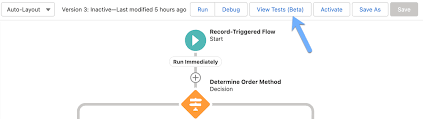
Salesforce Flow Tests

Mastering Salesforce Flows

Mastering Salesforce Flows: The Complete Guide to Process Automation Why Flows Are Every Admin’s Superpower In today’s fast-moving business world, 87% of organizations report that automation is critical to maintaining competitiveness. Salesforce Flows empower admins to automate complex processes that traditionally required developer resources – making you the automation hero your team needs. The Flow Advantage *”After implementing flows, one manufacturing company reduced their quote-to-cash cycle from 5 days to 2 hours.”* Flow Types Demystified: Choose the Right Tool Flow Type Best For Key Features Trigger Examples Screen Flow User-guided processes Interactive UI, data collection Onboarding wizards, service case triage Record-Triggered Auto-processing records Runs on create/update/delete Auto-calculate discounts, update related records Schedule-Triggered Batch operations Runs on cron schedule Daily data cleanup, monthly reports Platform Event System integrations Handles external events Process IoT device alerts, SMS responses Orchestration Multi-step workflows Coordinates teams/systems Complex approvals, onboarding journeys Pro Tip: With Process Builder sunsetting in 2025, all new automation should use flows. Building Your First Flow: Step-by-Step 1. Planning Your Flow 2. Creating in Flow Builder markdown Copy Download 1. Setup > Flows > New Flow 2. Select type (e.g., Record-Triggered) 3. Configure trigger (when to run) 4. Add elements using + button: – Get Records (query data) – Decision (if/then logic) – Action (create/update records) 5. Set fault paths for error handling 3. Testing Like a Pro 4. Deployment Checklist ✅ Sandbox testing complete✅ Error handling implemented✅ Documentation created✅ User training scheduled Advanced Flow Techniques Avoid These Common Pitfalls 🚫 Nested Loops – Use Collection Filter instead🚫 Hardcoding IDs – Create custom labels🚫 Overquerying – Leverage $Record variables🚫 No Null Checks – Always add decision branches Proven Performance Boosters Example: Filtering 10,000 contacts takes: Real-World Flow Examples 1. Lightning-Fast Lead Routing Diagram Code Download EMEA APAC New Lead Region? Assign to London Queue Assign to Sydney Queue Send Welcome Email Create First Task Result: 90% faster lead assignment 2. Automated Renewal Management Impact: 30% increase in renewals 3. Customer Service Escalation Flows vs. Code: When to Choose What Scenario Flow Apex Field updates ✅ Best ⚠ Overkill Complex calculations ✅ Spring ’22+ ✅ Needed pre-2022 External API calls ✅ (Simple) ✅ (Complex) Bulk data (>10k recs) ⚠ Careful ✅ Better Trigger frameworks ❌ Avoid ✅ Required Golden Rule: Start with Flow, escalate to Apex only when limits hit. Flow Orchestration: Next-Level Automation For processes spanning multiple departments: Benefits:✔ End-to-end visibility✔ Automatic handoffs✔ Built-in wait steps Getting Started Resources “The average admin automates 23 hours of work weekly using flows.” – Salesforce ROI Study Ready to transform your processes? Book a flow consultation with our certified experts today! #Salesforce #Flow #CRM #BusinessAutomation #DigitalTransformation Content updated December 2024. Like Related Posts Who is Salesforce? Who is Salesforce? Here is their story in their own words. From our inception, we’ve proudly embraced the identity of Read more Salesforce Marketing Cloud Transactional Emails Salesforce Marketing Cloud Transactional Emails are immediate, automated, non-promotional messages crucial to business operations and customer satisfaction, such as order Read more Salesforce Unites Einstein Analytics with Financial CRM Salesforce has unveiled a comprehensive analytics solution tailored for wealth managers, home office professionals, and retail bankers, merging its Financial Read more AI-Driven Propensity Scores AI plays a crucial role in propensity score estimation as it can discern underlying patterns between treatments and confounding variables Read more

Read More
Salesforce Flow Builder

How Smart Flows Supercharge Your Business

The Automation Revolution: How Smart Flows Supercharge Your Business Automation isn’t just a buzzword—it’s the secret weapon of high-performing businesses. When done right, it transforms clunky processes into frictionless, hyper-efficient experiences—delighting customers and freeing up teams to focus on what really matters. And here’s the best part: You don’t need to be a coding wizard to harness its power. With Salesforce Flow, you can automate complex workflows with clicks, not code—while still maintaining full control over your business logic. But automation isn’t just about saving time—it’s about unlocking new possibilities. Want to see how? Let’s dive into 5 game-changing strategies most admins overlook. 🔥 Pro Tip #1: Treat Your Flow Like a Story—Not Just a Process Every great automation starts with a clear narrative. Before building, ask: 📌 Pro Hack: ⚡ Pro Tip #2: The Debugger Is Your Time Machine Imagine testing a flow without activating it—seeing exactly where it breaks before users do. That’s the Flow Debugger—your undo button for automation. ✅ Next-Level Debugging: ⚠ Watch Out For: 🚨 Pro Tip #3: Never Let Users See “Unhandled Fault” Again A cryptic error message is like a “Closed” sign on your automation. Instead: 🎯 Where This Shines: 🧩 Pro Tip #4: Subflows = Your Automation LEGO Blocks Why rebuild the wheel? Subflows let you: 🚀 Advanced Move:Create a “Utility” subflow library (e.g., “Send Approval Request,” “Log Audit Entry”). 🌀 Pro Tip #5: The Silent Killer Inside Every Loop Loops are powerful—but sneaky performance killers if misused. ❌ The Mistake: text Copy Download LOOP (500 Accounts) → UPDATE each Account (Result: 500 DML statements → SLOW!) ✅ The Fix: text Copy Download LOOP (500 Accounts) → STORE changes → SINGLE UPDATE at end (Result: 1 DML statement → FAST!) 🚀 From Theory to Action: Automate This Today Scenario: Your sales team keeps duplicating tasks on Accounts. The Fix: A 10-minute Flow that:1️⃣ Checks for existing tasks (Prevents duplicates).2️⃣ Auto-creates tasks if needed (No manual work).3️⃣ Notifies the team (“Hey, this was already done!”). 💡 Bonus: Use prebuilt Salesforce Flow templates to jumpstart dozens of automations. Your Next Move? ✔ Bookmark: Salesforce Flow Docs✔ Premier Support? Schedule a 1:1 Flow Workshop with an expert. Automation isn’t just the future—it’s your unfair advantage. Start building smarter today. Like Related Posts Who is Salesforce? Who is Salesforce? Here is their story in their own words. From our inception, we’ve proudly embraced the identity of Read more Salesforce Marketing Cloud Transactional Emails Salesforce Marketing Cloud Transactional Emails are immediate, automated, non-promotional messages crucial to business operations and customer satisfaction, such as order Read more Salesforce Unites Einstein Analytics with Financial CRM Salesforce has unveiled a comprehensive analytics solution tailored for wealth managers, home office professionals, and retail bankers, merging its Financial Read more AI-Driven Propensity Scores AI plays a crucial role in propensity score estimation as it can discern underlying patterns between treatments and confounding variables Read more

Read More
Salesforce Managed Services

Automation Tools in Salesforce

What are the types of automation in Salesforce? What are the Automation Tools in Salesforce? The automation capabilities offered by Salesforce are based on two main categories: process automation (workflows) and data operations (data loading and cleansing). There are four main automation tools that Salesforce offers, each tailored to a specific purpose. What is an automation tool in Salesforce? Automation provides the tools necessary to automate repetitive processes and tasks for your business, such as creating a follow-up task, sending a reminder email, or updating a record. Automations can help users save critical time and reduce errors by creating processes to complete repetitive tasks. The Top 8 Best Salesforce Automation Tools What is data automation in Salesforce? Healthy automation enables users to focus on high-value work and reduces time spent on repetitive, manual tasks or complex data entry. Most often, automation means translating business processes from one form to another: from paper-based form to digital form, from an old system to a new one. What is the power of automation in Salesforce? By adopting Salesforce automation, you save time and resources, which can be redirected to more productive tasks. Sales automation can reduce daily administrative time by 14%. Moreover, it significantly enhances deal closure rates by 30% and boosts sales productivity by 14.5%. Why is Salesforce difficult to automate? Here are some of the reasons why Salesforce is difficult to automate from a technical perspective: Frequent system updates: Salesforce regularly update their platform to enhance user experiences or fix underlying issues. Unfortunately, these changes can impact user customizations and even standard uses of the platform. This is one reason many Salesforce customers opt to have a Salesforce Managed Service Provider. Disadvantages of Salesforce Flow Limited Customization and Complexity: While Salesforce Flow is considered user-friendly, it may not offer the customization and complexity required for some advanced automation tasks. Businesses with highly specific needs might find Flow somewhat restrictive. Which three components are used to automate a process in Salesforce? Use Flow Builder to automate most of your organization’s repetitive business processes. More features can provide further automation functionality, including approval processes, Flow Orchestration, Einstein Next Best Action, and Apex. Note: Use Flow Builder instead of Process Builder and workflow rules. Content updated January 2024. Like2 Related Posts Who is Salesforce? Who is Salesforce? Here is their story in their own words. From our inception, we’ve proudly embraced the identity of Read more Salesforce Marketing Cloud Transactional Emails Salesforce Marketing Cloud Transactional Emails are immediate, automated, non-promotional messages crucial to business operations and customer satisfaction, such as order Read more Salesforce Unites Einstein Analytics with Financial CRM Salesforce has unveiled a comprehensive analytics solution tailored for wealth managers, home office professionals, and retail bankers, merging its Financial Read more AI-Driven Propensity Scores AI plays a crucial role in propensity score estimation as it can discern underlying patterns between treatments and confounding variables Read more

Read More
Crucial Role of Data and Integration in AI at Dreamforce

Salesforce Data Integration

Salesforce Data Integration: A Comprehensive Guide Introduction Salesforce offers numerous tools to access, synchronize, and share data with external systems. However, selecting the right tool for your project is critical. This guide explores Salesforce’s data integration landscape, providing recommendations based on specific use cases—along with guidance on which tools to avoid. Scope of This Guide This decision guide focuses on data-level integrations involving Salesforce, covering: While these are just a subset of integration challenges faced by Salesforce Architects, future guides will address: Note: Many tools discussed here can also solve enterprise-wide integration challenges, but those use cases are beyond this guide’s scope. Key Takeaways Common Considerations for Choosing Data Integration Tools Before selecting a tool, evaluate these key factors: Area to Consider Key Questions Existing Tools & Landscape Is an ESB/ETL solution already in place? Are there compliance requirements? Are systems cloud or on-premise? Data Flow Does data need to move synchronously, asynchronously, or in batches? Should data be replicated? Which system is the source of truth? Implementation What’s the effort for non-Salesforce systems? Which teams will deliver integrations? What tools do they prefer? Maintainability Who will maintain the integration? What skills do they have (or need)? What’s the total cost of ownership? Data Volume Is it a large data volume (LDV) scenario? How frequent are bulk changes? What’s the impact of singleton updates? Limits Are complex transformations needed? Will data be combined from multiple sources? How often will integrations run per user? Overview of Data Integration Tools Tool Salesforce → External External → Salesforce Execution License Required? Apex Actions ✅ Yes ✅ Yes Server-side ❌ No Change Data Capture ✅ Yes ❌ No Server-side ❌ No* Custom Apex (REST/SOAP) ✅ Yes ✅ Yes Server-side ❌ No External Services ✅ Yes ❌ No Server-side ❌ No Generic Events (Legacy) ✅ Yes ❌ No Server-side ❌ No** Heroku Connect ✅ Yes ✅ Yes Server-side ✅ Yes MuleSoft Anypoint ✅ Yes ✅ Yes Server-side ✅ Yes MuleSoft Composer ✅ Yes ✅ Yes Server-side ✅ Yes Native Salesforce APIs ❌ No ✅ Yes Server-side ❌ No OmniScript ✅ Yes ✅ Yes Client-side**** ✅ Yes OmniStudio Integration ✅ Yes ✅ Yes Server-side ✅ Yes Outbound Messaging ⚠️ Not Ideal ❌ No Server-side ❌ No Platform Events ✅ Yes ✅ Yes Server-side ❌ No*** PushTopic (Legacy) ⚠️ Not Ideal ❌ No Server-side ❌ No** Salesforce Connect ✅ Yes ✅ Yes Server-side ✅ Yes ✅ = Recommended | ⚠️ = Possible but consider alternatives | ❌ = Not supported Notes: Other Tools (Not Primary Integration Solutions) While these tools support aspects of data movement, they should not be the foundation of an integration strategy: Final Recommendations By aligning the right tool with your use case, you can optimize performance, reduce technical debt, and ensure scalable integrations. Content updated April 2025. Like Related Posts Who is Salesforce? Who is Salesforce? Here is their story in their own words. From our inception, we’ve proudly embraced the identity of Read more Salesforce Marketing Cloud Transactional Emails Salesforce Marketing Cloud Transactional Emails are immediate, automated, non-promotional messages crucial to business operations and customer satisfaction, such as order Read more Salesforce Unites Einstein Analytics with Financial CRM Salesforce has unveiled a comprehensive analytics solution tailored for wealth managers, home office professionals, and retail bankers, merging its Financial Read more AI-Driven Propensity Scores AI plays a crucial role in propensity score estimation as it can discern underlying patterns between treatments and confounding variables Read more

Read More
public sector and tribal governent

What is BI in Salesforce?

Salesforce BI helps to create fast, digestible reports to help you make informed decisions at the right time. Salesforce Einstein is a leading business intelligence software solution that will help streamline your operations. Read on in this insight to learn how Salesforce BI capabilities including Tableau rank in the Gartner Magic Quadrant. Make the right decision every time using analytics that go beyond business intelligence software. See why Gartner named Salesforce (Tableau) a Leader in the Gartner® Magic Quadrant™ for Analytics and Business Intelligence Platforms for the 11th consecutive year. Data and analytics leaders must use analytics and BI platforms to support the needs of IT, analysts, consumers and data scientists. While integration with cloud ecosystems and business applications is a key selection requirement, buyers also need platforms to support openness and interoperability. Analytics and business intelligence (ABI) platforms enable less technical users, including business people, to model, analyze, explore, share and manage data, and collaborate and share findings, enabled by IT and augmented by artificial intelligence (AI). For several years, the Magic Quadrant for Analytic and Business Intelligence Platforms has emphasized visual self-service for end users augmented by AI to deliver automated insights. While this remains a significant use case, the ABI platform market will increasingly need to focus on the needs of the analytic content consumer and business decision makers. To achieve this, automated insights must be relevant in context of a user’s goals, actions and workflow. Many platforms are adding capabilities for users to easily compose low-code or no-code automation workflows and applications. This blend of capabilities is helping to expand the vision for analytics beyond simply delivering datasets and presenting dashboards. Today’s ABI platforms can deliver enriched contextualized insights, refocus attention on decision-making processes and ultimately take actions that will deliver business value. In addition to the increasing consumer design focus trend, we see other key market trends, including the need for improved governance of analytic content creation and dissemination, and the demand for a headless, open architecture. For example, a headless ABI platform would decouple the metrics store from the front-end presentation layer, enabling more interoperability with competitive products. ABI platform functionality includes the following 12 critical capabilities, which have been updated to reflect areas of market change, differentiation and customer demand: Gartner added three new critical capabilities as part of our metrics store evaluation criteria this year:  ABI platforms have always been about measurement. For decades, the slicing and dicing of measures by their dimensional attributes was synonymous with the act of performing business intelligence. However, over the last decade, the focus on metrics and measurement was overshadowed by data visualization. As data visualization became the most conspicuous capability, some business executives began to conflate ABI platforms with data visualization — as if ABI platforms are glorified chart wizards. This misconception minimizes much of the work performed and the business value delivered by ABI platforms. Establishing metrics stores as a critical capability to execute makes it clear that defining and communicating performance measures throughout an organization is one of the key purposes of an ABI platform. Analytics collaboration is a combination of many features (such as Slack/Teams integration, action frameworks) that collectively improve an organization’s ability to make decisions with consensus. Data science integration reflects the increasing likelihood that a business analyst may want to use data science to test certain hypotheses, and that data scientists will need to leverage features such as data prep and data visualization. In addition, Gartner is changing “catalogs” to “analytic catalogs” to emphasize a set of requirements that are not being met by ABI platform vendors today. Most large enterprises have thousands of reports built across multiple ABI platforms, but consumers in these organizations have no easy way to access these reports. The name change to analytic catalogs reflects the need for ABI platform vendors to deliver analytic content with the consumer in mind. Three critical capabilities were removed from our evaluation criteria: security, natural language generation (NLG; rolled into data storytelling) and cloud analytics (which will no longer be considered a platform capability, but instead a go-to-market strategy covered in the Magic Quadrant). And one of the security sub-criteria, about the granularity of authorization (e.g., row-based security) has been moved to the enterprise reporting capability. Salesforce (Tableau) Tableau, a Salesforce company, is a Leader in this Magic Quadrant. Its products are mainly focused on visual-based exploration that enables business users to access, prepare, analyze and present findings in their data. CRM Analytics, formerly Tableau CRM, provides augmented analytics capabilities for analysts and citizen data scientists. Tableau has global operations and serves clients of all sizes. In 2022, Tableau reinforced its augmented consumer vision to provide contextualized insights with deeper integration with Salesforce Data Cloud. IT also improved decision intelligence by bringing domain-aware insights into action with Revenue Intelligence and other Salesforce-native apps. The extensible design and x-platform integrations (Salesforce Flow, MuleSoft, UiPath and Looker) further enable composable analytics to bring insights into workflow with agility. Strengths Cautions Like Related Posts Who is Salesforce? Who is Salesforce? Here is their story in their own words. From our inception, we’ve proudly embraced the identity of Read more Salesforce Marketing Cloud Transactional Emails Salesforce Marketing Cloud Transactional Emails are immediate, automated, non-promotional messages crucial to business operations and customer satisfaction, such as order Read more Salesforce Unites Einstein Analytics with Financial CRM Salesforce has unveiled a comprehensive analytics solution tailored for wealth managers, home office professionals, and retail bankers, merging its Financial Read more AI-Driven Propensity Scores AI plays a crucial role in propensity score estimation as it can discern underlying patterns between treatments and confounding variables Read more
Read More
Salesforce Einstein and Einstein Automate

Say Hello to Einstein Automate

Einstein Automate is a robust end-to-end automation solution within Salesforce, offering increased productivity benefits for individuals, account executives, and businesses alike. A central element, Salesforce Flow, transforms business processes by facilitating seamless interactions for both customers and employees. The incorporation of Flow Builder ensures the creation of automated business processes is both easy and efficient, enabling streamlined enterprise-scale automation from testing to monitoring. With low to no code potential. Salesforce Flow distinguishes itself with user-friendly features, employing easy-to-use visual elements and reusable building blocks. Combined with Automate, enables the creation of large-scale automations within Salesforce. The solution bridges disconnected systems and integrates siloed data sources into a cohesive workflow, leading to improved customer experiences and enhanced business agility through guided interactions for the sales team. Sales reps are engaged in non-selling activities up to 66% of the work day. That’s totally no bueno. Get them back on track and shorten sales cycles with Einstein Automate. The introduction of Einstein Automate from Salesforce brings notable benefits. Studies reveal that automating manual processes with tools like Salesforce Flow and Automate saves employees four hours per week, enabling a shift of focus toward higher-value, deal closing tasks. Einstein Automate facilitates the automation of repetitive tasks, provides self-service portals, guides employee workflows, and activates intelligent recommendations for next-best actions on leads and accounts. The platform offers reusable building blocks, including logic, data, action, and screen components, which can be employed to construct business logic. Automate enables the creation of workflows across Salesforce and external systems, utilizing platform events, External Services, and MuleSoft. Screen flows can be designed to guide user interactions and collect user inputs. Einstein Automate streamlines process lifecycle management, encompassing low-code debugging, troubleshooting, performance monitoring, and usage analysis. Businesses can benefit from pre-built automation components and configure industry best practices through Salesforce’s AppExchange of pre-built solutions. One great feature is Einstein Automated Contacts. As a comprehensive add-on solution for Salesforce, Einstein Automate empowers businesses to improve productivity, efficiency, and customer experiences by seamlessly automating manual processes. For a deeper understanding of how Salesforce’s Einstein Automate and Flow can optimize your Salesforce instance, connect with Tectonic. We predict there are great things on the Salesforce road map for Einstein Automate and Flow. Content updated June 2025, Shannan Hearne. Like Related Posts Who is Salesforce? Who is Salesforce? Here is their story in their own words. From our inception, we’ve proudly embraced the identity of Read more Salesforce Marketing Cloud Transactional Emails Salesforce Marketing Cloud Transactional Emails are immediate, automated, non-promotional messages crucial to business operations and customer satisfaction, such as order Read more Salesforce Unites Einstein Analytics with Financial CRM Salesforce has unveiled a comprehensive analytics solution tailored for wealth managers, home office professionals, and retail bankers, merging its Financial Read more AI-Driven Propensity Scores AI plays a crucial role in propensity score estimation as it can discern underlying patterns between treatments and confounding variables Read more

Read More
Salesforce Order Management

Salesforce Order Management Explained

What is Salesforce Order Management? It’s a platform for managing orders, customer records, fulfillment, inventory visibility, payments and invoicing, and customer care.

Read More
gettectonic.com