
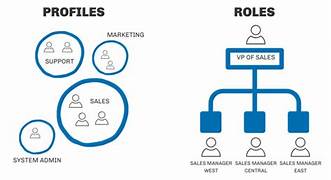
How to Set Up Salesforce Roles
- Navigate to the Setup page in Salesforce.
- In the Quick Find box, type “Roles” and select it.
- Click Set Up Roles.
- Locate the role within the existing role hierarchy.
- Identify the role above the new one and click Add Role.
- Enter a label for the new role.
- Select the person or role the new role reports to.
- Customize the role’s access to contacts, opportunities, and cases.
- Review the setup to ensure everything is configured correctly.
- Click Save.
Salesforce is a powerful platform used by many organizations to streamline operations across departments, from sales and marketing to customer support. With so many users working within the platform, it’s essential to manage access to data securely. Salesforce achieves this through its system of roles and profiles, which define who can see and do what in the system.
Salesforce Roles vs. Profiles
Roles determine what data users can view. They establish a hierarchy of access, with higher roles having visibility into records owned by those below them. This helps ensure that only authorized users can access sensitive information.
Profiles, on the other hand, define what actions users can take within Salesforce, such as creating or editing records. Profiles are assigned when user accounts are created and can be customized to suit specific job functions.
Role Hierarchy in Salesforce
The role hierarchy in Salesforce is designed to control data access, not mirror the organizational chart. Higher roles can generally view data from roles below them, but access can be restricted based on business needs.
Types of Salesforce Profiles
Salesforce comes with several standard profiles, and administrators can create custom profiles as needed. Some key profiles include:
- System Administrators: Have full control over Salesforce, including configuring apps and accessing products.
- Standard Platform Users: Can access core features like accounts, contacts, reports, and dashboards.
- Standard Platform One App Users: Similar to Standard Platform Users, but limited to a single app.
- Standard Users: Can run reports and edit most record types but have limited access to campaigns.
In addition to profiles, permission sets allow admins to grant users specific permissions without changing their profile.
Managing Salesforce Roles and Profiles
Setting up Salesforce roles and profiles is crucial for maintaining data security and ensuring users have the correct access for their responsibilities. By efficiently configuring roles and profiles, businesses can tailor the platform to their needs, enhancing both user experience and operational security.

Who is Salesforce? Here is their story in their own words. From our inception, we've proudly embraced the identity of Read more

Salesforce Marketing Cloud Transactional Emails are immediate, automated, non-promotional messages crucial to business operations and customer satisfaction, such as order Read more

Salesforce has unveiled a comprehensive analytics solution tailored for wealth managers, home office professionals, and retail bankers, merging its Financial Read more

AI plays a crucial role in propensity score estimation as it can discern underlying patterns between treatments and confounding variables Read more





