CX Archives - gettectonic.com - Page 6
Collecting customer data

Customer Journey Mapping

Based on a Salesforce study, 51% of marketing leaders measure success with revenue growth.  22% look at customer satisfaction. While only 18% look at customer retention.  Customer journey mapping addresses retention, satisfaction, and revenue growth.  Taking a customer-centric approach to designing your customer journey map puts your focus on the customer improving customer satisfaction and retention, in addition to revenue. Your customer journey map coordinates all your marketing efforts. Maximize the Advantages of Customer Journey Mapping To maximize the advantages of customer journey mapping, it’s critical to take a comprehensive approach that integrates each of the following steps: Your Customer Journey Map is a Diagram of Touchpoints The customer journey map becomes a diagram of all the touchpoints a customer has with your company. While every customer’s experience with your company will be slightly, or greatly, different the customer journey map will outline potential journeys and touchpoints. Understanding how, when, and why your customer is interacting with your company is key to improving your customer experiences. The Salesforce team at Tectonic looks forward to assisting you in implementing your customer journey throughout the entire Salesforce ecosystem. Like1 Related Posts Who is Salesforce? Who is Salesforce? Here is their story in their own words. From our inception, we’ve proudly embraced the identity of Read more Salesforce Marketing Cloud Transactional Emails Salesforce Marketing Cloud Transactional Emails are immediate, automated, non-promotional messages crucial to business operations and customer satisfaction, such as order Read more Salesforce Unites Einstein Analytics with Financial CRM Salesforce has unveiled a comprehensive analytics solution tailored for wealth managers, home office professionals, and retail bankers, merging its Financial Read more AI-Driven Propensity Scores AI plays a crucial role in propensity score estimation as it can discern underlying patterns between treatments and confounding variables Read more


Read More
Sensitive Information De-identification

Sensitive Information De-identification

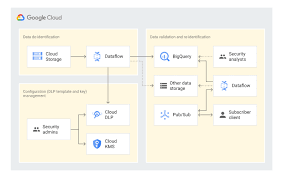
Using Google Cloud Data Loss Prevention with Salesforce for Sensitive Data Handling This insight discusses the transition from detecting and classifying sensitive data to preventing data loss using Google Cloud Data Loss Prevention (DLP). Sensitive Information De-identification for Salesforce is used as the data source to demonstrate how personal, health, credential, and financial information can be de-identified in unstructured data in near real-time. Overview of Google Cloud DLP Google Cloud DLP is a fully managed service designed to help discover, classify, and protect sensitive data. It easily transitions from detection to prevention by offering services that mask sensitive information and measure re-identification risk. Objective The goal was to demonstrate the ability to redact sensitive information in unstructured data at scale. Specifically, it aimed to determine whether sensitive data, such as credit card numbers, tax file numbers, and health care numbers, entered into Salesforce communications (Emails, Files, and Chatter) could be detected and redacted. Constraints Tested De-identifying Data with Google Cloud DLP API Instead of detailing the setup, this section focuses on the key areas of design. Google Design Decisions Supporting Disparate Data Sources with Multiple Integration Patterns and Redundant Design Salesforce Data Source De-identification targets include email addresses, Australian Medicare card numbers, GCP API keys, passwords, and credit card numbers. Credit card numbers are masked with asterisks, while other sensitive data is replaced with information types for readability (e.g., jane@secretemail.com becomes [redacted-email-address]). Sample Requests to Google De-identification Service JSON Structure to De-identify Text Using Google Cloud DLP API jsonCopy code{ // JSON structure } JSON Structure to De-identify Images Using Google Cloud DLP API jsonCopy code{ // JSON structure } Salesforce Design Decisions Redundancy and Batch Processing A scheduled batch job allows for recovery by polling unprocessed records. To handle large data volumes (e.g., 360,000 records over 5 days), the Salesforce BULK API is used to process queries and updates in large batch sizes, reducing the number of API calls. Sensitive Information De-identification Google Cloud Data Loss Prevention allows detecting and protecting assets with sensitive information, supporting a wide range of use cases across an enterprise. Proven Capabilities: Considerations and Lessons Learned Enhanced Email: Redacting tasks and EmailMessage records, handling read-only EmailMessage records by deleting and recreating them. Files: The architecture assumes files with sensitive data can be deleted and replaced with redacted versions. Audit Fields: Ensure setting CreatedDate and LastModifiedDate fields using original record dates. Field History Tracking: Avoid tracking fields intended for de-identification, tracking shadow fields instead. Image De-identification: Limited to JPEG, BMP, and PNG formats, with DOCX and PDF not yet supported. Like Related Posts Who is Salesforce? Who is Salesforce? Here is their story in their own words. From our inception, we’ve proudly embraced the identity of Read more Salesforce Marketing Cloud Transactional Emails Salesforce Marketing Cloud Transactional Emails are immediate, automated, non-promotional messages crucial to business operations and customer satisfaction, such as order Read more Salesforce Unites Einstein Analytics with Financial CRM Salesforce has unveiled a comprehensive analytics solution tailored for wealth managers, home office professionals, and retail bankers, merging its Financial Read more AI-Driven Propensity Scores AI plays a crucial role in propensity score estimation as it can discern underlying patterns between treatments and confounding variables Read more
Read More
Salesforce Order Management

Salesforce Order Management Explained

What is Salesforce Order Management? It’s a platform for managing orders, customer records, fulfillment, inventory visibility, payments and invoicing, and customer care.

Read More
Marketing Cloud Cloudpages

Salesforce Marketing Cloud Cloudpages

Utilize the CloudPages builder in Marketing Cloud Engagement to effortlessly publish targeted marketing content across multiple channels. CloudPages, a feature within Salesforce Marketing Cloud, offers drag-and-drop tools and pre-built templates for creating and publishing landing pages, preference center pages, and more. Salesforce Marketing Cloud empowers efficient marketing processes and streamlined customer relationship management. It enables the creation of customer profiles and tracking of interactions across various channels, including email, social media, and web interactions. CloudPages facilitates the automatic saving of Smart Capture block data, addition of default content versions to multiple destinations, and the design and preview of content in the audience’s format. For customer experience, CloudPages ensures a seamless process where prospects view and convert on pages using capture forms, with their data instantly updated in relevant Data Extensions. They are efficiently added to Journey Builder flows and receive tailored marketing communications promptly. Organize information for specific destinations, such as landing pages or microsites, with a Cloud Pages collection. Landing pages, created with Cloud Pages, can include custom forms with Ampscript and can be embedded in emails and websites. CloudPages smart capture forms can be used as a Journey Builder Entry Event. The difference between landing pages and CloudPages lies in CloudPages being an application within Marketing Cloud that can publish to various destinations, including Landing Pages. Marketing Cloud Engagement, with the inclusion of Cloud Pages, aids in conversions by providing a drag-and-drop interface for easy creation of landing pages, eliminating the need for complex coding. To create a landing page in Marketing Cloud, navigate to Web Studio > Cloud Pages, create a new collection, and within it, click ‘Create’ and select ‘Landing Page.’ Building CloudPages is user-friendly, featuring a drag-and-drop interface with templated layouts, content blocks, and dynamic content options. It allows easy insertion of text, images, buttons, forms, and more. Salesforce Marketing Cloud differs from Pardot, with Pardot being closely integrated with sales on the Salesforce core platform, while Marketing Cloud operates as a separate application. Landing pages are still crucial, as research indicates that businesses with more landing pages tend to experience higher conversion rates. The term “landing page” refers to a campaign-specific page with a single call to action and no website navigation. Insider tips for using Cloud Pages include making content relevant with Dynamic Content blocks, avoiding information overload, ensuring mobile-friendliness, and experimenting with different page versions for optimal performance. Content updated September 2023. Like2 Related Posts Who is Salesforce? Who is Salesforce? Here is their story in their own words. From our inception, we’ve proudly embraced the identity of Read more Salesforce Marketing Cloud Transactional Emails Salesforce Marketing Cloud Transactional Emails are immediate, automated, non-promotional messages crucial to business operations and customer satisfaction, such as order Read more Salesforce Unites Einstein Analytics with Financial CRM Salesforce has unveiled a comprehensive analytics solution tailored for wealth managers, home office professionals, and retail bankers, merging its Financial Read more AI-Driven Propensity Scores AI plays a crucial role in propensity score estimation as it can discern underlying patterns between treatments and confounding variables Read more
Read More
Talkdesk Dialer for Salesforce

Talkdesk Dialer for Salesforce

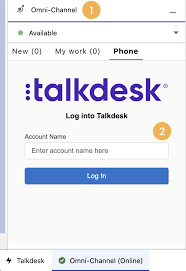
Forge Meaningful Customer Connections with Talkdesk Proactive Outbound Engagement™-Talkdesk Dialer for Salesforce Talkdesk Proactive Outbound Engagement™ is a comprehensive suite of outbound voice and digital capabilities integrated into the Talkdesk CX Cloud™ contact center platform. This suite includes versatile dialing modes tailored for every scenario, such as Talkdesk Preview Dialer, Talkdesk Dialer, Advanced Dialer, Talkdesk Dialer for Salesforce, and Automated Notifications. Maximize contact rates by reaching customers when and how they prefer to be contacted while ensuring high-quality interactions that reflect the level of service your customers deserve. Enhance Agent Productivity to Maximize Outbound Success Tools like the Talkdesk Preview Dialer can significantly increase outbound call volume, driving connect rates from 5 to 15 or more per hour and boosting revenue by up to 200-300%. Intelligently manage outbound call pacing to filter out unproductive calls like voicemails, busy signals, and no answers, optimizing agent productivity. Launch Strategic Campaigns Effortlessly Leverage highly configurable dialing options and advanced campaign management tools to maximize contact rates through precise targeting and segmentation. The Advanced Dialer supports customizable campaign and dialing configurations to accommodate virtually any outreach and retry strategy. Empower Agents with Smart Dialing Modes Equip agents with predictive, power, progressive, preview, and agentless dialing modes, complemented by a patented AI-driven answering machine detection algorithm. Salesforce Quick Campaign, part of the Talkdesk Dialer for Salesforce™ product, allows manual selection of Salesforce records for dialing using preview or power dialing modes. Streamlined List Management for Seamless Operations Set up calling lists effortlessly by uploading a CSV file or pushing records from Salesforce, other CRMs, or business systems via an API. Web leads can be seamlessly integrated into ongoing campaigns for immediate dialing, ensuring every hot lead is promptly engaged. Ensure Quality Connections with Talkdesk Dialer for Salesforce™ Talkdesk Dialer, fully embedded within the Salesforce UI, offers power and preview dialing to balance productivity with call quality and personalized customer interactions. Deliver Efficient and Proactive Notifications Go beyond voice calls with Talkdesk Automated Notifications, anticipating customer needs through automated event-triggered SMS notifications. Configure rules and content for each notification to deliver highly personalized messages that enhance efficiency and customer satisfaction. Robust Reporting and Insights While pre-set out-of-the-box reporting tools are currently unavailable for Talkdesk Dialer for Salesforce, Salesforce users can leverage standard Salesforce reporting functionality to create custom reports. Talkdesk Dialer™ is designed to automate the dialing process, maximize outbound call volume, and facilitate meaningful connections with customers while ensuring compliance with regulatory requirements. Learn more about our solutions crafted to optimize every customer interaction at talkdesk.com. Like1 Related Posts Who is Salesforce? Who is Salesforce? Here is their story in their own words. From our inception, we’ve proudly embraced the identity of Read more Salesforce Marketing Cloud Transactional Emails Salesforce Marketing Cloud Transactional Emails are immediate, automated, non-promotional messages crucial to business operations and customer satisfaction, such as order Read more Salesforce Unites Einstein Analytics with Financial CRM Salesforce has unveiled a comprehensive analytics solution tailored for wealth managers, home office professionals, and retail bankers, merging its Financial Read more AI-Driven Propensity Scores AI plays a crucial role in propensity score estimation as it can discern underlying patterns between treatments and confounding variables Read more
Read More
Salesforce analytics insurance

Cool Ways to Use Surveys With Salesforce

Leveraging survey forms is an effective way to gather real-life insights from individuals crucial to your organization. Salesforce facilitates survey integration either through Salesforce Surveys and Feedback Management (add-on license) or by seamlessly integrating web forms with Salesforce. Storing feedback in your CRM, linked to comprehensive contact information, is an obvious advantage. Salesforce surveys give you real-time feedback.  However, adopting an integrated web form approach offers additional benefits. Here are seven ideas to enhance your survey integration with Salesforce, ensuring valuable customer insights: Integrating survey forms with Salesforce is a strategic move to enhance customer experience and internal processes. Implementing these tips will not only improve the effectiveness of your Salesforce surveys but also align internal practices with best standards. Choose a tip that fits your needs and contributes to the success of your Salesforce surveys. Like Related Posts Who is Salesforce? Who is Salesforce? Here is their story in their own words. From our inception, we’ve proudly embraced the identity of Read more Salesforce Marketing Cloud Transactional Emails Salesforce Marketing Cloud Transactional Emails are immediate, automated, non-promotional messages crucial to business operations and customer satisfaction, such as order Read more Salesforce Unites Einstein Analytics with Financial CRM Salesforce has unveiled a comprehensive analytics solution tailored for wealth managers, home office professionals, and retail bankers, merging its Financial Read more AI-Driven Propensity Scores AI plays a crucial role in propensity score estimation as it can discern underlying patterns between treatments and confounding variables Read more

Read More
Salesforce Document Generation

Generating Documents in Salesforce

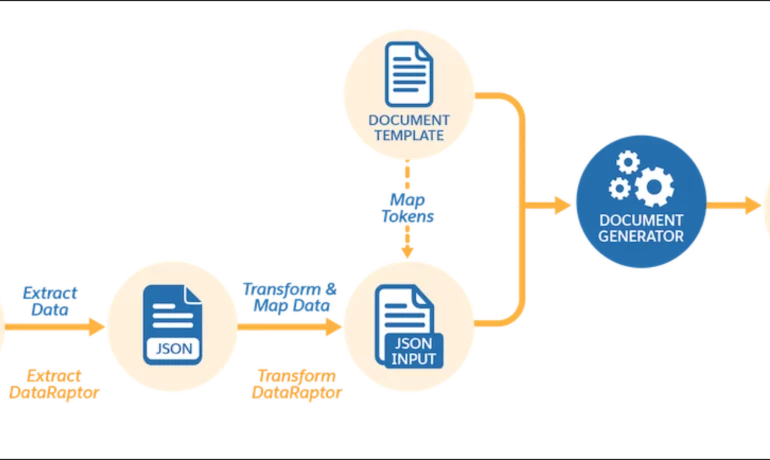
Salesforce document generation poses a challenge for businesses, given the intricacies of integration involved. Fortunately, a variety of tools are available for generating documents in Salesforce, and Tectonic is well-equipped to assist in their successful implementation. Salesforce Industries Document Generation empowers businesses to craft and manage accurate documents linked to standard Salesforce objects, encompassing contracts, opportunities, orders, quotes, and custom objects. For a more dynamic approach, Salesforce OmniStudio Document Generation facilitates the creation of documents using Microsoft Word and Microsoft PowerPoint templates. These templates can incorporate values from any JSON-based data within the text, including data sourced from various Salesforce objects. This versatile tool enables the generation of contracts, proposals, quotes, reports, non-disclosure agreements, service agreements, and more. Salesforce Industries Document Generation seamlessly integrates with Vlocity Insurance, Vlocity Health, communications, media, energy, utilities, government, and beyond. Vlocity Analytics, another valuable component, offers pre-built measurement tools that seamlessly integrate with Salesforce Reports, Dashboards, and Einstein. The Salesforce AppExchange boasts an extensive array of over 200 document generation tools. Your Salesforce partner can assist in selecting, installing, and implementing the most suitable options based on your business requirements. With Document Generation, you can generate contracts, proposals, quotes, reports, non-disclosure agreements, job offers, service agreements, and so on. You can generate documents using the specified sample client-side or server-side OmniScripts. You can also create your own OmniScripts by cloning and customizing the sample OmniScript to generate documents. Client-Side document generation is a synchronous process that results in a downloadable preview of the generated documents. You can generate documents from Microsoft Word (.docx), Microsoft PowerPoint (.pptx), and Web templates. These templates can include values from any JSON-based data in the text, including data from any Salesforce object. You can optionally convert the resulting documents to .pdf format. Server-Side document generation is available in both the OmniStudio Foundation and Salesforce Industries packages. Server-Side document generation is an asynchronous process that’s best for large and rendering-heavy documents and for document generation in batches. The Server-Side document generation service is secure and scalable and is hosted on Salesforce Hyperforce. The generated document is stored in your Salesforce org, and is attached to the object for which it’s generated. You can use Apex Classes, sample Integration Procedures, or a sample OmniScript to generate documents. Client-Side document generation supports Customer Community Plus, Customer Community, and Partner Community users to generate documents using client-side OmniScripts. Server-Side document generation supports Customer Community Plus, Customer Community, and Partner Community users to generate documents using the singleDocxServersideLwc server-side OmniScript. With the right licenses, Document Generation is available in the Salesforce Industries package. Metering measures resource utilization levels and throttling controls resource access and use based on defined rules. Metering measures the number of server-side documents that are generated by an org hourly and daily. The default hourly and daily limits for processing server-side document generation requests are 1,000 per org and 24,000 per org respectively. Throttling maintains consistency and resilience of the server-side document generation service by managing incoming server-side document generation requests from multiple orgs. Throttling can also prevent service degradation caused by high volume of requests at peak hours by blocking requests that exceed the default limits. The request details are saved in the Document Generation Processes entity. You can retrieve the blocked requests and later retry the server-side document generation. No matter what your specific document generation needs, Tectonic simplifies the process of getting your system up and running seamlessly, whether it’s through Salesforce Quickstarts or comprehensive implementation services. Content updated in 2February 2024, Shannan Hearne. Like1 Related Posts Who is Salesforce? Who is Salesforce? Here is their story in their own words. From our inception, we’ve proudly embraced the identity of Read more Salesforce Marketing Cloud Transactional Emails Salesforce Marketing Cloud Transactional Emails are immediate, automated, non-promotional messages crucial to business operations and customer satisfaction, such as order Read more Salesforce Unites Einstein Analytics with Financial CRM Salesforce has unveiled a comprehensive analytics solution tailored for wealth managers, home office professionals, and retail bankers, merging its Financial Read more AI-Driven Propensity Scores AI plays a crucial role in propensity score estimation as it can discern underlying patterns between treatments and confounding variables Read more
Read More
gettectonic.com