EGI Archives - gettectonic.com - Page 10
AI-Powered Data Management

AI-Powered Data Management

AI-Powered Data Management: Transforming Data into Strategic Assets What is AI Data Management? AI data management integrates artificial intelligence (AI) and machine learning (ML) to optimize data processes—automating workflows, improving accuracy, and unlocking deeper insights. By leveraging AI, organizations can enhance data quality, security, compliance, and analytics, making data more actionable for AI-driven applications. Key Capabilities of AI in Data Management 1. Intelligent Automation 2. Enhanced Data Quality 3. Advanced Security & Compliance 4. Smart Data Discovery & Classification 5. Predictive & Prescriptive Analytics Real-World Applications ✅ Automated Data Cleansing – AI validates and corrects data in real time, ensuring accuracy.✅ Intelligent Data Cataloging – AI scans and classifies data for easy retrieval and governance.✅ Predictive Modeling – Analyzes historical data to forecast trends (e.g., customer behavior, operational risks).✅ AI-Driven Cybersecurity – Monitors network activity to detect and block threats before they escalate. Business Benefits of AI Data Management 🔹 Higher Data Accuracy – Fewer errors, more reliable insights.🔹 Faster Decision-Making – AI extracts insights in seconds, not weeks.🔹 Cost Efficiency – Reduces manual labor and storage waste.🔹 Regulatory Readiness – Automates compliance reporting.🔹 Competitive Edge – Turns data into a strategic differentiator. The Future of AI in Data Management As AI evolves, expect: Conclusion AI-powered data management isn’t just an upgrade—it’s a paradigm shift. By integrating AI, organizations can automate workflows, enhance security, and extract unprecedented value from their data, positioning themselves ahead in the data-driven economy. Is your business ready to harness AI for smarter data management? Like Related Posts Who is Salesforce? Who is Salesforce? Here is their story in their own words. From our inception, we’ve proudly embraced the identity of Read more Salesforce Unites Einstein Analytics with Financial CRM Salesforce has unveiled a comprehensive analytics solution tailored for wealth managers, home office professionals, and retail bankers, merging its Financial Read more AI-Driven Propensity Scores AI plays a crucial role in propensity score estimation as it can discern underlying patterns between treatments and confounding variables Read more Tectonic’s Successful Salesforce Track Record Salesforce Technology Services Integrator – Tectonic has successfully delivered Salesforce in a variety of industries including Public Sector, Hospitality, Manufacturing, Read more

Read More
Account Planning With Salesforce

CRM Analytics Limits

When using CRM Analytics, keep these limits in mind. API Call Limits These limits apply to all supported editions. API Call Limit Maximum concurrent CRM Analytics API calls per org 100 Maximum CRM Analytics API calls per user per hour 10,000 Dataset Row Storage Allocations per License In Salesforce org, your total row storage limit for all registered datasets combined depends on your license combination. Each license allocates a different number of rows. Baseline Row Allocation Allocated Rows CRM Analytics Plus 10 billion CRM Analytics Growth 100 million Sales Analytics 25 million Service Analytics 25 million Event Monitoring Analytics 50 million B2B Marketing Analytics 25 million CRM Analytics for Financial Services Cloud 25 million CRM Analytics for Health Cloud 25 million Extra Data Rows license 100 million Your total row storage limit is a combination of your active licenses. For example: Because the CRM Analytics Plus license includes the Sales Analytics and Service Analytics licenses, your total row allocation remains 10 billion. Similarly, the CRM Analytics Growth license includes the Sales Analytics and the Service Analytics licenses, so your total row allocation remains 100 million. However, if you obtain another Sales Analytics or Services Analytics license, your row limit increases by 25 million for each added license. Dataset Row Limits Each dataset supports up to 2 billion rows. If your Salesforce org has less than 2 billion allocated rows, each dataset supports up to your org’s allocated rows. Dataset Field Limits Value Limit Maximum number of fields in a dataset 5,000 (including up to 1,000 date fields) Maximum number of decimal places for each value in a numeric field in a dataset (overflow limit) 17 decimal placesWhen a value exceeds the maximum number of decimal places, it overflows. Both 100,000,000,000,000,000 and 10,000,000,000,000,000.0 overflow because they use more than 17 decimal places. A number also overflows if it’s greater (or less) than the maximum (or minimum) supported value. 36,028,797,018,963,968 overflows because its value is greater than 36,028,797,018,963,967. -36,028,797,018,963,968 overflows because it’s less than -36,028,797,018,963,967.When a number overflows, the resulting behavior in CRM Analytics is unpredictable. Sometimes CRM Analytics throws an error. Sometimes it replaces a numeric value with a null value. And sometimes mathematical calculations, such as sums or averages, return incorrect results. Occasionally, CRM Analytics handles numbers up to 19 digits without overflowing because they are within the maximum value for a 64-bit signed integer (263 – 1). But numbers of these lengths aren’t guaranteed to process.As a best practice, stick with numbers that are 17 decimal places or fewer. If numbers that would overflow are necessary, setting lower precision and scale on the dataset containing the large numbers sometimes prevents overflow. If your org hasn’t enabled the handling of numeric values, the maximum number of decimal places for each value in a numeric field in a dataset is 16. All orgs created after Spring ’17 have Null Measure Handling enabled. Maximum value for each numeric field in a dataset, including decimal places 36,028,797,018,963,967For example, if three decimal places are used, the maximum value is 36,028,797,018,963.967 Minimum value for each numeric field in a dataset, including decimal places -36,028,797,018,963,968For example, if five decimal places are used, the minimum value is -36,028,797,018,9.63968 Maximum number of characters in a field 32,000 Data Sync Limits If you extract more than 100 objects in your dataflows, contact Salesforce Customer Support before you enable data sync. Value Limit Maximum number of concurrent data sync runs 3 Maximum number of objects that can be enabled for data sync, including local and remote objects 100 Maximum amount of time each data sync job can run for local objects 24 hours Maximum amount of time each data sync job can run for remote objects 12 hours Data sync limits for each job:Marketo Connector (Beta)NetSuite ConnectorZendesk Connector Up to 100,000 rows or 500 MB per object, whichever limit is reached first Data sync limits for each job:Amazon Athena ConnectorAWS RDS Oracle ConnectorDatabricks ConnectorGoogle Analytics ConnectorGoogle Analytics Core Reporting V4 ConnectorOracle Eloqua ConnectorSAP HANA Cloud ConnectorSAP HANA Connector Up to 10 million rows or 5 GB per object, whichever limit is reached first Data sync limits for each job*:AWS RDS Aurora MySQL ConnectorAWS RDS Aurora PostgresSQL ConnectorAWS RDS MariaDB ConnectorAWS RDS MySQL ConnectorAWS RDS PostgreSQL ConnectorAWS RDS SQL Server ConnectorGoogle Cloud Spanner ConnectorMicrosoft Azure Synapse Analytics ConnectorMicrosoft Dynamics CRM ConnectorSalesforce External ConnectorSalesforce Contacts Connector for Marketing Cloud EngagementSalesforce OAuth 2.0 Connector for Marketing Cloud Engagement Up to 20 million rows or 10 GB per object, whichever limit is reached first Data sync limits for each job*:Amazon Redshift ConnectorAmazon S3 ConnectorCustomer 360 Global Profile Data Connector (Beta)Google BigQuery for Legacy SQL ConnectorGoogle BigQuery Standard SQL ConnectorHeroku Postgres ConnectorMicrosoft Azure SQL Database ConnectorSnowflake Input Connector Up to 100 million rows or 50 GB per object, whichever limit is reached first *When using these connectors, Salesforce Government Cloud org data is protected in transit with advanced encryption and can sync up to 10 million rows or 5 GB for each connected object, whichever limit is reached first. Note When using a Salesforce local input connection, CRM Analytics bulk API usage doesn’t count towards Salesforce bulk API limits. Use of the external Salesforce connection and output connection impacts your limits. The dataflow submits a separate bulk API call to extract data from each Salesforce object. The dataflow uses a batch size of 100,000–250,000, depending on whether the dataflow or the bulk API chunks the data. As a result, to extract 1 million rows from an object, the dataflow creates 4–10 batches. Recipe and Dataflow Limits Important In Winter ‘24, recipe runs over 2 minutes are counted against the limit. Previously, the recipe run counts weren’t correct. For more information, see Known Issue – Recipe runs are not counting towards the daily maximum run limit. Value Limit Maximum amount of time each recipe or dataflow can run 48 hours Maximum number of recipes 1,000 Maximum number of dataflows definitions (with data sync enabled) 100 Maximum number of dataflow and recipe runs in a rolling

Read More
Accounting Software That Integrates With Salesforce

Accounting Software Integration With Salesforce

Integrating accounting software with Salesforce streamlines financial processes and improves data visibility across departments. This integration allows for a more efficient flow of information, reducing manual data entry and potential errors, ultimately leading to better decision-making and a healthier bottom line.  Benefits and popular options: Benefits of Salesforce Accounting Integration: Popular Accounting Software Integrated with Salesforce: How it Works: Salesforce integrations with accounting software typically involve: By integrating accounting software with Salesforce, businesses can create a more efficient and streamlined workflow, leading to better financial management and improved business outcomes.  Like Related Posts Who is Salesforce? Who is Salesforce? Here is their story in their own words. From our inception, we’ve proudly embraced the identity of Read more Salesforce Marketing Cloud Transactional Emails Salesforce Marketing Cloud Transactional Emails are immediate, automated, non-promotional messages crucial to business operations and customer satisfaction, such as order Read more Salesforce Unites Einstein Analytics with Financial CRM Salesforce has unveiled a comprehensive analytics solution tailored for wealth managers, home office professionals, and retail bankers, merging its Financial Read more AI-Driven Propensity Scores AI plays a crucial role in propensity score estimation as it can discern underlying patterns between treatments and confounding variables Read more

Read More
Salesforce Experience Cloud

Nonprofit with Salesforce Experience Cloud

Transform Your Nonprofit with Salesforce Experience Cloud: A Digital Storefront for Engagement Think of Salesforce Experience Cloud as your Nonprofit’s digital storefront—always open, always inviting. This powerful Digital Experience Platform (DXP) enables you to create custom portals, communities, and hubs where donors, volunteers, and beneficiaries can seamlessly connect with your organization. Instead of juggling endless emails and spreadsheets, Experience Cloud centralizes interactions, making them self-service, intuitive, and engaging. With nonprofit-specific features, you can build customized, branded experiences without heavy development work. Here’s what makes Experience Cloud a game-changer: ✅ Drag-and-drop site builder for effortless customization✅ Prebuilt templates & Lightning components for quick deployment✅ Mobile Publisher for consistent branding across mobile apps✅ Built-in content management system (CMS)✅ Personalization tools like audience targeting & role-based access✅ Einstein AI-powered chatbots for instant responses✅ Gamification with badges & leaderboards✅ Google Analytics 4 integration for engagement insights✅ Advanced security with Lightning Locker & Clickjack protection …and much more. 🔍 Nonprofit Solutions You Can Build with Salesforce Experience Cloud 1️⃣ Program Applications & Intake Portals Managing program applications can be overwhelming without a structured system. Experience Cloud allows Nonprofits to create a self-service portal where applicants can submit forms, track status updates, and receive automated notifications—eliminating paper-based processes and endless email chains. With Dynamic Forms and Flow Builder, applications stay structured while automation accelerates approvals. Plus, since everything syncs to the Nonprofit Success Pack (NPSP), you’ll always have a real-time view of applicants and program impact. 2️⃣ Volunteer Portals Managing volunteers shouldn’t feel like a full-time job. With a Volunteer Portal, people can sign up, pick shifts, and track their hours—all without back-and-forth emails. Features like automated background checks and approval workflows ensure smooth operations. Meanwhile, Experience Cloud’s Chatter integration fosters engagement, helping you track who’s active, who’s disengaged, and who might need a little encouragement. 3️⃣ Community Partner Portals Nonprofits thrive on partnerships, and a Community Partner Portal keeps corporate sponsors, local businesses, and community groups connected. With this portal, partners can log in, access shared resources, submit funding applications, and track joint projects—all from one secure platform. Role-based access ensures that sensitive data stays protected while collaboration remains seamless. 4️⃣ Membership Portals If your nonprofit has a membership program, Experience Cloud helps you build a Member Portal where users can renew memberships, update information, and access exclusive content. Want to boost engagement? Introduce gamification with badges, leaderboards, and personalized event recommendations. Since everything is integrated with Salesforce CRM, you’ll gain real-time insights into member activity to keep engagement levels high. 5️⃣ Grant Management Portals Grant applications shouldn’t feel like a never-ending email thread. With Experience Cloud, you can create a Grant Management Portal where organizations apply for funding, track application progress, and submit reports—all in one place. Einstein AI can even prioritize applications based on predefined criteria, accelerating the review process. Grantors, in turn, can access real-time funding reports—enhancing transparency and trust. 6️⃣ E-Commerce & Donation Portals Looking to sell nonprofit merchandise or accept donations online? Experience Cloud seamlessly integrates with Salesforce Commerce Cloud, allowing you to build an e-commerce storefront for hassle-free transactions. Supporters can:💳 Make one-time or recurring donations🛍️ Purchase branded merchandise📜 Track donation history & receive personalized thank-you messages For secure transactions and easy donor tracking, you can integrate Stripe, PayPal, or other payment processors directly into your portal. 7️⃣ Voter Registration Portals If your nonprofit promotes civic engagement, Experience Cloud can power a Voter Registration Portal where users can check registration status, sign up to vote, and receive election reminders. With geolocation tools, voters can find polling places instantly, while Marketing Cloud integration allows you to send timely voter updates—ensuring higher participation in the democratic process. Implementing Salesforce Experience Cloud for Nonprofits Which Approach is Right for Your Nonprofit? Your ideal Experience Cloud implementation depends on your current CRM, budget, and long-term strategy. 1️⃣ Standalone Experience Cloud Implementation If your nonprofit already uses Salesforce CRM (but not NPSP), you can still implement Experience Cloud independently to create portals, volunteer hubs, and dashboards while maintaining your existing CRM as the system of record. Considerations:🔹 Custom Configuration – You’ll need to set up nonprofit-specific objects & automation.🔹 Permissions & Access – Well-structured security settings are crucial.🔹 CRM Integration – If using a non-Salesforce CRM, API integrations (e.g., MuleSoft, Zapier) will be required. This option is best for nonprofits that want external-facing engagement tools without fully shifting to the Salesforce Nonprofit ecosystem. 2️⃣ Experience Cloud + Nonprofit Cloud / NPSP For nonprofits already using Salesforce Nonprofit Cloud or NPSP, Experience Cloud becomes an extension of your engagement strategy. 🔹 Real-time donor, volunteer, and grant data sharing🔹 Prebuilt nonprofit features (fundraising, donor management, program tracking)🔹 Automation & AI-powered engagement 3️⃣ Experience Cloud + Third-Party Nonprofit CRMs Already using a third-party nonprofit CRM (like Raiser’s Edge NXT, Neon One, or DonorPerfect)? You can still leverage Experience Cloud, but strong integration is key. 🔹 Experience Cloud powers your donor, volunteer, or program portal🔹 API-based sync required for real-time data exchange🔹 Tools like MuleSoft or Zapier help bridge data gaps This approach is ideal for nonprofits wanting the flexibility of Experience Cloud without migrating their backend to Salesforce. Final Thought: Making Experience Cloud Work for Your Nonprofit No matter your approach, Salesforce Experience Cloud is a powerful tool to drive engagement and efficiency for nonprofits. However, successful implementation requires a well-thought-out strategy. Need expert guidance? A Salesforce implementation partner can help tailor Experience Cloud to fit your unique nonprofit needs, ensuring your digital storefront delivers maximum impact. Like Related Posts Who is Salesforce? Who is Salesforce? Here is their story in their own words. From our inception, we’ve proudly embraced the identity of Read more Salesforce Marketing Cloud Transactional Emails Salesforce Marketing Cloud Transactional Emails are immediate, automated, non-promotional messages crucial to business operations and customer satisfaction, such as order Read more Salesforce Unites Einstein Analytics with Financial CRM Salesforce has unveiled a comprehensive analytics solution tailored for wealth managers, home office professionals, and retail bankers, merging its Financial Read more AI-Driven Propensity Scores AI plays

Read More
Salesforce Flow Tests

Mastering Salesforce Flows

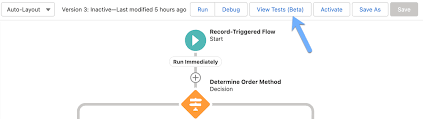
Mastering Salesforce Flows: The Complete Guide to Process Automation Why Flows Are Every Admin’s Superpower In today’s fast-moving business world, 87% of organizations report that automation is critical to maintaining competitiveness. Salesforce Flows empower admins to automate complex processes that traditionally required developer resources – making you the automation hero your team needs. The Flow Advantage *”After implementing flows, one manufacturing company reduced their quote-to-cash cycle from 5 days to 2 hours.”* Flow Types Demystified: Choose the Right Tool Flow Type Best For Key Features Trigger Examples Screen Flow User-guided processes Interactive UI, data collection Onboarding wizards, service case triage Record-Triggered Auto-processing records Runs on create/update/delete Auto-calculate discounts, update related records Schedule-Triggered Batch operations Runs on cron schedule Daily data cleanup, monthly reports Platform Event System integrations Handles external events Process IoT device alerts, SMS responses Orchestration Multi-step workflows Coordinates teams/systems Complex approvals, onboarding journeys Pro Tip: With Process Builder sunsetting in 2025, all new automation should use flows. Building Your First Flow: Step-by-Step 1. Planning Your Flow 2. Creating in Flow Builder markdown Copy Download 1. Setup > Flows > New Flow 2. Select type (e.g., Record-Triggered) 3. Configure trigger (when to run) 4. Add elements using + button: – Get Records (query data) – Decision (if/then logic) – Action (create/update records) 5. Set fault paths for error handling 3. Testing Like a Pro 4. Deployment Checklist ✅ Sandbox testing complete✅ Error handling implemented✅ Documentation created✅ User training scheduled Advanced Flow Techniques Avoid These Common Pitfalls 🚫 Nested Loops – Use Collection Filter instead🚫 Hardcoding IDs – Create custom labels🚫 Overquerying – Leverage $Record variables🚫 No Null Checks – Always add decision branches Proven Performance Boosters Example: Filtering 10,000 contacts takes: Real-World Flow Examples 1. Lightning-Fast Lead Routing Diagram Code Download EMEA APAC New Lead Region? Assign to London Queue Assign to Sydney Queue Send Welcome Email Create First Task Result: 90% faster lead assignment 2. Automated Renewal Management Impact: 30% increase in renewals 3. Customer Service Escalation Flows vs. Code: When to Choose What Scenario Flow Apex Field updates ✅ Best ⚠ Overkill Complex calculations ✅ Spring ’22+ ✅ Needed pre-2022 External API calls ✅ (Simple) ✅ (Complex) Bulk data (>10k recs) ⚠ Careful ✅ Better Trigger frameworks ❌ Avoid ✅ Required Golden Rule: Start with Flow, escalate to Apex only when limits hit. Flow Orchestration: Next-Level Automation For processes spanning multiple departments: Benefits:✔ End-to-end visibility✔ Automatic handoffs✔ Built-in wait steps Getting Started Resources “The average admin automates 23 hours of work weekly using flows.” – Salesforce ROI Study Ready to transform your processes? Book a flow consultation with our certified experts today! #Salesforce #Flow #CRM #BusinessAutomation #DigitalTransformation Content updated December 2024. Like Related Posts Who is Salesforce? Who is Salesforce? Here is their story in their own words. From our inception, we’ve proudly embraced the identity of Read more Salesforce Marketing Cloud Transactional Emails Salesforce Marketing Cloud Transactional Emails are immediate, automated, non-promotional messages crucial to business operations and customer satisfaction, such as order Read more Salesforce Unites Einstein Analytics with Financial CRM Salesforce has unveiled a comprehensive analytics solution tailored for wealth managers, home office professionals, and retail bankers, merging its Financial Read more AI-Driven Propensity Scores AI plays a crucial role in propensity score estimation as it can discern underlying patterns between treatments and confounding variables Read more

Read More
Salesforce Flow Builder

How Smart Flows Supercharge Your Business

The Automation Revolution: How Smart Flows Supercharge Your Business Automation isn’t just a buzzword—it’s the secret weapon of high-performing businesses. When done right, it transforms clunky processes into frictionless, hyper-efficient experiences—delighting customers and freeing up teams to focus on what really matters. And here’s the best part: You don’t need to be a coding wizard to harness its power. With Salesforce Flow, you can automate complex workflows with clicks, not code—while still maintaining full control over your business logic. But automation isn’t just about saving time—it’s about unlocking new possibilities. Want to see how? Let’s dive into 5 game-changing strategies most admins overlook. 🔥 Pro Tip #1: Treat Your Flow Like a Story—Not Just a Process Every great automation starts with a clear narrative. Before building, ask: 📌 Pro Hack: ⚡ Pro Tip #2: The Debugger Is Your Time Machine Imagine testing a flow without activating it—seeing exactly where it breaks before users do. That’s the Flow Debugger—your undo button for automation. ✅ Next-Level Debugging: ⚠ Watch Out For: 🚨 Pro Tip #3: Never Let Users See “Unhandled Fault” Again A cryptic error message is like a “Closed” sign on your automation. Instead: 🎯 Where This Shines: 🧩 Pro Tip #4: Subflows = Your Automation LEGO Blocks Why rebuild the wheel? Subflows let you: 🚀 Advanced Move:Create a “Utility” subflow library (e.g., “Send Approval Request,” “Log Audit Entry”). 🌀 Pro Tip #5: The Silent Killer Inside Every Loop Loops are powerful—but sneaky performance killers if misused. ❌ The Mistake: text Copy Download LOOP (500 Accounts) → UPDATE each Account (Result: 500 DML statements → SLOW!) ✅ The Fix: text Copy Download LOOP (500 Accounts) → STORE changes → SINGLE UPDATE at end (Result: 1 DML statement → FAST!) 🚀 From Theory to Action: Automate This Today Scenario: Your sales team keeps duplicating tasks on Accounts. The Fix: A 10-minute Flow that:1️⃣ Checks for existing tasks (Prevents duplicates).2️⃣ Auto-creates tasks if needed (No manual work).3️⃣ Notifies the team (“Hey, this was already done!”). 💡 Bonus: Use prebuilt Salesforce Flow templates to jumpstart dozens of automations. Your Next Move? ✔ Bookmark: Salesforce Flow Docs✔ Premier Support? Schedule a 1:1 Flow Workshop with an expert. Automation isn’t just the future—it’s your unfair advantage. Start building smarter today. Like Related Posts Who is Salesforce? Who is Salesforce? Here is their story in their own words. From our inception, we’ve proudly embraced the identity of Read more Salesforce Marketing Cloud Transactional Emails Salesforce Marketing Cloud Transactional Emails are immediate, automated, non-promotional messages crucial to business operations and customer satisfaction, such as order Read more Salesforce Unites Einstein Analytics with Financial CRM Salesforce has unveiled a comprehensive analytics solution tailored for wealth managers, home office professionals, and retail bankers, merging its Financial Read more AI-Driven Propensity Scores AI plays a crucial role in propensity score estimation as it can discern underlying patterns between treatments and confounding variables Read more

Read More
Salesforce Data Cloud

Salesforce Data Cloud – The Ultimate Guide to Unified Customer Intelligence

Why Salesforce Data Cloud is Transforming Business Operations In today’s digital-first economy, customer data is your most valuable asset—if you can harness it effectively. Salesforce Data Cloud revolutionizes how enterprises unify, analyze, and activate customer data across every touchpoint. 5 Key Business Transformations The Data Cloud Advantage: Beyond Traditional CDPs Unlike legacy customer data platforms, Salesforce Data Cloud delivers: Feature Traditional Solutions Salesforce Data Cloud Data Integration Manual ETL processes Real-time harmonization AI Capabilities Basic segmentation Predictive insights & recommendations Activation Limited channel support Native Salesforce app integration Scalability Fixed data models Elastic cloud infrastructure Total Cost Hidden implementation fees Transparent consumption model Proven Results Across Industries Financial Services Healthcare Retail Implementation Roadmap Phase 1: Foundation (Weeks 1-4) Phase 2: Activation (Weeks 5-8) Phase 3: Scaling (Ongoing) Overcoming Common Challenges “Our data is too messy”→ Automated data quality tools clean and standardize information during ingestion “We can’t afford another platform”→ Consumption-based pricing starts at $25K/year with proven 3-5X ROI “Our team isn’t technical enough”→ No-code tools like Flow Builder enable business user configuration The Future of Data-Driven Business As AI reshapes customer expectations, Salesforce Data Cloud provides the essential infrastructure to: Leading organizations are already achieving: Next Steps for Your Data Transformation “Companies using Data Cloud see 47% faster decision-making and 32% higher customer satisfaction scores within 6 months.” – Forrester Consulting Study Unlock your data’s full potential. Contact our specialists today to begin your assessment. Like Related Posts Who is Salesforce? Who is Salesforce? Here is their story in their own words. From our inception, we’ve proudly embraced the identity of Read more Salesforce Marketing Cloud Transactional Emails Salesforce Marketing Cloud Transactional Emails are immediate, automated, non-promotional messages crucial to business operations and customer satisfaction, such as order Read more Salesforce Unites Einstein Analytics with Financial CRM Salesforce has unveiled a comprehensive analytics solution tailored for wealth managers, home office professionals, and retail bankers, merging its Financial Read more AI-Driven Propensity Scores AI plays a crucial role in propensity score estimation as it can discern underlying patterns between treatments and confounding variables Read more

Read More

Einstein License for Service Cloud

Salesforce Einstein for Service Cloud combines AI technology with customer prioritization to enhance CRM solutions and deliver superior customer service experiences. Tectonic, as a trusted Salesforce implementation partner, can assist organizations in leveraging the full potential of Salesforce Einstein for Service Cloud to revolutionize their customer service operations.

Read More
Account Based Marketing

The Ultimate Guide to ABM Email Templates That Convert

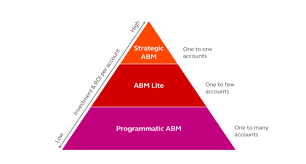
Crafting Hyper-Personalized ABM Emails That Get Responses Account-based marketing emails aren’t just messages—they’re strategic business conversations tailored to your most valuable accounts. These templates show you how to break through the noise with highly relevant, value-driven communication. Why ABM Emails Work Differently ✔ 87% higher response rates than generic emails✔ 3x more pipeline value from targeted accounts✔ 56% better conversion rates when properly personalized 1. Subject Lines That Demand Attention Personalized & Benefit-Driven Intriguing & Relevant Referencing Connections Pro Tip: Include the recipient’s name and company in 70% of subject lines for 22% higher open rates. 2. Email Body Structure That Converts The 4-Part ABM Email Framework 1. Personalized Hook (1 sentence)“Congrats on [Recent Achievement] – impressive growth in [Specific Metric]!” 2. Relevant Insight (2-3 sentences)“When we helped [Peer Company] with similar [Challenge], they achieved [Quantifiable Result] by [Unique Approach].” 3. Tailored Value Proposition“For [Account Name], this could mean [Specific Benefit 1] and [Specific Benefit 2] based on your [Unique Factor].” 4. Clear CTA with Social Proof*”When’s a good time for a 15-min chat? P.S. [Industry Leader] saw [Result] in [Timeframe].”* 3. Proven ABM Email Templates Template 1: The Executive Insight Email Subject: “[Industry Trend] impacting [Account Name]’s [Department]” Body:“Hi [First Name], Noticed [Account Name]’s focus on [Strategic Initiative] in your [Source]. With [Industry Trend] accelerating, many [Industry] leaders are seeing [Specific Impact]. We recently helped [Peer Company] navigate this by [Solution], achieving [Metric] in [Timeframe]. Would you have 20 minutes to discuss how this approach could support [Initiative]? Best,[Your Name][Your Position][Your Company]” Template 2: The Peer Comparison Email Subject: “How [Peer Company] achieved [Result] with [Solution]” Body:“Hi [First Name], [Peer Company] faced similar [Challenge] to what [Account Name] is managing around [Specific Issue]. Their solution? [Brief Case Study Summary]. *Three specific outcomes they gained: Would you be open to a quick call to explore if this approach could work for [Account Name]? [Your Name]” 4. Advanced ABM Email Strategies The Multi-Touch Sequence Interactive Elements That Boost Engagement 5. Measuring ABM Email Success Track these key metrics:✅ Open Rate (Target: 40-60%)✅ Response Rate (Target: 15-30%)✅ Meeting Booked Rate (Target: 5-15%)✅ Pipeline Influence (Measure account progression) Optimization Tip: A/B test every 5th email with different: Your ABM Email Checklist 🔹 Before Sending: 🔹 After Sending: “After implementing these ABM email strategies, we saw a 4x increase in meetings with target accounts and 35% faster deal velocity.”— Enterprise ABM Director Transform your ABM outreach from ignored to engaged with science-backed templates. Like Related Posts Who is Salesforce? Who is Salesforce? Here is their story in their own words. From our inception, we’ve proudly embraced the identity of Read more Salesforce Marketing Cloud Transactional Emails Salesforce Marketing Cloud Transactional Emails are immediate, automated, non-promotional messages crucial to business operations and customer satisfaction, such as order Read more Salesforce Unites Einstein Analytics with Financial CRM Salesforce has unveiled a comprehensive analytics solution tailored for wealth managers, home office professionals, and retail bankers, merging its Financial Read more AI-Driven Propensity Scores AI plays a crucial role in propensity score estimation as it can discern underlying patterns between treatments and confounding variables Read more

Read More

GDPR Compliance Checklist for US Companies

The GDPR is a comprehensive data privacy law from the EU, designed to enhance data protection and give individuals greater control over their personal information. Non-compliance with the GDPR can result in substantial fines, reaching up to 4% of global revenue or €20 million, depending on the severity of the violation.

Read More
Always Be Curious

Always Be Curious

“Always Be Curious”: A Modern Approach to Sales The classic sales mantra “A-B-C: Always Be Closing” has become emblematic of an outdated, aggressive approach to sales that prioritized closing deals at all costs. However, as the sales landscape evolves, so does the mindset of successful sales professionals. In today’s market, an approach centered around curiosity—”Always Be Curious”—is emerging as a more effective strategy. Here’s a look at why this shift matters and how it can transform your sales approach. Is “Always Be Closing” Still Relevant? The old-school sales tactic of relentless deal-closing often sacrificed customer relationships and long-term satisfaction. However, today’s customers are more informed and connected, expecting sales reps to act as trusted advisors rather than pushy sellers. According to Salesforce’s latest State of Sales report, 87% of business buyers expect this advisory role from sales reps. In my experience, the “Always Be Closing” mindset is less effective today. Customers seek to be understood, not just sold to. They want solutions to their problems, and they value genuine relationships over a quick transaction. Thus, sales strategies must evolve to focus on understanding customer needs, building trust, and delivering value. Alternative Sales Strategies Modern sales strategies prioritize understanding customer needs and building lasting relationships over the urgency of closing a deal. Here are three approaches that align with an “Always Be Curious” mindset: From “Always Be Closing” to “Always Be Curious” Transitioning from “Always Be Closing” to “Always Be Curious” is more than a change in slogan; it’s a strategic shift that transforms how deals are won. Here are some key elements of this approach: How a CRM Can Help A Customer Relationship Management (CRM) system can be invaluable for adopting an “Always Be Curious” approach. Here’s how: Embrace Curiosity in Sales In the modern sales environment, success hinges on building relationships and truly understanding customer needs. By adopting a curious, customer-centric approach, you can create lasting partnerships that benefit both parties. Embrace this shift, and let curiosity lead you to deeper connections and more successful closes. Like Related Posts Who is Salesforce? Who is Salesforce? Here is their story in their own words. From our inception, we’ve proudly embraced the identity of Read more Salesforce Marketing Cloud Transactional Emails Salesforce Marketing Cloud Transactional Emails are immediate, automated, non-promotional messages crucial to business operations and customer satisfaction, such as order Read more Salesforce Unites Einstein Analytics with Financial CRM Salesforce has unveiled a comprehensive analytics solution tailored for wealth managers, home office professionals, and retail bankers, merging its Financial Read more AI-Driven Propensity Scores AI plays a crucial role in propensity score estimation as it can discern underlying patterns between treatments and confounding variables Read more

Read More

Salesforce Reports Explained

Salesforce Reports: A Complete Guide to Data Analysis & Insights What Are Salesforce Reports? Salesforce Reports empower users to access, analyze, and share critical business data stored in Salesforce. They transform raw data into actionable insights, helping teams track performance, identify trends, and make data-driven decisions. Reports can be customized, visualized in dashboards, and shared across teams for better collaboration. Key Types of Salesforce Reports Salesforce offers four main report types, each suited for different analytical needs: 1. Tabular Reports 2. Summary Reports 3. Matrix Reports 4. Joined Reports How to Create & Customize Reports Step 1: Navigate to the Reports Tab Step 2: Customize Your Report Step 3: Save & Share Advanced Analysis with Salesforce Reports Einstein Analytics Dynamic Filters Scheduled Reports Best Practices for Effective Reporting ✅ Define a Clear Purpose – What decision will this report drive?✅ Keep It User-Friendly – Use charts, summaries, and clear labels.✅ Ensure Data Accuracy – Regularly review filters & formulas.✅ Share Strategically – Grant access only to relevant stakeholders.✅ Automate Where Possible – Schedule reports to save time. Conclusion: Unlock the Power of Salesforce Reports Salesforce Reports turn raw data into strategic insights, helping businesses track performance, optimize processes, and drive growth. By mastering report types, customization, and sharing, teams can make faster, smarter decisions. Need help? Explore Salesforce’s Report Builder or check out Trailhead for hands-on training! Like Related Posts Who is Salesforce? Who is Salesforce? Here is their story in their own words. From our inception, we’ve proudly embraced the identity of Read more Salesforce Marketing Cloud Transactional Emails Salesforce Marketing Cloud Transactional Emails are immediate, automated, non-promotional messages crucial to business operations and customer satisfaction, such as order Read more Salesforce Unites Einstein Analytics with Financial CRM Salesforce has unveiled a comprehensive analytics solution tailored for wealth managers, home office professionals, and retail bankers, merging its Financial Read more AI-Driven Propensity Scores AI plays a crucial role in propensity score estimation as it can discern underlying patterns between treatments and confounding variables Read more

Read More
Line Charts

Line Charts

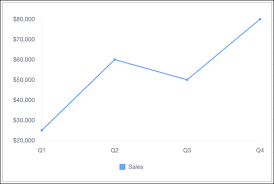
Line Charts: A Comprehensive Guide Overview Line charts are ideal for visualizing changes in values over time, such as weekly, quarterly, or monthly trends. They work best when you have: Availability Types of Line Charts 1. Standard Line Chart 2. Grouped Line Chart 3. Cumulative Line Chart 4. Grouped Cumulative Line Chart Customizing Line Charts In the Chart Editor, use the Customize tab to adjust: 1. Style 2. Series 3. Horizontal Axis 4. Vertical Axis Sample Data & Use Case Quarter Sales Q1 $25,000 Q2 $60,000 Q3 $50,000 Q4 $80,000 Example Visualization:A line chart plotting quarterly sales trends. Advanced Technique: Summed Line Graph Task: Create a line graph where one line represents the total sum of all other lines. Steps (Using Tableau Superstore Data Example) This creates a line chart with individual category trends and a summed total line. Key Takeaways Like Related Posts Who is Salesforce? Who is Salesforce? Here is their story in their own words. From our inception, we’ve proudly embraced the identity of Read more Salesforce Marketing Cloud Transactional Emails Salesforce Marketing Cloud Transactional Emails are immediate, automated, non-promotional messages crucial to business operations and customer satisfaction, such as order Read more Salesforce Unites Einstein Analytics with Financial CRM Salesforce has unveiled a comprehensive analytics solution tailored for wealth managers, home office professionals, and retail bankers, merging its Financial Read more AI-Driven Propensity Scores AI plays a crucial role in propensity score estimation as it can discern underlying patterns between treatments and confounding variables Read more

Read More
gettectonic.com