
Google Archives - gettectonic.com - Page 24

Salesforce Cloud Key Management

Salesforce Cloud Key Management refers to features and services that allow users to manage encryption keys used to protect data stored within the Salesforce platform. This includes options like Bring Your Own Key (BYOK), Hold Your Own Key (HYOK), and External Key Management (EKM), allowing organizations to maintain control over their encryption keys and meet compliance requirements.  Here’s a deeper dive: 1. Key Management in Salesforce: 2. Key Management Features and Services: 3. Benefits of Salesforce Key Management: Salesforce Cloud Key Management provides organizations with a range of options to manage encryption keys for their data stored in Salesforce, enabling them to enhance security, meet compliance requirements, and maintain control over their sensitive information.  Like Related Posts Who is Salesforce? Who is Salesforce? Here is their story in their own words. From our inception, we’ve proudly embraced the identity of Read more Salesforce Marketing Cloud Transactional Emails Salesforce Marketing Cloud Transactional Emails are immediate, automated, non-promotional messages crucial to business operations and customer satisfaction, such as order Read more Salesforce Unites Einstein Analytics with Financial CRM Salesforce has unveiled a comprehensive analytics solution tailored for wealth managers, home office professionals, and retail bankers, merging its Financial Read more AI-Driven Propensity Scores AI plays a crucial role in propensity score estimation as it can discern underlying patterns between treatments and confounding variables Read more


Read More
Forecasting With Foundation Models

Forecasting Tools

Leveraging Technology and AI for Accurate Sales Forecasting Sales forecasting is essential for business success, helping organizations allocate resources, set goals, and anticipate challenges. However, forecasting is inherently complex, involving uncertainty, variability, and vast datasets. By leveraging modern tools and AI-powered technologies, businesses can streamline this process, improve forecast accuracy, and drive better decision-making. This section explores the benefits of using technology for sales forecasting, highlights key tools available in the market, and discusses how AI enhances forecasting and analytics for B2B sales. Benefits of Technology in Sales Forecasting Tools for Enhanced Sales Forecasting AI’s Role in Revolutionizing Sales Forecasting AI-driven tools enable businesses to overcome traditional forecasting limitations, offering several advantages: AI Tools for Sales Forecasting Conclusion Harnessing technology and AI for sales forecasting transforms the process from a time-consuming challenge to a strategic advantage. By adopting visualization tools, automation, and AI-powered insights, businesses can generate reliable projections, optimize decision-making, and position themselves for success in dynamic markets. Content updated November 2024. Like Related Posts Who is Salesforce? Who is Salesforce? Here is their story in their own words. From our inception, we’ve proudly embraced the identity of Read more Salesforce Marketing Cloud Transactional Emails Salesforce Marketing Cloud Transactional Emails are immediate, automated, non-promotional messages crucial to business operations and customer satisfaction, such as order Read more Salesforce Unites Einstein Analytics with Financial CRM Salesforce has unveiled a comprehensive analytics solution tailored for wealth managers, home office professionals, and retail bankers, merging its Financial Read more AI-Driven Propensity Scores AI plays a crucial role in propensity score estimation as it can discern underlying patterns between treatments and confounding variables Read more

Read More
analytics 360 and journey builder

Google Analytics 360 and Salesforce Marketing Cloud

Customers seek to engage with brands that understand and value them, offering personalized interactions. Google Analytics 360 and Marketing Cloud provide a full understanding of your customers. 67 percent express a willingness to pay more for an enhanced brand experience. However, 51 percent of consumers feel that brands are currently falling short in delivering this desired level of customer experience. Various challenges contribute to this, including disconnected data, outdated systems, disparate channels, and siloed departments. The solution to overcoming these obstacles lies in integration. Integration of Google Analytics 360 and Marketing Cloud is the fix! While the answer seems straightforward, the task of untangling data from multiple fragmented systems to create a unified and actionable view of the consumer is more complex. Salesforce and Google recognize this challenge and have joined forces to facilitate the seamless integration of cross-channel insights for marketers within the Salesforce Marketing Cloud and Google Marketing Platform. Empowering Marketers This integration offers several capabilities, empowering marketers to be more productive, analyze rich data in one place and create personalized messages. The ability to make informed marketing decisions is key for many. Key features include simplified setup, cross-channel analytics, content performance analysis, website optimization, marketing attribution, and audience activation. The simplified setup allows users to view Analytics 360 reports in one Marketing Cloud dashboard. The cross-channel analytics feature provides a comprehensive understanding of customer engagement metrics, integrating data from various sources, including web and advertising. Content performance analysis goes beyond open and click rates, offering insights into customer behavior after interacting with marketing content. Website optimization leverages Marketing Cloud engagement data to enhance web optimization tests and personalize the site experience based on a broader, cross-channel view of the consumer. Marketing attribution enriches attribution reports with Marketing Cloud engagement data for a more complete view of the channels and tactics leading to optimal results. Integration of Google Analytics 360 and Marketing Cloud Provides Simplification The integration also simplifies the process of providing additional marketing and channel engagement data to Google Marketing Platform for measurement and activation through auto-tagging of journeys. Additionally, for the first time, marketers can create audiences in Analytics 360 based on users’ web and app browsing behavior and directly share and activate them through additional Marketing Cloud channels like email, SMS, or push notifications. This coordination ensures a consistent and personalized customer journey across various channels. Like1 Related Posts Who is Salesforce? Who is Salesforce? Here is their story in their own words. From our inception, we’ve proudly embraced the identity of Read more Salesforce Marketing Cloud Transactional Emails Salesforce Marketing Cloud Transactional Emails are immediate, automated, non-promotional messages crucial to business operations and customer satisfaction, such as order Read more Salesforce Unites Einstein Analytics with Financial CRM Salesforce has unveiled a comprehensive analytics solution tailored for wealth managers, home office professionals, and retail bankers, merging its Financial Read more AI-Driven Propensity Scores AI plays a crucial role in propensity score estimation as it can discern underlying patterns between treatments and confounding variables Read more

Read More
clock

Salesforce Integrations for Sales and Marketing Teams

What do Salesforce integrations entail? Salesforce Integrations for Sales and Marketing Teams. Salesforce integrations involve establishing connections between Salesforce and various third-party applications, ranging from marketing automation tools and customer service software to accounting programs. This seamless exchange of data between platforms serves to enhance Salesforce’s overall functionality. How extensive is Salesforce’s integration ecosystem? Salesforce boasts a robust integration ecosystem, with over 3,000 integrations available on its AppExchange marketplace. Beyond these, users can leverage: Salesforce Integrations for Sales and Marketing Teams While there isn’t a one-size-fits-all list of essential Salesforce integrations for sales and marketing, we’ve curated a selection of widely-used integrations across various categories: These integrations cater to diverse needs within sales and marketing, facilitating efficient data handling, analytics, communication, project management, and more. Like1 Related Posts Who is Salesforce? Who is Salesforce? Here is their story in their own words. From our inception, we’ve proudly embraced the identity of Read more Salesforce Marketing Cloud Transactional Emails Salesforce Marketing Cloud Transactional Emails are immediate, automated, non-promotional messages crucial to business operations and customer satisfaction, such as order Read more Salesforce Unites Einstein Analytics with Financial CRM Salesforce has unveiled a comprehensive analytics solution tailored for wealth managers, home office professionals, and retail bankers, merging its Financial Read more AI-Driven Propensity Scores AI plays a crucial role in propensity score estimation as it can discern underlying patterns between treatments and confounding variables Read more
Read More
Salesforce Marketing Cloud Advertising Studio

Salesforce Advertising Studio Platforms

Are you looking to take your advertising and marketing campaigns to new heights? Look no further than Salesforce Advertising Studio. In this insight, we will provide an overview of Salesforce Advertising Studio and its crucial role in driving successful advertising and marketing endeavors. Engage prospects across every channel. Connect third-party webinar, survey, and SMS apps directly to your marketing programs. Trigger webinar and event registrations, survey sends, and SMS sends in your automated journeys. Connect engagement data, like third-party webinar, survey, and SMS data, for easy segmentation and campaign maintenance. One of the key advantages of Salesforce Advertising Studio is its seamless integration with other Salesforce platforms such as Customer 360 and Marketing Cloud. This integration allows businesses to harness the power of unified customer data, enabling highly personalized and targeted advertising campaigns. By leveraging the wealth of insights and information stored within Customer 360 and Marketing Cloud, advertisers can create more impactful and relevant messaging that resonates with their audience. An upscale solution of Salesforce Marketing Cloud (SFMC), Advertising Studio helps marketers digitize their efforts at scale and target the right audiences to reach business goals effectively. It allows you to create unique experiences for customers while displaying ads to your target audience. Leverage Salesforce Advertising Studio to effortlessly plan and execute advertising campaigns across multiple channels. This powerful tool provides marketers with efficient features for designing personalized ads, creating compelling content, scheduling campaigns, and automating processes. Furthermore, Advertising Studio smoothly integrates with popular advertising networks and platforms, such as Facebook, Google Ads, Instagram, and Twitter. Benefits Of Advertising Studio Marketing Cloud Advertising helps you engage and advertise to your customers and prospects. Use it to coordinate campaigns with social, mobile, sales, and customer service efforts and enhance your email marketing goals with advertising. You can engage with existing customers, find new prospects with lookalikes, and re-engage inactive users within the customer journey across digital advertising. NOTE: Salesforce Advertising Studio is now called Marketing Cloud Advertising. Use Marketing Cloud Advertising to: Marketing Cloud Advertising helps you target your digital advertising campaigns across various platforms with Advertising Audiences. These platforms include Facebook, Instagram, Google Ads, LinkedIn, X (Twitter), Pinterest, and Snapchat. Use Advertising Audiences to: You can also configure audiences to refresh automatically. If you discontinue your Ad Studio license, you must delete all audiences and authorized accounts. As a Marketing Cloud Advertising customer with a Marketing Cloud Intelligence license, you have access to deeper audience and campaign analytics with Audience Insights for Marketing Cloud Advertising. The application is available in the Marketing Cloud Intelligence Marketplace. Advertising Studio is now called Marketing Cloud Advertising. During this transition, you may see references to Advertising Studio. To empower your advertising with Marketing Cloud Advertising, contact Tectonic today. Content updated November 2023. Like1 Related Posts Who is Salesforce? Who is Salesforce? Here is their story in their own words. From our inception, we’ve proudly embraced the identity of Read more Salesforce Marketing Cloud Transactional Emails Salesforce Marketing Cloud Transactional Emails are immediate, automated, non-promotional messages crucial to business operations and customer satisfaction, such as order Read more Salesforce Unites Einstein Analytics with Financial CRM Salesforce has unveiled a comprehensive analytics solution tailored for wealth managers, home office professionals, and retail bankers, merging its Financial Read more AI-Driven Propensity Scores AI plays a crucial role in propensity score estimation as it can discern underlying patterns between treatments and confounding variables Read more

Read More
marketing cloud utm parameters

UTM Parameter FAQs

How to Retrieve UTM Data Using Google Tag Manager Retrieving UTM data in Google Tag Manager involves a straightforward process to enhance tracking and analytics. Follow these steps: By following these steps, you can effectively retrieve and utilize UTM data in Google Tag Manager, enhancing your tracking capabilities and improving data accuracy for marketing campaigns. Content updated March 2024. Like Related Posts Who is Salesforce? Who is Salesforce? Here is their story in their own words. From our inception, we’ve proudly embraced the identity of Read more Salesforce Marketing Cloud Transactional Emails Salesforce Marketing Cloud Transactional Emails are immediate, automated, non-promotional messages crucial to business operations and customer satisfaction, such as order Read more Salesforce Unites Einstein Analytics with Financial CRM Salesforce has unveiled a comprehensive analytics solution tailored for wealth managers, home office professionals, and retail bankers, merging its Financial Read more AI-Driven Propensity Scores AI plays a crucial role in propensity score estimation as it can discern underlying patterns between treatments and confounding variables Read more
Read More
Marketing Cloud Intelligence

Salesforce Marketing Cloud Intelligence Explained

What is Marketing Cloud Intelligence? Salesforce’s Marketing Cloud Intelligence, formerly known as Datorama, is an analytics tool designed to integrate and visualize marketing performance data across various platforms. It caters to analytically driven marketers and seasoned analysts, providing an easy-to-use interface while offering connections to traditional BI tools like Tableau. Marketing efforts generate extensive data across multiple platforms, and Marketing Cloud Intelligence consolidates all these marketing tools into a centralized source. It serves as a comprehensive solution for reporting, measurement, and optimization. Market intelligence involves gathering real-time data from the market to understand customers, trends, behaviors, and more, enabling a company to stay competitive and meet market demands. By leveraging out-of-the-box connections, Marketing Cloud Intelligence seamlessly links platforms like Google, YouTube, Instagram, and others without the need for complex coding. The tool, now known as Marketing Cloud Intelligence, reveals trends, tracks progress against goals, and quantifies the ROI of marketing initiatives once connected. The system features a connected library of over 170 connectors for acquiring data from major advertising, commerce, CRM, and database vendors. The unique universal connector, powered by AI, allows effortless connection of any data stream within minutes, even from sources lacking an API connection. Marketing Cloud Intelligence addresses the challenge of data consistency by providing an out-of-the-box marketing data model. It helps organize data into a clear and consistent taxonomy, enriching it with naming conventions, data classification, and automated maintenance alerts for trustworthy decision-making. Beyond reporting and dashboards, Marketing Cloud Intelligence, with the assistance of Einstein, provides actionable insights. Marketers can select a KPI to improve and create a perpetual pipeline of AI insights, addressing overarching questions or specific areas like reducing spend or analyzing creative impacts. What can marketers do with Marketing Cloud Intelligence? Marketers can efficiently compile multiple sources of data in Marketing Cloud using various KPIs, creating at-a-glance and visually appealing dashboards and reports. Marketing Cloud Intelligence, powered by Datorama, facilitates the organization and analysis of diverse data within Marketing Cloud. What does Marketing Cloud Intelligence do? Marketing Cloud Intelligence integrates data from marketing and advertising platforms, web analytics, CRM, e-commerce, and more. It offers a unified view for optimizing campaign performance and real-time insights. The tool optimizes marketing spend and customer engagement with unified performance data, automated reporting, and AI-driven insights. Why is marketing intelligence important in Salesforce? Marketing intelligence tools help businesses gather and analyze market data. CRM and CDP tools, such as Salesforce Marketing Cloud Intelligence, unite data from disparate sources to provide a fuller picture of their customers and the marketplace. Like Related Posts Who is Salesforce? Who is Salesforce? Here is their story in their own words. From our inception, we’ve proudly embraced the identity of Read more Salesforce Marketing Cloud Transactional Emails Salesforce Marketing Cloud Transactional Emails are immediate, automated, non-promotional messages crucial to business operations and customer satisfaction, such as order Read more Salesforce Unites Einstein Analytics with Financial CRM Salesforce has unveiled a comprehensive analytics solution tailored for wealth managers, home office professionals, and retail bankers, merging its Financial Read more AI-Driven Propensity Scores AI plays a crucial role in propensity score estimation as it can discern underlying patterns between treatments and confounding variables Read more
Read More
What is Omni-Channel Salesforce

What is Omni-Channel Salesforce?

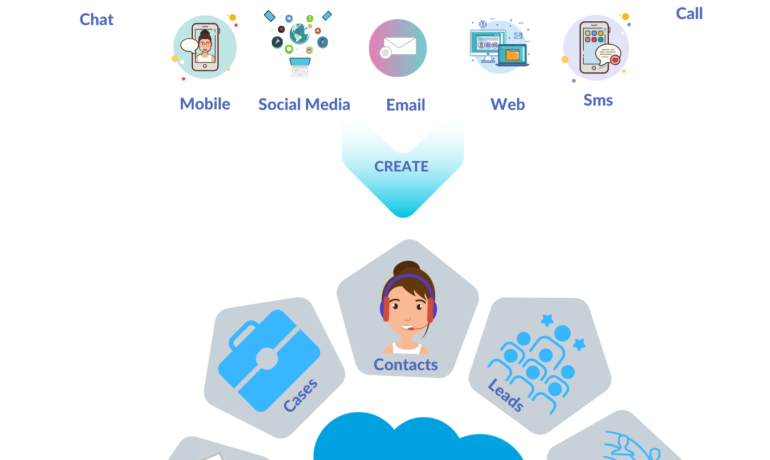
What is Omni-Channel Salesforce? Omni-Channel is a Salesforce feature designed for Customer Service and Console applications that automates the routing of various work items, such as Leads and Cases, to agents. It ensures that work items are assigned to agents based on their capacity, priority, skill set, and other criteria. Features of Omni-Channel Benefits Omni-Channel in Salesforce Enhanced Omni-Channel Setting Up and Using Omni-Channel Key Differences: Multichannel vs. Omni-Channel Route Work with Omni-Channel Omni-Channel is a flexible, customizable feature, and you can configure it declaratively—that is, without writing code. Use Omni-Channel to manage the priority of work items, which makes it a cinch to route important work items to agents quickly. Manage your agents’ capacity to take on work items so that they’re given only the number of assignments that they can handle. You can also define which agents can work on different types of assignments. For example, you can create one group of agents to respond to leads and sales inquiries, and another group that helps customers with support questions. Omni-Channel routes work requests to the most available and qualified support agents in the app. You can also provide real-time operational intelligence to support supervisors with Omni Supervisor. Agents no longer have to pick and choose work assignments manually from a queue, which saves everyone in your call center time, effort, and brainpower. Because it’s easier for agents to work on their assignments, they can assist your customers faster and more effectively and close assignments more quickly. Routing logic is applied when work is assigned to an owner. If field values on the work item are changed after the item is routed, the routing logic isn’t reapplied. Omni-Channel is supported in both Lightning Experience (recommended) and Salesforce Classic. You can run Omni-Channel in both standard and console apps. Route Work with Omni-Channel Use Omni-Channel to route work items to queues, agents, skills, and even Einstein Bots (on supported channels). Depending on your business needs, you can use different ways to route work, including Omni-Channel flows. Omni-Channel routes work based on the defined routing logic. When an agent is assigned a work item, they can accept it to begin working on it or decline it. When a work item is declined, Omni-Channel releases the agent’s capacity consumed by the work item. But the declined work item remains owned by the declining agent until the work is routed again. If the agent declines a work item or doesn’t accept the work item in the specified time period, Omni-Channel doesn’t try to route that work item to that agent again. If an agent accepts the work, they can transfer the work to another agent. NOTE We recommend using Enhanced Omni-Channel. Enhanced Omni-Channel features better and more extensive experiences for agents and supervisors than Standard Omni-Channel, and future Omni-Channel features are developed on Enhanced Omni-Channel. See Compare Standard and Enhanced Omni-Channel and Enable Omni-Channel. Set Up Omni-Channel Set up Omni-Channel to route any type of incoming work item to the most qualified, available support agents in your call center. Omni-Channel integrates seamlessly into both console and standard apps. NOTE We recommend using Enhanced Omni-Channel. Enhanced Omni-Channel features better and more extensive experiences for agents and supervisors than Standard Omni-Channel, and future Omni-Channel features are developed on Enhanced Omni-Channel. See Compare Standard and Enhanced Omni-Channel and Enable Omni-Channel. Test Your Omni-Channel Implementation Now that you’ve got Omni-Channel set up and enabled, test your implementation to make sure it’s working correctly. To test your implementation, route a work item to yourself. Sit back and relax. You’ll see an incoming request notification in Omni-Channel within a few seconds. Manage Agents, Queues, and Skills with Omni Supervisor Manage agents, queues, and skills in Omni Supervisor. Get to Know the Omni Supervisor TabsSupervisors can check the health of their call center in real time using the Agents, Queues Backlog, Assigned Work, and Skills Backlog tabs in Omni Supervisor. These tabs let supervisors see which work items are open and active, who’s assigned to what, and other details such as open capacities and average wait times for customers. Provide Customer Support for Real-Time Channels with Omni-Channel Service customers using their preferred means of real-time communication, including phone, messaging, or chat in standard and enhanced channels. You can accept and manage these types of support requests in Omni-Channel. If needed, while helping a customer, you can reach out to your supervisor to get support. Use the Omni-Channel Component to Work with CustomersTo begin receiving inbound requests from customers or to make outbound contacts, log in to the Omni-Channel component and update your status to indicate that you’re available. If you don’t see the Omni-Channel component in your app, check with your admin. Use the Omni-Channel Component to Work with Customers To begin receiving inbound requests from customers or to make outbound contacts, log in to the Omni-Channel component and update your status to indicate that you’re available. If you don’t see the Omni-Channel component in your app, check with your admin. When you mark your status as available in Omni-Channel, you begin receiving work requests, like phone calls. Work items assigned to you appear in Omni-Channel until you complete, transfer, or decline them. TIP By default, phone calls are taken through the same speakers and microphone your system device uses. To take calls through different audio devices, click the Settings icon on the Omni-Channel component and choose your preferred devices under Input and Output. The devices you choose are only set only for your current browser. For example, if you choose a device for Google Chrome, that device isn’t set for Mozilla Firefox. This feature isn’t available in Apple Safari browser. If you set up a service channel to use the tab-based capacity model, Omni-Channel determines agent capacity based on the open tabs. Each tab is a session for a specific work item. To close the work item and remove it from your Omni-Channel instance, close the tab for that item. The tab-based capacity model releases an agent’s capacity

Read More
salesforce form builde4r

Salesforce Form Builder

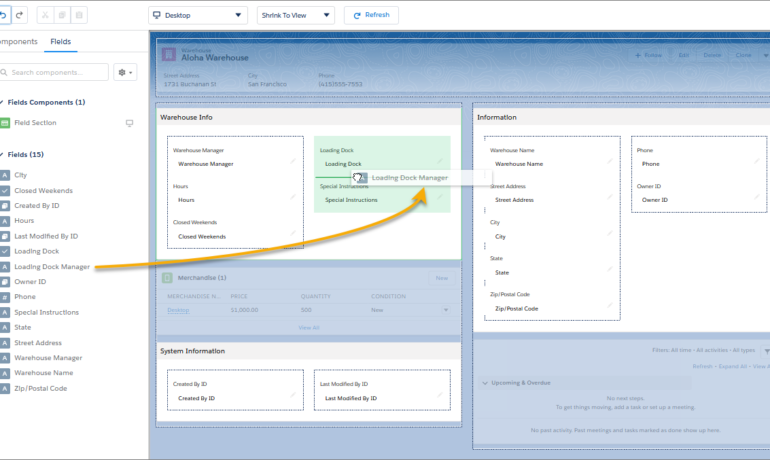
Is it possible to create forms within Salesforce? Salesforce provides a web-to-case feature, allowing the creation of basic customer support forms. Once you activate and configure this feature, you can generate your web form as HTML code for embedding on your website. Similar to the web-to-lead feature, this is a straightforward, use-case-specific option. Here are some notable forms that integrate with Salesforce: Is there a native form builder in Salesforce? Yes, Forms for Salesforce is a 100% native Salesforce form builder. What is the recommended form app for Salesforce? Native Forms is an excellent tool for streamlining customer engagement. With its user-friendly drag-and-drop form builder, you can swiftly create custom forms to capture customer data and update Salesforce records. Can Google Forms be integrated with Salesforce? Integrating Google Forms with Salesforce is a popular choice for creating versatile web forms, quizzes, surveys, and more to collect data. If you’re seeking a reliable app for creating web forms, Google Forms is highly recommended. Does Jotform work seamlessly with Salesforce? Jotform seamlessly connects with Salesforce, ensuring your forms automatically sync with the platform, keeping your account up to date with every new submission. Data security is a top priority with Jotform. Another Tool available from the Salesforce AppExhange is Formstack. And the Salesforce Lighting App Builder has added a form building functionality. Content updated January 2024. Like1 Related Posts Who is Salesforce? Who is Salesforce? Here is their story in their own words. From our inception, we’ve proudly embraced the identity of Read more Salesforce Marketing Cloud Transactional Emails Salesforce Marketing Cloud Transactional Emails are immediate, automated, non-promotional messages crucial to business operations and customer satisfaction, such as order Read more Salesforce Unites Einstein Analytics with Financial CRM Salesforce has unveiled a comprehensive analytics solution tailored for wealth managers, home office professionals, and retail bankers, merging its Financial Read more AI-Driven Propensity Scores AI plays a crucial role in propensity score estimation as it can discern underlying patterns between treatments and confounding variables Read more
Read More
Salesforce Slack

Slack Process Automation

Salesforce’s Slack team collaboration tool extends beyond facilitating communication across channels; it empowers users to automate routine processes seamlessly through the Workflow Builder tool. This feature, available in Slack, offers a range of tools to streamline processes both within and outside Slack, all without the need for coding. Slack process automation improves the power and usage of the collaboration tool. The versatility of workflows is vast, accommodating simple to complex processes that can connect with various apps and services, not limited to Slack and Salesforce alone. With over 2,400 apps in the Slack App Directory, integration possibilities are extensive. Should a pre-built app fall short, customization options allow tailoring to specific business needs without the necessity for coding expertise. Building a workflow primarily requires identifying routine business processes suitable for automation, whether through app installation or custom Workflow Builder creation. The absence of coding prerequisites makes this accessible to a broader audience. Workflow Builder considers any series of sequential, repeatable tasks aimed at achieving a specific goal as a viable process for automation. Since Salesforce’s acquisition of Slack in 2021, the platform has become a pivotal collaboration tool within and beyond the Salesforce ecosystem. Its popularity has surged, particularly in remote-based work environments, where integrations with various applications synchronize data into Slack, providing a single, accurate source accessible to all team members. This, coupled with automation features directly accessible from the Slack app, significantly reduces manual task durations. Eight highly recommended Slack automations, facilitated through pre-built templates, cover various aspects, including recruiting, lead management, deal alerts, quote-to-invoice processes, project status tracking, time tracking, support case management, and even creative applications like hue light automation. Tectonic offers expertise in custom Slack integrations with Salesforce projects. Companies can explore how Slack enhances team collaboration and process automation by connecting with us. Slack Workflows Importantly, Slack workflows extend beyond Salesforce integration, working seamlessly with other platforms such as Zapier, Centro, Google Sheets, AttendanceBot, Polly, Datadog, Fellow, Automate.io, BirthdayBot, Jira, Workstreams, ToDoBot, Workast, Simple Poll, and more. The Workflow Builder feature enables the creation of predefined triggers and steps to automate processes directly within the Slack app. Triggers can be manually selected, initiated by emoticon selections, or set to run automatically. Once triggered, the workflow’s steps unfold in the selected order, allowing the seamless execution of various tasks. Process Automation in Slack The possibilities for automation using Workflow Builder in Slack are extensive, ranging from employee onboarding, customer support, content and communication review, to sales lead and marketing campaign management, request approval processes, and beyond. Slack, in conjunction with Tectonic, stands ready to bring these envisioned automations to life for organizations seeking enhanced efficiency and collaboration. Like Related Posts Who is Salesforce? Who is Salesforce? Here is their story in their own words. From our inception, we’ve proudly embraced the identity of Read more Salesforce Marketing Cloud Transactional Emails Salesforce Marketing Cloud Transactional Emails are immediate, automated, non-promotional messages crucial to business operations and customer satisfaction, such as order Read more Salesforce Unites Einstein Analytics with Financial CRM Salesforce has unveiled a comprehensive analytics solution tailored for wealth managers, home office professionals, and retail bankers, merging its Financial Read more AI-Driven Propensity Scores AI plays a crucial role in propensity score estimation as it can discern underlying patterns between treatments and confounding variables Read more

Read More
Cloud Based Managed Services

Cloud Based Managed Services

At Tectonic, our aim is to enable you to concentrate on your business operations while we handle the intricacies of technology. Our team oversees all technology assets and evaluates your IT systems to ensure your employees have the necessary equipment to support their work. We work diligently in the background to maintain the seamless functioning of your business, encompassing tasks such as consistent backups, 24/7 server monitoring, event logging, and more. Cloud Based Managed Services. Managed Cloud Cloud managed services, or managed cloud, refer to applications, services, or ecosystems in the cloud managed by a third-party organization. These services include IT tasks like engineering on demand, operations management, 24/7 help desk support, hosting, and implementation. Cloud-based service involves the organized administration of cloud computing products and services. It encompasses processes, strategies, policies, and technology used to control and maintain public and private clouds, hybrid clouds, or multicloud environments. Cloud infrastructure managed services involve companies like Microsoft, AWS, HubSpot, IBM, and Google Cloud. This allows businesses to receive personalized tech support from specialists in specific software providers. Examples of cloud-based services include file storage and backup, web-based email, and project management tools. SaaS cloud service providers include Dropbox, G Suite, Microsoft Office 365, and Slack. While cloud service providers are cost-effective, they lack the robustness of fully managed IT services. With Tectonic, managed cloud services provide scalable solutions, offering benefits like consistent backups, disaster recovery, and flexibility to adapt to changing business requirements without downtime. Managed services differ from SaaS as they go beyond software provision, often handling networking and hardware requirements. Managed cloud services offer hybrid IT and cloud administration, with providers offering unique values in areas like migration, optimization, security, and configuration. Advantages of Managed Cloud Service Providers (MCSPs) include resource optimization, cloud service integration, and predictable spending. However, potential drawbacks include high costs, optimization impacting performance, and security risks due to multi-tenancy. Amid the global COVID-19 pandemic, cloud adoption has surged, with companies embracing remote work models. Businesses increasingly partner with cloud managed service providers to optimize IT infrastructure, address regulatory compliance, and ensure security in the cloud environment. Local servers, physically located on-premises or in private data centers, are not considered cloud services. They host applications, websites, or services within a specific organization’s infrastructure. Like Related Posts Who is Salesforce? Who is Salesforce? Here is their story in their own words. From our inception, we’ve proudly embraced the identity of Read more Salesforce Marketing Cloud Transactional Emails Salesforce Marketing Cloud Transactional Emails are immediate, automated, non-promotional messages crucial to business operations and customer satisfaction, such as order Read more Salesforce Unites Einstein Analytics with Financial CRM Salesforce has unveiled a comprehensive analytics solution tailored for wealth managers, home office professionals, and retail bankers, merging its Financial Read more AI-Driven Propensity Scores AI plays a crucial role in propensity score estimation as it can discern underlying patterns between treatments and confounding variables Read more

Read More
Salesforce and Google Calendar

Sync Google Calendar with Salesforce

Lightning Sync is specifically designed to synchronize only your primary Google Calendar with Salesforce. Verify with your administrator whether your sync configuration is configured to synchronize private events. Is there synchronization between Google Drive and Salesforce? Effortlessly associate Google Drive files and folders with Salesforce records for convenient access and sharing. Additionally, access and modify Google Drive files directly within Salesforce using the Drive Connect File Viewer. How does Salesforce collaborate with Google? Salesforce maintains its leadership position in business, philanthropy, and workplace satisfaction by leveraging Google Workspace for real-time collaboration among dispersed teams and partners. Salesforce stands out as the leading provider of Customer Relationship Management (CRM) software globally. Steps to sync Google Calendar with Salesforce: Can Google Calendar function as a CRM? No, but you can integrate your CRM system with Google Calendar. This integration allows you to add events from your calendar to a CRM task and vice versa, ensuring that your team stays informed about important company events. If you are interested in syncing Google Calendar or other Google tools to your Salesforce org, contact Tectonic today. Like1 Related Posts Who is Salesforce? Who is Salesforce? Here is their story in their own words. From our inception, we’ve proudly embraced the identity of Read more Salesforce Marketing Cloud Transactional Emails Salesforce Marketing Cloud Transactional Emails are immediate, automated, non-promotional messages crucial to business operations and customer satisfaction, such as order Read more Salesforce Unites Einstein Analytics with Financial CRM Salesforce has unveiled a comprehensive analytics solution tailored for wealth managers, home office professionals, and retail bankers, merging its Financial Read more AI-Driven Propensity Scores AI plays a crucial role in propensity score estimation as it can discern underlying patterns between treatments and confounding variables Read more

Read More
Salesforce Integration

Salesforce Integrations for Sales and Marketing Teams

First Understand Salesforce Integrations Salesforce integrations involve establishing seamless connections between Salesforce and diverse third-party applications. These applications range from marketing automation tools and customer service software to accounting programs. The purpose is to facilitate a smooth exchange of data, ultimately enhancing Salesforce’s overall functionality. Salesforce integrations for sales and marketing teams brings all the applications needed for the relationship with prospects into one place. Salesforce’s Integration Ecosystem While Salesforce boasts a robust integration ecosystem, featuring over 3,000 integrations available on its AppExchange marketplace. Users can leverage various integration approaches: Salesforce Integrations for Sales and Marketing While there’s no complete universal list of essential Salesforce integrations for sales and marketing, several widely-used integrations cater to diverse needs: No-code Data Automation Integrations: Analytics and Reporting Integrations: Email Marketing Automation Integration: Data Storage Integration: Communications Apps Integrations: Project Management Tools Integration: Account Management Integration: CRM Tools Integration: Helpdesk Integrations: Feedback Tools Integration: These integrations facilitate efficient data handling, analytics, communication, project management, and more within sales and marketing teams. Integrations for Sales and Marketing Tools Salesforce seamlessly integrates with various tools relevant to Sales and Marketing teams, including but not limited to: Salesforce Integration with Teams and Workday The Salesforce AppExchange Salesforce’s Role in Sales and Marketing Salesforce Marketing Cloud Salesforce and ERP Integration Digital Marketing and Salesforce Salesforce’s Role in Marketing Automation Content updated November 2023. Like Related Posts Who is Salesforce? Who is Salesforce? Here is their story in their own words. From our inception, we’ve proudly embraced the identity of Read more Salesforce Marketing Cloud Transactional Emails Salesforce Marketing Cloud Transactional Emails are immediate, automated, non-promotional messages crucial to business operations and customer satisfaction, such as order Read more Salesforce Unites Einstein Analytics with Financial CRM Salesforce has unveiled a comprehensive analytics solution tailored for wealth managers, home office professionals, and retail bankers, merging its Financial Read more AI-Driven Propensity Scores AI plays a crucial role in propensity score estimation as it can discern underlying patterns between treatments and confounding variables Read more

Read More
gettectonic.com