

11Oct
Heroku Explained
scale modern apps. Their platform is characterized by its elegance, flexibility, and user-friendly nature, providing developers with the simplest path to bring their apps to market.
scale modern apps. Their platform is characterized by its elegance, flexibility, and user-friendly nature, providing developers with the simplest path to bring their apps to market.

What is Box and Salesforce integration? Together, Box and Salesforce integration bring you seamless solutions that make it easy for teams to securely collaborate on the most critical content in Box, without leaving Salesforce. It easily connects with other Apps to share and store the data. Box allows users to create, edit, update, and share files/folders with Salesforce. It has a highly secured authentication process and a customizable user permission to access the files/folders. Your teams and customers expect amazing digital experiences, no matter what tools they use — which means you must deliver a consistent content experience across every app. Together, Box and Salesforce bring you seamlessly integrated solutions. The result? Better customer engagements, faster resolution on support cases, and seamless signatures so organizations can quickly go from quote to cash. Content is at the core of business today — and a driving force for your sales teams. Our integration empowers sales reps to collaborate on content directly in Salesforce, while your organization’s documents are centralized in Box to streamline processes, engage customers, and accelerate sales cycles. With Box for Salesforce, account teams can easily and securely access and share relevant files from any device, no matter if they’re at home, in the office, or out in the field. Box – Secure File Sharing — From file creation and sharing, to e-signing and retention — one secure place for it all. Like Related Posts Who is Salesforce? Who is Salesforce? Here is their story in their own words. From our inception, we’ve proudly embraced the identity of Read more Salesforce Marketing Cloud Transactional Emails Salesforce Marketing Cloud Transactional Emails are immediate, automated, non-promotional messages crucial to business operations and customer satisfaction, such as order Read more Salesforce Unites Einstein Analytics with Financial CRM Salesforce has unveiled a comprehensive analytics solution tailored for wealth managers, home office professionals, and retail bankers, merging its Financial Read more AI-Driven Propensity Scores AI plays a crucial role in propensity score estimation as it can discern underlying patterns between treatments and confounding variables Read more
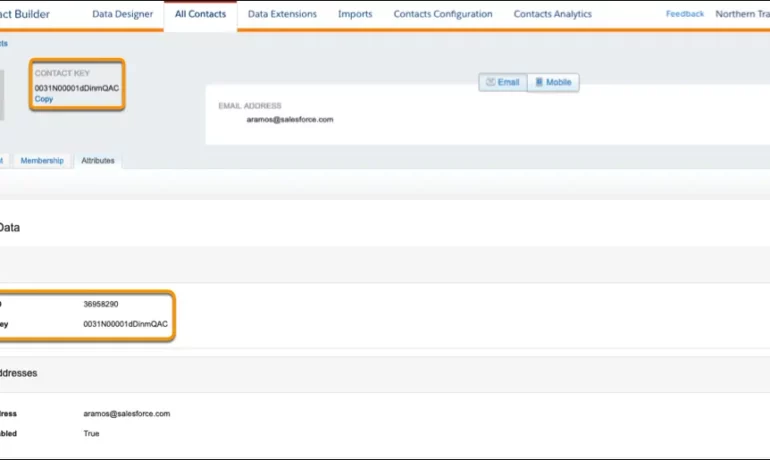
The contact key in Salesforce, also known as a subscriber key, is a unique identifier for a contact in Marketing Cloud MobilePush. Use this value to associate cross-channel addresses and subscriptions for a single contact. You can use the same key for a contact across multiple channels, such as email, SMS, and push messaging. What are contact keys? An immutable object that stores information about a single contact, such as the contact’s first name, phone numbers, and addresses. What is a Salesforce Subscriber key? A subscriber key is a text field that contains a value that uniquely identifies a subscriber in your Marketing Cloud account. A subscriber key is limited to 254 English characters. Avoid using email addresses as subscriber keys. What is the difference between subscriber key and contact key? This key is used to identify a single person across multiple channels inside of Marketing Cloud. In Email Studio, that key is called the “Subscriber Key”. In other channels, such as Mobile Connect or Mobile Push, that value is called “Contact Key”. What is the difference between contacts and subscribers? A subscriber in SFMC primarily represents an individual’s email communication preferences and is associated with email campaigns, while a contact represents a broader customer profile that includes information beyond email, allowing you to engage with customers across various channels. What is the difference between contact ID and contact key? The Contact Key gives you this ability and consistence. Existence of the contact key gives you the consistence of sending messages thru multiple channels and identify your contacts. Email and Text Message channels in our case. Contact ID is a unique number for your contacts in Salesforce Marketing Cloud. What is a subscriber key in Marketing Cloud? A subscriber is a person who has opted to receive communications from your organization. You can track information about subscribers using profile and preference attributes. Use the subscriber key to identify your subscribers in Marketing Cloud. Create lists or data extensions to store your subscribers. What is the difference between contact and subscriber in Marketing Cloud? Key Differences: Purpose: Contacts store customer data and facilitate segmentation and personalization efforts. Subscribers represent individuals who have subscribed to receive communications from your organization. Primary key is a column or set of columns that uniquely identifies the record in the table. When a primary key is defined using multiple columns, the data from each column is used to determine whether a record/row is unique. Like Related Posts Who is Salesforce? Who is Salesforce? Here is their story in their own words. From our inception, we’ve proudly embraced the identity of Read more Salesforce Marketing Cloud Transactional Emails Salesforce Marketing Cloud Transactional Emails are immediate, automated, non-promotional messages crucial to business operations and customer satisfaction, such as order Read more Salesforce Unites Einstein Analytics with Financial CRM Salesforce has unveiled a comprehensive analytics solution tailored for wealth managers, home office professionals, and retail bankers, merging its Financial Read more AI-Driven Propensity Scores AI plays a crucial role in propensity score estimation as it can discern underlying patterns between treatments and confounding variables Read more
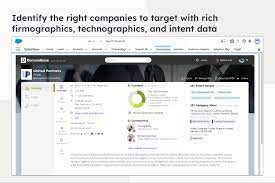
The integration of Demandbase with Salesforce creates a seamless connection between Demandbase One and your Salesforce CRM, establishing a bidirectional sync for efficient data exchange. Bidirectional sync means data can travel in both directions from one platform to the other.

Leveraging survey forms is an effective way to gather real-life insights from individuals crucial to your organization. Salesforce facilitates survey integration either through Salesforce Surveys and Feedback Management (add-on license) or by seamlessly integrating web forms with Salesforce. Storing feedback in your CRM, linked to comprehensive contact information, is an obvious advantage. Salesforce surveys give you real-time feedback. However, adopting an integrated web form approach offers additional benefits. Here are seven ideas to enhance your survey integration with Salesforce, ensuring valuable customer insights: Integrating survey forms with Salesforce is a strategic move to enhance customer experience and internal processes. Implementing these tips will not only improve the effectiveness of your Salesforce surveys but also align internal practices with best standards. Choose a tip that fits your needs and contributes to the success of your Salesforce surveys. Like Related Posts Who is Salesforce? Who is Salesforce? Here is their story in their own words. From our inception, we’ve proudly embraced the identity of Read more Salesforce Marketing Cloud Transactional Emails Salesforce Marketing Cloud Transactional Emails are immediate, automated, non-promotional messages crucial to business operations and customer satisfaction, such as order Read more Salesforce Unites Einstein Analytics with Financial CRM Salesforce has unveiled a comprehensive analytics solution tailored for wealth managers, home office professionals, and retail bankers, merging its Financial Read more AI-Driven Propensity Scores AI plays a crucial role in propensity score estimation as it can discern underlying patterns between treatments and confounding variables Read more
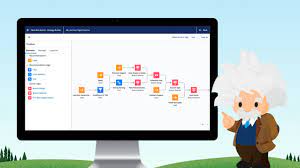
Salesforce AI Einstein Next Best Action is a feature designed to identify the most effective actions available to agents and customers in real-time. Operating as a recommendation engine powered by extensive data analysis, it facilitates a dynamic workflow aimed at optimizing the customer pipeline. Tailoring recommendations to specific individuals at opportune moments is made effortless with Einstein Next Best Action. This Salesforce Platform feature enables the configuration of business rules and filters to present the most suitable course of action for any user. It offers a diverse range of recommended actions directly accessible within Salesforce, enhancing decision-making processes. Salesforce AI Einstein Next Best Action for Personalization Personalizing the customer experience: Next Best Action (NBA) empowers organizations to customize their interactions with customers based on individual preferences, behaviors, and historical data. This fosters a more personalized and pertinent experience, ultimately boosting customer satisfaction and fostering loyalty. What is Einstein’s Next Best Action for upselling? NBA continuously evaluates real-time customer data to deliver personalized recommendations for the most effective actions to take, whether it involves cross-selling, upselling, or addressing a customer concern. These recommendations consider various factors such as customer history, product usage, and behavioral patterns. Salesforce AI Einstein Next Best Action Cost Is Einstein Next Best Action free? Einstein Next Best Action operates on a usage-based entitlement model. Every organization receives a monthly allotment of free Next Best Action requests. If usage exceeds this free allowance or any purchased entitlements, Salesforce communicates with the organization to discuss additional options for their contract. Next Best Action is a paid Salesforce product but also offers free usage for up to 5000 requests each month. What is the Next Best Action strategy? Next-best-action marketing, also known as best next action or recommended action, is a customer-centric marketing approach that assesses various actions applicable to a specific customer and determines the most favorable course of action. It’s a subset of next-best-action decision-making focused on optimizing customer interactions. The Salesforce Einstein feature is being renamed Agentforce. Conent editingd June 2025, Shannan Hearne. Like1 Related Posts Who is Salesforce? Who is Salesforce? Here is their story in their own words. From our inception, we’ve proudly embraced the identity of Read more Salesforce Marketing Cloud Transactional Emails Salesforce Marketing Cloud Transactional Emails are immediate, automated, non-promotional messages crucial to business operations and customer satisfaction, such as order Read more Salesforce Unites Einstein Analytics with Financial CRM Salesforce has unveiled a comprehensive analytics solution tailored for wealth managers, home office professionals, and retail bankers, merging its Financial Read more AI-Driven Propensity Scores AI plays a crucial role in propensity score estimation as it can discern underlying patterns between treatments and confounding variables Read more
What is Salesforce Quip? Quip is collaborative documents, spreadsheets, slides, and chat rooms directly within Salesforce objects and records. Quip can be attached to Sales Cloud and Service Cloud – and when combined with Chatter. Learn more about Quip for Customer 360 Admin Foundations. What is Quip for Salesforce? Quip helps your users collaborate to make smarter, faster decisions—all within the context of your data. With Quip Advanced (previously Salesforce Anywhere Advanced), your users can project manage with living documents and spreadsheets that centralize teamwork. Quip delivers templated best practices and real-time CRM data designed to help you win deals faster. Connect your teams and reimagine sales process for a more digital future – including account planning, executive briefings, and more. What’s the best use case for Quip? Quip is a collaborative tool that allows multiple users to work together on documents and spreadsheets in real time. Its native integration with SFDC allows you to pull and push data between the apps, which makes Quip a great productivity app for sales teams. Quip helps sales teams accelerate business in real-time. Reimagine sales processes with embedded documents, live Salesforce data, and built-in collaboration. For help integrating Quip, contact Tectonic. Like Related Posts Who is Salesforce? Who is Salesforce? Here is their story in their own words. From our inception, we’ve proudly embraced the identity of Read more Salesforce Marketing Cloud Transactional Emails Salesforce Marketing Cloud Transactional Emails are immediate, automated, non-promotional messages crucial to business operations and customer satisfaction, such as order Read more Salesforce Unites Einstein Analytics with Financial CRM Salesforce has unveiled a comprehensive analytics solution tailored for wealth managers, home office professionals, and retail bankers, merging its Financial Read more AI-Driven Propensity Scores AI plays a crucial role in propensity score estimation as it can discern underlying patterns between treatments and confounding variables Read more

Set up the components required for Record Alerts, including OmniStudio FlexCard components and integration procedures, custom severity values, and alert categories. Like Related Posts Who is Salesforce? Who is Salesforce? Here is their story in their own words. From our inception, we’ve proudly embraced the identity of Read more Salesforce Marketing Cloud Transactional Emails Salesforce Marketing Cloud Transactional Emails are immediate, automated, non-promotional messages crucial to business operations and customer satisfaction, such as order Read more Salesforce Unites Einstein Analytics with Financial CRM Salesforce has unveiled a comprehensive analytics solution tailored for wealth managers, home office professionals, and retail bankers, merging its Financial Read more AI-Driven Propensity Scores AI plays a crucial role in propensity score estimation as it can discern underlying patterns between treatments and confounding variables Read more

Optimize organizational efficiency, performance, and value by automating contracts with Agiloft Contract Lifecycle Management Software. Regain control and streamline processes through seamless integration with Salesforce. Read on about Agiloft Salesforce integration to learn more. Agiloft’s core platform offers direct integrations that facilitate interaction within your daily tools. Collaborate effortlessly in Microsoft Teams, Outlook, and Office, exchange data seamlessly in Salesforce, and create actionable dashboards in Tableau or Power BI. Integration works in two directions: inbound and outbound. Inbound integration occurs when an external system initiates contact with Salesforce, while outbound integration involves Salesforce initiating contact with an external system. Wondering about the cloud aspect? Agiloft is purposefully designed as a pure web application with full multi-tenancy support. It stands out by being available as a Hosted Cloud service and also for deployment on-premise, providing flexibility to suit your specific needs. Agiloft Salesforce integration is one of the many Salesforce integrations Tectonic can handle. Extend your Salesforce CRM Experience by adding a no-code, AI-powered Contract Lifecycle Management (CLM) solution. Eliminate red tape and automate the contracting process Full Salesforce integration with one-click contract creation of proposals, MSAs, and other agreements as well as automated approval processes integrated with email, SMS, and e-signature. Minimize revenue leakage from contracts Keep track of performance obligations, contract end-dates, renewals, and invoicing as well as recommend actions to maximize revenue. Build custom dashboards to track KPIs and issue alerts as required. Like Related Posts Who is Salesforce? Who is Salesforce? Here is their story in their own words. From our inception, we’ve proudly embraced the identity of Read more Salesforce Marketing Cloud Transactional Emails Salesforce Marketing Cloud Transactional Emails are immediate, automated, non-promotional messages crucial to business operations and customer satisfaction, such as order Read more Salesforce Unites Einstein Analytics with Financial CRM Salesforce has unveiled a comprehensive analytics solution tailored for wealth managers, home office professionals, and retail bankers, merging its Financial Read more AI-Driven Propensity Scores AI plays a crucial role in propensity score estimation as it can discern underlying patterns between treatments and confounding variables Read more

Channel Types & Usage Unlimited Channels Paid Channels Conversation Types & Consumption Outbound Messages (SMS Only) Einstein Bot Conversations Paid Channel Conversations Additional Options This policy ensures transparent usage tracking while providing flexibility for different communication needs. Customers can optimize costs by strategically using unlimited channels where possible and reserving paid channels for high-value interactions. Like Related Posts Who is Salesforce? Who is Salesforce? Here is their story in their own words. From our inception, we’ve proudly embraced the identity of Read more Salesforce Marketing Cloud Transactional Emails Salesforce Marketing Cloud Transactional Emails are immediate, automated, non-promotional messages crucial to business operations and customer satisfaction, such as order Read more Salesforce Unites Einstein Analytics with Financial CRM Salesforce has unveiled a comprehensive analytics solution tailored for wealth managers, home office professionals, and retail bankers, merging its Financial Read more AI-Driven Propensity Scores AI plays a crucial role in propensity score estimation as it can discern underlying patterns between treatments and confounding variables Read more
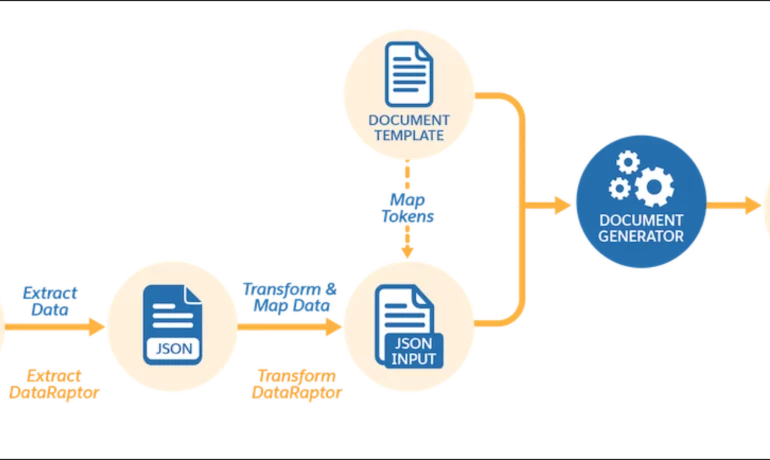
Salesforce document generation poses a challenge for businesses, given the intricacies of integration involved. Fortunately, a variety of tools are available for generating documents in Salesforce, and Tectonic is well-equipped to assist in their successful implementation. Salesforce Industries Document Generation empowers businesses to craft and manage accurate documents linked to standard Salesforce objects, encompassing contracts, opportunities, orders, quotes, and custom objects. For a more dynamic approach, Salesforce OmniStudio Document Generation facilitates the creation of documents using Microsoft Word and Microsoft PowerPoint templates. These templates can incorporate values from any JSON-based data within the text, including data sourced from various Salesforce objects. This versatile tool enables the generation of contracts, proposals, quotes, reports, non-disclosure agreements, service agreements, and more. Salesforce Industries Document Generation seamlessly integrates with Vlocity Insurance, Vlocity Health, communications, media, energy, utilities, government, and beyond. Vlocity Analytics, another valuable component, offers pre-built measurement tools that seamlessly integrate with Salesforce Reports, Dashboards, and Einstein. The Salesforce AppExchange boasts an extensive array of over 200 document generation tools. Your Salesforce partner can assist in selecting, installing, and implementing the most suitable options based on your business requirements. With Document Generation, you can generate contracts, proposals, quotes, reports, non-disclosure agreements, job offers, service agreements, and so on. You can generate documents using the specified sample client-side or server-side OmniScripts. You can also create your own OmniScripts by cloning and customizing the sample OmniScript to generate documents. Client-Side document generation is a synchronous process that results in a downloadable preview of the generated documents. You can generate documents from Microsoft Word (.docx), Microsoft PowerPoint (.pptx), and Web templates. These templates can include values from any JSON-based data in the text, including data from any Salesforce object. You can optionally convert the resulting documents to .pdf format. Server-Side document generation is available in both the OmniStudio Foundation and Salesforce Industries packages. Server-Side document generation is an asynchronous process that’s best for large and rendering-heavy documents and for document generation in batches. The Server-Side document generation service is secure and scalable and is hosted on Salesforce Hyperforce. The generated document is stored in your Salesforce org, and is attached to the object for which it’s generated. You can use Apex Classes, sample Integration Procedures, or a sample OmniScript to generate documents. Client-Side document generation supports Customer Community Plus, Customer Community, and Partner Community users to generate documents using client-side OmniScripts. Server-Side document generation supports Customer Community Plus, Customer Community, and Partner Community users to generate documents using the singleDocxServersideLwc server-side OmniScript. With the right licenses, Document Generation is available in the Salesforce Industries package. Metering measures resource utilization levels and throttling controls resource access and use based on defined rules. Metering measures the number of server-side documents that are generated by an org hourly and daily. The default hourly and daily limits for processing server-side document generation requests are 1,000 per org and 24,000 per org respectively. Throttling maintains consistency and resilience of the server-side document generation service by managing incoming server-side document generation requests from multiple orgs. Throttling can also prevent service degradation caused by high volume of requests at peak hours by blocking requests that exceed the default limits. The request details are saved in the Document Generation Processes entity. You can retrieve the blocked requests and later retry the server-side document generation. No matter what your specific document generation needs, Tectonic simplifies the process of getting your system up and running seamlessly, whether it’s through Salesforce Quickstarts or comprehensive implementation services. Content updated in 2February 2024, Shannan Hearne. Like1 Related Posts Who is Salesforce? Who is Salesforce? Here is their story in their own words. From our inception, we’ve proudly embraced the identity of Read more Salesforce Marketing Cloud Transactional Emails Salesforce Marketing Cloud Transactional Emails are immediate, automated, non-promotional messages crucial to business operations and customer satisfaction, such as order Read more Salesforce Unites Einstein Analytics with Financial CRM Salesforce has unveiled a comprehensive analytics solution tailored for wealth managers, home office professionals, and retail bankers, merging its Financial Read more AI-Driven Propensity Scores AI plays a crucial role in propensity score estimation as it can discern underlying patterns between treatments and confounding variables Read more

Customer relationship management (definition of a CRM) is a set of integrated, data-driven software solutions that help manage, track, and store information related to your company’s current and potential customers. What is CRM Software? Customer relationship management (CRM) is a technology for managing all your company’s relationships and interactions with customers and potential customers. The goal is simple: Improve business relationships. What is the basic idea of CRM? CRM is the strategy you put in place to manage all your company’s relationships and interactions with both customers and potential customers. The term also refers to the systems and processes you use to help you do that. Managed well, CRM has the power to directly improve profitability. From Wikipedia, the free encyclopedia: Customer relationship management (CRM) is a process in which a business or other organization administers its interactions with customers, typically using data analysis to study large amounts of information.[1] CRM systems compile data from a range of different communication channels, including a company’s website, telephone (which many softwares come with a softphone), email, live chat, marketing materials and more recently, social media.[2] They allow businesses to learn more about their target audiences and how to better cater to their needs, thus retaining customers and driving sales growth.[3] CRM may be used with past, present or potential customers. The concepts, procedures, and rules that a corporation follows when communicating with its consumers are referred to as CRM. This complete connection covers direct contact with customers, such as sales and service-related operations, forecasting, and the analysis of consumer patterns and behaviors, from the perspective of the company.[4] According to Gartner, the global CRM market size is estimated at $69 billion in 2020.[5][6] Salesforce is a CRM on steroids. Like Related Posts Who is Salesforce? Who is Salesforce? Here is their story in their own words. From our inception, we’ve proudly embraced the identity of Read more Salesforce Marketing Cloud Transactional Emails Salesforce Marketing Cloud Transactional Emails are immediate, automated, non-promotional messages crucial to business operations and customer satisfaction, such as order Read more Salesforce Unites Einstein Analytics with Financial CRM Salesforce has unveiled a comprehensive analytics solution tailored for wealth managers, home office professionals, and retail bankers, merging its Financial Read more AI-Driven Propensity Scores AI plays a crucial role in propensity score estimation as it can discern underlying patterns between treatments and confounding variables Read more

Salesforce Implementation with a Tectonic Quickstart: Step-by-Step Salesforce Quickstart Guide. Step 1: Define Your Business Requirements Step 2: Choose the Appropriate Salesforce Products Step 3: Choose the Right Salesforce Quickstart Package Step 4: Prepare Your Data Step 5: Customize Your Quickstart Package Step 6: Train Your Users Step 7: Monitor and Optimize Your Processes Benefits of Salesforce Implementation with QuickStart Package Is it time for your business to get up and running on Salesforce? Contact Tectonic about our Salesforce Quickstart solutions today. Salesforce quickstarts are also known as Salesforce Implementation Solutions. Content updated December 2024. Like1 Related Posts Who is Salesforce? Who is Salesforce? Here is their story in their own words. From our inception, we’ve proudly embraced the identity of Read more Salesforce Marketing Cloud Transactional Emails Salesforce Marketing Cloud Transactional Emails are immediate, automated, non-promotional messages crucial to business operations and customer satisfaction, such as order Read more Salesforce Unites Einstein Analytics with Financial CRM Salesforce has unveiled a comprehensive analytics solution tailored for wealth managers, home office professionals, and retail bankers, merging its Financial Read more AI-Driven Propensity Scores AI plays a crucial role in propensity score estimation as it can discern underlying patterns between treatments and confounding variables Read more

History of First Four Industrial Revolutions Throughout history, humanity has always relied on technology. Although the technology of each era looked different from today’s, it was groundbreaking for its time. People consistently used available technology to simplify their lives while striving to enhance and advance it. This ongoing pursuit of innovation laid the groundwork for the industrial revolutions. Today, we are in the midst of the fourth industrial revolution, also known as Industry 4.0, marked by the rise of tech and web design companies. The Evolution of Industrial Revolutions. Here’s an overview of the three previous industrial revolutions that have led us to this point: The First Industrial Revolution (1765) The first industrial revolution followed the proto-industrialization period, starting in the late 18th century and extending into the early 19th century. This era was characterized by mechanization, which transformed industries and shifted the economic backbone from agriculture to industry. The massive extraction of coal and the invention of the steam engine introduced a new type of energy, accelerating manufacturing and economic growth through the expansion of railroads. This led to the enlarging of cities where factories and industry took place. The Second Industrial Revolution (1870) Nearly a century after the first, the second industrial revolution began in the late 19th century, marked by significant technological advancements. New sources of energy—electricity, gas, and oil—emerged, leading to the development of the internal combustion engine. This period also saw the rise of steel demand, chemical synthesis, and new communication methods like the telegraph and telephone. The invention of the automobile and airplane at the turn of the 20th century solidified the second industrial revolution’s profound impact on modern society. This led to the growing mobility of humanity. The Third Industrial Revolution (1969) In the latter half of the 20th century, the third industrial revolution introduced nuclear energy as a new power source. This revolution brought forth the rise of electronics, telecommunications, and computers, paving the way for space exploration, advanced research, and biotechnology. In the industrial sector, the advent of Programmable Logic Controllers (PLCs) and robots led to an era of high-level automation, revolutionizing manufacturing processes. This, in turn, led to a time of greater lesiure and freedom. Industry 4.0 Many consider Industry 4.0 to be the fourth industrial revolution, unfolding right before our eyes. Beginning at the dawn of the third millennium with the widespread use of the Internet, Industry 4.0 represents a shift from physical to virtual innovations. It encompasses developments in virtual reality, augmented reality, and other digital technologies that reshape our interaction with the physical world. The four industrial revolutions have fundamentally shaped global economies. Numerous programs and projects are being implemented worldwide to help people harness the benefits of the fourth revolution in their daily lives. From digital flipbooks to augmented reality gaming, the future is bright. For instance, the EU-funded RESTART project aims to transform vocational education and training (VET) systems to meet the digital skill demands of modern industries, ensuring that the workforce is equipped to thrive in this new technological landscape. What’s next? Look out as we are already into the Fifth Industrial Revolution. Like Related Posts Who is Salesforce? Who is Salesforce? Here is their story in their own words. From our inception, we’ve proudly embraced the identity of Read more Salesforce Marketing Cloud Transactional Emails Salesforce Marketing Cloud Transactional Emails are immediate, automated, non-promotional messages crucial to business operations and customer satisfaction, such as order Read more Salesforce Unites Einstein Analytics with Financial CRM Salesforce has unveiled a comprehensive analytics solution tailored for wealth managers, home office professionals, and retail bankers, merging its Financial Read more AI-Driven Propensity Scores AI plays a crucial role in propensity score estimation as it can discern underlying patterns between treatments and confounding variables Read more
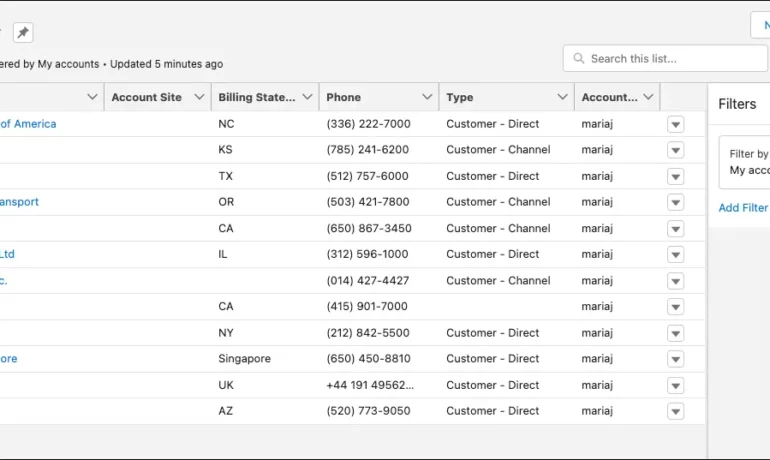
What is a listview in Salesforce? A list view is a filtered list of records where you can view records for one object at a time. For example, a list of Contacts, Accounts, or Opportunities. What are the benefits of list view in Salesforce? In a list view, you see only the data that you have access to. You can see records that you own, have read or write access to, or are shared with you. List views also include records owned by or shared with users in roles below you in the Salesforce hierarchy. What is the difference between report and Listview in Salesforce? While List Views are ideal for day-to-day tasks and offer quick access to relevant data, they cannot perform data analysis or generate summary reports. Reports, on the other hand, require an understanding of the data structure to create, and they’re only available to Salesforce users with the appropriate permissions enabled. Why use ListView? ListView builder is useful when you have a large number of items that can change dynamically, as it only builds the child records that are currently visible. It also allows you to easily scroll through the list of items. Column , on the other hand, is a layout widget that arranges its children vertically. What is the limitation of Listview in Salesforce? Due to SOQL limitations, list views are limited to first 2,000 records returned by the filter criteria. To confirm that the list view contains more than 2000 records you can create a report with the same criteria as list view to get the exact record count. Can you share a list view in Salesforce? Name the Public Group via the “Label” field. Select Users under the “Search” drop-down. Add the specific user(s) with whom you want to share the list view. Click Save. Content updated July 2025, Shannan Hearne Like Related Posts Who is Salesforce? Who is Salesforce? Here is their story in their own words. From our inception, we’ve proudly embraced the identity of Read more Salesforce Marketing Cloud Transactional Emails Salesforce Marketing Cloud Transactional Emails are immediate, automated, non-promotional messages crucial to business operations and customer satisfaction, such as order Read more Salesforce Unites Einstein Analytics with Financial CRM Salesforce has unveiled a comprehensive analytics solution tailored for wealth managers, home office professionals, and retail bankers, merging its Financial Read more AI-Driven Propensity Scores AI plays a crucial role in propensity score estimation as it can discern underlying patterns between treatments and confounding variables Read more


